> ## Documentation Index
> Fetch the complete documentation index at: https://moengage.com/docs/llms.txt
> Use this file to discover all available pages before exploring further.
# Manual Integration
> Install and configure MoEngage iOS SDK frameworks manually without using a dependency manager.
To install the frameworks manually, follow the steps below:
Download the latest SDKs from our GitHub repository. You can find the download URLs for each SDK in [package.json](https://github.com/moengage/apple-sdk/blob/master/package.json).
 # Embedded Frameworks in App Target
Make sure to embed the required frameworks to App Target as described in the following image, set the Embed option to **Embed & Sign** for MoEngage framework files:
# Embedded Frameworks in App Target
Make sure to embed the required frameworks to App Target as described in the following image, set the Embed option to **Embed & Sign** for MoEngage framework files:
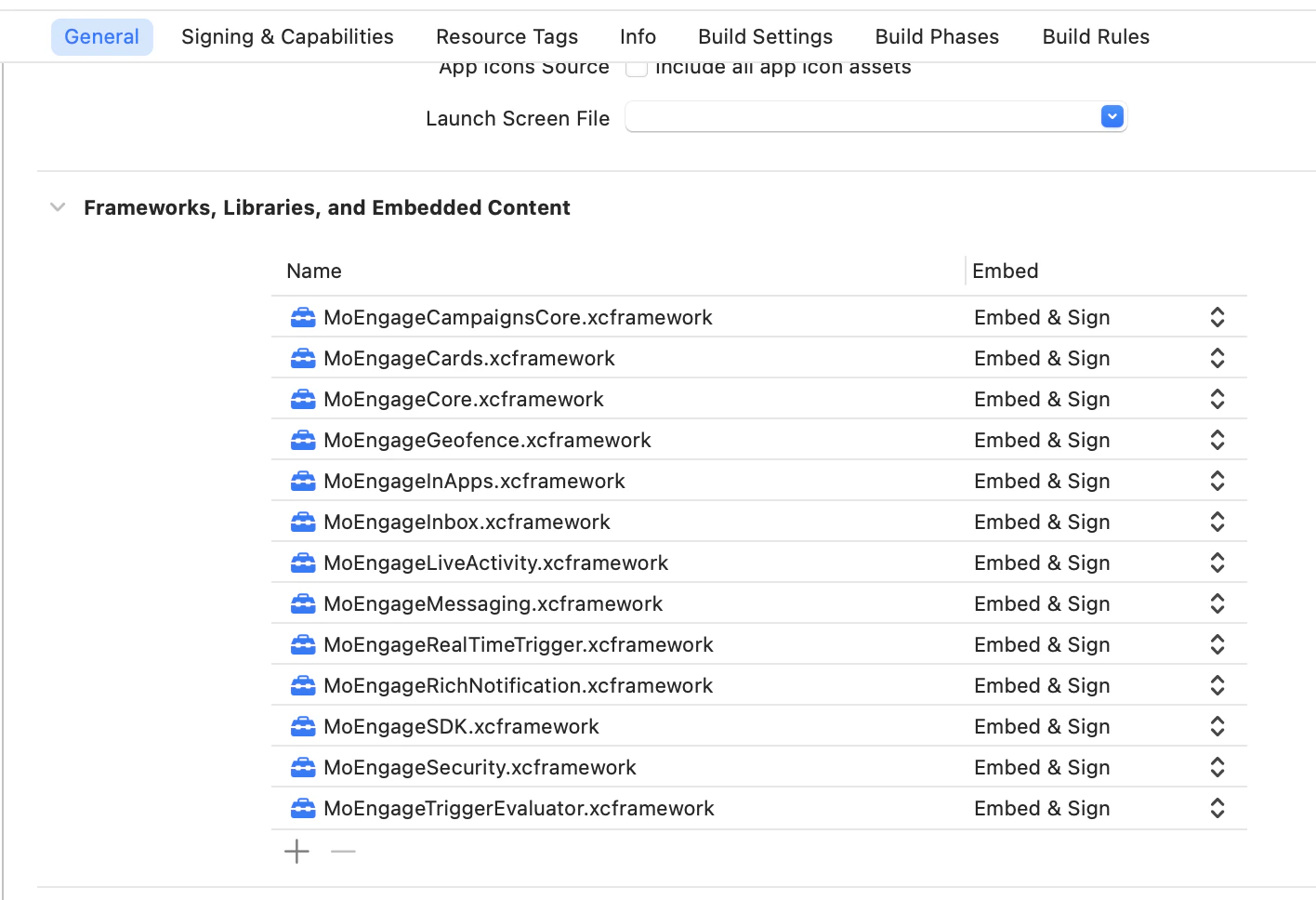 Required Frameworks:
| Frameworks | Status | Purpose |
| --------------------- | -------- | --------------------------------------------------------------------------------------------- |
| MoEngageCore | Required | Provides the foundational services, initialization, and lifecycle management for the SDK. |
| MoEngageSDK | Required | Serves as the primary public interface and orchestrator for all MoEngage SDK functionalities. |
| MoEngageSecurity | Required | Enables data protection during access and transmission. |
| MoEngageMessaging | Required | Manages push notification registration, payload handling, and core messaging features. |
| MoEngageCampaignsCore | Required | Manages campaign payload handling and display. |
Add-on Frameworks:
| Frameworks | Status | Purpose |
| ------------------------ | -------- | ---------------------------------------------------------------------------------------------------------------- |
| MoEngageTriggerEvaluator | Optional | Enables the display of in-app messages and device triggered push notifications, based on AND trigger conditions. |
| MoEngageInApps | Optional | Enables the display of in-app messages, such as pop-ups and modals. |
| MoEngageGeofence | Optional | Enables geofence monitoring for location-based campaign triggers. |
| MoEngageInbox | Optional | Enables a persistent notification center (inbox) within the application. |
| MoEngageCards | Optional | Enables the display and management of Content Cards. |
| MoEngageRichNotification | Optional | Enables rich media content (images, video, audio) and templates in push notifications. |
| MoEngageRealTimeTrigger | Optional | Facilitates high-frequency, real-time campaign triggers based on user events. |
| MoEngageLiveActivity | Optional | Manages live activities registration, payload handling, and tracking. |
# Link MoEngageRichNotification framework in App Extensions
This is only required if you are using the `MoEnagageRichNotification` framework in the project. Make sure to link the framework in the Extension targets as shown below and set the **Embed** option to **Do Not Embed** in this case, as it is already embedded in your App Target:
Required Frameworks:
| Frameworks | Status | Purpose |
| --------------------- | -------- | --------------------------------------------------------------------------------------------- |
| MoEngageCore | Required | Provides the foundational services, initialization, and lifecycle management for the SDK. |
| MoEngageSDK | Required | Serves as the primary public interface and orchestrator for all MoEngage SDK functionalities. |
| MoEngageSecurity | Required | Enables data protection during access and transmission. |
| MoEngageMessaging | Required | Manages push notification registration, payload handling, and core messaging features. |
| MoEngageCampaignsCore | Required | Manages campaign payload handling and display. |
Add-on Frameworks:
| Frameworks | Status | Purpose |
| ------------------------ | -------- | ---------------------------------------------------------------------------------------------------------------- |
| MoEngageTriggerEvaluator | Optional | Enables the display of in-app messages and device triggered push notifications, based on AND trigger conditions. |
| MoEngageInApps | Optional | Enables the display of in-app messages, such as pop-ups and modals. |
| MoEngageGeofence | Optional | Enables geofence monitoring for location-based campaign triggers. |
| MoEngageInbox | Optional | Enables a persistent notification center (inbox) within the application. |
| MoEngageCards | Optional | Enables the display and management of Content Cards. |
| MoEngageRichNotification | Optional | Enables rich media content (images, video, audio) and templates in push notifications. |
| MoEngageRealTimeTrigger | Optional | Facilitates high-frequency, real-time campaign triggers based on user events. |
| MoEngageLiveActivity | Optional | Manages live activities registration, payload handling, and tracking. |
# Link MoEngageRichNotification framework in App Extensions
This is only required if you are using the `MoEnagageRichNotification` framework in the project. Make sure to link the framework in the Extension targets as shown below and set the **Embed** option to **Do Not Embed** in this case, as it is already embedded in your App Target:
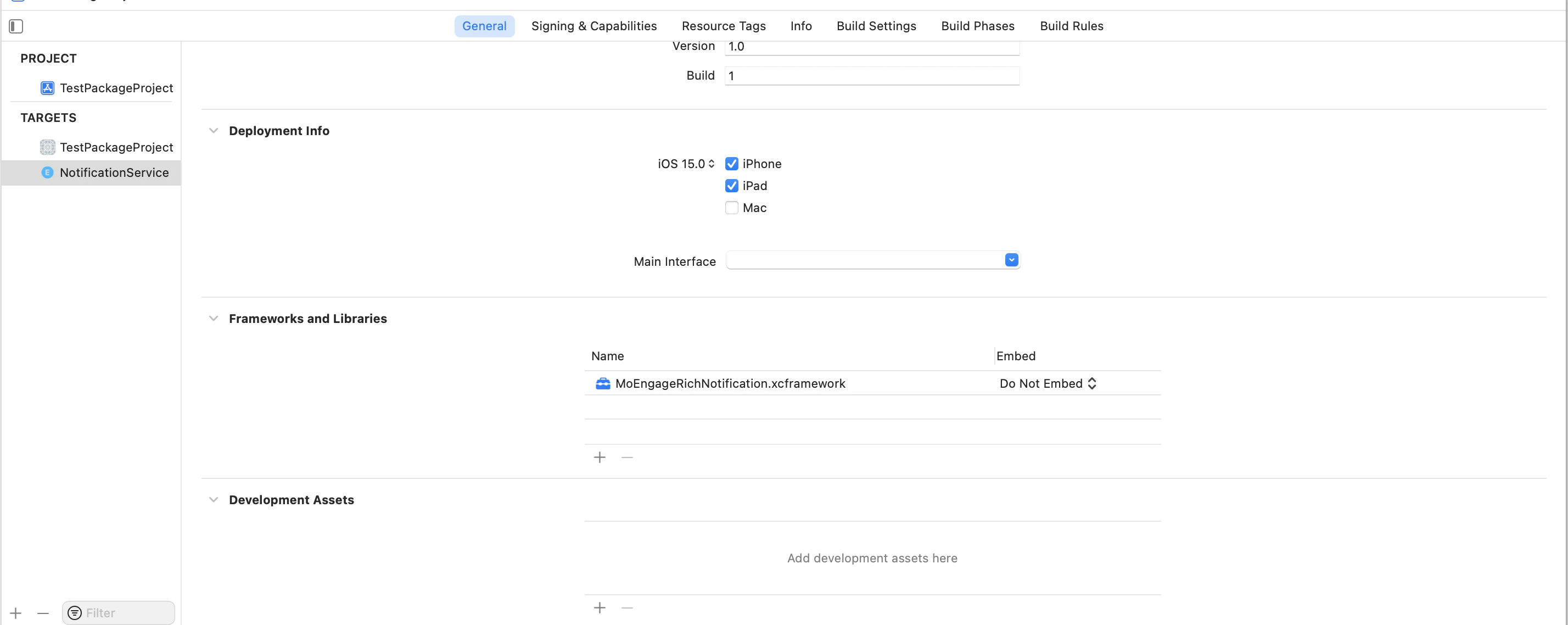 In extension target build settings, add `@executable_path/../../Frameworks` as additional `LD_RUNPATH_SEARCH_PATHS`.