> ## Documentation Index
> Fetch the complete documentation index at: https://moengage.com/docs/llms.txt
> Use this file to discover all available pages before exploring further.
# Add-On Security
> Encrypt data stored by the MoEngage iOS SDK on device using Keychain and encrypted storage.
# Encrypted Storage
By default, all the data stored by the SDK on the device is inside the application sandbox. This prevents other applications from accessing the data(both read and write). Due to compliance standards or any other use cases, you might want additionally encrypt the data stored on the SDK.
## Keychain Set Up
To ensure the encryption works as expected, follow the below steps to set up the Keychain Sharing.
1. Turn on Keychain sharing in Xcode with the below steps:
a. Select your app target and click the ***Signing & Capabilities*** tab.
b. Turn on the ***Keychain Sharing*** capability.
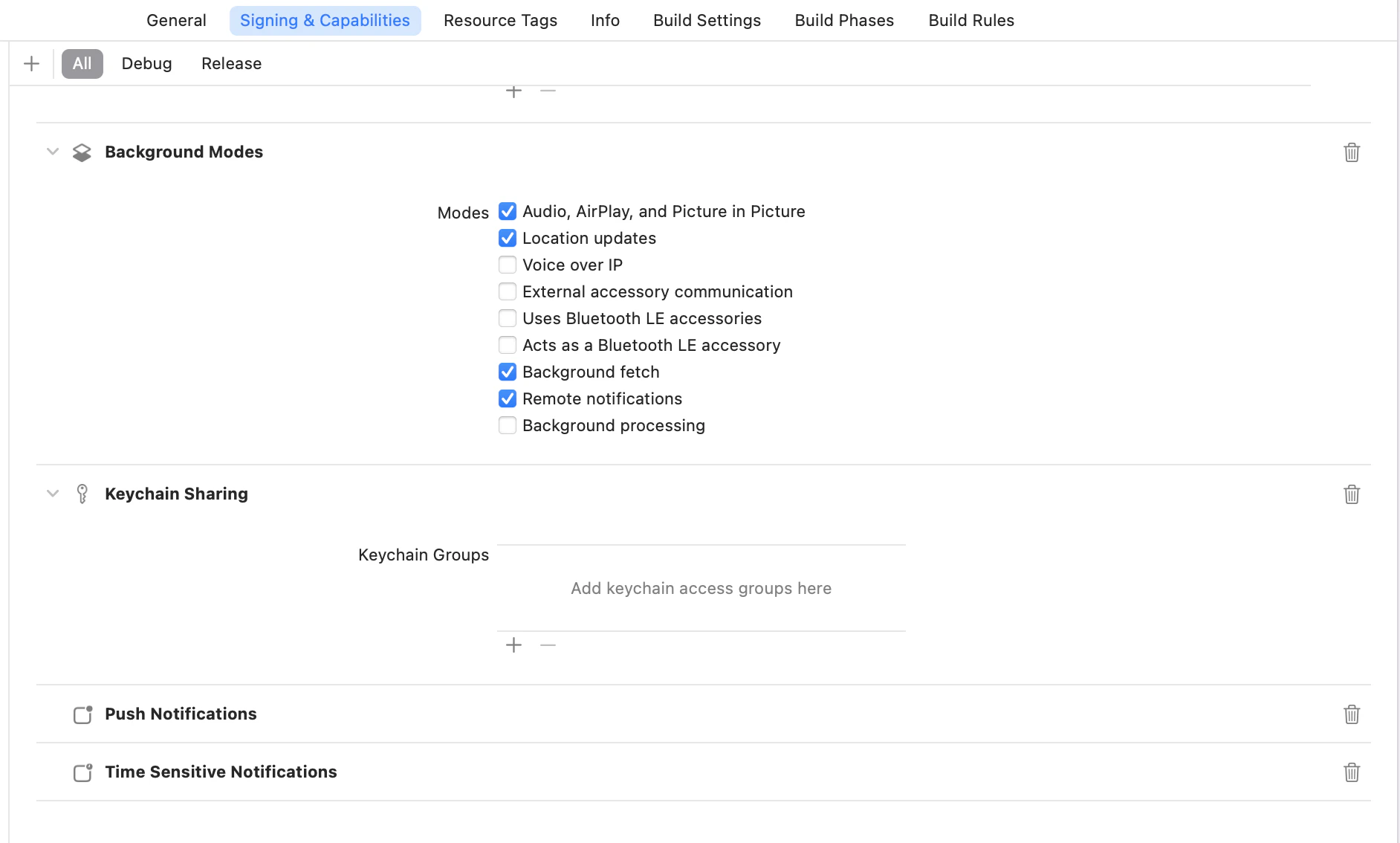 2. Specify the Keychain group name
 3. App ID Prefix and Keychain group name: Xcode automatically prefixes keychain groups with your team ID. This ensures that your groups are specific to your development team. In order to see how it works, click on the *.entitlements* file and look at the value of the *Keychain Access Groups* array.
 4. Get your AppID: The App ID Prefix (also called Team ID) is a unique text identifier associated with your Apple developer account that allows the sharing of keychain and pasteboard items between your apps.
Assume the AppID is ***AB123CDE45***, Keychain group name is ***AB123CDE45.com.example.sharedItems***. Make sure to pass the same keychain group name to MoEngage SDK via the [***keyChainConfig***](https://moengage.github.io/ios-api-reference/Classes/MoEngageSDKConfig.html#/c:@M@MoEngageCore@objc\(cs\)MoEngageSDKConfig\(py\)keyChainConfig) property on [***MoEngageSDKConfig***](https://moengage.github.io/ios-api-reference/Classes/MoEngageSDKConfig.html) object.
## Enabling Encryption
You can enable the storage encryption by setting the [***storageConfig***](https://moengage.github.io/ios-api-reference/Classes/MoEngageSDKConfig.html#/c:@M@MoEngageCore@objc\(cs\)MoEngageSDKConfig\(py\)storageConfig) property on the [***MoEngageSDKConfig***](https://moengage.github.io/ios-api-reference/Classes/MoEngageSDKConfig.html) while initializing the SDK.
```swift Swift wrap theme={null}
let sdkConfig = MoEngageSDKConfig(appId: "YOUR_APP_ID", dataCenter: .data_center_01)
sdkConfig.storageConfig = MoEngageStorageConfig(encryptionConfig: MoEngageStorageEncryptionConfig(isEncryptionEnabled: true))
sdkConfig.keyChainConfig = MoEngageKeyChainConfig(groupName: "YOUR_KEYCHAIN_GROUP_NAME")
```
```objective-c Objective C wrap theme={null}
MoEngageSDKConfig* sdkConfig = [[MoEngageSDKConfig alloc] initWithAppId:@"YOUR Workspace ID" dataCenter:MoEngageDataCenterData_center_01];
sdkConfig.storageConfig = [[MoEngageStorageConfig alloc] initWithEncryptionConfig: [[MoEngageStorageEncryptionConfig alloc] initWithIsEncryptionEnabled:true]];
sdkConfig.keyChainConfig = [[MoEngageKeyChainConfig alloc] initWithGroupName:@"YOUR_KEYCHAIN_GROUP_NAME"];
```
**Note**
Once storage encryption is enabled and a build is released to production(App Store), you should not disable encryption. Disabling the encryption after the build is released will result in a new user being created in the MoEngage system when the user updates the application.
* When storage encryption is enabled, you must pass a valid keychain group to `MoEngageKeyChainConfig`. If the keychain group is missing or your app is not configured with the matching Keychain Sharing capability, the SDK throws a fatal exception and crashes the app in `DEBUG` builds. In release builds, storage encryption fails to initialize and the SDK falls back to unencrypted storage.
* If you are upgrading an existing app and these strict `DEBUG` validations cause disruptive crashes while you refactor your tracking code, you can temporarily opt out by calling `disableIntegrationValidator()` during SDK initialization. Use this strictly as a stopgap for phased upgrades, and aim to remove the opt-out once your attribute call sites are properly validated.
# Encrypted Network Communication
By default, we use HTTPS protocol for all requests made from the SDK; HTTPS encrypts the requests by default. MoEngage SDK optionally adds another layer of encryption apart from the encryption done by HTTPS.
## Enabling Encryption
You can enable the storage encryption setting in the [***networkConfig***](https://moengage.github.io/ios-api-reference/Classes/MoEngageSDKConfig.html#/c:@M@MoEngageCore@objc\(cs\)MoEngageSDKConfig\(py\)networkConfig) property on the [***MoEngageSDKConfig***](https://moengage.github.io/ios-api-reference/Classes/MoEngageSDKConfig.html) while initializing the SDK.
```swift Swift wrap theme={null}
let sdkConfig = MoEngageSDKConfig(appId: appId, dataCenter: .data_center_01)
sdkConfig.networkConfig = MoEngageNetworkRequestConfig(dataSecurityConfig: MoEngageNetworkDataSecurityConfig(isEncryptionEnabled: true, encryptionKeyDebug: "YOUR_TEST_ENVIRONMENT_ENCRYPTION_KEY", encryptionKeyRelease: "YOUR_LIVE_ENVIRONMENT_ENCRYPTION_KEY"))
```
```objective-c Objective C wrap theme={null}
MoEngageSDKConfig* sdkConfig = [[MoEngageSDKConfig alloc] initWithAppId:@"YOUR Workspace ID" dataCenter:MoEngageDataCenterData_center_01];
sdkConfig.networkConfig = [[MoEngageNetworkRequestConfig alloc] initWithDataSecurityConfig:[[MoEngageNetworkDataSecurityConfig alloc] initWithIsEncryptionEnabled:true encryptionKeyDebug:@"YOUR_TEST_ENVIRONMENT_ENCRYPTION_KEY" encryptionKeyRelease:@"YOUR_LIVE_ENVIRONMENT_ENCRYPTION_KEY"]];;
```
**Note**
1. When using encrypted network communication, we strongly recommend you enable Storage encryption as well.
2. Adding the above dependency and enabling the flag isn't enough for this feature to work; there is some additional configuration required on our side to enable this feature completely. In case you want to use this feature, reach out to your account manager or the MoEngage Support team.
When network encryption is enabled (`isEncryptionEnabled: true`), you must provide non-empty values for both `encryptionKeyDebug` and `encryptionKeyRelease`. Passing an empty key for the active build configuration throws a fatal exception and crashes the app in `DEBUG` builds. In release builds, network requests fall back to standard HTTPS without the additional encryption layer.
4. Get your AppID: The App ID Prefix (also called Team ID) is a unique text identifier associated with your Apple developer account that allows the sharing of keychain and pasteboard items between your apps.
Assume the AppID is ***AB123CDE45***, Keychain group name is ***AB123CDE45.com.example.sharedItems***. Make sure to pass the same keychain group name to MoEngage SDK via the [***keyChainConfig***](https://moengage.github.io/ios-api-reference/Classes/MoEngageSDKConfig.html#/c:@M@MoEngageCore@objc\(cs\)MoEngageSDKConfig\(py\)keyChainConfig) property on [***MoEngageSDKConfig***](https://moengage.github.io/ios-api-reference/Classes/MoEngageSDKConfig.html) object.
## Enabling Encryption
You can enable the storage encryption by setting the [***storageConfig***](https://moengage.github.io/ios-api-reference/Classes/MoEngageSDKConfig.html#/c:@M@MoEngageCore@objc\(cs\)MoEngageSDKConfig\(py\)storageConfig) property on the [***MoEngageSDKConfig***](https://moengage.github.io/ios-api-reference/Classes/MoEngageSDKConfig.html) while initializing the SDK.
```swift Swift wrap theme={null}
let sdkConfig = MoEngageSDKConfig(appId: "YOUR_APP_ID", dataCenter: .data_center_01)
sdkConfig.storageConfig = MoEngageStorageConfig(encryptionConfig: MoEngageStorageEncryptionConfig(isEncryptionEnabled: true))
sdkConfig.keyChainConfig = MoEngageKeyChainConfig(groupName: "YOUR_KEYCHAIN_GROUP_NAME")
```
```objective-c Objective C wrap theme={null}
MoEngageSDKConfig* sdkConfig = [[MoEngageSDKConfig alloc] initWithAppId:@"YOUR Workspace ID" dataCenter:MoEngageDataCenterData_center_01];
sdkConfig.storageConfig = [[MoEngageStorageConfig alloc] initWithEncryptionConfig: [[MoEngageStorageEncryptionConfig alloc] initWithIsEncryptionEnabled:true]];
sdkConfig.keyChainConfig = [[MoEngageKeyChainConfig alloc] initWithGroupName:@"YOUR_KEYCHAIN_GROUP_NAME"];
```
**Note**
Once storage encryption is enabled and a build is released to production(App Store), you should not disable encryption. Disabling the encryption after the build is released will result in a new user being created in the MoEngage system when the user updates the application.
* When storage encryption is enabled, you must pass a valid keychain group to `MoEngageKeyChainConfig`. If the keychain group is missing or your app is not configured with the matching Keychain Sharing capability, the SDK throws a fatal exception and crashes the app in `DEBUG` builds. In release builds, storage encryption fails to initialize and the SDK falls back to unencrypted storage.
* If you are upgrading an existing app and these strict `DEBUG` validations cause disruptive crashes while you refactor your tracking code, you can temporarily opt out by calling `disableIntegrationValidator()` during SDK initialization. Use this strictly as a stopgap for phased upgrades, and aim to remove the opt-out once your attribute call sites are properly validated.
# Encrypted Network Communication
By default, we use HTTPS protocol for all requests made from the SDK; HTTPS encrypts the requests by default. MoEngage SDK optionally adds another layer of encryption apart from the encryption done by HTTPS.
## Enabling Encryption
You can enable the storage encryption setting in the [***networkConfig***](https://moengage.github.io/ios-api-reference/Classes/MoEngageSDKConfig.html#/c:@M@MoEngageCore@objc\(cs\)MoEngageSDKConfig\(py\)networkConfig) property on the [***MoEngageSDKConfig***](https://moengage.github.io/ios-api-reference/Classes/MoEngageSDKConfig.html) while initializing the SDK.
```swift Swift wrap theme={null}
let sdkConfig = MoEngageSDKConfig(appId: appId, dataCenter: .data_center_01)
sdkConfig.networkConfig = MoEngageNetworkRequestConfig(dataSecurityConfig: MoEngageNetworkDataSecurityConfig(isEncryptionEnabled: true, encryptionKeyDebug: "YOUR_TEST_ENVIRONMENT_ENCRYPTION_KEY", encryptionKeyRelease: "YOUR_LIVE_ENVIRONMENT_ENCRYPTION_KEY"))
```
```objective-c Objective C wrap theme={null}
MoEngageSDKConfig* sdkConfig = [[MoEngageSDKConfig alloc] initWithAppId:@"YOUR Workspace ID" dataCenter:MoEngageDataCenterData_center_01];
sdkConfig.networkConfig = [[MoEngageNetworkRequestConfig alloc] initWithDataSecurityConfig:[[MoEngageNetworkDataSecurityConfig alloc] initWithIsEncryptionEnabled:true encryptionKeyDebug:@"YOUR_TEST_ENVIRONMENT_ENCRYPTION_KEY" encryptionKeyRelease:@"YOUR_LIVE_ENVIRONMENT_ENCRYPTION_KEY"]];;
```
**Note**
1. When using encrypted network communication, we strongly recommend you enable Storage encryption as well.
2. Adding the above dependency and enabling the flag isn't enough for this feature to work; there is some additional configuration required on our side to enable this feature completely. In case you want to use this feature, reach out to your account manager or the MoEngage Support team.
When network encryption is enabled (`isEncryptionEnabled: true`), you must provide non-empty values for both `encryptionKeyDebug` and `encryptionKeyRelease`. Passing an empty key for the active build configuration throws a fatal exception and crashes the app in `DEBUG` builds. In release builds, network requests fall back to standard HTTPS without the additional encryption layer.