> ## Documentation Index
> Fetch the complete documentation index at: https://moengage.com/docs/llms.txt
> Use this file to discover all available pages before exploring further.
# Location Triggered
> Import the Geofence package to enable location-triggered push notifications in your Unity app.
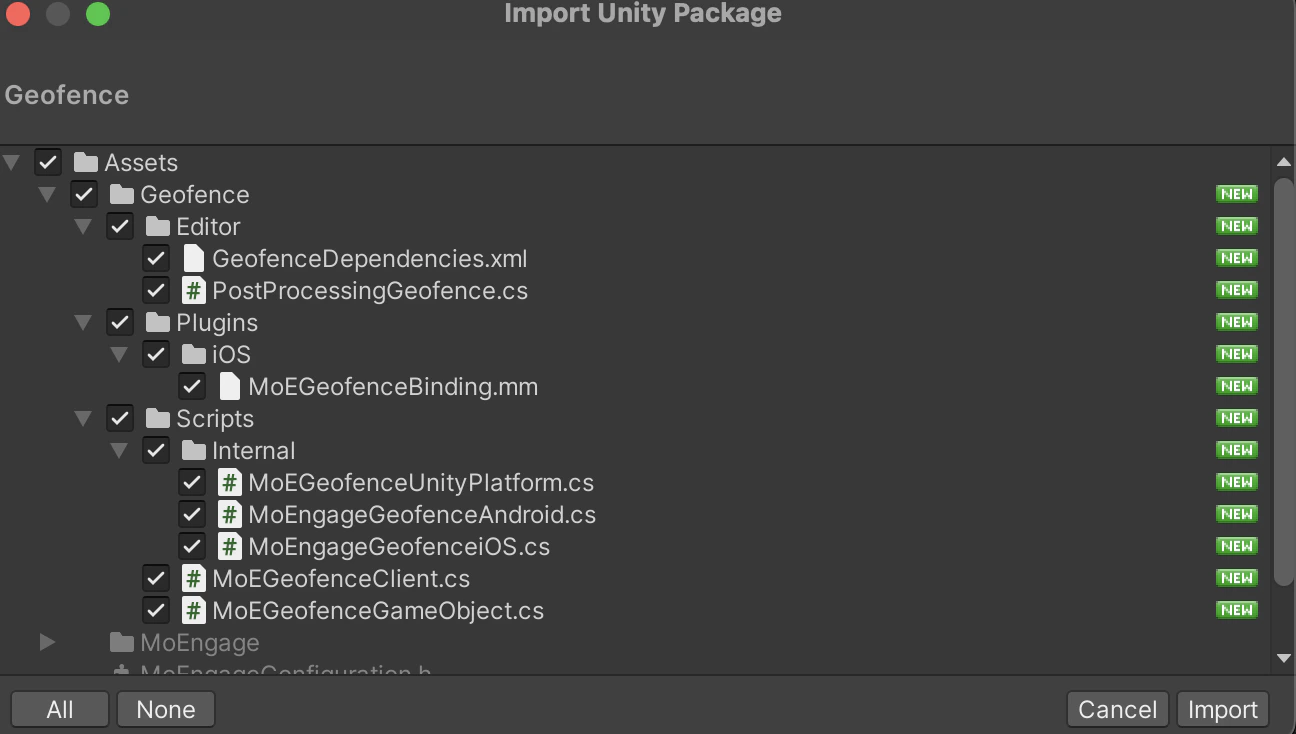
To integrate Geofence, Go to Unity Editor, navigating to `Assets > Import Package > Custom Package` and import the `Geofence.unitypackage`. The package is part of the `.zip` file you downloaded during installation.
 # Initialization
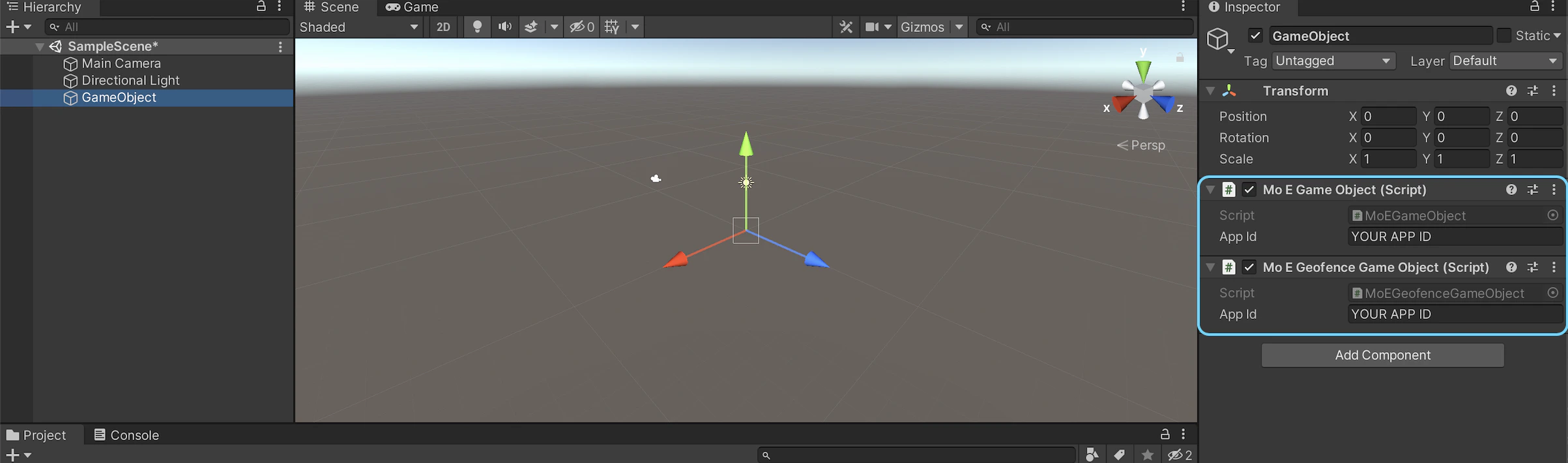
Add ***MoEGeofenceGameObject.cs*** to the same object created in the [Unity Initialization](/developer-guide/unity-sdk/sdk-integration/sdk-initialization/sdk-initialization) step and set the ***App Id***
# Initialization
Add ***MoEGeofenceGameObject.cs*** to the same object created in the [Unity Initialization](/developer-guide/unity-sdk/sdk-integration/sdk-initialization/sdk-initialization) step and set the ***App Id***
 # Android Configuration
## Prerequisites for Geofence
To use geofencing, your app must request the following:
* ACCESS\_FINE\_LOCATION
* ACCESS\_BACKGROUND\_LOCATION if your app targets Android 10 (API level 29) or higher
For Geofence pushes to work your Application should have location permission and [Play Services' Location Library](https://developers.google.com/android/guides/setup#declare-dependencies) should be included.
Refer to the [documentation](https://developer.android.com/training/location/geofencing#RequestGeofences) for more details on Geofence.
# iOS Configuration
Post integration with the geofence package make sure to [Build and Replace](/developer-guide/unity-sdk/sdk-integration/sdk-initialization/ios-sdk-initialization) for iOS.
# Configuration
## Start Geofence Monitoring
After integrating the geofence package call ***StartGeofenceMonitoring()*** method to initiate the geofence module, this will fetch the geofences around the current location of the user. Please take a look at the [iOS doc](/developer-guide/ios-sdk/push/optional/location-triggered) and [Android doc](/developer-guide/android-sdk/push/optional/location-triggered) for more information on Geofence. By default, the geofence feature is not enabled. You need to call the ***S***\*\**tartGeofenceMonitoring*()\*\*to receive location-triggered
```c# c# theme={null}
using MoEngage;
MoEngageGeofenceClient.StartGeofenceMonitoring();
```
## Stop Geofence Monitoring
If you want to stop the geofence monitoring or feature use the ***StopGeofenceMonitoring()*** API. This API will remove the existing geofences.
```c# c# theme={null}
using MoEngage;
MoEngageGeofenceClient.StopGeofenceMonitoring();
```
# Android Configuration
## Prerequisites for Geofence
To use geofencing, your app must request the following:
* ACCESS\_FINE\_LOCATION
* ACCESS\_BACKGROUND\_LOCATION if your app targets Android 10 (API level 29) or higher
For Geofence pushes to work your Application should have location permission and [Play Services' Location Library](https://developers.google.com/android/guides/setup#declare-dependencies) should be included.
Refer to the [documentation](https://developer.android.com/training/location/geofencing#RequestGeofences) for more details on Geofence.
# iOS Configuration
Post integration with the geofence package make sure to [Build and Replace](/developer-guide/unity-sdk/sdk-integration/sdk-initialization/ios-sdk-initialization) for iOS.
# Configuration
## Start Geofence Monitoring
After integrating the geofence package call ***StartGeofenceMonitoring()*** method to initiate the geofence module, this will fetch the geofences around the current location of the user. Please take a look at the [iOS doc](/developer-guide/ios-sdk/push/optional/location-triggered) and [Android doc](/developer-guide/android-sdk/push/optional/location-triggered) for more information on Geofence. By default, the geofence feature is not enabled. You need to call the ***S***\*\**tartGeofenceMonitoring*()\*\*to receive location-triggered
```c# c# theme={null}
using MoEngage;
MoEngageGeofenceClient.StartGeofenceMonitoring();
```
## Stop Geofence Monitoring
If you want to stop the geofence monitoring or feature use the ***StopGeofenceMonitoring()*** API. This API will remove the existing geofences.
```c# c# theme={null}
using MoEngage;
MoEngageGeofenceClient.StopGeofenceMonitoring();
```