> ## Documentation Index
> Fetch the complete documentation index at: https://moengage.com/docs/llms.txt
> Use this file to discover all available pages before exploring further.
# Cards
> Set up MoEngage Cards to deliver targeted inbox and newsfeed messages on your website.
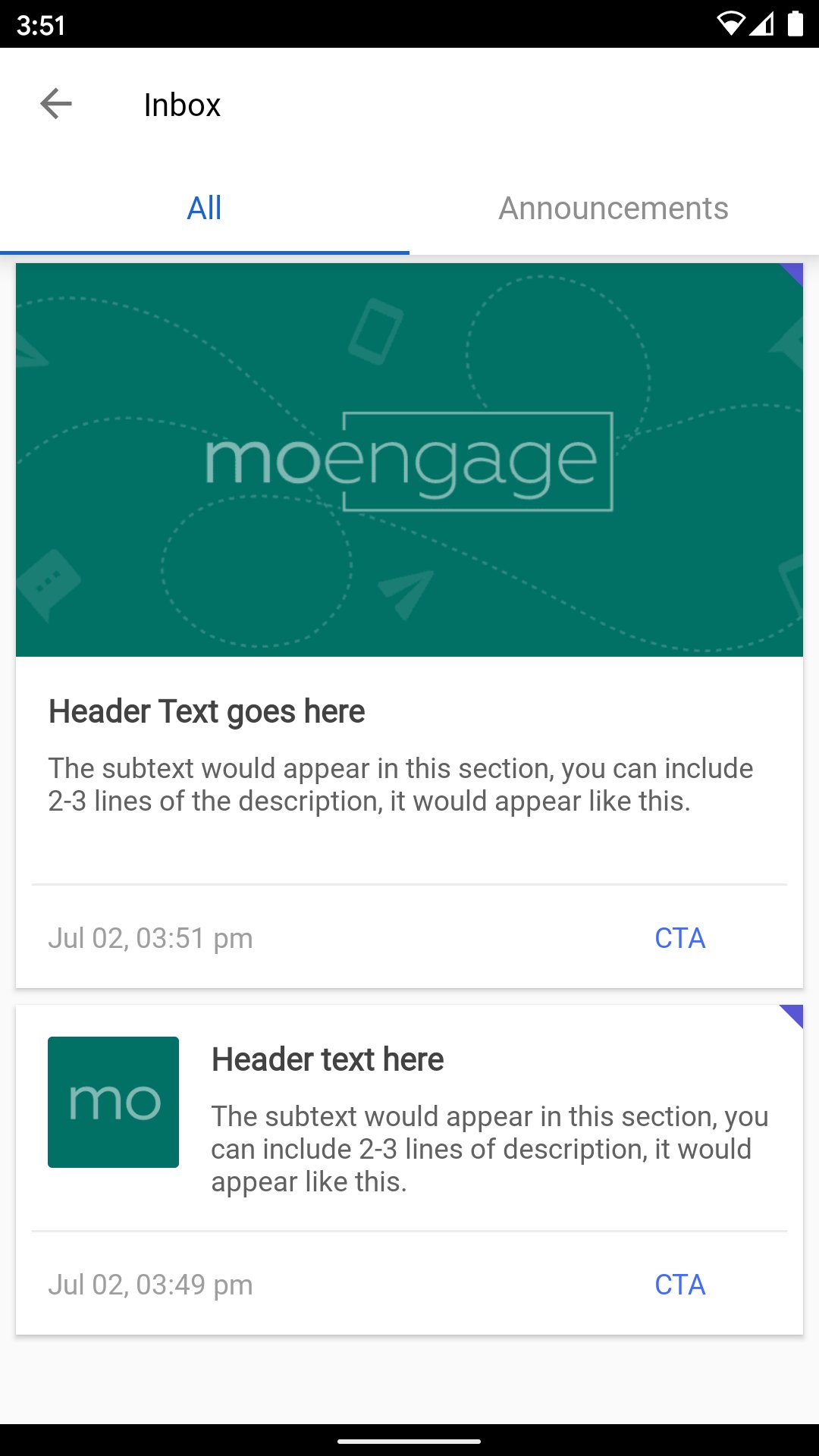
Cards can be used to create targeted or automated App Inbox/NewsFeed messages that can be grouped into various categories and target users with different updates/offers that can stay in the Inbox/Feed over a designated period. For more information, refer to [Cards](https://www.moengage.com/docs/user-guide/campaigns-and-channels/cards/create/create-a-card-campaign).
 ## SDK Installation
Pass the Cards config in the SDK [initialization](https://www.moengage.com/docs/developer-guide/web-sdk/web-sdk-integration/basic-integration/web-sdk-integration) script as shown below:
```javascript JavaScript lines wrap theme={null}
Moengage = moe({
appId: moeAppID,
env: 'LIVE',
logLevel: 0,
cards: {
enable: true,
placeholder: '#cardIcon' // CSS selector of inbox icon
}
});
```
`placeholder` is the icon on click of which the inbox will open. Make sure it is provided by you and it exist in the DOM.
## UI Customizations
SDK provides a set of UI customizations that can overwrite the default values. Refer to the code snippet below for the UI customizations.
```javascript JavaScript lines wrap theme={null}
Moengage = moe({
appId: moeAppID,
env: 'LIVE',
logLevel: 0,
cards: {
enable: true,
placeholder: "#cardIcon", // CSS selector of inbox icon
backgroundColor: "#F6FBFC", // any valid CSS color format
overLayColor: "rgba(0, 0, 0, 0.8)",
fontFaces: [{
family: "Sofia",
url: "https://fonts.gstatic.com/s/sofia/v14/8QIHdirahM3j_su5uI0Orbjl.woff2"
}, {
family: "Audiowide",
url: "https://fonts.gstatic.com/s/audiowide/v16/l7gdbjpo0cum0ckerWCdlg_OMRlABg.woff2"
}],
cardDismiss: {
color: "#db2828", // any valid CSS color format
enable: false // boolean value, which enable the dismiss option.
},
optionButtonColor: "#C4C4C4", // any valid CSS color format
dateTimeColor: "#8E8E8E", // any valid CSS color format
unclickedCardIndicatorColor: "blue", // any valid CSS color format
pinIcon: "https://app-cdn.moengage.com/sdk/pin-icon.svg", // absolute path to the icon image.
refreshIcon: "https://app-cdn.moengage.com/sdk/refresh-icon.svg", // absolute path to the icon image.
navigationBar: {
backgroundColor: "#00237C", // any valid CSS color format
text: "Notifications", // string. eg, Notifications
color: "#fff", // any valid CSS color format
fontSize: "16px", // any valid CSS size format
fontFamily: "", // any font family which is added to the website
},
closeButton: {
webIcon: "https://app-cdn.moengage.com/sdk/cross-icon.svg",
mWebIcon: "https://app-cdn.moengage.com/sdk/cross-icon.svg",
},
tab: {
active: {
color: "#06A6B7",
underlineColor: "#06A6B7",
backgroundColor: "transparent"
},
inactiveTabFontColor: "#7C7C7C",
fontSize: "14px", // any valid CSS size format
fontFamily: "", // any font family which is added to the website
backgroundColor: "#fff", // any valid CSS color format
},
webFloating: {
enable: false, // false by default
icon: "https://app-cdn.moengage.com/sdk/bell-icon.svg", // absolute path to the icon image. by default, our icon will be used.
postion: "0px 10px 40px 0", // need all 4 offset in proper CSS format in the order of top, right, bottom, left.
countBackgroundColor: "#FF5A5F",
countColor: "#fff",
iconBackgroundColor: "#D9DFED",
fontFamily: "Audiowide"
},
mWebFloating: {
enable: false, // false by default
icon: "https://app-cdn.moengage.com/sdk/bell-icon.svg", // absolute path to the icon image. by default, our icon will be used.
postion: "0px 10px 40px 0", // need all 4 offset in proper CSS format in the order of top, right, bottom, left.
countBackgroundColor: "#FF5A5F",
countColor: "#fff",
iconBackgroundColor: "#D9DFED",
fontFamily: "Audiowide"
},
card: {
headerFontSize: "16px",
descriptionFontSize: "14px",
ctaFontSize: "12px",
fontFamily: "inherit",
horizontalRowColor: "#D9DFED"
},
noDataContent: {
img: "https://app-cdn.moengage.com/sdk/cards-no-result.svg",
text: "No notifications to show, check again later.",
}
}
});
```
## APIs
### Unclicked Count
The SDK provides an API to fetch the number of cards that haven't been clicked by the users. To get the count, use the following API.
```javascript JavaScript lines wrap theme={null}
```
### New Card Count
The SDK provides an API to get the new cards for the user on the device. To get the count, use the following API.
```javascript JavaScript lines wrap theme={null}
```
## Callbacks
The SDK provides the following callbacks:
### Inbox Open Callback
To get a callback when the user clicks on the inbox icon and when the inbox is open, register the callback function to the setInboxOpenListener() method as shown below.
```javascript JavaScript lines wrap theme={null}
```
### Inbox Close Callback
To get a callback when the user closes the inbox, register the callback function to the setInboxCloseListener() method as shown below.
```javascript JavaScript lines wrap theme={null}
```
### Card Click Callback
To get a callback when the user clicks on a card, register the callback function to
setCardClickListener() method:
```javascript JavaScript lines wrap theme={null}
```
## SDK Installation
Pass the Cards config in the SDK [initialization](https://www.moengage.com/docs/developer-guide/web-sdk/web-sdk-integration/basic-integration/web-sdk-integration) script as shown below:
```javascript JavaScript lines wrap theme={null}
Moengage = moe({
appId: moeAppID,
env: 'LIVE',
logLevel: 0,
cards: {
enable: true,
placeholder: '#cardIcon' // CSS selector of inbox icon
}
});
```
`placeholder` is the icon on click of which the inbox will open. Make sure it is provided by you and it exist in the DOM.
## UI Customizations
SDK provides a set of UI customizations that can overwrite the default values. Refer to the code snippet below for the UI customizations.
```javascript JavaScript lines wrap theme={null}
Moengage = moe({
appId: moeAppID,
env: 'LIVE',
logLevel: 0,
cards: {
enable: true,
placeholder: "#cardIcon", // CSS selector of inbox icon
backgroundColor: "#F6FBFC", // any valid CSS color format
overLayColor: "rgba(0, 0, 0, 0.8)",
fontFaces: [{
family: "Sofia",
url: "https://fonts.gstatic.com/s/sofia/v14/8QIHdirahM3j_su5uI0Orbjl.woff2"
}, {
family: "Audiowide",
url: "https://fonts.gstatic.com/s/audiowide/v16/l7gdbjpo0cum0ckerWCdlg_OMRlABg.woff2"
}],
cardDismiss: {
color: "#db2828", // any valid CSS color format
enable: false // boolean value, which enable the dismiss option.
},
optionButtonColor: "#C4C4C4", // any valid CSS color format
dateTimeColor: "#8E8E8E", // any valid CSS color format
unclickedCardIndicatorColor: "blue", // any valid CSS color format
pinIcon: "https://app-cdn.moengage.com/sdk/pin-icon.svg", // absolute path to the icon image.
refreshIcon: "https://app-cdn.moengage.com/sdk/refresh-icon.svg", // absolute path to the icon image.
navigationBar: {
backgroundColor: "#00237C", // any valid CSS color format
text: "Notifications", // string. eg, Notifications
color: "#fff", // any valid CSS color format
fontSize: "16px", // any valid CSS size format
fontFamily: "", // any font family which is added to the website
},
closeButton: {
webIcon: "https://app-cdn.moengage.com/sdk/cross-icon.svg",
mWebIcon: "https://app-cdn.moengage.com/sdk/cross-icon.svg",
},
tab: {
active: {
color: "#06A6B7",
underlineColor: "#06A6B7",
backgroundColor: "transparent"
},
inactiveTabFontColor: "#7C7C7C",
fontSize: "14px", // any valid CSS size format
fontFamily: "", // any font family which is added to the website
backgroundColor: "#fff", // any valid CSS color format
},
webFloating: {
enable: false, // false by default
icon: "https://app-cdn.moengage.com/sdk/bell-icon.svg", // absolute path to the icon image. by default, our icon will be used.
postion: "0px 10px 40px 0", // need all 4 offset in proper CSS format in the order of top, right, bottom, left.
countBackgroundColor: "#FF5A5F",
countColor: "#fff",
iconBackgroundColor: "#D9DFED",
fontFamily: "Audiowide"
},
mWebFloating: {
enable: false, // false by default
icon: "https://app-cdn.moengage.com/sdk/bell-icon.svg", // absolute path to the icon image. by default, our icon will be used.
postion: "0px 10px 40px 0", // need all 4 offset in proper CSS format in the order of top, right, bottom, left.
countBackgroundColor: "#FF5A5F",
countColor: "#fff",
iconBackgroundColor: "#D9DFED",
fontFamily: "Audiowide"
},
card: {
headerFontSize: "16px",
descriptionFontSize: "14px",
ctaFontSize: "12px",
fontFamily: "inherit",
horizontalRowColor: "#D9DFED"
},
noDataContent: {
img: "https://app-cdn.moengage.com/sdk/cards-no-result.svg",
text: "No notifications to show, check again later.",
}
}
});
```
## APIs
### Unclicked Count
The SDK provides an API to fetch the number of cards that haven't been clicked by the users. To get the count, use the following API.
```javascript JavaScript lines wrap theme={null}
```
### New Card Count
The SDK provides an API to get the new cards for the user on the device. To get the count, use the following API.
```javascript JavaScript lines wrap theme={null}
```
## Callbacks
The SDK provides the following callbacks:
### Inbox Open Callback
To get a callback when the user clicks on the inbox icon and when the inbox is open, register the callback function to the setInboxOpenListener() method as shown below.
```javascript JavaScript lines wrap theme={null}
```
### Inbox Close Callback
To get a callback when the user closes the inbox, register the callback function to the setInboxCloseListener() method as shown below.
```javascript JavaScript lines wrap theme={null}
```
### Card Click Callback
To get a callback when the user clicks on a card, register the callback function to
setCardClickListener() method:
```javascript JavaScript lines wrap theme={null}
```