> ## Documentation Index
> Fetch the complete documentation index at: https://moengage.com/docs/llms.txt
> Use this file to discover all available pages before exploring further.
# API ドキュメント
> ユーザーデータ、キャンペーン、セグメント、テンプレート、連携を管理するための MoEngage REST API について説明します。
MoEngage REST API を使用すると、ダッシュボードを使わずにユーザーデータ、キャンペーン、セグメント、コンテンツ、連携を管理できます。すべてのエンドポイントは、標準的な HTTP メソッド、Basic 認証、JSON 形式のリクエストボディとレスポンスボディを使用します。
このリファレンスでは、利用可能な API カテゴリと、それらすべてに共通するデータセンター、ベース URL、認証、レート制限、エラー処理について説明します。
## API カテゴリ
ユーザーの作成と更新、イベントのトラッキング、デバイスの管理、データの一括インポートを行います。
ビジネスイベントを作成およびトリガーして、自動化されたキャンペーンを実行します。
テンプレート、コンテンツブロック、レコメンデーション、クーポン、カタログを管理します。
Push キャンペーンと Email キャンペーンをプログラムで作成および管理します。
ファイルベース、フィルターベース、コホート同期のユーザーセグメントを作成および管理します。
メールの購読と購読カテゴリの設定を管理します。
カスタムダッシュボードにアクセスし、そのチャートの基になる分析データを取得します。
Android、iOS、Web にトランザクションプッシュ通知やターゲットプッシュ通知を送信します。
ユーザーの App Inbox カードを取得および管理します。
SMS、Email、Push チャネルでトランザクションアラートを送信します。
ブロードキャストを使用して iOS Live Activities を開始、更新、終了します。
ユーザー向けのパーソナライズされたエクスペリエンスを取得および管理します。
アーカイブされたメッセージを表示および取得します。
***
## データセンター
MoEngage は複数のデータセンターを運用しています。サインアップ時に特定のデータセンターが割り当てられます。データセンターはダッシュボードの URL から確認できます。
| データセンター | ダッシュボード URL | REST API ホスト |
| ------- | ------------------------------------ | ------------------------------ |
| DC-01 | `https://dashboard-01.moengage.com` | `https://api-01.moengage.com` |
| DC-02 | `https://dashboard-02.moengage.com` | `https://api-02.moengage.com` |
| DC-03 | `https://dashboard-03.moengage.com` | `https://api-03.moengage.com` |
| DC-04 | `https://dashboard-04.moengage.com` | `https://api-04.moengage.com` |
| DC-05 | `https://dashboard-05.moengage.com` | `https://api-05.moengage.com` |
| DC-06 | `https://dashboard-06.moengage.com` | `https://api-06.moengage.com` |
| DC-101 | `https://dashboard-101.moengage.com` | `https://api-101.moengage.com` |
### データセンターの選択
ユーザーデータを特定の地理的リージョンに保存する必要があるデータプライバシー要件がある場合:
* **米国リージョン**: DC-01 または DC-04 でサインアップします
* **EU リージョン**: DC-02 でサインアップします
* **インドリージョン**: DC-03 でサインアップします
* **インドネシアリージョン**: DC-06 でサインアップします
DC-05(シンガポール)は新規サインアップでは利用できません。既存の DC-05 ワークスペースは引き続き運用され、API リクエストには引き続き `https://api-05.moengage.com` を使用します。シンガポールでのデータレジデンシー要件については、カスタマーサクセスマネージャーにお問い合わせください。
ワークスペースでデータが取得された後は、別のデータセンターに移行することはできません。必ず登録済みのデータセンターに対応する REST API エンドポイントを使用してください。
***
## ベース URL
すべての API リクエストは次の URL に送信されます。
```text theme={null}
https://api-{dc}.moengage.com
```
`{dc}` をデータセンター番号(例: `01`、`02`、`03`)に置き換えてください。データセンターはダッシュボードの URL から確認できます。
各 API には追加のパスセグメント(例: `/v1`、`/core-services/v1`)がある場合があります。完全なエンドポイントパスについては、各 API のドキュメントを参照してください。
***
## 認証
MoEngage API リクエストには Basic 認証が必要です。Data API は OAuth 2.0 にも対応しています。詳細については、[OAuth 2.0](/docs/ja/api/data/data-overview#oauth-2) を参照してください。Basic 認証を使用して認証するには、すべてのリクエストの Authorization ヘッダーに、認証情報を Base64 でエンコードした文字列を含めます。Basic 認証では、'username:password' という文字列を Base64 でエンコードし、エンコードされた文字列の先頭に 'Basic ' を付けます。この文字列は、次のように Authorization ヘッダーに含めます。
`{"Authorization: Basic Base64_ENCODED_WORKSPACEID_APIKEY=="}`
### 必須ヘッダー
```http theme={null}
Authorization: Basic {base64_encoded_credentials}
MOE-APPKEY: {your_workspace_id} # This header is mandatory for the File Import and Test Connection APIs. It is not required for API Endpoints under Data.
Content-Type: application/json
```
`MOE-APPKEY` ヘッダー(Workspace ID を設定)は、File Import API と Test Connection API でのみ必要です。Track User、Get User、Track Event、Merge User、Delete User、Track Device などのコア Data API では必要ありません。
### 認証情報の生成
`Authorization` ヘッダーの値は、`workspace_id:api_key` を Base64 でエンコードしたものです。
```bash theme={null}
# Example: Encoding credentials
echo -n "YOUR_WORKSPACE_ID:YOUR_API_KEY" | base64
```
### 認証情報の取得
1. [MoEngage ダッシュボード](https://dashboard.moengage.com)にログインします。
2. **Settings** > **Account** > **APIs** に移動します。
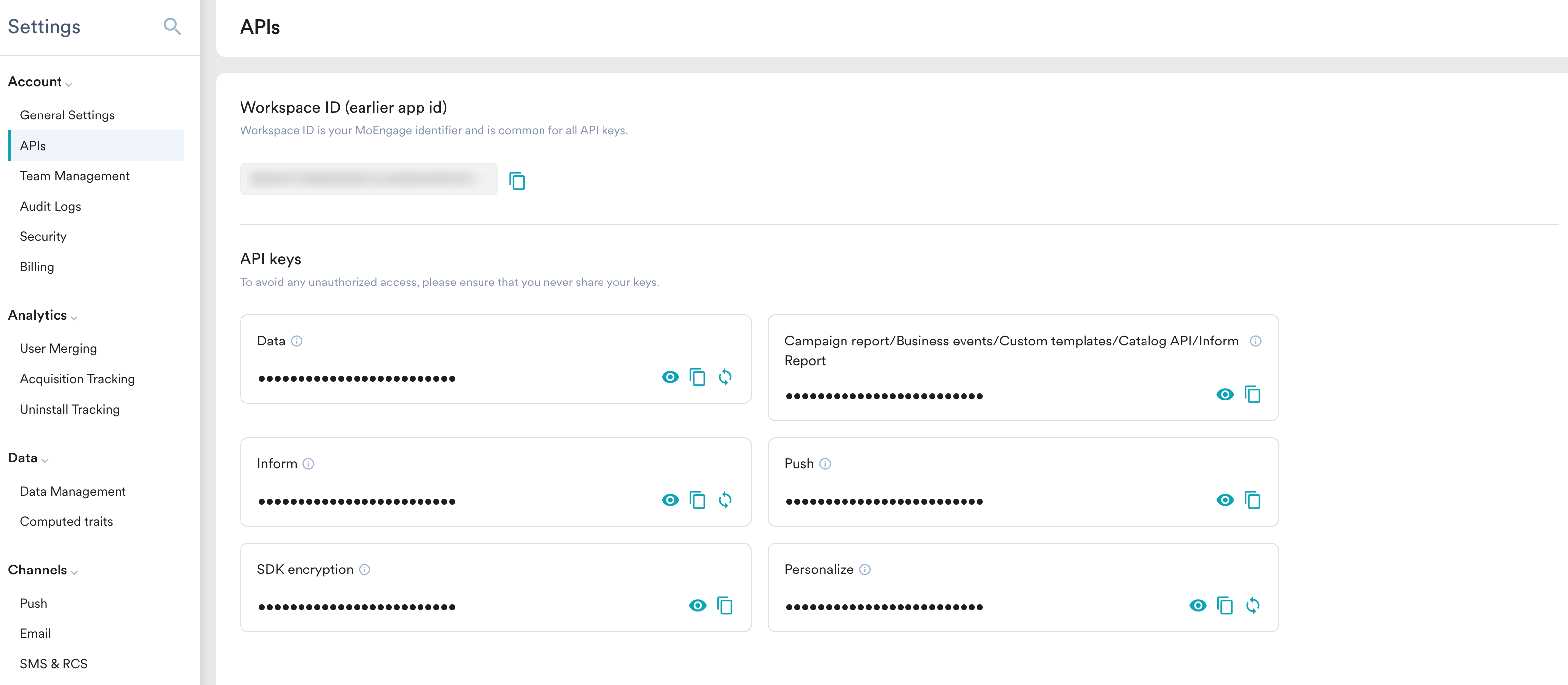 3. **Workspace ID** と該当する **API Key** をコピーします。
キーの作成、スコープ設定、再生成、アーカイブについては、[API Key Dashboard](/docs/ja/user-guide/settings/account/api-and-api-keys/api-key-dashboard) を参照してください。
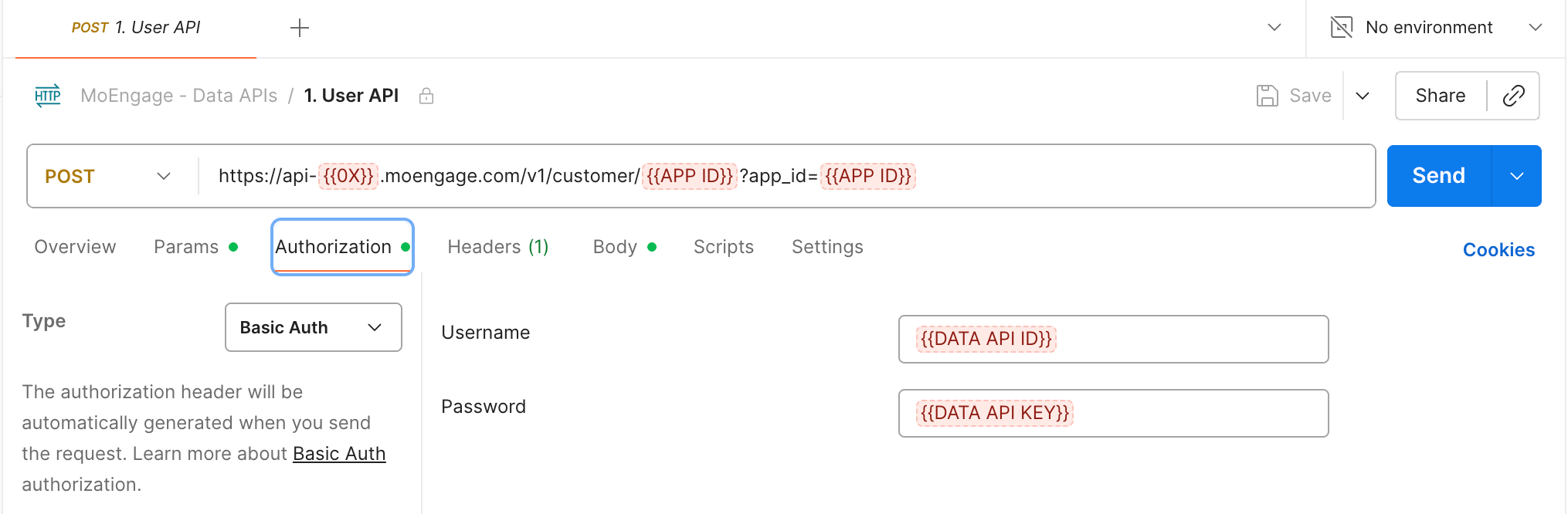
Postman などのクライアントを使用して、次のように認証を行うことができます。
3. **Workspace ID** と該当する **API Key** をコピーします。
キーの作成、スコープ設定、再生成、アーカイブについては、[API Key Dashboard](/docs/ja/user-guide/settings/account/api-and-api-keys/api-key-dashboard) を参照してください。
Postman などのクライアントを使用して、次のように認証を行うことができます。
 ### 機能別の API キー
API によって、ダッシュボードで必要な API キーが異なります。
| API | API キーの場所(Settings → Account → APIs) |
| --------------------- | -------------------------------------------------------------------------- |
| Data | Data |
| Push | Push |
| Inform | Inform |
| Campaigns および Catalog | Campaign report/Business events/Custom templates/Catalog API/Inform Report |
| Personalize | Personalize |
## レート制限
MoEngage は、REST API に対してワークスペースごとのレート制限とペイロードの上限を設けています。レート制限を超えたリクエストには `HTTP 429` レスポンスが返され、サイズが大きすぎるペイロードには `HTTP 413`(または `400`)が返されます。レート制限されたレスポンスには `x-ratelimit-limit`、`x-ratelimit-remaining`、`x-ratelimit-reset` ヘッダーが含まれるため、残りの容量をリアルタイムで把握できます。
エンドポイントごとの詳細(レート制限、ペイロードサイズの上限、モニタリング用ヘッダー、上限引き上げのリクエスト方法)については、[Rate Limits](/docs/ja/api/rate-limits) を参照してください。
***
## エラー処理
ほとんどの MoEngage API は、次の標準形式でエラーを返します。
### 標準エラー形式
```json wrap theme={null}
{
"status": "fail",
"error": {
"message": "The request parameters are invalid",
"type": "Bad Request",
"request_id": "abc123xyz"
}
}
```
[Flows](/docs/ja/api/flows/flows-overview) などの新しい v5 API では、異なるエラーエンベロープ `{ response_id, error: { code, message, target, details } }` を使用します。正確なエラーの形式については、各 API のリファレンスを参照してください。
### HTTP ステータスコード
| コード | 説明 |
| ----- | -------------------------------- |
| `200` | 成功 |
| `201` | 作成済み |
| `202` | 受け付け済み(非同期処理) |
| `400` | Bad Request - 無効なパラメーター |
| `401` | Unauthorized - 無効な認証情報 |
| `403` | Forbidden - アクセス拒否 |
| `404` | Not Found - リソースが存在しない |
| `409` | Conflict - リソースの重複 |
| `413` | Payload Too Large(ペイロードが大きすぎる) |
| `429` | Rate Limit Exceeded(レート制限超過) |
| `500` | Internal Server Error(内部サーバーエラー) |
***
## 主要エンドポイントのリファレンス
### Data
| メソッド | エンドポイント | 説明 |
| ------ | ------------------------------------ | ------------------ |
| `POST` | `/customer/{Workspace_ID}` | ユーザーの作成または更新 |
| `POST` | `/customers/export` | ユーザー詳細の取得 |
| `POST` | `/customer/merge` | 2 人のユーザーのマージ |
| `POST` | `/customer/delete` | ユーザーの一括削除 |
| `POST` | `/event/{Workspace_ID}` | ユーザーイベントのトラッキング |
| `POST` | `/transition/{Workspace_ID}` | 一括インポート |
| `POST` | `/device/{app_id}` | デバイスの作成または更新 |
| `POST` | `/devices/manage` | デバイスの管理 |
| `POST` | `/fileimports/trigger/{schedule_id}` | ファイルインポートのトリガー |
| `POST` | `/fileimports/import/status` | インポートステータスの取得 |
| `GET` | `/installInfo` | インストール情報の取得 |
| `POST` | `/integrations/authentication` | 認証の検証 |
| `POST` | `/opengdpr_requests/{appId}` | GDPR/CCPA リクエストの作成 |
### Business Events
| メソッド | エンドポイント | 説明 |
| ------ | ------------------------- | ------------- |
| `POST` | `/business_event` | ビジネスイベントの作成 |
| `POST` | `/business_event/trigger` | ビジネスイベントのトリガー |
| `POST` | `/business_event/search` | ビジネスイベントの検索 |
### Content
#### テンプレート
| メソッド | エンドポイント | 説明 |
| ------ | -------------------------------- | ---------------------- |
| `POST` | `/custom-templates/inapp` | In-App テンプレートの作成 |
| `PUT` | `/custom-templates/inapp` | In-App テンプレートの更新 |
| `POST` | `/custom-templates/inapp/search` | In-App テンプレートの検索 |
| `POST` | `/custom-templates/osm` | OSM テンプレートの作成 |
| `PUT` | `/custom-templates/osm` | OSM テンプレートの更新 |
| `POST` | `/custom-templates/osm/search` | OSM テンプレートの検索 |
| `POST` | `/custom-templates/sms` | SMS テンプレートの作成 |
| `PUT` | `/custom-templates/sms` | SMS テンプレートの更新 |
| `POST` | `/custom-templates/sms/search` | SMS テンプレートの検索 |
| `POST` | `/email-templates` | Email テンプレートの作成 |
| `GET` | `/email-templates` | すべての Email テンプレートの取得 |
| `GET` | `/email-templates/{id}` | ID による Email テンプレートの取得 |
| `PUT` | `/email-templates/{id}` | Email テンプレートの更新 |
| `POST` | `/custom-templates/email` | Email テンプレート V2 の作成 |
| `PUT` | `/custom-templates/email` | Email テンプレート V2 の更新 |
| `POST` | `/custom-templates/push` | Push テンプレートの作成 |
| `PUT` | `/custom-templates/push` | Push テンプレートの更新 |
| `POST` | `/custom-templates/push/search` | Push テンプレートの検索 |
#### コンテンツブロック
| メソッド | エンドポイント | 説明 |
| ------ | ---------------------------- | ------------------ |
| `POST` | `/content-blocks` | コンテンツブロックの作成 |
| `PUT` | `/content-blocks` | コンテンツブロックの更新 |
| `POST` | `/content-blocks/get-by-ids` | ID によるコンテンツブロックの取得 |
| `POST` | `/content-blocks/search` | コンテンツブロックの検索 |
#### レコメンデーション
| メソッド | エンドポイント | 説明 |
| ------ | -------------------------------------------- | ------------------ |
| `GET` | `/recommendations` | すべてのレコメンデーションの一覧表示 |
| `GET` | `/recommendations/{recommendation_id}` | レコメンデーションの詳細の取得 |
| `POST` | `/recommendations/{recommendation_id}/items` | ユーザー向けのおすすめアイテムの取得 |
#### クーポン
| メソッド | エンドポイント | 説明 |
| -------- | ------------------------------------------------------ | --------------- |
| `POST` | `/coupon-list` | クーポンリストの作成 |
| `GET` | `/coupon-list` | クーポンリストの一覧表示 |
| `GET` | `/coupon-list/{coupon_list_id}` | クーポンリストの取得 |
| `PATCH` | `/coupon-list/{coupon_list_id}` | クーポンリストの更新 |
| `PUT` | `/coupon-list/{coupon_list_id}/activate` | クーポンリストの有効化 |
| `PUT` | `/coupon-list/{coupon_list_id}/archive` | クーポンリストのアーカイブ |
| `POST` | `/coupon-list/{coupon_list_id}/files` | クーポンファイルのアップロード |
| `GET` | `/coupon-list/{coupon_list_id}/files` | クーポンファイルの一覧表示 |
| `GET` | `/coupon-list/{coupon_list_id}/files/{coupon_file_id}` | クーポンファイルの取得 |
| `DELETE` | `/coupon-list/{coupon_list_id}/files/{coupon_file_id}` | クーポンファイルの削除 |
| `POST` | `/coupon-list/{coupon_list_id}/usage-report` | 使用状況レポートの取得 |
#### カタログ
| メソッド | エンドポイント | 説明 |
| ------- | ----------------------------------------- | ------------- |
| `POST` | `/catalog` | カタログの作成 |
| `PATCH` | `/catalog/{catalog_id}/attributes` | カタログ属性の追加 |
| `POST` | `/catalog/{catalog_id}/items` | カタログアイテムの取り込み |
| `POST` | `/catalog/{catalog_id}/items/search` | カタログアイテムの検索 |
| `PATCH` | `/catalog/{catalog_id}/items` | カタログアイテムの更新 |
| `POST` | `/catalog/{catalog_id}/items/bulk-delete` | カタログアイテムの削除 |
### Campaigns
| メソッド | エンドポイント | 説明 |
| ------- | ------------------------------------------------ | ----------------- |
| `POST` | `/campaigns` | キャンペーンの作成 |
| `PATCH` | `/campaigns/{campaign_id}` | キャンペーンの更新 |
| `POST` | `/campaigns/search` | キャンペーンの検索 |
| `POST` | `/campaigns/test` | キャンペーンのテスト |
| `POST` | `/personalization/preview` | パーソナライズのプレビュー |
| `POST` | `/campaigns/meta` | キャンペーンメタデータの取得 |
| `POST` | `/campaigns/status` | キャンペーンステータスの取得 |
| `POST` | `/campaigns/{parent_campaign_id}/executions` | キャンペーン実行履歴の取得 |
| `POST` | `/core-services/v1/campaign-stats` | キャンペーン統計の取得 |
| `GET` | `/campaign_reports/rest_api/{APP_ID}/{FILENAME}` | キャンペーンレポートのダウンロード |
### Segments
| メソッド | エンドポイント | 説明 |
| ------- | ----------------------------------------------- | --------------- |
| `POST` | `/v2/custom-segments/file-segment` | ファイルセグメントの作成 |
| `PUT` | `/v2/custom-segments/file-segment/add-users` | セグメントへのユーザーの追加 |
| `PUT` | `/v2/custom-segments/file-segment/remove-users` | セグメントからのユーザーの削除 |
| `PUT` | `/v2/custom-segments/file-segment/replace` | セグメントユーザーの置き換え |
| `GET` | `/v3/custom-segments` | フィルターセグメントの一覧表示 |
| `POST` | `/v3/custom-segments` | フィルターセグメントの作成 |
| `GET` | `/v3/custom-segments/{id}` | ID によるセグメントの取得 |
| `PATCH` | `/v3/custom-segments/{id}` | フィルターセグメントの更新 |
| `POST` | `/v1/integrations/cohortsync` | コホートオーディエンスの同期 |
| `PATCH` | `/v2/custom-segments/archive` | セグメントのアーカイブ |
| `PATCH` | `/v2/custom-segments/unarchive` | セグメントのアーカイブ解除 |
### Subscriptions
| メソッド | エンドポイント | 説明 |
| ------ | ------------------------------------------ | ---------- |
| `POST` | `/emails/v1.0/bulk-resubscribe` | メールの一括再購読 |
| `PUT` | `/v1.0/opt-in-management/user-preferences` | オプトイン設定の更新 |
| `GET` | `/category-subscription/user-preferences` | 購読設定の取得 |
| `PUT` | `/category-subscription/user-preferences` | 購読設定の更新 |
| `POST` | `/category-subscription/user-preferences` | 購読設定の作成 |
### Push
| メソッド | エンドポイント | 説明 |
| ------ | ----------------------- | --------- |
| `POST` | `/transaction/sendpush` | プッシュ通知の送信 |
### Cards
| メソッド | エンドポイント | 説明 |
| -------- | --------------- | ------ |
| `POST` | `/cards/fetch` | カードの取得 |
| `DELETE` | `/cards/delete` | カードの削除 |
### Inform
| メソッド | エンドポイント | 説明 |
| ------ | -------------- | ------------------------------- |
| `POST` | `/alerts/send` | トランザクションアラートの送信(SMS/Email/Push) |
### Live Activities
| メソッド | エンドポイント | 説明 |
| ------ | --------------------------------- | ----------------- |
| `POST` | `/live-activity/broadcast/start` | Live Activity の開始 |
| `POST` | `/live-activity/broadcast/update` | Live Activity の更新 |
| `POST` | `/live-activity/broadcast/end` | Live Activity の終了 |
### Personalize
| メソッド | エンドポイント | 説明 |
| ------ | ----------------------- | ------------------- |
| `POST` | `/experiences/fetch` | エクスペリエンスの取得 |
| `GET` | `/experiences/metadata` | エクスペリエンスメタデータの取得 |
| `POST` | `/experiences/events` | エクスペリエンスイベントのトラッキング |
### Message Archival
| メソッド | エンドポイント | 説明 |
| ------ | ---------------- | ---------------- |
| `POST` | `/archival/view` | アーカイブされたメッセージの表示 |
***
## サポート
API についてサポートが必要ですか?
* **サポート**: カスタマーサクセスマネージャーにお問い合わせいただくか、[サポートチケットを作成](https://www.moengage.com/docs/user-guide/contact-support/raise-a-support-ticket-through-moengage-dashboard)してください。
### 機能別の API キー
API によって、ダッシュボードで必要な API キーが異なります。
| API | API キーの場所(Settings → Account → APIs) |
| --------------------- | -------------------------------------------------------------------------- |
| Data | Data |
| Push | Push |
| Inform | Inform |
| Campaigns および Catalog | Campaign report/Business events/Custom templates/Catalog API/Inform Report |
| Personalize | Personalize |
## レート制限
MoEngage は、REST API に対してワークスペースごとのレート制限とペイロードの上限を設けています。レート制限を超えたリクエストには `HTTP 429` レスポンスが返され、サイズが大きすぎるペイロードには `HTTP 413`(または `400`)が返されます。レート制限されたレスポンスには `x-ratelimit-limit`、`x-ratelimit-remaining`、`x-ratelimit-reset` ヘッダーが含まれるため、残りの容量をリアルタイムで把握できます。
エンドポイントごとの詳細(レート制限、ペイロードサイズの上限、モニタリング用ヘッダー、上限引き上げのリクエスト方法)については、[Rate Limits](/docs/ja/api/rate-limits) を参照してください。
***
## エラー処理
ほとんどの MoEngage API は、次の標準形式でエラーを返します。
### 標準エラー形式
```json wrap theme={null}
{
"status": "fail",
"error": {
"message": "The request parameters are invalid",
"type": "Bad Request",
"request_id": "abc123xyz"
}
}
```
[Flows](/docs/ja/api/flows/flows-overview) などの新しい v5 API では、異なるエラーエンベロープ `{ response_id, error: { code, message, target, details } }` を使用します。正確なエラーの形式については、各 API のリファレンスを参照してください。
### HTTP ステータスコード
| コード | 説明 |
| ----- | -------------------------------- |
| `200` | 成功 |
| `201` | 作成済み |
| `202` | 受け付け済み(非同期処理) |
| `400` | Bad Request - 無効なパラメーター |
| `401` | Unauthorized - 無効な認証情報 |
| `403` | Forbidden - アクセス拒否 |
| `404` | Not Found - リソースが存在しない |
| `409` | Conflict - リソースの重複 |
| `413` | Payload Too Large(ペイロードが大きすぎる) |
| `429` | Rate Limit Exceeded(レート制限超過) |
| `500` | Internal Server Error(内部サーバーエラー) |
***
## 主要エンドポイントのリファレンス
### Data
| メソッド | エンドポイント | 説明 |
| ------ | ------------------------------------ | ------------------ |
| `POST` | `/customer/{Workspace_ID}` | ユーザーの作成または更新 |
| `POST` | `/customers/export` | ユーザー詳細の取得 |
| `POST` | `/customer/merge` | 2 人のユーザーのマージ |
| `POST` | `/customer/delete` | ユーザーの一括削除 |
| `POST` | `/event/{Workspace_ID}` | ユーザーイベントのトラッキング |
| `POST` | `/transition/{Workspace_ID}` | 一括インポート |
| `POST` | `/device/{app_id}` | デバイスの作成または更新 |
| `POST` | `/devices/manage` | デバイスの管理 |
| `POST` | `/fileimports/trigger/{schedule_id}` | ファイルインポートのトリガー |
| `POST` | `/fileimports/import/status` | インポートステータスの取得 |
| `GET` | `/installInfo` | インストール情報の取得 |
| `POST` | `/integrations/authentication` | 認証の検証 |
| `POST` | `/opengdpr_requests/{appId}` | GDPR/CCPA リクエストの作成 |
### Business Events
| メソッド | エンドポイント | 説明 |
| ------ | ------------------------- | ------------- |
| `POST` | `/business_event` | ビジネスイベントの作成 |
| `POST` | `/business_event/trigger` | ビジネスイベントのトリガー |
| `POST` | `/business_event/search` | ビジネスイベントの検索 |
### Content
#### テンプレート
| メソッド | エンドポイント | 説明 |
| ------ | -------------------------------- | ---------------------- |
| `POST` | `/custom-templates/inapp` | In-App テンプレートの作成 |
| `PUT` | `/custom-templates/inapp` | In-App テンプレートの更新 |
| `POST` | `/custom-templates/inapp/search` | In-App テンプレートの検索 |
| `POST` | `/custom-templates/osm` | OSM テンプレートの作成 |
| `PUT` | `/custom-templates/osm` | OSM テンプレートの更新 |
| `POST` | `/custom-templates/osm/search` | OSM テンプレートの検索 |
| `POST` | `/custom-templates/sms` | SMS テンプレートの作成 |
| `PUT` | `/custom-templates/sms` | SMS テンプレートの更新 |
| `POST` | `/custom-templates/sms/search` | SMS テンプレートの検索 |
| `POST` | `/email-templates` | Email テンプレートの作成 |
| `GET` | `/email-templates` | すべての Email テンプレートの取得 |
| `GET` | `/email-templates/{id}` | ID による Email テンプレートの取得 |
| `PUT` | `/email-templates/{id}` | Email テンプレートの更新 |
| `POST` | `/custom-templates/email` | Email テンプレート V2 の作成 |
| `PUT` | `/custom-templates/email` | Email テンプレート V2 の更新 |
| `POST` | `/custom-templates/push` | Push テンプレートの作成 |
| `PUT` | `/custom-templates/push` | Push テンプレートの更新 |
| `POST` | `/custom-templates/push/search` | Push テンプレートの検索 |
#### コンテンツブロック
| メソッド | エンドポイント | 説明 |
| ------ | ---------------------------- | ------------------ |
| `POST` | `/content-blocks` | コンテンツブロックの作成 |
| `PUT` | `/content-blocks` | コンテンツブロックの更新 |
| `POST` | `/content-blocks/get-by-ids` | ID によるコンテンツブロックの取得 |
| `POST` | `/content-blocks/search` | コンテンツブロックの検索 |
#### レコメンデーション
| メソッド | エンドポイント | 説明 |
| ------ | -------------------------------------------- | ------------------ |
| `GET` | `/recommendations` | すべてのレコメンデーションの一覧表示 |
| `GET` | `/recommendations/{recommendation_id}` | レコメンデーションの詳細の取得 |
| `POST` | `/recommendations/{recommendation_id}/items` | ユーザー向けのおすすめアイテムの取得 |
#### クーポン
| メソッド | エンドポイント | 説明 |
| -------- | ------------------------------------------------------ | --------------- |
| `POST` | `/coupon-list` | クーポンリストの作成 |
| `GET` | `/coupon-list` | クーポンリストの一覧表示 |
| `GET` | `/coupon-list/{coupon_list_id}` | クーポンリストの取得 |
| `PATCH` | `/coupon-list/{coupon_list_id}` | クーポンリストの更新 |
| `PUT` | `/coupon-list/{coupon_list_id}/activate` | クーポンリストの有効化 |
| `PUT` | `/coupon-list/{coupon_list_id}/archive` | クーポンリストのアーカイブ |
| `POST` | `/coupon-list/{coupon_list_id}/files` | クーポンファイルのアップロード |
| `GET` | `/coupon-list/{coupon_list_id}/files` | クーポンファイルの一覧表示 |
| `GET` | `/coupon-list/{coupon_list_id}/files/{coupon_file_id}` | クーポンファイルの取得 |
| `DELETE` | `/coupon-list/{coupon_list_id}/files/{coupon_file_id}` | クーポンファイルの削除 |
| `POST` | `/coupon-list/{coupon_list_id}/usage-report` | 使用状況レポートの取得 |
#### カタログ
| メソッド | エンドポイント | 説明 |
| ------- | ----------------------------------------- | ------------- |
| `POST` | `/catalog` | カタログの作成 |
| `PATCH` | `/catalog/{catalog_id}/attributes` | カタログ属性の追加 |
| `POST` | `/catalog/{catalog_id}/items` | カタログアイテムの取り込み |
| `POST` | `/catalog/{catalog_id}/items/search` | カタログアイテムの検索 |
| `PATCH` | `/catalog/{catalog_id}/items` | カタログアイテムの更新 |
| `POST` | `/catalog/{catalog_id}/items/bulk-delete` | カタログアイテムの削除 |
### Campaigns
| メソッド | エンドポイント | 説明 |
| ------- | ------------------------------------------------ | ----------------- |
| `POST` | `/campaigns` | キャンペーンの作成 |
| `PATCH` | `/campaigns/{campaign_id}` | キャンペーンの更新 |
| `POST` | `/campaigns/search` | キャンペーンの検索 |
| `POST` | `/campaigns/test` | キャンペーンのテスト |
| `POST` | `/personalization/preview` | パーソナライズのプレビュー |
| `POST` | `/campaigns/meta` | キャンペーンメタデータの取得 |
| `POST` | `/campaigns/status` | キャンペーンステータスの取得 |
| `POST` | `/campaigns/{parent_campaign_id}/executions` | キャンペーン実行履歴の取得 |
| `POST` | `/core-services/v1/campaign-stats` | キャンペーン統計の取得 |
| `GET` | `/campaign_reports/rest_api/{APP_ID}/{FILENAME}` | キャンペーンレポートのダウンロード |
### Segments
| メソッド | エンドポイント | 説明 |
| ------- | ----------------------------------------------- | --------------- |
| `POST` | `/v2/custom-segments/file-segment` | ファイルセグメントの作成 |
| `PUT` | `/v2/custom-segments/file-segment/add-users` | セグメントへのユーザーの追加 |
| `PUT` | `/v2/custom-segments/file-segment/remove-users` | セグメントからのユーザーの削除 |
| `PUT` | `/v2/custom-segments/file-segment/replace` | セグメントユーザーの置き換え |
| `GET` | `/v3/custom-segments` | フィルターセグメントの一覧表示 |
| `POST` | `/v3/custom-segments` | フィルターセグメントの作成 |
| `GET` | `/v3/custom-segments/{id}` | ID によるセグメントの取得 |
| `PATCH` | `/v3/custom-segments/{id}` | フィルターセグメントの更新 |
| `POST` | `/v1/integrations/cohortsync` | コホートオーディエンスの同期 |
| `PATCH` | `/v2/custom-segments/archive` | セグメントのアーカイブ |
| `PATCH` | `/v2/custom-segments/unarchive` | セグメントのアーカイブ解除 |
### Subscriptions
| メソッド | エンドポイント | 説明 |
| ------ | ------------------------------------------ | ---------- |
| `POST` | `/emails/v1.0/bulk-resubscribe` | メールの一括再購読 |
| `PUT` | `/v1.0/opt-in-management/user-preferences` | オプトイン設定の更新 |
| `GET` | `/category-subscription/user-preferences` | 購読設定の取得 |
| `PUT` | `/category-subscription/user-preferences` | 購読設定の更新 |
| `POST` | `/category-subscription/user-preferences` | 購読設定の作成 |
### Push
| メソッド | エンドポイント | 説明 |
| ------ | ----------------------- | --------- |
| `POST` | `/transaction/sendpush` | プッシュ通知の送信 |
### Cards
| メソッド | エンドポイント | 説明 |
| -------- | --------------- | ------ |
| `POST` | `/cards/fetch` | カードの取得 |
| `DELETE` | `/cards/delete` | カードの削除 |
### Inform
| メソッド | エンドポイント | 説明 |
| ------ | -------------- | ------------------------------- |
| `POST` | `/alerts/send` | トランザクションアラートの送信(SMS/Email/Push) |
### Live Activities
| メソッド | エンドポイント | 説明 |
| ------ | --------------------------------- | ----------------- |
| `POST` | `/live-activity/broadcast/start` | Live Activity の開始 |
| `POST` | `/live-activity/broadcast/update` | Live Activity の更新 |
| `POST` | `/live-activity/broadcast/end` | Live Activity の終了 |
### Personalize
| メソッド | エンドポイント | 説明 |
| ------ | ----------------------- | ------------------- |
| `POST` | `/experiences/fetch` | エクスペリエンスの取得 |
| `GET` | `/experiences/metadata` | エクスペリエンスメタデータの取得 |
| `POST` | `/experiences/events` | エクスペリエンスイベントのトラッキング |
### Message Archival
| メソッド | エンドポイント | 説明 |
| ------ | ---------------- | ---------------- |
| `POST` | `/archival/view` | アーカイブされたメッセージの表示 |
***
## サポート
API についてサポートが必要ですか?
* **サポート**: カスタマーサクセスマネージャーにお問い合わせいただくか、[サポートチケットを作成](https://www.moengage.com/docs/user-guide/contact-support/raise-a-support-ticket-through-moengage-dashboard)してください。