> ## Documentation Index
> Fetch the complete documentation index at: https://moengage.com/docs/llms.txt
> Use this file to discover all available pages before exploring further.
# イベントとユーザーデータのトラッキング
> Shopify ストアから MoEngage に行動データを送信して、セグメントの作成、キャンペーンのトリガー、コミュニケーションのパーソナライズを行います。
イベントトラッキングとユーザーデータトラッキングにより、Shopify ストアから MoEngage に行動データを送信できます。これらのイベントをトラッキングすると、ストア上でのユーザーの行動に基づいて、セグメントの作成、キャンペーンのトリガー、コミュニケーションのパーソナライズに利用できます。
## トラッキングされるイベント
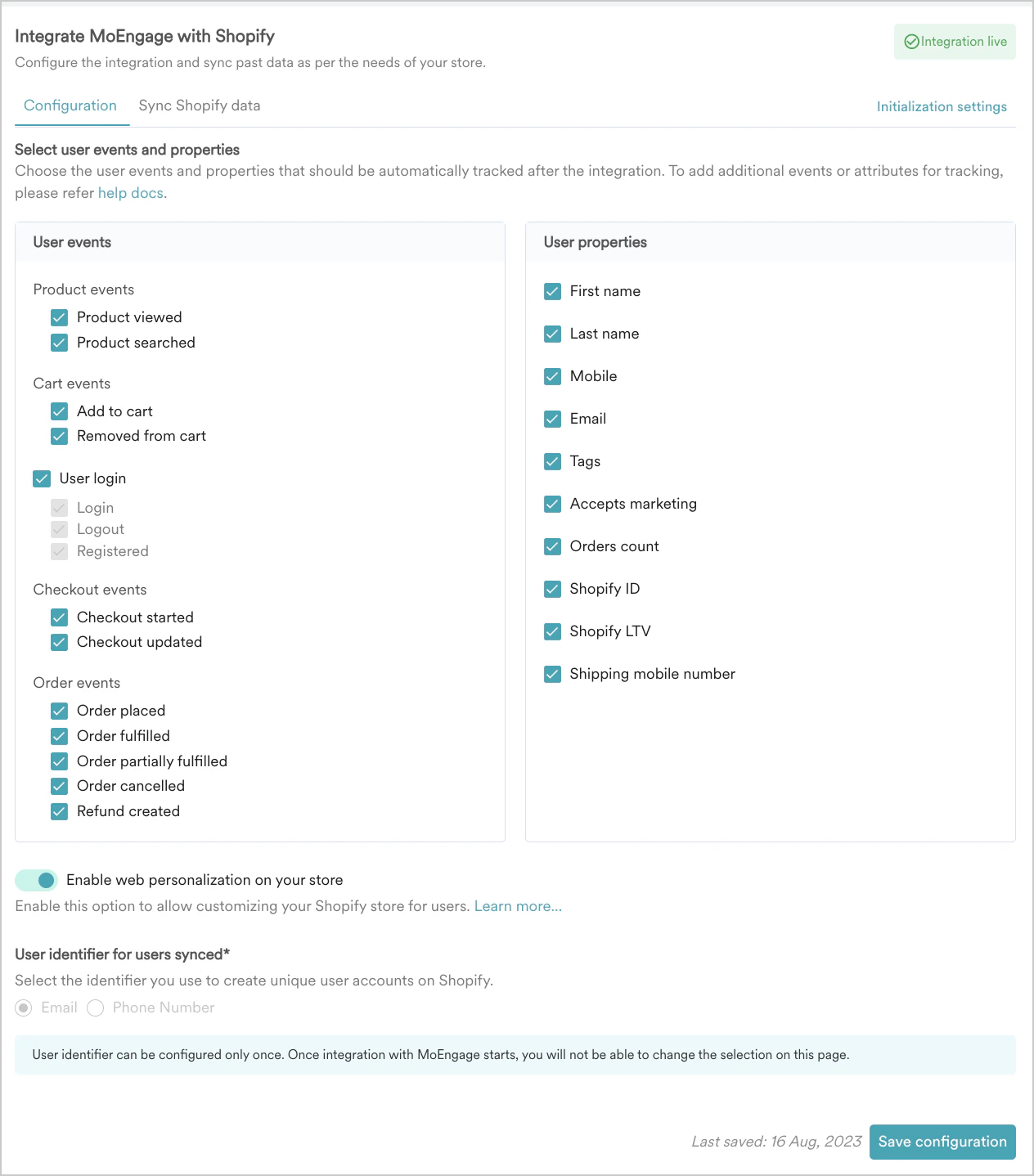
統合時に Shopify アプリで有効にすると、MoEngage は次のイベントをトラッキングします。
| イベントタイプ | イベント名 | 説明 |
| - | - | - |
| 商品イベント | Product Viewed | ユーザーが商品ページを閲覧したときに、MoEngage がこのイベントをトラッキングします。再入荷通知やパーソナライズされた商品レコメンデーションの送信に使用します。
**注意**: このイベントは、Shopify のデフォルトの商品ページテンプレートでのみトリガーされます。カスタムの商品ページテンプレートを使用しているストアでは、追加の実装が必要です。詳細については、MoEngage サポートチームにお問い合わせください |
| 商品イベント | Product Searched | ユーザーが商品を検索したときに、MoEngage がこのイベントをトラッキングします。検索意図に基づいてレコメンデーションをパーソナライズするために使用します。 |
| カートイベント | Shopify - Add To Cart / Shopify - Update Cart | ユーザーが商品をカートに追加したとき、またはカートを更新したときに、MoEngage がこのイベントをトラッキングします。カート放棄キャンペーンのトリガーに使用します。 |
| カートイベント | Removed from Cart | ユーザーがカートから商品を削除したときに、MoEngage がこのイベントをトラッキングします。 |
| ユーザーログインイベント | Customer Registered | 顧客が Shopify ストアに登録したときに、MoEngage がこのイベントをトラッキングします。ウェルカムメッセージやオンボーディングフローに使用します。 |
| ユーザーログインイベント | Customer Logged In | 顧客がストアにログインしたときに、MoEngage がこのイベントをトラッキングします。 |
| ユーザーログインイベント | Customer Logged Out | 顧客がストアからログアウトしたときに、MoEngage がこのイベントをトラッキングします。 |
| チェックアウトイベント | Shopify - Checkout Started | 顧客がチェックアウトを開始したときに、MoEngage がこのイベントをトラッキングします。 |
| チェックアウトイベント | Shopify - Checkout Updated | 顧客がチェックアウト中にカートを更新したときに、MoEngage がこのイベントをトラッキングします。 |
| 注文イベント | Shopify - Order Placed | 顧客が購入を完了したときに、MoEngage がこのイベントをトラッキングします。注文確認メッセージ、ロイヤルティプログラムへの誘導、サブスクリプションの案内に使用します。 |
| 注文イベント | Shopify - Order Fulfilled | 注文のフルフィルメントが完了し、出荷準備が整ったときに、MoEngage がこのイベントをトラッキングします。 |
| 注文イベント | Shopify - Order Partially Fulfilled | 注文内の一部の商品のみフルフィルメントが完了したときに、MoEngage がこのイベントをトラッキングします。 |
| 注文イベント | Shopify - Order Cancelled | 注文をキャンセルしたときに、MoEngage がこのイベントをトラッキングします。 |
| 注文イベント | Shopify - Refund Created | キャンセルまたは苦情により返金を作成したときに、MoEngage がこのイベントをトラッキングします。パーソナライズされたコミュニケーションを送信し、解約を減らすために使用します。 |
イベント、イベント属性、ユーザー属性の名前に「moe\_」をプレフィックスとして使用しないでください。これは予約済みのシステムプレフィックスです。使用すると、事前の通知なく定期的にブラックリストに登録される可能性があります。
## イベントの種類
MoEngage Shopify 統合では、次の 2 つのソースからイベントが生成されます。
* **Webhook**: Shopify がこれらのイベントを生成し、Shopify の Webhook システムを介して MoEngage に直接送信します。これらは、ユーザーが注文を行ったときやチェックアウトを開始したときなど、Shopify のバックエンドがトリガーするサーバーサイドのシグナルです。
* **Web SDK:** ブラウザーで動作する MoEngage JavaScript SDK が、ストアのフロントエンドでのユーザーの行動(商品ページの閲覧や検索操作など)に基づいてこれらのイベントを生成します。
Add to Cart や Checkout Started など、一部のイベントは両方のソースでキャプチャされます。つまり、同じユーザー行動に対して、名前と属性が異なる 2 つの別々のイベントレコードが MoEngage に表示される場合があります。
### キャンペーンとセグメンテーションに推奨されるイベントバージョン
Webhook と Web SDK の両方でトラッキングされるイベントについては、セグメントの作成やキャンペーンのトリガーには Webhook バージョンを使用してください。
MoEngage は Webhook イベントを Shopify のバックエンドから直接受信するため、キャンペーンロジックにとってより信頼性の高いシグナルとなります。Web SDK イベントは、ブラウザーセッション内でリアルタイムに表示する必要があるオンサイトメッセージのトリガーに役立ちます。
1 つのキャンペーンやジャーニーで同じイベントの両方のバージョンを使用すると、競合が発生し、一貫したイベントトリガー型のフローが実行されなくなります。
## イベント属性の要件
### Webhook イベントにおける商品 URL と画像 URL
Webhook イベントのペイロードには、商品 URL や画像 URL は含まれません。これらの属性は、Web SDK を使用してイベントをキャプチャした場合にのみ存在します。
**これらの属性を取得するには:** 商品カタログを MoEngage に同期している場合は、**Product set-based personalization** を使用して、送信時にカタログから商品 URL と画像 URL を取得できます。詳細については、[User Actions Model](/docs/ja/user-guide/content/recommendations/basic-recommendations/user-actions-model) を参照してください。
### Shopify 顧客メタフィールド
MoEngage は、デフォルトでは Shopify 顧客メタフィールド(Shopify の顧客オブジェクトに付加されたカスタムデータフィールド)を MoEngage のユーザープロファイルに同期しません。また、イベント属性にも含めません。
このデータをカスタムの方法で渡すには、以下の [**カスタムユーザー属性のトラッキング**](#track-custom-user-attributes) セクションを参照してください。
## Shopify Liquid を使用したカスタムイベントのトラッキング
ウィッシュリストへの追加やカスタムボタンのクリックなど、MoEngage のデフォルトセット以外のイベントをトラッキングする必要がある場合は、Shopify テーマの Liquid ファイルで MoEngage Web SDK を使用して追加できます。
**始める前に**
この手順では Shopify のテーマファイルを編集する必要があり、開発者アクセスが必要です。変更を加える前に、Web チームに確認してください。
### ステップ 1: 編集する正しい Liquid ファイルを特定する
Shopify テーマは、Liquid テンプレートファイルを使用してページをレンダリングします。正しいファイルを見つけるには、次の手順を実行します。
1. Shopify 管理画面にログインします。
2. **Online Store** > **Themes** に移動します。
3. 編集するテーマを見つけ、**Actions**(三点リーダー)ボタンをクリックします。
4. ドロップダウンメニューから **Edit code** を選択します。
5. `sections/` フォルダーを参照します。
編集するファイルは、イベントをトリガーする場所によって異なります。
* **商品ページでの操作:** `sections/product-template.liquid` または `sections/main-product.liquid` を編集します。
* **コレクションページでの操作:** 該当するコレクションセクションのファイルを編集します。
* **すべてのページ:** `layout/theme.liquid` を編集します。このファイルの使用は最小限にしてください。
### ステップ 2: track\_event の呼び出しを追加する
Liquid ファイルで、ユーザーが操作する HTML 要素を見つけます。MoEngage の **track\_event** メソッドを呼び出す JavaScript を追加します。
```javascript No Attributes theme={null}
Moengage.track_event("EVENT_NAME");
```
```javascript With Attributes theme={null}
Moengage.track_event("EVENT_NAME", {
"attribute_1": "value_1",
"attribute_2": 2,
"attribute_3": 3.4
});
```
```liquid Example: Wishlist theme={null}
```
### ステップ 3: イベントが発火することを検証する
イベントが正しく発火することを検証するには、[統合の検証](/docs/ja/developer-guide/ecommerce-platforms/shopify/validate-integration)のドキュメントを参照してください。
## カスタムユーザー属性のトラッキング
次の回避策を使用して、カスタム属性(メタフィールドなど)を MoEngage のプロファイルに渡すことができます。
### 公開メタフィールド向けの Liquid ベースの方法
メタフィールドのストアフロントアクセスを有効にしている場合は、Shopify Liquid で直接読み取ることができます。正しいファイルを見つけてコードを追加するには、次の手順を実行します。
1. Shopify 管理画面にログインします。
2. **Online Store** > **Themes** に移動します。
3. 編集するテーマを見つけ、**Actions**(三点リーダー)ボタンをクリックします。
4. ドロップダウンメニューから **Edit code** を選択します。
5. `layout/theme.liquid` を開きます。
6. `` タグ内で、MoEngage SDK を初期化した後に次のコードを追加します。
```liquid theme={null}
{% if customer %}
{% endif %}
```
*loyalty* と *tier* を、メタフィールドの実際の名前空間とキーに置き換えてください。`{% if customer %}` ガードにより、顧客がログインしている場合にのみコードが実行されます。
### アプリ所有メタフィールド向けのサーバーサイド同期
サードパーティアプリがメタフィールドを作成した場合、ストアフロントアクセスは通常 **None** に設定されています。この場合は、サーバーサイドの統合を行う必要があります。
1. Shopify の `customers/update` Webhook をサブスクライブします。
2. Webhook ハンドラーで、Shopify Admin API を使用して顧客のメタフィールドの値を読み取ります。
3. MoEngage Data API を呼び出して、顧客のプロファイルの対応するユーザー属性を更新します。
## イベントペイロードのサンプル
以下のペイロードサンプルは、セグメントの作成やイベントデータのパーソナライズ時に参照できる属性を示しています。各イベントの完全なペイロードサンプルを以下に示します。
### Webhook イベントのペイロードサンプル
```json Shopify - Update Cart theme={null}
{
"Event Received Time": "17th July 2023, 03:25:55 pm",
"Product Title": "Sample Product",
"Updated At": "17th July 2023, 03:26:15 pm",
"Variation ID": "123456",
"Currency": "USD",
"cart_token": "c1-fcdd3207bee3eef9f98abefaf2ca...",
"Product ID": "845236547",
"Price": 555.99,
"Source": "Shopify",
"Vendor Name": "845236547",
"Created At": "17th July 2023, 03:25:55 pm",
"Quantity": 2
}
```
```json Removed From Cart theme={null}
{
"Event Received Time": "17th July 2023, 03:25:55 pm",
"Product Title": "Sample Product",
"Updated At": "17th July 2023, 03:26:15 pm",
"Variation ID": "123456",
"Currency": "USD",
"Product ID": "845236547",
"Price": 555.99,
"Source": "Shopify",
"Vendor Name": "845236547",
"Created At": "17th July 2023, 03:25:55 pm",
"Quantity": 2
}
```
```json Shopify - Checkout Started theme={null}
{
"Event Received Time": "17th July 2023, 03:25:55 pm",
"Product Title": "Sample Product",
"Updated At": "17th July 2023, 03:26:15 pm",
"ID": "3cce6aeedf786679ac03e043729fd...",
"Variation ID": "0:123456",
"Currency": "USD",
"Checkout ID": "3cce6aeedf786679ac03e043729fd...",
"Source Name": "web",
"cart_token": "c1-fcdd3207bee3eef9f98abefaf2ca...",
"Checkout URL": "https://store.myshopify.com/products/snowboard",
"Shopify Customer Id": 36838667059499,
"Total Price": 327,
"Price": 0:300.00,
"Subtotal Price": 300.00,
"Source": "Shopify",
"Vendor Name": "845236547",
"Created At": "17th July 2023, 03:25:55 pm",
"Quantity": 2,
"Product ID": "845236547"
}
```
```json Shopify - Checkout Updated theme={null}
{
"Event Received Time": "17th July 2023, 03:25:55 pm",
"Product Title": "0:Sample Product01",
"Updated At": "17th July 2023, 03:26:15 pm",
"ID": "3cce6aeedf786679ac03e043729fd...",
"Variation ID": "0:123456",
"Currency": "USD",
"Checkout ID": "3cce6aeedf786679ac03e043729fd...",
"Source Name": "web",
"cart_token": "c1-fcdd3207bee3eef9f98abefaf2ca...",
"Checkout URL": "https://store.myshopify.com/products/snowboard",
"Shopify Customer Id": 36838667059499,
"Total Price": 327,
"Price": [0:300.00],
"Subtotal Price": 300.00,
"Source": "Shopify",
"Vendor Name": "845236547",
"Created At": "17th July 2023, 03:25:55 pm",
"Quantity": [0:1],
"Product ID": [0:845236547]
}
```
```json Checkout Updated after Shipment theme={null}
{
"Event Received Time": "17th July 2023, 03:25:55 pm",
"Shipping Address Country": "US",
"Billing Address City": "New York",
"Product Title": "0:Sample Product01",
"cart_token": "c1-fcdd3207bee3eef9f98abefaf2ca...",
"ID": "3cce6aeedf786679ac03e043729fd...",
"Checkout ID": "3cce6aeedf786679ac03e043729fd...",
"First Name": "John",
"Currency": "USD",
"Shipping Address Country Code": "US",
"Billing Address Country Code": "US",
"Updated At": "",
"Source Name": "web",
"first_name": "John",
"Shipping Address Province": "New York",
"Checkout URL": "https://store.myshopify.com/products/snowboard",
"last_name": "Doe",
"Shopify Customer Id": 36838667059499,
"Total Price": 327,
"Price": 0:300.00,
"Shipping Address Zip": "10009",
"Subtotal Price": 300.00,
"Source": "Shopify",
"Shipping Address Province Code": "NY",
"Vendor Name": "845236547",
"Billing Address Country": "US",
"Created At": "17th July 2023, 03:25:55 pm",
"Variation ID": "0:123456",
"Quantity": [0:1],
"Product ID": [0:845236547]
}
```
```json Shopify - Order Placed theme={null}
{
"Event Received Time": "17th July 2023, 03:25:55 pm",
"Current Total Discounts": 0.00,
"Product Title": "0:Sample Product01",
"cart_token": "c1-fcdd3207bee3eef9f98abefaf2ca...",
"ID": "3cce6aeedf786679ac03e043729fd...",
"Name": "#1008",
"Order Status URL": "",
"Total Quantity": 1,
"Billing Address Country Code": "US",
"Billing Address Zip": 10009,
"Order ID": 12334534345,
"Currency": "USD",
"Total Price": 354,
"Checkout ID": "3cce6aeedf786679ac03e043729fd...",
"First Name": "John",
"Order Number": 1008,
"Financial_status": "paid",
"Source": "Shopify"
}
```
```json Order Partially Fulfilled theme={null}
{
"Event Received Time": "17th July 2023, 03:25:55 pm",
"product_title": [0:"product 2", 1:"product 2"],
"Updated At": "17th July 2023, 03:25:57 pm",
"product_id": [0:234234324, 1: 97897897897],
"variation_id": [0:23423423423, 1:23423423444],
"Total Spent": 5687,
"Currency": "USD",
"Total Price": 354,
"Checkout ID": "3cce6aeedf786679ac03e043729fd...",
"tracking_company": "1",
"vendor_name": [0:"ShopiWeb", 1:"ShopifyWeb"],
"OrderID": 34343455,
"item_fulfilment_status": [0:"partial", 1:"fulfilled"],
"Quantity": [0:4, 1:3],
"item_count": 2,
"order_fulfilment_status": "partial",
"Subtotal Price": 10500,
"Order Status URL": "https://yourshopifystore...",
"price": [0:1500.00, 1:1500.00],
"variation_title": [0:"product 2 - black", 1:"product 2 - red"],
"Financial status": "refunded",
"Created At": "17th July 2023, 03:25:55 pm"
}
```
```json Shopify - Order Fulfilled theme={null}
{
"Event Received Time": "17th July 2023, 03:25:55 pm",
"product_title": [0:"product 2"],
"cart_token": "c1-fcdd3207bee3eef9f98abefaf2ca...",
"product_id": [0:234234324],
"variation_id": [0:23423423423],
"Total Spent": 5687,
"Currency": "USD",
"Total Price": 354,
"Checkout ID": "3cce6aeedf786679ac03e043729fd...",
"Source Name": "web",
"vendor_name": [0:"ShopiWeb"],
"item_fulfilment_status": [0:"fulfilled"],
"Updated At": "17th July 2023, 03:25:58 pm",
"OrderID": 34343455,
"Quantity": [0:1],
"item_count": 1,
"order_fulfilment_status": "fulfilled",
"Subtotal Price": 300,
"Order Status URL": "https://yourshopifystore...",
"price": [0:1500.00, 1:1500.00],
"variation_title": [0:"product 2 - black"],
"Financial status": "paid",
"Created At": "17th July 2023, 03:25:55 pm"
}
```
```json Shopify - Order Cancelled theme={null}
{
"Event Received Time": "17th July 2023, 03:25:55 pm",
"product_title": [0:"product 2", 1:"product 2"],
"cart_token": "c1-fcdd3207bee3eef9f98abefaf2ca...",
"product_id": [0:234234324, 0:23423423446],
"variation_id": [0:23423423423, 0:84353458],
"Total Spent": 5687,
"Currency": "USD",
"Total Price": 354,
"Checkout ID": "3cce6aeedf786679ac03e043729fd...",
"cancelled at": "17th July 2023, 03:25:55 pm",
"Source Name": "web",
"vendor_name": [0:"ShopiWeb", 1:"ShopiWeb"],
"item_fulfilment_status": [0:"fulfilled"],
"Updated At": "17th July 2023, 03:25:58 pm",
"OrderID": 34343455,
"Quantity": [0:1, 1:2],
"item_count": 2,
"order_fulfilment_status": [0: , 1:],
"Subtotal Price": 300,
"Order Status URL": "https://yourshopifystore...",
"price": [0:1500.00, 1:1500.00],
"variation_title": [0:"product 2 - black", 1:"product 2 - red"],
"Financial status": "refunded",
"Created At": "17th July 2023, 03:25:55 pm"
}
```
```json Shopify - Refund Created theme={null}
{
"Event Received Time": "17th July 2023, 03:25:55 pm",
"Variation Title": [0:"Product 2 Black"],
"Product Title": [0:"Product 2"],
"Updated At": "17th July 2023, 03:25:59 pm",
"OrderID": 34343455,
"Variation ID": [0:234234234],
"Currency": "USD",
"email": "John.doe@example.com",
"user_id": 1545645465,
"Refund Created At": "17th July 2023, 03:25:55 pm",
"Source": "Shopify",
"Vendor Name": [0:"ShopifyWeb"],
"Created At": "17th July 2023, 03:25:55 pm",
"price": [0:500.00],
"Quantity": [0:1],
"Product ID": [0:8923423]
}
```
### Web SDK イベントのペイロードサンプル
```json Product Viewed theme={null}
{
"Event Received Time": "17th July 2023, 03:25:55 pm",
"Email": "john.doe@example.com",
"Product Title": "Sample Product",
"Variation ID": "123456",
"Total Variants": 3,
"Product Handle": "Product 1",
"Available": true,
"Currency": "USD",
"Product ID": "845236547",
"Price": 555.99,
"Source": "Shopify",
"Quantity": 3,
"First Session": true,
"URL": "https://yourstore.myshopify.com/products/view"
}
```
```json Product Searched theme={null}
{
"Event Received Time": "17th July 2023, 03:25:55 pm",
"Variation ID": "123456",
"Currency": "USD",
"URL": "Search URL",
"Search String": "Sneakers Green",
"Source": "Shopify",
"First Session": true
}
```
```json Add to Cart theme={null}
{
"Event Received Time": "17th July 2023, 03:25:55 pm",
"Email": "john.doe@example.com",
"Product Title": "Sample Product",
"Variation ID": "123456",
"Variation Title": "Sea Green",
"Total Variants": 3,
"Product Handle": "Product 1",
"Available": true,
"Currency": "USD",
"Product ID": "845236547",
"Vendor Name": "845236547",
"Price": 555.99,
"Source": "Shopify",
"Quantity": 3,
"First Session": true,
"Product URL": "/product/type?type=Sneakers"
}
```
```json Update Cart theme={null}
{
"Event Received Time": "17th July 2023, 03:25:55 pm",
"Email": "john.doe@example.com",
"Product Title": "Sample Product",
"Variation ID": "123456",
"Variation Title": "Sea Green",
"Total Variants": 3,
"Product Handle": "Product 1",
"Available": true,
"Currency": "USD",
"Product ID": "845236547",
"Vendor Name": "845236547",
"Price": 555.99,
"Source": "Shopify",
"Quantity": 3,
"First Session": true,
"Product URL": "/product/type?type=Sneakers"
}
```
```json Removed From Cart theme={null}
{
"Event Received Time": "17th July 2023, 03:25:55 pm",
"Email": "john.doe@example.com",
"Product Title": "Sample Product",
"Variation ID": "123456",
"Currency": "USD",
"Product ID": "845236547",
"Price": 555.99,
"Source": "Shopify",
"Quantity": 3
}
```
```json Customer Registered theme={null}
{
"Event Received Time": "17th July 2023, 03:25:55 pm",
"Email": "john.doe@example.com",
"Source": "Shopify",
"First Session": true,
"URL": "https://yourstore.myshopify.com/"
}
```
```json Customer Logged In theme={null}
{
"Event Received Time": "17th July 2023, 03:25:55 pm",
"Email": "john.doe@example.com",
"FirstName": "John",
"LastName": "Doe",
"Customer ID": 7385786908975,
"URL": "https://yourstore.myshopify.com/account"
}
```
```json Checkout Started theme={null}
{
"Event Received Time": "17th July 2023, 03:25:55 pm",
"Email": "john.doe@example.com",
"currency": "USD",
"Total Price": 699.95,
"Product Prices": [699.95],
"Product IDs": ["8869819679023"],
"Product Quantities": [1],
"Product Titles": ["The Complete Snowboard - Ice"],
"Variation IDs": ["46822634324271"],
"Vendor Names": ["Snowboard Vendor"],
"Source": "Shopify",
"First Session": true,
"URL": "https://yourstore.myshopify.com/products/the-complete-snowboard"
}
```
## トラッキングされるユーザープロパティ
統合時に有効にすると、MoEngage は次のユーザー属性をトラッキングします。
| 属性名 | 説明 |
| - | - |
| First Name | ユーザーの名。 |
| Last Name | ユーザーの姓。 |
| Mobile | ユーザーの携帯電話番号。 |
| Email | ユーザーのメールアドレス。 |
| Shopify ID | Shopify 内でのユーザーの ID。 |
| Shopify LTV | ユーザーの顧客生涯価値(LTV) |
## イベントとユーザートラッキングの設定
MoEngage がトラッキングするイベントとユーザープロパティを選択するには、次の手順を実行します。
1. Shopify アプリの **Configuration** タブに移動します。
2. トラッキングするユーザーイベントとプロパティを選択します。
3. **Save configuration** をクリックします。
 Shopify 統合について質問がある場合は、[MoEngage Shopify FAQ](/docs/ja/developer-guide/ecommerce-platforms/shopify/faqs) を参照してください。