> ## Documentation Index
> Fetch the complete documentation index at: https://moengage.com/docs/llms.txt
> Use this file to discover all available pages before exploring further.
# JWT 認証
> iOS アプリケーションに JWT 認証を実装して、MoEngage のデータ収集を保護します。
## 概要
JWT(JSON Web Token)認証は、ユーザーの身元を安全に検証するための標準的な方法です。JWT 認証を実装することで、MoEngage によるデータ収集プロセスに重要なセキュリティレイヤーを追加できます。
この機能により、識別済みユーザーに代わって送信されるデータが本物であり、改ざんされていないことが保証されます。このセキュリティは、お客様自身のサーバーで暗号署名されたトークンを必須とすることで実現され、不正なユーザーが正規のユーザーになりすますことを防ぎます。
**前提条件**
実装を開始する前に、以下の要件を満たしていることを確認してください。
* JWT 認証機能を利用するには、アプリケーションで MoEngage iOS SDK バージョン ***10.08.0*** 以上を使用する必要があります。
* 公開鍵を管理し、この機能の適用設定を構成するために、MoEngage ダッシュボードへのアクセス権が必要です。
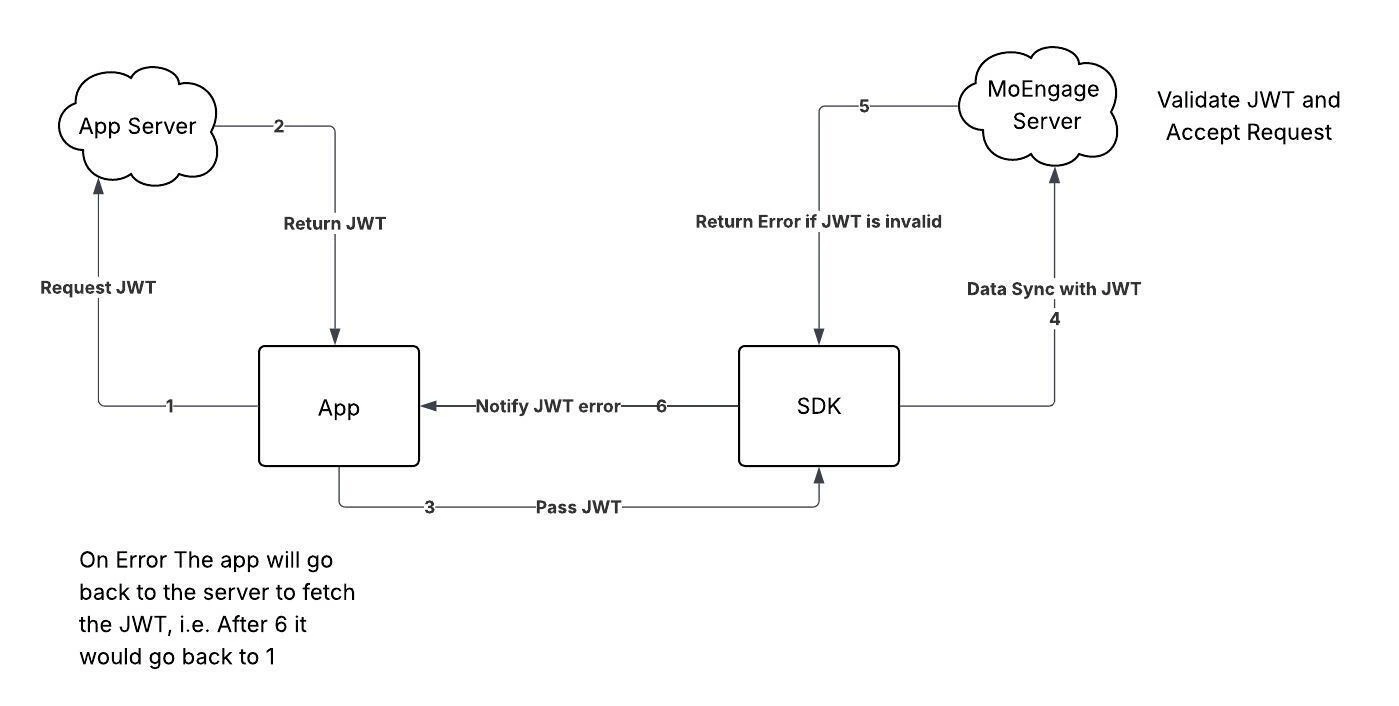
以下の図は、お客様のアプリケーション、お客様のサーバー、MoEngage SDK、MoEngage サーバー間のやり取りを示しています。
 ## 統合
以下の手順に従って、iOS アプリケーションに JWT 認証を統合します。
### ステップ 1: JWT 認証を有効にする
[SDK の初期化](/docs/ja/developer-guide/ios-sdk/sdk-integration/basic/sdk-initialization)時に、[***MoEngageSDKConfig***](https://moengage.github.io/ios-api-reference/Classes/MoEngageSDKConfig.html) オブジェクトの [***networkConfig***](https://moengage.github.io/ios-api-reference/Classes/MoEngageSDKConfig.html#/c:@M@MoEngageCore@objc\(cs\)MoEngageSDKConfig\(py\)networkConfig).[***authorizationConfig***](https://moengage.github.io/ios-api-reference/Classes/MoEngageNetworkRequestConfig.html#/c:@M@MoEngageCore@objc\(cs\)MoEngageNetworkRequestConfig\(py\)authorizationConfig) プロパティを構成することで、JWT 認証を有効にできます。
```swift Swift wrap theme={null}
let sdkConfig = MoEngageSDKConfig(appId: "", dataCenter: .YOUR_DATA_CENTER)
sdkConfig.networkConfig = MoEngageNetworkRequestConfig(authorizationConfig: MoEngageNetworkAuthorizationConfig(isJwtEnabled: true))
#if DEBUG
MoEngage.sharedInstance.initializeDefaultTestInstance(sdkConfig)
#else
MoEngage.sharedInstance.initializeDefaultLiveInstance(sdkConfig)
#endif
```
```objective-c Objective C wrap theme={null}
MoEngageSDKConfig* sdkConfig = [[MoEngageSDKConfig alloc] initWithAppId:@"" dataCenter:YOUR_DATA_CENTER];
sdkConfig.networkConfig = [[MoEngageNetworkRequestConfig alloc] initWithAuthorizationConfig:[[MoEngageNetworkAuthorizationConfig alloc] initWithIsJwtEnabled:YES]];
#ifdef DEBUG
[[MoEngage sharedInstance] initializeDefaultTestInstance:sdkConfig];
#else
[[MoEngage sharedInstance] initializeDefaultLiveInstance:sdkConfig];
#endif
```
### ステップ 2: JWT を SDK に渡す
JWT のライフサイクルの管理はアプリケーションの責任です。推奨されるフローは、ユーザーのログイン時にトークンを取得し、そのトークンを SDK に渡すことです。また、以降のアプリ起動時にトークンの有効期限が切れていないかを確認し、必要に応じて新しいトークンを取得してください。
SDK にトークンを渡すには、[***MoEngageSDKCore.passAuthenticationDetails()***](https://moengage.github.io/ios-api-reference/Classes/MoEngageSDKCore.html#/c:@CM@MoEngageCore@objc\(cs\)MoEngageSDKCore\(im\)passAuthenticationDetails:workspaceId:) メソッドを使用します。
* `MoEngageSDKCore.sharedInstance.passAuthenticationDetails` を使用するには、SDK の初期化時(上記のステップ 1)に `MoEngageNetworkAuthorizationConfig` で JWT を有効にしておく必要があります。JWT を有効にせずにこのメソッドを呼び出すと、`DEBUG` ビルドでは致命的な例外がスローされ、アプリがクラッシュします。リリースビルドでは、呼び出しは暗黙的に破棄され、トークンは SDK に登録されません。
* アップグレード中にこれらの `DEBUG` 検証によってアプリがクラッシュする場合は、SDK を初期化する前に `MoEngageSDKCore.sharedInstance.disableIntegrationValidator()` を呼び出して一時的にオプトアウトしてください。問題が修正されたら、この呼び出しを削除してください。
iOS SDK における `DEBUG` モードとは、SDK が `initializeDefaultTestInstance(_:)`(TEST ワークスペース)を使用して初期化され、アプリが Xcode にアタッチされた状態で実行されていることを意味します。これは、デバッグシンボルが有効になっているリリースビルドとは異なります。
```swift Swift wrap theme={null}
let jwtDetails = MoEngageJwtAuthenticationDetails(token: "your_jwt_token", identifier: "user_id")
MoEngageSDKCore.sharedInstance.passAuthenticationDetails(jwtDetails)
```
```objective-c Objective C wrap theme={null}
MoEngageJwtAuthenticationDetails* jwtDetails = [[MoEngageJwtAuthenticationDetails alloc] initWithToken:@"your_jwt_token" identifier:@"user_id"];
[[MoEngageSDKCore sharedInstance] passAuthenticationDetails:jwtDetails];
```
### ステップ 3: 認証エラーを処理する
MoEngage サーバーが返すトークン検証エラーを処理するには、[***MoEngageSDKCore.registerAuthenticationListener()***](https://moengage.github.io/ios-api-reference/Classes/MoEngageSDKCore.html#/c:@CM@MoEngageCore@objc\(cs\)MoEngageSDKCore\(im\)registerAuthenticationListener:workspaceId:) メソッドを使用してエラーリスナーを登録する必要があります。認証エラーが発生すると SDK がこのリスナーを呼び出すため、アプリケーションは新しいトークンを取得して提供できます。
iOS SDK [11.0.0](/docs/ja/release-notes/sdks/ios#22nd-july-2026) 以降、`MoEngageAuthenticationError.Listener` は `Sendable` と `@MainActor` 分離を採用しており、SDK はメインアクター上で `onError(_:)` を呼び出します。準拠する型は、並行処理ドメイン間で安全に使用できる状態を維持する必要があります。上記の例は非 `Sendable` の状態をキャプチャしていないため、影響を受けません。
```swift Swift wrap theme={null}
class JwtAuthenticationListener: NSObject, MoEngageAuthenticationError.Listener {
func onError(_ error: MoEngageAuthenticationError) {
print("Authentication Error Received:")
if let jwtError = error as? MoEngageJwtAuthenticationError {
print("- Code: \(jwtError.details.code.rawValue) - \(jwtError.details.code.description)")
print("- Token: \(jwtError.details.token == nil ? "No token" : String(jwtError.details.token!.prefix(20)) + "...")")
print("- Identifier: \(jwtError.details.identifier == nil ? "No identifier" : jwtError.details.identifier!)")
print("- Message: \(jwtError.details.message ?? "No message")")
} else {
print("- Message: \(error.details.message ?? "No message")")
}
print("- Account: \(error.accountMeta.appID)")
}
}
// Register listner after SDK initialization
let listener = JwtAuthenticationListener()
MoEngageSDKCore.sharedInstance.registerAuthenticationListener(listener)
```
```objective-c Objective C wrap theme={null}
@interface JwtAuthenticationListener : NSObject
@end
@implementation JwtAuthenticationListener
- (void)onError:(MoEngageAuthenticationError *)error {
NSLog(@"Authentication Error Received:");
if ([error isKindOfClass:[MoEngageJwtAuthenticationError class]]) {
MoEngageJwtAuthenticationError *jwtError = (MoEngageJwtAuthenticationError *)error;
NSLog(@"- Code: %ld - %@", (long)jwtError.details.code.rawValue, jwtError.details.code.description);
NSString *tokenDisplay = jwtError.details.token ?
[[jwtError.details.token substringToIndex:MIN(20, jwtError.details.token.length)] stringByAppendingString:@"..."] :
@"No token";
NSLog(@"- Token: %@", tokenDisplay);
NSLog(@"- Identifier: %@", jwtError.details.identifier ?: @"No identifier");
NSLog(@"- Message: %@", jwtError.details.message ?: @"No message");
} else {
NSLog(@"- Message: %@", error.details.message ?: @"No message");
}
NSLog(@"- Account: %@", error.accountMeta.appID);
}
@end
//
JwtAuthenticationListener *listener = [[JwtAuthenticationListener alloc] init];
[[MoEngageSDKCore sharedInstance] registerAuthenticationListener:listener];
```
### ステップ 4: SDK の初期化後にリスナーを登録する
アプリケーションが常にコールバックを受信できるように、AppDelegate クラスの ***applicaton(\_:didFinishLaunchingWithOptions:)*** メソッドなどのグローバルスコープで [***MoEngageAuthenticationError.Listener***](https://moengage.github.io/ios-api-reference/Classes/MoEngageAuthenticationError/Listener.html) を登録します。
```swift Swift wrap theme={null}
let listener = JwtAuthenticationListener()
MoEngageSDKCore.sharedInstance.registerAuthenticationListener(listener)
```
```objective-c Objective C wrap theme={null}
JwtAuthenticationListener *listener = [[JwtAuthenticationListener alloc] init];
[[MoEngageSDKCore sharedInstance] registerAuthenticationListener:listener];
```
**情報**
* 認証エラーにより API リクエストが失敗した場合、アプリケーションが新しいトークンを提供するまで、SDK はリクエストを再試行しません。
* 1 つのセッションで認証に 10 回連続して失敗すると、SDK は次のセッションが開始されるまでデータの同期を停止します。このカウンターは、同期が成功するとリセットされます。
* ユーザーのログアウト時に JWT エラーによりデータ同期が失敗した場合、保留中のデータは削除され、再試行は行われません。
## 統合
以下の手順に従って、iOS アプリケーションに JWT 認証を統合します。
### ステップ 1: JWT 認証を有効にする
[SDK の初期化](/docs/ja/developer-guide/ios-sdk/sdk-integration/basic/sdk-initialization)時に、[***MoEngageSDKConfig***](https://moengage.github.io/ios-api-reference/Classes/MoEngageSDKConfig.html) オブジェクトの [***networkConfig***](https://moengage.github.io/ios-api-reference/Classes/MoEngageSDKConfig.html#/c:@M@MoEngageCore@objc\(cs\)MoEngageSDKConfig\(py\)networkConfig).[***authorizationConfig***](https://moengage.github.io/ios-api-reference/Classes/MoEngageNetworkRequestConfig.html#/c:@M@MoEngageCore@objc\(cs\)MoEngageNetworkRequestConfig\(py\)authorizationConfig) プロパティを構成することで、JWT 認証を有効にできます。
```swift Swift wrap theme={null}
let sdkConfig = MoEngageSDKConfig(appId: "", dataCenter: .YOUR_DATA_CENTER)
sdkConfig.networkConfig = MoEngageNetworkRequestConfig(authorizationConfig: MoEngageNetworkAuthorizationConfig(isJwtEnabled: true))
#if DEBUG
MoEngage.sharedInstance.initializeDefaultTestInstance(sdkConfig)
#else
MoEngage.sharedInstance.initializeDefaultLiveInstance(sdkConfig)
#endif
```
```objective-c Objective C wrap theme={null}
MoEngageSDKConfig* sdkConfig = [[MoEngageSDKConfig alloc] initWithAppId:@"" dataCenter:YOUR_DATA_CENTER];
sdkConfig.networkConfig = [[MoEngageNetworkRequestConfig alloc] initWithAuthorizationConfig:[[MoEngageNetworkAuthorizationConfig alloc] initWithIsJwtEnabled:YES]];
#ifdef DEBUG
[[MoEngage sharedInstance] initializeDefaultTestInstance:sdkConfig];
#else
[[MoEngage sharedInstance] initializeDefaultLiveInstance:sdkConfig];
#endif
```
### ステップ 2: JWT を SDK に渡す
JWT のライフサイクルの管理はアプリケーションの責任です。推奨されるフローは、ユーザーのログイン時にトークンを取得し、そのトークンを SDK に渡すことです。また、以降のアプリ起動時にトークンの有効期限が切れていないかを確認し、必要に応じて新しいトークンを取得してください。
SDK にトークンを渡すには、[***MoEngageSDKCore.passAuthenticationDetails()***](https://moengage.github.io/ios-api-reference/Classes/MoEngageSDKCore.html#/c:@CM@MoEngageCore@objc\(cs\)MoEngageSDKCore\(im\)passAuthenticationDetails:workspaceId:) メソッドを使用します。
* `MoEngageSDKCore.sharedInstance.passAuthenticationDetails` を使用するには、SDK の初期化時(上記のステップ 1)に `MoEngageNetworkAuthorizationConfig` で JWT を有効にしておく必要があります。JWT を有効にせずにこのメソッドを呼び出すと、`DEBUG` ビルドでは致命的な例外がスローされ、アプリがクラッシュします。リリースビルドでは、呼び出しは暗黙的に破棄され、トークンは SDK に登録されません。
* アップグレード中にこれらの `DEBUG` 検証によってアプリがクラッシュする場合は、SDK を初期化する前に `MoEngageSDKCore.sharedInstance.disableIntegrationValidator()` を呼び出して一時的にオプトアウトしてください。問題が修正されたら、この呼び出しを削除してください。
iOS SDK における `DEBUG` モードとは、SDK が `initializeDefaultTestInstance(_:)`(TEST ワークスペース)を使用して初期化され、アプリが Xcode にアタッチされた状態で実行されていることを意味します。これは、デバッグシンボルが有効になっているリリースビルドとは異なります。
```swift Swift wrap theme={null}
let jwtDetails = MoEngageJwtAuthenticationDetails(token: "your_jwt_token", identifier: "user_id")
MoEngageSDKCore.sharedInstance.passAuthenticationDetails(jwtDetails)
```
```objective-c Objective C wrap theme={null}
MoEngageJwtAuthenticationDetails* jwtDetails = [[MoEngageJwtAuthenticationDetails alloc] initWithToken:@"your_jwt_token" identifier:@"user_id"];
[[MoEngageSDKCore sharedInstance] passAuthenticationDetails:jwtDetails];
```
### ステップ 3: 認証エラーを処理する
MoEngage サーバーが返すトークン検証エラーを処理するには、[***MoEngageSDKCore.registerAuthenticationListener()***](https://moengage.github.io/ios-api-reference/Classes/MoEngageSDKCore.html#/c:@CM@MoEngageCore@objc\(cs\)MoEngageSDKCore\(im\)registerAuthenticationListener:workspaceId:) メソッドを使用してエラーリスナーを登録する必要があります。認証エラーが発生すると SDK がこのリスナーを呼び出すため、アプリケーションは新しいトークンを取得して提供できます。
iOS SDK [11.0.0](/docs/ja/release-notes/sdks/ios#22nd-july-2026) 以降、`MoEngageAuthenticationError.Listener` は `Sendable` と `@MainActor` 分離を採用しており、SDK はメインアクター上で `onError(_:)` を呼び出します。準拠する型は、並行処理ドメイン間で安全に使用できる状態を維持する必要があります。上記の例は非 `Sendable` の状態をキャプチャしていないため、影響を受けません。
```swift Swift wrap theme={null}
class JwtAuthenticationListener: NSObject, MoEngageAuthenticationError.Listener {
func onError(_ error: MoEngageAuthenticationError) {
print("Authentication Error Received:")
if let jwtError = error as? MoEngageJwtAuthenticationError {
print("- Code: \(jwtError.details.code.rawValue) - \(jwtError.details.code.description)")
print("- Token: \(jwtError.details.token == nil ? "No token" : String(jwtError.details.token!.prefix(20)) + "...")")
print("- Identifier: \(jwtError.details.identifier == nil ? "No identifier" : jwtError.details.identifier!)")
print("- Message: \(jwtError.details.message ?? "No message")")
} else {
print("- Message: \(error.details.message ?? "No message")")
}
print("- Account: \(error.accountMeta.appID)")
}
}
// Register listner after SDK initialization
let listener = JwtAuthenticationListener()
MoEngageSDKCore.sharedInstance.registerAuthenticationListener(listener)
```
```objective-c Objective C wrap theme={null}
@interface JwtAuthenticationListener : NSObject
@end
@implementation JwtAuthenticationListener
- (void)onError:(MoEngageAuthenticationError *)error {
NSLog(@"Authentication Error Received:");
if ([error isKindOfClass:[MoEngageJwtAuthenticationError class]]) {
MoEngageJwtAuthenticationError *jwtError = (MoEngageJwtAuthenticationError *)error;
NSLog(@"- Code: %ld - %@", (long)jwtError.details.code.rawValue, jwtError.details.code.description);
NSString *tokenDisplay = jwtError.details.token ?
[[jwtError.details.token substringToIndex:MIN(20, jwtError.details.token.length)] stringByAppendingString:@"..."] :
@"No token";
NSLog(@"- Token: %@", tokenDisplay);
NSLog(@"- Identifier: %@", jwtError.details.identifier ?: @"No identifier");
NSLog(@"- Message: %@", jwtError.details.message ?: @"No message");
} else {
NSLog(@"- Message: %@", error.details.message ?: @"No message");
}
NSLog(@"- Account: %@", error.accountMeta.appID);
}
@end
//
JwtAuthenticationListener *listener = [[JwtAuthenticationListener alloc] init];
[[MoEngageSDKCore sharedInstance] registerAuthenticationListener:listener];
```
### ステップ 4: SDK の初期化後にリスナーを登録する
アプリケーションが常にコールバックを受信できるように、AppDelegate クラスの ***applicaton(\_:didFinishLaunchingWithOptions:)*** メソッドなどのグローバルスコープで [***MoEngageAuthenticationError.Listener***](https://moengage.github.io/ios-api-reference/Classes/MoEngageAuthenticationError/Listener.html) を登録します。
```swift Swift wrap theme={null}
let listener = JwtAuthenticationListener()
MoEngageSDKCore.sharedInstance.registerAuthenticationListener(listener)
```
```objective-c Objective C wrap theme={null}
JwtAuthenticationListener *listener = [[JwtAuthenticationListener alloc] init];
[[MoEngageSDKCore sharedInstance] registerAuthenticationListener:listener];
```
**情報**
* 認証エラーにより API リクエストが失敗した場合、アプリケーションが新しいトークンを提供するまで、SDK はリクエストを再試行しません。
* 1 つのセッションで認証に 10 回連続して失敗すると、SDK は次のセッションが開始されるまでデータの同期を停止します。このカウンターは、同期が成功するとリセットされます。
* ユーザーのログアウト時に JWT エラーによりデータ同期が失敗した場合、保留中のデータは削除され、再試行は行われません。