> ## Documentation Index
> Fetch the complete documentation index at: https://moengage.com/docs/llms.txt
> Use this file to discover all available pages before exploring further.
# iOS SDK バージョン 7.x.x を使用する iOS デバイスで、プッシュ通知の一般的な問題を回避するにはどうすればよいですか?
> iOS SDK 7.x.x で、プッシュキャンペーンのインプレッショントラッキングと画像レンダリングの問題を解決します。MoEngage のセットアップで appgroupid を設定する手順を説明します。
## 問題
SDK バージョン 7.x.x で、プッシュ通知がデバイスに正常に配信されているにもかかわらず、プッシュキャンペーンのインプレッションがトラッキングされない、画像がレンダリングされないなど、プッシュ通知に関する一般的な問題が発生しています。
* インプレッションをトラッキングするには、アプリに Notification Service Extension が実装されていることを確認してください。
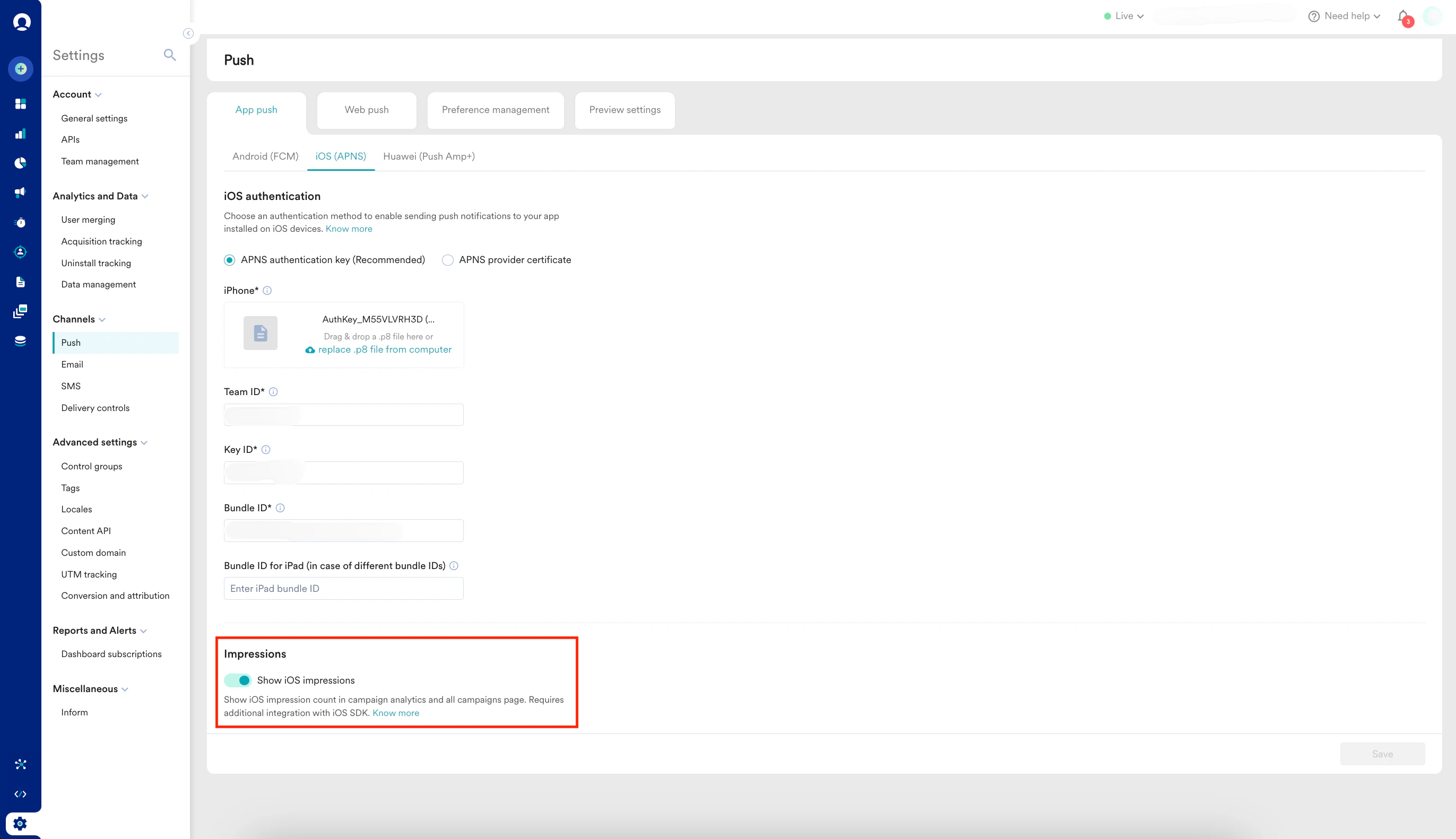
* また、MoEngage ダッシュボードで **Settings → Channel → Push → IOS** に移動し、**Show iOS impressions** トグルを有効にしてください。
 ## 解決策
以下の手順を実行します。
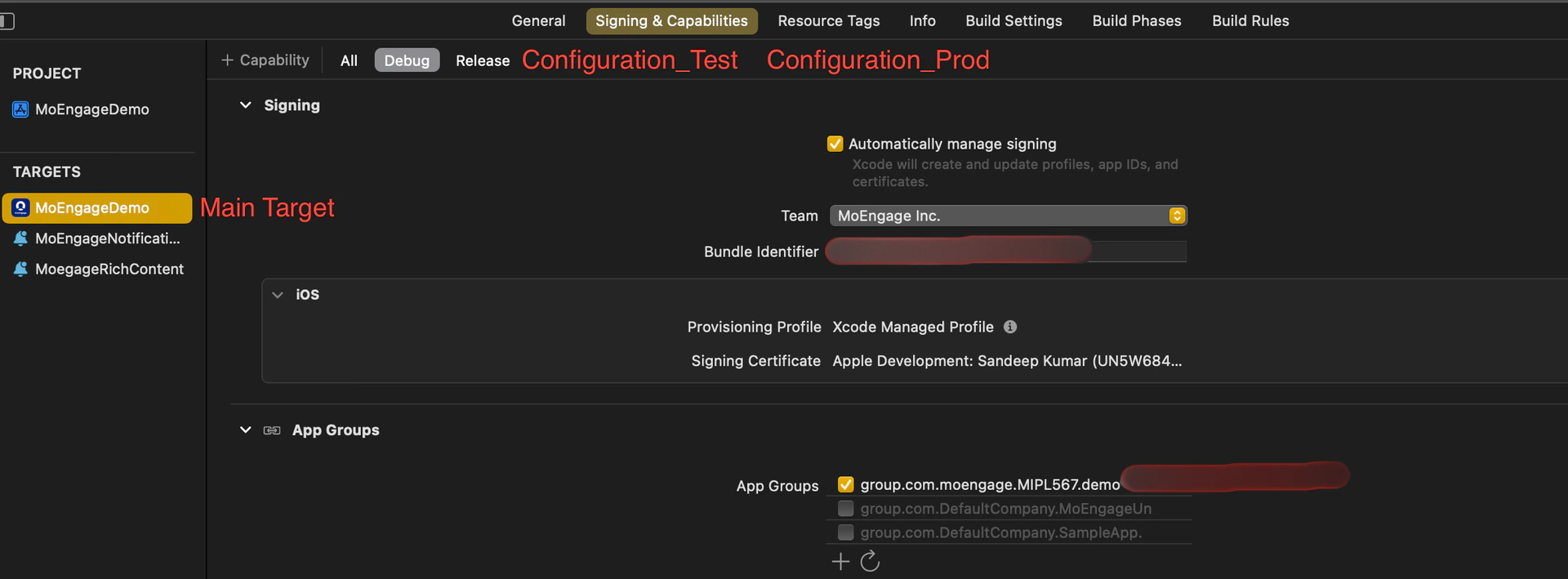
1. **各構成について、プロジェクトのメインターゲットに app\_group\_id を追加する**:
構成間で同じ app\_group\_id を追加することも、異なる app\_group\_id を追加することもできます。
構成で異なる Bundle Identifier を使用しながら同じ app\_group\_id を共有している場合、問題が発生する可能性があります。具体的には、Bundle Identifier が異なり app\_group\_id が同じ 2 つのアプリが同じデバイスにインストールされている場合、Notification Service Extension が失敗する可能性があります。
これを回避するために複数の構成で同じ app\_group\_id を使用できますが、その場合は 1 台のデバイスですべてのアプリを同時にテストできないことに注意してください。
## 解決策
以下の手順を実行します。
1. **各構成について、プロジェクトのメインターゲットに app\_group\_id を追加する**:
構成間で同じ app\_group\_id を追加することも、異なる app\_group\_id を追加することもできます。
構成で異なる Bundle Identifier を使用しながら同じ app\_group\_id を共有している場合、問題が発生する可能性があります。具体的には、Bundle Identifier が異なり app\_group\_id が同じ 2 つのアプリが同じデバイスにインストールされている場合、Notification Service Extension が失敗する可能性があります。
これを回避するために複数の構成で同じ app\_group\_id を使用できますが、その場合は 1 台のデバイスですべてのアプリを同時にテストできないことに注意してください。
 2. **SDK の初期化時に app\_group\_id を追加する**:
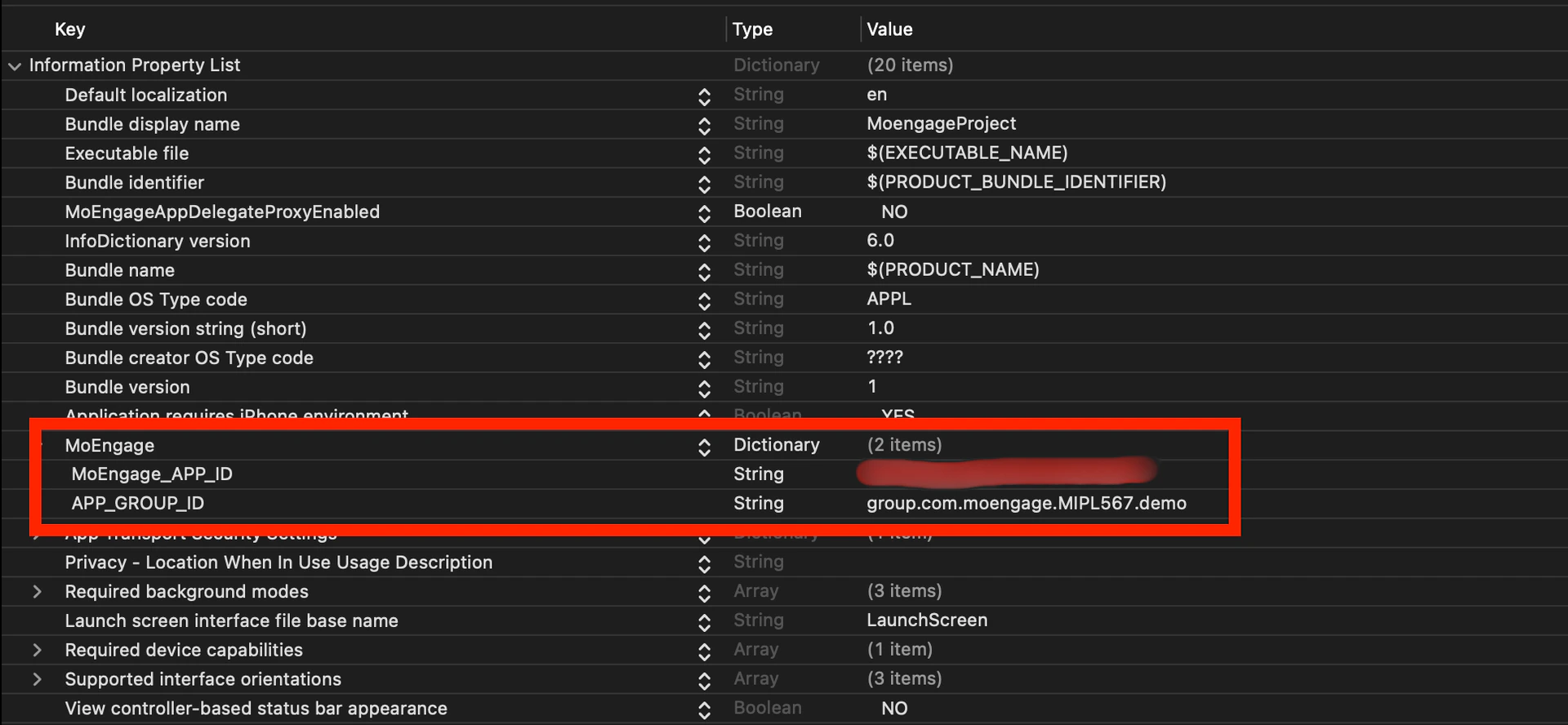
* info.plist を使用して SDK を初期化する場合は、info.plist ファイルの MoEngage キー内に APP\_GROUP\_ID キーを追加します。
* sdkConfig を使用して SDK を初期化する場合は、AppDelegate ファイル内の sdkConfig 変数に APP\_GROUP\_ID を追加します。\
**info.plist 内の app\_group\_id:**
2. **SDK の初期化時に app\_group\_id を追加する**:
* info.plist を使用して SDK を初期化する場合は、info.plist ファイルの MoEngage キー内に APP\_GROUP\_ID キーを追加します。
* sdkConfig を使用して SDK を初期化する場合は、AppDelegate ファイル内の sdkConfig 変数に APP\_GROUP\_ID を追加します。\
**info.plist 内の app\_group\_id:**
 **sdkConfig 変数内の app\_group\_id:**
```swift Swift theme={null}
var sdkConfig = MOSDKConfig.init(appID: "XXXXXXXXXXXXXXXX")
sdkConfig.moeDataCenter = DATA_CENTER_0X
sdkConfig.appGroupID = "group.com.XXXXXXXXXXXXXXXX"
//if SDK initialized without sdkConfig in AppDelegate file
MoEngage.setAppGroupID("group.com.moengage.MIPL567.demo")
```
```swift Objective-C theme={null}
MOSDKConfig* sdkConfig = [[MOSDKConfig alloc] initWithAppID: @"XXXXXXXXXXXXXXXX"];
sdkConfig.moeDataCenter = DATA_CENTER_0X;
sdkConfig.appGroupID = @"group.com.XXXXXXXXXXXXXXXX";
//if SDK initialized without sdkConfig in AppDelegate file
[MoEngage setAppGroupID: @"group.com.XXXXXXXXXXXXXXXX"];
```
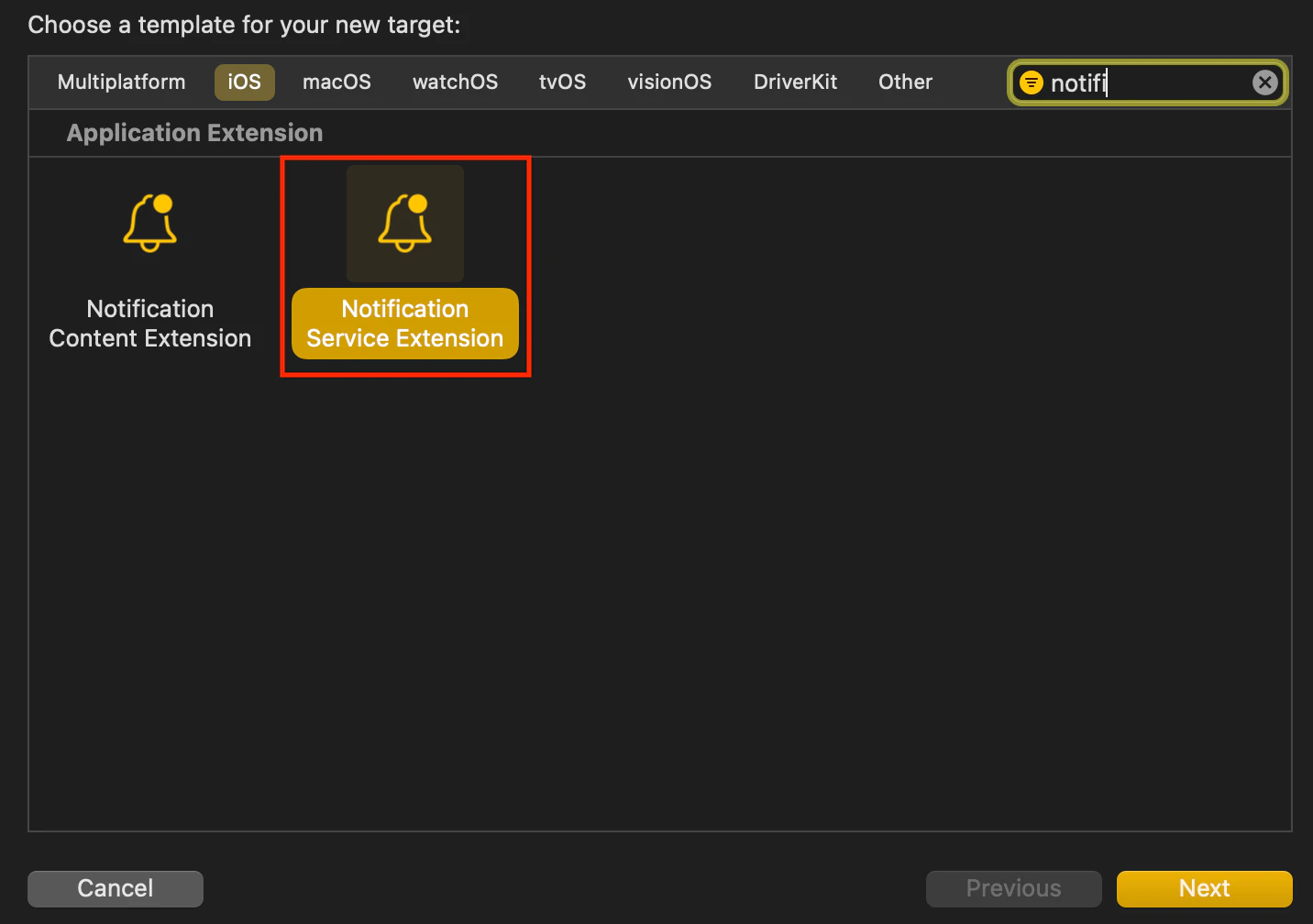
3. **Notification Service Extension ターゲットを作成する**:
**sdkConfig 変数内の app\_group\_id:**
```swift Swift theme={null}
var sdkConfig = MOSDKConfig.init(appID: "XXXXXXXXXXXXXXXX")
sdkConfig.moeDataCenter = DATA_CENTER_0X
sdkConfig.appGroupID = "group.com.XXXXXXXXXXXXXXXX"
//if SDK initialized without sdkConfig in AppDelegate file
MoEngage.setAppGroupID("group.com.moengage.MIPL567.demo")
```
```swift Objective-C theme={null}
MOSDKConfig* sdkConfig = [[MOSDKConfig alloc] initWithAppID: @"XXXXXXXXXXXXXXXX"];
sdkConfig.moeDataCenter = DATA_CENTER_0X;
sdkConfig.appGroupID = @"group.com.XXXXXXXXXXXXXXXX";
//if SDK initialized without sdkConfig in AppDelegate file
[MoEngage setAppGroupID: @"group.com.XXXXXXXXXXXXXXXX"];
```
3. **Notification Service Extension ターゲットを作成する**:
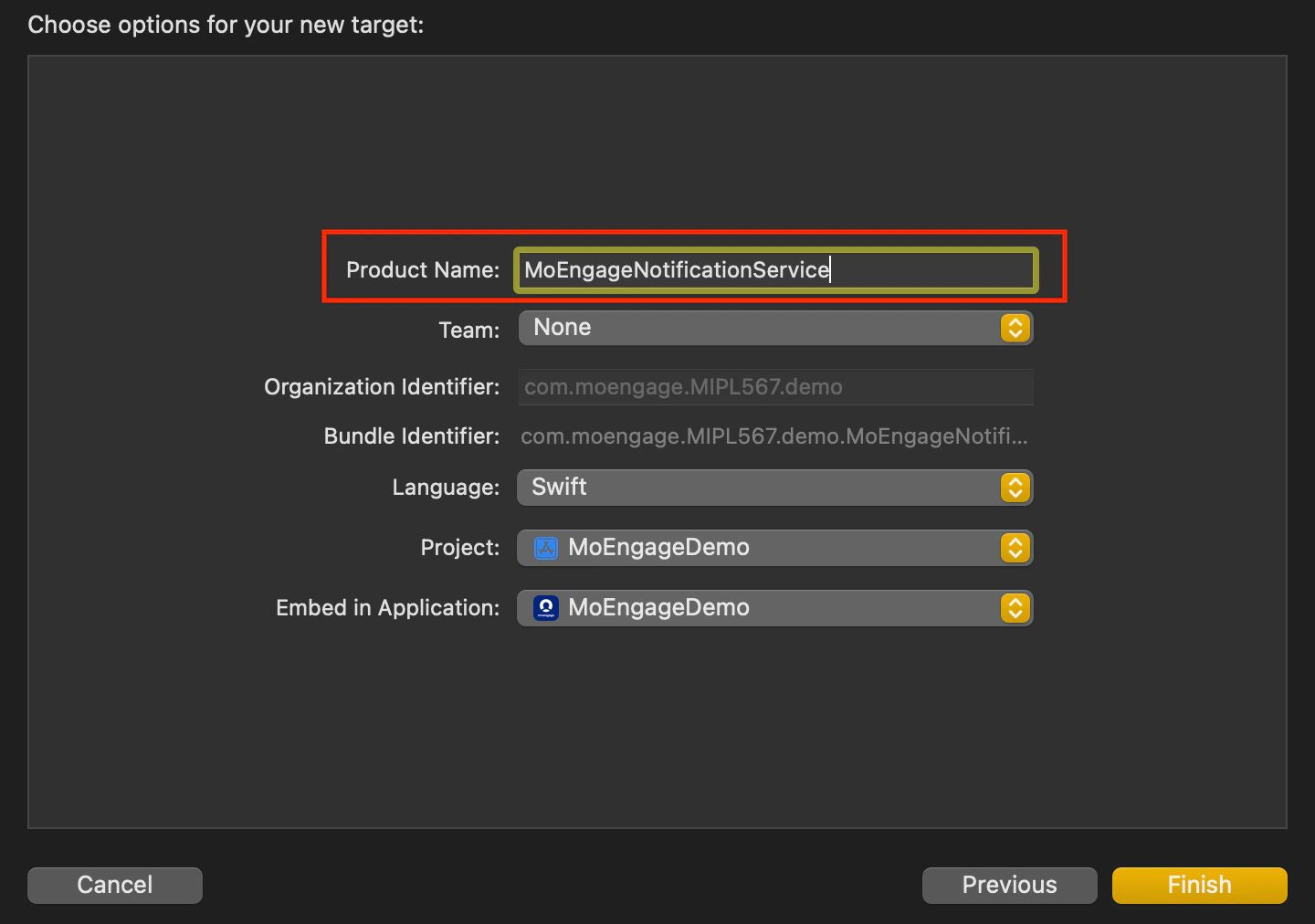
 * **拡張ターゲットに名前を付ける**: 拡張ターゲットの名前を選択します。Swift は Objective-C プロジェクトともシームレスに連携するため、言語として Swift を推奨します。
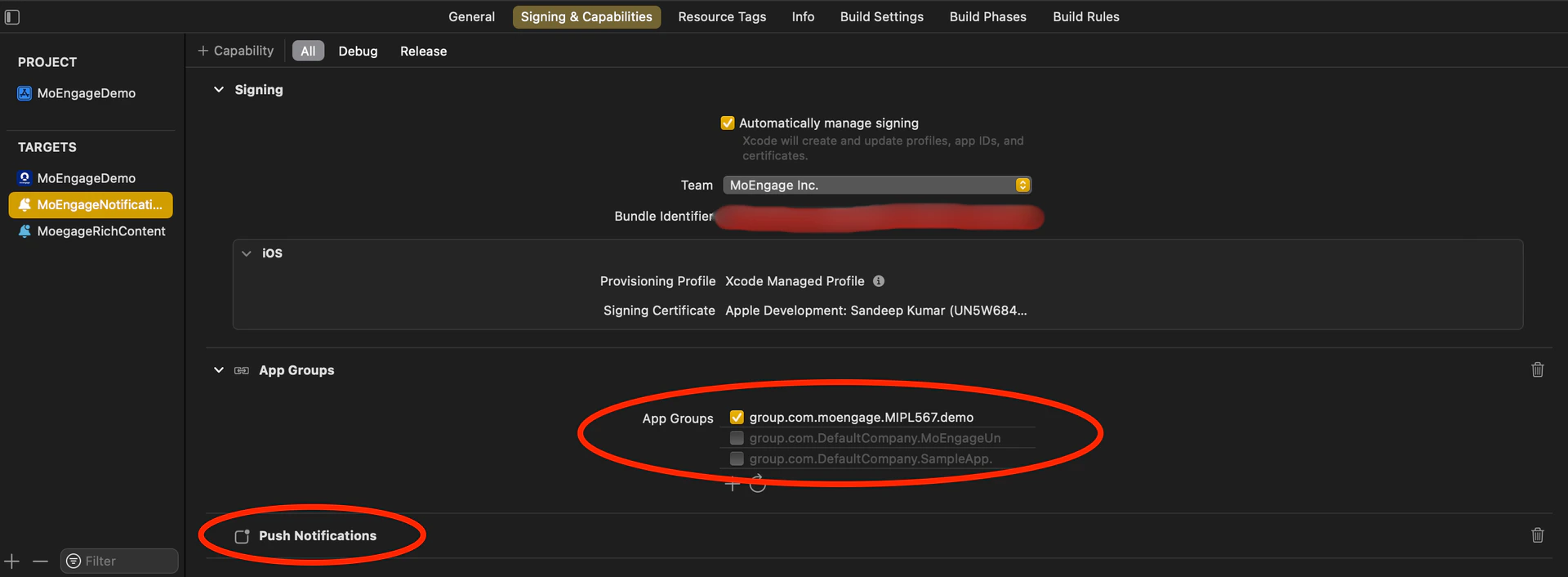
  * **プッシュ通知を有効にする**: 拡張ターゲットの Signing & Capabilities セクションで、Push Notifications を有効にし、AppGroupId を追加します。
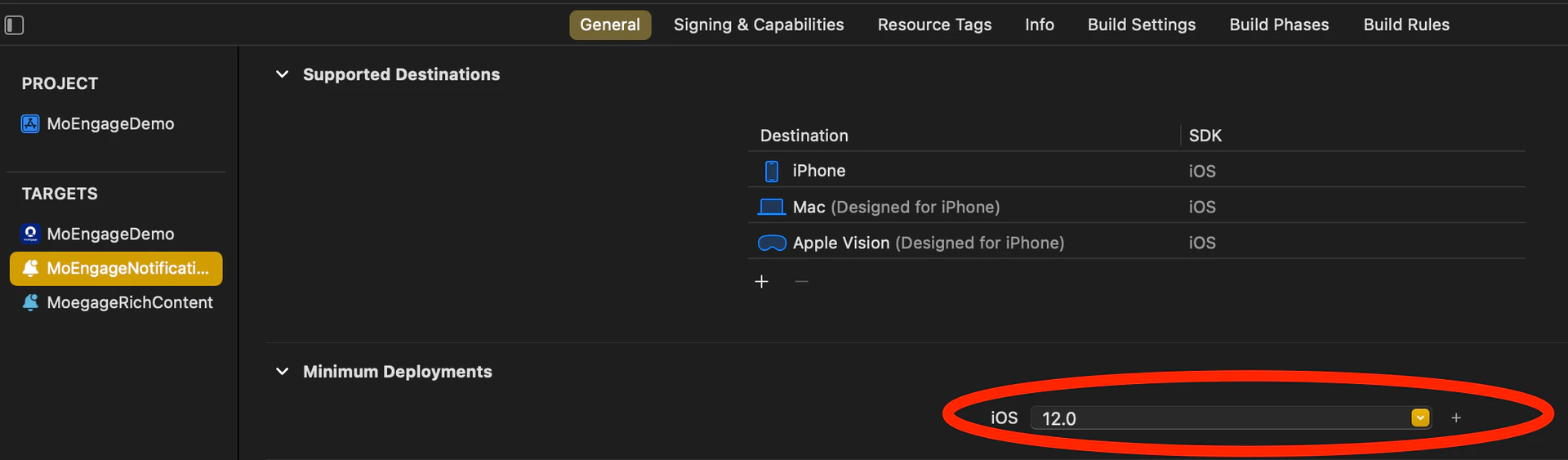
 * **最小デプロイ iOS バージョンを揃える**: Notification Service Extension の最小デプロイ iOS バージョンが、メインアプリの iOS バージョンと一致していることを確認します。
  4. **MORichNotification フレームワークを Notification Service Extension ターゲットに統合する**: podfile で、Notification Service Extension を別のターゲットとして追加し、MORichNotification フレームワークをインストールします。
```swift Swift theme={null}
target 'MoEngageDemo' do
use_frameworks!
pod 'MoEngage-iOS-SDK'
end
target 'MoEngageNotificationService' do
use_frameworks! #use use_frameworks only if included in main target as in above scenario
pod 'MORichNotification'
end
```
5. NotificationService.swift ファイルのコード変更:
```swift Swift theme={null}
import UserNotifications
import MORichNotification
class NotificationService: UNNotificationServiceExtension {
var contentHandler: ((UNNotificationContent) - Void)?
var bestAttemptContent: UNMutableNotificationContent?
override func didReceive(_ request: UNNotificationRequest, withContentHandler contentHandler: @escaping (UNNotificationContent) - Void) {
MORichNotification.setAppGroupID("group.com.XXXXXXXXXXXXXXXX")
self.contentHandler = contentHandler
bestAttemptContent = (request.content.mutableCopy() as? UNMutableNotificationContent)
MORichNotification.handle(request, withContentHandler: contentHandler)
}
override func serviceExtensionTimeWillExpire() {
// Called just before the extension will be terminated by the system.
// Use this as an opportunity to deliver your "best attempt" at modified content, otherwise the original push payload will be used.
if let contentHandler = contentHandler, let bestAttemptContent = bestAttemptContent {
contentHandler(bestAttemptContent)
}
}
}
```
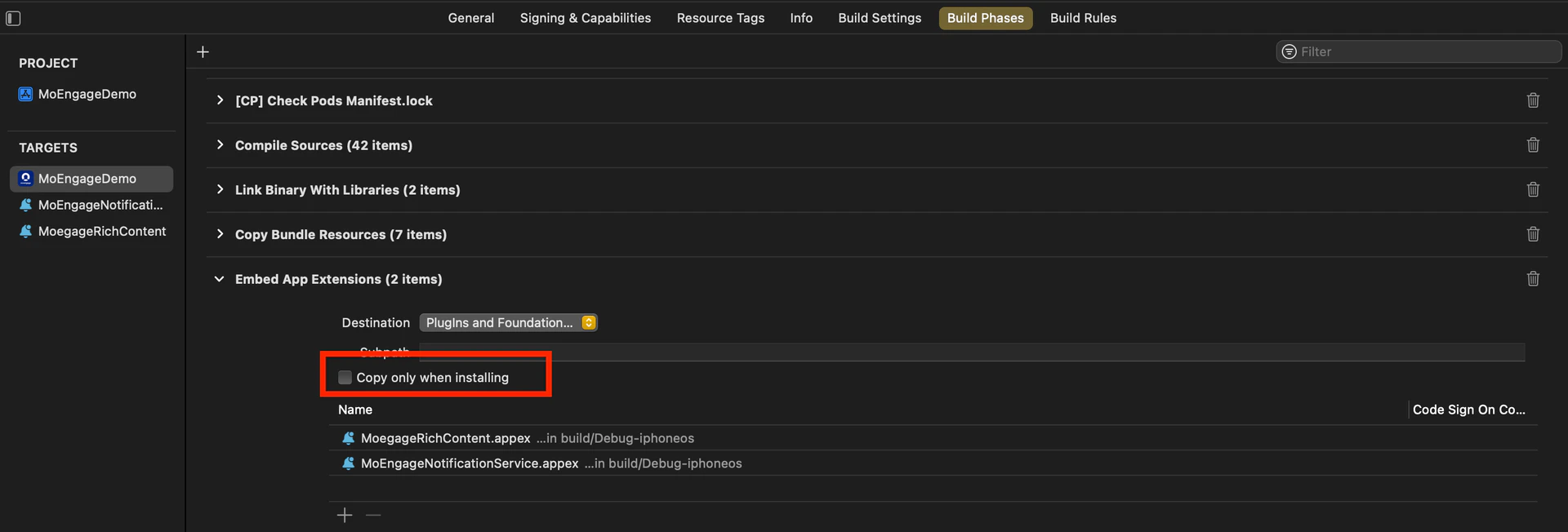
6. **メインアプリターゲットの Build Phases を確認する**: メインアプリターゲットの Build Phases セクションで、Embed App Extensions / Embed Foundation Extensions セクションを見つけます。**Copy only when installing** オプションがオフになっていることを確認します。
4. **MORichNotification フレームワークを Notification Service Extension ターゲットに統合する**: podfile で、Notification Service Extension を別のターゲットとして追加し、MORichNotification フレームワークをインストールします。
```swift Swift theme={null}
target 'MoEngageDemo' do
use_frameworks!
pod 'MoEngage-iOS-SDK'
end
target 'MoEngageNotificationService' do
use_frameworks! #use use_frameworks only if included in main target as in above scenario
pod 'MORichNotification'
end
```
5. NotificationService.swift ファイルのコード変更:
```swift Swift theme={null}
import UserNotifications
import MORichNotification
class NotificationService: UNNotificationServiceExtension {
var contentHandler: ((UNNotificationContent) - Void)?
var bestAttemptContent: UNMutableNotificationContent?
override func didReceive(_ request: UNNotificationRequest, withContentHandler contentHandler: @escaping (UNNotificationContent) - Void) {
MORichNotification.setAppGroupID("group.com.XXXXXXXXXXXXXXXX")
self.contentHandler = contentHandler
bestAttemptContent = (request.content.mutableCopy() as? UNMutableNotificationContent)
MORichNotification.handle(request, withContentHandler: contentHandler)
}
override func serviceExtensionTimeWillExpire() {
// Called just before the extension will be terminated by the system.
// Use this as an opportunity to deliver your "best attempt" at modified content, otherwise the original push payload will be used.
if let contentHandler = contentHandler, let bestAttemptContent = bestAttemptContent {
contentHandler(bestAttemptContent)
}
}
}
```
6. **メインアプリターゲットの Build Phases を確認する**: メインアプリターゲットの Build Phases セクションで、Embed App Extensions / Embed Foundation Extensions セクションを見つけます。**Copy only when installing** オプションがオフになっていることを確認します。
 7. **構成間で appGroupId を統一する**: プロジェクト内のすべてのスキームと構成(Debug/Release/QA/UAT など)で appGroupId が統一されていることを確認します。
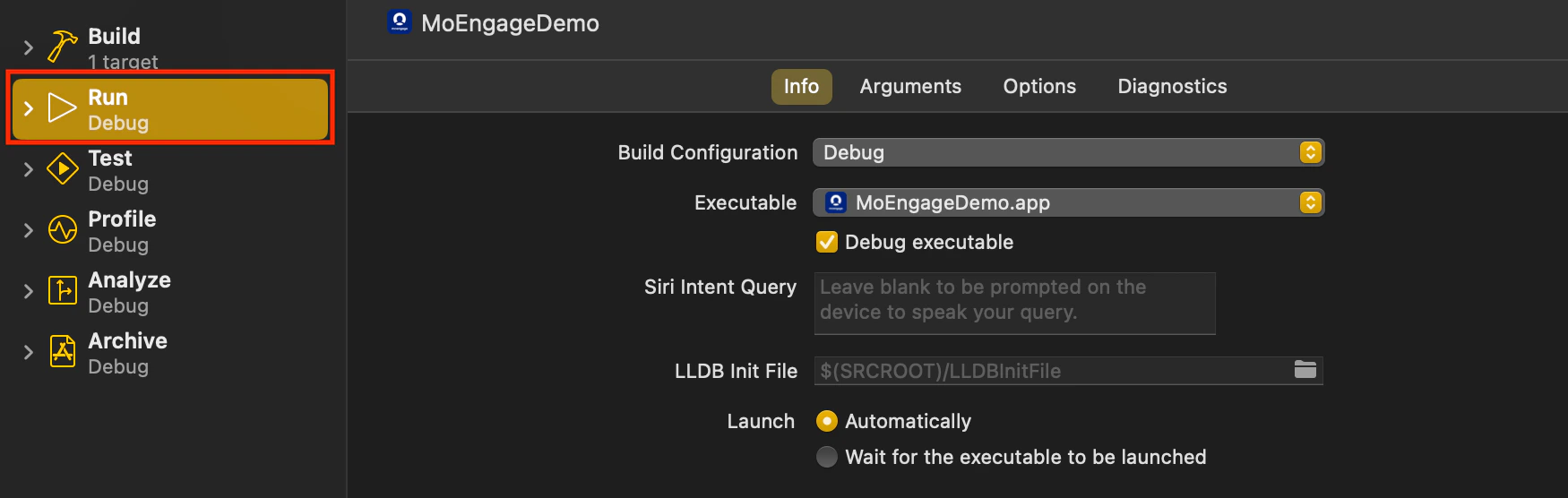
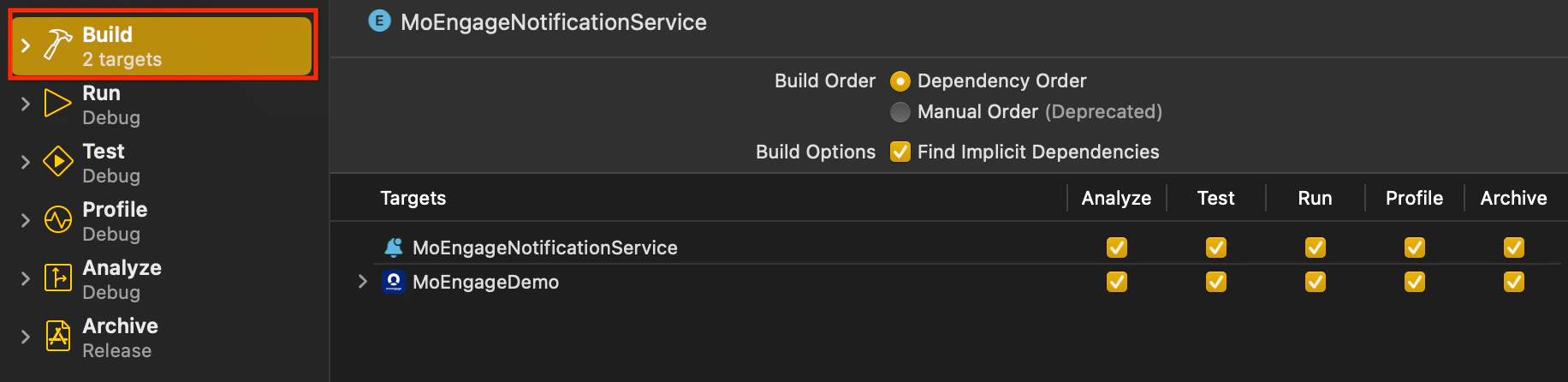
8. **ビルド構成を揃える**: プロジェクトを実行またはアーカイブする際は、メインターゲットと Notification Service Extension ターゲットの両方の Build Configuration が同じスキーム/構成を指していることを確認します。
7. **構成間で appGroupId を統一する**: プロジェクト内のすべてのスキームと構成(Debug/Release/QA/UAT など)で appGroupId が統一されていることを確認します。
8. **ビルド構成を揃える**: プロジェクトを実行またはアーカイブする際は、メインターゲットと Notification Service Extension ターゲットの両方の Build Configuration が同じスキーム/構成を指していることを確認します。