> ## Documentation Index
> Fetch the complete documentation index at: https://moengage.com/docs/llms.txt
> Use this file to discover all available pages before exploring further.
# Proactive Insights の設定
> RFM インサイト、主要インサイトの設定、信頼区間、分析期間を設定して、MoEngage Proactive Insights をカスタマイズします。
# 概要
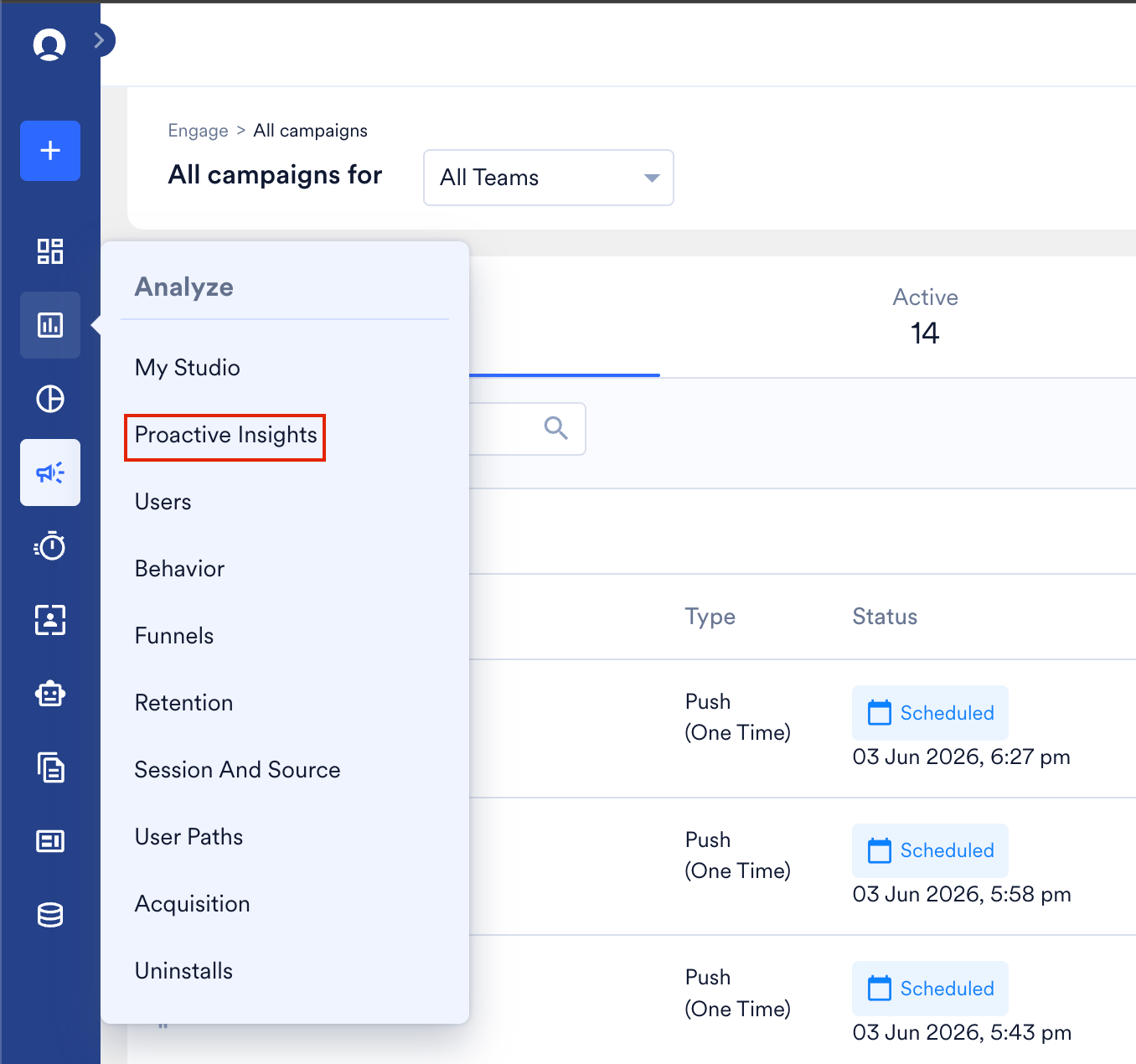
Proactive Insights の設定ページでは、RFM Insights と Key Insights の設定をカスタマイズできます。また、必要に応じて信頼区間 (Confidence Interval) と分析期間 (Analysis Duration) を調整することもできます。これらを設定すると、MoEngage ダッシュボードの **Proactive Insights** ページに正確なデータが表示されるようになります。Proactive Insights ページを開くには、左側のナビゲーションで **Analyze** を選択し、**Proactive Insights** をクリックします。
 この AI 搭載アシスタントの仕組みの詳細については、[Proactive Insights](/docs/ja/user-guide/ai-and-intelligence/proactive-insights) を参照してください。
# Proactive Insights の設定
Proactive Insights の設定ページにアクセスするには、**Settings** > **Reports and alerts** > **Proactive Insights** に移動します。**Proactive Insights settings** ページが表示されます。
この AI 搭載アシスタントの仕組みの詳細については、[Proactive Insights](/docs/ja/user-guide/ai-and-intelligence/proactive-insights) を参照してください。
# Proactive Insights の設定
Proactive Insights の設定ページにアクセスするには、**Settings** > **Reports and alerts** > **Proactive Insights** に移動します。**Proactive Insights settings** ページが表示されます。
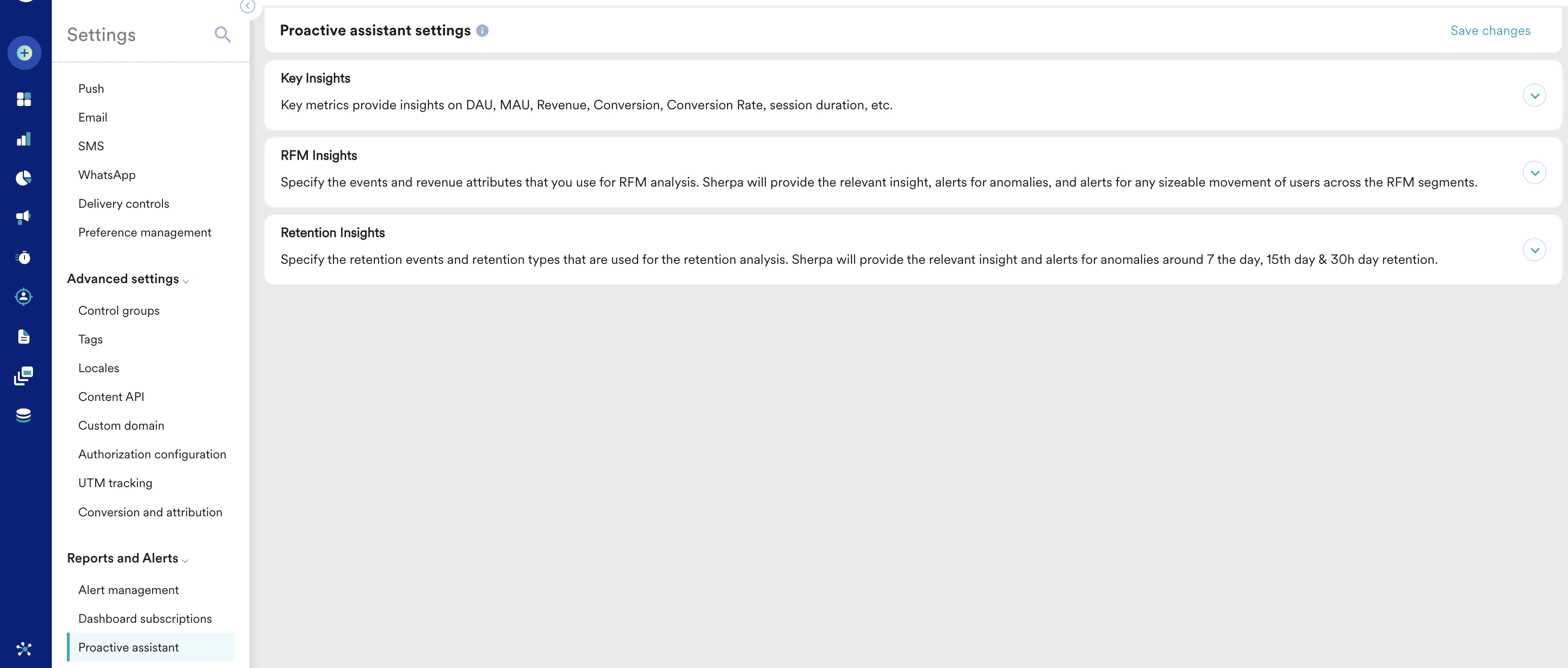 次の設定を構成できます。
* [Key insights](/docs/ja/user-guide/settings/reports-and-alerts/proactive-insights-settings#key-insights)
* [RFM insights](/docs/ja/user-guide/settings/reports-and-alerts/proactive-insights-settings#rfm-insights)
* [Retention insights](/docs/ja/user-guide/settings/reports-and-alerts/proactive-insights-settings#retention-insights)
## Key Insights
**Key Insights** セクションで設定したイベントと収益属性は、主要指標 (Key Metrics) の分析に使用されます。Proactive Insights は、DAU および MAU 指標においてユーザーの大きな変動があった場合に、関連するインサイトとアラートを提供します。
次の設定を構成できます。
* [Key insights](/docs/ja/user-guide/settings/reports-and-alerts/proactive-insights-settings#key-insights)
* [RFM insights](/docs/ja/user-guide/settings/reports-and-alerts/proactive-insights-settings#rfm-insights)
* [Retention insights](/docs/ja/user-guide/settings/reports-and-alerts/proactive-insights-settings#retention-insights)
## Key Insights
**Key Insights** セクションで設定したイベントと収益属性は、主要指標 (Key Metrics) の分析に使用されます。Proactive Insights は、DAU および MAU 指標においてユーザーの大きな変動があった場合に、関連するインサイトとアラートを提供します。
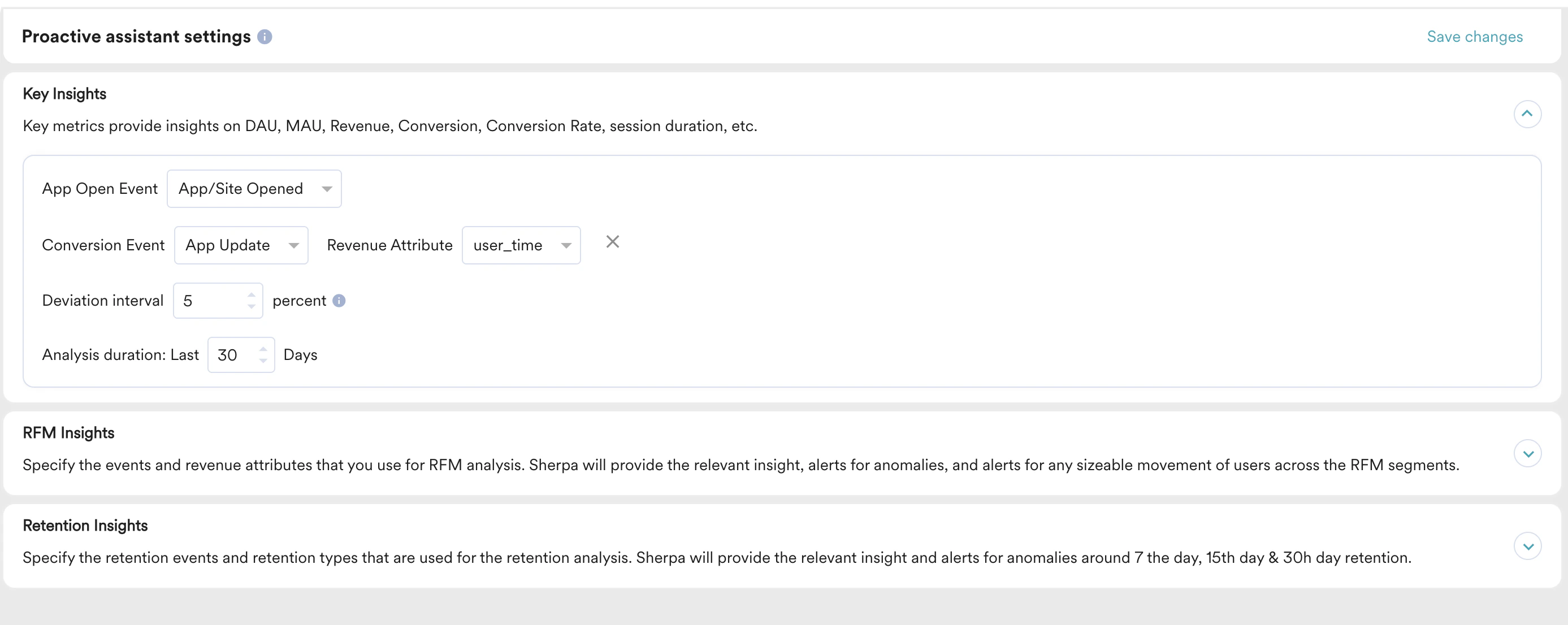 Key Insights を設定するには、次の手順を実行します。
1. Key Insights に使用する **App Open Event**、**Conversion Event**、**Revenue Attribute** を指定します。
2. **Deviation interval** を定義します。Deviation Interval とは、インサイトを生成するために、実際の値が収まる可能性が高い予測値周辺の範囲です。この範囲は 5% から 20% の間で設定できます。
3. 必要に応じて **Analysis duration** を設定します。
## RFM Insights
**RFM Insights** セクションで設定したイベントと収益属性は、RFM 分析に使用されます。Merlin AI は、RFM セグメント間でユーザーの大きな移動があった場合に、関連するインサイトとアラートを提供します。
Key Insights を設定するには、次の手順を実行します。
1. Key Insights に使用する **App Open Event**、**Conversion Event**、**Revenue Attribute** を指定します。
2. **Deviation interval** を定義します。Deviation Interval とは、インサイトを生成するために、実際の値が収まる可能性が高い予測値周辺の範囲です。この範囲は 5% から 20% の間で設定できます。
3. 必要に応じて **Analysis duration** を設定します。
## RFM Insights
**RFM Insights** セクションで設定したイベントと収益属性は、RFM 分析に使用されます。Merlin AI は、RFM セグメント間でユーザーの大きな移動があった場合に、関連するインサイトとアラートを提供します。
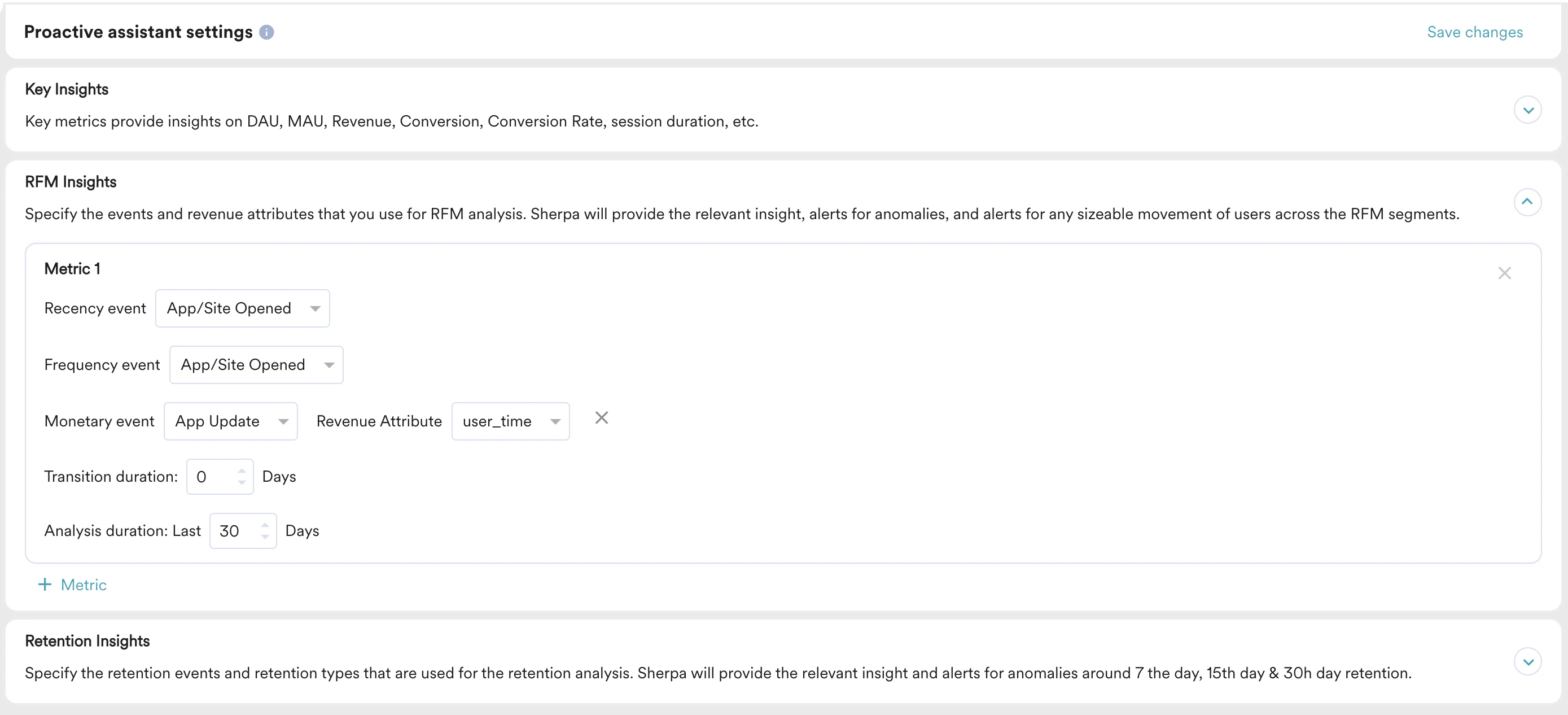 Merlin AI への入力として、最大 5 つの異なる RFM 指標を設定できます。RFM Insights を設定するには、次の手順を実行します。
1. デフォルトでは、**Recency event** と **Frequency** **event** は *App/Site Opened* に設定されます。
2. **Monetary event** は、**Settings** > **General** > **Goal mapping** > **Revenue attribute** フィールドから取得されます。
3. これらの入力は、**Analysis duration** に指定した期間にわたって分析されます。必要に応じて分析期間を設定してください。有意義なインサイトを得るには、7 日を超える期間を設定することをお勧めします。
## Retention Insights
Retention Insights セクションで設定したイベントと収益属性は、リテンション分析に使用されます。Merlin AI は、7 日間、15 日間、30 日間のリテンションに関する異常について、関連するインサイトとアラートを提供します。
Merlin AI への入力として、最大 5 つの異なる RFM 指標を設定できます。RFM Insights を設定するには、次の手順を実行します。
1. デフォルトでは、**Recency event** と **Frequency** **event** は *App/Site Opened* に設定されます。
2. **Monetary event** は、**Settings** > **General** > **Goal mapping** > **Revenue attribute** フィールドから取得されます。
3. これらの入力は、**Analysis duration** に指定した期間にわたって分析されます。必要に応じて分析期間を設定してください。有意義なインサイトを得るには、7 日を超える期間を設定することをお勧めします。
## Retention Insights
Retention Insights セクションで設定したイベントと収益属性は、リテンション分析に使用されます。Merlin AI は、7 日間、15 日間、30 日間のリテンションに関する異常について、関連するインサイトとアラートを提供します。
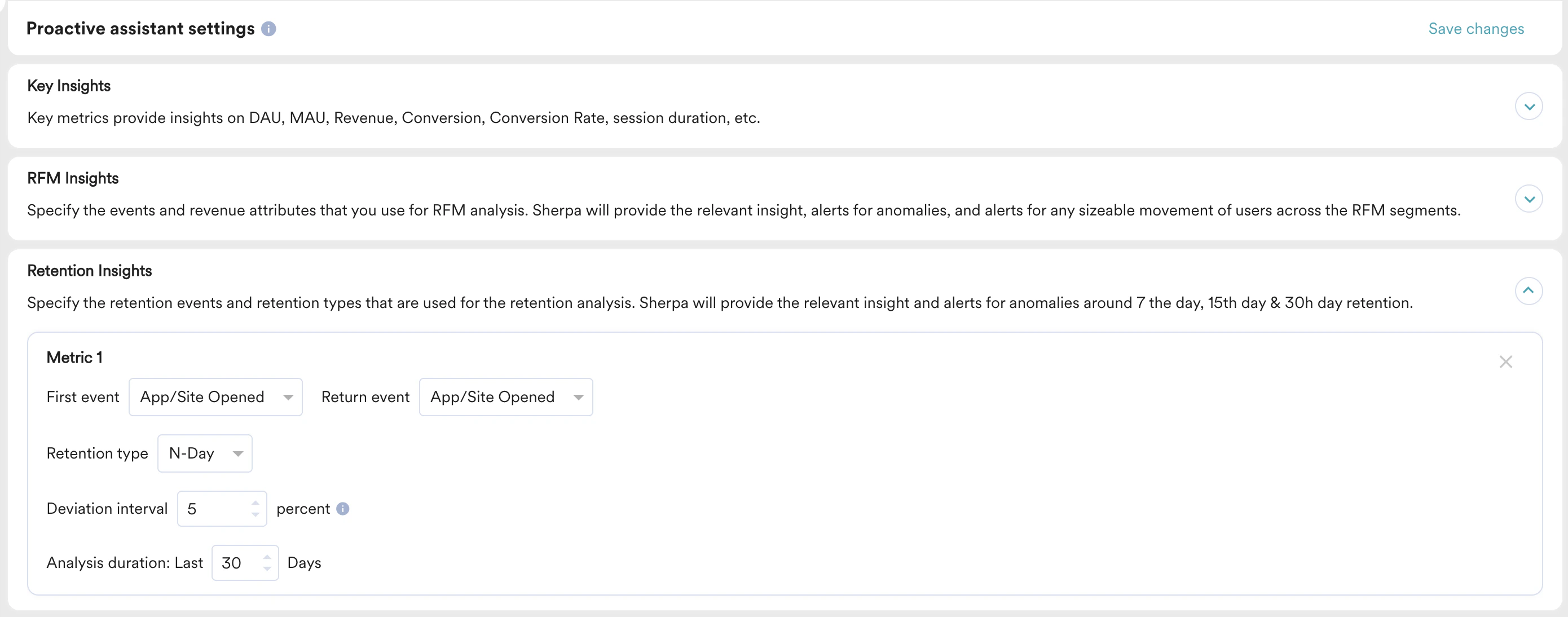 Retention Insights を設定するには、次の手順を実行します。
1. Retention insights に使用する **First Event**、**Return Event**、**Retention type** を指定します。
2. 必要に応じて **Deviation interval** と **Analysis duration** を指定します。
Proactive Insights は、D7 および D30 リテンション指標においてユーザーの大きな変動があった場合に、関連するインサイトとアラートを提供します。
以前は *Sherpa AI* と呼ばれていたすべての MoEngage AI 製品は、現在 *Merlin AI* として知られています。
Retention Insights を設定するには、次の手順を実行します。
1. Retention insights に使用する **First Event**、**Return Event**、**Retention type** を指定します。
2. 必要に応じて **Deviation interval** と **Analysis duration** を指定します。
Proactive Insights は、D7 および D30 リテンション指標においてユーザーの大きな変動があった場合に、関連するインサイトとアラートを提供します。
以前は *Sherpa AI* と呼ばれていたすべての MoEngage AI 製品は、現在 *Merlin AI* として知られています。