> ## Documentation Index
> Fetch the complete documentation index at: https://moengage.com/docs/llms.txt
> Use this file to discover all available pages before exploring further.
# Telegram
> Connect Telegram to MoEngage to send personalized text, photo, and media campaigns to Telegram users, groups, and channels through the Telegram Bot API.
[Telegram](https://telegram.org/) is a cloud-based instant messaging application designed for fast, secure, and cross-device communication. Telegram helps brands to:
* Deliver rich interactive push alerts with custom media and redirect pathways.
* Automate real-time customer support alerts and transaction reports.
* Directly reach targeted groups, subscriber lists, or public channels.
# MoEngage \<> Telegram
The MoEngage and Telegram integration uses MoEngage Connectors to link your campaigns with the Telegram Bot API. By connecting your bot, you can utilize MoEngage segmentation, dynamic personalization, and behavioral triggers to send tailored messages directly to Telegram users or public channels.
## Pre-Built Connectors
MoEngage provides pre-built connectors to support your various messaging requirements:
| Connector | Description |
| ----------------------------------------- | ------------------------------------------------------------------------------- |
| **Send a message to a user or a channel** | Sends text messages with support for MarkdownV2, HTML, and Markdown formatting. |
| **Send Photo Message** | Sends a photo with captions and inline Call-to-Action (CTA) buttons. |
| **Send Photos & Videos** | Sends a media group with captions. |
# Integration
**Prerequisites**
* **Telegram Bot:** You must create a Telegram bot. Your messages use this bot's identity, meaning users see your bot details as the sender. Set up your bot using the official [Telegram Bot Creation Tutorial](https://core.telegram.org/bots/tutorial).
* **Bot Token:** The unique authorization token you obtain when creating your bot via [BotFather](https://t.me/BotFather) to authorize API requests.
* **Telegram Chat IDs:** The unique destination identifiers required to route messages. These are distinct from public usernames.
To deliver personalized campaigns, you must populate the recipient's identifier (Telegram Chat ID) as a user attribute inside MoEngage.
Telegram rules allow you to send promotional and transactional messages to users who have given consent. To receive your bot's messages, users must meet one of the following conditions:
* Users have started a conversation with your Telegram bot.
* Users have sent a message to your Telegram bot (and have not blocked the bot since).
## Step 1: Collect Your Users' Telegram Chat IDs
To send messages via Telegram, you must collect your users' unique Telegram Chat IDs to identify and interact with them. Chat IDs are numeric values generated by Telegram and differ from user handles.
After a user interacts with your bot, you can capture their Chat ID through the [Telegram getUpdates API](https://core.telegram.org/bots/api#getupdates).
## Step 2: Save the User's Telegram Chat ID on MoEngage
After you capture the Chat IDs, save them in MoEngage as a custom-tracked user attribute named `telegram_chat_id`. Write this attribute using either of the following methods:
* Send the attribute to MoEngage via the [User Data API](/api/user/track-user).
* Upload a CSV file containing your users and Chat IDs using the [User Import tool](/user-guide/data/imports/file-based-imports/import-user-data-using-csv).
## Step 3: Integrate Telegram with MoEngage
To set up your Telegram connectors inside MoEngage, perform the following steps:
1. On the MoEngage Dashboard navigation bar, click **App marketplace**.
2. Search for **Telegram** and select the **Telegram** tile.
3. On the Telegram page, go to the **Integrate** tab.
4. Click the **+ Add integration** down-arrow key and then click your preferred connector type from the drop-down list.
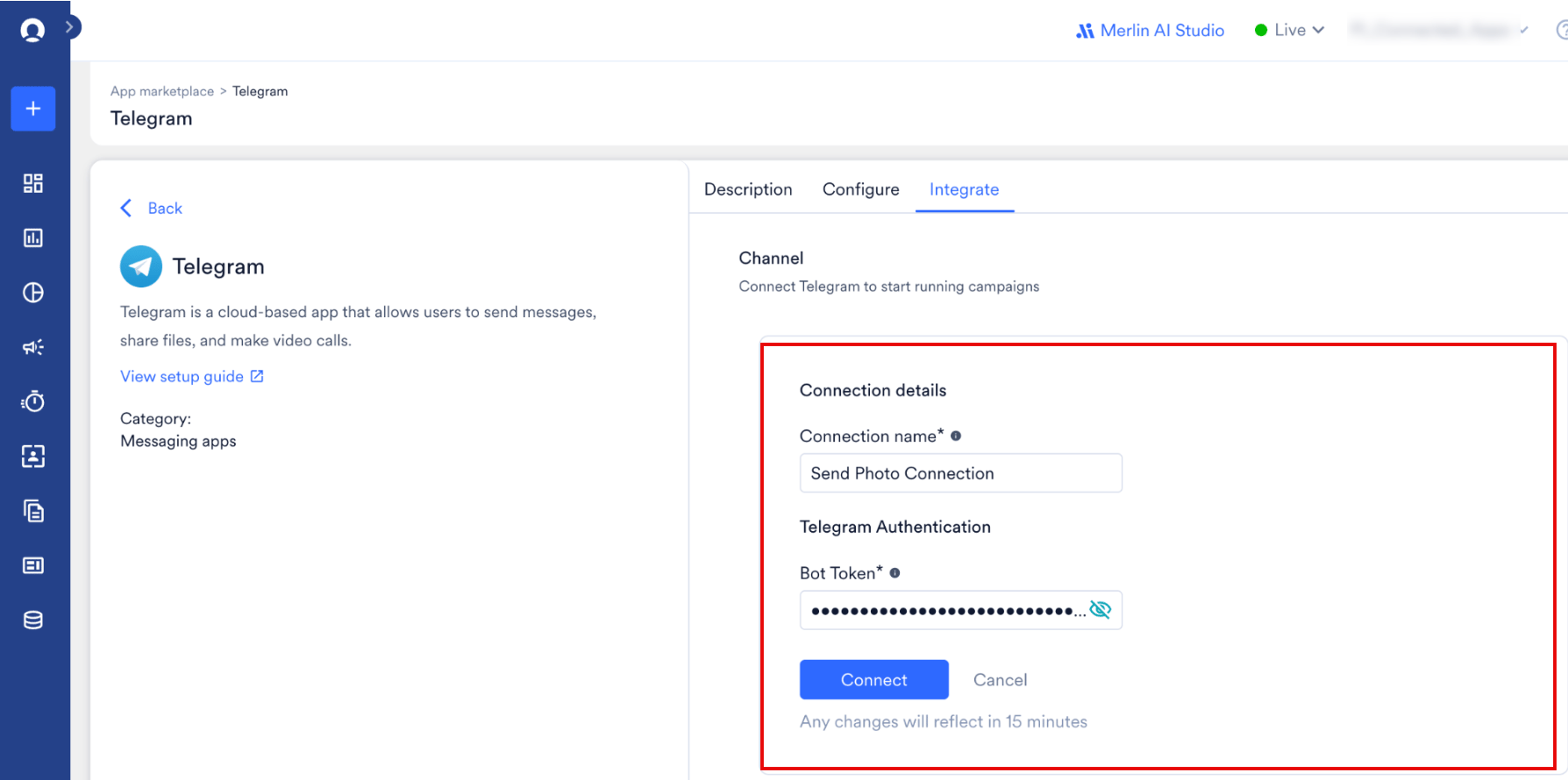
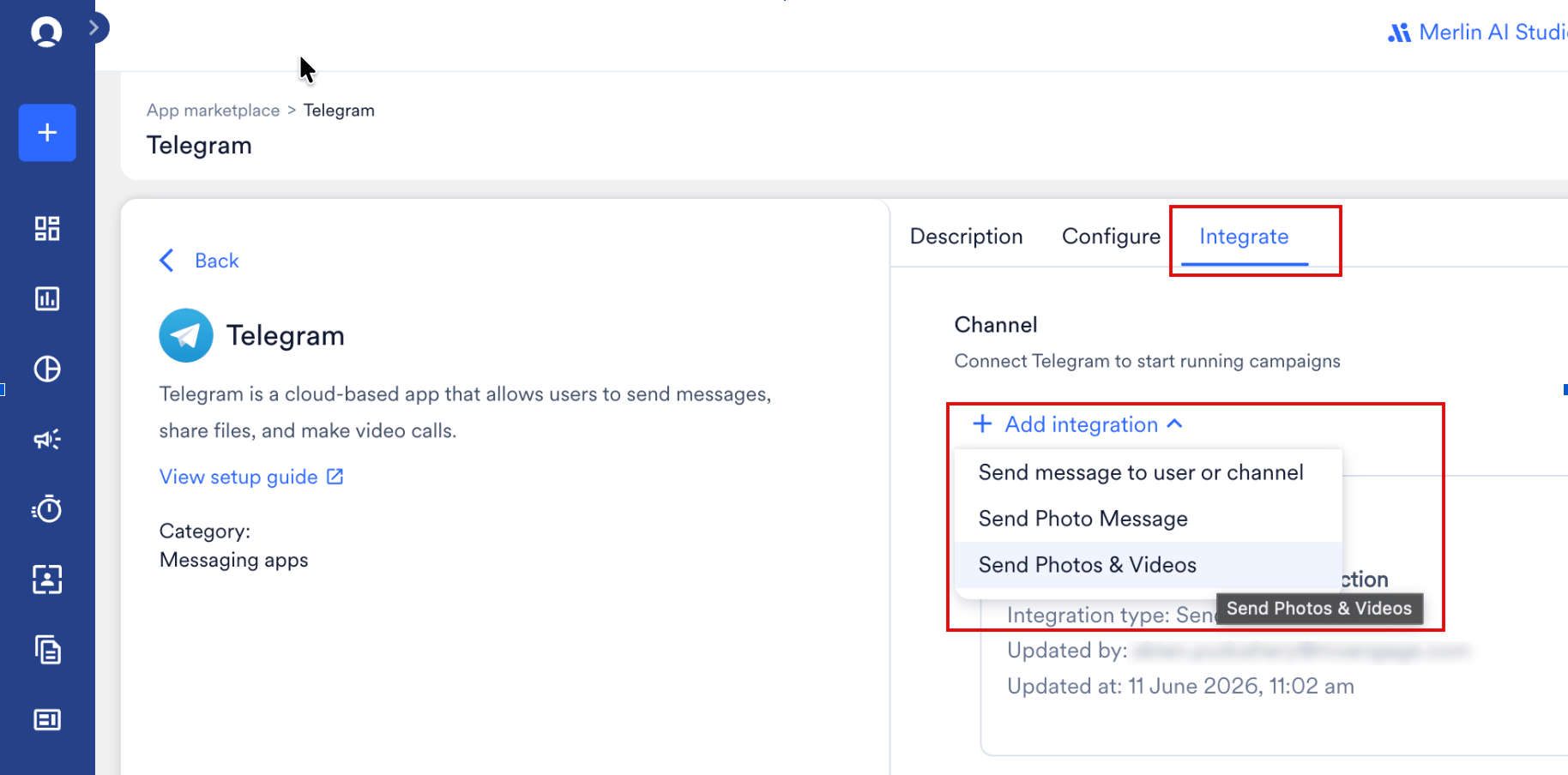 5. Enter the following details:
| Field | Description |
| ------------------- | --------------------------------------------------------------------------- |
| **Connection name** | The unique internal name for your connection. |
| **Bot Token** | The unique authorization credentials provided by BotFather during creation. |
6. Click **Connect**.
5. Enter the following details:
| Field | Description |
| ------------------- | --------------------------------------------------------------------------- |
| **Connection name** | The unique internal name for your connection. |
| **Bot Token** | The unique authorization credentials provided by BotFather during creation. |
6. Click **Connect**.
 ## Step 4: Create a Campaign on MoEngage to Send a Telegram Message
To launch a Telegram campaign, perform the following steps:
1. Navigate to **Engage** > **Campaigns** and click **+ Create campaign**.
2. In the campaign setup dialog, click **Telegram** under **Connected Apps**, and select your preferred delivery type.
3. Under **Select audience**, click **Filter users by**. Under the **User property** tab, define a segment where the `telegram_chat_id` attribute exists.
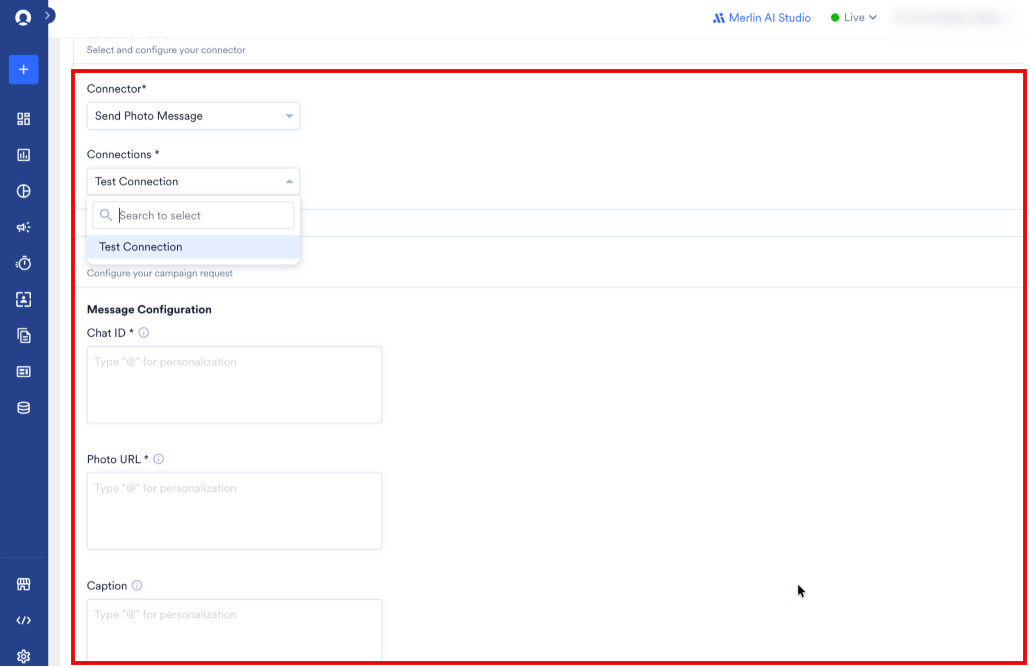
4. In Step 3 of the campaign creator, select your connector and define your parameters.
Based on the connector you select, you must provide the following details:
Use this connector to transmit a plain-text message. You can utilize MarkdownV2, HTML, or traditional Markdown formatting systems.
| Field | Required | Description |
| --------------------------------- | -------- | ---------------------------------------------------------------------------------------------------- |
| **Chat ID** | Yes | The recipient's Chat ID. Supports personalization tags like `{{UserAttribute['telegram_chat_id']}}`. |
| **Message Content** | Yes | The text of your message (maximum 4096 characters). Personalization is supported. |
| **Formatting Style (Parse Mode)** | Yes | Determines text styling parsing. Choose **HTML**, **MarkdownV2**, or **Markdown**. |
Use this connector to send a image payload accompanied by inline buttons (such as dynamic CTAs) positioned directly under the visual message.
| Field | Required | Description |
| --------------------------------- | -------- | --------------------------------------------------------------------------------------------------------------------------------------------------------- |
| **Chat ID** | Yes | The recipient's chat ID or public handle. Supports personalization tags like `{{UserAttribute['telegram_chat_id']}}`. |
| **Photo URL** | Yes | A public, secure HTTPS link to your image file (maximum 10 MB). This field supports personalization. |
| **Caption** | No | The text details that accompany the image (maximum 1024 characters). Supports personalization. |
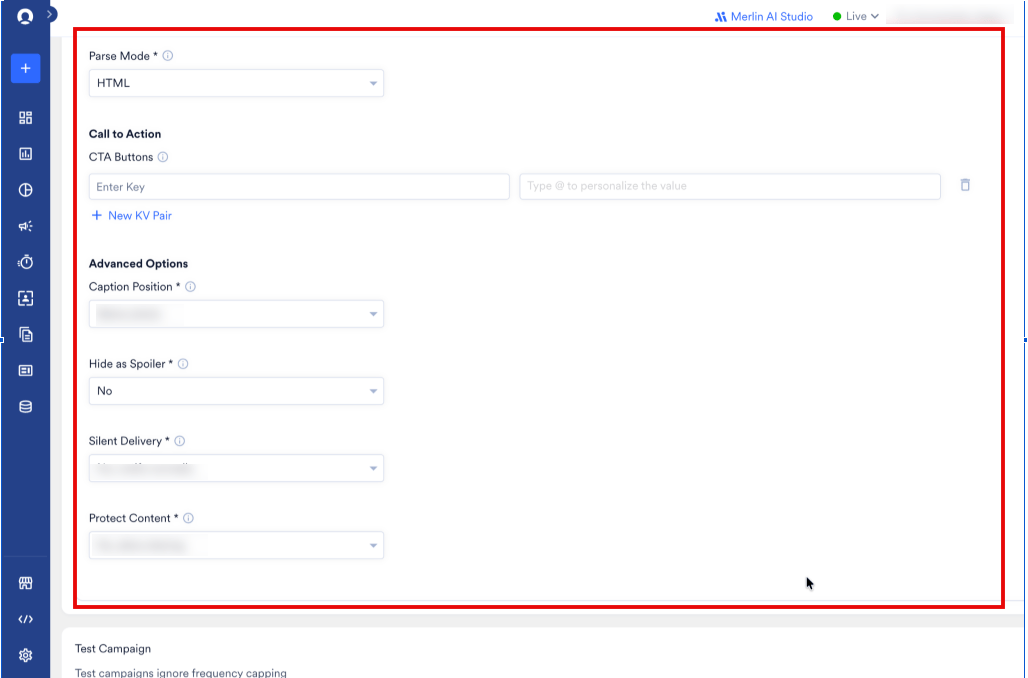
| **Formatting Style (Parse Mode)** | Yes | Determines text styling parsing. Choose **HTML**, **MarkdownV2**, or **Markdown**. |
| **CTA Buttons** | No | Interactive inline buttons below the image. Enter the button copy as the Key and redirect URL as the Value (maximum 8 buttons, arranged up to 2 per row). |
| **Caption Position** | No | Determines whether text appears **Above photo** or **Below photo** (default). |
| **Hide as Spoiler** | No | Blurs the image with a spoiler visual overlay until the recipient taps the message. Defaults to **No**. |
| **Silent Delivery** | No | Delivers the campaign without triggering notification sounds on the recipient's device. Defaults to **No, notify normally**. |
| **Protect Content** | No | Restricts the recipient's ability to save, forward, or screenshot the image inside Telegram. Defaults to **No, allow sharing**. |
## Step 4: Create a Campaign on MoEngage to Send a Telegram Message
To launch a Telegram campaign, perform the following steps:
1. Navigate to **Engage** > **Campaigns** and click **+ Create campaign**.
2. In the campaign setup dialog, click **Telegram** under **Connected Apps**, and select your preferred delivery type.
3. Under **Select audience**, click **Filter users by**. Under the **User property** tab, define a segment where the `telegram_chat_id` attribute exists.
4. In Step 3 of the campaign creator, select your connector and define your parameters.
Based on the connector you select, you must provide the following details:
Use this connector to transmit a plain-text message. You can utilize MarkdownV2, HTML, or traditional Markdown formatting systems.
| Field | Required | Description |
| --------------------------------- | -------- | ---------------------------------------------------------------------------------------------------- |
| **Chat ID** | Yes | The recipient's Chat ID. Supports personalization tags like `{{UserAttribute['telegram_chat_id']}}`. |
| **Message Content** | Yes | The text of your message (maximum 4096 characters). Personalization is supported. |
| **Formatting Style (Parse Mode)** | Yes | Determines text styling parsing. Choose **HTML**, **MarkdownV2**, or **Markdown**. |
Use this connector to send a image payload accompanied by inline buttons (such as dynamic CTAs) positioned directly under the visual message.
| Field | Required | Description |
| --------------------------------- | -------- | --------------------------------------------------------------------------------------------------------------------------------------------------------- |
| **Chat ID** | Yes | The recipient's chat ID or public handle. Supports personalization tags like `{{UserAttribute['telegram_chat_id']}}`. |
| **Photo URL** | Yes | A public, secure HTTPS link to your image file (maximum 10 MB). This field supports personalization. |
| **Caption** | No | The text details that accompany the image (maximum 1024 characters). Supports personalization. |
| **Formatting Style (Parse Mode)** | Yes | Determines text styling parsing. Choose **HTML**, **MarkdownV2**, or **Markdown**. |
| **CTA Buttons** | No | Interactive inline buttons below the image. Enter the button copy as the Key and redirect URL as the Value (maximum 8 buttons, arranged up to 2 per row). |
| **Caption Position** | No | Determines whether text appears **Above photo** or **Below photo** (default). |
| **Hide as Spoiler** | No | Blurs the image with a spoiler visual overlay until the recipient taps the message. Defaults to **No**. |
| **Silent Delivery** | No | Delivers the campaign without triggering notification sounds on the recipient's device. Defaults to **No, notify normally**. |
| **Protect Content** | No | Restricts the recipient's ability to save, forward, or screenshot the image inside Telegram. Defaults to **No, allow sharing**. |
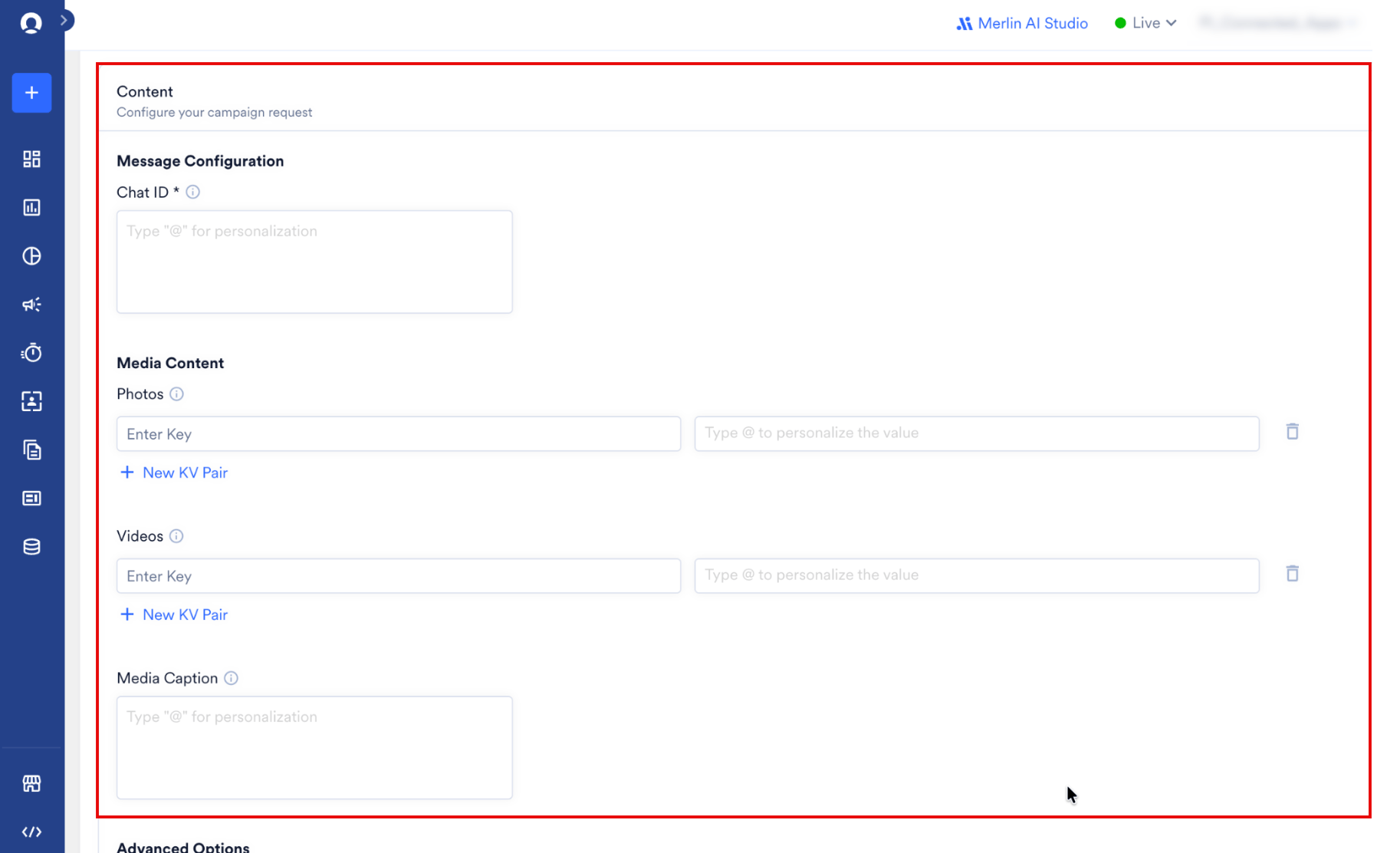
 Use this connector to send bundled media packages containing up to 10 assets (photos and videos) with a single, shared caption block.
| Field | Required | Description |
| --------------------------------- | ------------------ | -------------------------------------------------------------------------------------------------------------------------------------------------------------------------------------------------------------------------------------------------------------------------------------------------- |
| **Chat ID** | Yes | The destination chat ID or public handle. Supports personalization. |
| **Media Content** | Yes (At least one) | Provide secure HTTPS URLs for your photos and videos. Your total asset count must be between 1 and 10 items.
Use this connector to send bundled media packages containing up to 10 assets (photos and videos) with a single, shared caption block.
| Field | Required | Description |
| --------------------------------- | ------------------ | -------------------------------------------------------------------------------------------------------------------------------------------------------------------------------------------------------------------------------------------------------------------------------------------------- |
| **Chat ID** | Yes | The destination chat ID or public handle. Supports personalization. |
| **Media Content** | Yes (At least one) | Provide secure HTTPS URLs for your photos and videos. Your total asset count must be between 1 and 10 items.
**Note**: When configuring photo or video assets as key-value pairs, ensure that the keys are discarded before transmission; Telegram receives only the values (the media URLs). |
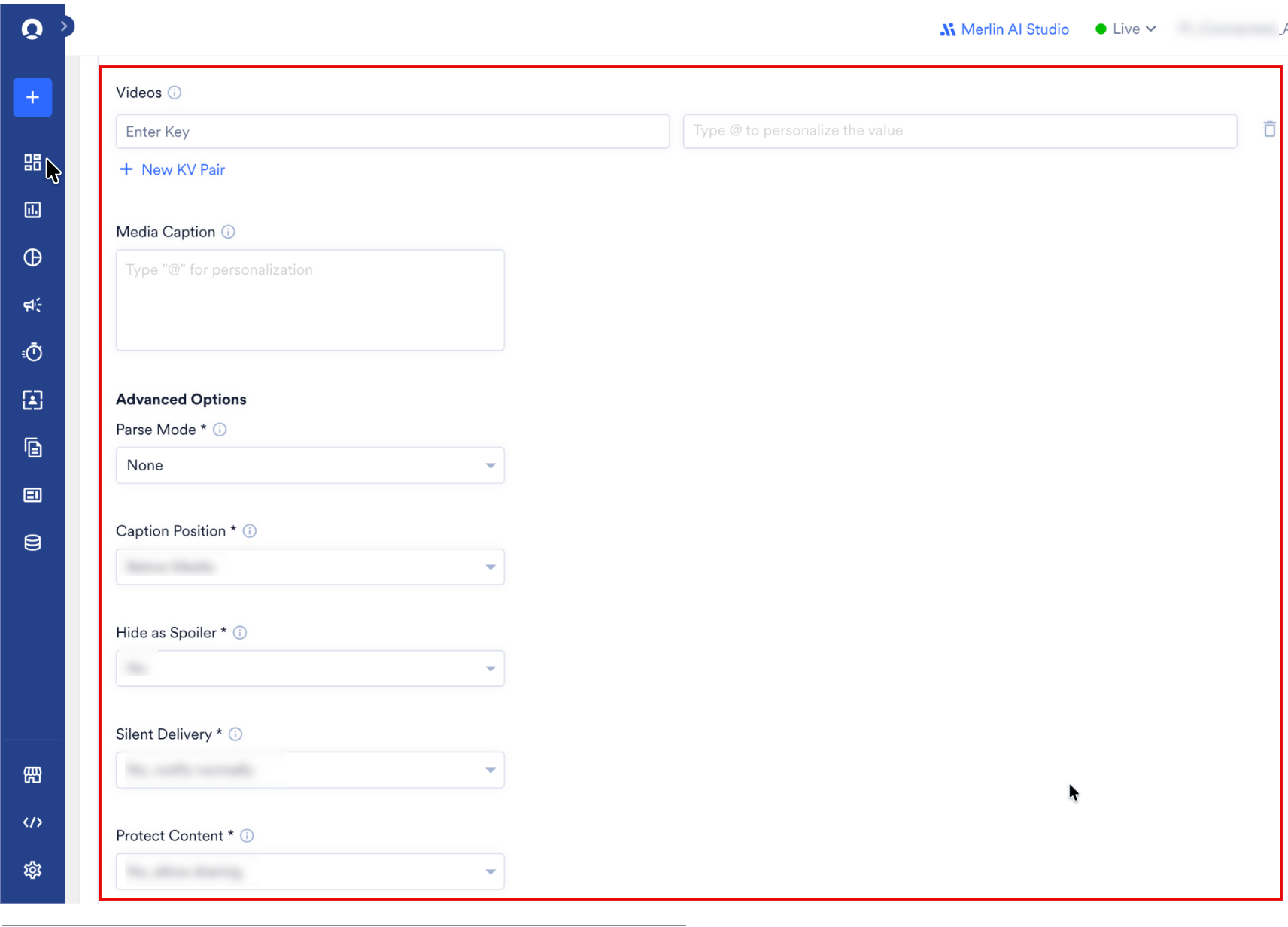
| **Media Caption** | No | A shared text block (maximum 1024 characters) bound to the first item in the media group. |
| **Formatting Style (Parse Mode)** | Yes | Determines text styling parsing. Choose **HTML**, **MarkdownV2**, or **Markdown**. |
| **Hide as Spoiler** | No | Blurs all items in the media group until tapped. Defaults to **No**. |
| **Silent Delivery** | No | Sends the media group quietly with no audible alert. Defaults to **No, notify normally**. |
| **Protect Content** | No | Prevents users from saving, taking screenshots, or forwarding any file in the media group. Defaults to **No, allow sharing**. |
 Interactive CTA buttons are exclusive to the **Send Photo Message** connector. Due to limitations in the Telegram `sendMediaGroup` API, inline buttons are not supported with the **Send Photos & Videos** connector.
5. Your campaign is now ready to be tested and sent to your audience. Use the **Test** functionality to dispatch a sample payload to a test user chat ID and verify your configuration.
6. Publish the campaign.
Interactive CTA buttons are exclusive to the **Send Photo Message** connector. Due to limitations in the Telegram `sendMediaGroup` API, inline buttons are not supported with the **Send Photos & Videos** connector.
5. Your campaign is now ready to be tested and sent to your audience. Use the **Test** functionality to dispatch a sample payload to a test user chat ID and verify your configuration.
6. Publish the campaign.
 ## Send a Telegram Message to a Channel or Group
To deliver campaigns to your public Telegram channel or a restricted group chat, perform the following steps:
1. Create a virtual user record in MoEngage to represent the channel or group. Set the `telegram_chat_id` attribute of this user profile to your target group ID or public channel ID (for example, `-100123456789` or `@mychannel`). Learn how to acquire these IDs through [this detailed Chat ID retrieval guide](https://gist.github.com/nafiesl/4ad622f344cd1dc3bb1ecbe468ff9f8a).
2. Isolate this single user profile by creating a specific segment. Ensure your target segment contains exactly one user. If you target multiple users with the same channel ID, MoEngage sends duplicate messages to the channel for each matched profile.
3. In Step 2 of the campaign creator, define the target Telegram Chat ID using the channel or group credentials.
## Recommended Connector Logic
Use the matrix below to choose the correct connector based on your message payload:
| Messaging Need | Target Connector | Interactive CTA Buttons Supported? |
| --------------------------------------------------------------------- | ------------------------------------- | ---------------------------------------------------------- |
| Only text content | Send a message to a user or a channel | No |
| Single photo with optional caption and redirect links | Send Photo Message | Yes (Up to 8 inline buttons) |
| Media bundle (mix of up to 10 photos or videos) with a single caption | Send Photos & Videos | No (Telegram APIs restrict inline buttons on media groups) |
## Campaign Analytics
MoEngage tracks messaging attempts and API responses to calculate performance analytics. By default, MoEngage tracks the following metrics for your Telegram campaigns:
1. **Attempted:** The number of users who qualified for your campaign after applying frequency capping (FC) limits and for whom MoEngage initiated message dispatch. Refer to the [MoEngage Connected Apps Campaign Analytics guide](https://help.moengage.com/hc/en-us/articles/32006723784980-Connected-Apps-Campaign-Analytics) for complete details.
2. **Failed:** The number of instances where the Telegram API rejected the payload, or cases where MoEngage could not resolve personalized attributes used in your content.
3. **Successfully Sent:** The number of messages accepted by Telegram servers. MoEngage increments this metric when Telegram APIs return an HTTP status code 200.
## Send a Telegram Message to a Channel or Group
To deliver campaigns to your public Telegram channel or a restricted group chat, perform the following steps:
1. Create a virtual user record in MoEngage to represent the channel or group. Set the `telegram_chat_id` attribute of this user profile to your target group ID or public channel ID (for example, `-100123456789` or `@mychannel`). Learn how to acquire these IDs through [this detailed Chat ID retrieval guide](https://gist.github.com/nafiesl/4ad622f344cd1dc3bb1ecbe468ff9f8a).
2. Isolate this single user profile by creating a specific segment. Ensure your target segment contains exactly one user. If you target multiple users with the same channel ID, MoEngage sends duplicate messages to the channel for each matched profile.
3. In Step 2 of the campaign creator, define the target Telegram Chat ID using the channel or group credentials.
## Recommended Connector Logic
Use the matrix below to choose the correct connector based on your message payload:
| Messaging Need | Target Connector | Interactive CTA Buttons Supported? |
| --------------------------------------------------------------------- | ------------------------------------- | ---------------------------------------------------------- |
| Only text content | Send a message to a user or a channel | No |
| Single photo with optional caption and redirect links | Send Photo Message | Yes (Up to 8 inline buttons) |
| Media bundle (mix of up to 10 photos or videos) with a single caption | Send Photos & Videos | No (Telegram APIs restrict inline buttons on media groups) |
## Campaign Analytics
MoEngage tracks messaging attempts and API responses to calculate performance analytics. By default, MoEngage tracks the following metrics for your Telegram campaigns:
1. **Attempted:** The number of users who qualified for your campaign after applying frequency capping (FC) limits and for whom MoEngage initiated message dispatch. Refer to the [MoEngage Connected Apps Campaign Analytics guide](https://help.moengage.com/hc/en-us/articles/32006723784980-Connected-Apps-Campaign-Analytics) for complete details.
2. **Failed:** The number of instances where the Telegram API rejected the payload, or cases where MoEngage could not resolve personalized attributes used in your content.
3. **Successfully Sent:** The number of messages accepted by Telegram servers. MoEngage increments this metric when Telegram APIs return an HTTP status code 200.