> ## Documentation Index
> Fetch the complete documentation index at: https://moengage.com/docs/llms.txt
> Use this file to discover all available pages before exploring further.
# Oracle OPERA Cloud
> Stream reservation, check-in, check-out, and guest profile events from Oracle OPERA Cloud PMS into MoEngage in real time through the Oracle Hospitality Integration Platform.
[Oracle OPERA Cloud](https://www.oracle.com/hospitality/) is a property management system (PMS) used by hotels to manage reservations, guest profiles, and stays. The MoEngage and OPERA Cloud integration streams hotel business events, such as reservations, check-ins, check-outs, and guest profile changes, from OPERA Cloud into MoEngage through the Oracle Hospitality Integration Platform (OHIP).
Each change arrives in MoEngage as a user event or profile update, so you can build pre-arrival, in-stay, and post-stay guest journeys on data that reflects the current state of the property.
## Supported Events
The following table describes the events that OPERA Cloud sends to MoEngage:
| Event | Description | Use case |
| ----------------------- | ------------------------------------------ | ------------------------------------------------------------------- |
| Reservation Created | A new booking is confirmed. | Trigger a pre-arrival campaign. |
| Reservation Updated | Booking details are modified. | Re-trigger or suppress a journey. |
| Reservation Cancelled | A booking is cancelled. | Trigger a win-back or feedback campaign. |
| Reservation Checked-In | The guest arrives at the property. | Send an in-stay upsell or welcome message. |
| Reservation Checked-Out | The guest completes the stay. | Send a post-stay Net Promoter Score (NPS) survey or review request. |
| Guest Profile Updated | Contact or preference information changes. | Enrich the guest profile in MoEngage. |
These are the events MoEngage streams by default. If you need an event that is not listed, raise it with your CSM in the same request, and MoEngage evaluates it as part of the setup.
For information on working with business events in OPERA Cloud, refer to the [Configuring Business Events](https://docs.oracle.com/en/industries/hospitality/opera-cloud/23.1/ocsuh/t_admin_interfaces_configuring_business_events.htm) topic in the *OPERA Cloud User Guide*. This topic also provides a list of business events and data elements. Using this, let MoEngage know the data elements and the ID to be processed. If you need new events, MoEngage evaluates them as part of the request.
## Integration
The integration follows a real-time streaming architecture between OPERA Cloud and MoEngage. A MoEngage-hosted middleware layer processes events in real time, so you do not need to set up Oracle Integration Cloud (OIC) or run a connectivity agent in your own environment.
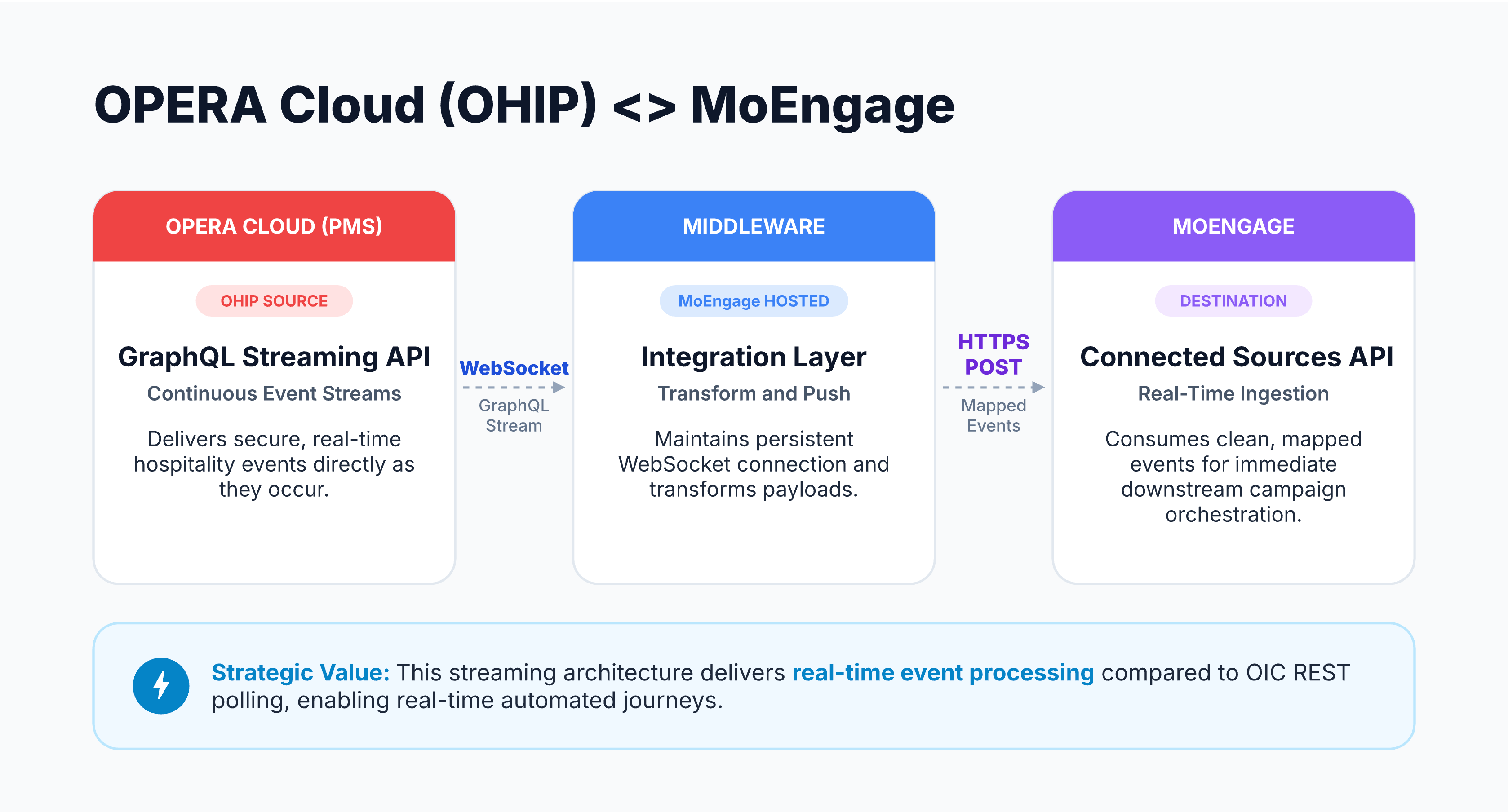 The following three components make up the integration:
* **Source (OPERA Cloud)**: The OHIP GraphQL Streaming API delivers secure, real-time hospitality events as they occur. It maintains a persistent WebSocket subscription instead of polling OPERA Cloud on a schedule.
* **Integration layer (MoEngage-hosted middleware)**: A fully managed listener holds the WebSocket connection to OHIP, authenticates securely with Oracle through OAuth 2.0, and transforms each event payload into the MoEngage user and event schema.
* **Destination (MoEngage)**: The middleware sends the transformed data through an HTTPS POST to the MoEngage Connected Sources API, which makes the mapped events available for use in your campaigns.
## Prerequisites
Before you request the integration, ensure you have an active [Oracle Hospitality Integration Platform](https://shop.oracle.com/apex/f?p=DSTORE:PRODUCT::::6:P6_LPI,P6_PROD_HIER_ID:126819285023690850584826,128016537132070991130337) subscription with the Streaming API enabled.
You must also add the OPERA environment you want to consume events from before you can subscribe to its events.
## Set Up the Integration
MoEngage configures this integration for you. To request it, perform the following steps:
1. Contact your MoEngage Customer Success Manager (CSM) or [MoEngage Support](https://help.moengage.com/hc/en-us/requests/new) and request the Oracle OPERA Cloud integration.
2. In the request, provide the following details:
| Detail | Description |
| ------------- | ------------------------------------------------------------------------------ |
| Enterprise ID | The unique identifier of the enterprise for which the OHIP client was created. |
| Chain Code | The code that identifies your hotel chain in OPERA Cloud. |
| Property Code | The code that identifies the property to stream events from. |
You can find all three in your OHIP Developer Portal.
3. Approve the access request that MoEngage raises through the OHIP Developer Portal. Sign in to your own OHIP portal instance to grant approval.
OHIP uses the Enterprise ID, Chain Code, and Property Code to authenticate the connection, so the request cannot proceed without all three. After you approve the access request, MoEngage completes the technical configuration and begins streaming events into your workspace.
## Related Integrations
To send data into MoEngage from other sources, refer to the following guides:
* [Data Imports](/docs/user-guide/data/imports/overview/overview-imports)
* [Connected Sources](/docs/partner-guide/integrate-with-us/build-integration/connected-sources)
The following three components make up the integration:
* **Source (OPERA Cloud)**: The OHIP GraphQL Streaming API delivers secure, real-time hospitality events as they occur. It maintains a persistent WebSocket subscription instead of polling OPERA Cloud on a schedule.
* **Integration layer (MoEngage-hosted middleware)**: A fully managed listener holds the WebSocket connection to OHIP, authenticates securely with Oracle through OAuth 2.0, and transforms each event payload into the MoEngage user and event schema.
* **Destination (MoEngage)**: The middleware sends the transformed data through an HTTPS POST to the MoEngage Connected Sources API, which makes the mapped events available for use in your campaigns.
## Prerequisites
Before you request the integration, ensure you have an active [Oracle Hospitality Integration Platform](https://shop.oracle.com/apex/f?p=DSTORE:PRODUCT::::6:P6_LPI,P6_PROD_HIER_ID:126819285023690850584826,128016537132070991130337) subscription with the Streaming API enabled.
You must also add the OPERA environment you want to consume events from before you can subscribe to its events.
## Set Up the Integration
MoEngage configures this integration for you. To request it, perform the following steps:
1. Contact your MoEngage Customer Success Manager (CSM) or [MoEngage Support](https://help.moengage.com/hc/en-us/requests/new) and request the Oracle OPERA Cloud integration.
2. In the request, provide the following details:
| Detail | Description |
| ------------- | ------------------------------------------------------------------------------ |
| Enterprise ID | The unique identifier of the enterprise for which the OHIP client was created. |
| Chain Code | The code that identifies your hotel chain in OPERA Cloud. |
| Property Code | The code that identifies the property to stream events from. |
You can find all three in your OHIP Developer Portal.
3. Approve the access request that MoEngage raises through the OHIP Developer Portal. Sign in to your own OHIP portal instance to grant approval.
OHIP uses the Enterprise ID, Chain Code, and Property Code to authenticate the connection, so the request cannot proceed without all three. After you approve the access request, MoEngage completes the technical configuration and begins streaming events into your workspace.
## Related Integrations
To send data into MoEngage from other sources, refer to the following guides:
* [Data Imports](/docs/user-guide/data/imports/overview/overview-imports)
* [Connected Sources](/docs/partner-guide/integrate-with-us/build-integration/connected-sources)