> ## Documentation Index
> Fetch the complete documentation index at: https://moengage.com/docs/llms.txt
> Use this file to discover all available pages before exploring further.
# Overview
> Bi-directional, real-time integration between MoEngage and Salesforce that unifies marketing and sales data across contacts, leads, opportunities, and custom objects.
## Introduction
This integration is part of the Salesforce CRM paid add-on. Contact your dedicated MoEngage Customer Success Manager (CSM) to enable it for your account.
[Salesforce](https://www.salesforce.com/in/) is a popular CRM tool used by support, sales, and marketing teams worldwide. Salesforce services help businesses use cloud technology to better connect with partners, customers, and prospects.
## MoEngage and Salesforce
The MoEngage and Salesforce bi-directional, real-time integration helps you unify marketing and sales by giving deeper insights into which campaigns increase your deal conversion rate. With this integration, you can:
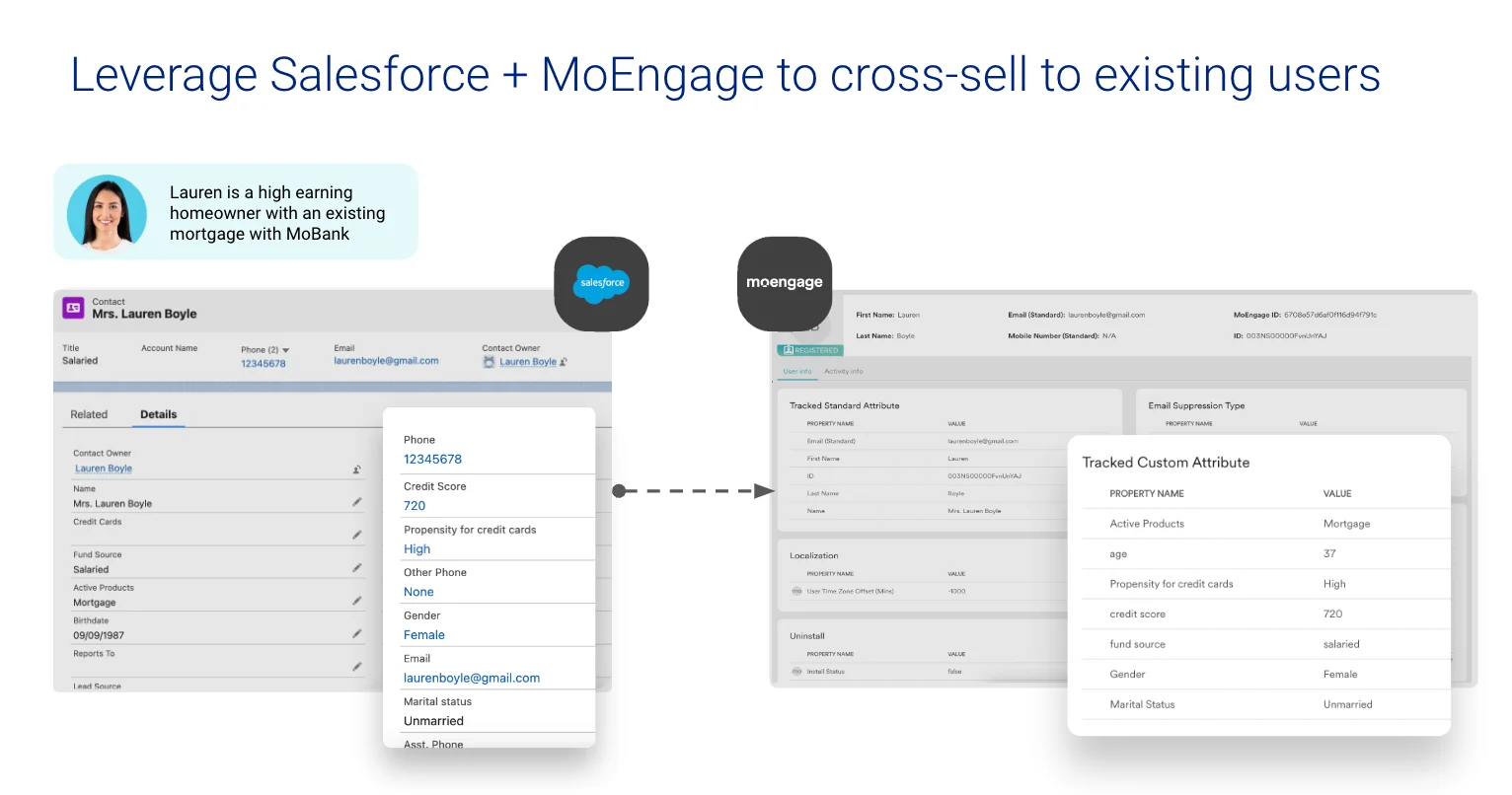
* Create or update Salesforce contacts, leads, opportunities, custom objects, or any other Salesforce object in MoEngage as users or events.
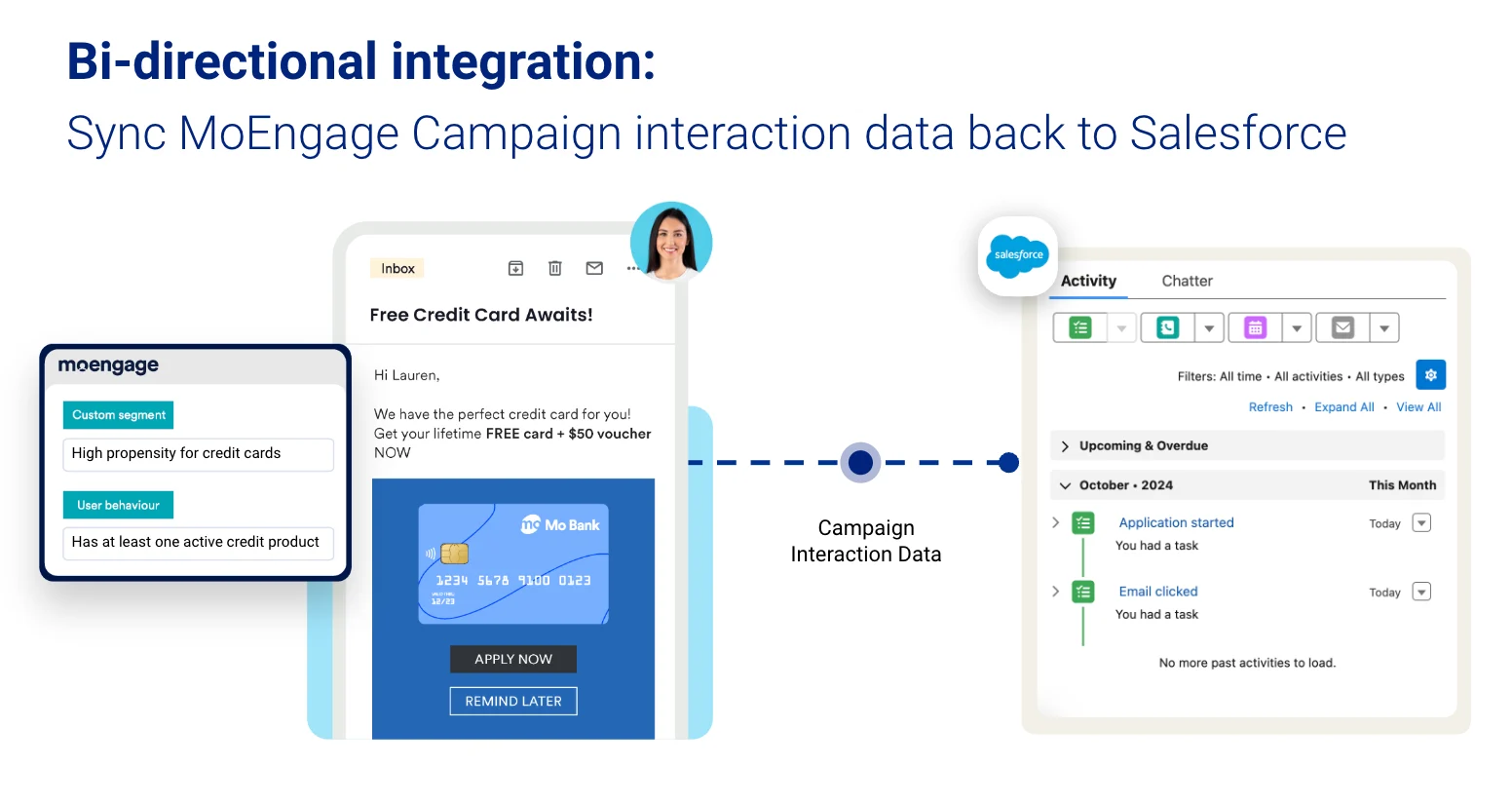
 * Send MoEngage campaign interaction data back to Salesforce as Activities, Events, or any custom Salesforce object.
 ### Use cases
* Engage your open Salesforce opportunities using custom segments in MoEngage.
* Win back lost deals by updating prospects about new features through MoEngage campaigns.
* Convert leads to opportunities by sending targeted campaigns from MoEngage.
* Move prospects down the funnel with timely, event-triggered campaigns in MoEngage.
## Integration
**Prerequisites**
* A Salesforce account with admin access and access to Salesforce AppExchange.
* Access to your MoEngage APIs (**Settings** > **Account** > **APIs**).
## Setup
Follow these steps to set up the bi-directional data flow between MoEngage and Salesforce.
This is a one-time setup where you install the MoEngage app from the Salesforce AppExchange and enable it through App Manager. See the [setup guide](/partner-guide/data-and-analytics/crm/salesforce-crm-native/setup-moengage-app-on-salesforce) for full details.
* [Install the Salesforce app](/partner-guide/data-and-analytics/crm/salesforce-crm-native/setup-moengage-app-on-salesforce): Required for both Salesforce-to-MoEngage and MoEngage-to-Salesforce data flow.
* [Create a connected app](/partner-guide/data-and-analytics/crm/salesforce-crm-native/setup-moengage-app-on-salesforce): Required only when you send data from MoEngage to Salesforce through MoEngage Streams.
Follow the steps in the [Sync Salesforce objects to MoEngage](/partner-guide/data-and-analytics/crm/salesforce-crm-native/sync-salesforce-objects-to-moengage) guide to sync any Salesforce object to MoEngage as users or events. Newly created or updated records are synced in real time.
[Set up an outbound integration](/partner-guide/data-and-analytics/crm/salesforce-crm-native/sync-data-from-moengage-to-salesforce) with Salesforce that forwards MoEngage events to Salesforce as Activities or any other standard or custom Salesforce object. With this, any campaign interaction data captured by MoEngage can be sent in real time through MoEngage Streams.
## Next steps
Install the MoEngage app from AppExchange and configure permissions and connected apps.
Sync standard or custom Salesforce objects to MoEngage as users or events.
Forward MoEngage campaign interaction events to Salesforce as Activities or custom objects.
### Use cases
* Engage your open Salesforce opportunities using custom segments in MoEngage.
* Win back lost deals by updating prospects about new features through MoEngage campaigns.
* Convert leads to opportunities by sending targeted campaigns from MoEngage.
* Move prospects down the funnel with timely, event-triggered campaigns in MoEngage.
## Integration
**Prerequisites**
* A Salesforce account with admin access and access to Salesforce AppExchange.
* Access to your MoEngage APIs (**Settings** > **Account** > **APIs**).
## Setup
Follow these steps to set up the bi-directional data flow between MoEngage and Salesforce.
This is a one-time setup where you install the MoEngage app from the Salesforce AppExchange and enable it through App Manager. See the [setup guide](/partner-guide/data-and-analytics/crm/salesforce-crm-native/setup-moengage-app-on-salesforce) for full details.
* [Install the Salesforce app](/partner-guide/data-and-analytics/crm/salesforce-crm-native/setup-moengage-app-on-salesforce): Required for both Salesforce-to-MoEngage and MoEngage-to-Salesforce data flow.
* [Create a connected app](/partner-guide/data-and-analytics/crm/salesforce-crm-native/setup-moengage-app-on-salesforce): Required only when you send data from MoEngage to Salesforce through MoEngage Streams.
Follow the steps in the [Sync Salesforce objects to MoEngage](/partner-guide/data-and-analytics/crm/salesforce-crm-native/sync-salesforce-objects-to-moengage) guide to sync any Salesforce object to MoEngage as users or events. Newly created or updated records are synced in real time.
[Set up an outbound integration](/partner-guide/data-and-analytics/crm/salesforce-crm-native/sync-data-from-moengage-to-salesforce) with Salesforce that forwards MoEngage events to Salesforce as Activities or any other standard or custom Salesforce object. With this, any campaign interaction data captured by MoEngage can be sent in real time through MoEngage Streams.
## Next steps
Install the MoEngage app from AppExchange and configure permissions and connected apps.
Sync standard or custom Salesforce objects to MoEngage as users or events.
Forward MoEngage campaign interaction events to Salesforce as Activities or custom objects.