> ## Documentation Index
> Fetch the complete documentation index at: https://moengage.com/docs/llms.txt
> Use this file to discover all available pages before exploring further.
# Airbridge
[Airbridge](https://www.airbridge.io/) is a mobile attribution and marketing analytics platform that helps you measure and optimize your app marketing campaigns.
## MoEngage × Airbridge
The integration between MoEngage and Airbridge sends attributed app install events from Airbridge directly to your MoEngage account. This enables you to analyze campaign performance and create targeted user segments based on acquisition data.
## Use Cases
Integrating Airbridge with MoEngage helps you with the following:
* **Targeted campaign creation** : You can use attribution data from Airbridge to build finely-targeted marketing campaigns for users acquired from specific sources.
* **Performance analysis** : You can analyze which campaigns and publishers are driving the most valuable users by tracking their behavior in MoEngage.
* **User segmentation** : You can create user segments based on their acquisition source for personalized onboarding flows and engagement journeys.
# Integration
To set up the integration, you need the following from your MoEngage dashboard:
* Workspace ID (earlier app ID)
* Attribution key
* Data center ID
## Step 1: Find Your Credentials in MoEngage
To find your credentials, perform the following steps:
1. On the MoEngage UI, navigate to **Settings** > **Account** > **APIs**.
2. Copy the ID under **Workspace ID (earlier app id)**. 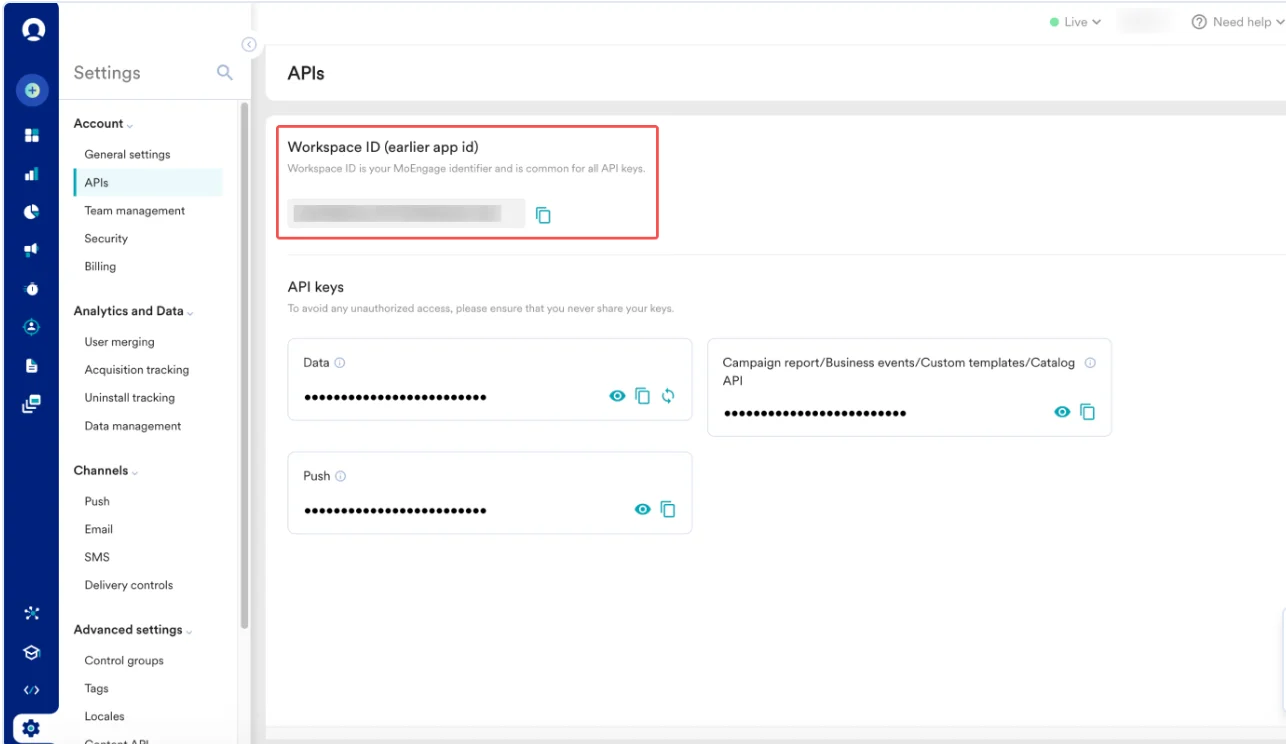 3. On the MoEngage UI, navigate to **Settings** > **Analytics** **and** **Data** > **Acquisition tracking**.\*\*\
**The**Acquisition tracking\*\* page appears.
4. Turn the **Acquisition tracking** toggle on.
5. In the **Attribution Platform** list, select **Airbridge**.\
The **Attribution Key** field appears. This is your attribution key.
6. Click **Save**.
3. On the MoEngage UI, navigate to **Settings** > **Analytics** **and** **Data** > **Acquisition tracking**.\*\*\
**The**Acquisition tracking\*\* page appears.
4. Turn the **Acquisition tracking** toggle on.
5. In the **Attribution Platform** list, select **Airbridge**.\
The **Attribution Key** field appears. This is your attribution key.
6. Click **Save**. 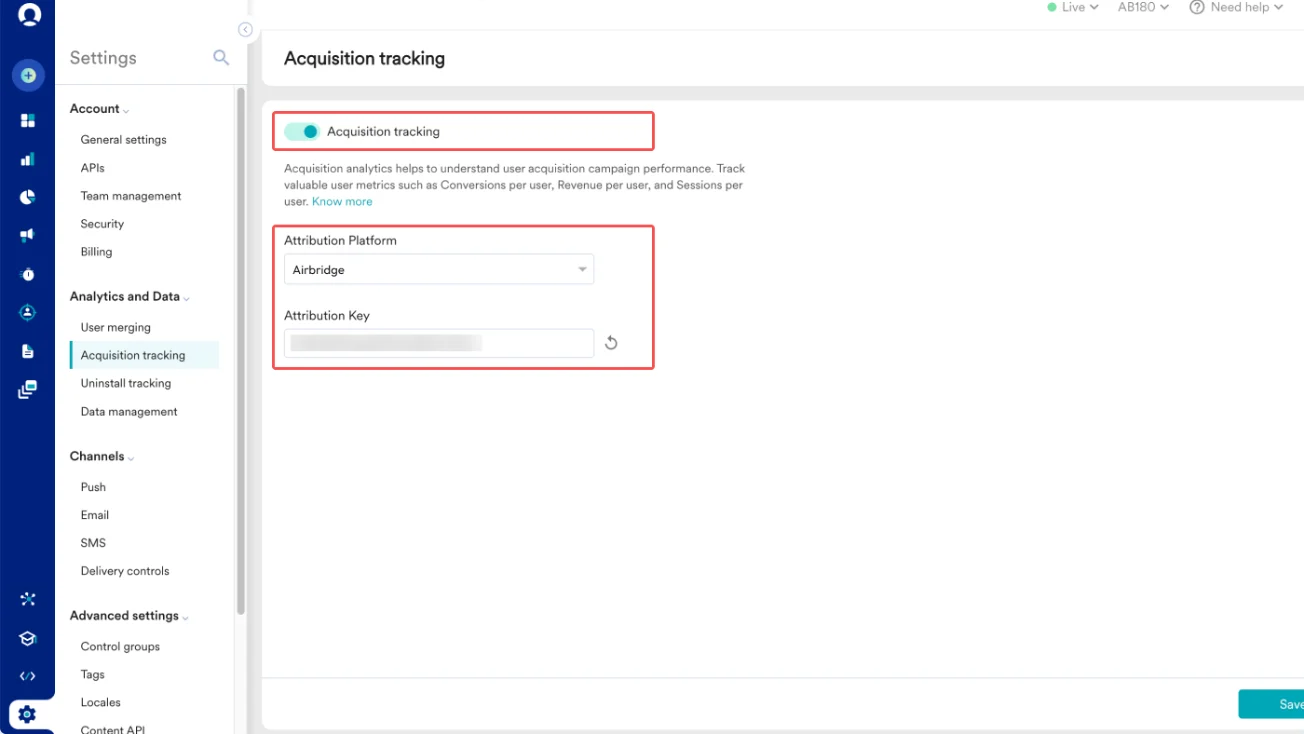 7. Data Center IDs are assigned when signing up with MoEngage. Your data center ID can be identified from the dashboard URL. For example, if your dashboard URL is [https://dashboard-04.moengage.com/v4/#/auth](https://dashboard-04.moengage.com/v4/#/auth), your data center is data center 04, and the data center ID is\
DC-04. For more information, refer to [Data Centers in MoEngage](https://www.moengage.com/docs/user-guide/data/key-concepts/data-centers-in-moengage).
## Step 2: Configure Integration in Airbridge
After locating your MoEngage credentials, log in to your Airbridge dashboard. To complete the setup, perform the following steps:
1. On the sidebar menu, click**Integrations**. The **Integrations** menu appears.
2. Click **Third-party Integration**.
3. On the **Third-party Integration** page, click the **MoEngage** tile.
7. Data Center IDs are assigned when signing up with MoEngage. Your data center ID can be identified from the dashboard URL. For example, if your dashboard URL is [https://dashboard-04.moengage.com/v4/#/auth](https://dashboard-04.moengage.com/v4/#/auth), your data center is data center 04, and the data center ID is\
DC-04. For more information, refer to [Data Centers in MoEngage](https://www.moengage.com/docs/user-guide/data/key-concepts/data-centers-in-moengage).
## Step 2: Configure Integration in Airbridge
After locating your MoEngage credentials, log in to your Airbridge dashboard. To complete the setup, perform the following steps:
1. On the sidebar menu, click**Integrations**. The **Integrations** menu appears.
2. Click **Third-party Integration**.
3. On the **Third-party Integration** page, click the **MoEngage** tile.
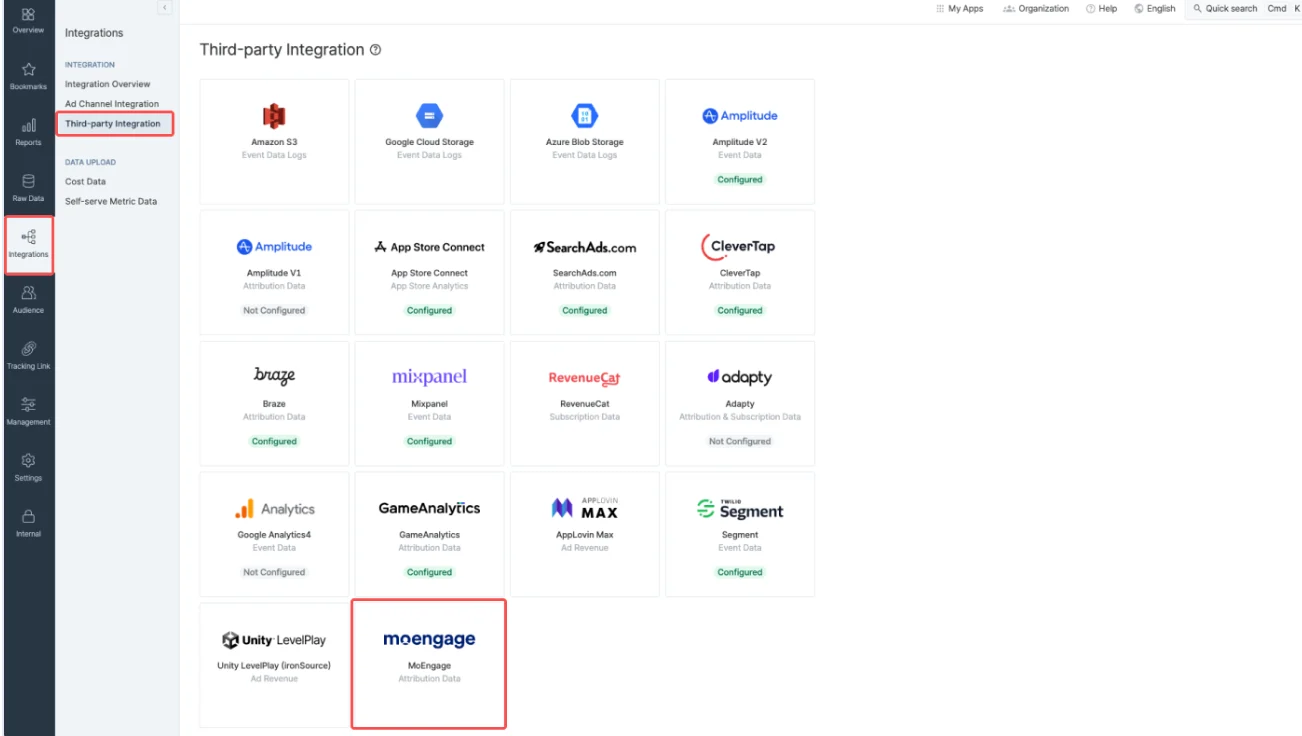 The **MoEngage** page appears.
4. Enter the workspace ID (app ID) copied from MoEngage in the **Workspace ID** box.
5. Enter the attribution key copied from MoEngage in the **Attribution Key** box.
6. In the **Data Cente** r list, select your MoEngage data center. Ensure you've entered all information correctly. The integration will fail if any details are missing or incorrect.
7. Click **Submit**.
The **MoEngage** page appears.
4. Enter the workspace ID (app ID) copied from MoEngage in the **Workspace ID** box.
5. Enter the attribution key copied from MoEngage in the **Attribution Key** box.
6. In the **Data Cente** r list, select your MoEngage data center. Ensure you've entered all information correctly. The integration will fail if any details are missing or incorrect.
7. Click **Submit**. 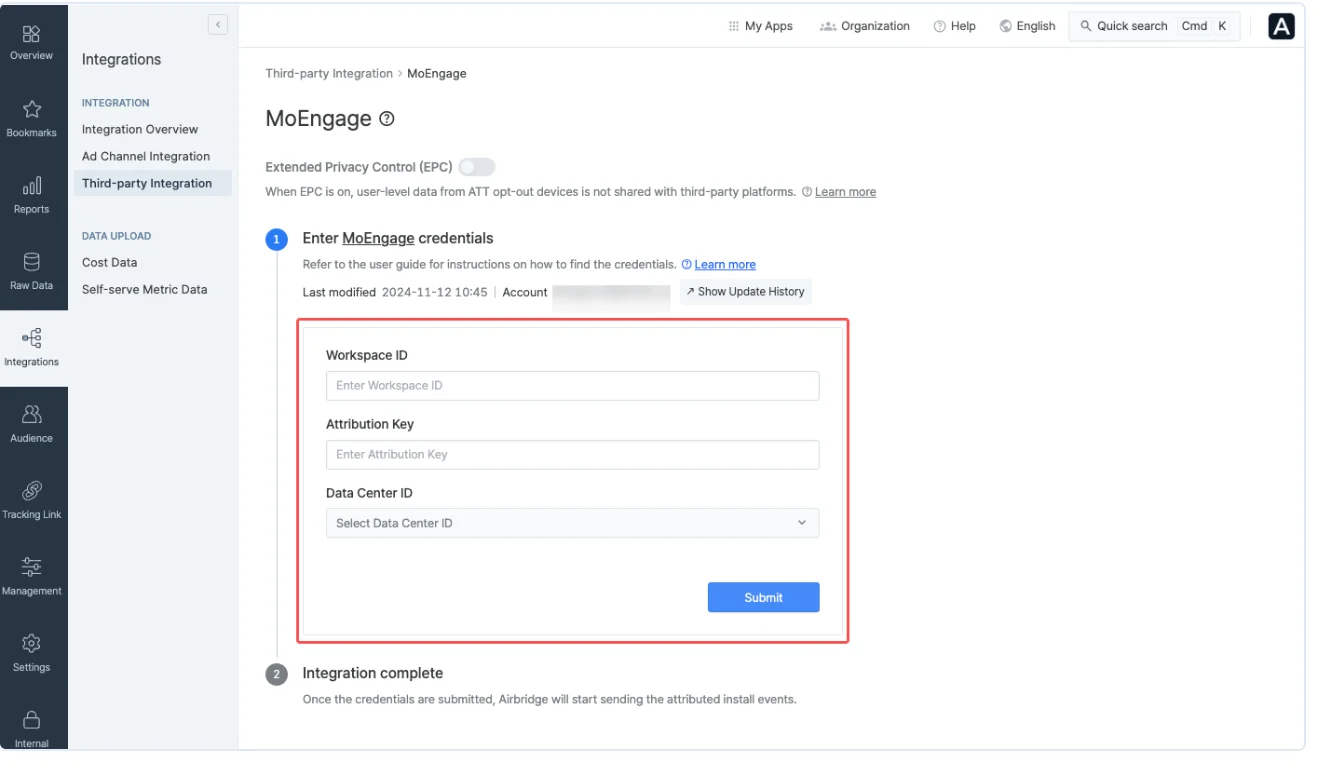 # Use the Acquisition Data in MoEngage
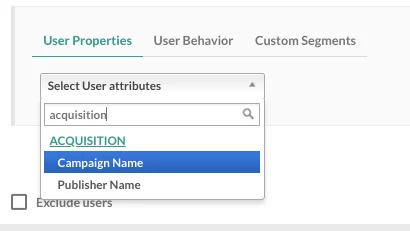
After MoEngage receives data from Airbridge, you can use user attributes such as *Campaign Name* and *Publisher Name* to improve your campaigns, segment your audience more effectively, and improve your reports. This allows you to create personalized welcome experiences, guide users smoothly through their journey, and automate your marketing smarter in MoEngage.
# Use the Acquisition Data in MoEngage
After MoEngage receives data from Airbridge, you can use user attributes such as *Campaign Name* and *Publisher Name* to improve your campaigns, segment your audience more effectively, and improve your reports. This allows you to create personalized welcome experiences, guide users smoothly through their journey, and automate your marketing smarter in MoEngage.
 ## Analyze the Performance of Publishers
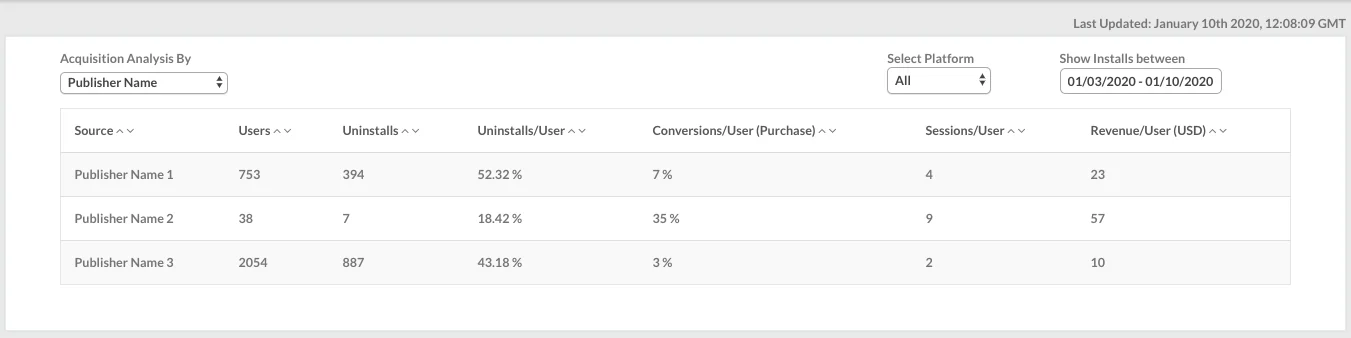
After integrating Airbridge, MoEngage helps you analyze the effectiveness of your app install campaigns and their sources. Combine Airbridge's acquisition data with user events, conversion goals, and uninstall data in MoEngage. You can then compare the performance of different campaigns and analyze installs from various publishers to optimize your marketing spend.
## Analyze the Performance of Publishers
After integrating Airbridge, MoEngage helps you analyze the effectiveness of your app install campaigns and their sources. Combine Airbridge's acquisition data with user events, conversion goals, and uninstall data in MoEngage. You can then compare the performance of different campaigns and analyze installs from various publishers to optimize your marketing spend.
 ## Analyze the Performance of Campaigns
After the integration is complete, you can view your acquisition data analysis on the acquisition dashboard. In MoEngage, navigate to **Analyze** > **Acquisition**. If you're using MoEngage Analytics, you can also leverage the *Publisher Name* and *Campaign Name* attributes to analyze your user funnels.
## Analyze the Performance of Campaigns
After the integration is complete, you can view your acquisition data analysis on the acquisition dashboard. In MoEngage, navigate to **Analyze** > **Acquisition**. If you're using MoEngage Analytics, you can also leverage the *Publisher Name* and *Campaign Name* attributes to analyze your user funnels.
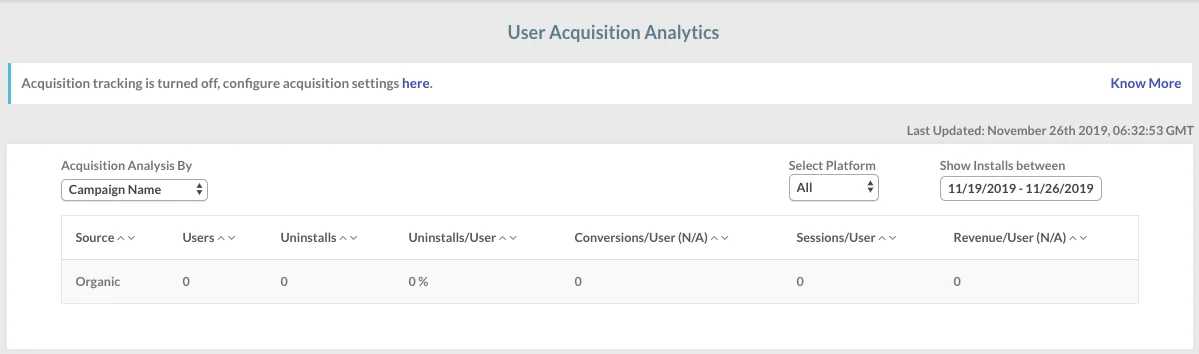 You may observe a difference between the user counts shown in MoEngage and the counts sent by Airbridge. This is typically due to differences in how each platform identifies and attributes users.