> ## Documentation Index
> Fetch the complete documentation index at: https://moengage.com/docs/llms.txt
> Use this file to discover all available pages before exploring further.
# POPcoins
# Introduction
[POPcoins](https://mypop.in/) is a currency that allows you to access exclusive offers and discounts when you shop on POPcoins partner websites.
# MoEngage × POPcoins
With the MoEngage and POPcoins integration, you can:
1. Send lifecycle events to MoEngage such as login, purchase, credit added, etc.
2. Update the information of the customer name, email, and mobile number, as well as update their loyalty information such as coin balance, coins earned, etc. on MoEngage
# Integration
**Prerequisites**
* You would need access to your POPclub dashboard.
To begin sending your users' loyalty information as well as their event activities,
1. On your POPclub dashboard, go to *Integrations >> MoEngage*.
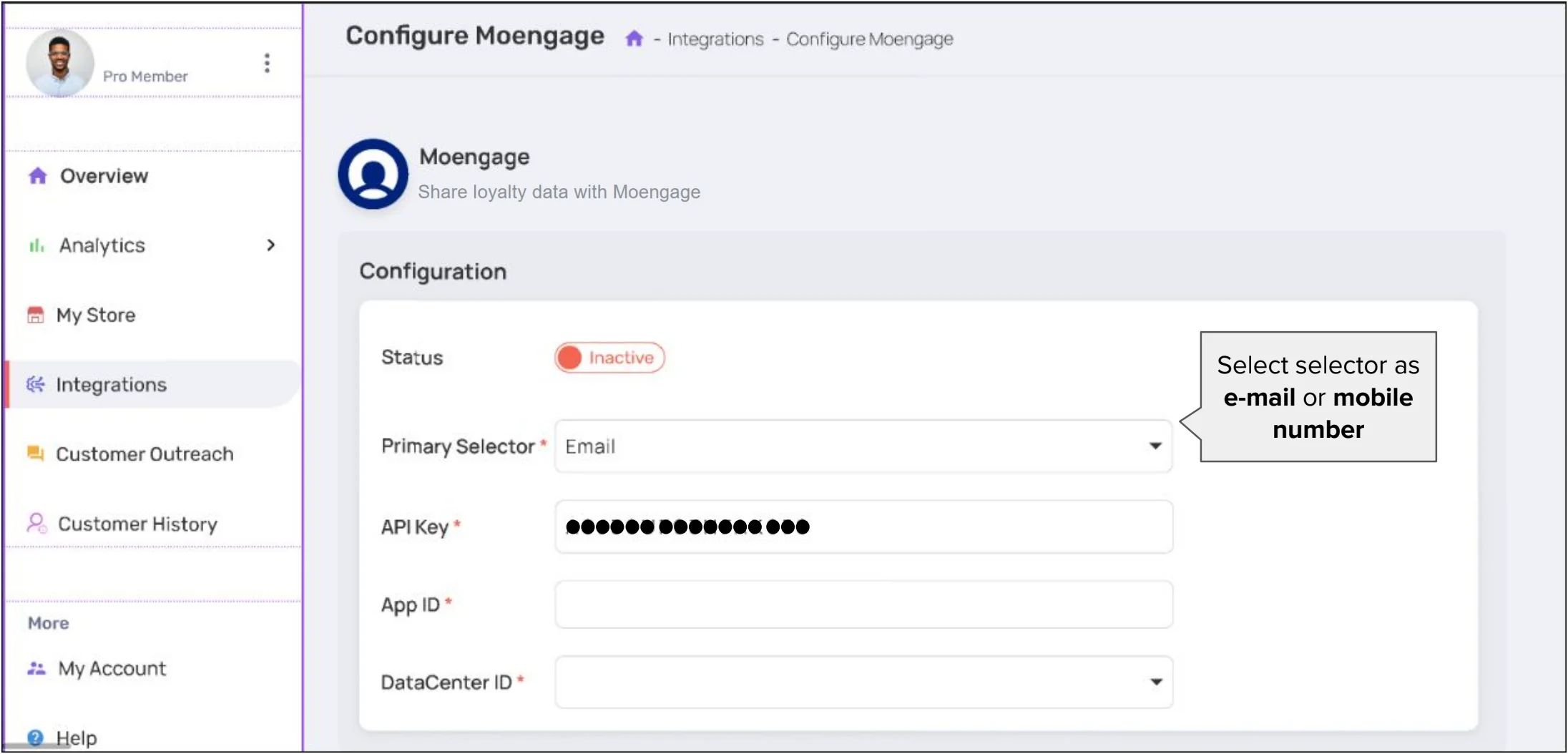 2. Enter the following information:
| **Field** | **Description** |
| ---------------- | -------------------------------------------------------------------------------------------------------------------------------------------------------------------------------------- |
| Status | Click on "Inactive" to activate the status. |
| Primary Selector | Select your customer identifier to match users on MoEngage. This can be either mobile or e-mail. Note that POPcoins will attempt to match users based on your customer ID in MoEngage. |
| API Key | The Data API key of your MoEngage account is available at **Settings -> Account -> APIs -> API keys** > **Data** API settings. |
| Workspace ID | The Workspace ID of your MoEngage account is available at **Settings -> Account -> APIs -> Workspace ID**. |
| Data Center ID | Select your Data Center ID based on your MoEngage Dashboard URL. [Know more](/user-guide/data/key-concepts/data-centers-in-moengage). |
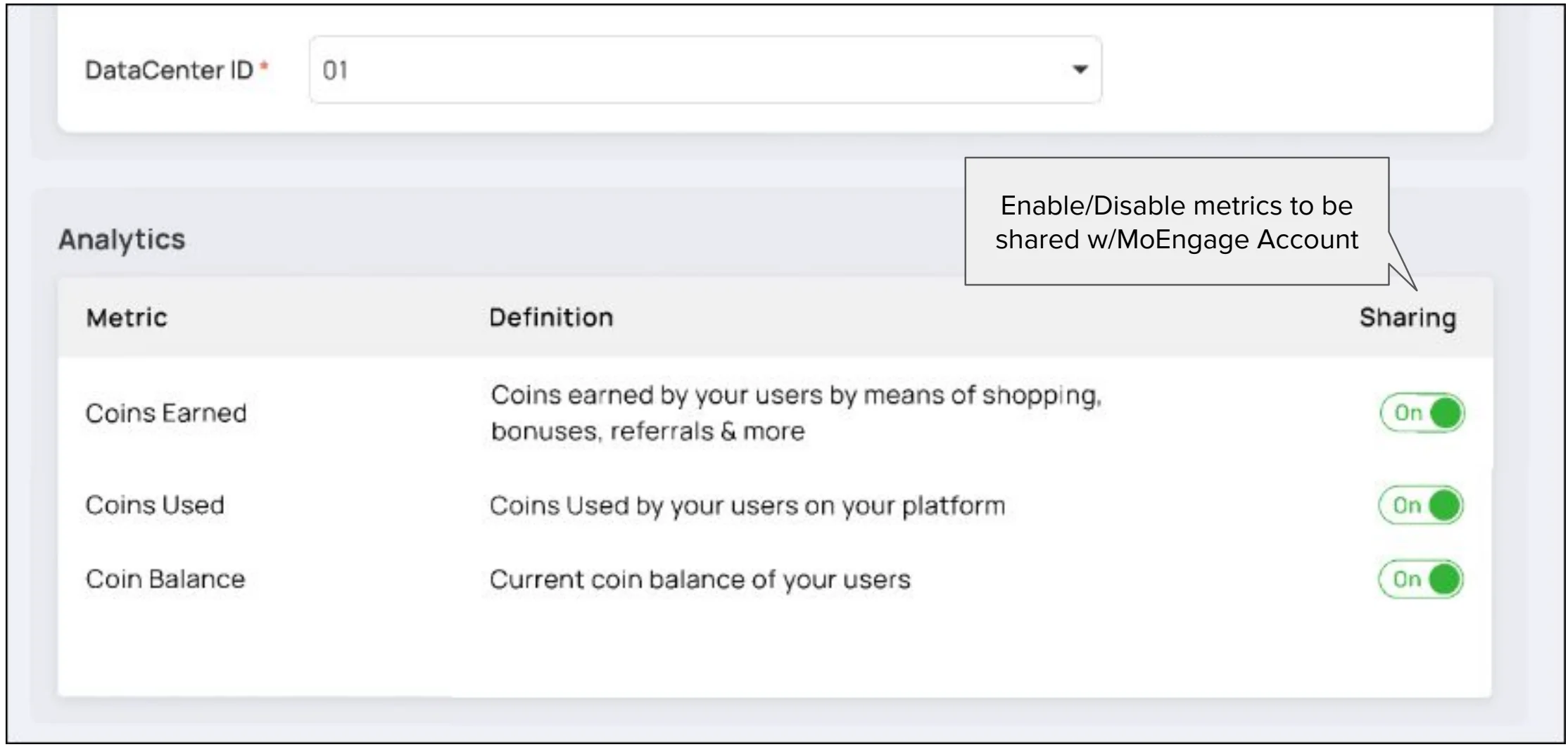
3. Toggle the metrics you want to send to MoEngage:
2. Enter the following information:
| **Field** | **Description** |
| ---------------- | -------------------------------------------------------------------------------------------------------------------------------------------------------------------------------------- |
| Status | Click on "Inactive" to activate the status. |
| Primary Selector | Select your customer identifier to match users on MoEngage. This can be either mobile or e-mail. Note that POPcoins will attempt to match users based on your customer ID in MoEngage. |
| API Key | The Data API key of your MoEngage account is available at **Settings -> Account -> APIs -> API keys** > **Data** API settings. |
| Workspace ID | The Workspace ID of your MoEngage account is available at **Settings -> Account -> APIs -> Workspace ID**. |
| Data Center ID | Select your Data Center ID based on your MoEngage Dashboard URL. [Know more](/user-guide/data/key-concepts/data-centers-in-moengage). |
3. Toggle the metrics you want to send to MoEngage:
 4. Toggle the events you want to forward to MoEngage:
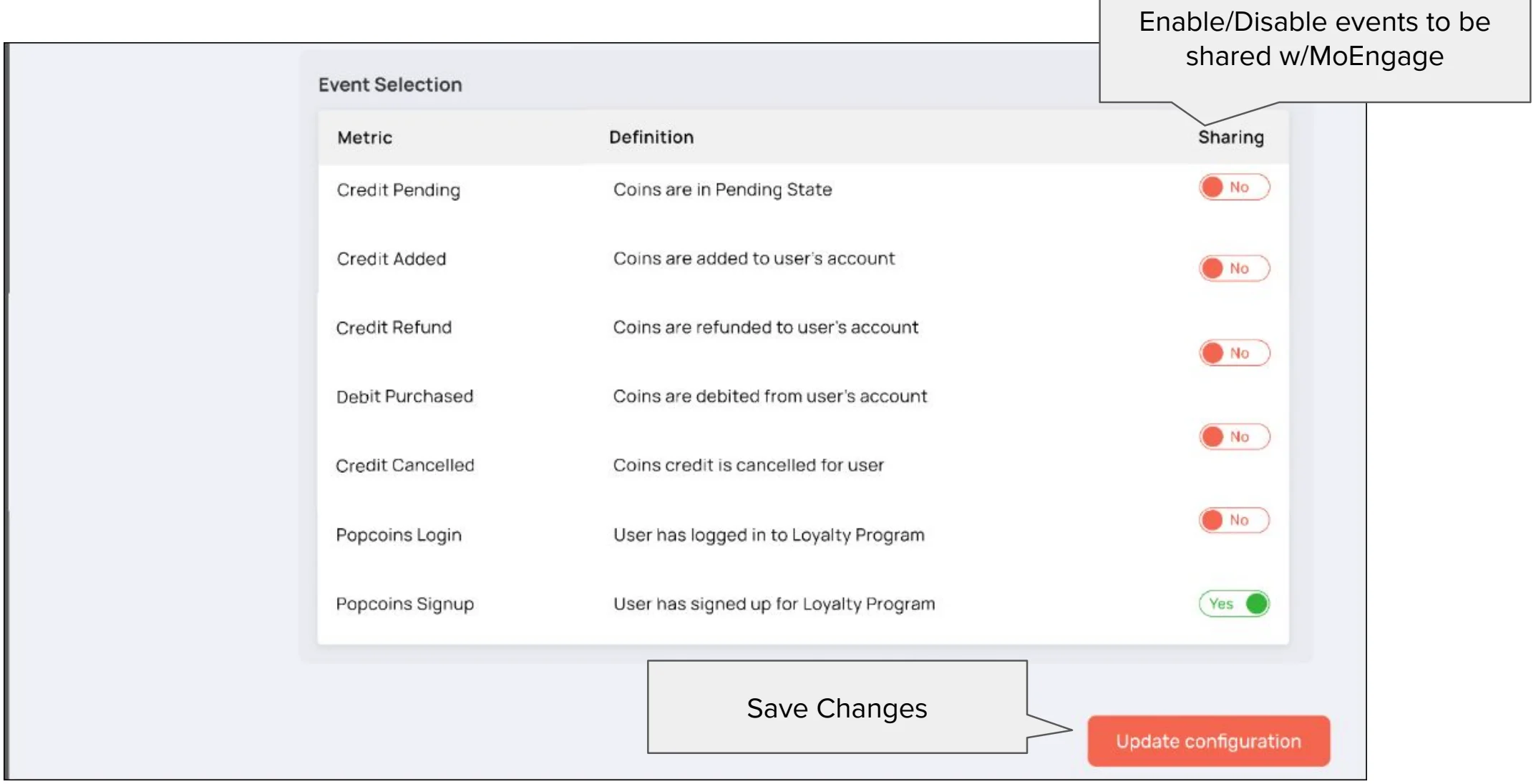 5. Click on "Update configuration" to save the integration.
## Events forwarded by POPcoins
| **Event** | **Description** |
| ---------------- | ----------------------------------------- |
| Credit Pending | Coins are in Pending State |
| Credit Added | Coins are added to the user's account. |
| Credit Refund | Your Coins are refunded to your account. |
| Debit Purchased | Your Coins are debited from your account. |
| Credit Cancelled | Your Coins credit is canceled. |
| Popcoins Login | You have logged in to your account. |
| Popcoins Signup | You have signed up. |
5. Click on "Update configuration" to save the integration.
## Events forwarded by POPcoins
| **Event** | **Description** |
| ---------------- | ----------------------------------------- |
| Credit Pending | Coins are in Pending State |
| Credit Added | Coins are added to the user's account. |
| Credit Refund | Your Coins are refunded to your account. |
| Debit Purchased | Your Coins are debited from your account. |
| Credit Cancelled | Your Coins credit is canceled. |
| Popcoins Login | You have logged in to your account. |
| Popcoins Signup | You have signed up. |