> ## Documentation Index
> Fetch the complete documentation index at: https://moengage.com/docs/llms.txt
> Use this file to discover all available pages before exploring further.
# Create MoEngage Event activity in SFMC
> Configure the MoEngage Event custom activity in Salesforce Marketing Cloud to trigger Event Triggered Campaigns in MoEngage for any contact in a journey.
## Introduction
This guide provides detailed instructions for creating a MoEngage Event custom activity in SFMC.
**Prerequisites**
* Salesforce Marketing Cloud Access: Ensure you have access to SFMC.
## Integration
The integration leverages MoEngage event custom activity in SFMC to trigger an Event Triggered Campaign on MoEngage.
| Context | Description |
| --------------------------------- | ----------------------------------------------------------------------------------------------------------------------------------------------------------------------------------------------------------------------------------------------------------------------------------------------------------------------------- |
| MoEngage Event Triggered Campaign | These allow you to automatically send personalized messages (like push, email, or SMS) when a specific event is tracked in MoEngage. These campaigns can be configured to send immediately after the event happens (for example, an order confirmation) or after a specific delay, potentially based on a sequence of events. |
| MoEngage Event Activity in SFMC | MoEngage event custom activity is a component added to the SFMC canvas. When a contact reaches this activity in a journey, it triggers a specified event via MoEngage's event API, which in turn registers an event against that contact in MoEngage. |
So, when a contact reaches this activity in a journey, it sends an event to MoEngage, which can then initiate related campaigns configured within MoEngage.
## Steps
### Step 1: Create a MoEngage Event Triggered Campaign
[Refer to the guide here](https://www.moengage.com/docs/user-guide/campaigns-and-channels/getting-started/triggers/event/create-an-event-triggered-campaign) to create an event triggered campaign in MoEngage. You can choose an event that you want to send from SFMC as your trigger criteria. Any personalisation that you want to use in the campaign content can be passed from SFMC as event attribute.
### Step 2: Configure MoEngage Event
1. In your SFMC journey, drag and drop the "MoEngage Event" activity.
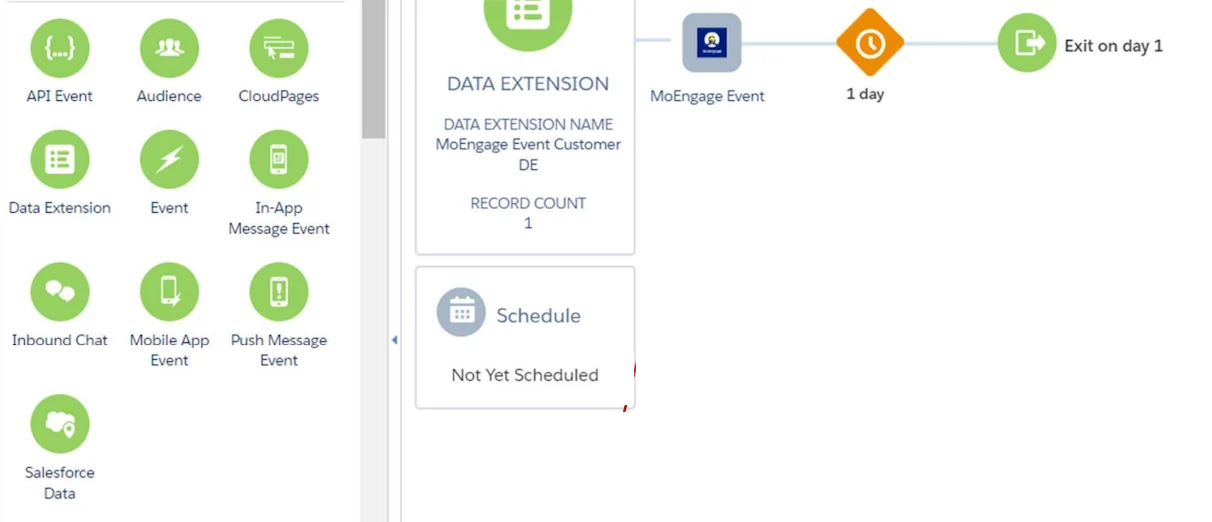 2. Click on "MoEngage Event".
3. Fill in the relevant details for the Event.
| Field | Field name | Description |
| ----------------- | ----------------------------- | ------------------------------------------------------------------------------------------------------------------------------------------------------------------------------------------------------------------------------------------------------------------------------------------------------------------------------------------------------------------------------------------------------------------------------------------------------------------------------------------------------------------------------------------------------------------------------------------------------------------------------------------------------------------------------------------------------------------------------------------------------------------------------------------------------------------------------------------------------------------------------------------------------------------------------------------------------------------------------------------------------------------------------------------------------------------------------------------------------------------------------------------------------------------------------------------------------------------------------------------------------------------------------------------------------------------------------------------------------------------------------------------------------------------------------------------------------------------------------------------------------------------------------------------------------------------------------------------------------------------------------------------------------------------------------------------------------------------------------------------------------------------------------------------------------------------------------------------ |
| Workspace details | Workspace Name | Enter your workspace name. It is present in the header on your MoEngage dashboard.
2. Click on "MoEngage Event".
3. Fill in the relevant details for the Event.
| Field | Field name | Description |
| ----------------- | ----------------------------- | ------------------------------------------------------------------------------------------------------------------------------------------------------------------------------------------------------------------------------------------------------------------------------------------------------------------------------------------------------------------------------------------------------------------------------------------------------------------------------------------------------------------------------------------------------------------------------------------------------------------------------------------------------------------------------------------------------------------------------------------------------------------------------------------------------------------------------------------------------------------------------------------------------------------------------------------------------------------------------------------------------------------------------------------------------------------------------------------------------------------------------------------------------------------------------------------------------------------------------------------------------------------------------------------------------------------------------------------------------------------------------------------------------------------------------------------------------------------------------------------------------------------------------------------------------------------------------------------------------------------------------------------------------------------------------------------------------------------------------------------------------------------------------------------------------------------------------------------ |
| Workspace details | Workspace Name | Enter your workspace name. It is present in the header on your MoEngage dashboard.

Note: Workspace name must be the same as the one entered on the "MoEngage User Authentication Page" CloudPage. To verify the Workspace name, go to the Data Extension titled "MoEngage Credentials DE" and open "MoEngage Credentials". |
| Event Details | Event Name | Name of the event that you have used to create an Event Triggered campaign in MoEngage.
Note: Ensure the Event Name matches the Event Trigger Campaign. |
| Event Details | User Identifier | Select the attribute and value that needs to be used to identify the user in MoEngage. |
| Event Attributes | Campaign ID \[Optional] | ID of your event triggered campaign on MoEngage. You can use this as a filter criteria while creating your campaign. This is only to ensure that you are triggering the right campaign. |
| Event Attributes | Campaign Name \[Optional] | Name of your event triggered campaign on MoEngage. You can use this as a filter criteria while creating your campaign. This is only to ensure that you are triggering the right campaign. |
| Event Attributes | Custom Attributes \[Optional] | Any other data points from your SFMC Data Extension that needs to be passed to MoEngage for hyper-personalisation or targeting.- Key Value pairs can be added manually.
- Structure:
- Key: Type in the key name that you want to be available as an event attribute in MoEngage.
- Value: It can be a hardcoded value or any value from the Data Extension specific to the contact.
- Dynamic value format: You can use the Data Extension field name in mustache syntax, formatted as
\{\{Field Name}}.
Note: Ensure that the field name exactly matches the target DE. If the field name is correct, it will populate with the corresponding value from the target DE; otherwise, it will display the placeholder \{\{Field Name}} as is. |
Once the custom activity is set up, you can continue with your Journey.
### Step 3: View campaign on MoEngage
You can navigate to the All Campaigns page and view all the created campaigns. These will be created as API triggered Push Campaigns on MoEngage.