> ## Documentation Index
> Fetch the complete documentation index at: https://moengage.com/docs/llms.txt
> Use this file to discover all available pages before exploring further.
# Sinch
# Introduction
Sinch is a global CPaas (Communications Platform as a Service provider) that enables businesses to send text messages to large numbers of customers and to make video and voice calls.
# Configure Sinch as SMS connector (Service Provider)
**Prerequisites**
Ensure you have the Shortcode, Access token, and Service Plan ID available on the Sinch dashboard. You can also reach out to MoEngage Customer Success team to get assistance on this.
Log in to the MoEngage Dashboard and follow these steps:
1. Navigate to **Settings** -> **Channel** -> **SMS** -> **Sender Configuration**.
2. Click **+Add Service Provider** at the top right corner.
3. Select **Sinch** in the **Add Sender** screen.
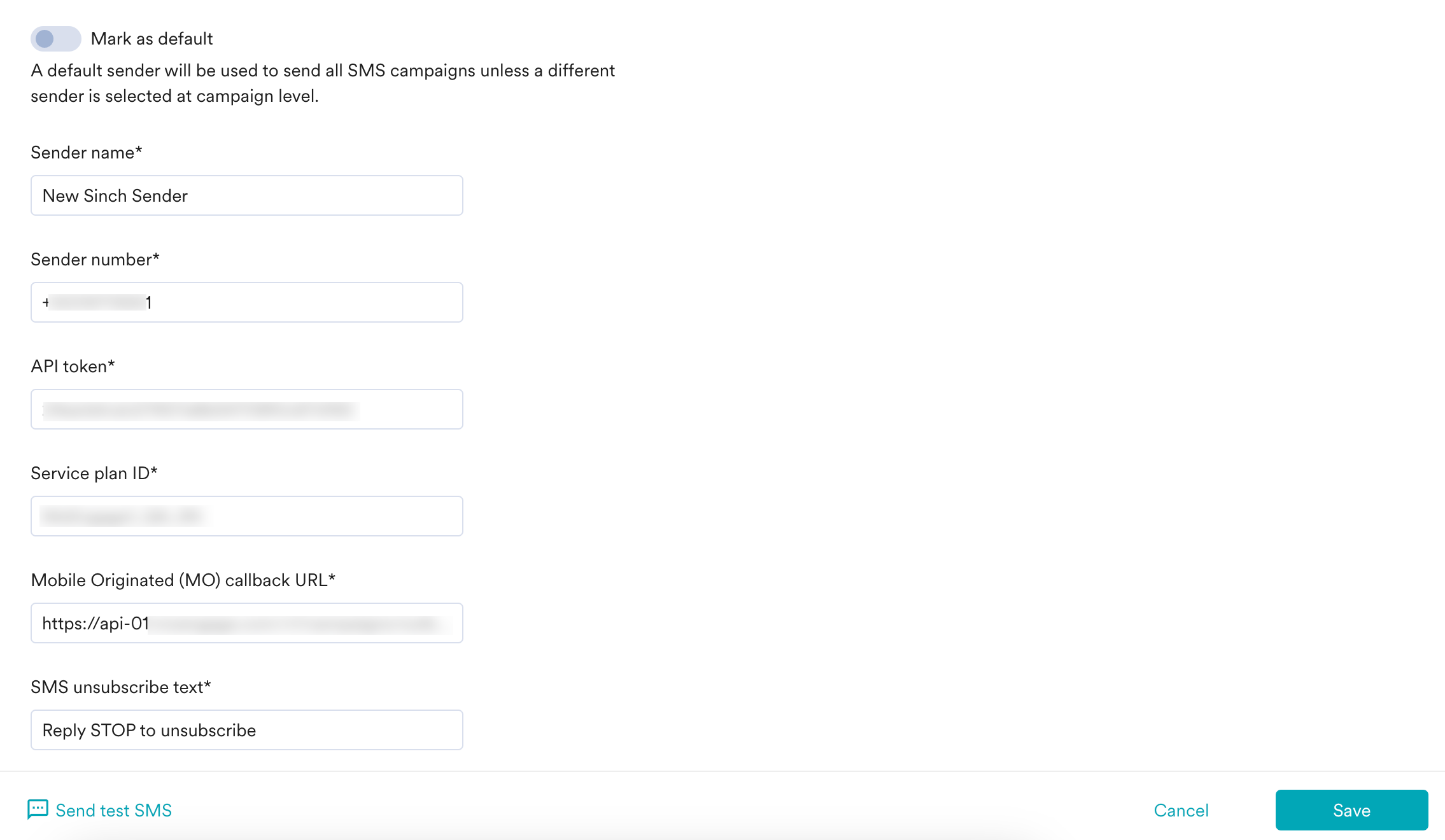
4. Add the following details in the **Sender Details** screen.
| Field | Description |
| --------------------------------------- | ------------------------------------------------------------------------------------------------------------------------------------------------------------------------------------------------------------------------------------------------------------------------------------------------------------------------------------------------------------------------------------------------------------------------------------------------------------------------------------------------------------------------------------------------------------------------------------------------------------------------------------------------------------------------------------------------------------------------------------------------------------------------------------------------------------------------------------------------------------------------------------------------------------------------------------------------------------------------------------------------------------------------------------------------------------------------------------------------------------------------------------------------------------------------------------------------------------------------------------------------------------------------------------------------------------------------------------------------------------------------------------------------------------------------------------------------------------------------------------------------------------------------------------------------------------------------------------------------------------------------------------------------------------------------------------------------------------------------------------- |
| **Mark as default** | This toggle will be disabled during sender creation. The first sender to be created in your MoEngage account will be marked as the default sender for your SMS campaigns. You can change the default sender by following the steps mentioned in [Marking a sender as default](/docs/user-guide/campaigns-and-channels/sms-mms-and-rcs/sms/getting-started-with-sms/configure-an-sms-sender). |
| **Sender name** | This field identifies the readable sender name that can be used while creating a campaign or alert. |
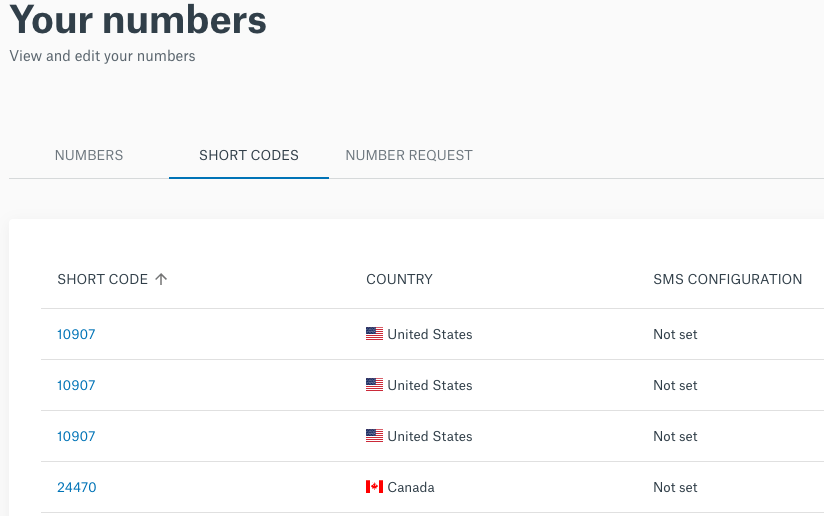
| **Sender number** | This field denotes the number from which SMS will be sent to your users. Use the shortcode number from the [Shortcode Sinch dashboard](https://dashboard.sinch.com/numbers/your-numbers/short-codes), as described.
 |
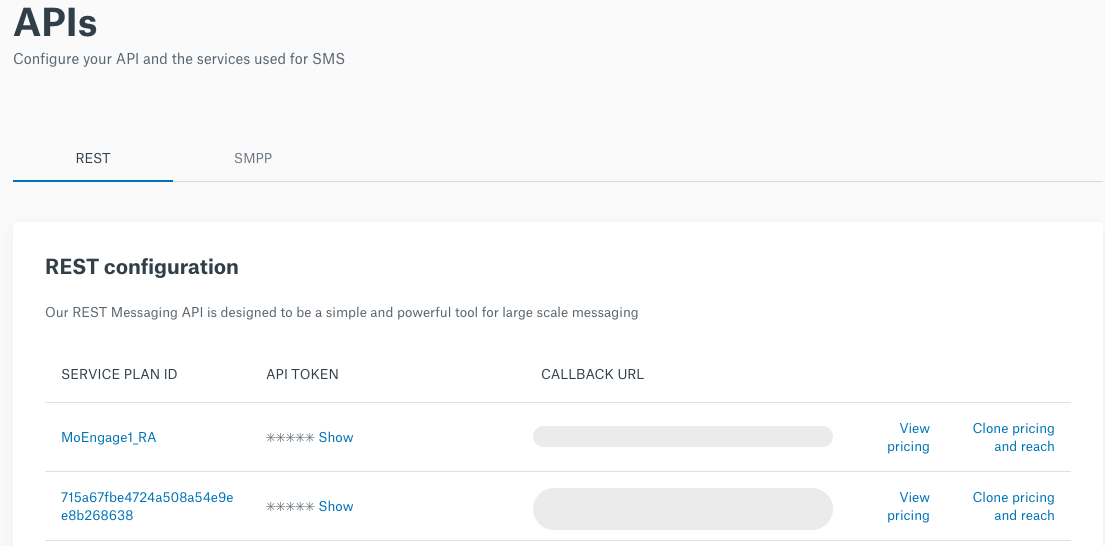
| **API token** | This field denotes the API token that is required for authentication and is linked to a service plan ID. You can find the API token [here](https://dashboard.sinch.com/sms/api/rest). Click **Show** to reveal your API token. |
| **Service plan ID** | Enter the Service plan ID corresponding to the API token you have entered in the **API token** field. Ensure that your short code is linked to this service plan ID. You can check with the Sinch team if you need clarity on which shortcode is linked to which service plan ID.
|
| **API token** | This field denotes the API token that is required for authentication and is linked to a service plan ID. You can find the API token [here](https://dashboard.sinch.com/sms/api/rest). Click **Show** to reveal your API token. |
| **Service plan ID** | Enter the Service plan ID corresponding to the API token you have entered in the **API token** field. Ensure that your short code is linked to this service plan ID. You can check with the Sinch team if you need clarity on which shortcode is linked to which service plan ID.
 |
| **Mobile Originated (MO) callback URL** | This callback URL depends on the data center (DC) to which your workspace belongs. The callback URLs are listed below:
|
| **Mobile Originated (MO) callback URL** | This callback URL depends on the data center (DC) to which your workspace belongs. The callback URLs are listed below: - For DC 01: [https://api-01.moengage.com/v1/campaigns/outbound/sms/callbacks/mo/sinch](https://api-01.moengage.com/v1/campaigns/outbound/sms/callbacks/mo/sinch)
- For DC 02: [https://api-02.moengage.com/v1/campaigns/outbound/sms/callbacks/mo/sinch](https://api-02.moengage.com/v1/campaigns/outbound/sms/callbacks/mo/sinch)
- For DC 03: [https://api-03.moengage.com/v1/campaigns/outbound/sms/callbacks/mo/sinch](https://api-03.moengage.com/v1/campaigns/outbound/sms/callbacks/mo/sinch)
- For DC 04: [https://api-04.moengage.com/v1/campaigns/outbound/sms/callbacks/mo/sinch](https://api-04.moengage.com/v1/campaigns/outbound/sms/callbacks/mo/sinch)
Note that this field is only available when the **Manage keyword based responses** toggle under **Keyword management** is enabled.
|
| **SMS unsubscribe text** | The input text provided in this field appears when you select the **SMS opt-out instruction** checkbox while creating content for your SMS campaign. The SMS opt-out instruction allows you to include a text in the created SMS campaign that helps your customers to opt-out from receiving further SMS messages. Note that this field is only available when the **Manage keyword based responses** toggle under **Keyword management** is enabled. |
5. **Send a test SMS** to verify your configuration.
6. Click **Save** to save the Sender Configuration.
## Delivery Callback
MoEngage automatically tracks delivery receipts as the delivery callback URL is passed in the API call to Sinch. No additional configuration for tracking the SMS delivery.
# Configure Keyword Management
## Changes in MoEngage Settings
To configure keyword management, you need to input the below two fields in the **Sender Details** screen of the MoEngage dashboard. These fields appear only when the **Manage keyword-based responses** toggle under **Keyword management** is enabled.
 * **Mobile Originated (MO) callback URL** - This callback URL depends on the DC you belong to. The callback URLs are listed below:
* For DC 01 - [https://api-01.moengage.com/v1/campaigns/outbound/sms/callbacks/mo/sinch](https://api-01.moengage.com/v1/campaigns/outbound/sms/callbacks/mo/sinch)
* For DC 02 - [https://api-02.moengage.com/v1/campaigns/outbound/sms/callbacks/mo/sinch](https://api-02.moengage.com/v1/campaigns/outbound/sms/callbacks/mo/sinch)
* For DC 03 - [https://api-03.moengage.com/v1/campaigns/outbound/sms/callbacks/mo/sinch](https://api-03.moengage.com/v1/campaigns/outbound/sms/callbacks/mo/sinch)
* For DC 04 - [https://api-04.moengage.com/v1/campaigns/outbound/sms/callbacks/mo/sinch](https://api-04.moengage.com/v1/campaigns/outbound/sms/callbacks/mo/sinch)
* **SMS unsubscribe text** - The SMS unsubscribe text allows you to include a text in the created SMS campaign that helps your customers opt-out from further SMS messages. The input text provided in this field is displayed as an opt-out text when you select **SMS opt-out instruction** checkbox while creating content for your SMS campaign.
## Changes in Sinch Console
For any configured sender, perform the following steps to configure key management in the Sinch console:
* **Mobile Originated (MO) callback URL** - This callback URL depends on the DC you belong to. The callback URLs are listed below:
* For DC 01 - [https://api-01.moengage.com/v1/campaigns/outbound/sms/callbacks/mo/sinch](https://api-01.moengage.com/v1/campaigns/outbound/sms/callbacks/mo/sinch)
* For DC 02 - [https://api-02.moengage.com/v1/campaigns/outbound/sms/callbacks/mo/sinch](https://api-02.moengage.com/v1/campaigns/outbound/sms/callbacks/mo/sinch)
* For DC 03 - [https://api-03.moengage.com/v1/campaigns/outbound/sms/callbacks/mo/sinch](https://api-03.moengage.com/v1/campaigns/outbound/sms/callbacks/mo/sinch)
* For DC 04 - [https://api-04.moengage.com/v1/campaigns/outbound/sms/callbacks/mo/sinch](https://api-04.moengage.com/v1/campaigns/outbound/sms/callbacks/mo/sinch)
* **SMS unsubscribe text** - The SMS unsubscribe text allows you to include a text in the created SMS campaign that helps your customers opt-out from further SMS messages. The input text provided in this field is displayed as an opt-out text when you select **SMS opt-out instruction** checkbox while creating content for your SMS campaign.
## Changes in Sinch Console
For any configured sender, perform the following steps to configure key management in the Sinch console:
 1. Log in to Sinch console.
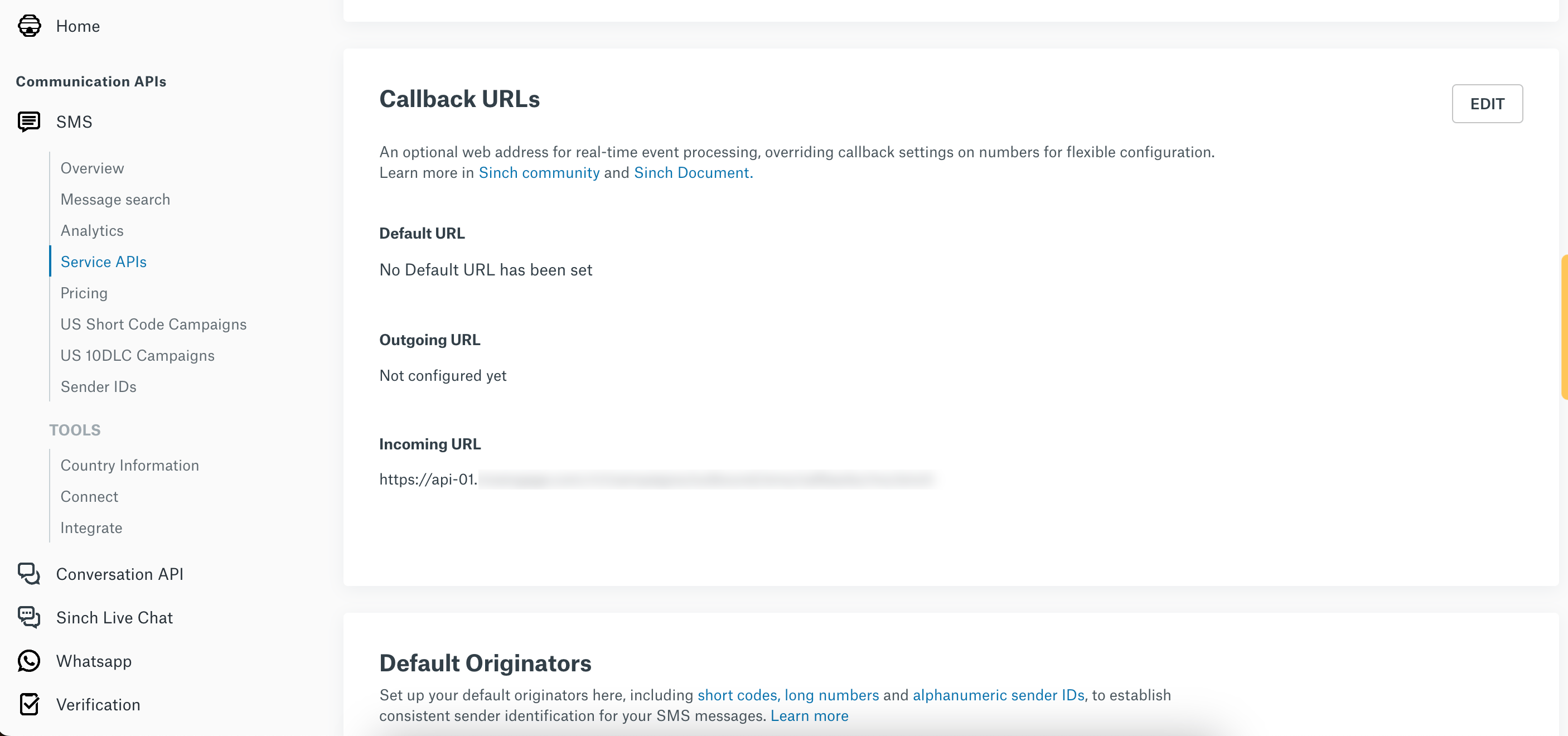
2. Navigate to **SMS** and click **Service APIs**.
3. Under **Callback URLs**, navigate to **Incoming URL**.
4. In the **Incoming URL** field, enter the same callback URL you added in the **Mobile Originated (MO) callback URL** field of the MoEngage dashboard.
# Next Steps
* Create an SMS campaign using the [Getting Started for creating SMS campaign](/docs/user-guide/campaigns-and-channels/sms-mms-and-rcs/sms/create-an-sms-campaign).
* Set the [Frequency Capping for SMS](/docs/user-guide/settings/channels/delivery-controls/frequency-capping).
* Set the [Current Service Provider](/docs/user-guide/campaigns-and-channels/sms-mms-and-rcs/sms/getting-started-with-sms/configure-an-sms-sender).
1. Log in to Sinch console.
2. Navigate to **SMS** and click **Service APIs**.
3. Under **Callback URLs**, navigate to **Incoming URL**.
4. In the **Incoming URL** field, enter the same callback URL you added in the **Mobile Originated (MO) callback URL** field of the MoEngage dashboard.
# Next Steps
* Create an SMS campaign using the [Getting Started for creating SMS campaign](/docs/user-guide/campaigns-and-channels/sms-mms-and-rcs/sms/create-an-sms-campaign).
* Set the [Frequency Capping for SMS](/docs/user-guide/settings/channels/delivery-controls/frequency-capping).
* Set the [Current Service Provider](/docs/user-guide/campaigns-and-channels/sms-mms-and-rcs/sms/getting-started-with-sms/configure-an-sms-sender).