> ## Documentation Index
> Fetch the complete documentation index at: https://moengage.com/docs/llms.txt
> Use this file to discover all available pages before exploring further.
# Times Mobile
# Introduction
[Times Mobile](https://timesmobile.in/) (Part of Times Internet Limited) offers enterprise communication services including SMS, Voice, Email, RCS & WhatsApp Business Messaging. With the MoEngage and Times Mobile SMS Integration, you can communicate with your end users for the following:
* Bulk SMS communication of different categories – Promotional, Service Implicit, and Service explicit.
* Real-Time Delivery updates
In addition, you can also automate sales and marketing engagements by sending personalized texts through a secured SMS Platform.
# Integration
* You must have an SMS account with respective SMS Push API details from TIL.
* You must have DLT-approved details i.e., templates if the region of your account is in India.
## Configure Times Mobile as a Custom SMS Connector
Log in to the MoEngage dashboard:
1. Navigate to Settings > Channel > SMS & Connectors.
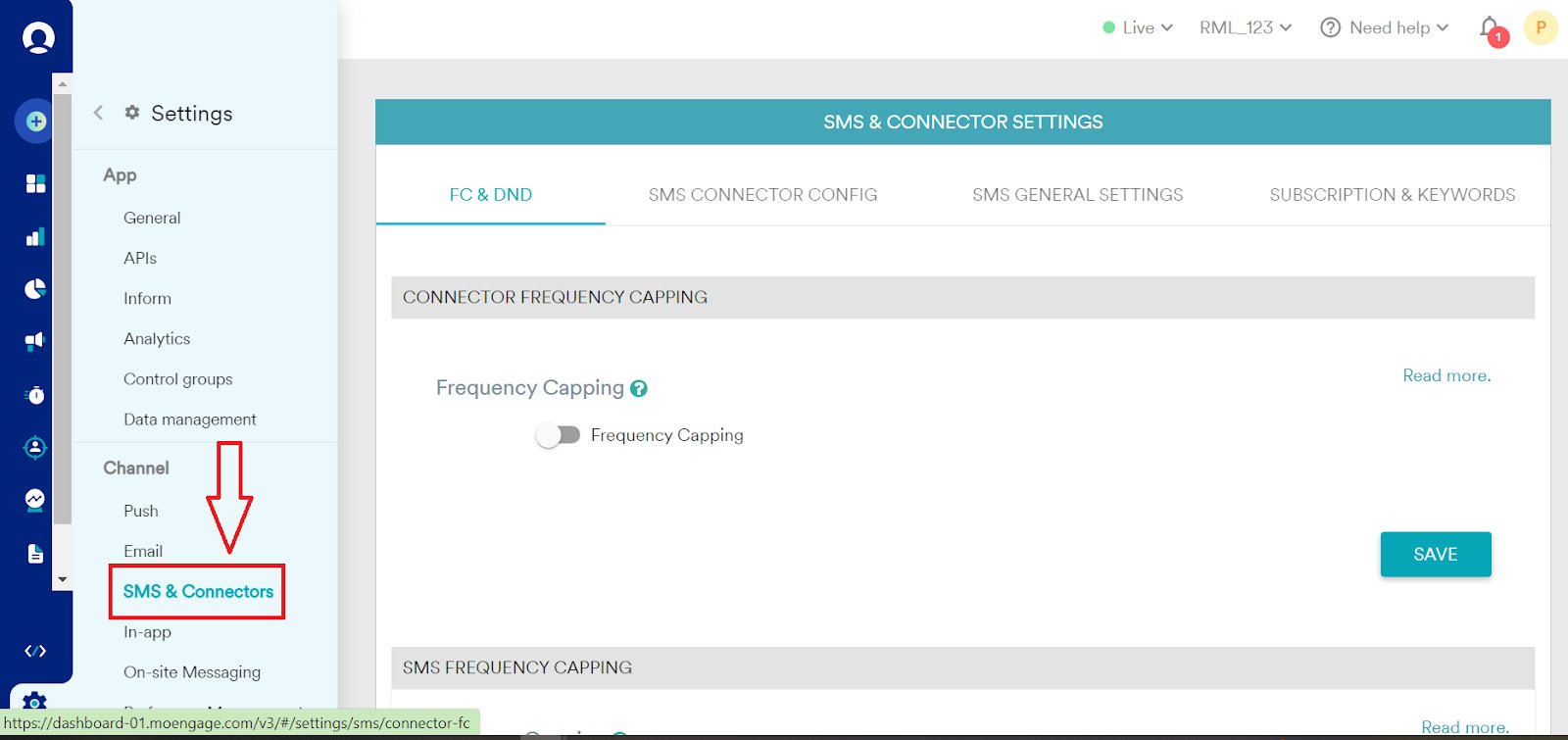 2. Click the *SMS Connector Config tab*.
3. Under *Custom Connecters*, click *+CREATE.*
2. Click the *SMS Connector Config tab*.
3. Under *Custom Connecters*, click *+CREATE.* 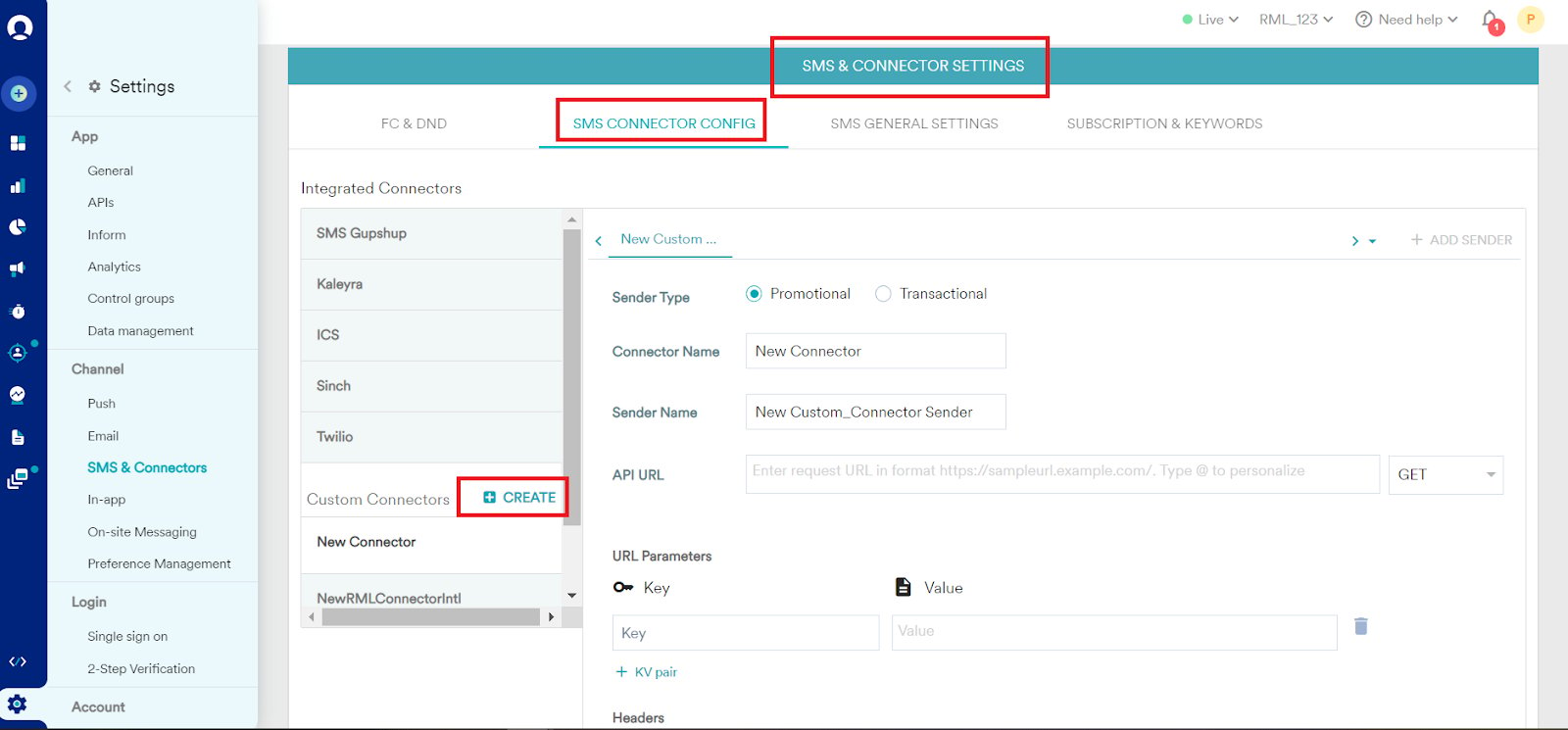 4. Add the following details:
| Field | Description |
| --------------------- | --------------------------------------------------------------------------------------------------------------------------------------------------------------------------------------------------------------------------------------------------------------------------------------------------------------------------------------------------------------------------------------------------------------------------------------------------------------------------------------------------------------------------------------------------------------------------------------------------------------------------------------------------------------------------------------------------------------------------------------------------------------------------------------------------------------------------------------------------------------------------------------------------------------------------------------------------------------------------------------------------------------------------------------------------------------------------------------------------------------- |
| **Sender Type** | Select Sender Type - Promotional/Transactional based on SMS account at TIL. |
| **Connector Name** | Enter the Connector Name for the SMS Connector to uniquely identify it. Example: "Times Mobile" |
| **Sender Name** | Enter Sender Name (DLT Approved Header) |
| **API URL** | Select the **GET** or **POST** option depending on which HTTP Endpoint you have from TIL.
4. Add the following details:
| Field | Description |
| --------------------- | --------------------------------------------------------------------------------------------------------------------------------------------------------------------------------------------------------------------------------------------------------------------------------------------------------------------------------------------------------------------------------------------------------------------------------------------------------------------------------------------------------------------------------------------------------------------------------------------------------------------------------------------------------------------------------------------------------------------------------------------------------------------------------------------------------------------------------------------------------------------------------------------------------------------------------------------------------------------------------------------------------------------------------------------------------------------------------------------------------------- |
| **Sender Type** | Select Sender Type - Promotional/Transactional based on SMS account at TIL. |
| **Connector Name** | Enter the Connector Name for the SMS Connector to uniquely identify it. Example: "Times Mobile" |
| **Sender Name** | Enter Sender Name (DLT Approved Header) |
| **API URL** | Select the **GET** or **POST** option depending on which HTTP Endpoint you have from TIL.
Now, enter the TIL SMS Push Endpoint (GET/POST) with respective credentials/details: Select the **GET** or **POST** option depending on which HTTP Endpoint you have from TIL.
Now, enter the TIL SMS Push Endpoint (GET/POST) with respective credentials/details: - GET API:
- Endpoint: [https://bsms.timesapi.in/ct/api/v1/send?username=\&password=\&unicode=false\&from=\&to=Moesms\_destination\&text=Moesms\_message\&dltContentId=Moesms\_dltTemplateId\&corelationid=Moesms\_campaignId](https://bsms.timesapi.in/ct/api/v1/send?username=\&password=\&unicode=false\&from=\&to=Moesms_destination\&text=Moesms_message\&dltContentId=Moesms_dltTemplateId\&corelationid=Moesms_campaignId)
- Key-value pair: Enter your keys and values.
- POST API:
- Endpoint: [https://bsms.timesapi.in/ct/api/v1/message](https://bsms.timesapi.in/ct/api/v1/message)
- Enter the JSON payload structure supported by the POST Endpoint.
|
| **Parameter Details** | Key value pair / Json Parameter details:
- username= \<\*\*\*\*\*\*> \[TIL api username]
- password= \<\*\*\*\*\*\*> \[TIL api password]
- unicode= \[by default “false” for normal English SMS text and “true” for Unicode SMS text]
- from= \[DLT approved Header]
- to= `Moesms_message` \[Mobile no. on which SMS to be sent]
- text= `Moesms_destination` \[DLT approved message text]
- dltContentId= `Moesms_dltTemplateId` \[DLT Template ID for message text]
- corelationid= `Moesms_campaignId` \[Parameter for MoEngage Campaign Id]
|
| **Headers** | For POST Endpoint, please enter below key-value pairs: - Key: `Content-Type` \| Value: `application/json`
- Key: `Accept` \| Value: `application/json`
- Key: `Authorization` \| Value: `Basic`
|
| **Delivery tracking** | For Delivery tracking, after saving the “Custom Connector” edit it. Now select the option “Map fields manually” and do the below mapping: - Unique sent ID field: uuid
- Unique delivery ID field \*: uuid
- Delivery status field \*: status
- Success values for delivery status \*: DELIVERY\_SUCCESS
- Failure reason field \*: description
Please share SMS delivery tracking URL with Times for configuration.
|
5. For **Body Type** (Only for POST), select “Raw” and enter the entire JSON payload structure:
```json JSON theme={null}
{
"extra": {
"corelationid": "Moesms_campaignld",
"dltContentId": "Moesms_dltTemplateld"
},
"message": {
"recipient": "Moesms_destination",
"text": "Moesms_message"
},
"sender": "",
"unicode": "false"
}
```
6. Click Save. The settings have been added.
## Troubleshooting
If any issue occurs while sending test message or saving configuration follow the below steps:
* Ensure that the TIL Endpoint and respective parameters/json structure are added correctly as they are case-sensitive.
* If the issue persists, raise a Support Request to MoEngage to get your error code.
* Connect with the TIL support team to get the issue resolved after you receive the error code from the MoEngage Support team. Support Email: [support@timesmobile.in](mailto:support@timesmobile.in)