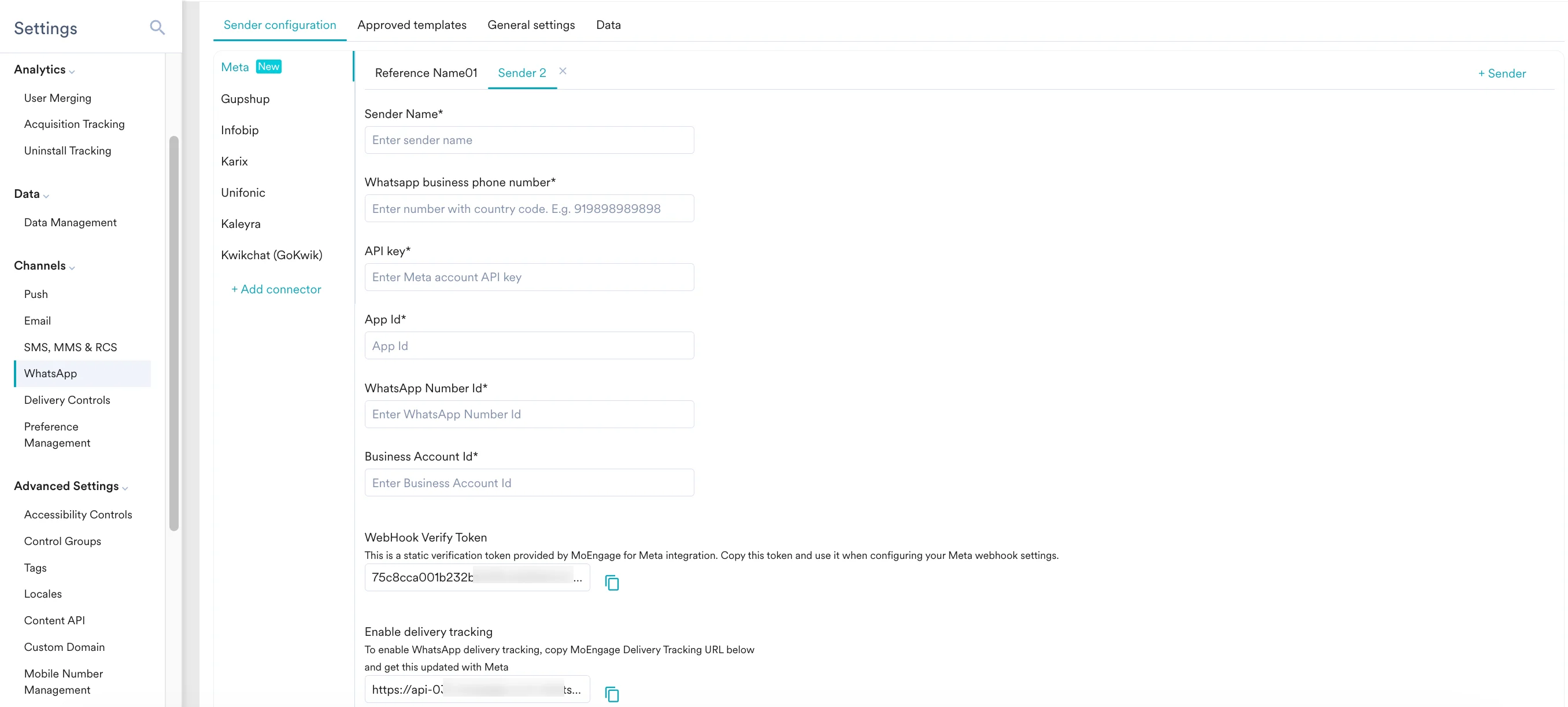
 | Field Name | Description |
| ------------------------------ | -------------------------------------------------------------------------------------------------------------------------------------------------------------------------------------------------------------------------------------------------------------------------------------------------------------------------------------------------------------------------------------------------------------------------------------------------------------------------------------------------------------------------------------------------------------------------------------------------------------------------------------------------------------------------------------------------------------------------------------------------------------------------------------------------------------------------------------------------------------------------------------------------------------------------------------------------------------------------------------------------------------------------------------------------------------------------------------------------------------------------------------------------------------------------------------------------------------------------------------------------------------------------------------------------------------------------------------------------------------------------------------------------------------------------------------------------------------------------------------------------------------------------------------------------------------------------------------------------------------------------------------------------------------------------------------------------------------------------------------------------------------------------------------------------------------------------------------------------------------------- |
| Sender name | This field denotes a readable sender name that can be used while creating a campaign or alert. The Sender Name should be between 5 and 50 characters. This is a mandatory field. |
| WhatsApp business phone number | This field denotes the phone number registered with WhatsApp (directly or via Meta), using which you want to send out WhatsApp messages to your users. This is the same business number that you have onboarded on the Meta platform. This is a mandatory field and is also referred to as the WABA number. |
| API key | This field denotes the access token, which can be temporarily generated by clicking **Generate access token** in the **WhatsApp** > **API setup** of your developer dashboard.
| Field Name | Description |
| ------------------------------ | -------------------------------------------------------------------------------------------------------------------------------------------------------------------------------------------------------------------------------------------------------------------------------------------------------------------------------------------------------------------------------------------------------------------------------------------------------------------------------------------------------------------------------------------------------------------------------------------------------------------------------------------------------------------------------------------------------------------------------------------------------------------------------------------------------------------------------------------------------------------------------------------------------------------------------------------------------------------------------------------------------------------------------------------------------------------------------------------------------------------------------------------------------------------------------------------------------------------------------------------------------------------------------------------------------------------------------------------------------------------------------------------------------------------------------------------------------------------------------------------------------------------------------------------------------------------------------------------------------------------------------------------------------------------------------------------------------------------------------------------------------------------------------------------------------------------------------------------------------------------- |
| Sender name | This field denotes a readable sender name that can be used while creating a campaign or alert. The Sender Name should be between 5 and 50 characters. This is a mandatory field. |
| WhatsApp business phone number | This field denotes the phone number registered with WhatsApp (directly or via Meta), using which you want to send out WhatsApp messages to your users. This is the same business number that you have onboarded on the Meta platform. This is a mandatory field and is also referred to as the WABA number. |
| API key | This field denotes the access token, which can be temporarily generated by clicking **Generate access token** in the **WhatsApp** > **API setup** of your developer dashboard. 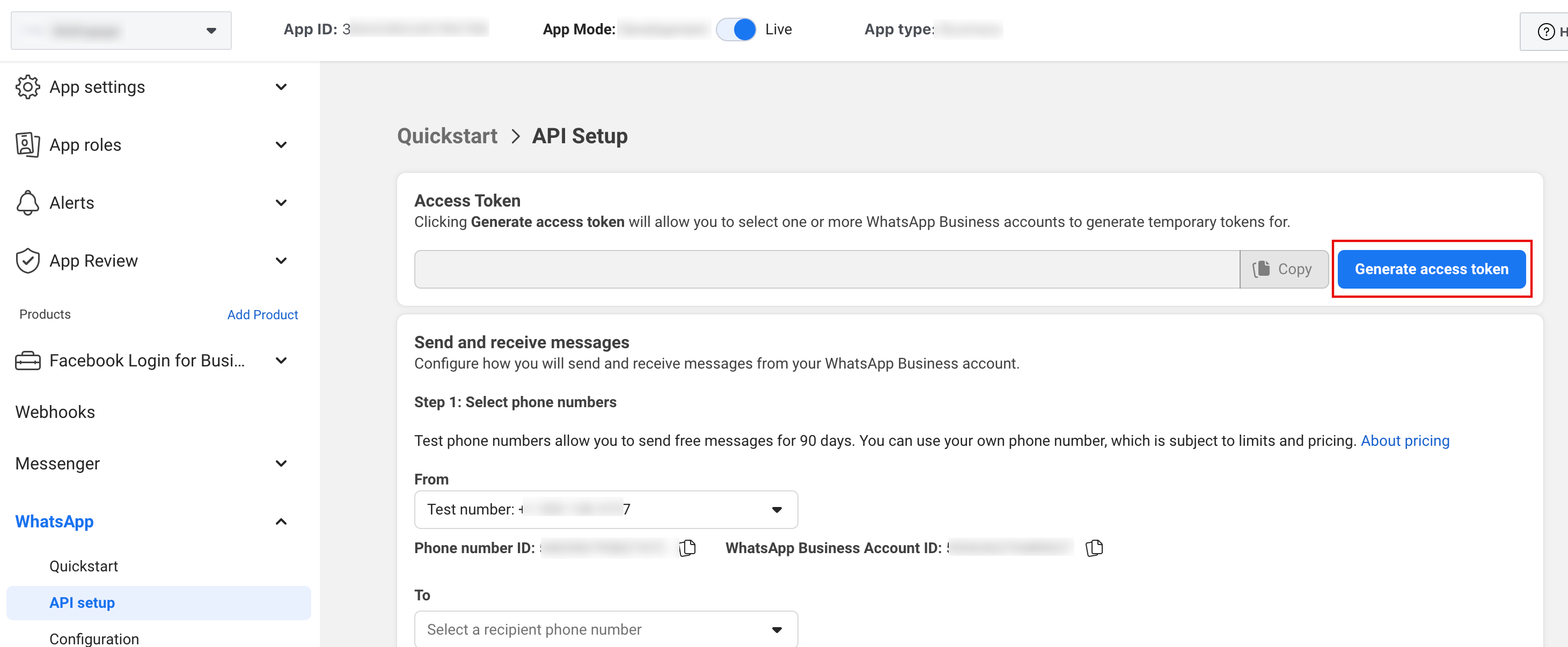 You can also generate a permanent access token using a System user, which follows a different configuration flow than the one for a temporary token. For more information, refer [here](http://facebook.com/business/help/327596604689624). |
| App Id | This is the **App ID** assigned to your application in the Meta Developer Dashboard. App IDs are generated when an app is created. They are unique to each app and cannot be changed. You can find this App ID in the toolbar that appears at the top of your Meta developer dashboard after you have selected an app, as shown in the image below:
You can also generate a permanent access token using a System user, which follows a different configuration flow than the one for a temporary token. For more information, refer [here](http://facebook.com/business/help/327596604689624). |
| App Id | This is the **App ID** assigned to your application in the Meta Developer Dashboard. App IDs are generated when an app is created. They are unique to each app and cannot be changed. You can find this App ID in the toolbar that appears at the top of your Meta developer dashboard after you have selected an app, as shown in the image below:  |
| WhatsApp Number Id | This is the **Phone number ID** from the Meta developer dashboard. This ID corresponds to the specific phone number (WABA number) you are registering and can be found in the **WhatsApp** > **API setup** of your developer dashboard, as shown in the image below:
|
| WhatsApp Number Id | This is the **Phone number ID** from the Meta developer dashboard. This ID corresponds to the specific phone number (WABA number) you are registering and can be found in the **WhatsApp** > **API setup** of your developer dashboard, as shown in the image below: 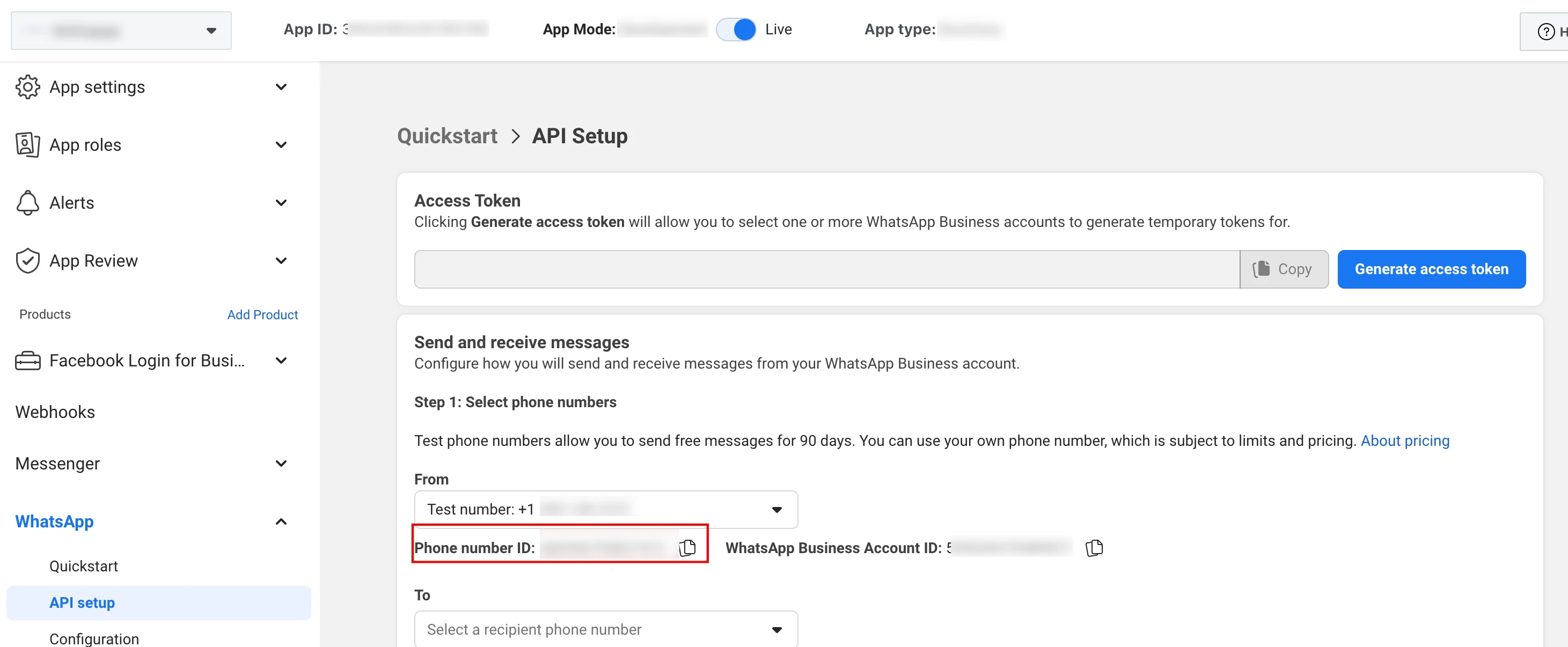 |
| Business Account Id | This is the **WhatsApp Business Account ID**. This identifies your overarching business account on the Meta platform and can be found in the **WhatsApp** > **API setup** of your developer dashboard, as shown in the image below:
|
| Business Account Id | This is the **WhatsApp Business Account ID**. This identifies your overarching business account on the Meta platform and can be found in the **WhatsApp** > **API setup** of your developer dashboard, as shown in the image below: 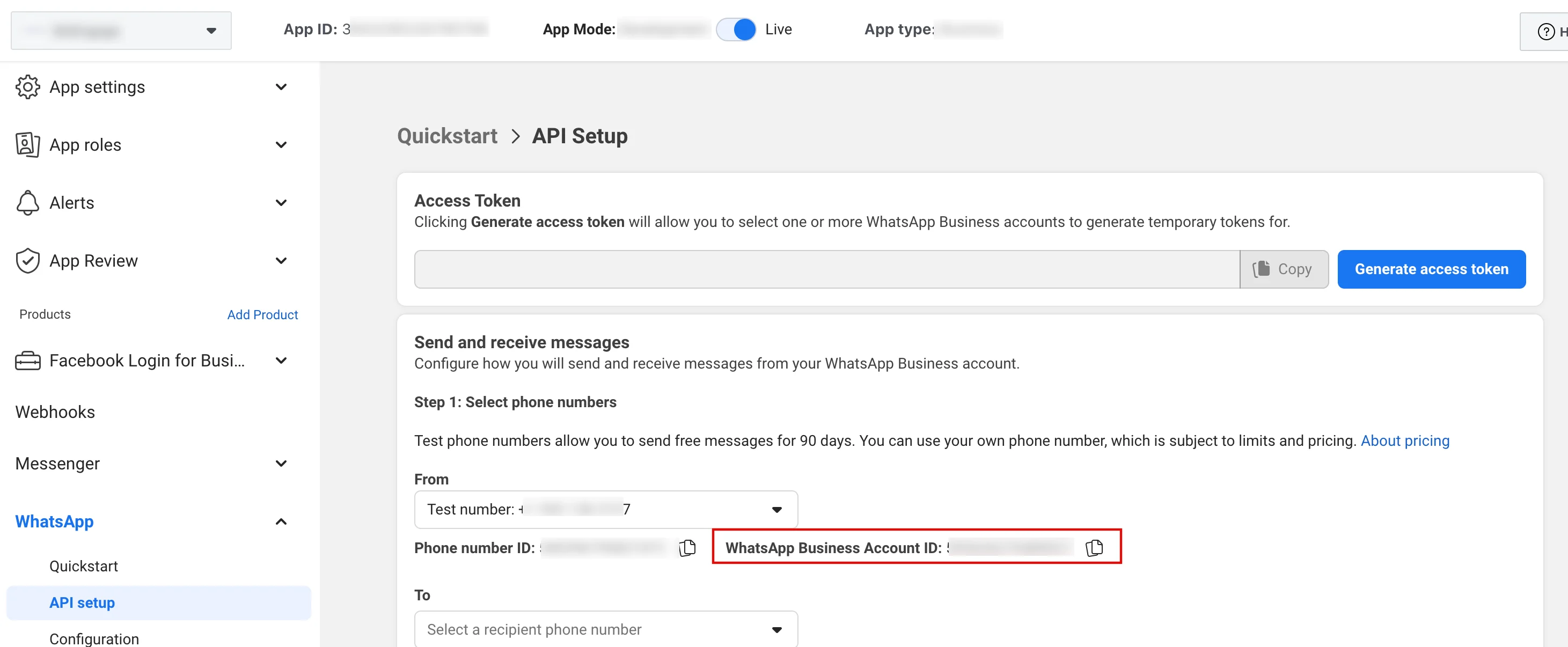 |
5. Copy the following fields from MoEngage and paste them to your Meta developer dashboard:
| Field Name | Description |
| ------------------------ | ------------------------------------------------------------------------------------------------------------------------------------------------------------------------------------------------------------------------------------------------------------------------------------------------------------------------------------------------------------------------------------------------------------------------------------------------------------------------------------------------------------------------------------------------------------------------------------------------------------------------------------------------------------------------------------------------------------------------------------------------------------------------------------------------------------------------------------------------------------------------------------------------------------------------------------------------------------------------------------------------------------------------------------------------------------------------------------------------------------------------------------------------------------------------------------------------------------------------------------------------------------------------------------------------------------------------------------------------------------------------------------------------------------------------------------------------------------------------------------------------------------------------------------------------------------------------------------------------------------------------------------------------------------------------------------------------------------------------------------------------------------------------------------------------------------------------------------------------------------------------------------------------------------------------------------------------------------------------------------------------------------------------------------------------------------------------------------------------------------------------------------------------------------------------------------------------------------------------------------------------------------------------------------------------------------------------------------------------------------------------------------------------------------------------------------------------------------------------------------------------------------------------------------------------------------------------------------------------------------------------------------------------------------------------------------------------------------------------------------------------------------------------------------------------------------------------------------------------------------------------------------------------------------------------------------------------------------------------------------------------------------------------------------------------------------------------------------------------------------------------------------------------------------------------------------------------------------------------------------------------------------------------------------------------------------------------------------------------------------------------------------------------------------- |
| WebHook Verify Token | This is a static verification token provided by MoEngage for Meta integration. Copy this token from MoEngage and paste it into the **Verify token** field, which can be found in the **WhatsApp** > **Configuration** of your Meta developer dashboard, as shown in the image below:
|
5. Copy the following fields from MoEngage and paste them to your Meta developer dashboard:
| Field Name | Description |
| ------------------------ | ------------------------------------------------------------------------------------------------------------------------------------------------------------------------------------------------------------------------------------------------------------------------------------------------------------------------------------------------------------------------------------------------------------------------------------------------------------------------------------------------------------------------------------------------------------------------------------------------------------------------------------------------------------------------------------------------------------------------------------------------------------------------------------------------------------------------------------------------------------------------------------------------------------------------------------------------------------------------------------------------------------------------------------------------------------------------------------------------------------------------------------------------------------------------------------------------------------------------------------------------------------------------------------------------------------------------------------------------------------------------------------------------------------------------------------------------------------------------------------------------------------------------------------------------------------------------------------------------------------------------------------------------------------------------------------------------------------------------------------------------------------------------------------------------------------------------------------------------------------------------------------------------------------------------------------------------------------------------------------------------------------------------------------------------------------------------------------------------------------------------------------------------------------------------------------------------------------------------------------------------------------------------------------------------------------------------------------------------------------------------------------------------------------------------------------------------------------------------------------------------------------------------------------------------------------------------------------------------------------------------------------------------------------------------------------------------------------------------------------------------------------------------------------------------------------------------------------------------------------------------------------------------------------------------------------------------------------------------------------------------------------------------------------------------------------------------------------------------------------------------------------------------------------------------------------------------------------------------------------------------------------------------------------------------------------------------------------------------------------------------------------------------------------- |
| WebHook Verify Token | This is a static verification token provided by MoEngage for Meta integration. Copy this token from MoEngage and paste it into the **Verify token** field, which can be found in the **WhatsApp** > **Configuration** of your Meta developer dashboard, as shown in the image below: 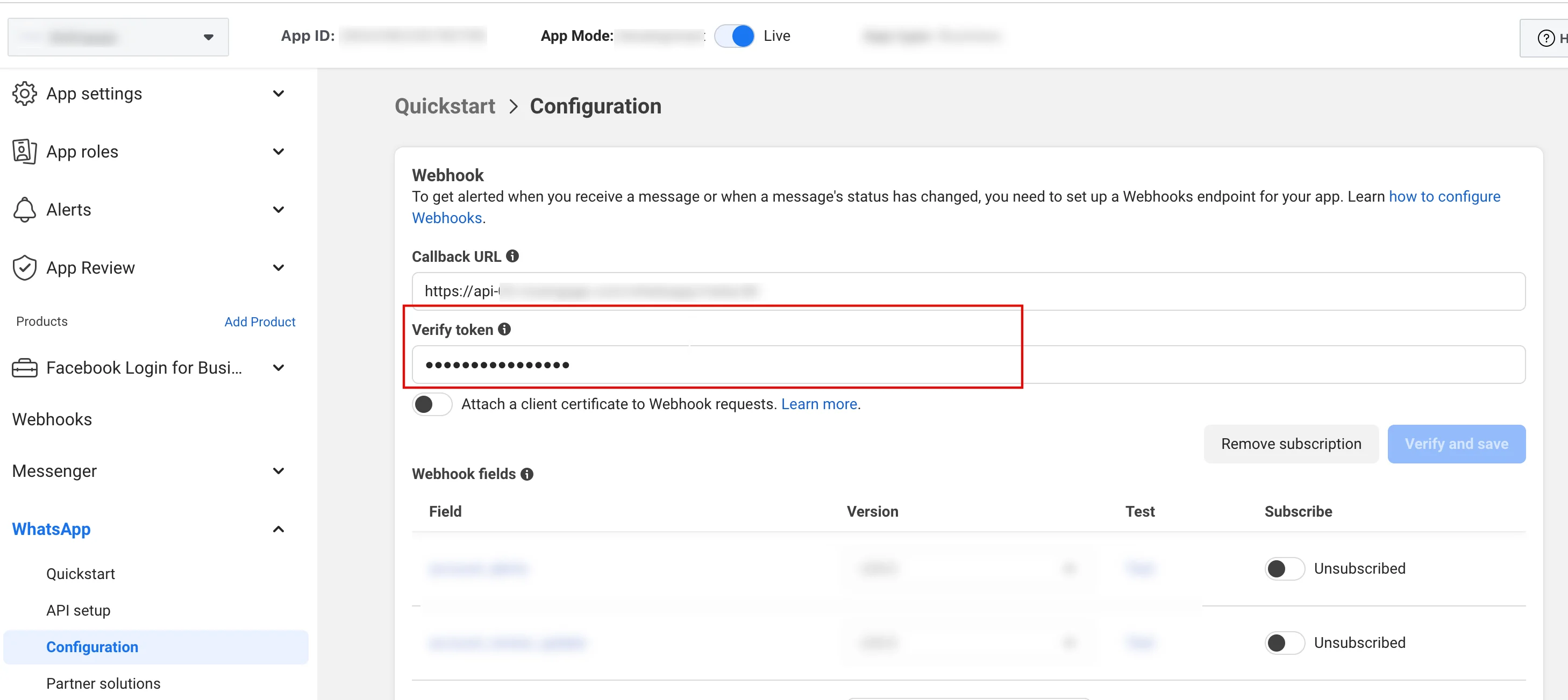 |
| Enable delivery tracking | This field tracks the delivery of your WhatsApp messages inside MoEngage. Copy this token from MoEngage and paste it into the **Callback URL** field, which can be found in the **WhatsApp** > **Configuration** of your Meta developer dashboard, as shown in the image below:
|
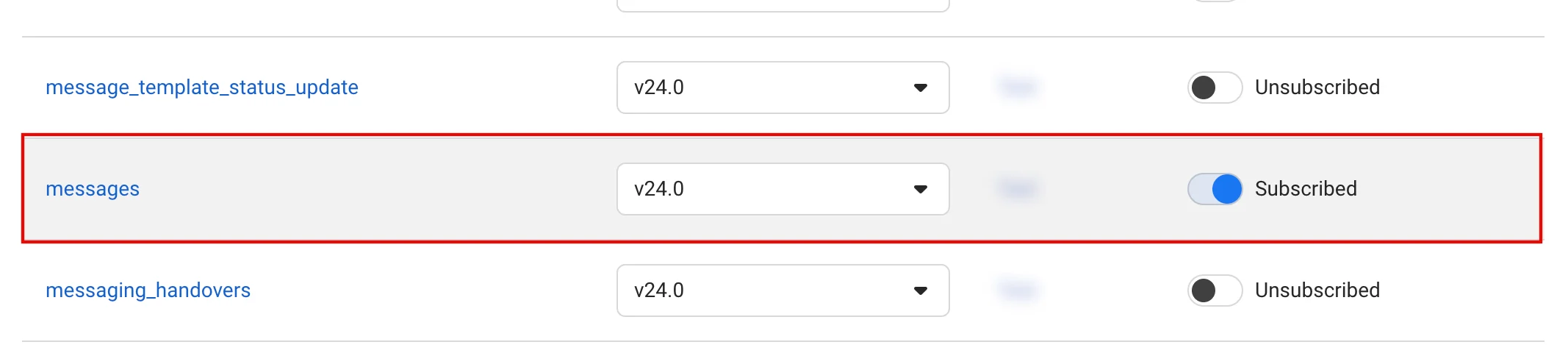
| Enable delivery tracking | This field tracks the delivery of your WhatsApp messages inside MoEngage. Copy this token from MoEngage and paste it into the **Callback URL** field, which can be found in the **WhatsApp** > **Configuration** of your Meta developer dashboard, as shown in the image below: 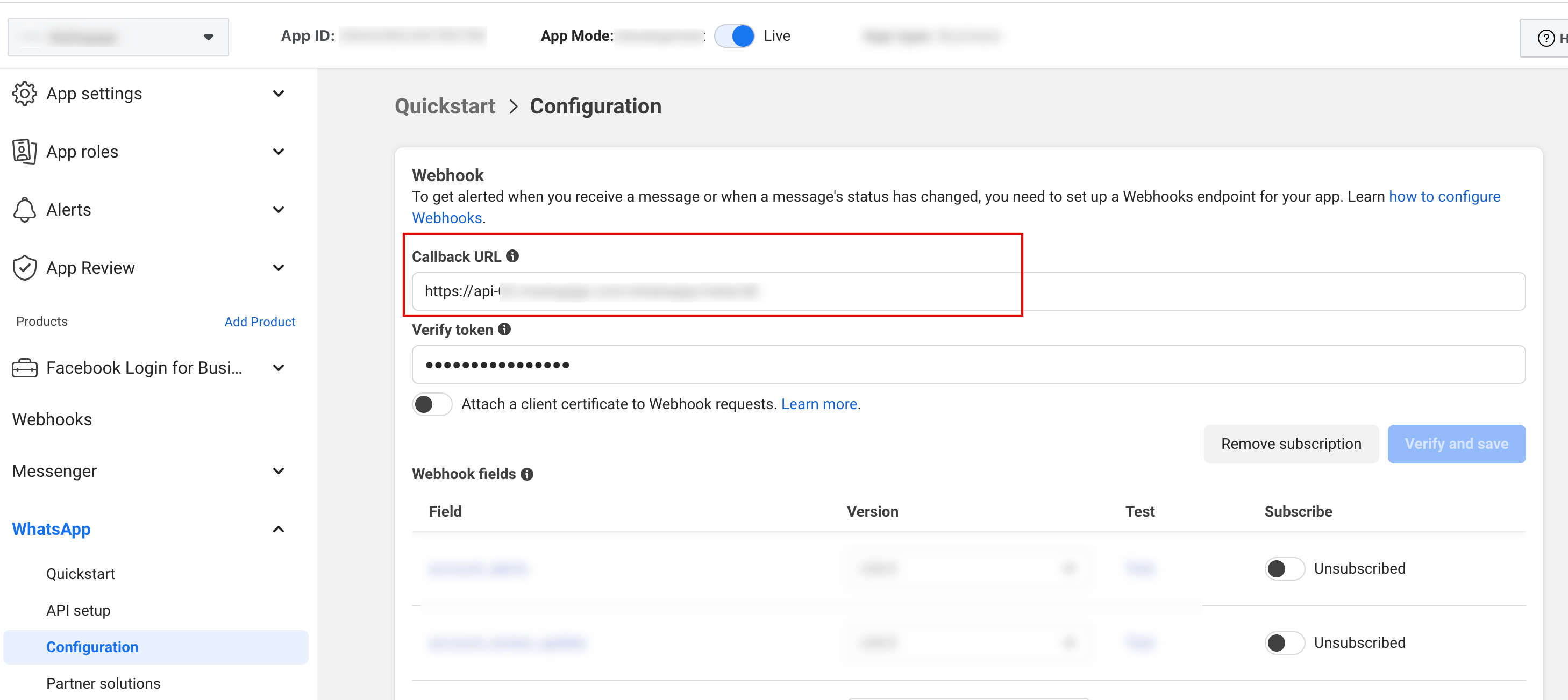 Make sure to turn on the **Subscribed** toggle against the **messages** field under the **Webhook fields** section of **WhatsApp** >**Configuration** of your Meta developer dashboard, as shown in the image below:
  |
6. Click **Save**.
|
6. Click **Save**.