
Introduction

Bluedot is a location platform that provides accurate geofencing for your apps. Use Bluedot to message smarter, automate mobile order check-ins, optimize workflows, and create frictionless experiences.

MoEngage and Bluedot

The MoEngage and Bluedot integration lets you use Bluedot’s geofence location services to create user events. You can use these events to build flows, run campaigns, and analyze customer behavior and interests. Entry and exit events generated on the user’s device are sent to MoEngage in real time with all relevant information.

Use cases

Target users when they are near your physical store with a promotional campaign that drives them in-store. Common use cases include:
  • Quick service restaurants (QSR)
  • Click and collect
  • Drive-thru

Integration

Prerequisites
  • A Bluedot account is required to use this integration.
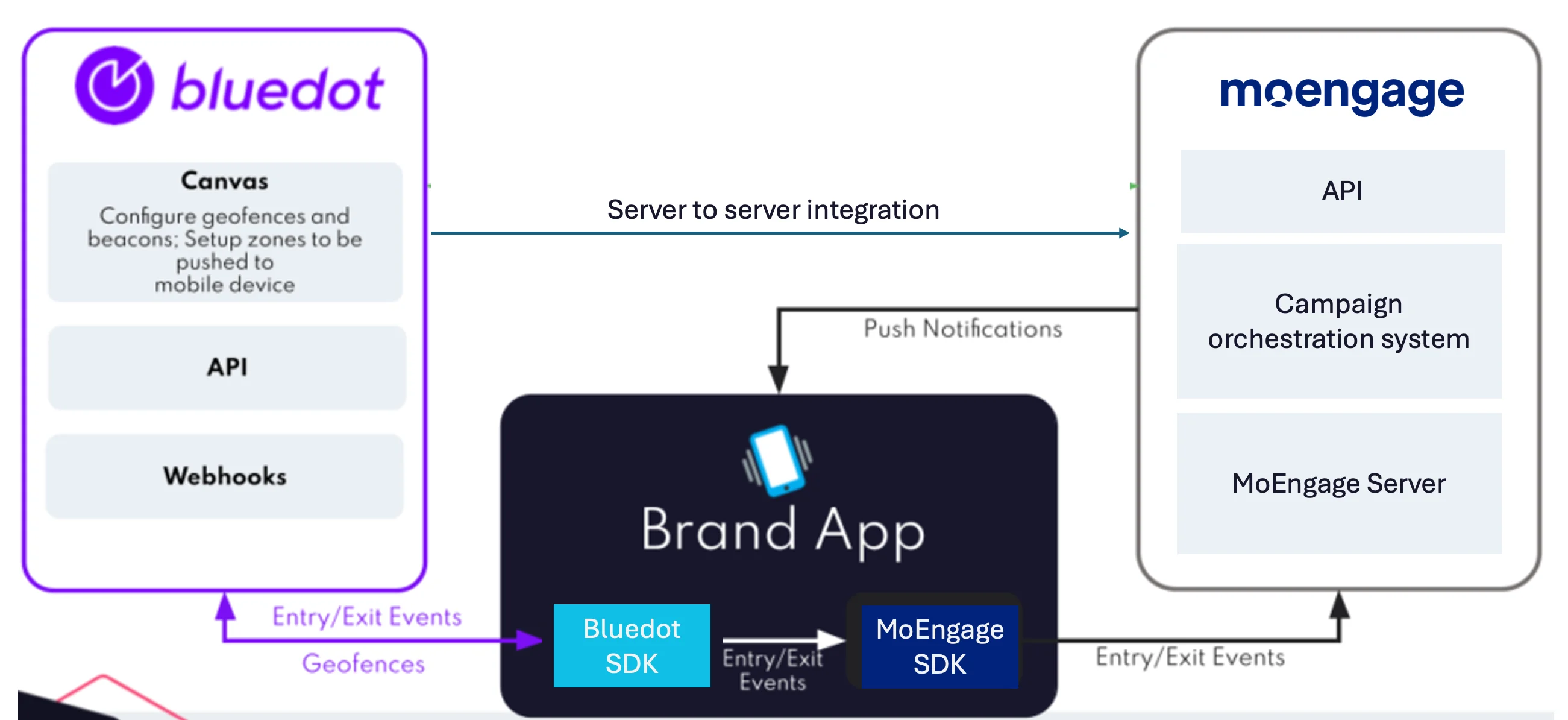
High-level diagram of the Bluedot to MoEngage event flow

SDK setup

Step 1: Create a Bluedot project

Set up your Bluedot account and log in to the Bluedot Canvas dashboard. Refer to the Bluedot documentation to learn how to create a new project.

Step 2: Integrate the SDKs

Configure your application to send custom events to MoEngage when a Bluedot entry or exit trigger fires. Use the snippets below to integrate the Bluedot Point SDK and the MoEngage SDK in your app. Android
override fun onZoneEntryEvent(geoTriggerEvent: GeoTriggerEvent, context: Context) {
    val properties = Properties()

    properties.addAttribute("zone_id", geoTriggerEvent.zoneInfo.id)
        .addAttribute("zone_name", geoTriggerEvent.zoneInfo.name)
        .addAttribute("latitude", geoTriggerEvent.entryEvent()?.locations?.get(0)?.latitude)
        .addAttribute("longitude", geoTriggerEvent.entryEvent()?.locations?.get(0)?.longitude)
        .addAttribute("fence_id", geoTriggerEvent.entryEvent()?.fenceId)
        .addAttribute("fence_name", geoTriggerEvent.entryEvent()?.fenceName)
        .setNonInteractive()

    MoEAnalyticsHelper.trackEvent(context, "customEventEntry", properties)
}
iOS
didEnterZone callback
func didEnterZone(_ triggerEvent: GeoTriggerEvent) {
    var eventAttrDict: Dictionary<String, Any> = Dictionary()
    let eventProperties = MoEngageProperties(withAttributes: eventAttrDict)
    eventProperties.addAttribute(triggerEvent.zoneInfo.id, withName: "zone_id")
    eventProperties.addAttribute(triggerEvent.zoneInfo.name, withName: "zone_name")
    eventProperties.addAttribute(triggerEvent.entryEvent?.locations[0].coordinate.latitude ?? 0.0, withName: "latitude")
    eventProperties.addAttribute(triggerEvent.entryEvent?.locations[0].speed ?? 0.0, withName: "speed")
    eventProperties.addAttribute(triggerEvent.entryEvent?.eventTime.timeIntervalSince1970 ?? 0.0, withName: "timestamp")

    let customData = triggerEvent.zoneInfo.customData
    if !customData.isEmpty {
        customData.forEach { data in eventAttrDict["\(data.key)"] = "\(data.value)" }
    }

    MoEngageSDKAnalytics.sharedInstance.trackEvent("customEventEntry", withProperties: eventProperties)
}
To capture Bluedot exit triggers, add similar code in the didExitZone callback.