> ## Documentation Index
> Fetch the complete documentation index at: https://moengage.com/docs/llms.txt
> Use this file to discover all available pages before exploring further.

# Crowdin

> Translate MoEngage email templates and content blocks with Crowdin or Crowdin Enterprise, and sync translations between the two platforms automatically.

## Introduction

[Crowdin](https://crowdin.com/) is a cloud-based software for localization management. Crowdin streamlines the localization of your app's user interface, website, marketing, and support content so you can deliver content in multiple languages.

## MoEngage and Crowdin

The MoEngage and Crowdin integration lets you translate email templates and content blocks. You can also synchronize content and creatives from your MoEngage account to your Crowdin project and push translations back to MoEngage.

## Integration

<Info>
  **Prerequisites**

  * A Crowdin account.
  * Access to a Crowdin translation project. You can sign up and create a project from the Crowdin dashboard.
</Info>

### Step 1: Set up your MoEngage app in Crowdin or Crowdin Enterprise

#### Crowdin

1. Go to the [MoEngage app in the Crowdin marketplace](https://store.crowdin.com/moengage).
2. Click **Install** to add it to your account.
3. Open the project you created for MoEngage content localization.
4. Navigate to **Settings** > **Integrations**.
5. In the **Applications** section, click the MoEngage app.
6. In the dialog box, provide your MoEngage credentials (data center, workspace ID, and Data API key):
   | Field                                                                                                                                                                                                                                                                                                                                                                                                                                                                                                                                                                                                                                                                                                                                                                                                                                                                                                                                                                                                                                                                                                                                                                                                                                                                                                                                                                                                                                                                                          | Description                                                                                                                                                                                                                                                                                                       |
   | ---------------------------------------------------------------------------------------------------------------------------------------------------------------------------------------------------------------------------------------------------------------------------------------------------------------------------------------------------------------------------------------------------------------------------------------------------------------------------------------------------------------------------------------------------------------------------------------------------------------------------------------------------------------------------------------------------------------------------------------------------------------------------------------------------------------------------------------------------------------------------------------------------------------------------------------------------------------------------------------------------------------------------------------------------------------------------------------------------------------------------------------------------------------------------------------------------------------------------------------------------------------------------------------------------------------------------------------------------------------------------------------------------------------------------------------------------------------------------------------------- | ----------------------------------------------------------------------------------------------------------------------------------------------------------------------------------------------------------------------------------------------------------------------------------------------------------------- |
   | App ID                                                                                                                                                                                                                                                                                                                                                                                                                                                                                                                                                                                                                                                                                                                                                                                                                                                                                                                                                                                                                                                                                                                                                                                                                                                                                                                                                                                                                                                                                         | Your MoEngage workspace ID. Available at **Settings** > **Account** > **APIs** > **Workspace ID**.                                                                                                                                                                                                                |
   | Data API ID                                                                                                                                                                                                                                                                                                                                                                                                                                                                                                                                                                                                                                                                                                                                                                                                                                                                                                                                                                                                                                                                                                                                                                                                                                                                                                                                                                                                                                                                                    | Your MoEngage Data API ID. This is the same as the workspace ID.                                                                                                                                                                                                                                                  |
   | Data API Key                                                                                                                                                                                                                                                                                                                                                                                                                                                                                                                                                                                                                                                                                                                                                                                                                                                                                                                                                                                                                                                                                                                                                                                                                                                                                                                                                                                                                                                                                   | Your MoEngage Data API key. Available at **Settings** > **App Settings** > **APIs** > **API Keys** > **Data**.                                                                                                                                                                                                    |
   | Data Center Name                                                                                                                                                                                                                                                                                                                                                                                                                                                                                                                                                                                                                                                                                                                                                                                                                                                                                                                                                                                                                                                                                                                                                                                                                                                                                                                                                                                                                                                                               | Check your MoEngage URL: `https://dashboard-OX.moengage.com`. Based on the dashboard value (`DC-01`, `DC-02`, `DC-03`, or `DC-04`), set the matching value in Crowdin. For more information, see [Data Centers in MoEngage](https://www.moengage.com/docs/user-guide/data/key-concepts/data-centers-in-moengage). |
   | <img src="https://mintcdn.com/moengage/V7W8fvZbxtTmKTAn/images/partner_10360750343188.png?fit=max&auto=format&n=V7W8fvZbxtTmKTAn&q=85&s=22fa0d60114e73a41b95bf3de775c52a" alt="Crowdin MoEngage app credential dialog with the four fields filled in" width="1920" height="1338" data-path="images/partner_10360750343188.png" /> |                                                                                                                                                                                                                                                                                                                   |
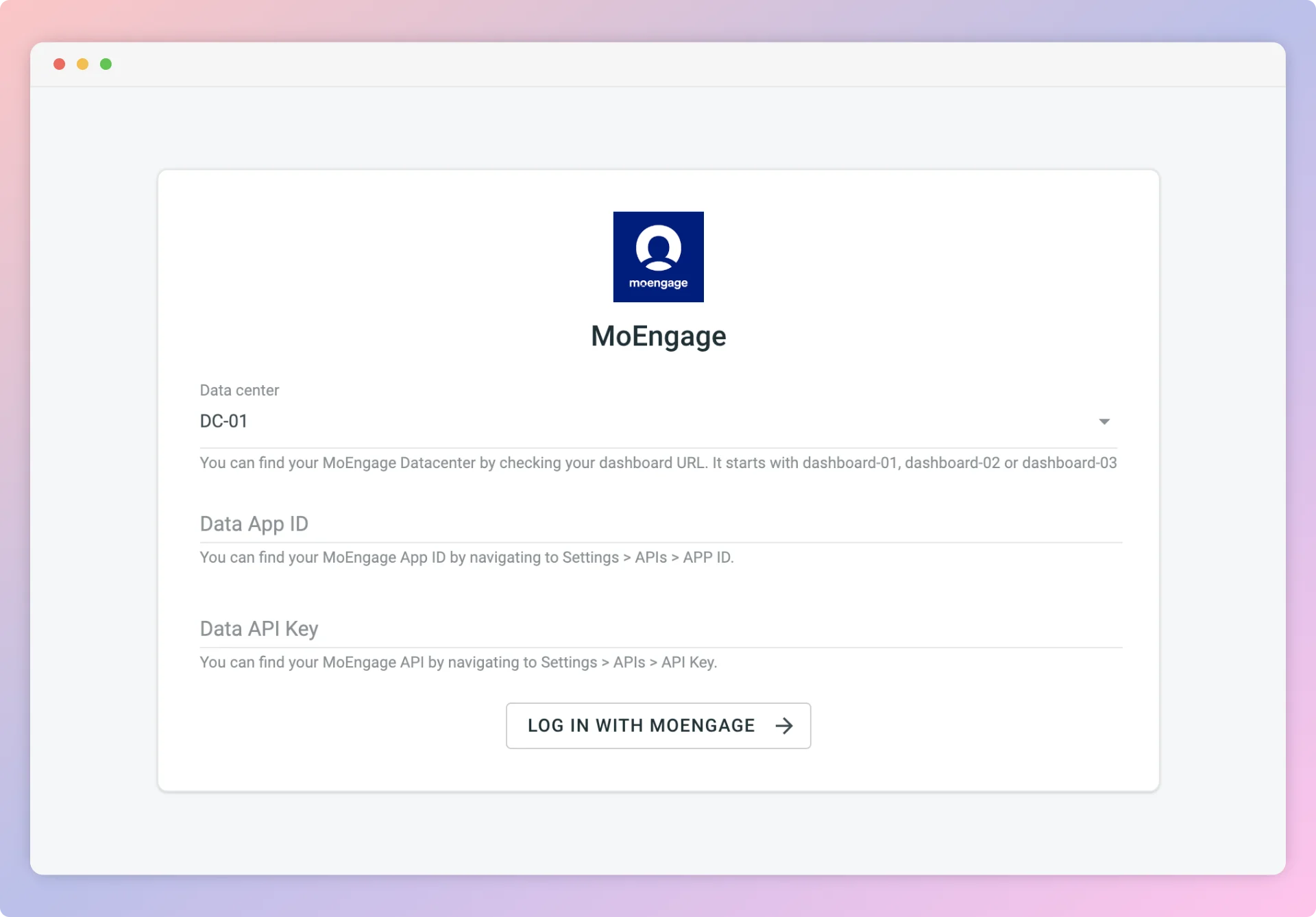
7. Click **Log in with MoEngage**.

#### Crowdin Enterprise

1. Navigate to **Workspace** > **Marketplace**.
2. Click **Install** on the MoEngage app to add it to your organization.
3. Open the project for your MoEngage content localization.
4. Navigate to **Applications** > **Custom**.
5. Click the MoEngage app.
6. In the dialog box, provide your MoEngage credentials (data center, workspace ID, and Data API key):
   | Field                                                                                                                                                                                                                                                                                                                                                                                                                                                                                                                                                                                                                                                                                                                                                                                                                                                                                                                                                                                                                                                                                                                                                                                                                                                                                                                                                                                                                                                                                                     | Description                                                                                                                                                                                                                                                                                                       |
   | --------------------------------------------------------------------------------------------------------------------------------------------------------------------------------------------------------------------------------------------------------------------------------------------------------------------------------------------------------------------------------------------------------------------------------------------------------------------------------------------------------------------------------------------------------------------------------------------------------------------------------------------------------------------------------------------------------------------------------------------------------------------------------------------------------------------------------------------------------------------------------------------------------------------------------------------------------------------------------------------------------------------------------------------------------------------------------------------------------------------------------------------------------------------------------------------------------------------------------------------------------------------------------------------------------------------------------------------------------------------------------------------------------------------------------------------------------------------------------------------------------- | ----------------------------------------------------------------------------------------------------------------------------------------------------------------------------------------------------------------------------------------------------------------------------------------------------------------- |
   | App ID                                                                                                                                                                                                                                                                                                                                                                                                                                                                                                                                                                                                                                                                                                                                                                                                                                                                                                                                                                                                                                                                                                                                                                                                                                                                                                                                                                                                                                                                                                    | Your MoEngage workspace ID. Available at **Settings** > **Account** > **APIs** > **Workspace ID**.                                                                                                                                                                                                                |
   | Data API ID                                                                                                                                                                                                                                                                                                                                                                                                                                                                                                                                                                                                                                                                                                                                                                                                                                                                                                                                                                                                                                                                                                                                                                                                                                                                                                                                                                                                                                                                                               | Your MoEngage Data API ID. This is the same as the workspace ID.                                                                                                                                                                                                                                                  |
   | Data API Key                                                                                                                                                                                                                                                                                                                                                                                                                                                                                                                                                                                                                                                                                                                                                                                                                                                                                                                                                                                                                                                                                                                                                                                                                                                                                                                                                                                                                                                                                              | Your MoEngage Data API key. Available at **Settings** > **App Settings** > **APIs** > **API Keys** > **Data**.                                                                                                                                                                                                    |
   | Data Center Name                                                                                                                                                                                                                                                                                                                                                                                                                                                                                                                                                                                                                                                                                                                                                                                                                                                                                                                                                                                                                                                                                                                                                                                                                                                                                                                                                                                                                                                                                          | Check your MoEngage URL: `https://dashboard-OX.moengage.com`. Based on the dashboard value (`DC-01`, `DC-02`, `DC-03`, or `DC-04`), set the matching value in Crowdin. For more information, see [Data Centers in MoEngage](https://www.moengage.com/docs/user-guide/data/key-concepts/data-centers-in-moengage). |
   | <img src="https://mintcdn.com/moengage/V7W8fvZbxtTmKTAn/images/partner_10360750343188.png?fit=max&auto=format&n=V7W8fvZbxtTmKTAn&q=85&s=22fa0d60114e73a41b95bf3de775c52a" alt="Crowdin Enterprise MoEngage app credential dialog with the four fields filled in" width="1920" height="1338" data-path="images/partner_10360750343188.png" /> |                                                                                                                                                                                                                                                                                                                   |
7. Click **Log in with MoEngage**.

### Step 2: Share content between Crowdin and MoEngage

#### A. Send content from MoEngage to Crowdin

To import content for translation from MoEngage:

1. Open the MoEngage integration.
2. In the MoEngage section (right panel), select the files to translate.
3. Click **Sync**.

#### B. Send translations from Crowdin to MoEngage

1. Open the MoEngage integration.
2. In the left section, select the files to sync to MoEngage.
3. Click **Sync to MoEngage**.
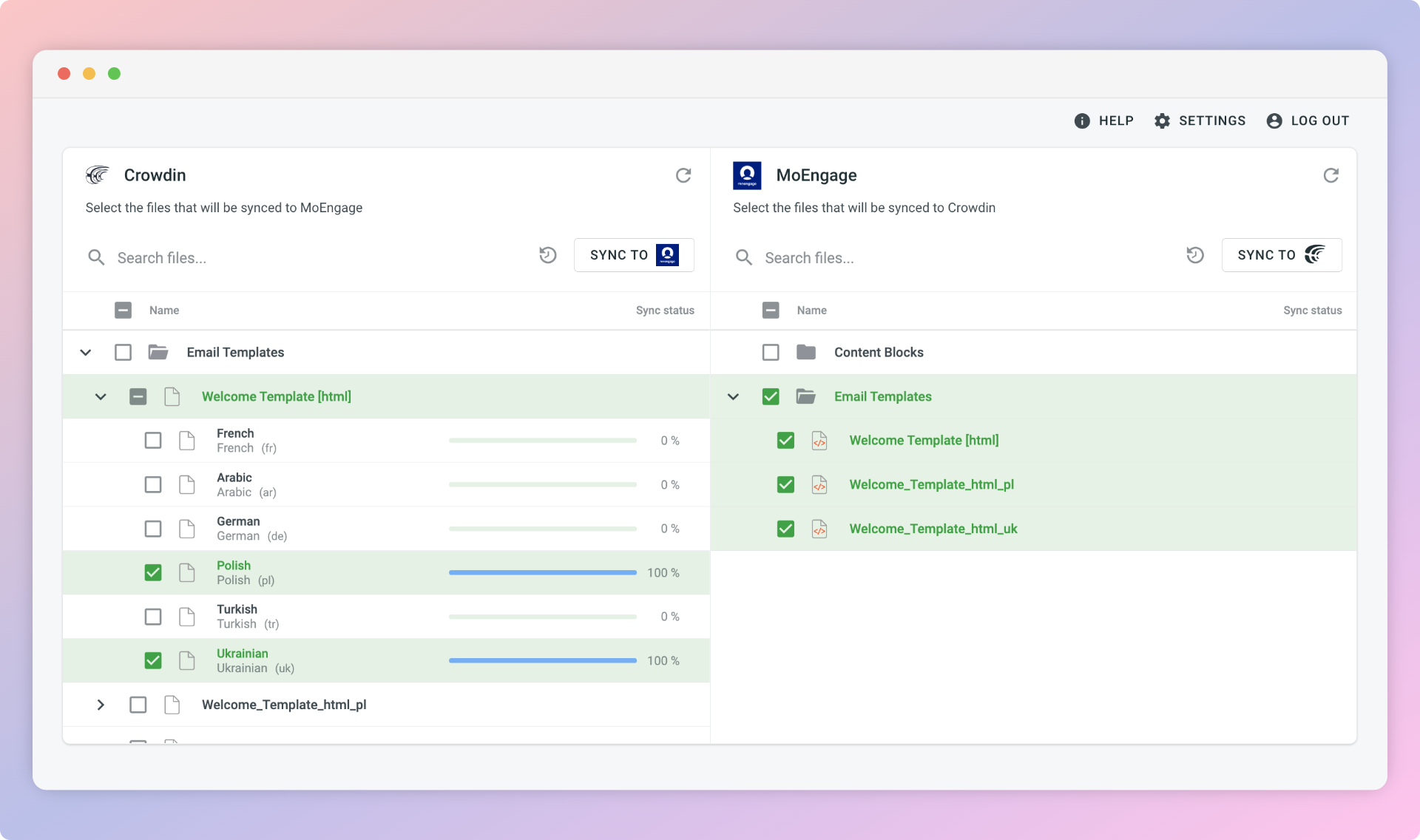
![Crowdin MoEngage integration UI showing files selected for sync between Crowdin and MoEngage](https://developer.app.crowdin.net/assets/4e814fb1-8662-4064-b7e0-6cce176288b5)

#### Automatic sync

To automatically import content for translation from MoEngage:

Choose your files and click **Scheduled sync** in the right panel of the MoEngage integration. The selected file is pushed at a scheduled time (once a day by default). The same button exports translated files from Crowdin to MoEngage (in the left panel). You can disable the sync by clicking **Disable Sync**.

### Step 3: Use translations in MoEngage campaigns

#### Email templates

Once the templates are created, you can access them in step 2 of your email campaigns. The new templates appear under the **My saved templates** section.

![MoEngage email campaign step 2 showing the saved Crowdin templates section](https://www.moengage.com/docs/user-guide/campaigns-and-channels/email/create/create-an-email-campaign)

For more information, see [Create an email campaign](https://www.moengage.com/docs/user-guide/campaigns-and-channels/email/create/create-an-email-campaign).

#### Content blocks

Once the content blocks are created, you can access them from **Content** > **Content Blocks**. For more information, see [Content Blocks](https://www.moengage.com/docs/user-guide/content/content-blocks/content-blocks).
