> ## Documentation Index
> Fetch the complete documentation index at: https://moengage.com/docs/llms.txt
> Use this file to discover all available pages before exploring further.
# Bluedot
## Introduction
[Bluedot](https://bluedot.io/) is a location platform that provides accurate geofencing for your apps. Use Bluedot to message smarter, automate mobile order check-ins, optimize workflows, and create frictionless experiences.
## MoEngage and Bluedot
The MoEngage and Bluedot integration lets you use Bluedot's geofence location services to create user events. You can use these events to build flows, run campaigns, and analyze customer behavior and interests. Entry and exit events generated on the user's device are sent to MoEngage in real time with all relevant information.
## Use cases
Target users when they are near your physical store with a promotional campaign that drives them in-store. Common use cases include:
* Quick service restaurants (QSR)
* Click and collect
* Drive-thru
## Integration
**Prerequisites**
* A Bluedot account is required to use this integration.
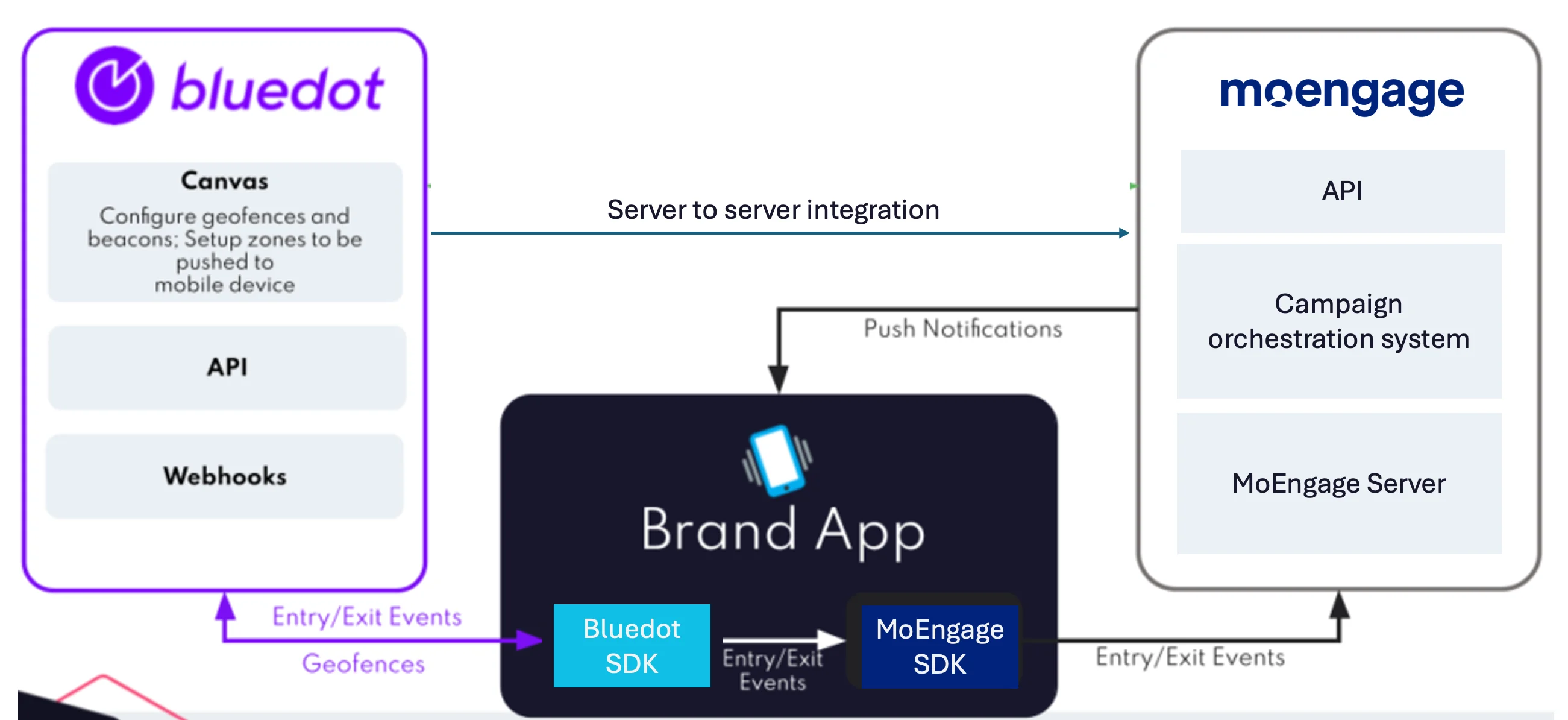 ### SDK setup
#### Step 1: Create a Bluedot project
Set up your Bluedot account and log in to the Bluedot Canvas dashboard. Refer to the [Bluedot documentation](https://docs.bluedot.io/canvas/creating-a-new-project/) to learn how to create a new project.
#### Step 2: Integrate the SDKs
Configure your application to send custom events to MoEngage when a Bluedot entry or exit trigger fires. Use the snippets below to integrate the Bluedot Point SDK and the MoEngage SDK in your app.
**Android**
```kotlin onZoneEntryEvent wrap theme={null}
override fun onZoneEntryEvent(geoTriggerEvent: GeoTriggerEvent, context: Context) {
val properties = Properties()
properties.addAttribute("zone_id", geoTriggerEvent.zoneInfo.id)
.addAttribute("zone_name", geoTriggerEvent.zoneInfo.name)
.addAttribute("latitude", geoTriggerEvent.entryEvent()?.locations?.get(0)?.latitude)
.addAttribute("longitude", geoTriggerEvent.entryEvent()?.locations?.get(0)?.longitude)
.addAttribute("fence_id", geoTriggerEvent.entryEvent()?.fenceId)
.addAttribute("fence_name", geoTriggerEvent.entryEvent()?.fenceName)
.setNonInteractive()
MoEAnalyticsHelper.trackEvent(context, "customEventEntry", properties)
}
```
```kotlin onZoneExitEvent wrap theme={null}
override fun onZoneExitEvent(geoTriggerEvent: GeoTriggerEvent, context: Context) {
val properties = Properties()
properties.addAttribute("zone_id", geoTriggerEvent.zoneInfo.id)
.addAttribute("zone_name", geoTriggerEvent.zoneInfo.name)
.addAttribute("latitude", geoTriggerEvent.exitEvent()?.locations?.get(0)?.latitude)
.addAttribute("longitude", geoTriggerEvent.exitEvent()?.locations?.get(0)?.longitude)
.addAttribute("fence_id", geoTriggerEvent.exitEvent()?.fenceId)
.addAttribute("fence_name", geoTriggerEvent.exitEvent()?.fenceName)
.setNonInteractive()
MoEAnalyticsHelper.trackEvent(context, "customEventExit", properties)
}
```
**iOS**
```swift didEnterZone callback wrap theme={null}
func didEnterZone(_ triggerEvent: GeoTriggerEvent) {
var eventAttrDict: Dictionary = Dictionary()
let eventProperties = MoEngageProperties(withAttributes: eventAttrDict)
eventProperties.addAttribute(triggerEvent.zoneInfo.id, withName: "zone_id")
eventProperties.addAttribute(triggerEvent.zoneInfo.name, withName: "zone_name")
eventProperties.addAttribute(triggerEvent.entryEvent?.locations[0].coordinate.latitude ?? 0.0, withName: "latitude")
eventProperties.addAttribute(triggerEvent.entryEvent?.locations[0].speed ?? 0.0, withName: "speed")
eventProperties.addAttribute(triggerEvent.entryEvent?.eventTime.timeIntervalSince1970 ?? 0.0, withName: "timestamp")
let customData = triggerEvent.zoneInfo.customData
if !customData.isEmpty {
customData.forEach { data in eventAttrDict["\(data.key)"] = "\(data.value)" }
}
MoEngageSDKAnalytics.sharedInstance.trackEvent("customEventEntry", withProperties: eventProperties)
}
```
To capture Bluedot exit triggers, add similar code in the `didExitZone` callback.
### SDK setup
#### Step 1: Create a Bluedot project
Set up your Bluedot account and log in to the Bluedot Canvas dashboard. Refer to the [Bluedot documentation](https://docs.bluedot.io/canvas/creating-a-new-project/) to learn how to create a new project.
#### Step 2: Integrate the SDKs
Configure your application to send custom events to MoEngage when a Bluedot entry or exit trigger fires. Use the snippets below to integrate the Bluedot Point SDK and the MoEngage SDK in your app.
**Android**
```kotlin onZoneEntryEvent wrap theme={null}
override fun onZoneEntryEvent(geoTriggerEvent: GeoTriggerEvent, context: Context) {
val properties = Properties()
properties.addAttribute("zone_id", geoTriggerEvent.zoneInfo.id)
.addAttribute("zone_name", geoTriggerEvent.zoneInfo.name)
.addAttribute("latitude", geoTriggerEvent.entryEvent()?.locations?.get(0)?.latitude)
.addAttribute("longitude", geoTriggerEvent.entryEvent()?.locations?.get(0)?.longitude)
.addAttribute("fence_id", geoTriggerEvent.entryEvent()?.fenceId)
.addAttribute("fence_name", geoTriggerEvent.entryEvent()?.fenceName)
.setNonInteractive()
MoEAnalyticsHelper.trackEvent(context, "customEventEntry", properties)
}
```
```kotlin onZoneExitEvent wrap theme={null}
override fun onZoneExitEvent(geoTriggerEvent: GeoTriggerEvent, context: Context) {
val properties = Properties()
properties.addAttribute("zone_id", geoTriggerEvent.zoneInfo.id)
.addAttribute("zone_name", geoTriggerEvent.zoneInfo.name)
.addAttribute("latitude", geoTriggerEvent.exitEvent()?.locations?.get(0)?.latitude)
.addAttribute("longitude", geoTriggerEvent.exitEvent()?.locations?.get(0)?.longitude)
.addAttribute("fence_id", geoTriggerEvent.exitEvent()?.fenceId)
.addAttribute("fence_name", geoTriggerEvent.exitEvent()?.fenceName)
.setNonInteractive()
MoEAnalyticsHelper.trackEvent(context, "customEventExit", properties)
}
```
**iOS**
```swift didEnterZone callback wrap theme={null}
func didEnterZone(_ triggerEvent: GeoTriggerEvent) {
var eventAttrDict: Dictionary = Dictionary()
let eventProperties = MoEngageProperties(withAttributes: eventAttrDict)
eventProperties.addAttribute(triggerEvent.zoneInfo.id, withName: "zone_id")
eventProperties.addAttribute(triggerEvent.zoneInfo.name, withName: "zone_name")
eventProperties.addAttribute(triggerEvent.entryEvent?.locations[0].coordinate.latitude ?? 0.0, withName: "latitude")
eventProperties.addAttribute(triggerEvent.entryEvent?.locations[0].speed ?? 0.0, withName: "speed")
eventProperties.addAttribute(triggerEvent.entryEvent?.eventTime.timeIntervalSince1970 ?? 0.0, withName: "timestamp")
let customData = triggerEvent.zoneInfo.customData
if !customData.isEmpty {
customData.forEach { data in eventAttrDict["\(data.key)"] = "\(data.value)" }
}
MoEngageSDKAnalytics.sharedInstance.trackEvent("customEventEntry", withProperties: eventProperties)
}
```
To capture Bluedot exit triggers, add similar code in the `didExitZone` callback.