> ## Documentation Index
> Fetch the complete documentation index at: https://moengage.com/docs/llms.txt
> Use this file to discover all available pages before exploring further.
# Object Data in Analytics
> Query nested object data attributes in MoEngage Analytics to analyze complex event properties like trip details without flattening your schema.
# Overview
Object data allows you to get deeper insights into user interactions. By querying attributes within an object, you can perform more effective analysis based on the specific characteristics of the events you track.
This approach allows you to query complex, related data points in their natural structure (like a 'trip' object containing 'source' and 'destination' details) without needing to flatten all possible variations into separate, top-level event attributes.
# Create Analytics Queries with Object Data
You can leverage object data within Analytics to build powerful queries. The attributes of an object can be of any primitive data type, such as string, numeric, or date. The following example shows how to create a Behavior Analysis query using an event that contains object data.
For data structures where an array of objects is nested within another array of objects, you can perform analysis by creating queries that span across both levels. This allows you to analyze events based on a combination of attributes from the parent array and the nested array within the same object element.
Consider a *SEARCH\_BUS* event, where the event attribute **trip** is a single object that contains details like its *source*, *destination*, and *journey\_date*.
```json Example Event Data theme={null}
{
"SEARCH\_BUS": {
"trip": {
"source": {
"city": "Bengaluru",
"state": "KA"
},
"destination": {
"city": "Chennai",
"state": "TN"
},
"journey\_date": "2025-11-20",
"passenger\_count": 2
}
}
}
```
Now, let's create an analysis. Say you want to query for *SEARCH\_BUS* events where the *trip* object has a *journey\_date* that exists, AND the *destination.city* within that same *trip* object is *Chennai*.
1. On the **Behavior Analysis** page, select the event. For our example, we will select *SEARCH\_BUS*.
2. Click **+ Attributes** and start by filtering for the attribute: `trip.journey\_date`.
3. Click the **+ With** operator that appears indented. This allows you to add more conditions that must be true for the same *trip* object.
4. Add the condition: `trip.destination.city` is *Chennai*.
5. Follow the rest of the steps to create your analysis. For more information, refer [here](/user-guide/analyze/analytics/behavior/behavior-analysis).
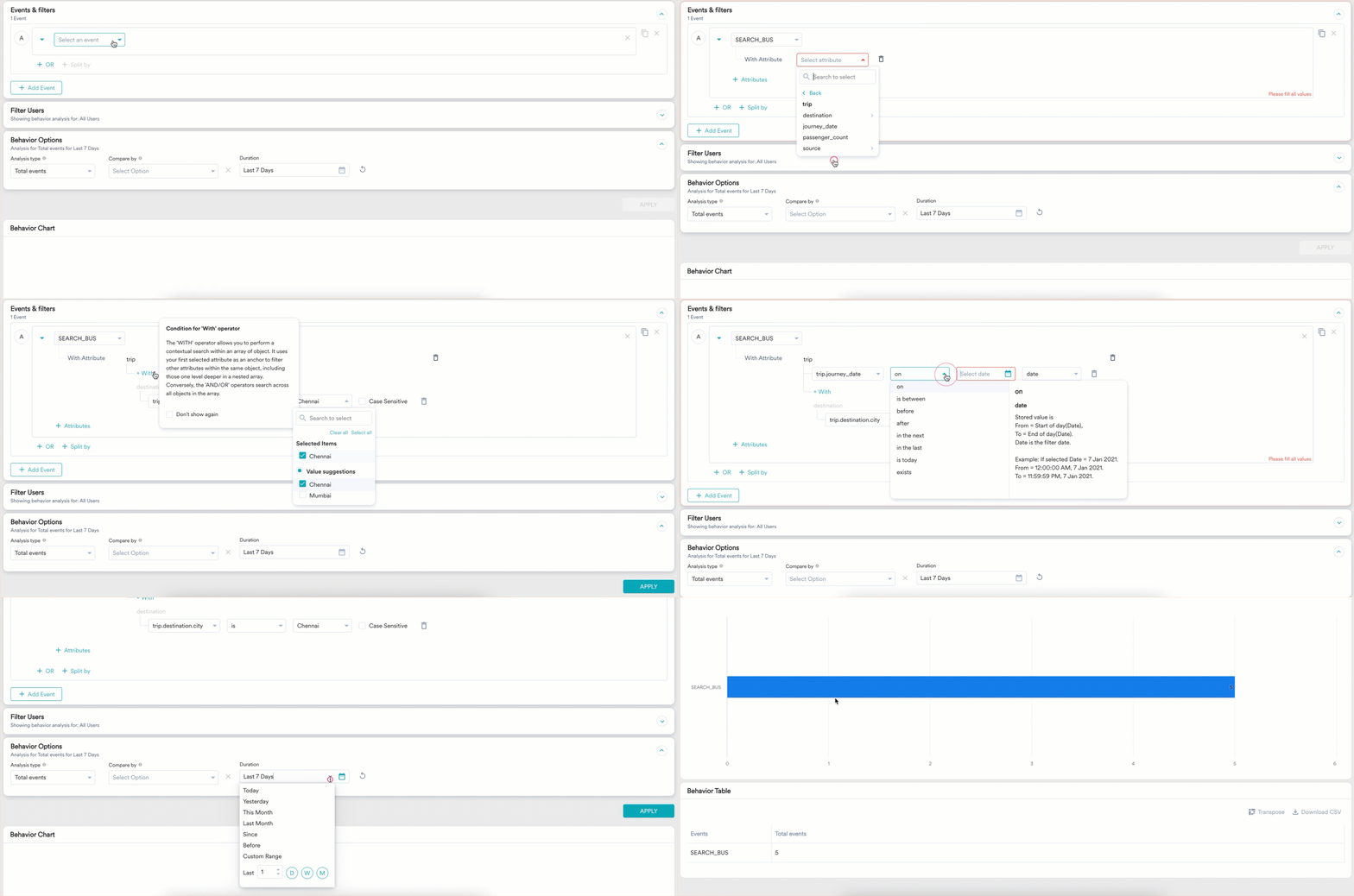 This query uses the **With** operator to ensure all conditions are met within the same *trip* object. It will find *SEARCH\_BUS* events that have a trip where the `journey\_date` exists AND the `destination.city` is *Chennai*.
For more information on the functionality of operators such as "With" and "And/Or" for querying object data, refer to [Object Data Type in Segmentation](/user-guide/segment/advanced-concepts/object-data-type-in-segmentation).
# Current Analytics Functionality
Support for using object data attributes in the following Analytics functionalities is planned in the next phase:
* All analytics features
* Split by
* Compare by
* User Analysis
* Distribution
* Date/Timestamp Attributes
For scenarios requiring these capabilities in the meantime, consider transforming your data into simpler, primitive types before ingestion.
# Next Steps
* Learn more about the various analysis types [here](/user-guide/analyze/moengage-analytics/overview).
* Learn more about defining user groups in [Create Segments](/user-guide/segment/segment-operations/create-segments).
* Understand how to use the "With" and "And/Or" operators in [Object Data Type in Segmentation](/user-guide/segment/advanced-concepts/object-data-type-in-segmentation).
This query uses the **With** operator to ensure all conditions are met within the same *trip* object. It will find *SEARCH\_BUS* events that have a trip where the `journey\_date` exists AND the `destination.city` is *Chennai*.
For more information on the functionality of operators such as "With" and "And/Or" for querying object data, refer to [Object Data Type in Segmentation](/user-guide/segment/advanced-concepts/object-data-type-in-segmentation).
# Current Analytics Functionality
Support for using object data attributes in the following Analytics functionalities is planned in the next phase:
* All analytics features
* Split by
* Compare by
* User Analysis
* Distribution
* Date/Timestamp Attributes
For scenarios requiring these capabilities in the meantime, consider transforming your data into simpler, primitive types before ingestion.
# Next Steps
* Learn more about the various analysis types [here](/user-guide/analyze/moengage-analytics/overview).
* Learn more about defining user groups in [Create Segments](/user-guide/segment/segment-operations/create-segments).
* Understand how to use the "With" and "And/Or" operators in [Object Data Type in Segmentation](/user-guide/segment/advanced-concepts/object-data-type-in-segmentation).