> ## Documentation Index
> Fetch the complete documentation index at: https://moengage.com/docs/llms.txt
> Use this file to discover all available pages before exploring further.
# All Campaigns - Search/View and Export Campaign Statistics
> Search, filter, and export campaign statistics from MoEngage's All Campaigns dashboard. Analyze performance across channels, delivery types, and dates.
The **All Campaigns** section on your MoEngage Dashboard helps you manage and analyze your campaign performance. From here, you can view campaign statistics, search for specific campaigns, and export data for further insights.
To open this section, go to **Campaigns** > **All Campaigns** on the dashboard.
# Search for Campaigns
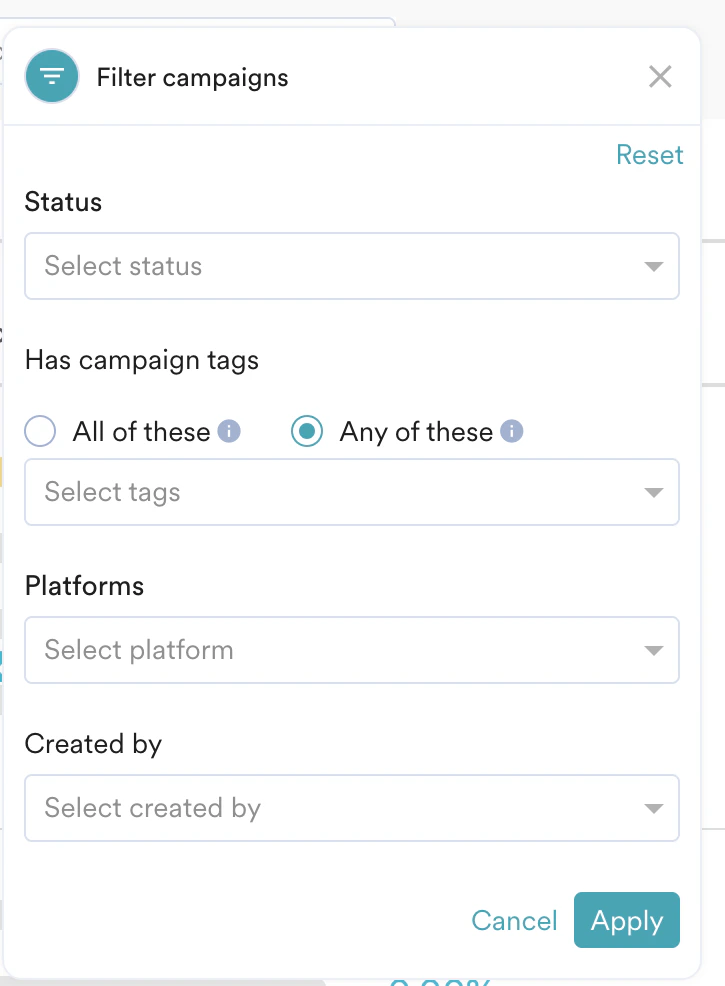
Searching for campaigns allows you to quickly locate specific campaigns for analysis, modification, or performance review. You can quickly find specific campaigns by using these criteria:
* Campaign name
* Creation date
* Channel
* Delivery type
* Status
* Campaign tags
* Platforms
* Creator

 # Export Campaign Data
You can export your campaign data to create custom reports or gain deeper insights. To export data, click the **Export** button at the top of the **All Campaigns** page.
# Export Campaign Data
You can export your campaign data to create custom reports or gain deeper insights. To export data, click the **Export** button at the top of the **All Campaigns** page.
 For more details on campaign export options and how to schedule periodic reports, see [Create Ad Hoc or Scheduled Campaign Reports](/user-guide/campaigns-and-channels/campaign-management-and-reports/create-ad-hoc-campaign-reports).
# Archive and Unarchive Campaigns
You can archive campaigns to remove them from your active view without deleting them. This helps keep your campaign list clean and organized while retaining historical data for future reference.
### Archive a Campaign
1. On the **All Campaigns** page, locate the campaign you want to archive.
2. Click the **Archive** button next to the campaign name.
### View Archived Campaigns
To view campaigns that you have archived:
1. On the **All Campaigns** page, locate the filters section.
2. Toggle on the **Archived Campaigns** button.
For more details on campaign export options and how to schedule periodic reports, see [Create Ad Hoc or Scheduled Campaign Reports](/user-guide/campaigns-and-channels/campaign-management-and-reports/create-ad-hoc-campaign-reports).
# Archive and Unarchive Campaigns
You can archive campaigns to remove them from your active view without deleting them. This helps keep your campaign list clean and organized while retaining historical data for future reference.
### Archive a Campaign
1. On the **All Campaigns** page, locate the campaign you want to archive.
2. Click the **Archive** button next to the campaign name.
### View Archived Campaigns
To view campaigns that you have archived:
1. On the **All Campaigns** page, locate the filters section.
2. Toggle on the **Archived Campaigns** button.
 ### Unarchive a Campaign
You can restore an archived campaign to your active list:
1. On the **All Campaigns** page, ensure the **Archived Campaigns** toggle is on to view archived campaigns.
2. Click the **Unarchive** button next to the archived campaign name.
**Note:** Card campaigns cannot be archived. For more information, refer to [Cards](/user-guide/campaigns-and-channels/cards).
To learn more about campaign details, editing, or duplicating campaigns, see [Campaign Overview: Edit and Duplicate Campaigns](/user-guide/campaigns-and-channels/campaign-management-and-reports/campaign-analytics-page).
### Unarchive a Campaign
You can restore an archived campaign to your active list:
1. On the **All Campaigns** page, ensure the **Archived Campaigns** toggle is on to view archived campaigns.
2. Click the **Unarchive** button next to the archived campaign name.
**Note:** Card campaigns cannot be archived. For more information, refer to [Cards](/user-guide/campaigns-and-channels/cards).
To learn more about campaign details, editing, or duplicating campaigns, see [Campaign Overview: Edit and Duplicate Campaigns](/user-guide/campaigns-and-channels/campaign-management-and-reports/campaign-analytics-page).