> ## Documentation Index
> Fetch the complete documentation index at: https://moengage.com/docs/llms.txt
> Use this file to discover all available pages before exploring further.
# Facebook Audience Campaign Analytics
> Campaign Analytics and Campaign Info for Facebook Audience campaigns in MoEngage.
# Campaign Analytics
All the metrics are calculated and displayed in the App's Timezone.
The campaign analytics section has the following information:
| Field | Description |
| ------------------- | -------------------------------------------------------------------------------------------------------------------------------------------------------------------------------------------------------------------------------------------------------------------------------------------------------------------------------------------------------------------------------------------------------------------------------------------------------------------- |
| Eligible users | This is the number of users who have qualified for the campaign based on their having fulfilled the segmentation criteria and trigger criteria, if applicable. |
| Attempted | This is the number of eligible users who have at least one of the identifiers that the campaign passes to Facebook - Device Identifier (Device ID) or Customer Match Identifiers (Mobile Number, Email). Only these users can be synced. A user being reachable on another channel (such as push) does not make them an attempted user - if they do not have at least one of these identifiers, MoEngage cannot send them to Facebook, so they are not counted here. |
| Successfully synced | This is the number of users from the list of attempted users that were added to the Facebook console. |
| Conversions | This represents the unique number of successfully synced users who have received the conversion event during the attribution window. |
| Conversion events | This represents the number of successfully synced users who have received the conversion event during the attribution window. |
* Conversion Goal is optional during campaign creation. The above conversion-related metrics are measured and displayed if it is added during campaign creation.
* Successfully synced is confirmed at the batch level. MoEngage sends users to the Facebook console in batches, and Facebook confirms the batch was received. Some individual users within a confirmed batch may be dropped during Facebook's internal processing without being reported back, so this metric may not reflect those individual drops.
* It takes between 6 and 48 hours for Facebook audiences to sync in the Facebook ad center.
The metrics in the above table are available for all delivery types.
### Campaign Analytics for Periodic Campaigns
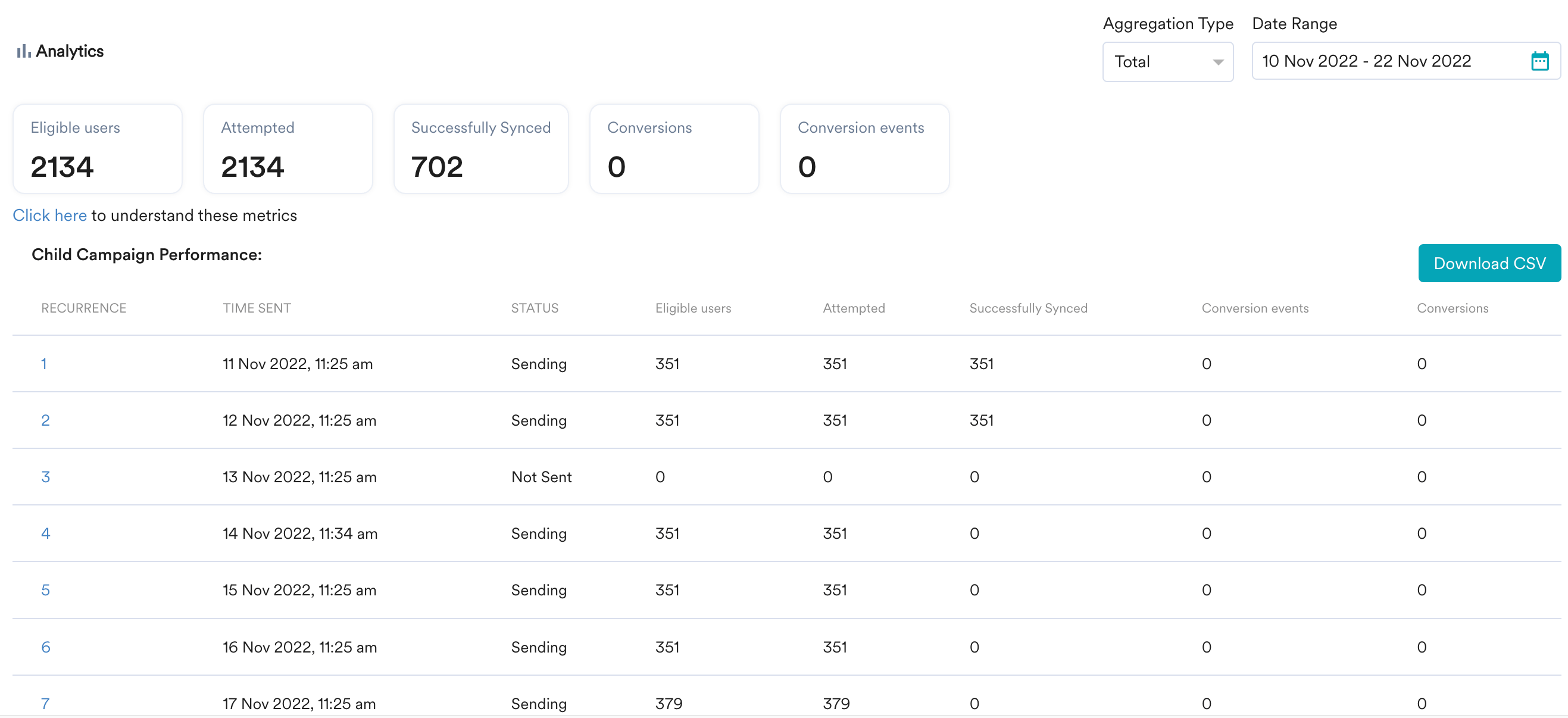
In the case of a periodic campaign, the above stats are available for the parent campaign. The stats for the child campaigns (every instance of the campaign run) are shown in a table below these stats.
 ## Campaign Stats Filters
These filters are available only for periodic and event-triggered campaigns.
1. **Aggregation Type**: You can choose Total/Average here.
2. **Date Range**: You can choose the date range for which you want to see the information about the campaign instances.
## Time Trends
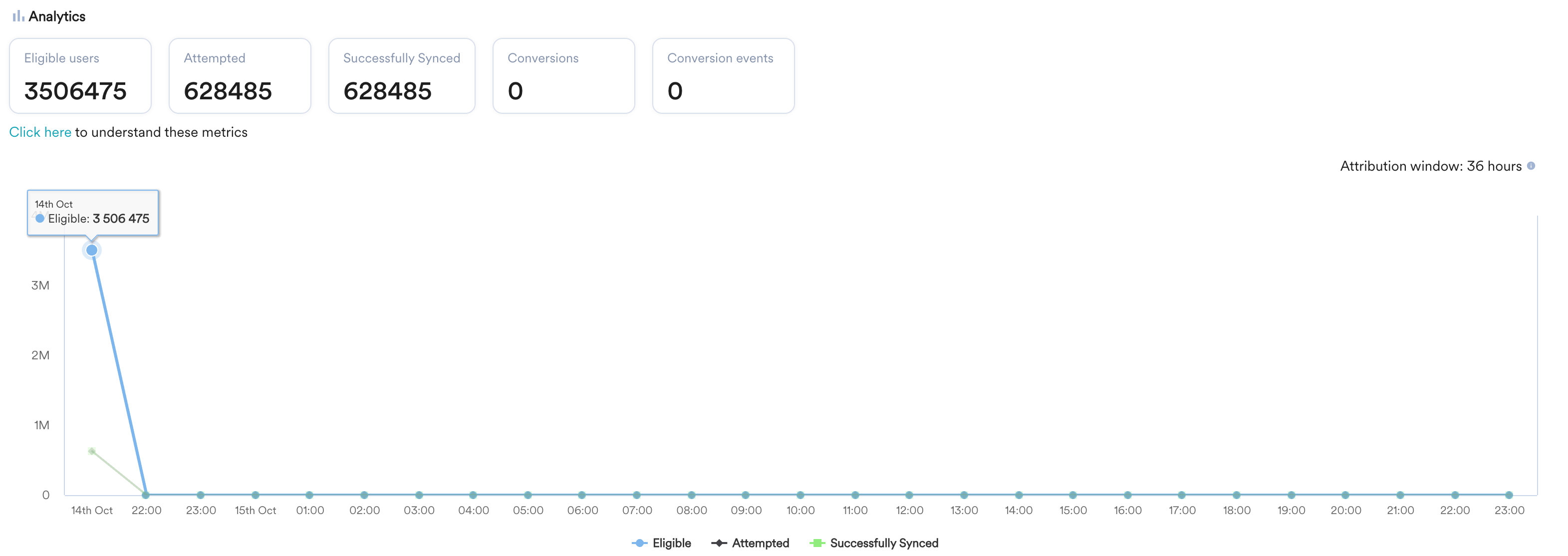
The time trends for the campaign are available for stats shown in the table, along with the details of the attribution window as shown below.
## Campaign Stats Filters
These filters are available only for periodic and event-triggered campaigns.
1. **Aggregation Type**: You can choose Total/Average here.
2. **Date Range**: You can choose the date range for which you want to see the information about the campaign instances.
## Time Trends
The time trends for the campaign are available for stats shown in the table, along with the details of the attribution window as shown below.
 ## Campaign Failure Breakdown
In the case of a campaign failure for any user, the reasons for failure are shown in an error table in the image below.
## Campaign Failure Breakdown
In the case of a campaign failure for any user, the reasons for failure are shown in an error table in the image below.
 ### List of Possible Errors
The campaign failure breakdown section will list the errors or failures encountered while running the campaign. These could be access-related errors, data-related failures, or API/service-related failures, which are listed below.
For more information on understanding these errors, refer to [Troubleshoot common errors in FB Audience](/docs/user-guide/campaigns-and-channels/facebook-audience/troubleshooting-and-faqs-facebook-audience/troubleshoot-common-errors-in-fb-audience).
# Campaign Info
The campaign info tab has the following information:
| Field | Description |
| ---------------------- | -------------------------------------------------------------------------------------------------------------------------------------------------- |
| Segmentation | This section contains information about the target segment chosen for the campaign. |
| Qualification Criteria | This section contains information about the filters and criteria that the users in the target segment need to satisfy to qualify for the campaign. |
| Facebook audience | This section contains information on whether the audience will be added to or removed from the custom audience. |
| Goals | This section contains information about the goals set for the campaigns. |
| Timing | This section contains information about the campaign's delivery schedules, including the start and end times of the campaign instance. |
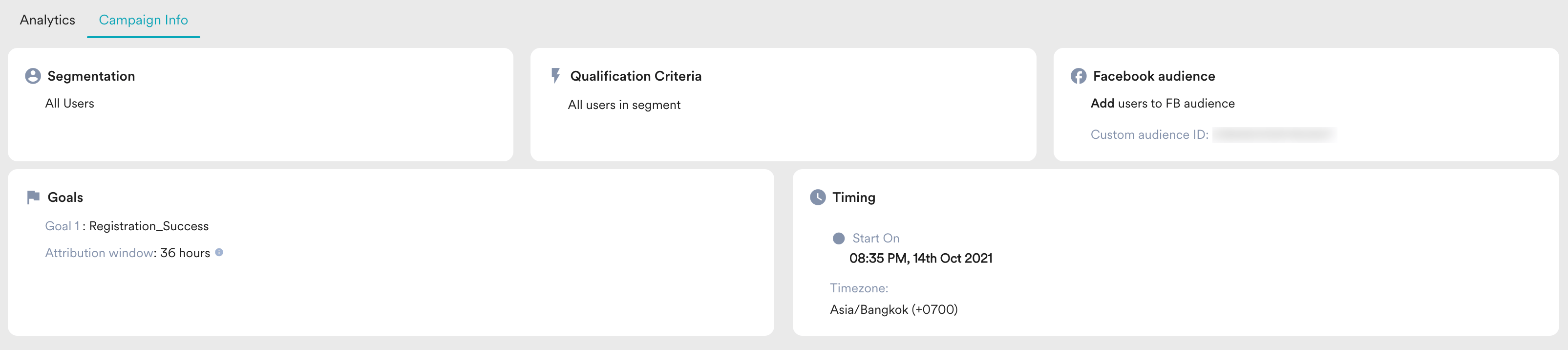
The image below illustrates the Campaign Info section for a Facebook Audience campaign that has an audience added.
### List of Possible Errors
The campaign failure breakdown section will list the errors or failures encountered while running the campaign. These could be access-related errors, data-related failures, or API/service-related failures, which are listed below.
For more information on understanding these errors, refer to [Troubleshoot common errors in FB Audience](/docs/user-guide/campaigns-and-channels/facebook-audience/troubleshooting-and-faqs-facebook-audience/troubleshoot-common-errors-in-fb-audience).
# Campaign Info
The campaign info tab has the following information:
| Field | Description |
| ---------------------- | -------------------------------------------------------------------------------------------------------------------------------------------------- |
| Segmentation | This section contains information about the target segment chosen for the campaign. |
| Qualification Criteria | This section contains information about the filters and criteria that the users in the target segment need to satisfy to qualify for the campaign. |
| Facebook audience | This section contains information on whether the audience will be added to or removed from the custom audience. |
| Goals | This section contains information about the goals set for the campaigns. |
| Timing | This section contains information about the campaign's delivery schedules, including the start and end times of the campaign instance. |
The image below illustrates the Campaign Info section for a Facebook Audience campaign that has an audience added.
 # FAQs
Two factors can cause this difference:
* **Sync latency:** After MoEngage syncs an audience, Facebook takes between 6 and 48 hours to make it available in the Facebook Ads Manager. If you check before this window, the counts may not match yet.
* **Batch-level confirmation:** MoEngage sends users to Facebook in batches and counts a user under **Successfully synced** when Facebook confirms the batch was received. Facebook may drop some individual users within a confirmed batch during its internal processing (for example, when an identifier cannot be matched) without reporting those drops back. As a result, the number of users that finally appear in your Facebook custom audience can be lower than the **Successfully synced** count in MoEngage.
Eligible users are all users who qualify for the campaign based on the segmentation and trigger criteria. A user is counted under **Attempted** only if they have at least one of the identifiers that the campaign passes to Facebook (Device ID, Mobile Number, or Email). Eligible users who do not have any of these identifiers cannot be sent to Facebook, so they are not counted as attempted.
Being reachable on another channel, such as push, does not mean a user can be synced to Facebook. Facebook Audience sync depends on the user having at least one of the identifiers that the campaign passes to the Facebook Marketing API (Device ID, Mobile Number, or Email). If the user does not have any of these identifiers, MoEngage cannot send them to Facebook, even if they are reachable on push.
# FAQs
Two factors can cause this difference:
* **Sync latency:** After MoEngage syncs an audience, Facebook takes between 6 and 48 hours to make it available in the Facebook Ads Manager. If you check before this window, the counts may not match yet.
* **Batch-level confirmation:** MoEngage sends users to Facebook in batches and counts a user under **Successfully synced** when Facebook confirms the batch was received. Facebook may drop some individual users within a confirmed batch during its internal processing (for example, when an identifier cannot be matched) without reporting those drops back. As a result, the number of users that finally appear in your Facebook custom audience can be lower than the **Successfully synced** count in MoEngage.
Eligible users are all users who qualify for the campaign based on the segmentation and trigger criteria. A user is counted under **Attempted** only if they have at least one of the identifiers that the campaign passes to Facebook (Device ID, Mobile Number, or Email). Eligible users who do not have any of these identifiers cannot be sent to Facebook, so they are not counted as attempted.
Being reachable on another channel, such as push, does not mean a user can be synced to Facebook. Facebook Audience sync depends on the user having at least one of the identifiers that the campaign passes to the Facebook Marketing API (Device ID, Mobile Number, or Email). If the user does not have any of these identifiers, MoEngage cannot send them to Facebook, even if they are reachable on push.