> ## Documentation Index
> Fetch the complete documentation index at: https://moengage.com/docs/llms.txt
> Use this file to discover all available pages before exploring further.
# Why Is Click Tracking Not Working for Some OSM Campaigns?
> Fix click tracking issues in MoEngage On-site Messaging campaigns by adding explicit tracking code to embedded redirection URLs in text elements.
## Problem
Some On-site Messaging (OSM) campaigns experienced issues tracking clicks, even though:
* The OSMs were successfully clicked.
* The redirection worked as expected.
## Instructions
To ensure proper click tracking in OSM campaigns, you must explicitly enter click tracking when redirection URLs are embedded in the text. Perform the following steps:
1. Edit the campaign.
2. Go to the content section and click the text that contains the link.
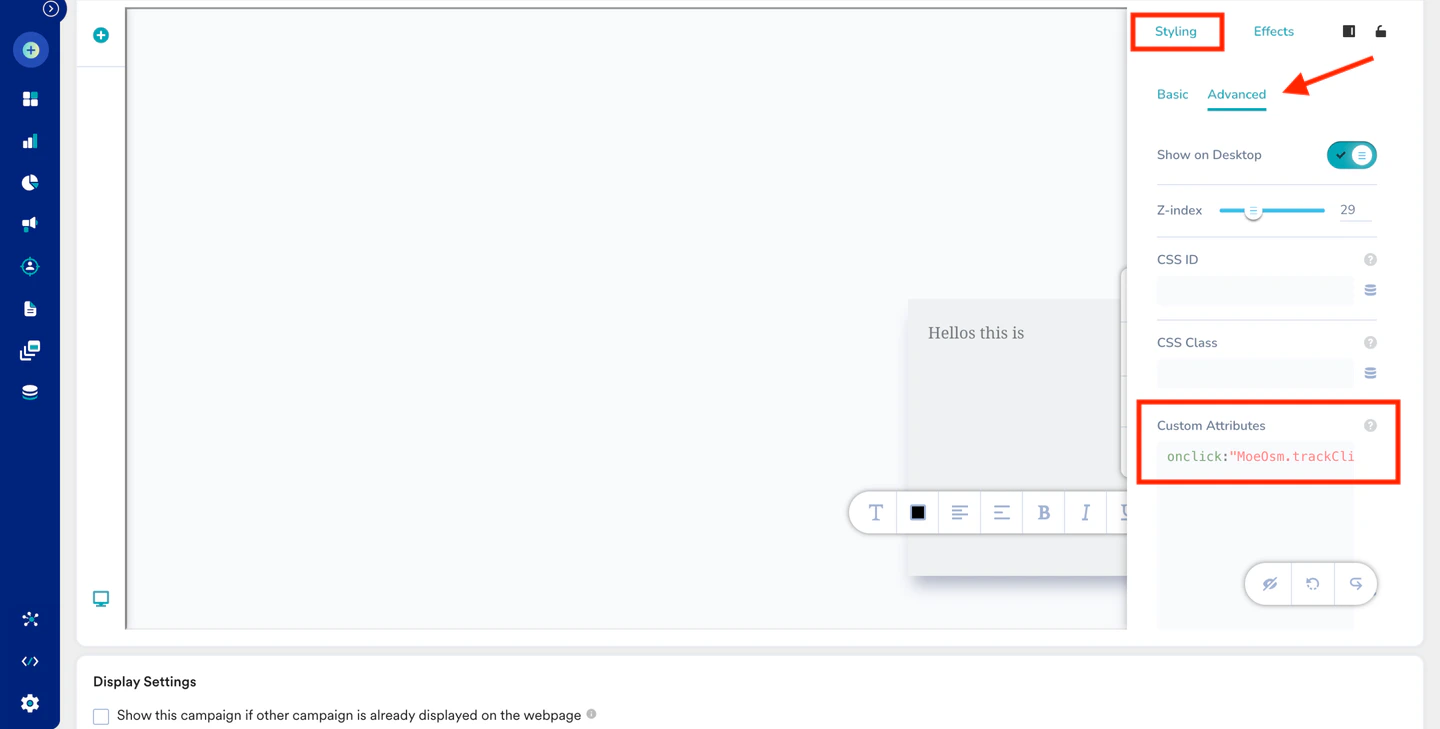
3. Click **Settings** and select **Styling**.
4. Switch from **Basic** to **Advanced**.
5. Add the provided line `onclick:"MoeOsm.trackClick('Widget ID');MoeOsm.dismissMessage();"` to the **Custom Attributes** section and replace the **Widget ID** with the widget ID value (such as 1, 2, and 3).
6. Save the campaign and publish it.
 * You can add multiple links in the same row by including them once and treating the entire row as a single entity.
* Ensure the specified line is entered in each respective row to track clicks across multiple rows.
* You can add multiple links in the same row by including them once and treating the entire row as a single entity.
* Ensure the specified line is entered in each respective row to track clicks across multiple rows.