> ## Documentation Index
> Fetch the complete documentation index at: https://moengage.com/docs/llms.txt
> Use this file to discover all available pages before exploring further.
# User Actions Model
> Generate personalized recommendations from user actions like cart abandonment, wishlist saves, and product views to re-engage high-intent shoppers.
# Introduction
The User Actions recommendations model utilizes user behavior to create rule-based personalized recommendations. These are effective when a strong intent is shown by users, such as abandoned carts, wishlists, and other behaviors indicating an interest in a specific product or service. User Action recommendations offer several benefits for businesses:
* Personalized engagement
* Precise targeting
* Re-engagement opportunities
### Example Use Cases
* Recover lost sales with cart abandonment reminders.
* Get back-in-stock alerts and never miss out!
* Boost engagement with personalized campaigns from users' wishlists.
* Re-engage users with recently viewed items.
* Drive repeat business with gentle nudges.
Before you proceed, you must map the user actions and add a catalog. For more information, refer to [User Actions](/user-guide/content/recommendations/prerequisites/map-user-actions-settings) and [Catalogs](/user-guide/content/recommendations/prerequisites/catalogs).
# Creating User Action Recommendations
The recommendations can be created by Admin/ Manager / Marketer roles only
To create a user action recommendation, perform the following steps:
1. On the sidebar menu in MoEngage, hover over the Content menu item  . The **Content** menu appears.
2. Click **Recommendations**.
. The **Content** menu appears.
2. Click **Recommendations**. 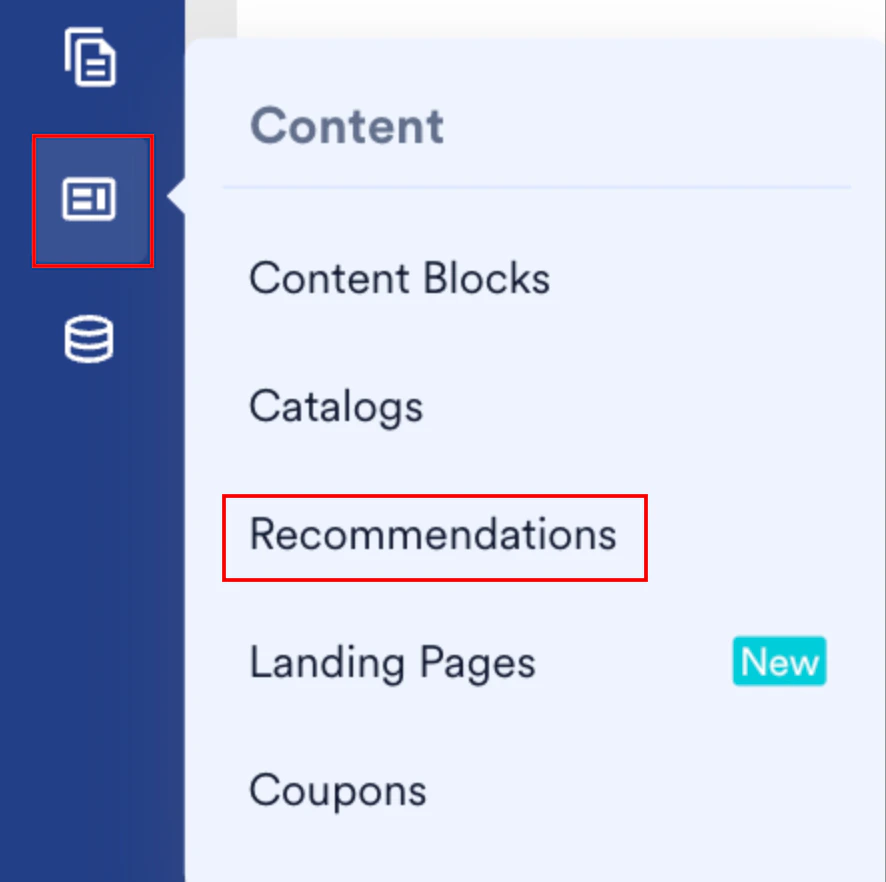 The Recommendations page appears.
3. Click **+ Create recommendation**.
The Recommendations page appears.
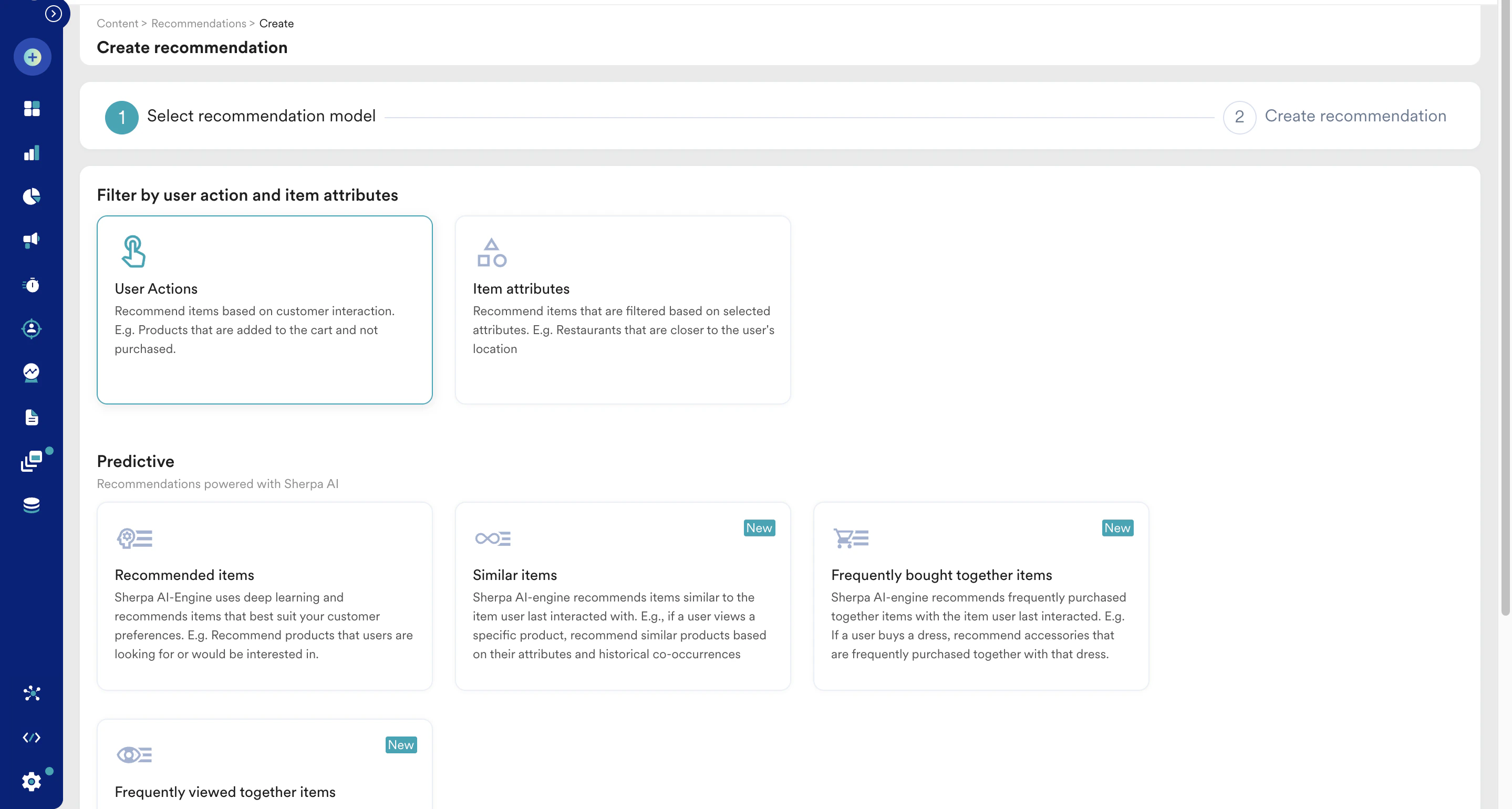
3. Click **+ Create recommendation**. 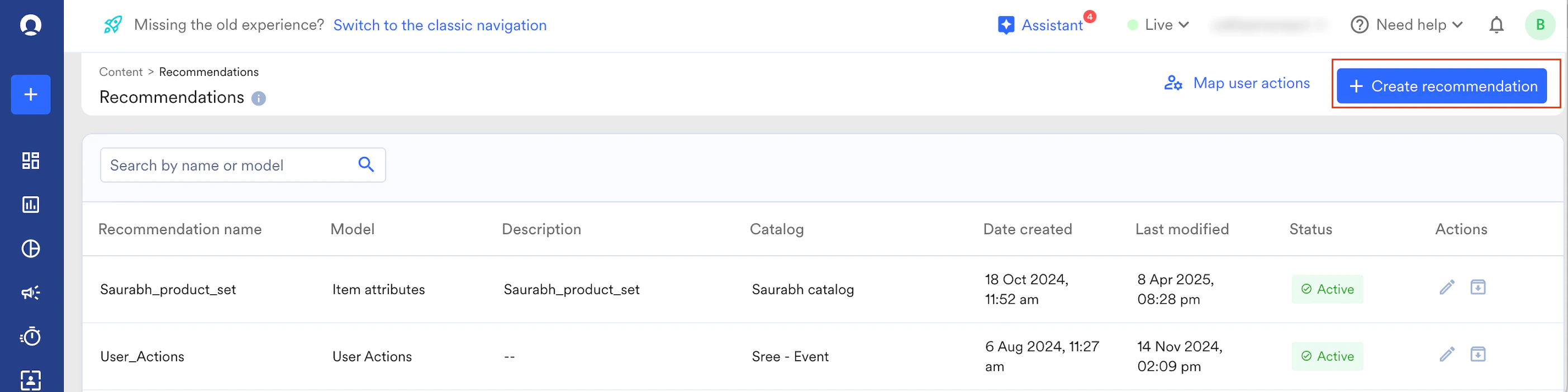 4. Select the **User Actions** model and click **Next**.
  5. In the **Recommendation name** field, enter a name for the recommendation.
6. In the **Recommendation description** field, enter a description for the recommendation.
7. In the **Catalog** drop-down list, select the relevant catalog from which you wish to retrieve these recommendations.
8. Choose the relevant user actions based on your use case from the **Item where user performed** drop-down list and define the activity date range. For example, Added to wishlist performed in the last 7 days. You can also exclude certain types of interacted items.
5. In the **Recommendation name** field, enter a name for the recommendation.
6. In the **Recommendation description** field, enter a description for the recommendation.
7. In the **Catalog** drop-down list, select the relevant catalog from which you wish to retrieve these recommendations.
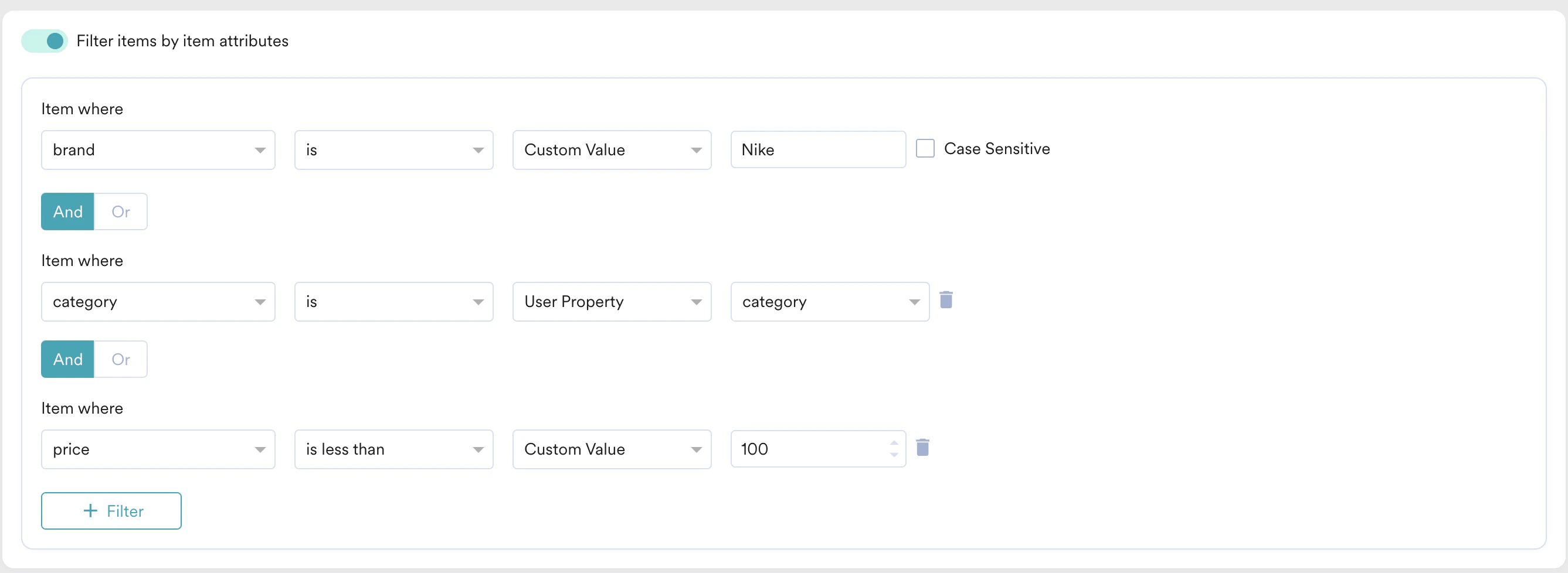
8. Choose the relevant user actions based on your use case from the **Item where user performed** drop-down list and define the activity date range. For example, Added to wishlist performed in the last 7 days. You can also exclude certain types of interacted items. 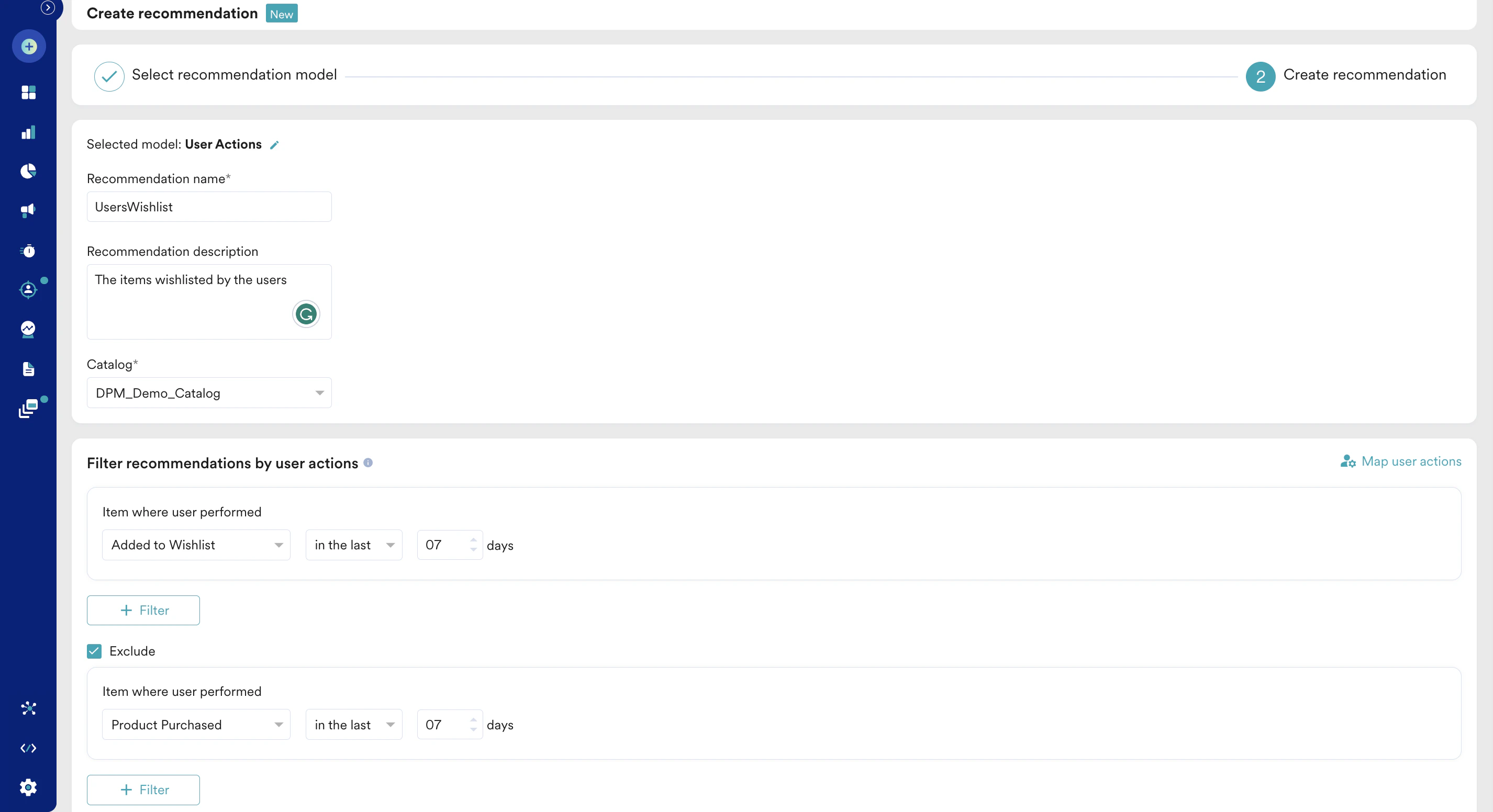 9. Turn the **Filter items by item attributes** toggle on to add filtering criteria and control which items to recommend to their customers. These filters are applied over the recommendations of the User Action model.
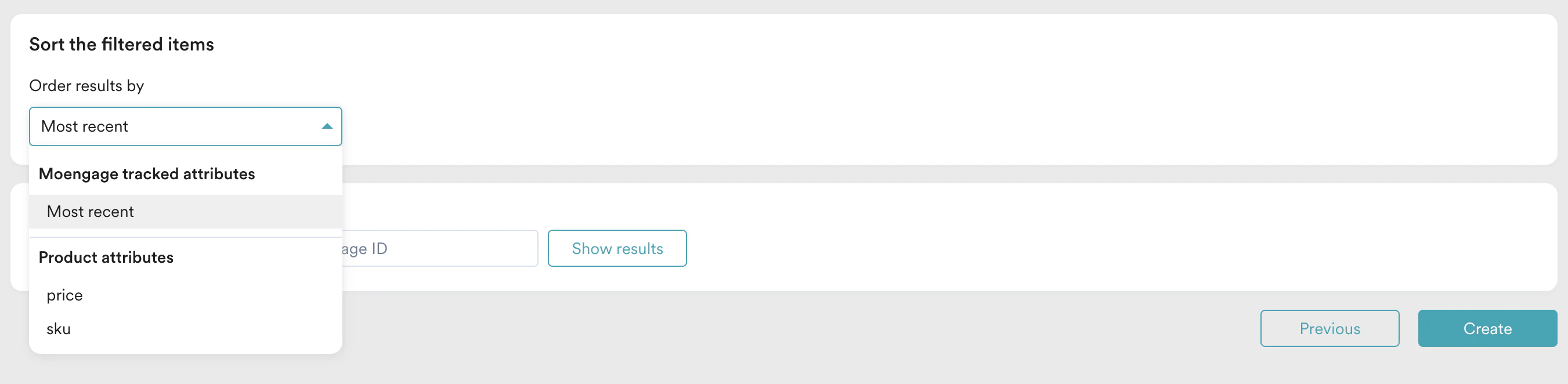
  10. In the **Sort the filtered items** section, sort the recommendation results by any numeric attribute. For example, price.
  11. Click **Save**. A recommendation is created with an 'Active' state on the Recommendations page.
By leveraging specific user actions such as abandoned carts or wishlist items, businesses can re-engage users and drive conversions.
## Filters
The filter settings allow you to refine the recommendations shown to your customers based on information available in the catalog. These filters customize the output of the User Action model to enhance the relevance of the suggested items.
### Example Use Cases
* Recover lost sales with cart abandonment reminders excluding those items which are currently out of stock.
* Recommend the wishlist items on sale.
* Recommend recently viewed items of a specific brand.
11. Click **Save**. A recommendation is created with an 'Active' state on the Recommendations page.
By leveraging specific user actions such as abandoned carts or wishlist items, businesses can re-engage users and drive conversions.
## Filters
The filter settings allow you to refine the recommendations shown to your customers based on information available in the catalog. These filters customize the output of the User Action model to enhance the relevance of the suggested items.
### Example Use Cases
* Recover lost sales with cart abandonment reminders excluding those items which are currently out of stock.
* Recommend the wishlist items on sale.
* Recommend recently viewed items of a specific brand.