> ## Documentation Index
> Fetch the complete documentation index at: https://moengage.com/docs/llms.txt
> Use this file to discover all available pages before exploring further.
# BigQuery Exports
> Export campaign interaction events from MoEngage to Google BigQuery. Follow the step-by-step guide to set up permissions and configuration.
# Introduction
[BigQuery](https://cloud.google.com/bigquery) is a fully managed, serverless data warehouse available on the Google Cloud Platform (GCP). It allows you to perform complex analytics on terabytes of data in real time without managing infrastructure
# MoEngage `<>` BigQuery
The MoEngage and BigQuery integration directly transfers user and event data to Google BigQuery for advanced analytics.
**Note**: This is a direct integration and does not require Google Cloud Storage (GCS) to export your data.
# Integration
* Ensure you have a BigQuery account with the required permissions to create/edit BigQuery instances, roles, and policies.
* It is optional to create a new user. However, you must have access to create a new user in your BigQuery database.
* If your system requires IP whitelisting, you must allowlist MoEngage IPs. For more information, refer [here](/user-guide/settings/account/security/ip-whitelisting-in-moengage).
* Ensure you have a [BigQuery Connection](/user-guide/data/exports/events/data-warehouse/bigquery-exports#introduction) in the App marketplace.\
Exports to BigQuery are part of the Streams add-on. Contact your MoEngage customer success manager (CSM) to enable this feature for your account.
* If not done already, you must set up a MoEngage \<> BigQuery integration for your account. For more information, refer to the [BigQuery Integration](/user-guide/data/exports/events/data-warehouse/bigquery-exports#introduction) help doc.
## Export Events from MoEngage to BigQuery
### Step 1: Ensure Your User's Assigned Role Has Required Permissions
To successfully set up and execute a BigQuery export, your service account or user must have the following permissions based on the action being performed:
* **To Create a Connection**: To establish a new BigQuery connection within the MoEngage App Marketplace, the user must have the *BigQuery Data Viewer* and *BigQuery Job User* roles. This allows MoEngage to validate the project and dataset details. For more information, refer [here](/user-guide/data/imports/data-warehouses-imports/bigquery-imports).
* **To Perform Exports**: To execute the actual data transfer, your service account must be assigned the *BigQuery Data Editor* role. This grants MoEngage the necessary permissions to read and write data to your specific BigQuery tables.
### Step 2: Add a New BigQuery Export in the MoEngage App Marketplace
* For a full list of events and attributes, refer to the [Data Exports Glossary](/user-guide/data/exports/events/data-export-glossary).
* The `event_time` of exported events is always in UTC.
* MoEngage does not currently support exporting historical data.
To add a new BigQuery export, perform the following steps:
1. On the left navigation menu in the MoEngage UI, click **App marketplace**.
2. On the App Marketplace page, search for **BigQuery**. 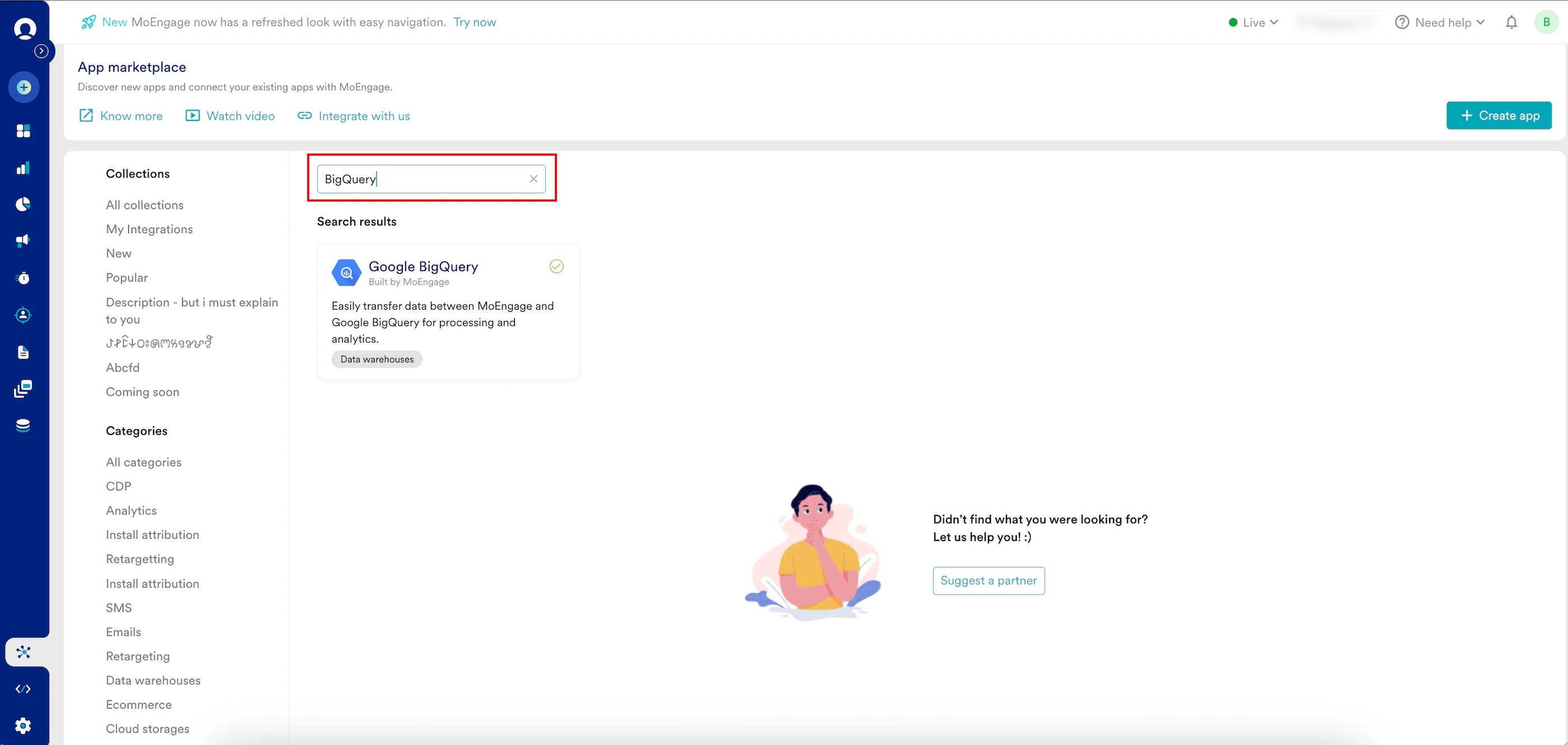 3. Click the **Google BigQuery** tile.
4. On the Google BigQuery page, go to the **Integrate** tab and click **+Add Export**.
5. Enter the following details:
| Field | Required | Description |
| ------------------------------------------------------------------------------------------------------------------------------------------------------------------------------------------------------------------------------------------------------------------------------------------------------------------------------------------------------------------------------------------------------------------------------------------------------------------------------------------------------------------------------------------------------------------------------------------------------------------------------------------------------------------------------------------------------------------------------------------------------------------------------------------------------------------------------------------------------------------------------------------------------------------------------------------------------------------------------------------------------------------------------------------------------------------------------------------------------------------------------------------------------------------------------------------------------------------------------------------------------------------------------------------------------------------------------------------------------ | -------- | ------------------------------------------------------------------------------------------------------------------------------------------------------------------------------------------------------- |
| **Export name** | Yes | Type a name for the BigQuery export. Ensure your export name contains at least three characters. |
| **BigQuery connection** | Yes | Select your BigQuery connection. |
| **Dataset ID** | Yes | Select the specific dataset in BigQuery where your data will be exported. |
| **Table name** | Optional | Enter the name for the export table. If left blank, MoEngage creates a name for you with the prefix *moe\_events*.
3. Click the **Google BigQuery** tile.
4. On the Google BigQuery page, go to the **Integrate** tab and click **+Add Export**.
5. Enter the following details:
| Field | Required | Description |
| ------------------------------------------------------------------------------------------------------------------------------------------------------------------------------------------------------------------------------------------------------------------------------------------------------------------------------------------------------------------------------------------------------------------------------------------------------------------------------------------------------------------------------------------------------------------------------------------------------------------------------------------------------------------------------------------------------------------------------------------------------------------------------------------------------------------------------------------------------------------------------------------------------------------------------------------------------------------------------------------------------------------------------------------------------------------------------------------------------------------------------------------------------------------------------------------------------------------------------------------------------------------------------------------------------------------------------------------------------ | -------- | ------------------------------------------------------------------------------------------------------------------------------------------------------------------------------------------------------- |
| **Export name** | Yes | Type a name for the BigQuery export. Ensure your export name contains at least three characters. |
| **BigQuery connection** | Yes | Select your BigQuery connection. |
| **Dataset ID** | Yes | Select the specific dataset in BigQuery where your data will be exported. |
| **Table name** | Optional | Enter the name for the export table. If left blank, MoEngage creates a name for you with the prefix *moe\_events*.
**Note:** To avoid errors, allow MoEngage to automatically create this table. |
| **User Properties** | Optional | Select the specific user properties you want to include in the export. |
| **Select events** | Yes | Select the events to export to BigQuery. You can choose to export all events, including existing and new events coming into MoEngage, or manually select specific events to export. |
| 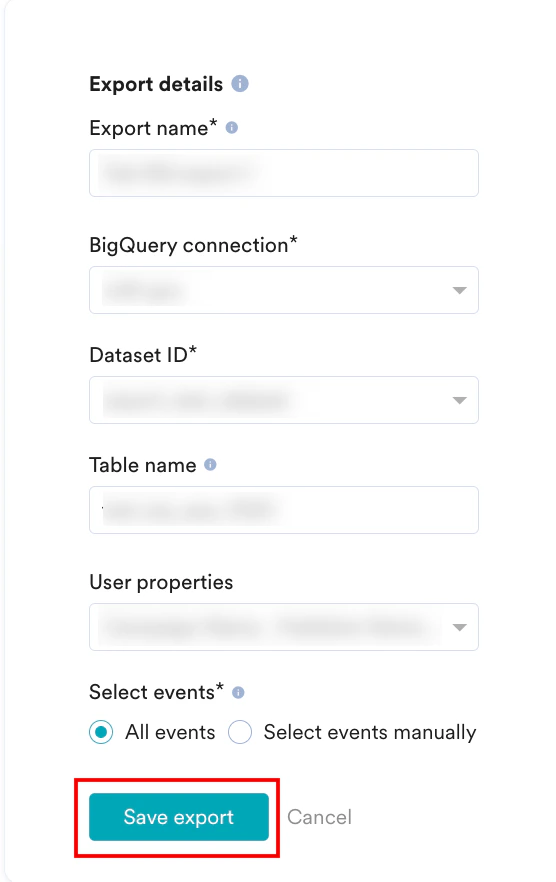 | | |
6. Click **Save export**.
Now, MoEngage populates the newly created table with events every hour.
### Export Process and Frequency
After you save the export, MoEngage creates a destination table in your dataset. New event data is then appended to this same table at hourly intervals:
**Initial action**: MoEngage creates the table when the first export is triggered.
**Recurring action**: MoEngage adds (appends) data to the same table every hour.
### Sample Table Structure
If you do not specify a table name in the export configuration, MoEngage creates a single table in your dataset using the following format:\
`moe_events_`
**Note**: This table is created once per connection. All hourly exports and different event types configured under this connection are consolidated and appended to this specific table.
The overall structure of the table remains fixed for all event types. Any new user property or event attribute that is exported will be included in the user\_attributes or event\_attributes column, respectively. All events are consolidated in a single table containing necessary information, such as event names and event times, for easy analysis:
| Field | Type | NULL |
| ----------------------------------------- | --------- | -------- |
| app\_name | VARCHAR | NOT NULL |
| event\_name | VARCHAR | NOT NULL |
| event\_code | VARCHAR | NOT NULL |
| event\_uuid | VARCHAR | NOT NULL |
| event\_time | TIMESTAMP | NOT NULL |
| event\_type | VARCHAR | NOT NULL |
| event\_source | VARCHAR | NOT NULL |
| uid | VARCHAR | NULL |
| user\_attributes\_moengage\_user\_id | VARCHAR | NULL |
| device\_attributes\_moengage\_device\_id | VARCHAR | NULL |
| push\_id | VARCHAR | NULL |
| email\_address | VARCHAR | NULL |
| mobile\_number | VARCHAR | NULL |
| event\_attributes\_app\_version | VARCHAR | NULL |
| event\_attributes\_sdk\_version | VARCHAR | NULL |
| event\_attributes\_platform | VARCHAR | NULL |
| event\_attributes\_campaign\_id | VARCHAR | NULL |
| event\_attributes\_campaign\_name | VARCHAR | NULL |
| event\_attributes\_campaign\_type | VARCHAR | NULL |
| event\_attributes\_campaign\_channel | VARCHAR | NULL |
| event\_attributes\_readable\_campaign\_id | VARCHAR | NULL |
| event\_attributes\_parent\_campaign\_id | VARCHAR | NULL |
| event\_attributes\_parent\_flow\_id | VARCHAR | NULL |
| event\_attributes\_parent\_flow\_name | VARCHAR | NULL |
| event\_attributes\_variation\_id | VARCHAR | NULL |
| event\_attributes\_locale\_id | VARCHAR | NULL |
| event\_attributes\_locale\_name | VARCHAR | NULL |
| event\_attributes\_url | VARCHAR | NULL |
| event\_attributes\_timestamp | TIMESTAMP | NULL |
| event\_attributes\_first\_session | BOOLEAN | NULL |
| event\_attributes\_logged\_in\_status | STRING | NULL |
| event\_attributes | JSON | NULL |
| user\_attributes | JSON | NULL |
| device\_attributes | JSON | NULL |
# Frequently Asked Questions
It typically takes up to 30 minutes for the automated data exports to be set up for your account and for you to start seeing data there.
Yes, if you need to export new events at a later time, you can always edit your configuration on the App Marketplace and get the new events added to your exports.
As of now, you cannot export historical data using Automated Data Exports. Once configured, you will start seeing data for each event from the time you enabled your exports.
If your billing plan does not cover this already and you need to get this enabled at a later time, you would need to work with your Customer Success Manager to get this included in your billing plan. Based on the amount of data that MoEngage will place in your Data warehouse/Partner/API on a monthly basis, this could lead to additional charges.
No, Data Exports is primarily built to export your Events in near real-time, and user attributes in MoEngage are updated asynchronously, so it is currently not possible to guarantee the latest values of user attributes in the exports.
| | |
6. Click **Save export**.
Now, MoEngage populates the newly created table with events every hour.
### Export Process and Frequency
After you save the export, MoEngage creates a destination table in your dataset. New event data is then appended to this same table at hourly intervals:
**Initial action**: MoEngage creates the table when the first export is triggered.
**Recurring action**: MoEngage adds (appends) data to the same table every hour.
### Sample Table Structure
If you do not specify a table name in the export configuration, MoEngage creates a single table in your dataset using the following format:\
`moe_events_`
**Note**: This table is created once per connection. All hourly exports and different event types configured under this connection are consolidated and appended to this specific table.
The overall structure of the table remains fixed for all event types. Any new user property or event attribute that is exported will be included in the user\_attributes or event\_attributes column, respectively. All events are consolidated in a single table containing necessary information, such as event names and event times, for easy analysis:
| Field | Type | NULL |
| ----------------------------------------- | --------- | -------- |
| app\_name | VARCHAR | NOT NULL |
| event\_name | VARCHAR | NOT NULL |
| event\_code | VARCHAR | NOT NULL |
| event\_uuid | VARCHAR | NOT NULL |
| event\_time | TIMESTAMP | NOT NULL |
| event\_type | VARCHAR | NOT NULL |
| event\_source | VARCHAR | NOT NULL |
| uid | VARCHAR | NULL |
| user\_attributes\_moengage\_user\_id | VARCHAR | NULL |
| device\_attributes\_moengage\_device\_id | VARCHAR | NULL |
| push\_id | VARCHAR | NULL |
| email\_address | VARCHAR | NULL |
| mobile\_number | VARCHAR | NULL |
| event\_attributes\_app\_version | VARCHAR | NULL |
| event\_attributes\_sdk\_version | VARCHAR | NULL |
| event\_attributes\_platform | VARCHAR | NULL |
| event\_attributes\_campaign\_id | VARCHAR | NULL |
| event\_attributes\_campaign\_name | VARCHAR | NULL |
| event\_attributes\_campaign\_type | VARCHAR | NULL |
| event\_attributes\_campaign\_channel | VARCHAR | NULL |
| event\_attributes\_readable\_campaign\_id | VARCHAR | NULL |
| event\_attributes\_parent\_campaign\_id | VARCHAR | NULL |
| event\_attributes\_parent\_flow\_id | VARCHAR | NULL |
| event\_attributes\_parent\_flow\_name | VARCHAR | NULL |
| event\_attributes\_variation\_id | VARCHAR | NULL |
| event\_attributes\_locale\_id | VARCHAR | NULL |
| event\_attributes\_locale\_name | VARCHAR | NULL |
| event\_attributes\_url | VARCHAR | NULL |
| event\_attributes\_timestamp | TIMESTAMP | NULL |
| event\_attributes\_first\_session | BOOLEAN | NULL |
| event\_attributes\_logged\_in\_status | STRING | NULL |
| event\_attributes | JSON | NULL |
| user\_attributes | JSON | NULL |
| device\_attributes | JSON | NULL |
# Frequently Asked Questions
It typically takes up to 30 minutes for the automated data exports to be set up for your account and for you to start seeing data there.
Yes, if you need to export new events at a later time, you can always edit your configuration on the App Marketplace and get the new events added to your exports.
As of now, you cannot export historical data using Automated Data Exports. Once configured, you will start seeing data for each event from the time you enabled your exports.
If your billing plan does not cover this already and you need to get this enabled at a later time, you would need to work with your Customer Success Manager to get this included in your billing plan. Based on the amount of data that MoEngage will place in your Data warehouse/Partner/API on a monthly basis, this could lead to additional charges.
No, Data Exports is primarily built to export your Events in near real-time, and user attributes in MoEngage are updated asynchronously, so it is currently not possible to guarantee the latest values of user attributes in the exports.