> ## Documentation Index
> Fetch the complete documentation index at: https://moengage.com/docs/llms.txt
> Use this file to discover all available pages before exploring further.
# Portfolio: Data Ingestion and Management
> Manage data ingestion across projects with MoEngage Portfolio. Learn how user attributes, events, and profiles work in a unified workspace.
This article explains data ingestion, management, and viewing within a MoEngage workspace where the [Portfolio](/user-guide/settings/account/portfolio/portfolio) feature is enabled. This feature centralizes your data and user profiles, allowing for seamless management of user attributes and events across all projects. This article covers:
* [Data ingestion](/user-guide/data/key-concepts/portfolio-data-ingestion-and-management#data-ingestion): How to ingest data using Data APIs, SDK, and Data Warehouse while specifying the relevant project.
* [Data management](/user-guide/data/key-concepts/portfolio-data-ingestion-and-management#data-management): How data, events, and user attributes are managed and presented within a Portfolio-enabled workspace, including a breakdown of unique event and user attribute limits.
* [User profile view](/user-guide/data/key-concepts/portfolio-data-ingestion-and-management#user-profile): How user data is displayed at both the portfolio and individual project levels.
* [Derived user attributes](https://moengage-user-guide.mintlify.app/user-guide/data/key-concepts/portfolio-data-ingestion-and-management#derived-user-attributes-behaviour): How derived user attributes (for example, LTV, First Seen) are calculated and displayed at both the project and portfolio levels.
The [Portfolio](/user-guide/settings/account/portfolio/portfolio) feature is designed to unify user data from multiple projects into a single profile based on a unique ID field. Because of this, [Identity resolution](/user-guide/data/user-data/unified-identity-identity-resolution) (the process of merging profiles) based on custom attributes is not supported.
# Data Ingestion
You (or your development team) can ingest data into a Portfolio-enabled workspace using:
* [Data APIs](/user-guide/data/key-concepts/portfolio-data-ingestion-and-management#data-apis)
* [SDK](/user-guide/data/key-concepts/portfolio-data-ingestion-and-management#sdk)
* [Data Warehouse](/user-guide/data/key-concepts/portfolio-data-ingestion-and-management#data-warehouse)
## Data APIs
In MoEngage, data ingestion uses a unique ID to update a user attribute or event. For portfolio-enabled workspaces, you (or your development team) can use Data APIs (such as the [Track User](https://www.moengage.com/docs/api/user/track-user), [Create Event](https://www.moengage.com/docs/api/event/track-event), and [Bulk Import API](https://www.moengage.com/docs/api/bulk/bulk-import-users-and-events) to pass a *projectID* in the parameters. This ID identifies which project a user or event belongs to. You can find the **Project ID** at **Settings** > **Account** > **Portfolio** in your MoEngage dashboard.
**Use case** A brand has separate apps for "Brand A" (Project 1) and "Brand B" (Project 2). When a user downloads both apps, the Portfolio feature uses Data APIs or SDKs to ingest all their data. The *projectID* attribute identifies which brand the data originates from, ensuring all events and user attributes are associated with the correct project while being unified under a single user profile.
While ingesting data using Data APIs, any attribute passed without a projectID is considered a custom portfolio user attribute.
The following are the sample cURL requests of Data APIs with projectID passed in the API endpoint:
**Track User:**
JSON
```json theme={null}
curl --location 'https://api-0X.moengage.com/v1/customer/{{APP\_ID}}?app\_id={{APP\_ID}}&project\_code={{project ID}}' \
--header 'Content-Type: application/json' \
--header 'Authorization: Basic {{Authorization\_Key}}'\
--data-raw '{
"type": "customer",
"customer_id": "{{customer\_id}}",
"attributes": {
"name": "John Doe",
"first_name": "John",
"last_name": "Doe",
"age": "67",
"email": "2uV4@xyz.com",
"gender": "male",
"mobile": "{{mobile}}",
"geo": "88.90 89.00",
"birthday": "02-12-2001",
"created_time": "1756198118474",
"last_seen": "1756198118474",
"userdata": "insert",
"revenue": 100,
"transaction": "100",
"platforms": [
{ "platform": "iOS",
"active": "true"
}
]
}
}'
```
**Create Event:**
JSON
```json theme={null}
curl --location 'https://api-0X.moengage.com/v1/event/{{appId}}?app\_id={{appId}}&project\_code={{projectId} \
--header 'Content-Type: application/json' \
--header {"Authorization": "Basic Base64\_ENCODED\_APPKEY\_APIKEY"} \
--data-raw '{
"type": "event",
"customer_id": "123",
"actions" : [
{
"action": "ProductAdded",
"attributes": {
"product": "Accessories",
"color": "Black",
"Brand": "Adidas"
},
"platform": "Android",
"app_version": "1.2.3",
"user_time": "1708939453396",
"current_time" : "1708939453396"
}
]
}'
```
## SDK
Supported SDKs where portfolio changes are available:
* Android ([14.03.04](https://www.moengage.com/docs/developer-guide/android-sdk/sdk-integration/basic-integration/sdk-initialization))
* iOS ([10.07.0](https://www.moengage.com/docs/developer-guide/ios-sdk/sdk-integration/basic/sdk-initialization))
## Data Warehouse
The [Portfolio](/user-guide/settings/account/portfolio/portfolio) feature enhances your data warehouse integration, giving you the flexibility to manage data correctly within your multi-project portfolio. This allows you to leverage your existing backend data for both brand-specific analysis and holistic customer understanding.
MoEngage handles different data types as follows:
* Event attributes are ingested at the project level, allowing you to attribute specific actions to the correct brand.
* User attributes are ingested at the portfolio level, and updates are applied to the user's global profile across all your brands.
### Event Attributes (Project-Level)
For accurate analysis and segmentation in a portfolio, it is crucial to associate every event with a specific project. To achieve this, you must map a column from your data source to the dedicated MoEngage attribute: `moe\_project\_name`.
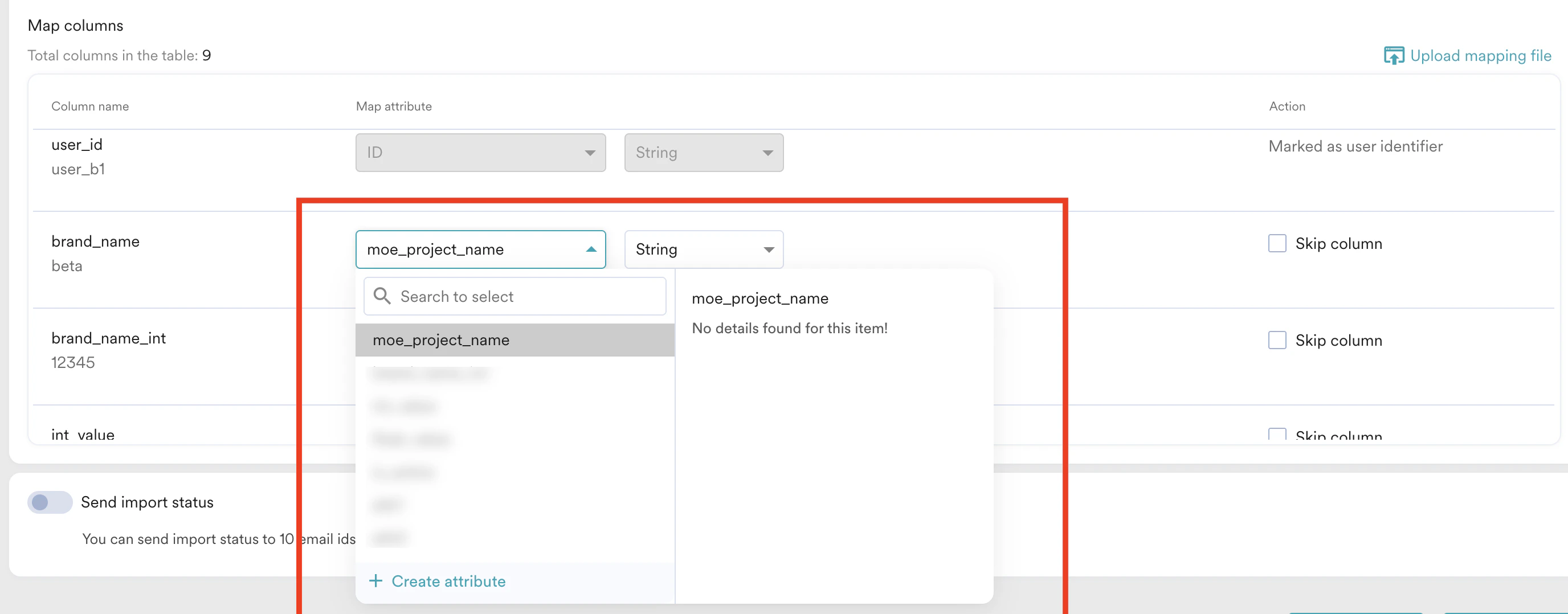 **Example Scenario:**
Let's assume you manage two brands: Project A (a sports app) and Project B (a shopping app). Your data table contains a column named `brand` with values like "Project A" or "Project B" for each event.
During data warehouse setup, you would map your `brand` column to the MoEngage event attribute `moe_project_name`. This directs MoEngage to automatically assign each event to the correct project based on the value in that column.
The values in your source column (for example, "Project A") must **exactly match** the Project Names configured in your MoEngage portfolio. If there is a mismatch, the event is ingested at the portfolio level and is not associated with any specific project. This data will be unusable in project-specific analysis or segmentation.
### Ingest User Attributes (Portfolio-Level)
Conversely, any user attributes you import are always applied at the portfolio level. This updates the user's single, global profile and is not tied to a specific project. The process is the same as for non-portfolio accounts, requiring you to map standard columns like `User ID` and `Updated at`.
You cannot use this method to import or update *project-specific* user attributes. Only global user attributes are supported via data warehouse imports.
For a complete step-by-step guide on the import configuration, please refer to our [Data Warehouse import guides](https://moengage-user-guide.mintlify.app/user-guide/data/imports/data-warehouses-imports).
# Data Management
A Portfolio-enabled workspace has the following details at **Settings** >**Data** > **Data Management**:
* The **Overview** tab displays the total number of unique events and user attributes for the entire portfolio. While you can pass events and user attributes between projects, the portfolio-level limits remain fixed by default: 1024 unique events and 1024 unique user attributes. Ensure the total sum of unique events and user attributes across all projects does not exceed these limits. This simplifies the process of tracking total unique events and attributes across your entire business, ensuring you stay within the fixed limits.
* The **Events** and **User attributes** tabs provide a holistic view of events and user attributes across all projects. You can use the **Select project** list to filter the list and view data for specific projects.
**Example Scenario:**
Let's assume you manage two brands: Project A (a sports app) and Project B (a shopping app). Your data table contains a column named `brand` with values like "Project A" or "Project B" for each event.
During data warehouse setup, you would map your `brand` column to the MoEngage event attribute `moe_project_name`. This directs MoEngage to automatically assign each event to the correct project based on the value in that column.
The values in your source column (for example, "Project A") must **exactly match** the Project Names configured in your MoEngage portfolio. If there is a mismatch, the event is ingested at the portfolio level and is not associated with any specific project. This data will be unusable in project-specific analysis or segmentation.
### Ingest User Attributes (Portfolio-Level)
Conversely, any user attributes you import are always applied at the portfolio level. This updates the user's single, global profile and is not tied to a specific project. The process is the same as for non-portfolio accounts, requiring you to map standard columns like `User ID` and `Updated at`.
You cannot use this method to import or update *project-specific* user attributes. Only global user attributes are supported via data warehouse imports.
For a complete step-by-step guide on the import configuration, please refer to our [Data Warehouse import guides](https://moengage-user-guide.mintlify.app/user-guide/data/imports/data-warehouses-imports).
# Data Management
A Portfolio-enabled workspace has the following details at **Settings** >**Data** > **Data Management**:
* The **Overview** tab displays the total number of unique events and user attributes for the entire portfolio. While you can pass events and user attributes between projects, the portfolio-level limits remain fixed by default: 1024 unique events and 1024 unique user attributes. Ensure the total sum of unique events and user attributes across all projects does not exceed these limits. This simplifies the process of tracking total unique events and attributes across your entire business, ensuring you stay within the fixed limits.
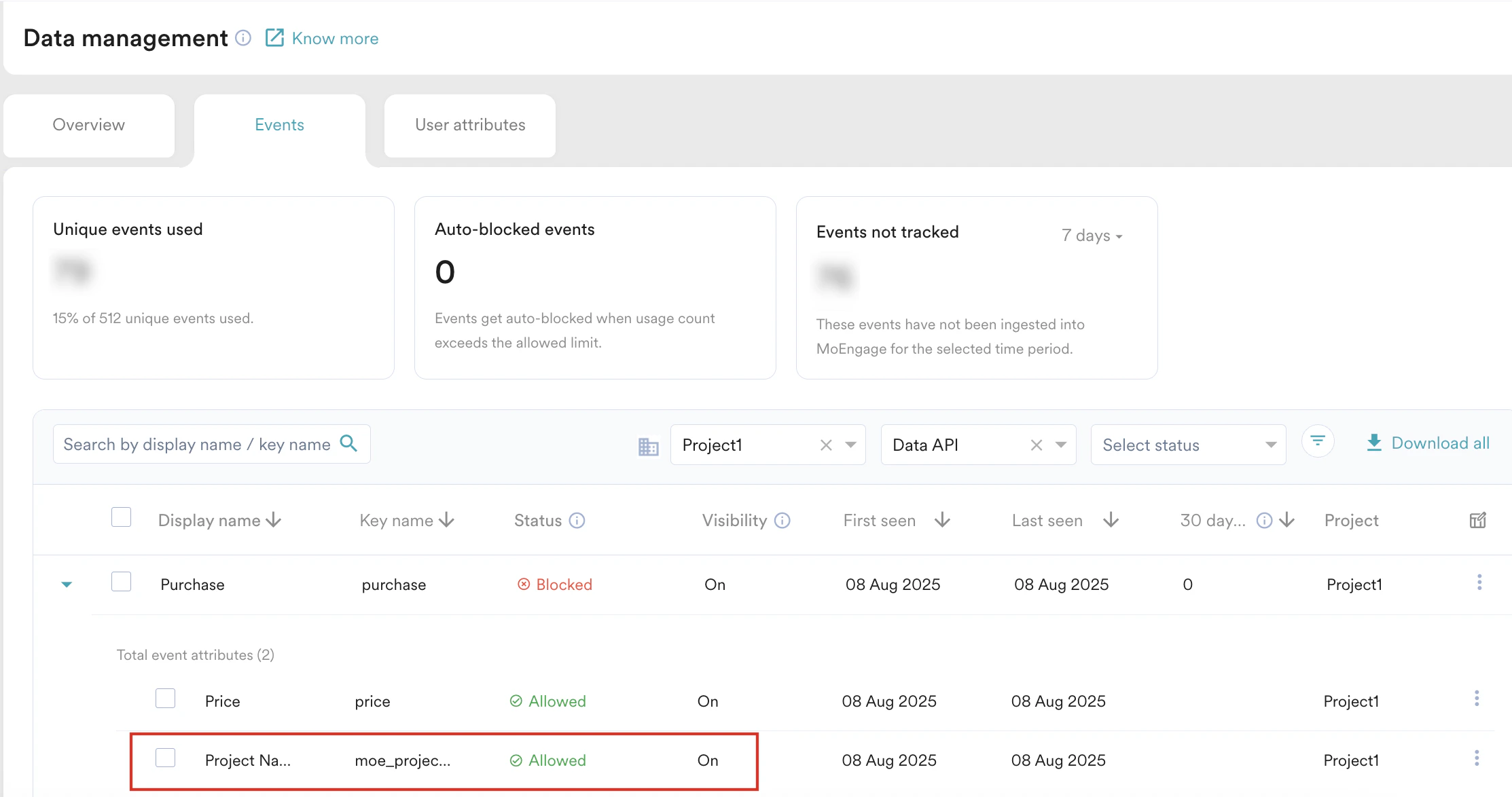
* The **Events** and **User attributes** tabs provide a holistic view of events and user attributes across all projects. You can use the **Select project** list to filter the list and view data for specific projects. 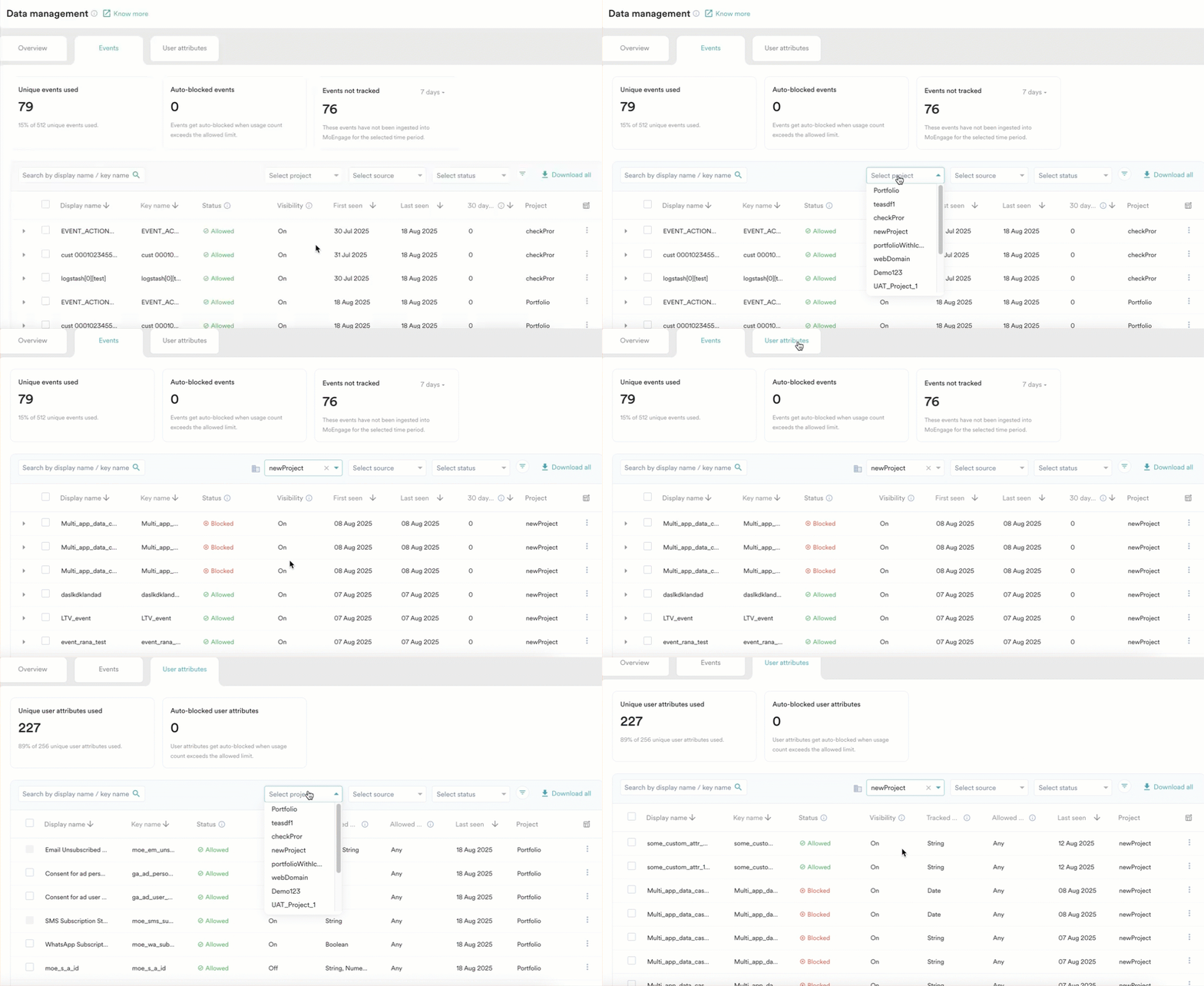 * **For standard and custom events**: MoEngage automatically adds the *moe\_project\_name* event attribute to all ingested events, specifying the project they originate from. For instance, a *Purchase* event from *Project1* includes the attribute *moe\_project\_name* with a value of *Project1*.
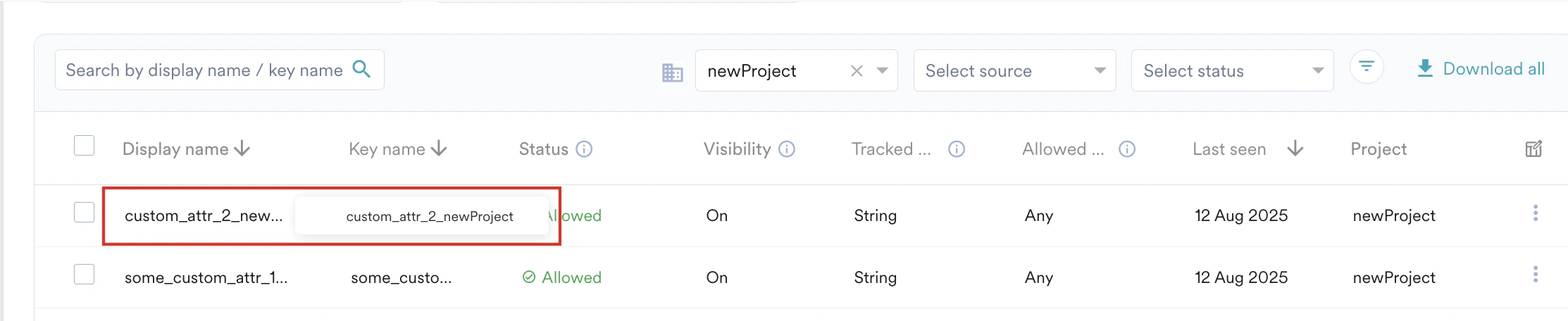
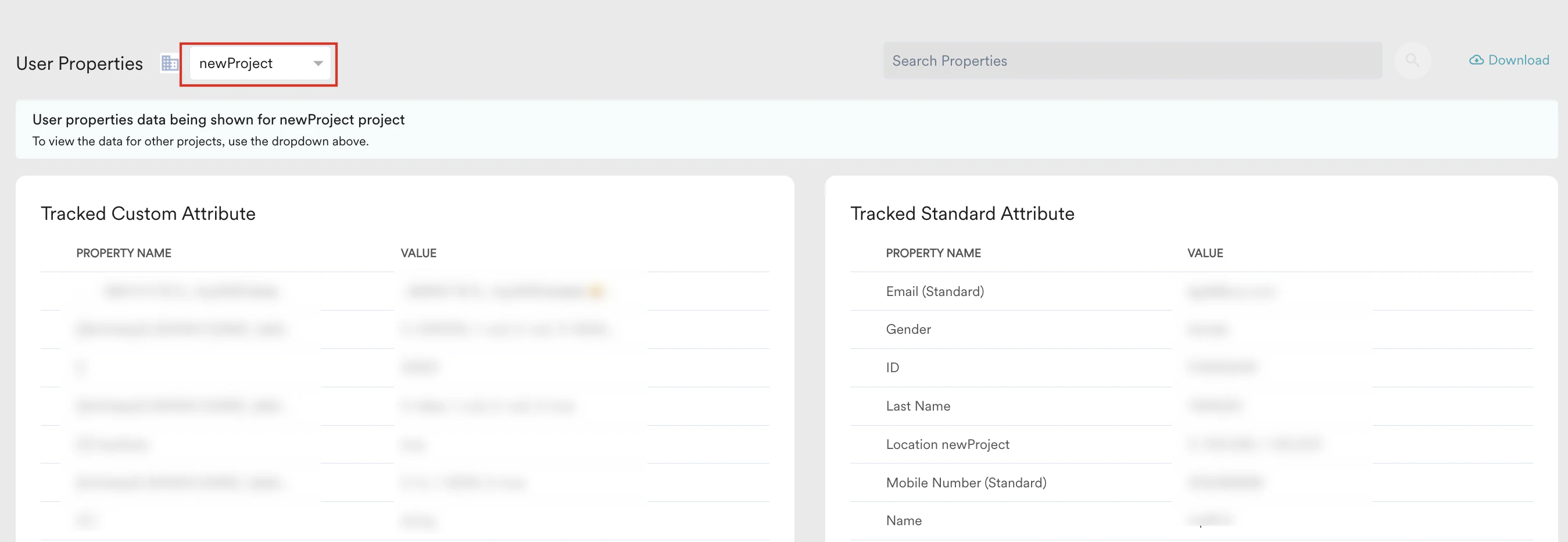
  * **For standard user attributes**: MoEngage adds the project name as a suffix to both the **Display name** and **Key name** of the user attribute. For instance, the display and key name for the *custom\_attr\_2* user attribute from *newproject* is *custom\_attr\_2\_newproject*.
  * **For custom user attributes**: MoEngage adds the project name as a suffix to the **Key name**, and the **Display name** remains the same as passed by the user without any suffixing. For instance, the key name for the *custom\_attr\_2* user attribute from *newproject* is *custom\_attr\_2\_newproject,* and the display name is *custom\_attr\_2.*
# User Profile
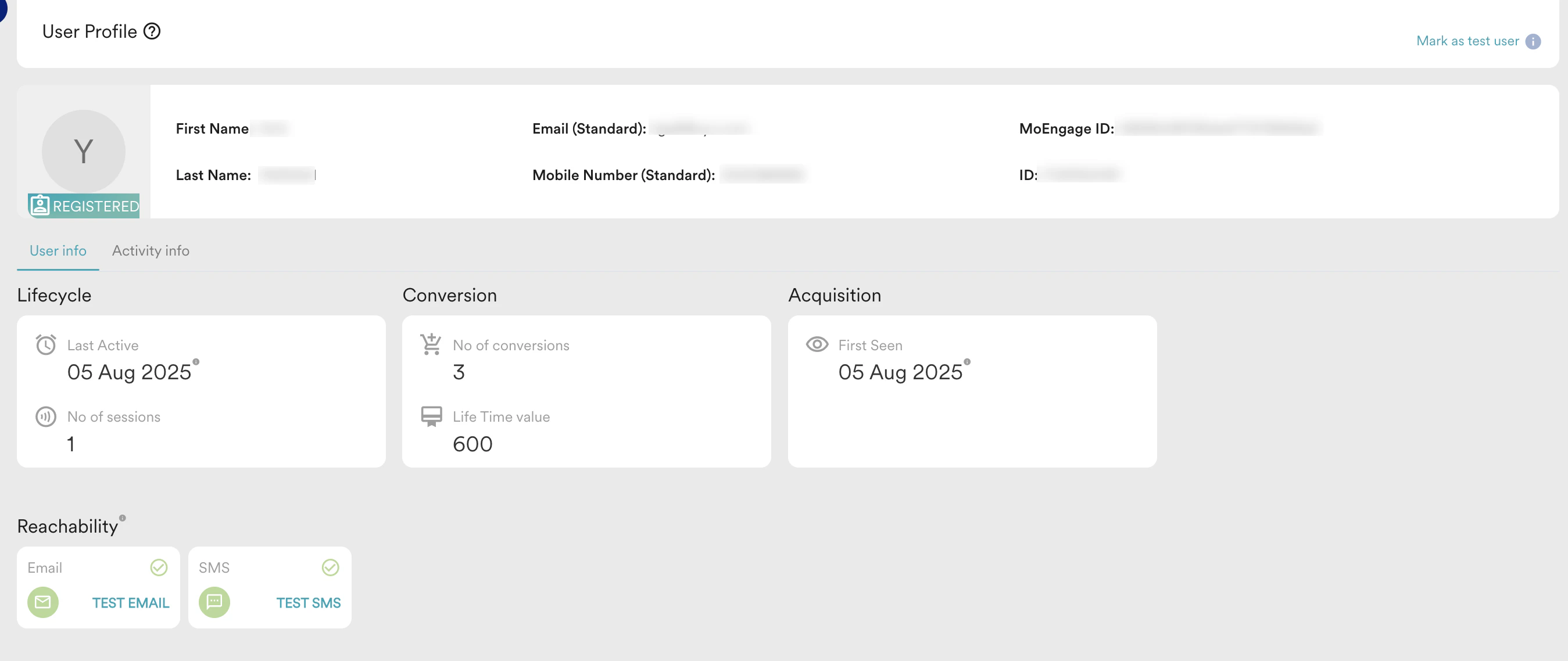
When Portfolio is enabled, the **User Info** tab in a user profile displays information at both the portfolio and project levels. For example, a user who interacts with both "Brand A" and "Brand B" will have a single profile where you can view their total *LTV Portfolio*, which is the sum of their LTVs from both projects.
In a user profile, you can view the following details at the portfolio level:
* First Name
* Last Name
* Email (Standard)
* Mobile Number (Standard)
* MoEngage ID
* ID
* Lifecycle
* Conversion
* Acquisition
* Reachability
* **For custom user attributes**: MoEngage adds the project name as a suffix to the **Key name**, and the **Display name** remains the same as passed by the user without any suffixing. For instance, the key name for the *custom\_attr\_2* user attribute from *newproject* is *custom\_attr\_2\_newproject,* and the display name is *custom\_attr\_2.*
# User Profile
When Portfolio is enabled, the **User Info** tab in a user profile displays information at both the portfolio and project levels. For example, a user who interacts with both "Brand A" and "Brand B" will have a single profile where you can view their total *LTV Portfolio*, which is the sum of their LTVs from both projects.
In a user profile, you can view the following details at the portfolio level:
* First Name
* Last Name
* Email (Standard)
* Mobile Number (Standard)
* MoEngage ID
* ID
* Lifecycle
* Conversion
* Acquisition
* Reachability
 You can view **User Properties** for a specific project by selecting the project from the drop-down menu.
 # Derived User Attributes Behaviour
If you have custom attributes with the same name across different projects, ensure you rename them in Data Management. This helps avoid confusion and ensures accuracy in personalization and conversions.
The following table lists the derived user attributes tracked at the project and portfolio level:
| Derived User Attribute | Displayed at the Project Level? | Displayed at Portfolio Level? | Calculation Method (if applicable) |
| ----------------------------------------------------------------------------------------------- | ------------------------------- | ----------------------------- | ------------------------------------------------------------------------------------------------------------------------------------------------------------------------------------------------------------------------------------------------------------------------------------------------------------------------------------------------------------------------------------------------------------------- |
| LTV | Yes | Yes |
# Derived User Attributes Behaviour
If you have custom attributes with the same name across different projects, ensure you rename them in Data Management. This helps avoid confusion and ensures accuracy in personalization and conversions.
The following table lists the derived user attributes tracked at the project and portfolio level:
| Derived User Attribute | Displayed at the Project Level? | Displayed at Portfolio Level? | Calculation Method (if applicable) |
| ----------------------------------------------------------------------------------------------- | ------------------------------- | ----------------------------- | ------------------------------------------------------------------------------------------------------------------------------------------------------------------------------------------------------------------------------------------------------------------------------------------------------------------------------------------------------------------------------------------------------------------- |
| LTV | Yes | Yes | - LTV is calculated based on the conversion goal setup. For more information, refer to [Configure Lifetime Value (LTV)](/user-guide/data/user-data/derived-user-attributes#configure-lifetime-value-ltv).
- The **LTV Portfolio** displays the sum of all project-level LTVs.
- Use the same event (the event attribute set across projects) for consistent project-level LTV tracking.
|
| First Seen | Yes | Yes | The **First Seen Portfolio** displays the oldest first seen across all projects within the portfolio. |
| Last Seen | Yes | Yes | The **Last Seen Portfolio** displays the recent last seen across all projects within the portfolio. |
| No. of conversions | Yes | Yes | |
| No. of Sessions | Yes | Yes | The number of sessions is tracked through the MoEngage SDK at a project level and is added up at the portfolio level. |
| Reachability Push Android | Yes | Yes | A user is considered reachable via push notifications if they are reachable in at least one project across the portfolio. |
| Reachability Push iOS | Yes | Yes | |
| Reachability Push Web | Yes | Yes | |
| Install status - Uninstall time
- Device reinstall
- User reinstall
| Yes | No | |
| Location attributes | Yes | No | |
| First name, Last name, birthday | No | Yes | |
| Email (Standard) | No | Yes | |
| Hard Bounce (Email) | No | Yes | |
| Spam (Email) | No | Yes | |
| Unsubscribe (Email) | No | Yes | |
| Mobile number (Standard) | No | Yes | |
| SMS subscription | No | Yes | |
| Whatsapp subscription | No | Yes | |
| Advertising ID (GAID, IDFV) | No | Yes | |
| Subscription Categories (Email) | No | Yes | |
| Consent for ad user data (Google Audience sync) | No | Yes | |
| Consent for ad personalization | No | Yes | |
# FAQs
All the unique user attributes and events that exceed this limit are auto-blocked.
No, it is not possible.