> ## Documentation Index
> Fetch the complete documentation index at: https://moengage.com/docs/llms.txt
> Use this file to discover all available pages before exploring further.
# Merlin AI Usage
> Track Merlin AI usage in MoEngage AI Credits, review consumption by service and team member, and monitor your usage.
## Overview
MoEngage AI Credits are the single unit that measures how much your workspace uses Merlin AI. Every text variation, generated creative, and agent run draws from one shared monthly credit balance.
## Features That Consume Credits
Every Merlin AI feature draws from the same credit balance:
| Feature | Where you use it |
| - | - |
| [Merlin AI Copywriter](/docs/user-guide/ai-and-intelligence/merlin-ai/merlin-ai-copywriter/merlin-ai-copywriter) | Push campaigns, email subject lines, on-site messaging campaigns, and [Merlin AI Studio](/docs/user-guide/ai-and-intelligence/merlin-ai/merlin-ai-studio). |
| [Merlin AI Designer](/docs/user-guide/ai-and-intelligence/merlin-ai/merlin-ai-designer/merlin-ai-designer) | Push campaigns, email subject lines, on-site messaging campaigns, and Merlin AI Studio. |
| [Merlin AI Jinja Assistant](/docs/user-guide/ai-and-intelligence/merlin-ai/merlin-ai-jinja-generator/merlin-ai-jinja-assistant) | Personalization across all campaigns. |
| [Merlin AI Segment Assist](/docs/user-guide/ai-and-intelligence/merlin-ai/merlin-ai-segment-assist) | Segment creation and Merlin AI Studio. |
| [Merlin AI In-App Template Generator](/docs/user-guide/ai-and-intelligence/merlin-ai/merlin-ai-in-app-template-generator/merlin-ai-in-app-template-generator) | In-app campaigns and Merlin AI Studio. |
| [Merlin AI Flows Assist](/docs/user-guide/ai-and-intelligence/merlin-ai/merlin-ai-flows-assist) | Flows and Merlin AI Studio. |
| [Campaign Insights Agent](/docs/user-guide/ai-and-intelligence/merlin-ai/campaign-insights-agent) | Push campaigns, email campaigns, and on-site messaging campaigns. |
| [Custom Agents](/docs/user-guide/ai-and-intelligence/merlin-ai/custom-agents/custom-agents-overview) | Every agent run, recorded against the name of the agent. |
### Credit Factors
MoEngage records credits for each completed session, based on the resources that session uses. Each session may have multiple agent requests associated to it.
* **Text generation:** MoEngage counts the input and output tokens the session uses.
* **Image generation:** MoEngage counts the size, in bytes, of the asset the session produces.
* **Agent runs:** MoEngage counts the model processing duration, the infrastructure the run uses, and any web searches the run executes.
Each completed session updates your balance as soon as the session finishes, so your team attributes consumption to a specific user, service, and sub service.
Merlin AI consumes credits when a session completes, not when you accept the output. Regenerating a variation or re-running an agent consumes credits again.
## View AI Credit Consumption
On the left navigation menu in the MoEngage dashboard, click **Settings** > **Account** > **Billing**, then select the **Merlin AI** tab.
### Summary Metrics
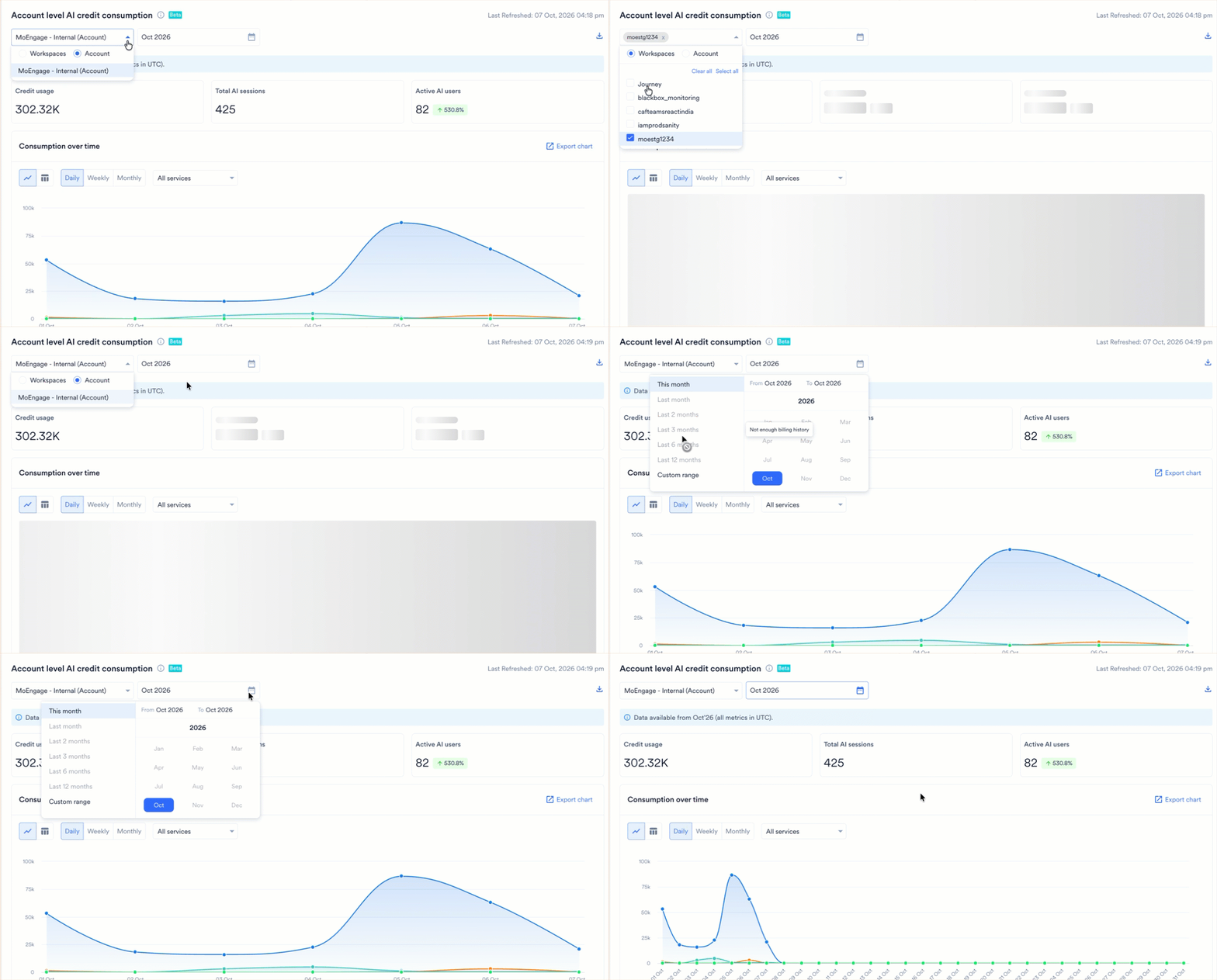
Before you read the metrics, set the scope and the reporting period:
* **Scope:** Open the scope selector and choose one of the following options:
* **Account:** View AI credit consumption across your entire account.
* **Workspaces:** View AI credit consumption for the workspaces you select. Use **Select all** or **Clear all** to adjust your selection quickly.
* **Month:** Select the month you want to report on. Every metric reflects the selected month and compares it against the previous month, so you see whether consumption is rising or falling.
The heading above the metrics confirms your current scope, and a **Last Refreshed** timestamp shows when MoEngage last updated the data.
 #### Review Session-Level Data
To export the table of raw data covering every individual Merlin AI session, click the download icon. The table includes the following details:
* The user who created the session.
* The service and sub service of the session.
* The credit consumed by the session.
* The timestamp of the session.
Apply the table filters to investigate an unexpected increase in consumption.
Based on your selection, the tab presents the following three metrics:
| Metric | What it shows |
| - | - |
| Credit usage | The credits consumed against the total allotment, with a progress bar. |
| Total AI sessions | The number of Merlin AI sessions. |
| Active AI users | The number of team members who use Merlin AI. |
### Analyze Consumption
The **Merlin AI** tab breaks your consumption down across the following four views. Each view reflects the scope and month you select.
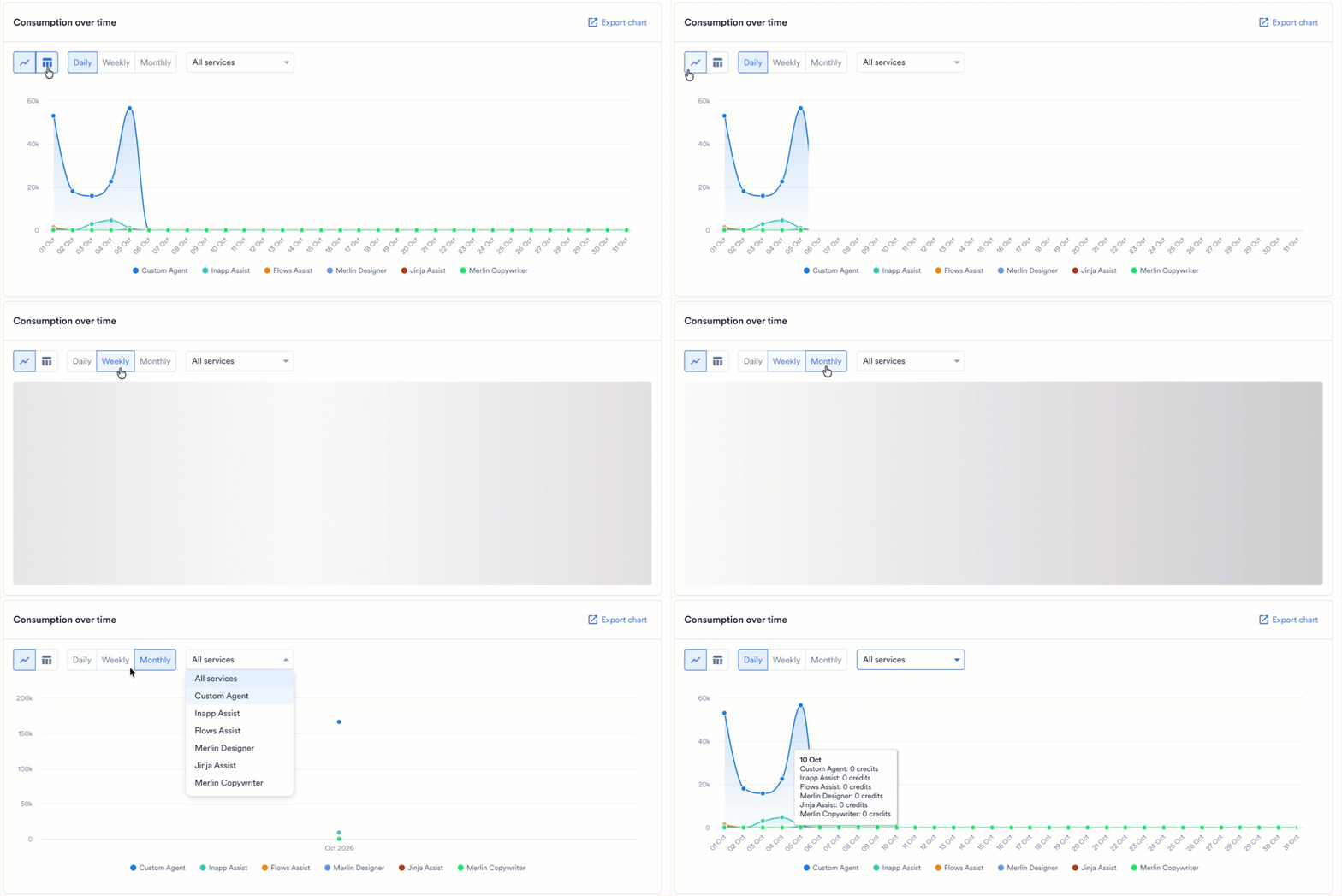
This view plots your credit consumption across the selected period, with one series per service. The legend below the chart identifies each service. Configure the chart using the following controls:
* **Chart type:** Switch between a line chart and a bar chart.
* **Granularity:** Choose **Daily**, **Weekly**, or **Monthly**.
* **Service:** Keep **All services**, or select a single service to isolate its consumption.
To download the chart, click **Export chart**.
#### Review Session-Level Data
To export the table of raw data covering every individual Merlin AI session, click the download icon. The table includes the following details:
* The user who created the session.
* The service and sub service of the session.
* The credit consumed by the session.
* The timestamp of the session.
Apply the table filters to investigate an unexpected increase in consumption.
Based on your selection, the tab presents the following three metrics:
| Metric | What it shows |
| - | - |
| Credit usage | The credits consumed against the total allotment, with a progress bar. |
| Total AI sessions | The number of Merlin AI sessions. |
| Active AI users | The number of team members who use Merlin AI. |
### Analyze Consumption
The **Merlin AI** tab breaks your consumption down across the following four views. Each view reflects the scope and month you select.
This view plots your credit consumption across the selected period, with one series per service. The legend below the chart identifies each service. Configure the chart using the following controls:
* **Chart type:** Switch between a line chart and a bar chart.
* **Granularity:** Choose **Daily**, **Weekly**, or **Monthly**.
* **Service:** Keep **All services**, or select a single service to isolate its consumption.
To download the chart, click **Export chart**.
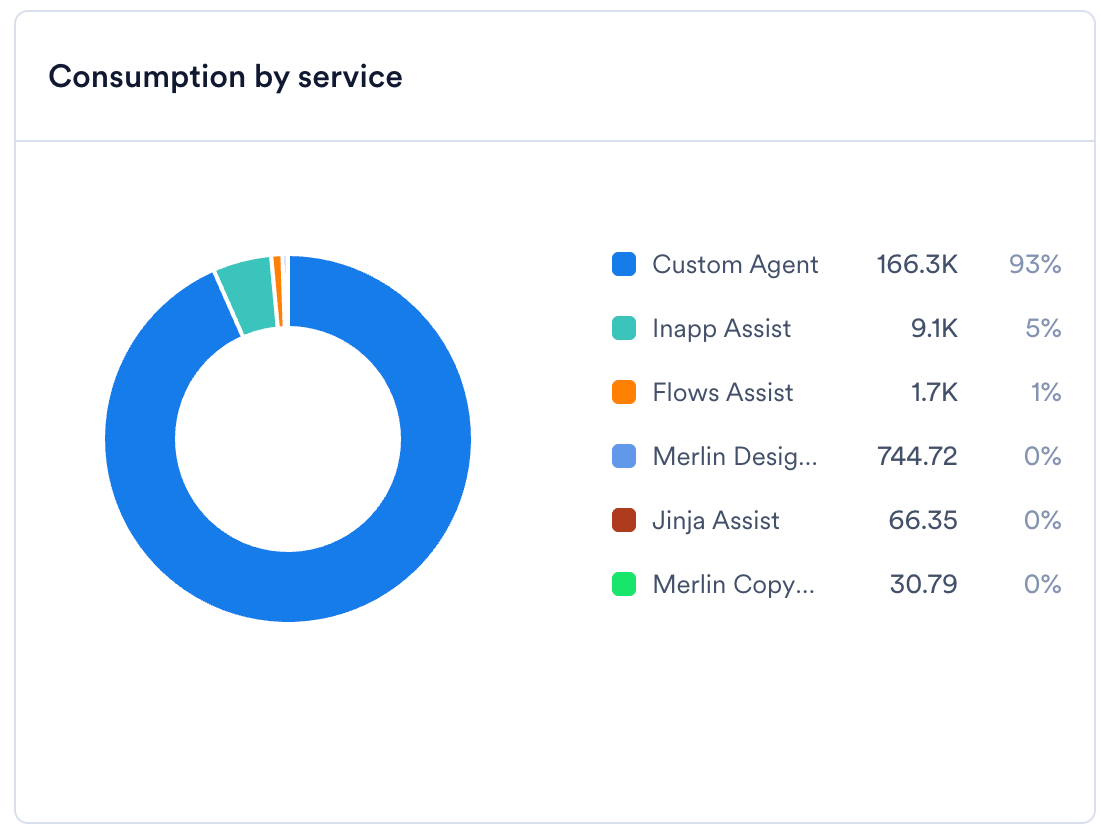
 This view splits your credits across Merlin AI services in a donut chart. A service is the Merlin AI feature that handles the session, such as Merlin Copywriter, Merlin Designer, Jinja Assist, Inapp Assist, Flows Assist, or Custom Agent.
The legend beside the chart lists each service alongside the credits it consumes and its percentage share of your total consumption.
This view splits your credits across Merlin AI services in a donut chart. A service is the Merlin AI feature that handles the session, such as Merlin Copywriter, Merlin Designer, Jinja Assist, Inapp Assist, Flows Assist, or Custom Agent.
The legend beside the chart lists each service alongside the credits it consumes and its percentage share of your total consumption.
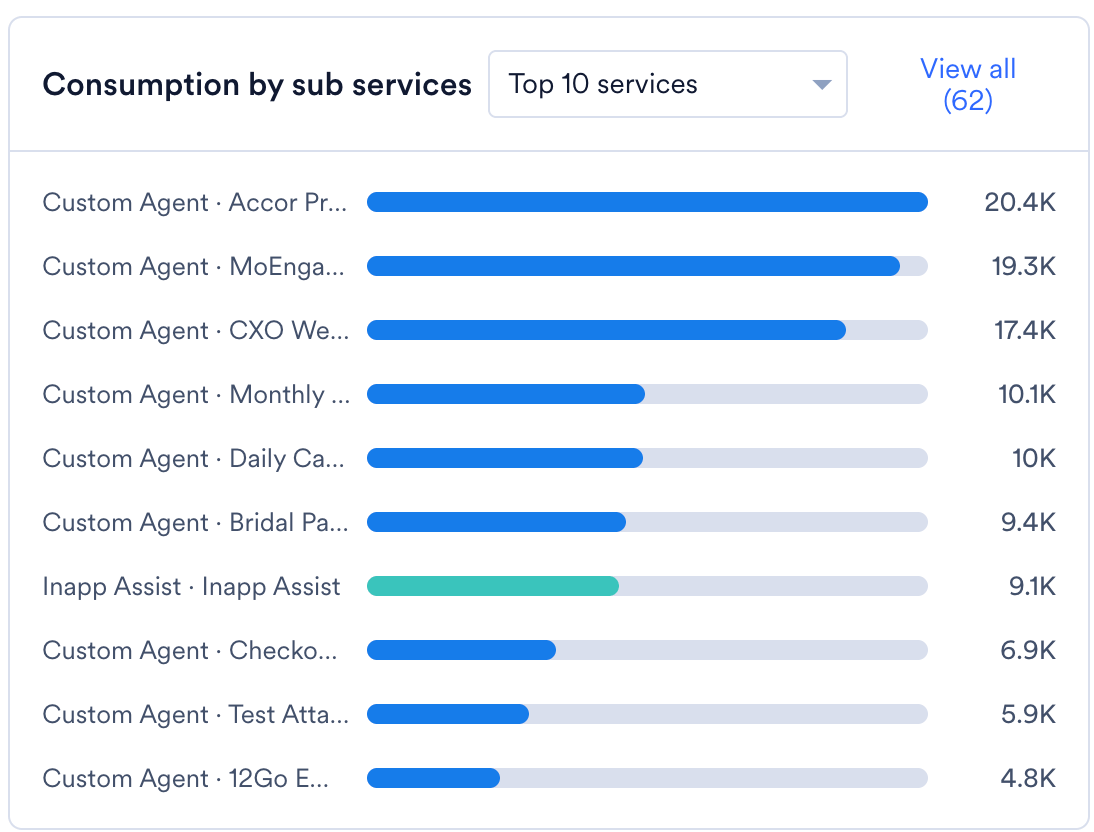
 This view ranks your sub services by credit consumption in a bar chart. A sub service is where you use the service, such as a push campaign, an email subject line, an in-app campaign, or Merlin AI Studio. For a Custom Agent, the sub service is the name of the agent.
Each row identifies the service and the sub service, and shows the credits that combination consumes. The dropdown controls how many rows appear and defaults to the top 10. To see every sub service, click **View all**.
This view ranks your sub services by credit consumption in a bar chart. A sub service is where you use the service, such as a push campaign, an email subject line, an in-app campaign, or Merlin AI Studio. For a Custom Agent, the sub service is the name of the agent.
Each row identifies the service and the sub service, and shows the credits that combination consumes. The dropdown controls how many rows appear and defaults to the top 10. To see every sub service, click **View all**.
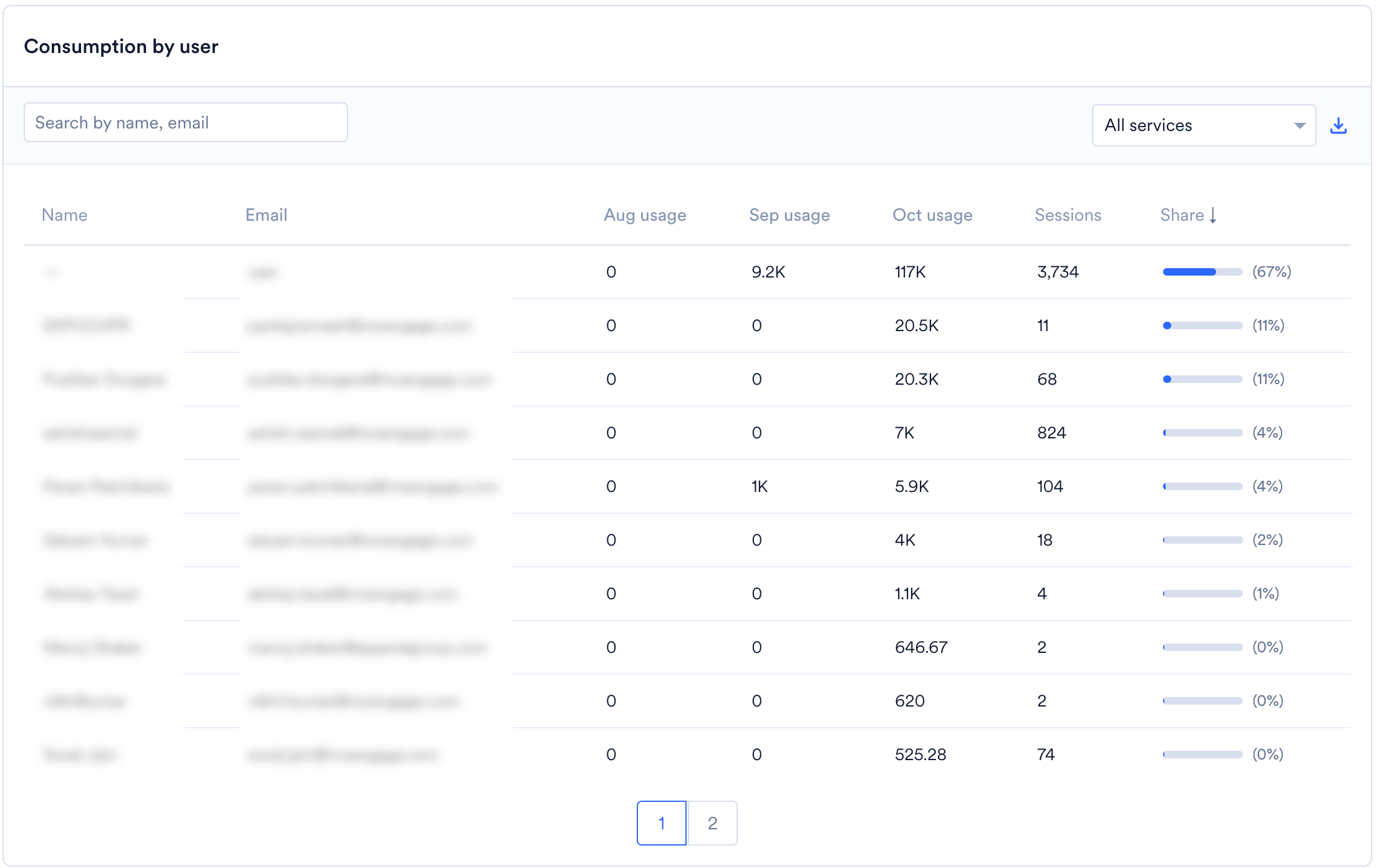
 This view lists all users alongside the credits each user consumes, in a table with the following columns:
* **Name** and **Email:** The user who created the sessions.
* **Monthly usage:** One column for the selected month and one for each of the two preceding months, so you compare a user's recent activity.
* **Sessions:** The number of Merlin AI sessions the user runs.
* **Share:** The user's percentage share of total consumption, shown with a bar. Click the column heading to sort the table.
To find a specific user, enter their name or email address in the search field. To narrow the table to one service, use the service dropdown. To download the table, click the export icon.
This view lists all users alongside the credits each user consumes, in a table with the following columns:
* **Name** and **Email:** The user who created the sessions.
* **Monthly usage:** One column for the selected month and one for each of the two preceding months, so you compare a user's recent activity.
* **Sessions:** The number of Merlin AI sessions the user runs.
* **Share:** The user's percentage share of total consumption, shown with a bar. Click the column heading to sort the table.
To find a specific user, enter their name or email address in the search field. To narrow the table to one service, use the service dropdown. To download the table, click the export icon.
 ## FAQs
No. The credit of the session reflects the resources that session uses, such as the tokens a text generation consumes or the size of an image a session produces. Review the session-level table to compare costs across services.
MoEngage records each session against your balance as soon as the session finishes, so consumption appears on this tab shortly afterward.
Yes. The **Merlin AI** tab lists all users and the credits each user consumes in the selected period, and the session-level table attributes each individual session to a user.
## Related Articles
* [Merlin AI Studio](/docs/user-guide/ai-and-intelligence/merlin-ai/merlin-ai-studio)
* [Custom Agents: Overview](/docs/user-guide/ai-and-intelligence/merlin-ai/custom-agents/custom-agents-overview)
* [Usage Details](/docs/user-guide/settings/account/billing/usage-details)
* [Manage Subscription](/docs/user-guide/settings/account/billing/manage-subscription)
* [Billing & Contract FAQs](/docs/user-guide/settings/account/billing/billing-and-contract-faqs)
This documentation is built and hosted on [Mintlify](https://mintlify.com), a developer documentation platform.
## FAQs
No. The credit of the session reflects the resources that session uses, such as the tokens a text generation consumes or the size of an image a session produces. Review the session-level table to compare costs across services.
MoEngage records each session against your balance as soon as the session finishes, so consumption appears on this tab shortly afterward.
Yes. The **Merlin AI** tab lists all users and the credits each user consumes in the selected period, and the session-level table attributes each individual session to a user.
## Related Articles
* [Merlin AI Studio](/docs/user-guide/ai-and-intelligence/merlin-ai/merlin-ai-studio)
* [Custom Agents: Overview](/docs/user-guide/ai-and-intelligence/merlin-ai/custom-agents/custom-agents-overview)
* [Usage Details](/docs/user-guide/settings/account/billing/usage-details)
* [Manage Subscription](/docs/user-guide/settings/account/billing/manage-subscription)
* [Billing & Contract FAQs](/docs/user-guide/settings/account/billing/billing-and-contract-faqs)
This documentation is built and hosted on [Mintlify](https://mintlify.com), a developer documentation platform.