> ## Documentation Index
> Fetch the complete documentation index at: https://moengage.com/docs/llms.txt
> Use this file to discover all available pages before exploring further.
# Configure Custom Domain (Link Branding)
> Set up custom domain link branding in MoEngage to replace default URLs with your branded domain in campaign messages and tracking links.
# Overview
This feature enables you to configure a custom domain to be used in the messages instead of the standard MoEngage Domain. A custom domain is a personalized domain name that lends your brand credibility and authority and differentiates you from the competition. Oftentimes, it becomes your brand's online identity. For example, it is common for customers to say Google it when they mean Google Search. Google's domain name is Google.com, and it is everyone's favorite moniker for the company's search feature!
The custom domain feature enables you to use your custom domain in the URLs sent in the message body of SMS, WhatsApp, or Email.
In the MoEngage Email context, Custom Domain is referred to as Link Branding.
For SMS & WhatsApp campaigns, any URL or link added to your message body is shortened with the chosen brand in the settings. For example, if the link used in the SMS or WhatsApp campaign is [*www.xyz.com/products/mobiles*](http://www.xyz.com/products/mobiles) and the custom domain selected is yourbrand.com, then the link will be displayed as *yourbrand.com/1234.*
For Email campaigns, any URL or link in the Email’s body is wrapped with the chosen Custom Domain. For example, if the selected domain is *yourbrand.com* in the Email Campaign and the Email has a link as [*www.xyz.com/products/mobiles*](http://www.xyz.com/products/mobiles), then the URL will be rendered as [*www.yourbrand.com/abc*](http://www.yourbrand.com/abc).
# Glossary
| Terms and Definitions | Applicable for SMS & WhatsApp, Email | Notes |
| --------------------------------------------------------------------------------------------------------------------------------------------------------------------------------------------------------------------------------------------------------------------------------------------------------------------------------------------------------------------------------------------------------------------------------------------------------------------------------------------------------------------------------------------------------------------------------------------- | ------------------------------------ | ----------------------------------------------------------------------------------------------------------------------------------------------------------------------------------------------------------------------------------------------------------------------------------------------------------------------------------------------------------------------------------------------------------------------------------- |
| **Domain**: A domain is that part of the URL that directs your users to a web server to fetch the web page content they are looking for. To visit your webpage, users must type the domain name containing the location of your site's files. A domain is the principal part of the URL that denotes to whom this URL belongs. This helps the user identify the brand sending them this URL in their communication. | All | |
| **Domain Name**: a unique string owned by the brand that can reflect the brand name without confusing the user. Examples: moengage.com, google.com, wikipedia.org. A **custom domain** is a purchased domain that allows you the flexibility to choose the name. For example, if you wish to name your domain YourBrand.com, you must purchase the domain name. | All | |
| **DNS**: Domain Name System. It is popularly referred to as the phonebook of the internet. It maps the domain name to the actual address of the resource and helps the browser load the requested web page. For example, if you were to type google.com on your browser, the DNS server would look up the actual location where the website's pages are located and return them to the browser. The browser would then fire a request for that specific location and get the webpage to be displayed. For more information, refer to [DNS](https://en.wikipedia.org/wiki/Domain_Name_System). | All | |
| **CNAME**: A canonical name or CNAME record is a type of DNS record that maps an alias name to a true domain name. For more information, refer to [CNAME Record](https://en.wikipedia.org/wiki/CNAME_record). | All | |
| **Click Tracking**: A feature that tracks which users have clicked on the links added in the message. MoEngage's proprietary technology facilitates this. When a user clicks on a URL in the message body, the click action is tracked, and this event is logged. This is helpful in understanding click behavior and engagement. | All | |
| MoEngage Standard Tracking Domain | SMS & WhatsApp | ux.mnge.co The 'X' in the API Endpoint URL refers to the MoEngage Data Center (DC). MoEngage hosts each customer in a different DC. You can find your DC number (value of X) and replace the value of 'X' in the URL by referring to the DC and API endpoint mapping [here](/user-guide/data/key-concepts/data-centers-in-moengage). |
| | Email | For DC1: email-10.moengage.com For DC2,3,4,5,6, and 100: api-0X.moengage.com The 'X' in the API Endpoint URL refers to the MoEngage Data Center (DC). MoEngage hosts each customer in a different DC. You can find your DC number (value of X) and replace the value of 'X' in the URL by referring to the DC and API endpoint mapping [here](https://moengage.com/docs/user-guide/data/key-concepts/data-centers-in-moengage). |
# How do CNAME Records work?
If your domain name is *yourbrand.com* and you add the following link to your SMS or WhatsApp message body: [*http://www.yourbrand.com/producregistrationpage*](http://www.yourbrand.com/producregistrationpage) and shorten it using MoEngage’s default URL shortening, the URL will appear as *ux.moengage.com/register*. If you want your shortened URL to be *YourBrand* instead of *ux.mnge.co*, you should add a CNAME DNS record to your DNS, as shown below. The shortened URL would then be: *yourbrand.com/register*.
| | | |
| --------- | ----- | ------------------------------------------------------------------------------------------------------------------------------------------------------------------------------------------------------------------------------------------------------------------------------------------------------------------------------------- |
| Name | Type | Value |
| YourBrand | CNAME | ux.mnge.co The 'X' in the API Endpoint URL refers to the MoEngage Data Center (DC). MoEngage hosts each customer in a different DC. You can find your DC number (value of X) and replace the value of 'X' in the URL by referring to the DC and API endpoint mapping [here](/user-guide/data/key-concepts/data-centers-in-moengage). |
When you request a web page, here’s what happens:
1. A DNS request is created to look up the actual location where the resource is located for the domain name in the URL.
2. The DNS resolver finds the actual location mapped to the domain name (this is called resolving the DNS) by fetching the CNAME record.
3. This CNAME is returned to the browser. The CNAME helps the user's app/browser understand the server domain that needs to be requested.
4. The browser sends a new DNS request for the IP/domain mapped to the CNAME, and the web page for the requested resource is located and returned
If your domain name is *yourbrand.com* and you add the following link to your Email body: [*www.xyz.com/products/mobiles*](http://www.xyz.com/products/mobiles), the URL will appear as *api-0x.moengage.com/abc*. If you want your URL to be *YourBrand* instead of *api-0x.moengage.com*, you should add a CNAME DNS record to your DNS, as shown below. The URL would then be: *yourbrand.com/register. The URL would then be: yourbrand.com/abc*
| | | |
| --------- | ----- | ----------------------------------------------------------------------------------------------------------------------------------------------------------------------------------------------------------------------------------------------------------------------------------------------------------------------------------------------- |
| Name | Type | Value |
| YourBrand | CNAME | bapi-0X.moengage.com The 'X' in the API Endpoint URL refers to the MoEngage Data Center (DC). MoEngage hosts each customer in a different DC. You can find your DC number (value of X) and replace the value of 'X' in the URL by referring to the DC and API endpoint mapping [here](/user-guide/data/key-concepts/data-centers-in-moengage). |
When you request a web page, here’s what happens:
1. A DNS request is created to look up the actual location where the resource is located for the domain name in the URL.
2. The DNS resolver finds the actual location mapped to the domain name (this is called resolving the DNS) by fetching the CNAME record.
3. This CNAME is returned to the browser. The CNAME helps the user's app/browser understand the server domain that needs to be requested.
4. The browser sends a new DNS request for the IP/domain mapped to the CNAME, and the web page for the requested resource is located and returned.
# Prerequisites
If you have Certificate Authority Authorization (CAA) records set up for your domain to control the Certificate Authorities (CAs) that can issue SSL certificates for their domain, please add [http://sectigo.com/](http://sectigo.com/) to the same before trying to set up a custom domain in MoEngage.
You need to set up a custom domain before configuring it in MoEngage. To set it up, do the following:
1. Look up a popular domain registrar (A domain name registrar provides domain name registrations to the general public. For example, GoDaddy and Google Domains)and look for a domain name that is not used.
2. Purchase the domain name. You can also purchase a custom domain from your web hosting provider. In case you have a custom domain, you can go ahead and skip to the next step.
3. Add a CNAME Record in your DNS to point to the MoEngage domain. For more information, refer to [How CNAME Records Work.](https://en.wikipedia.org/wiki/CNAME_record)
4. Set the Time To Live (TTL) to 30 minutes for this record.\
**Note**: If your DNS provider doesn’t support 30 min TTL, select the minimal TTL time frame supported by your DNS provider.
5. After the records and details are successfully added and verified on your DNS, you can add the custom domain in MoEngage.
You can use the same custom domain for SMS and WhatsApp. For Email, you need to set up a different custom domain.
# Configure a Custom Domain
To configure a Custom Domain for the SMS, WhatsApp, and Email channels:
Navigate to the MoEngage Dashboard and select **Settings** -> **Advanced settings** -> **Custom domain**. You can create custom domains for **SMS & WhatsApp** or **Email** by clicking the respective tabs on the **Custom domain** screen.
Follow the below steps to configure custom domain for SMS & Whatsapp:
1. Make sure to follow the provided **Pre-requisites** to ensure that your custom domain is verified.
2. Add the custom domain name in the **Custom domain name** field and click **Verify.** You must not add *http\://*,*https\://* or [*www*](http://www)*.* to the domain name. Add the name as added in the CNAME record.
3. After verification, you get a message stating that the custom domain is verified, as shown below. 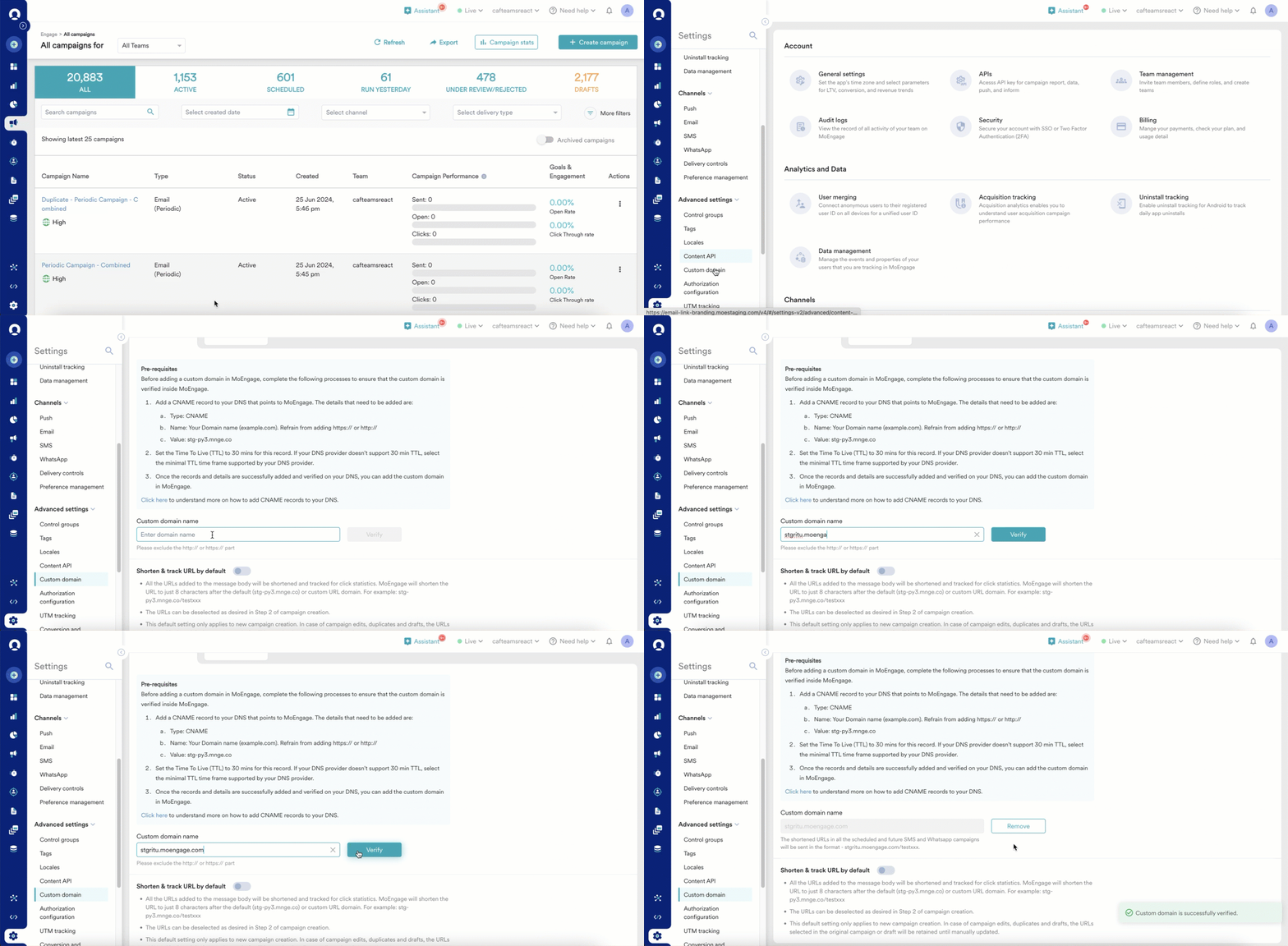 4. Toggle **Shorten and track URL** **by default** to enable shortening and tracking of links added to SMS and WhatsApp messages using the custom domain. This will turn on the shortening and tracking of the URL for all SMS and WhatsApp campaigns. This ensures that tracking is automated and never missed. Also, it can be unchecked in the campaigns or turned off in the settings here when you do not wish to track clicks.
You can add multiple link branding domains for email campaigns. Follow the below steps to configure a link branding domain for an email campaign:
1. To add a link branding domain, click the **+** **Add link branding**.
2. On the **Add link branding** page, you can select any one of the following options to add a link branding domain:
1. **Self managed**: Select this option if you don't want MoEngage to procure SSL certificates on your behalf. You must monitor and manage the SSL certificates, particularly when they are approaching expiration, and ensure their timely renewal.
2. **MoEngage managed**: Select this option if you want MoEngage to procure SSL certificates on your behalf. In this case, MoEngage procures and manages the SSL certificate when they are approaching expiration, and ensure their timely renewal.
If you decide to proceed with the MoEngage managed option and have CAA enabled for the link branding domain, you must include Sectigo.com in the CAA, as MoEngage procures SSL certificates from Sectigo.com. If you do not prefer this, you can opt for the self-managed option.
3. Make sure the following **Prerequisites** are met based on the option you selected to manage the SSL certificates.
**Prerequisites**
1. If you choose to proceed with the Self managed option, the following are the prerequisites to be met to ensure that the custom domain is verified inside MoEngage:
* Add a CNAME record to your DNS that points to MoEngage. The details to be added include:
* Type: CNAME
* Name: Your preferred link domain (url.example.com). Refrain from adding https\:// or http\://
* Value: api-0x.moengage.com
* Set the Time To Live (TTL) to 30 minutes for this record. If your DNS provider does not support a 30-minute TTL, select the minimum TTL timeframe supported by your DNS provider.
2. If you choose to proceed with the MoEngage managed option, the following are the prerequisites to be met to ensure that the custom domain is verified inside MoEngage:
* Add a CNAME record to your DNS that points to MoEngage. The details to be added includes:
* Type: CNAME
* Name: Your preferred link domain (url.example.com). Refrain from adding https\:// or http\://
* Value: ``.bapi-0x.moengage.com
* Set the Time To Live (TTL) to 30 minutes for this record. If your DNS provider does not support a 30-minute TTL, select the minimum TTL timeframe supported by your DNS provider.
4. Type the custom domain name in the **Custom domain name** field.
5. Select **Mark this domain as default** option, if you want this domain as your default domain.
6. Select the acknowledge option to recognize that the prerequisites are met, and click tracking is turned off in your ESP settings.
7. Click **Save**.
* The maximum supported depth of the domain that can be added is six. For example, the depth of the sub1.sub2.sub3.sub4.sub5.sub6.com domain is six.
* Configuring a custom domain for Email will brand your links with your own domain instead of the standard MoEngage domain. Unlike its usage in SMS and WhatsApp, this feature does not result in link shortening; it is used exclusively to apply your brand to the URL without impacting the link's length.
8. After successfully verified and saved, your custom domain is listed under the **Custom domain** screen with a **Verified** tag against that custom domain.
4. Toggle **Shorten and track URL** **by default** to enable shortening and tracking of links added to SMS and WhatsApp messages using the custom domain. This will turn on the shortening and tracking of the URL for all SMS and WhatsApp campaigns. This ensures that tracking is automated and never missed. Also, it can be unchecked in the campaigns or turned off in the settings here when you do not wish to track clicks.
You can add multiple link branding domains for email campaigns. Follow the below steps to configure a link branding domain for an email campaign:
1. To add a link branding domain, click the **+** **Add link branding**.
2. On the **Add link branding** page, you can select any one of the following options to add a link branding domain:
1. **Self managed**: Select this option if you don't want MoEngage to procure SSL certificates on your behalf. You must monitor and manage the SSL certificates, particularly when they are approaching expiration, and ensure their timely renewal.
2. **MoEngage managed**: Select this option if you want MoEngage to procure SSL certificates on your behalf. In this case, MoEngage procures and manages the SSL certificate when they are approaching expiration, and ensure their timely renewal.
If you decide to proceed with the MoEngage managed option and have CAA enabled for the link branding domain, you must include Sectigo.com in the CAA, as MoEngage procures SSL certificates from Sectigo.com. If you do not prefer this, you can opt for the self-managed option.
3. Make sure the following **Prerequisites** are met based on the option you selected to manage the SSL certificates.
**Prerequisites**
1. If you choose to proceed with the Self managed option, the following are the prerequisites to be met to ensure that the custom domain is verified inside MoEngage:
* Add a CNAME record to your DNS that points to MoEngage. The details to be added include:
* Type: CNAME
* Name: Your preferred link domain (url.example.com). Refrain from adding https\:// or http\://
* Value: api-0x.moengage.com
* Set the Time To Live (TTL) to 30 minutes for this record. If your DNS provider does not support a 30-minute TTL, select the minimum TTL timeframe supported by your DNS provider.
2. If you choose to proceed with the MoEngage managed option, the following are the prerequisites to be met to ensure that the custom domain is verified inside MoEngage:
* Add a CNAME record to your DNS that points to MoEngage. The details to be added includes:
* Type: CNAME
* Name: Your preferred link domain (url.example.com). Refrain from adding https\:// or http\://
* Value: ``.bapi-0x.moengage.com
* Set the Time To Live (TTL) to 30 minutes for this record. If your DNS provider does not support a 30-minute TTL, select the minimum TTL timeframe supported by your DNS provider.
4. Type the custom domain name in the **Custom domain name** field.
5. Select **Mark this domain as default** option, if you want this domain as your default domain.
6. Select the acknowledge option to recognize that the prerequisites are met, and click tracking is turned off in your ESP settings.
7. Click **Save**.
* The maximum supported depth of the domain that can be added is six. For example, the depth of the sub1.sub2.sub3.sub4.sub5.sub6.com domain is six.
* Configuring a custom domain for Email will brand your links with your own domain instead of the standard MoEngage domain. Unlike its usage in SMS and WhatsApp, this feature does not result in link shortening; it is used exclusively to apply your brand to the URL without impacting the link's length.
8. After successfully verified and saved, your custom domain is listed under the **Custom domain** screen with a **Verified** tag against that custom domain. 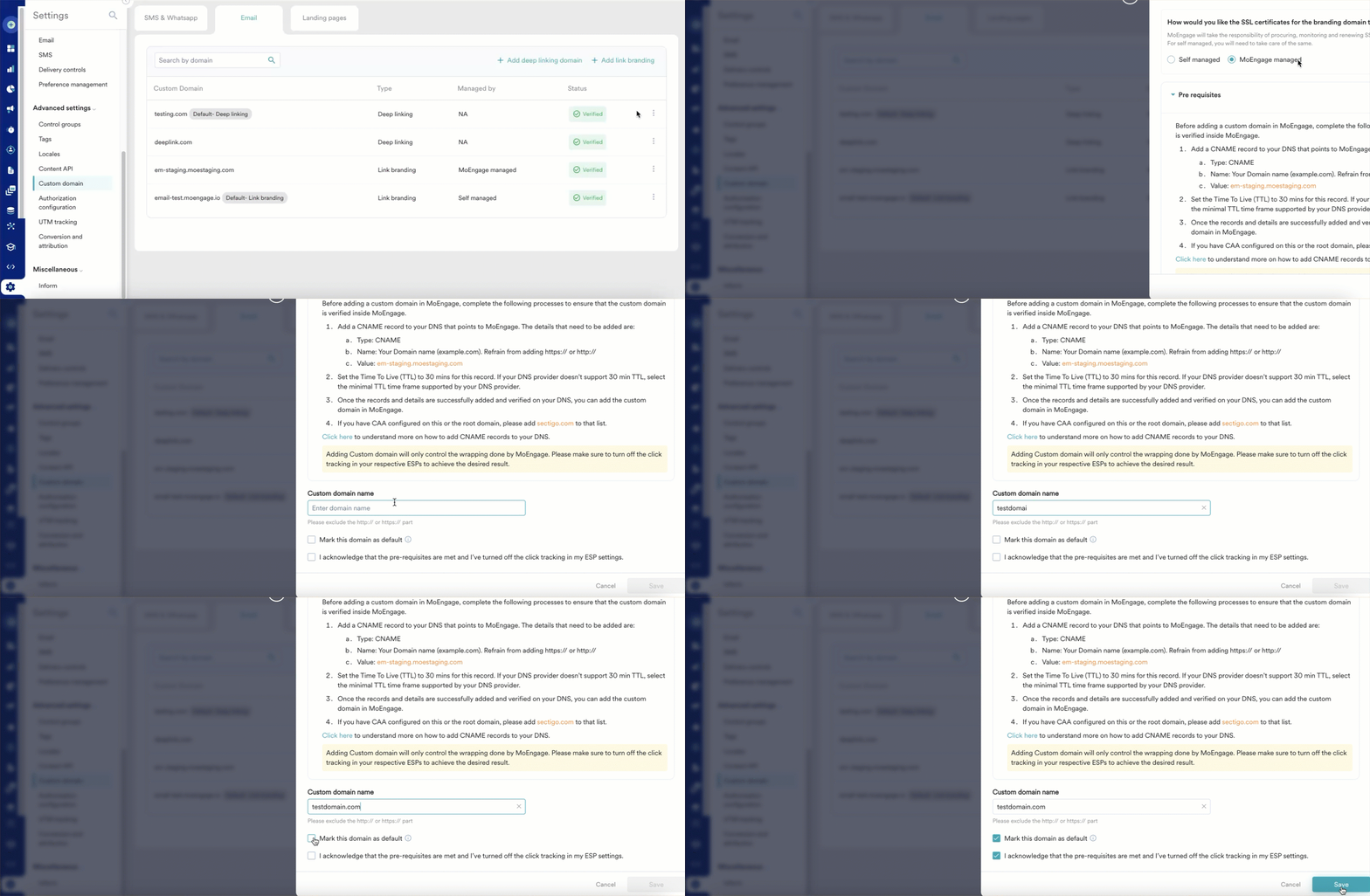 9. Click the ellipsis icon ( ) against any of your custom domains to mark it as **Default** or **Delete**.
* If you have only one default link brand domain configured and delete the same, you cannot add this branding domain while creating the email campaign.
* If you have configured multiple default link branding domains and delete one, any active campaign that uses the deleted link branding domain falls back to the new default link branding domain.\
For more information on how to use a link branding domain while creating an email campaign, refer to [Create an Email Campaign](/user-guide/campaigns-and-channels/email/create/create-an-email-campaign).
If you want to configure a deep linking domain for your brand, MoEngage recommends its Deep linking feature. For more information, refer to [Configure a Deep Linking Domain](/user-guide/campaigns-and-channels/email/getting-started-with-email/configure-a-deep-linking-domain).
# Campaign Previews
For SMS & WhatsApp, when you add a link to the message body and the **Shorten and Track URLs option** is selected, the preview will display a shortened link, as shown below.
9. Click the ellipsis icon ( ) against any of your custom domains to mark it as **Default** or **Delete**.
* If you have only one default link brand domain configured and delete the same, you cannot add this branding domain while creating the email campaign.
* If you have configured multiple default link branding domains and delete one, any active campaign that uses the deleted link branding domain falls back to the new default link branding domain.\
For more information on how to use a link branding domain while creating an email campaign, refer to [Create an Email Campaign](/user-guide/campaigns-and-channels/email/create/create-an-email-campaign).
If you want to configure a deep linking domain for your brand, MoEngage recommends its Deep linking feature. For more information, refer to [Configure a Deep Linking Domain](/user-guide/campaigns-and-channels/email/getting-started-with-email/configure-a-deep-linking-domain).
# Campaign Previews
For SMS & WhatsApp, when you add a link to the message body and the **Shorten and Track URLs option** is selected, the preview will display a shortened link, as shown below.
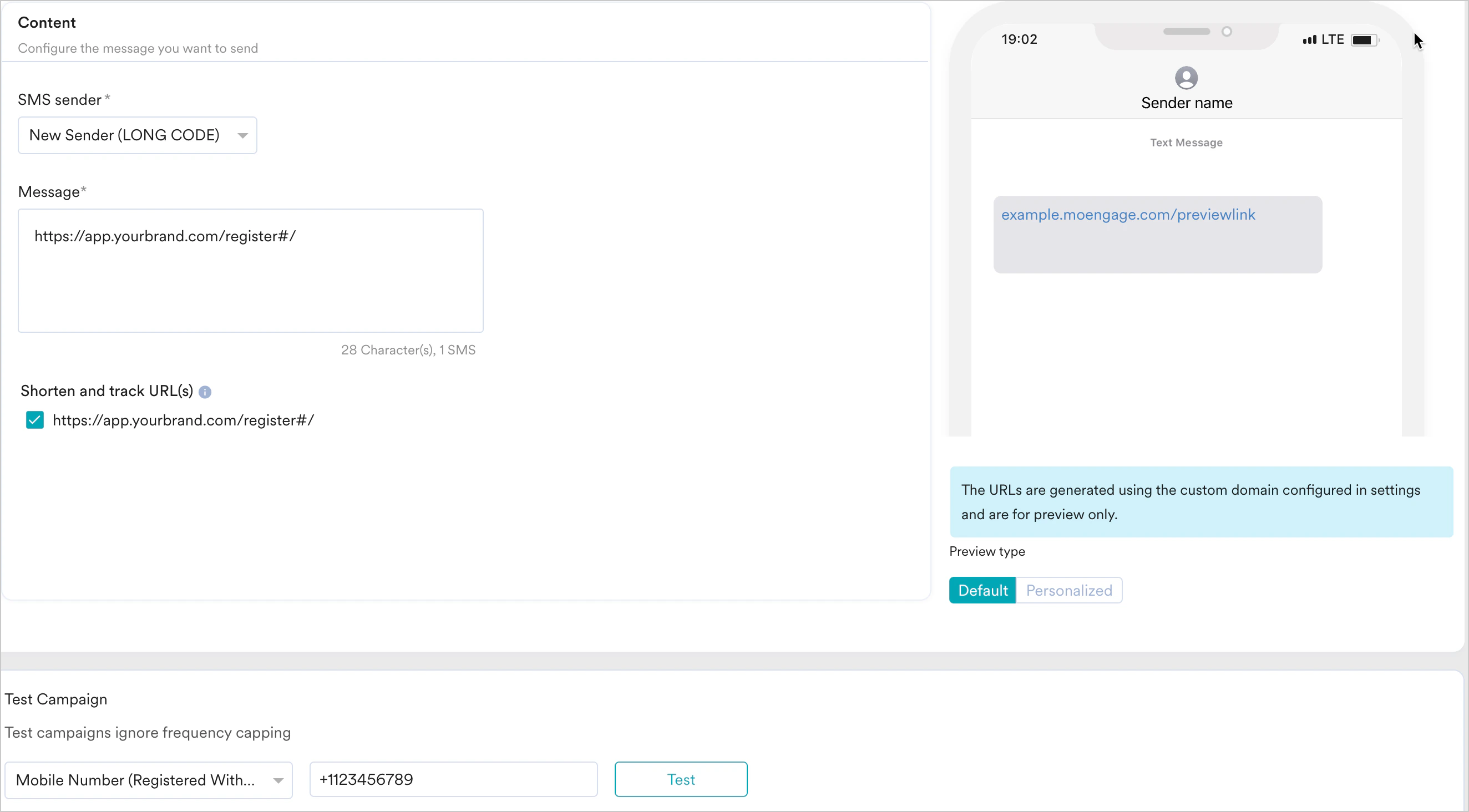
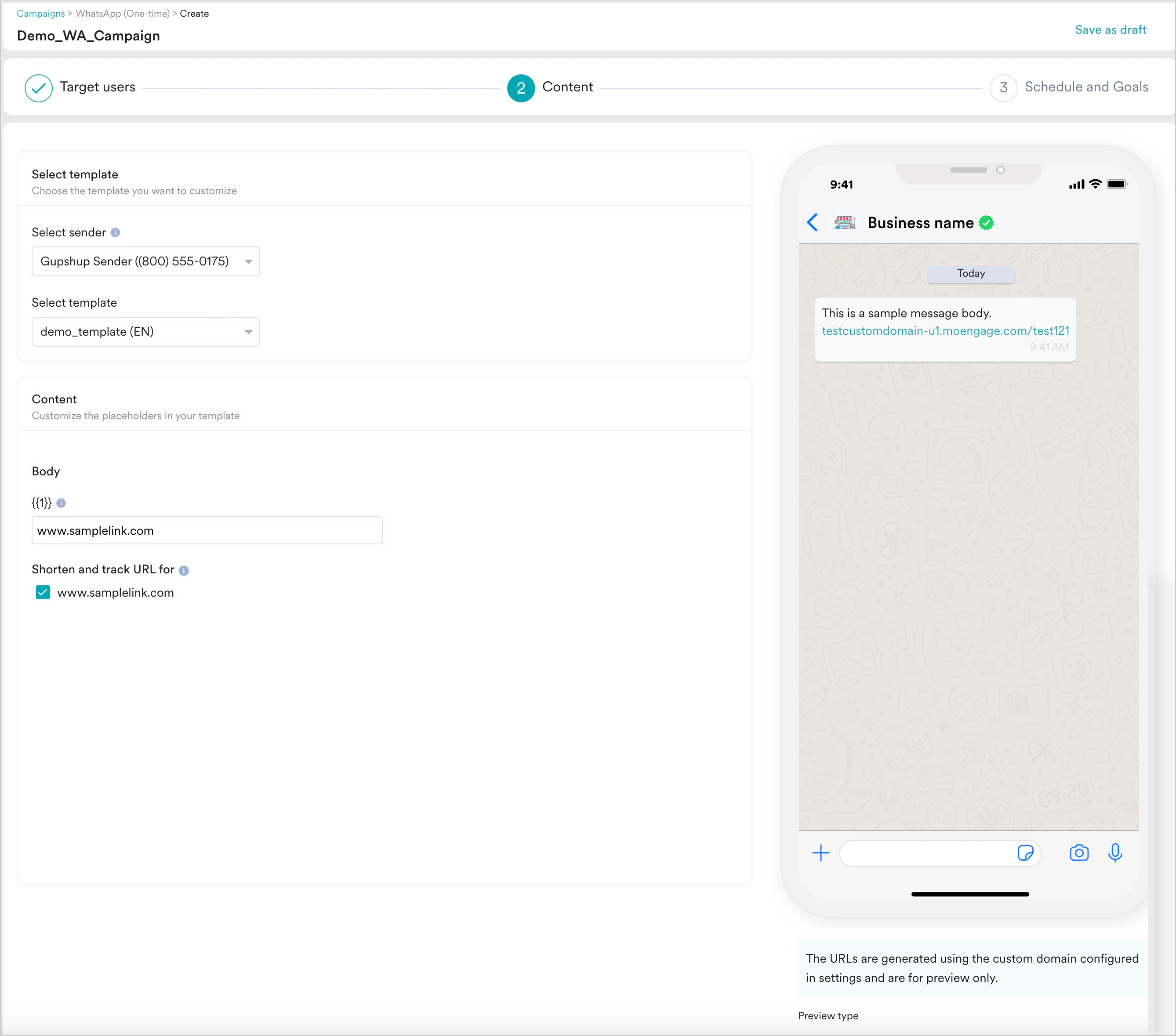 * The URL displayed in the preview is only an example of how the real message body would look and is not the real URL that would be sent in the campaign.
* To test how a user would receive the SMS, WhatsApp message, or Email use the Test Message(SMS), Test Campaign (WhatsApp, Email) feature and send a test message. You can view the URL as it would appear in your live campaign.
# Troubleshooting
If you get the error "Unable to verify. Check domain settings where this domain is managed and retry," make sure the DNS & CNAME mapping is done correctly in your specific Domain Registrar. To verify this, follow the steps your registrar has mentioned. If you don't have the required access, you can share these details with your IT admin, and they can help you in setting these up:
* [GoDaddy](https://ie.godaddy.com/help/add-a-cname-record-19236)
* [Cloudflare](https://developers.cloudflare.com/dns/manage-dns-records/how-to/create-dns-records/#create-dns-records)
* [Microsoft Azure](https://azure.microsoft.com/en-us/blog/a-records-cname-and-using-dns-with-windows-azure-web-sites-waws/#:~:text=into%20the%20picture.-,CNAME%20record,-In%20a%20situation)
* [Google Domains](https://support.google.com/a/answer/47283?hl=en)
* [Shopify](https://help.shopify.com/en/manual/domains/managing-domains/edit-dns-settings#add-dns-record)
The **Unsubscribe URL** added in the **Email Settings** will not be a branded link if the unsubscribe URL is customized and not MoEngage’s default unsubscribe URL.
* The URL displayed in the preview is only an example of how the real message body would look and is not the real URL that would be sent in the campaign.
* To test how a user would receive the SMS, WhatsApp message, or Email use the Test Message(SMS), Test Campaign (WhatsApp, Email) feature and send a test message. You can view the URL as it would appear in your live campaign.
# Troubleshooting
If you get the error "Unable to verify. Check domain settings where this domain is managed and retry," make sure the DNS & CNAME mapping is done correctly in your specific Domain Registrar. To verify this, follow the steps your registrar has mentioned. If you don't have the required access, you can share these details with your IT admin, and they can help you in setting these up:
* [GoDaddy](https://ie.godaddy.com/help/add-a-cname-record-19236)
* [Cloudflare](https://developers.cloudflare.com/dns/manage-dns-records/how-to/create-dns-records/#create-dns-records)
* [Microsoft Azure](https://azure.microsoft.com/en-us/blog/a-records-cname-and-using-dns-with-windows-azure-web-sites-waws/#:~:text=into%20the%20picture.-,CNAME%20record,-In%20a%20situation)
* [Google Domains](https://support.google.com/a/answer/47283?hl=en)
* [Shopify](https://help.shopify.com/en/manual/domains/managing-domains/edit-dns-settings#add-dns-record)
The **Unsubscribe URL** added in the **Email Settings** will not be a branded link if the unsubscribe URL is customized and not MoEngage’s default unsubscribe URL.