

Overview
The Portfolio feature provides a unified view of your customers across all your websites. This enhances how you segment, personalize, and analyze On-site Messaging (OSM) campaigns. This article covers:- Targeting Specific Websites and Platforms
- Cross-Project Segmentation
- Personalization
- Test Campaigns
- Analytics and Project Identification
Target Specific Websites and Platforms
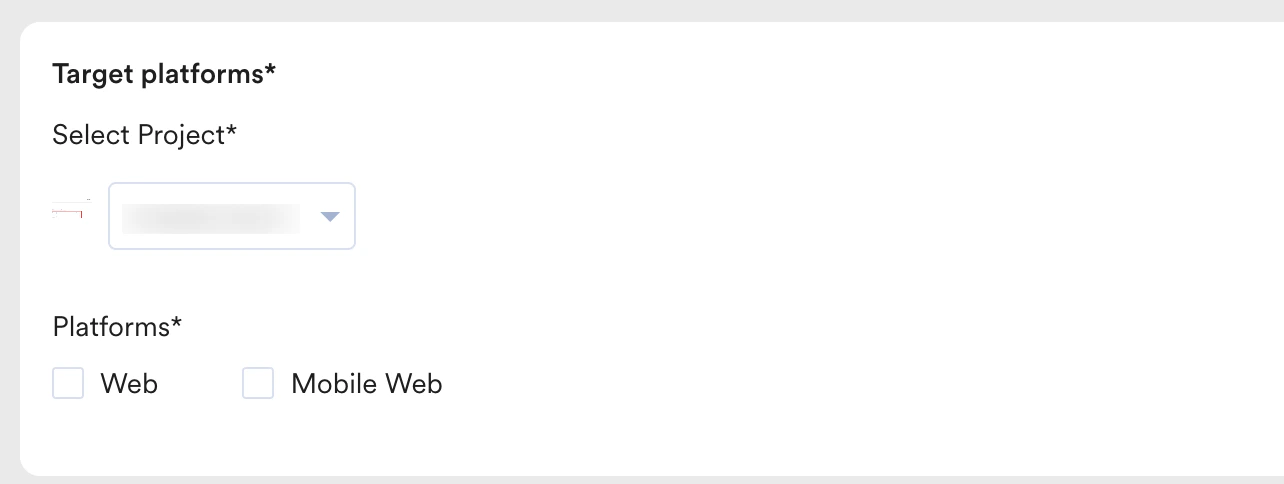
You can tailor your OSM overlays to appear only on the relevant project’s domain.- In the Target Users step of campaign creation, locate the Target platforms section.
- In the Select Project list, select your target project (for example, Project Alpha).
- Select the Platform checkbox, such as Web and Mobile Web, to ensure the message is eligible for all potential web sessions for that brand.
Cross-Project Segmentation
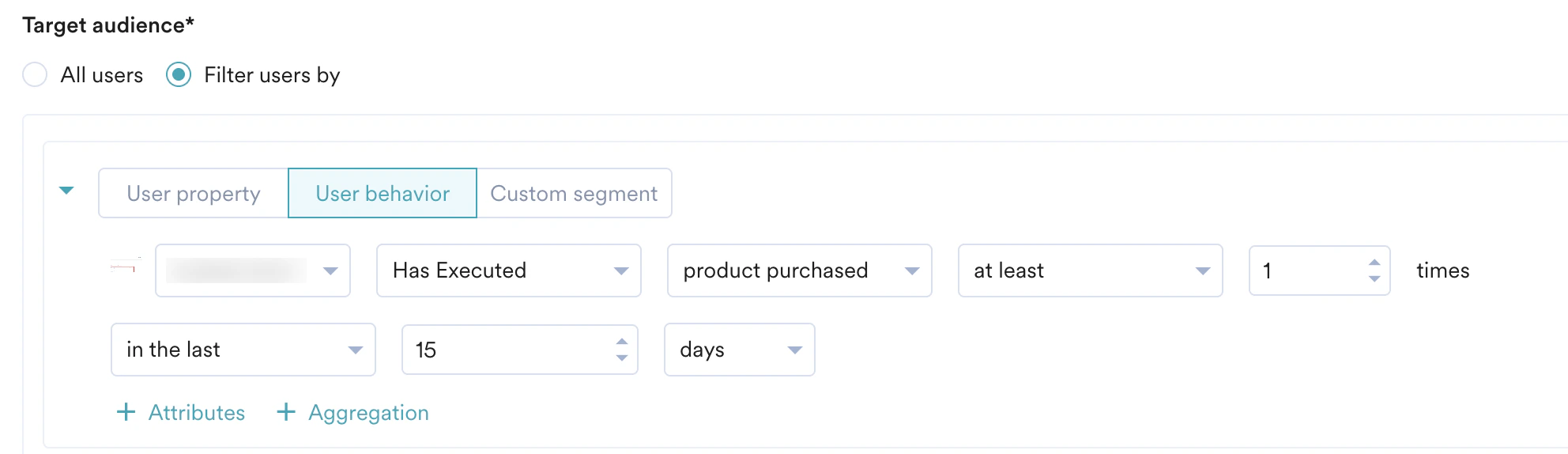
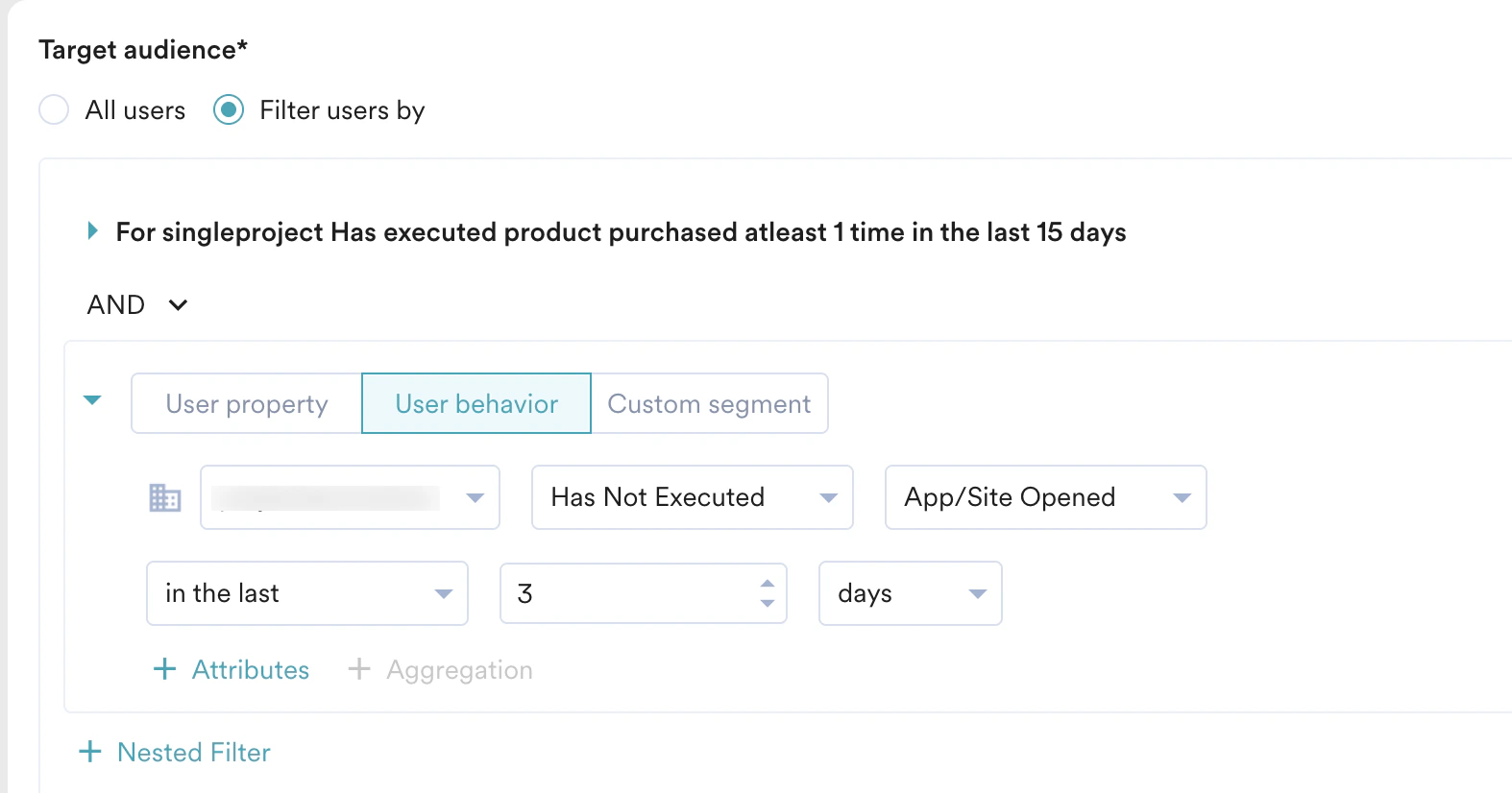
You can segment users based on their complete journey across your projects. This is essential for effective cross-promotion. Example: Find high-value customers of Project Alpha who have not yet engaged with Project Beta. In the Target audience section, we will target users who have made a purchase from Project Alpha and have not yet opened the app or visited the website for Project Beta. By following the steps mentioned below, you can configure this logic:- In the Target audience section, select Filter users by and choose the User behavior tab.
- For the first rule, select Project Alpha from the drop-down list and set the condition “Has Executed Made Purchase.”
- Click + Filter to add a second rule. Select Project Beta and set the condition “Has NOT Executed App Opened.”
- Unlike Push notifications, cross-project triggers are not supported for In-app and OSM campaigns.For example, you cannot trigger an OSM in Project Alpha based on an “Add to Cart” event occurring in Project Beta.
- For these channels, the project selected for sending the campaign is automatically applied to the trigger condition, and cross-project trigger selection is unavailable.
Personalization
Personalization tailors messaging to the project you target, ensuring relevance. When you create a campaign for a specific project, MoEngage automatically filters the user attribute list to display only those from the target project and any global attributes. Example: For a campaign promoting Project Beta to Project Alpha customers, personalization uses data from Project Alpha. Even if a user has different profile details in Project Beta (such as a different “First Name” or “Loyalty Status”), the campaign correctly uses their Project Alpha information to maintain the brand context the user is currently experiencing.- In the campaign’s Content step, type @ to open the list of personalization attributes.
- Select an attribute (for example, First Name) from the available Project Alpha or global attributes.
The message, “Hi @User Attributes.First Name! An exclusive offer awaits,” now correctly uses the name the user provided for Project Alpha.
Test Campaigns
Test campaigns for OSM are context-specific and only execute within the environment of the selected project.- When you initiate a test, the OSM is triggered exclusively on the website or domain associated with the project configured in the campaign settings.
- This segregation ensures that a test for Project Alpha does not inadvertently display on the Project Beta domain, maintaining the integrity of the user experience across your portfolio.
FAQs
I want to show an offer on my Travel site the second a user buys a flight on my Airline site. Why can't I select that trigger?
I want to show an offer on my Travel site the second a user buys a flight on my Airline site. Why can't I select that trigger?
MoEngage currently doesn’t support real-time cross-project triggers for OSM. An OSM campaign can only be triggered by an action that happens on the same website where the message appears.MoEngage suggests you use Cross-Project Segmentation as a workaround. You can target users who are part of a specific segment (e.g., “Recent Airline Purchasers”) and set the campaign to show the Travel offer the next time they visit the Travel domain.
If a customer is browsing both of my websites in different tabs, will they get hit with two different pop-ups at once?
If a customer is browsing both of my websites in different tabs, will they get hit with two different pop-ups at once?
Yes, potentially. Because MoEngage treats each project as its own environment, an active campaign on Site A and an active campaign on Site B will trigger independently.To avoid a cluttered experience, use the “Last Seen” or “Campaign Viewed” filters to ensure you aren’t over-communicating to users who are heavily engaged across your entire portfolio at the same time.
I’m trying to personalize my message with a 'Loyalty Status' from my sister brand, but it’s not appearing in the @ list. Why?
I’m trying to personalize my message with a 'Loyalty Status' from my sister brand, but it’s not appearing in the @ list. Why?
This is a built-in safety filter to prevent “brand-mixing” of data. By default, the personalization menu only surfaces attributes for the specific project you are currently working in.If you need to use data from Project B inside a campaign for Project A, that attribute must be configured as a Global Attribute in your MoEngage settings.
If I run a test campaign for one project, is there any risk it will accidentally show up on my other portfolio websites?
If I run a test campaign for one project, is there any risk it will accidentally show up on my other portfolio websites?
No. Test campaigns for OSM are context-specific and only execute within the environment of the selected project. This ensures that a test triggered for Project Alpha will only appear on the website or domain associated with that specific project, keeping your experimental designs away from your other live brands.