

Why is the small icon not rendering properly in notifications?
The small notification icon may appear as a box or circle in some cases, as in the following image.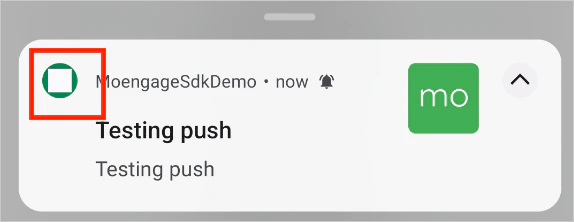
- flat
- pictured face-on
- of white color on a transparent background.
Large Icon not rendering in Push Notifications
The large icon is not displayed in push notifications if- The notification large icon is not in the initialization of the SDK. Please look at the Push Configuration documentation to check how to set the large icon.
- The download for the large icon configured in the campaign failed.
- You have explicitly disabled the large icon display in the notification configuration while integrating the SDK. Check if you have set the value of isLargeIconDisplayEnabled as false in the NotificationConfig object while initializing the SDK. Ensure the value is not set to false, else the large icon will not be displayed.
- The large icon display was disabled in the template settings for the campaign. Please check your campaign.
- The template does not support large icon. Please check the campaign preview.