

Supported Events
The following table describes the events that OPERA Cloud sends to MoEngage:
These are the events MoEngage streams by default. If you need an event that is not listed, raise it with your CSM in the same request, and MoEngage evaluates it as part of the setup.
For information on working with business events in OPERA Cloud, refer to the Configuring Business Events topic in the OPERA Cloud User Guide. This topic also provides a list of business events and data elements. Using this, let MoEngage know the data elements and the ID to be processed. If you need new events, MoEngage evaluates them as part of the request.
Integration
The integration follows a real-time streaming architecture between OPERA Cloud and MoEngage. A MoEngage-hosted middleware layer processes events in real time, so you do not need to set up Oracle Integration Cloud (OIC) or run a connectivity agent in your own environment.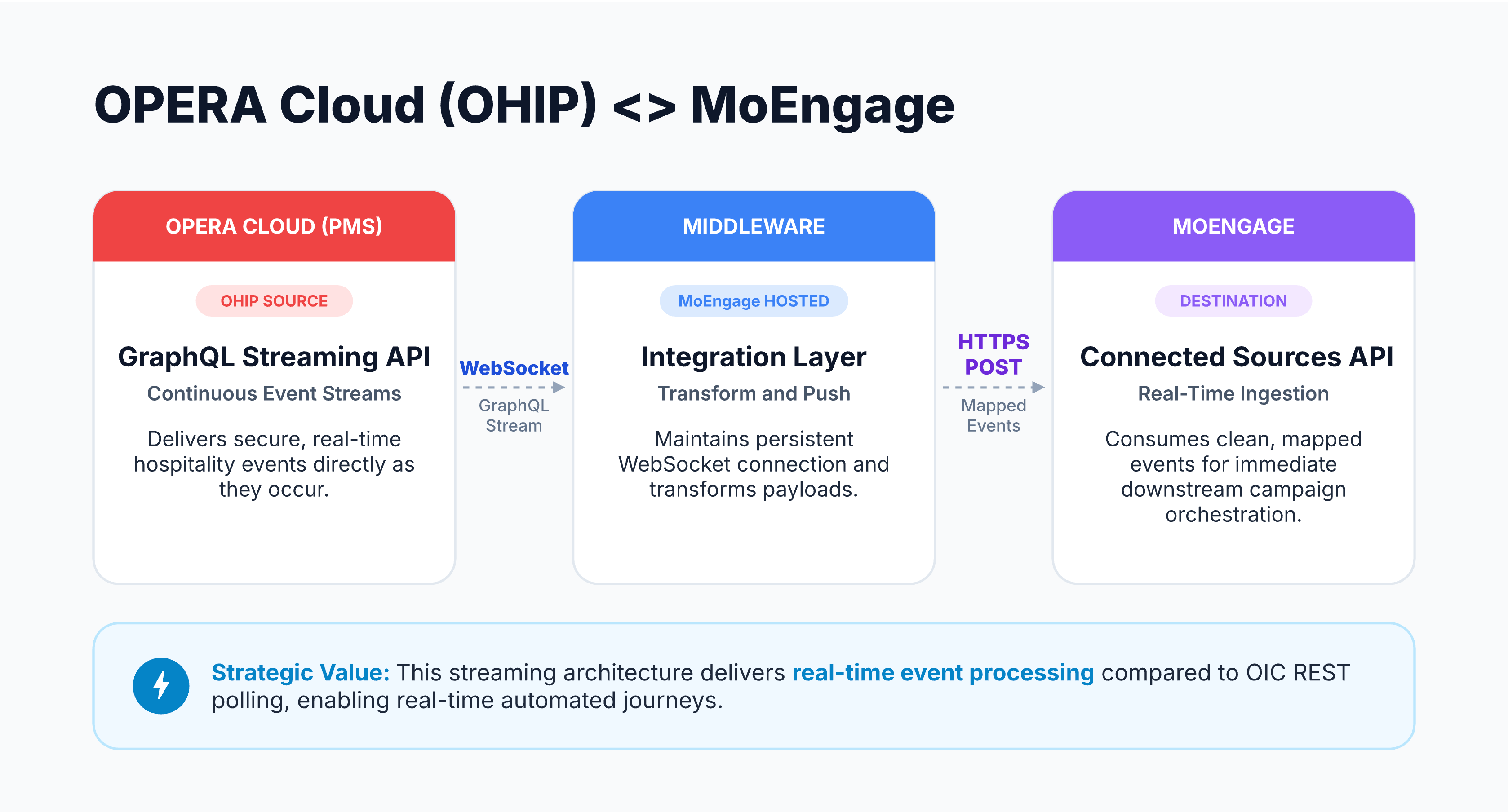
- Source (OPERA Cloud): The OHIP GraphQL Streaming API delivers secure, real-time hospitality events as they occur. It maintains a persistent WebSocket subscription instead of polling OPERA Cloud on a schedule.
- Integration layer (MoEngage-hosted middleware): A fully managed listener holds the WebSocket connection to OHIP, authenticates securely with Oracle through OAuth 2.0, and transforms each event payload into the MoEngage user and event schema.
- Destination (MoEngage): The middleware sends the transformed data through an HTTPS POST to the MoEngage Connected Sources API, which makes the mapped events available for use in your campaigns.
Prerequisites
Before you request the integration, ensure you have an active Oracle Hospitality Integration Platform subscription with the Streaming API enabled.You must also add the OPERA environment you want to consume events from before you can subscribe to its events.
Set Up the Integration
MoEngage configures this integration for you. To request it, perform the following steps:- Contact your MoEngage Customer Success Manager (CSM) or MoEngage Support and request the Oracle OPERA Cloud integration.
-
In the request, provide the following details:
You can find these details in your OHIP Developer Portal.
- Approve the access request that MoEngage raises through the OHIP Developer Portal. Sign in to your own OHIP portal instance to grant approval.