All the events pertaining to a user are present in the Activity Info tab of the User Profile. To see the events associated with an Alert for a specific user:
  1. Look up the user in Segmentation (Create Segment -> Click on the desired User in the search results or search for a specific user with their user ID using the Search bar at the top of the Create Segment screen).
  2. In the User Profile, click on the Activity Info tab.
  3. The following events are available for the various supported channels:
    • Push - Notification Sent iOS, Notification Sent Android, Notification Sent Web, Notification Clicked iOS, Notification Clicked Android. and Notification Clicked Web
    • SMS - SMS Sent, SMS Delivered
    • Email - Email Sent, Email Delivered
  4. Click on the desired event to view the event details, as shown below. AlertEvents.png
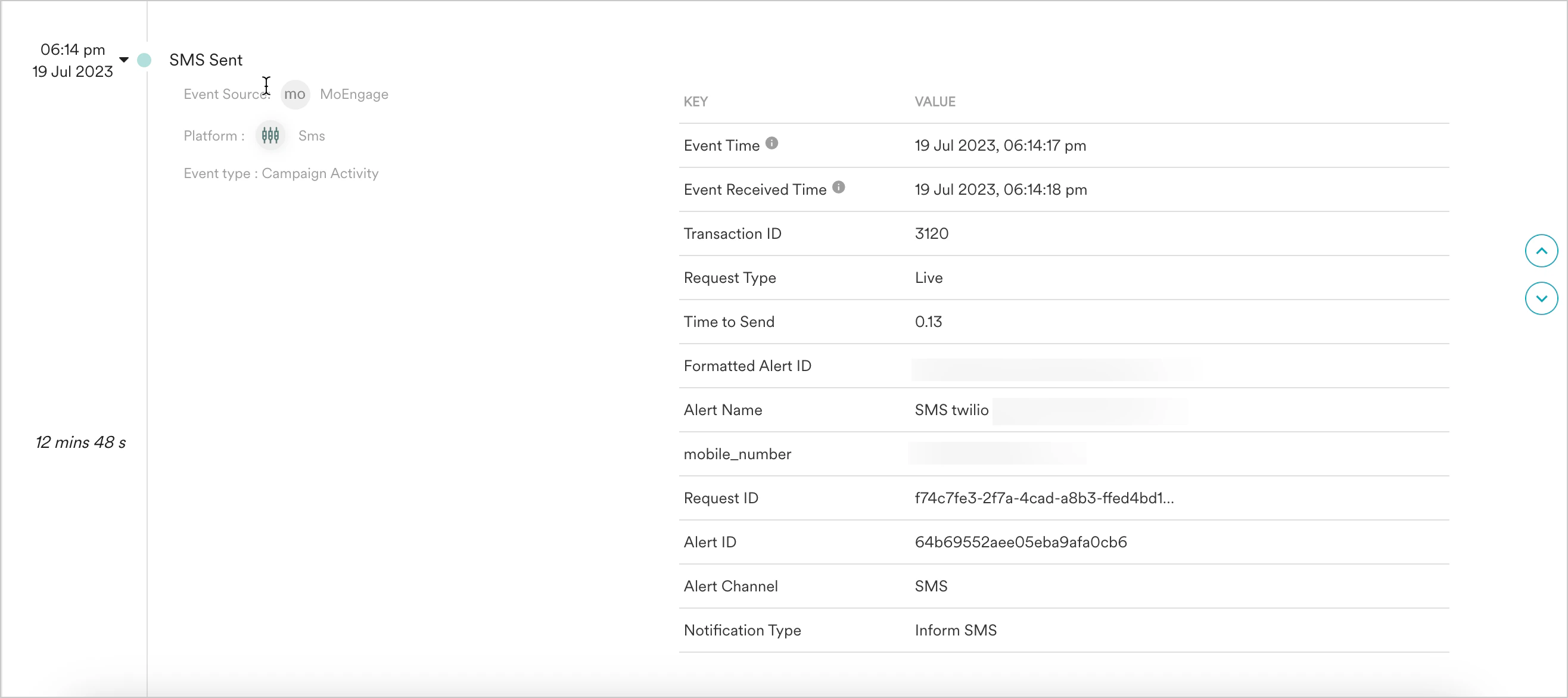
Information available in Activity Info

The following information is available:
  • Time taken between events
  • The information available for every Alert event:
    AttributeDescription
    Event TimeDenotes the time (as available on the device) at which the event is performed on the device. For events that are not generated at the device (MoEngage generated events) or events that don’t have device time (Data API events), the event time is recorded in the User Timezone. If it is unavailable, then the App timezone is shown. If neither is available, then UTC time is taken as the Event Time.
    Event Received TimeDenotes the time when the event reached at MoEngage from SDK or data APIs.
    Transaction IDDenotes the unique identifier denoting the transaction for which the Alert is being sent to the user. For more information, refer to Inform API Request Details.
    Request TypeDenotes the type of request - Live (when the event is related to a Live Alert) or Test (when the event is related to a Test Alert).
    Time to sendDenotes the time taken by MoEngage to send the message/email/notification and is present for the following events: SMS Sent/ Email Sent/ Notification Sent iOS/ Notification Sent Android/ Notification Sent Web
    Time to deliverDenotes the time taken to deliver the message/email/notification and is present for the following events: SMS Delivered/ Email Delivered/ Notification Clicked iOS/ Notification Clicked Android/ Notification Clicked Web
    For the SMS channel, the _Time to deliver _contains:
    • the exact time taken to deliver the Alert to the user for Kalyera, Gupshup, and ICS (as they are based on the delivery timestamp received in the delivery callback)
    • the time the delivery callback was received from Twilio and Sinch (as the delivery timestamp is not available in the delivery callback received).
    For the Email channel, the Time to deliver information is available only for SendGrid and Amazon SES.
    Alert NameDenotes the name of the Alert
    Request IDDenotes the unique identifier of the request associated with the Alert generating the event.
    Alert IDDenotes the unique identifier of the Alert
    Alert ChannelDenotes the alert channel associated with the event.
    Notification TypeRepresents that this notification was sent using Inform.