Data Types
On the MoEngage dashboard, there are seven primary data types:- String: A string is a sequence of characters. Strings are typically used to represent words and text. Character in a string can be a letter of some alphabet, a digit, a punctuation mark, a blank space, etc.
- Boolean: The Boolean data type can have values as true and false.
- Numeric : A number is a sequence of digits . Numeric data types are typically used to represent amount, quantity , and price.
- Geo Location: Geo-location represents the location on the map using latitude and longitude.
- Date Time: Date time data types represent the date and time for an event or action.
- Array: An array is a group of elements. In MoEngage, we have 2 array data types: String Array and Numeric array.
- Object: The Object data type provides a structured way to identify and query multiple related attributes contained within a single object. These attributes can be of any primitive data type, such as string, numeric, or date, and can be nested up to two levels. For more information, refer to Object Data Type in Segmentation.
Terms to know
| Term | Description |
|---|---|
| Key | The key is a record in the database. |
| Key is set | The field which holds the value of an attribute. |
| Key not set | The field is not present to hold the value of the attribute. |
| Stored Value | User Behavior or User Property value that is stored in the MoEngage Application. For example, App/Site Opened, Last Seen, Email Clicked. For more information, refer to Derived Events & Attributes. |
| Filter Value | The value you choose to filter is based on the selected stored value. For example, you can choose the filter at least and type or select the duration or number of times the App/Site is opened. |
String Filters
| Operator | Explanation |
|---|---|
| is | The stored value matches one of the filter values. |
| exists | The stored value is present. This includes all values, including Empty String and N/A. Filter users or events where the stored value exists (Key is set). |
| contains | The stored value contains one of the filter values. |
| contains spaces | The stored value contains spaces. The spaces can be at the start, in between, or at the end of the value. This includes all values, including Empty String and N/A. Filter users or events where the stored value contains spaces. Note: The contains spaces filter will be highly relevant in the case of unique identifier (UID) attributes like ID, Mobile number, Email ID, MoEngage ID, etc. It is also highly relevant for String and Array of string data types. Other data types do not have relevant use cases and might not yield expected results. |
| starts with | The stored value starts with one of the filter values. |
| ends with | The stored value ends with one of the filter values. |
| is not | The stored value is not a match to any of the filter values. The Filter is applied to all the attribute’s values, including those that are not available (The Key is not set). |
| does not exist | The stored value is not present. The filter is applied to all the attribute values, including those that are not available (The Key is not set). |
| does not contain | The stored values are not a partial match to (do not contain) any of the filter values. The filter is applied to all the values in the stored attribute, including those that are unavailable (The Key is not set). |
| does not start with | The stored value does not start with any of the filter values. (Key not set) The filter is applied to all the attribute values, including those that are not available (The Key is not set). |
| does not end with | The stored value does not end with any of the filter values. The filter is applied to all the attribute values, including those that are not available (The Key is not set). |
| is empty | The stored value is "" (The Key is set and the value is null). |
| is not empty | The stored value is not "" (the stored value is not null), whether the Key is set or not. |
Boolean Filters
| Operator | Explanation |
|---|---|
| is | The stored value is an exact match with the filter value. |
| is not | The stored value does not match the filter value. The stored value includes the attributes where the value does not exist (Key is not set). |
| exists | The stored value is present. This includes all values, including Empty Boolean and N/A. |
| does not exist | The stored value is not present (The Key is not set). |
Numeric Filters
For the table below - N, N1, and N2 are numeric, and N2 > N1.| Operator | Explanation |
|---|---|
| is equal to | The stored value is a match with one of the filter values. |
| is not equal to | The stored value does not match any of the filter values. The filter is applied to all the attribute values, including those that are not available (The Key is not set). |
| is between | The stored value is a match between the first filter value and the second filter value. N1 <= Stored value AND Stored value < N2. N1 & N2 are the first and second filter values, respectively. |
| is not between | The stored value is not matched between the first and second filter values. N1 > stored value OR stored value >= N2. N1 & N2 are the first and second filter values, respectively. |
| is less than | The stored value is less than the filter value. Stored value < Filter value |
| is greater than | The stored value is greater than the filter value. Stored value > Filter value |
| exists | The stored value is present. This includes all values, including Empty Numeric and N/A. Filter users or events where the stored value exists (Key is set). |
| does not exist | The stored value is not present. The filter is applied to all the attribute values, including those that are not available (The Key is not set). |
Event Occurrence Filters
Consider the following assumptions:- Number of times user executes or does not execute the event: n
- Event in consideration: Viewed Product
- Today’s Date - Dec 14th 2023.
- Event Retention Period for Segmentation - 30 days ( Nov 14th 2023)
| Operator | Explanation |
|---|---|
| exactly | The user has the event exactly for the specified number of times. Example: Has Executed Viewed Product exactly 2 times This filter would fetch users who have viewed a product exactly twice in the specified date range added in the filter criteria. |
| at least | The user has executed the event at least n times (>= n) Example: Has Executed Viewed Product at least 1 times This filter would fetch users who have viewed a product at least once in the specified date range added in the filter criteria. |
| at most | The user has executed the event at most n times (<= n). Example: Has Executed Viewed Product at most 4 times This filter would fetch users who have viewed a product at most four times (<=4) in the specified date range added in the filter criteria. |
| for the first time | The user has executed the event for the first time within the specified date range. Example: Has Executed Viewed Product for the first time in the last 4 days This filter would fetch users who have viewed a product for the first time in the last 4 days(till 10th Dec 2023) and have not viewed a product before that (has not executed viewed product before 10th Dec 2023 (period in consideration here - 14th Nov 2023 to 10th Dec 2023). Note: This operator will run as per the events data retention applicable to your Workspace. |
| for the last time | The user has executed the event for the last time within the specified date range. Example: Has Executed Viewed Product for the last time This filter would fetch users who have viewed a product for the last time in the specified date range added in the filter criteria. Note: This operator will run as per the events data retention applicable to your Workspace. |
Location-Triggered Filters
| Operator | Explanation |
|---|---|
| Point with Radius | The stored geolocation value is within the circle defined by the point and the radius. |
Date Time Filters
To understand filter operators in date-time data types, we need to first understand a few functions -- now = current timestamp up to milliseconds
- start_of_day(timestamp) = 00:00:00 of the selected day/date
- end_of_day(timestamp) = 23:59:59 of the selected day/date
- n days = n * 24 hours
- For the table below - n, n1, and n2 are numeric and n2 > n1.
For example
- Let’s assume now is 7:30:05 PM, 5 Jan 2001 then
- now - 3 days = now - (3* 24) hours = 7:30:05 PM, 2 Jan 2001
- now + 3 days = now + (3* 24) hours = 7:30:05 PM, 8 Jan 2001
- start of the day (now) = 12:00:00 AM, 5 Jan 2001
- end of the day (now) = 11:59:59 PM, 5 Jan 2001
- Let’s assume the date is 1 Jan 2001
- start of day (date) = 12:00:00 AM, 1 Jan 2001
- start of day (date + 1 day) = 12:00:00 AM, 2 Jan 2001
- start of day (date - 1 day) = 12:00:00 AM, 31 Dec 2000
- end of day (date) = 11:59:59 PM, 1 Jan 2001
- end of day (date + 1 day) = 11:59:59 PM, 2 Jan 2001
- end of day (date - 1 day) = 11:59:59 PM, 31 Dec 2000
All date-time filters work in the App time Zone, specified in Settings.
(Settings -> App -> General -> General Settings -> Account Settings -> TimeZone )
| Operator | Filter Value Type | Explanation |
|---|---|---|
| in the last | n days | Stored value is From = Start of day(Now - N days), To = Now. N is the filter value. Example: If Now = 11:30:30 AM, 7 Sep 2022 & N = 3. From = 12:00:00 AM, 4 Sep 2022. To = 11:30:30 AM, 7 Sep 2022. |
| n hours | Stored value is From = Start of the hour (Now - N hours), To = Now N is the filter value. Example: If Now = 11:30:30 AM, 7 Sep 2022 & N = 3. From = 8:00:00 AM, 7 Sep 2022. To = 11:30:30 AM, 7 Sep 2022. | |
| n weeks | Stored value is From = Start of the week (Monday of (Now - N weeks)), To = Now N is the filter value. Example: If Now = 11:30:30 AM, 7 Sep 2022 & N = 2. From = 12:00:00 AM, 22 Aug 2022 (Monday) To = 11:30:30 AM, 7 Sep 2022. | |
| n months | Stored value is From = Start of the month (Now - N months), To = Now N is the filter value. Example: If Now = 11:30:30 AM, 7 Sep 2022 & N = 2. From = 12:00:00 AM, 1 Jul 2022. To = 11:30:30 AM, 7 Sep 2022. | |
| on | date | Stored value is From = Start of day (Date chosen), To = End of day (Date chosen) Example: If Now = 11:30:30 AM, 7 Sep 2022 & Date chosen is today. From = 12:00:00 AM, 7 Sep 2022. To = 11:30:30 AM, 7 Sep 2022. |
| days ago | Stored value is From = Start of day (Now - N days), To = End of day (Now - N days) N is the filter value Example: If Now = 11:30:30 AM, 7 Sep 2022 & N=3. From = 12:00:00 AM, 4 Sep 2022. To = 11:59:59 PM, 4 Sep 2022. | |
| days from now | Stored value is From = Start of day(Now + N days), To = End of day(Now + N days). N is the filter value. Example: If Now = 11:30:30 AM, 7 Sep 2022, & N=3. From = 12:00:00 AM, 10 Sep 2022. To = 11:59:59 PM, 10 Sep 2022. | |
| in between | date | Stored value is From = Start of day(Date 1), To = End of day(Date 2). Date 1 & Date 2 are the start and end dates respectively. Example: If selected Date1 = 7 Sep 2022, & Date2 = 15 Sep 2022. From = 12:00:00 AM, 7 Sep 2022. To = 11:59:59 PM, 15 Sep 2022. |
| days ago | Stored value is From = Start of day (Now - N2 days), To = End of day (Now - N1 days). N1 & N2 are the first and second filter values respectively. Example: If Now = 11:30:30 AM, 7 Sep 2022, N1 = 3, & N2 = 5. From = 12:00:00 AM, 2 Sep 2022. To = 11:59:59 PM, 4 Sep 2022. | |
| days from now | Stored value is From = Start of day(Now + N1 days), To = End of day(Now + N2 days). N1 & N2 are the first and second filter values respectively. Example: If Now = 11:30:30 AM, 7 Sep 2022, N1 = 3, & N2 = 5. From = 12:00:00 AM, 10 Sep 2022. To = 11:59:59 PM, 12 Sep 2022. | |
| before | date | Stored value is To = End of day (Date chosen - 1 day) Example: If Now = 11:30:30 AM, 7 Sep 2022 & Date chosen is today. To = 11:59:59 PM, 6 Sep 2022. |
| days ago | Stored value is To = End of day(Now - (N+1) days) N is the filter value. Example: If Now = 11:30:30 AM, 7 Sep 2022 & N = 3. To = 11:59:59 PM, 3 Sep 2022. | |
| after | date | Stored value is From = Start of day (Date chosen + 1 day), Example: If Now = 11:30:30 AM, 7 Sep 2022 & Date chosen is today. From = 12:00:00 AM, 8 Sep 2022. |
| days from now | Stored value is From = Start of day(now + (N+1) days) N is the filter value. Example: If selected Date = 7 Sep 2022, & N = 3. From = 12:00:00 AM, 11 Sep 2022. | |
| in the next | days | Stored value is From = Now, To = End of day(now + N days). N is the filter value. Example: If Now = 11:30:30 AM, 7 Sep 2022 & N =3. From = 11:30:30 AM, 7 Sep 2022. To = 11:59:59 PM, 10 Sep 2022. |
| today | Stored value is From = Start of day(Today), To = Now Example: If Now = 11:30:30 AM, 7 Sep 2022. From = 12:00:00 AM, 7 Sep 2022. To = 11:30:30 AM, 7 Sep 2022. | |
| yesterday | Stored value is From = Start of day(Now - 1 day), To = End of day(Now - 1 day) Example: If Now = 11:30:30 AM, 7 Sep 2022. From = 12:00:00 AM, 6 Sep 2022. To = 11:59:59 PM, 6 Sep 2022. | |
| this week | Stored value is From = Start of week (Monday of the current week), To = Now Example: If Now = 11:30:30 AM, 7 Sep 2022. From = 12:00:00 AM, 5 Sep 2022. To = 11:30:30 AM, 7 Sep 2022. | |
| last week | Stored value is From = Start of week (Now - 7 days), To = End of week (Now - 7 days) Example: If Now = 11:30:30 AM, 7 Sep 2022. From = 12:00:00 AM, 29 Aug 2022. (Monday) To = 11:59:59 PM, 3 Sep 2022. | |
| this month | Stored value is From = Start of Month (1st of current month), To = End of Month (Now) Example: If Now = 11:30:30 AM, 7 Sep 2022. From = 12:00:00 AM, 1 Sep 2022. To = 11:30:30 AM, 7 Sep 2022. | |
| last month | Stored value is From = Start of Month (Now - 1 month), To = End of Month (Now - 1 month) Example: If Now = 11:30:30 AM, 7 Sep 2022. From = 12:00:00 AM, 1 Aug 2022. To = 11:59:59 PM, 31 Aug 2022. | |
| exists | The stored value is present. This includes all values including Empty Date Time and N/A. Filter users or events where the stored value exists (Key is set). | |
| does not exist | The stored value is not present. The filter is applied to all the values of the attribute including the values that are not available (The Key is not set). |
Special Date Filters
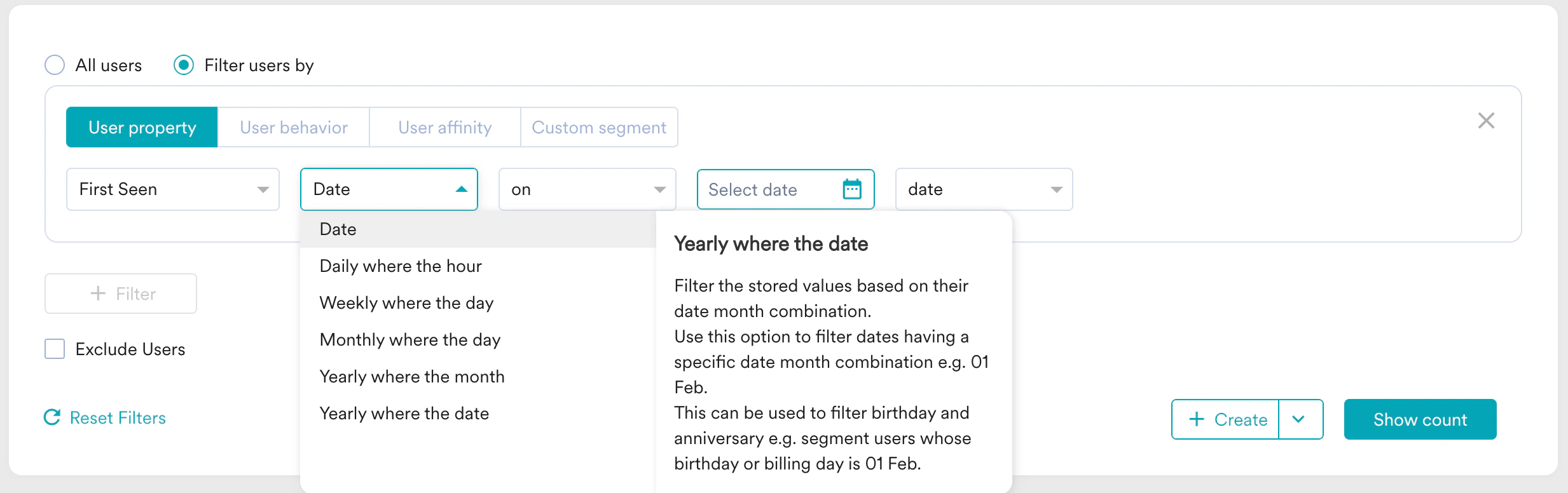
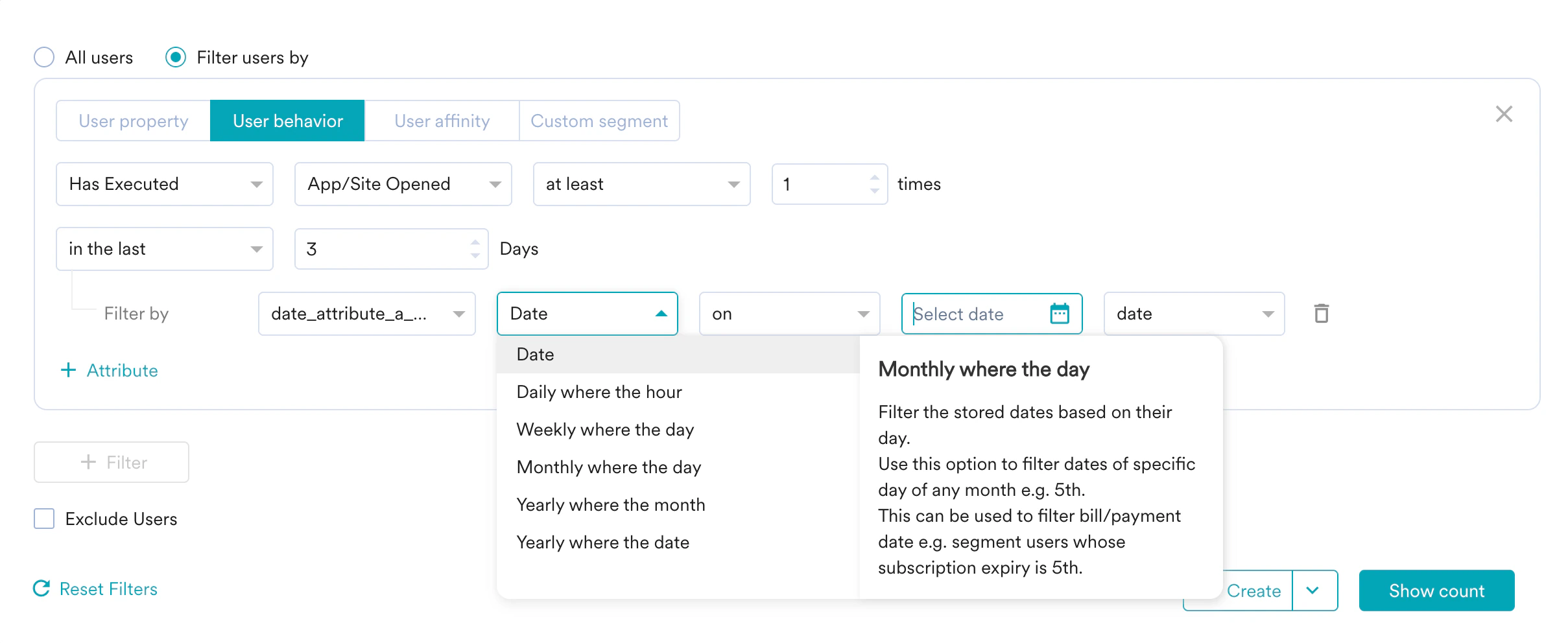
Special date filter filters for a specific hour, weekday, month, date of the month, and date of the year. This is useful for filtering out birthdays across years, and bill dates across months. Special date filters are available in the drop-down next to the date attributes in the User property and the User behavior section.
| Operator | Text on Dashboard | Explanation |
|---|---|---|
| Date | Date | Filter the stored dates. |
| Hour of the day | Daily where the hour/s | Filter the stored dates based on their hour. Use this option to filter dates having specific hour/s e.g. 12 AM - 1 AM. Use this filter to segment all users whose movie time or yoga class time falls between 8 AM - 9 AM. |
| Day of the week | Weekly where the day/s | Filter the stored dates based on their weekday. Use this option to filter dates of specific weekdays e.g. Monday. Use this filter to segment all users who ordered food or booked a cab on Friday. |
| Day of the month | Monthly where the day/s | Filter the stored dates based on their day. Use this option to filter dates of a specific day of any month e.g. 5th. Use this filter to segment users whose monthly bill payment date or subscription renewal date is the 15th. |
| Month of the year | Yearly where the month/s | Filter the stored dates based on their month. Use this option for actions performed on a specific month of any year e.g. January. Use this filter to segment all users whose birthday or yearly subscription expiry is in March. |
| Date Month | Yearly where the date/s | Filter the stored values based on their date month combination. Use this option to filter dates having a specific date month combination e.g. 01 Feb. This can be used to filter birthdays and anniversaries e.g. segment users whose birthday or billing day is 15 Sep. |
Hour of the day - Daily where the hours
For hours of the day, let’s understand these filters’ definitions better with examples.| Operator | Filter Value | Explanation | |
|---|---|---|---|
| in the following | — | Hour value of the stored date matches with one of the filter values. | |
| on | hour | Stored value is From = Start of the hour(Hour), To = End of the hour(Hour). Hour is the filter hour. Example: If selected Hour = 12 AM. From = 12:00:00 AM, To = 12:59:59 AM. (Irrespective of the date) | |
| hours ago | Stored value is From = Start of the hour(Now - N hours), To = End of the hour(Now - N hours). N is the filter value. Example: If Now = 11:30:30 AM & N =3. From = 8:00:00 AM, To = 8:59:59 AM. (Irrespective of the date) | ||
| hours from now | Stored value is From = Start of hour(Now + N hours), To = End of hour(Now + N hours). N is the filter value. Example: If Now = 11:30:30 AM & N =3. From = 02:00:00 PM, To = 02:59:59 PM. (Irrespective of the date) | ||
| In between | hour | Stored value is From = Start of the hour(Hour 1), To = End of the hour(Hour 2). Hour 1 & Hour 2 are the start and end hours respectively. Example: If selected Hour1 = 01 AM, & Hour2 = 05 PM. From = 01:00:00 AM, To = 05:59:59 PM. (Irrespective of the date) | |
| hours ago | Stored value is From = Start of the hour(Now - N2 hours), To = End of the hour(Now - N1 hours). N1 & N2 are the first and second filter values respectively. Example: If Now = 11:30:30 AM, N1 = 3, & N2 = 5. From = 06:00:00 AM, To = 8:59:59 AM. (Irrespective of the date) | ||
| hours from now | Stored value is From = Start of hour(Now + N1 hours), To = End of hour(Now + N2 hours). N1 & N2 are the first and second filter values respectively. Example: If Now = 11:30:30 AM, N1 = 3, & N2 = 5. From = 02:00:00 PM, To = 04:59:59 PM. (Irrespective of the date) | ||
| in the last | n hours | Stored value is From = Start of the hour(Now - N hours), To = End of the hour(Now) N is the filter value. Example: If Now = 11:30:30 AM & N =3. From = 8:00:00 AM, To = 11:59:59 AM. (Irrespective of the date) | |
| in the next | n hours | Stored value is From = Start of hour(Now), To = End of hour(Now + N hours) N is the filter value. Example: If Now = 11:30:30 AM & N =3. From = 11:00:00 AM, To = 02:59:59 PM. (Irrespective of the date) |
Day of the week - Weekly where the day
For the day of the week, let’s understand these filter definitions better with examples.| Operator | Filter Value | Explanation | |
|---|---|---|---|
| is today | — | Stored value is From = Start of weekday(Now), To = End of weekday(Now) Example: If Now = 04:30:30 PM, 1 Jan 2001, Monday. From = Monday 12:00:00 AM, To = Monday 11:59:59 PM. (Irrespective of the date) | |
| in the following | — | The weekday value of the stored date matches with one of the filter weekdays. | |
| on | day | Stored value is From = Start of weekday(Day), To = End of weekday(Day) Day is filter weekday. Example: If Day = Wednesday. From = Wednesday 12:00:00 AM, To = Wednesday 11:59:59 PM. (Irrespective of the date) | |
| days ago | Stored value is From = Start of weekday(Now - N days), To = End of weekday(Now - N days). N is the filter value. Example: If Now = 04:30:30 PM, 1 Jan 2001, Monday & N = 3 From = Friday 12:00:00 AM, To = Friday 11:59:59 PM. (Irrespective of the date) | ||
| days from now | Stored value is From = Start of weekday(Now + N days), To = End of weekday(Now + N days) N is the filter value. Example: If Now = 04:30:30 PM, 1 Jan 2001, Monday & N = 3 From = Thursday 12:00:00 AM, To = Thursday 11:59:59 PM. (Irrespective of the date) | ||
| In between | day | Stored value is From = Start of weekday(Day 1), To = End of weekday(Day 2) Day 1 & Day 2 are the start and end weekdays respectively. Example: If Now = 04:30:30 PM, 1 Jan 2001, Monday. Day 1 = Tuesday & Day 2 = Tuesday. From = Tuesday 12:00:00 AM, To = Thursday 11:59:59 PM. (Irrespective of the date) | |
| days ago | Stored value is From = Start of weekday(Now - N2 days), To = End of weekday(Now - N1 days). N1 & N2 are the first and second filter values respectively. Example: If Now = 04:30:30 PM, 1 Jan 2001, Monday. N1 = 2 & N2 = 4. From = Thursday 12:00:00 AM To = Saturday 11:59:59 PM (Irrespective of the date) | ||
| days from now | Stored value is From = Start of weekday(Now + N1 days), To = End of weekday(Now + N2 days) N1 & N2 are the first and second filter values respectively. Example: If Now = 04:30:30 PM, 1 Jan 2001, Monday. N1 = 2 & N2 = 4. From = Wednesday 12:00:00 AM, To = Friday 11:59:59 PM. (Irrespective of the date) | ||
| in the last | N days | Stored value is From = Start of day(Now - N days), To = End of day(Now) N is the filter value. Example: If Now = 04:30:30 PM, 1 Jan 2001, Monday & N = 3. From = Friday 12:00:00 AM, To = Monday 11:59:59 PM. (Irrespective of the date) | |
| in the next | N days | Stored value is From = Start of the day (Now), To = End of day(Now + N days) N is the filter value. Example: If Now = 04:30:30 PM, 1 Jan 2001, Monday & N = 3. From = Monday 12:00:00 AM, To = Thursday 11:59:59 PM. (Irrespective of the date) |
Day of the month - Monthly where the day
For the day of the week, let’s understand these filter definitions better with examples.Here Date(DD) numerical date value e.g. 11, 23, 05.
| Operator | Filter Value | Explanation | |
|---|---|---|---|
| is today | — | Stored value is From = Start of day(Now), To = End of day(Now) Example: If Now = 4:30 PM, 11 Jan 2001. From = 11th 12:00:00 AM To = 11th 11:59:59 PM (Irrespective of the month & year) | |
| in the following | — | Date(DD) value of the stored date matches with one of the filter dates. | |
| on | day | Stored value is From = Start of day(Date), To = End of day(Date) Date(DD) is the filter date. Example: If selected Date = 7th. From = 7th 12:00:00 AM, To = 7th 11:59:59 PM. (Irrespective of the month & year) | |
| days ago | Stored value is From = Start of day(Now - N days), To = End of day(Now - N days). N is the filter value. Example: If Now = 4:30 PM, 11 Jan 2001 & N = 3. From = 8th 12:00:00 AM, To = 8th 11:59:59 PM. (Irrespective of the month & year) | ||
| days from now | Stored value is From = Start of day(Now + N days), To = End of day(Now + N days) N is the filter value. Example: If Now = 4:30 PM, 11 Jan 2001 & N = 3. From = 14th 12:00:00 AM, To = 14th 11:59:59 PM. (Irrespective of the month & year) | ||
| In between | day | Stored value is From = Start of day(Date1), To = End of day(Date2) Date1(DD) & Date 2(DD) are the start and end dates respectively. Example: If Date1 = 14th & Date2 = 23rd. From = 14th 12:00:00 AM, To = 23rd 11:59:59 PM. (Irrespective of the month & year) | |
| days ago | Stored value is From = Start of day(Now - N2 days), To = End of day(Now - N1 days). N1 & N2 are the first and second filter values respectively. Example: If Now = 4:30 PM, 11 Jan 2001, N1 = 11 & N2=19. From = 23rd 12:00:00 AM, To = 31th 11:59:59 PM. (Irrespective of the month & year) | ||
| days from now | Stored value is From = Start of day(Now + N1 days), To = End of day(Now + N2 days). N1 & N2 are the first and second filter values respectively. Example: If Now = 4:30 PM, 11 Jan 2001, N1 = 11 & N2=19. From = 22nd 12:00:00 AM, To = 30th 11:59:59 PM. (Irrespective of the month & year) | ||
| in the last | N days | Stored value is From = Start of day(Now - N days), To = End of day(Now). N is the filter value. Example: If Now = 4:30 PM, 11 Jan 2001 & N = 3. From = 8th 12:00:00 AM, To = 11th 11:59:59 PM. (Irrespective of the month & year) | |
| in the next | N days | Stored value is From = Start of the day (Now), To = End of day(Now + N days). N is the filter value. Example: If Now = 4:30 PM, 11 Jan 2001 & N = 3. From = 11th 12:00:00 AM, To = 14th 11:59:59 PM. (Irrespective of the month & year) |
Month of the year - Yearly where the month
Let’s understand these filters’ definitions better with examples for the month of the year.| Operator | Filter Value | Explanation |
|---|---|---|
| is this month | — | Stored value is From = Start of month(Now), To = End of month(Now) Example: If Now = 4:30 PM, 11 Jan 2001. From = 1st Jan 12:00:00 AM To = 31st Jan 11:59:59 PM (Irrespective of the year) |
| in the following | — | The month value of the stored date matches one of the filter months. |
| on | month | Stored value is From = Start of month(Month), To = End of month(Month) Month is the filter month. Example: If selected Month = May. From = 1st May 12:00:00 AM To = 31st May 11:59:59 PM (Irrespective of the year) |
| months ago | Stored value is From = Start of month(Now - N months), To = End of month(Now - N months) N is the filter value. Example: If Now = 4:30 PM, 11 Jan 2001 & N = 3. From = 1st Oct 12:00:00 AM, To = 30th Oct 11:59:59 PM. (Irrespective of the year) | |
| months from now | Stored value is From = Start of month(Now + N months), To = End of month(Now + N months). N is the filter value. Example: If Now = 4:30 PM, 11 Jan 2001 & N = 3. From = 1st Apr 12:00:00 AM, To = 30th Apr 11:59:59 PM. (Irrespective of the year) | |
| In between | month | Stored value is From = Start of month(Month 1), To = End of month(Month 2). Month1 & Month2 are the start and end months respectively. Example: If Month1 = March, Month2= October. From = 1st Mar 12:00:00 AM, To = 30th Oct 11:59:59 PM. (Irrespective of the year) |
| month ago | Stored value is From = Start of month(Now - N2 months), To = End of month(Now - N1 months). N1 & N2 are the first and second filter values respectively. Example: If Now = 4:30 PM, 11 Jan 2001, N1 = 4 & N2 = 7. From = 1st Jun 12:00:00 AM, To = 30th Sep 11:59:59 PM. (Irrespective of the year) | |
| month from now | Stored value is From = Start of month(Now + N1 months), To = End of month(Now + N2 months). N1 & N2 are the first and second filter values respectively. Example: If Now = 4:30 PM, 11 Jan 2001, N1 = 4 & N2 = 7. From = 1st May 12:00:00 AM, To = 31th Aug 11:59:59 PM. (Irrespective of the year) | |
| in the last | n months | Stored value is From = Start of month(Now - N months), To = End of month(Now). N is the filter value. Example: If Now = 4:30 PM, 11 Jan 2001 & N = 3. From = 1st Oct 12:00:00 AM, To = 31th Jan 11:59:59 PM. (Irrespective of the year) |
| in the next | n months | Stored value is From = Start of month(Now), To = End of month(Now + N months). N is the filter value. Example: If Now = 4:30 PM, 11 Jan 2001 & N = 3. From = 1st Jan 12:00:00 AM, To = 30th Apr 11:59:59 PM. (Irrespective of the year) |
Date-Month of the year - Yearly where the date
Let’s understand these filters’ definitions better with examples for the date month of the year.| Operator | Filter Value | Explanation | |
|---|---|---|---|
| is today | — | Stored value is From = Start of day(Now), To = End of day(Now) Example: If Now = 4:30 PM, 11 Jan 2001. From = 11th Jan 12:00:00 AM, To = 11th Jan 11:59:59 PM. (Irrespective of the year) | |
| on | date month | Stored value is From = Start of day(Date-Month), To = End of day(Date-Month). Example: If Date-Month = 04 May. From = 4th May 12:00:00 AM, To = 4th May 11:59:59 PM. (Irrespective of the year) | |
| days ago | Stored value is From = Start of day(Now - N days), To = End of day(Now - N days) N is the filter value. Example: If Now = 11 Jan 2001, 4:29 PM & N = 3. From = 8th Jan 12:00:00 AM, To = 8th Jan 11:59:59 PM. (Irrespective of the year) | ||
| days from now | Stored value is From = Start of day(Now + N days), To = End of day(Now + N days). N is the filter value. Example: If Now = 11 Jan 2001, 4:29 PM & N = 3. From = 14 Jan 12:00:00 AM, To = 14 Jan 11:59:59 PM. (Irrespective of the year) | ||
| In between | day | Stored value is From = Start of day(Date-Month1), To = End of day(Date-Month2) Date-Month1 & Date-Month2 are the starts and end days respectively. Example: If Date-Month1 = 03 March, & Date-Month1 = 10 October. From = 3rd Mar 12:00:00 AM, To = 10th Oct 11:59:59 PM. (Irrespective of the year) | |
| days ago | Stored value is From = Start of day(Now - N2 days), To = End of day(Now - N1 days). N1 & N2 are the first and second filter values respectively. Example: If Now = 11 Jan 2001, 4:29 PM. N 1 = 4 & N2 = 7. From = 4th Jan 12:00:00 AM, To = 7th Jan 11:59:59 PM. (Irrespective of the year) | ||
| days from now | Stored value is From = Start of days(Now + N1 days), To = End of days(Now + N2 days). N1 & N2 are the first and second filter values respectively. Example: If Now = 11 Jan 2001, 4:29 PM. N 1 = 4 & N2 = 7. From = 15th Jan 12:00:00 AM, To = 18th Jan 11:59:59 PM. (Irrespective of the year) | ||
| in the last | N days | Stored value is From = Start of days(Now - N days), To = End of days(Now). N is the filter value. Example: If Now = 11 Jan 2001, 4:29 PM & N = 3. From = 8th Jan 12:00:00 AM, To = 11th Jan 11:59:59 PM. (Irrespective of the year) | |
| in the next | N days | Stored value is From = Start of days(Now), To = End of days(Now + N days). N is the filter value. Example: If Now = 11 Jan 2001, 4:29 PM & N = 3. From = 11th Jan 12:00:00 AM, To = 14th Jan 11:59:59 PM. (Irrespective of the year) |
Array Filters
Two types of array filters are available. Array filters are not supported for:- Entire Analytics Suite
- Triggers, Preference management, Conversion goals, and Personalization attributes
Array of Strings
Description for array filters for string -| Filter Name | Explanation |
|---|---|
| (any of) is | Any of the stored values is an exact match for at least one of the filter values. |
| (all of) is | All of the stored values of the array match all the filter values. |
| (any of) is empty | At least one of the stored values of the array is an empty string. |
| (all of) is empty | All of the stored values of the array are empty strings. |
| is not | All stored values of the array do not match any of the filter values. The filter is applied to all the values of the attribute, including the values that are not available (The Key is not set). |
| is not empty | The stored value is not empty. String instance has a length greater than 0. The Filter is applied to all the values of the attribute including the values that are not available (The Key is not set). |
| exists | The stored value is present. This includes all values including Empty Array and N/A. Filter users or events where the stored value exists (Key is set). |
| contains | All of the stored values of the array contain all the filter values. |
| does not exist | The stored value is not present. The filter is applied to all the values of the attribute including the values that are not available (The Key is not set). |
| (any of) contains | One of the stored values of the array contains the filter value. |
| (all of) contains | All of the stored value contains filter value |
| does not contain | All of the stored value does not contain filter value. The filter is applied to all the values of the attribute including the values that are not available (The Key is not set). |
| (any of) starts with | Any of the stored values start with the filter value. |
| (all of) starts with | All of the stored value starts with the filter value. |
| does not start with | All of the stored does not start with the filter value. The filter is applied to all the values of the attribute including the values that are not available (The Key is not set). |
| (any of) ends with | Any of the stored values end with the filter value. |
| (all of) ends with | All of the stored value ends with the filter value. |
| does not end with | All of the stored does not end with the filter value. The filter is applied to all the values of the attribute including the values that are not available (The Key is not set). |
Array of Numbers
Description for array filters for numeric values -| Filter Name | Explanation |
|---|---|
| (any of) is equal to | Any of the stored values is an exact match for at least one of the filter values. |
| (all of) is equal to | Stored values are an exact match for all the filter values. |
| is not equal to | Any of the stored values is not a match to any of the filter values. The filter is applied to all the values of the attribute, including the values that are not available (The Key is not set). |
| (any of) is between | One of the stored values of the array is a match between the first filter value and the second filter value. N1 <= at least one of the stored values of the array AND the same value is < N2. N1 & N2 are the first and second filter values respectively. |
| (all of) is between | All of the stored value of the array is a match between the first filter value and the second filter value. N1 <= all stored values of the array AND all stored values of the array < N2. N1 & N2 are the first and second filter values, respectively. |
| is not between | None of the stored values of the array matches between the first filter value and the second filter value. N1 > all stored values of the array OR all stored values of the array >= N2. N1 & N2 are the first and second filter values, respectively. |
| (any of) is less than | One of the stored values of the array is lesser than the filter value. |
| (all of) is less than | All of the stored values of the array are lesser than the filter value. |
| (any of) is greater than | One of the stored values of the array is greater than the filter value. |
| (all of) is greater than | All of the stored values of the array are greater than the filter value. |
| exists | The stored value is present. This includes all values, including Empty Array and N/A. Filter users or events where the stored value exists (Key is set). |
| contains | The stored value contains one of the filter values. |
| does not exist | The stored value is not present in the filter value (Key not set). |
Attribute Comparison
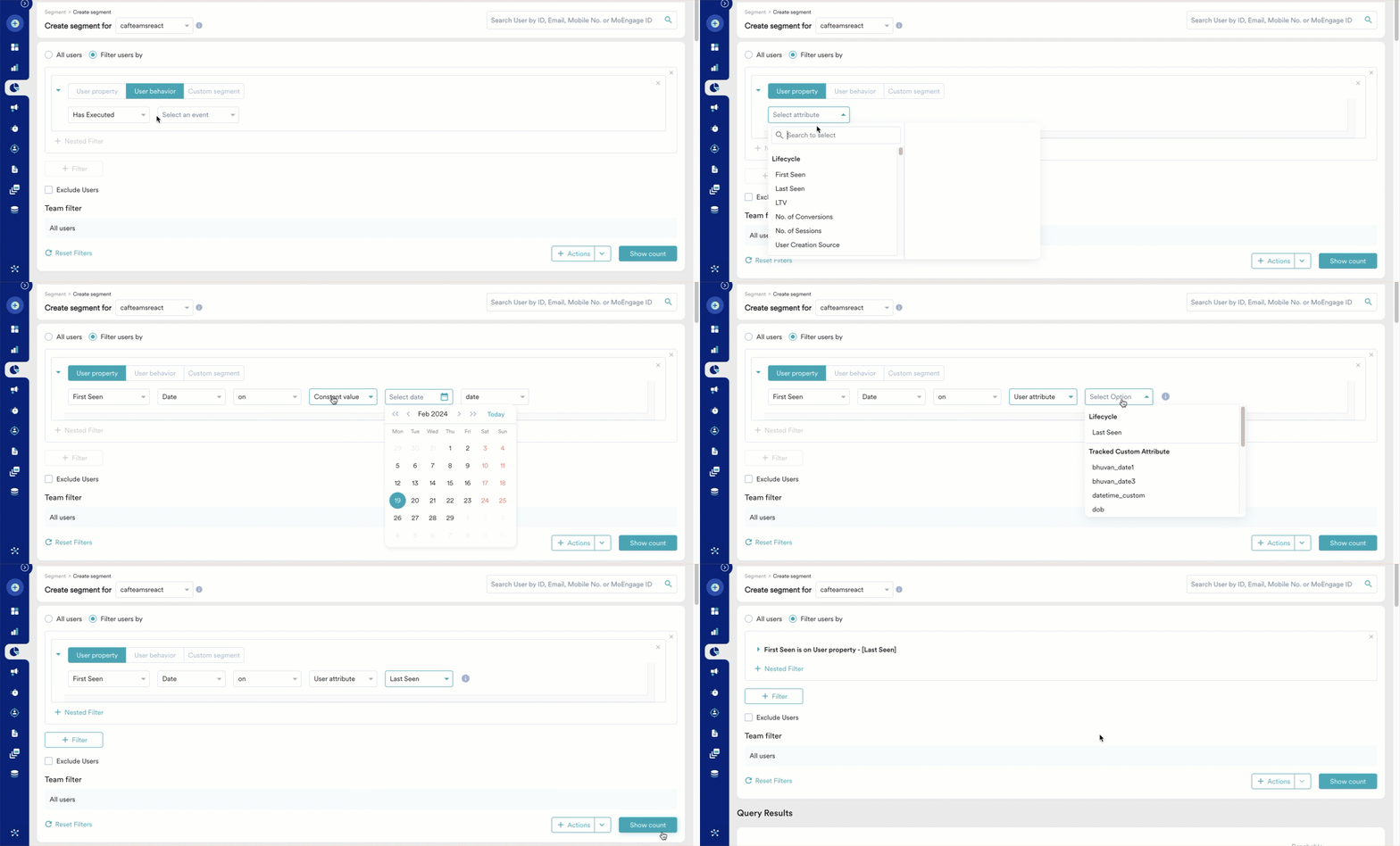
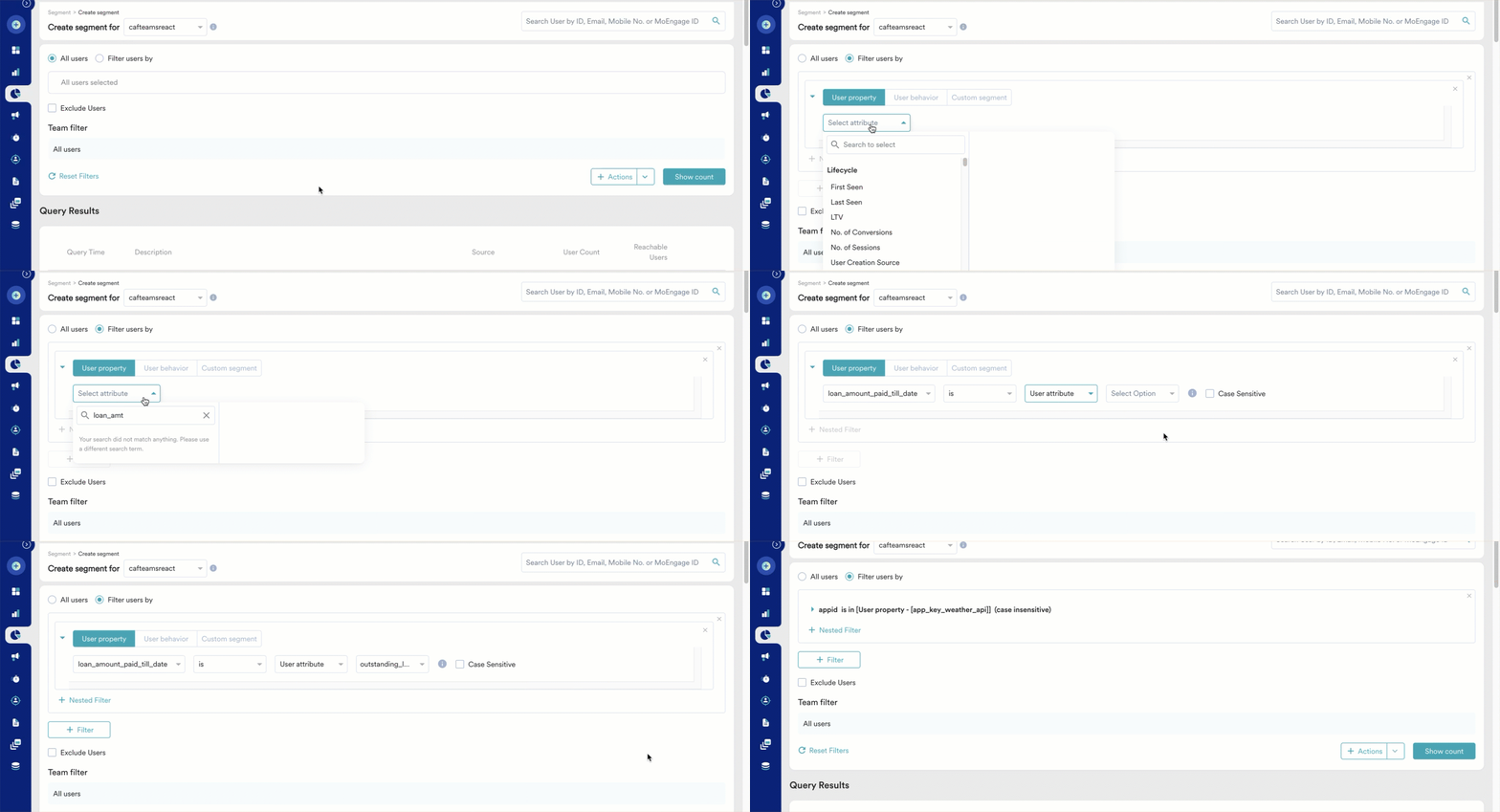
You can now compare a user attribute to another user attribute or a constant value.The following table lists the filters and data types supporting attribute comparison:
| Data Type | Filters supporting attribute comparison |
|---|---|
| String | is, is not |
| Boolean | is, is not |
| Date | On, before, after, in the next, in the last Note: MoEngage only matches the date and not the exact time stamp for date data types. |
| Number | is equal to, is not equal to, is greater than, is less than |
| Array of Strings | (any of) is, (all of) is, is not, (any of) contains, (all of) contains, does not contain, (any of) starts with, (all of) starts with, does not start with, (any of) ends with, (all of) ends with, does not end with |
| Array of Numbers | (any of) is equal to, (all of) is equal to, is not equal to, (any of) is less than, (all of) is less than, (any of) is greater than, (all of) is greater than |
Attribute to Attribute Comparison
You can now compare a user attribute of a specific data type with another user attribute of the same data type. Example 1: Consider a marketer looking to identify users who haven’t used their app since installing it. Comparing the First Seen and Last Seen user attributes of users can help the marketer identify the users who haven’t been active on the app since installation.
Attribute to Constant Value Comparison
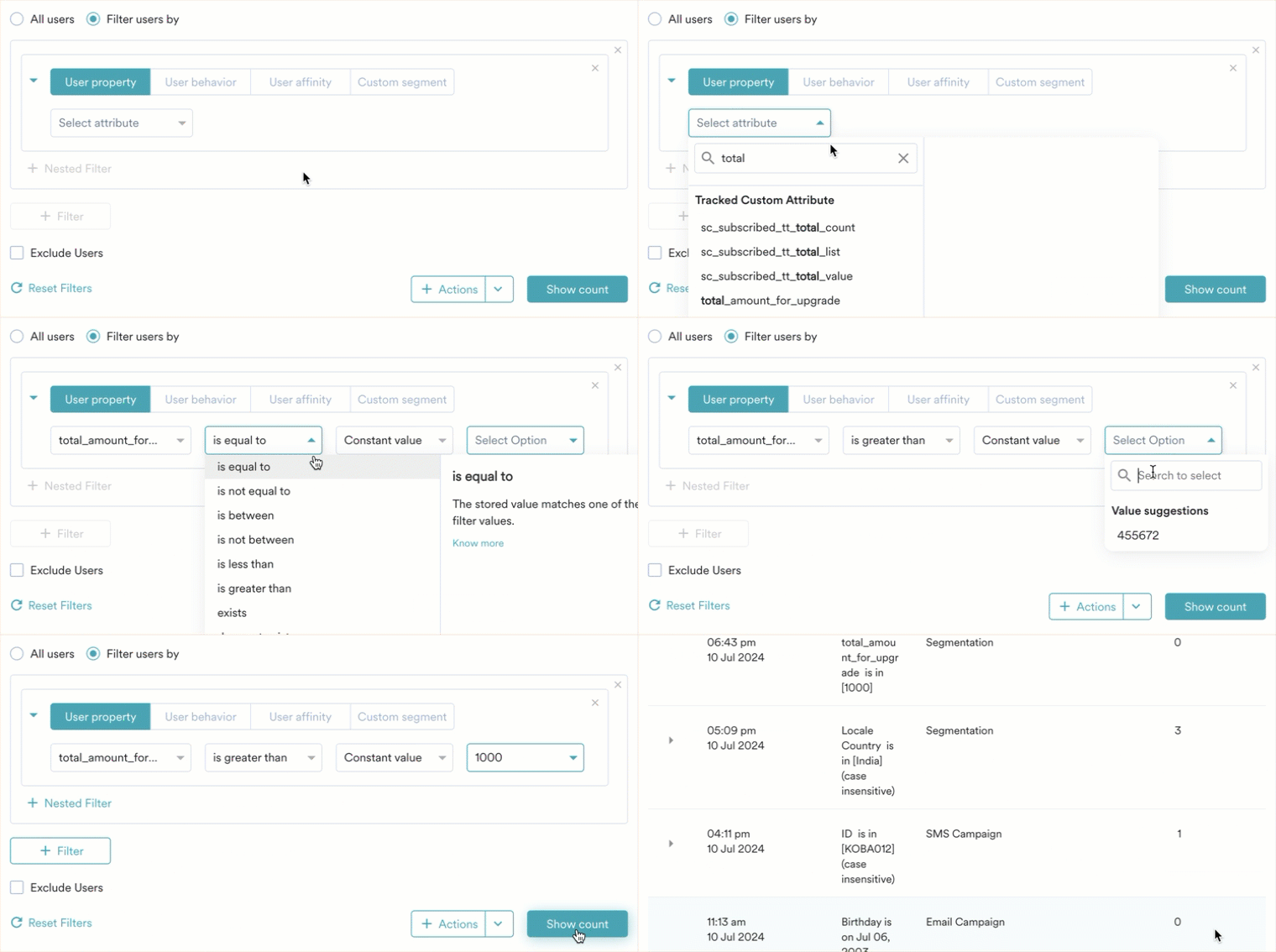
You can now compare a user attribute to a predefined constant value. Example 1: Consider an E-commerce business looking to identify users who have spent more than $1000 on their platform while upgrading the app. The user attribute total_amount_for_upgrade represents the total amount each user has spent to upgrade the platform to date. To segment users into ‘high spenders’, the E-commerce business can compare this user attribute with a constant value of 1000 as shown below:
Limitations
The following features currently do not support the new segmentation filters (first/last seen, contains spaces, is empty/not empty, and user attribute comparison):- Conversion Goal
- Business Event
- Smart Trigger & Dynamic Condition
- Flows
Frequently Asked Questions (FAQs)
What is the difference between "Is Empty" and "Does Not Exist"?
The difference is between a missing field and a blank value.
- Does Not Exist: The attribute key was never created or tracked for the user (for example, a “Loyalty_ID” field is completely missing from User A’s profile).
- Is Empty: The attribute key exists on the profile, but the value stored is an empty string (for example, User B has a “Loyalty_ID” field, but it contains no text: "").
What's the best way to find accurate users who have a specific attribute with an actual, non-empty value?
To ensure you target users with genuine data, you should always combine the Exists and Is Not Empty operators using AND logic. This prevents the system from accidentally including users who simply don’t have the attribute at all.
- Example: To find users with a valid phone number, use: (Phone Number EXISTS) AND (Phone Number IS NOT EMPTY)
- Why this works: Exists confirms the field is on the profile, and Is Not Empty ensures that the field isn’t just a blank string.