

Overview - The PGP Encryption Process
PGP (Pretty Good Privacy) is a security program that allows you to encrypt sensitive files. MoEngage supports PGP encryption in file imports (S3 Import, SFTP Import). This article explains how to use PGP encryption for your sensitive files.Prequisites
- PGP key pair: A PGP key pair consists of a public key and a private key. Use the public key to encrypt the file, and use the private key to decrypt the file. Do not share the private key with anyone, because it decrypts the sensitive information in the file. This private key is required for the SFTP (SSH File Transfer Protocol) integration process with MoEngage.
- Signing key pair: A signing key pair consists of a public key and a private key. Use the public key to sign the file; it is required for MoEngage SFTP integration. Internally, the private key verifies the signature.
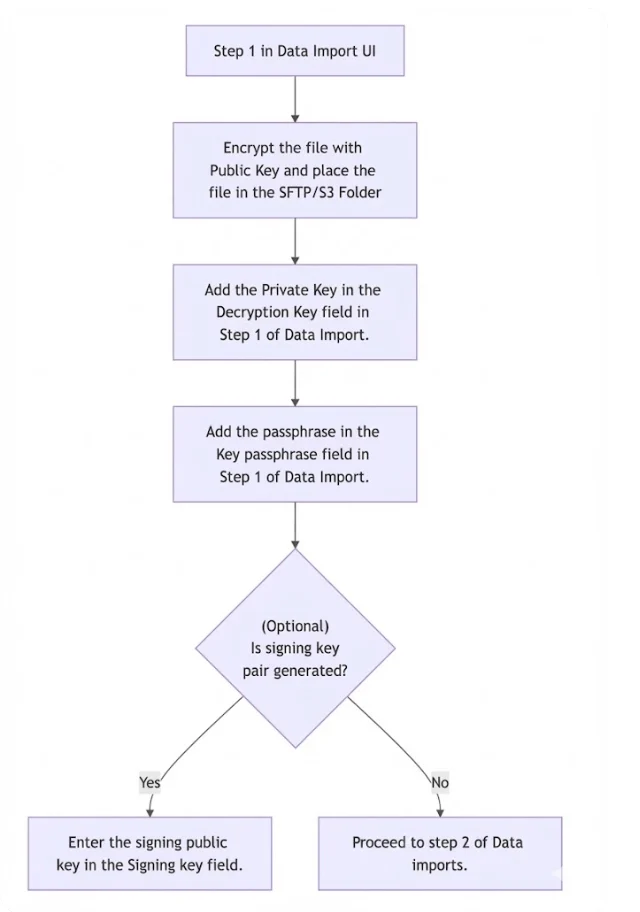
Use a PGP Key Pair
The following steps describe how to use PGP encryption through GnuPG, a free implementation of the PGP standard.Step 1: Generate a Standard Key Pair (Public and Private)
Generate the PGP key pair by using a PGP tool such as GnuPG. See the following example:Information
- MoEngage supports file encryption that uses RSA keys of up to 1024 bits in length. We do not recommend using higher bits.
- Ensure that compression is turned off during the encryption process.
Step 2: Generate a Public Key and Encrypt the Files
Encrypt the file by using the generated public key, and then upload the encrypted file to the S3 or SFTP folder.--sign option is used to encrypt a file by signing it.