

Data Available for Sync
The synchronization process imports two primary data types into MoEngage:User Attribute Mapping
MoEngage synchronizes the following attributes to the user profile if they are available in the Shopify record:- First name
- Last name
- Phone
- City
- Country
- State
- Shopify ID
- Accepts marketing
- Order count
Excluded DataBy default, MoEngage does not sync Shopify customer metafields (custom data fields). If your personalization requires metafield data, refer to the Events and User Data Tracking article for custom integration steps.
Sync Prerequisites
Event Retention Period
To ensure your event retention settings accommodate the data range you intend to sync, perform the following check before you begin the synchronization process: MoEngage stores events for a specific retention window. If your selected sync range exceeds your retention window, MoEngage stops syncing orders once it reaches the limit. The sync status will show as “Sync successful,” but older data will be missing from the dashboard.User Identifiers
MoEngage synchronizes users and their orders based on the unique identifier you selected during integration setup:- If you selected email, the system silently excludes users who do not have an email address.
- The system does not generate error messages for skipped records.
Sync Process
To synchronize your Shopify data, perform the following steps:- Open your MoEngage Shopify app and click the Sync Shopify data tab.
- Select the date range for your order history. You can sync data for up to the last 2 years from your installation date.
-
Click Sync past data.
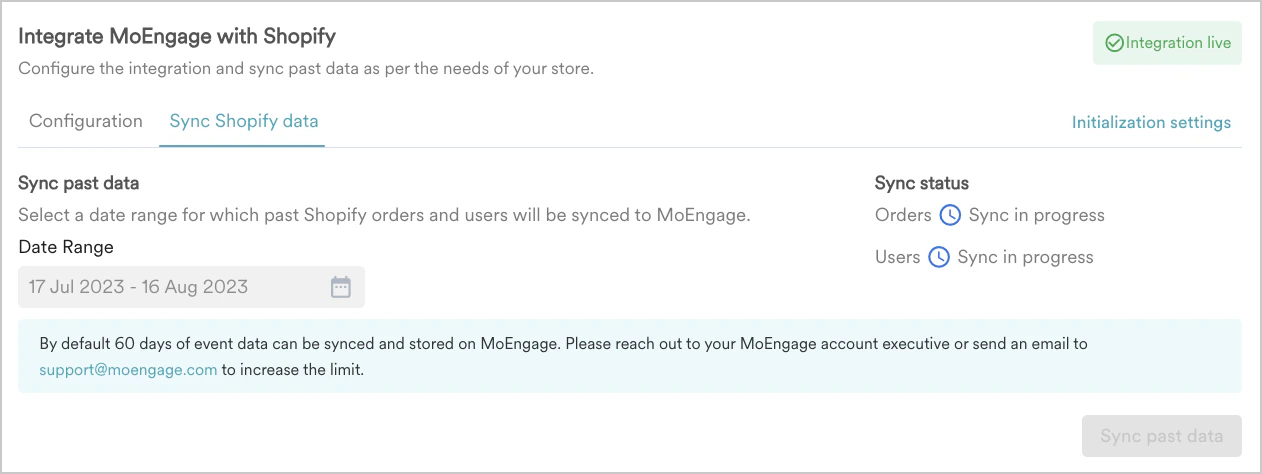
Sync Verification
Sync status does not confirm data arrivalThe sync status might update to Sync successful within seconds of starting. This indicates the request was received, not that the data has finished processing. Large datasets can take several hours, and up to 24 hours for very large stores. Always verify directly on user profiles.
- Wait for at least two hours after starting the sync.
- In the MoEngage UI, navigate to a user profile for a customer who placed an order within the sync window.
- Verify that the
Shopify - Order Placedevent appears on their profile with the correct original order date. - If the sync status shows as successful but no data appears after 24 hours, contact support with your selected date range and approximate order count.
Automatic Event Updates
After the historical sync completes, MoEngage automatically tracks new orders via Shopify webhooks. You do not need to run the sync again for new data.Synced User Attributes
MoEngage creates aShopify - Order Placed event for each unique order ID within your selected date range. The Created at attribute on each event reflects the date and time the order was originally placed in Shopify.
For more information on the list of event attributes, refer to the Events and User Data Tracking article.