




Salesforce Marketing Cloud Reviews: What B2C Marketing Teams Should Know
If you’re reading Salesforce Marketing Cloud reviews, you’re probably trying to answer one practical question: is SFMC actually worth the cost and complexity for your B2C marketing team?
Salesforce Marketing Cloud is one of the biggest names in enterprise marketing automation. It can handle complex journeys, large customer databases, Salesforce CRM integration, and high-volume campaigns.
But the real question for your B2C marketing team is whether SFMC is practical for your team to run day-to-day.
In this honest platform review, we’ll look at SFMC’s features, pricing considerations, real user feedback, pros and cons, best-fit use cases, and when teams start comparing Salesforce Marketing Cloud with alternatives.
Salesforce Marketing Cloud Reviews: TL;DR
This table summarizes our Salesforce Marketing Cloud review based on common user review patterns from G2, TrustRadius, and Capterra.
| Area | TL;DR Summary |
| Main SFMC Pros | Journey building; automation; Salesforce integration; segmentation; personalization; high-volume sends. |
| Main SFMC Cons | Steep learning curve; fragmented UI; technical dependency; high pricing; implementation effort. |
| Best For | Large B2C marketing teams using Salesforce with complex journeys and marketing operations support. |
| Less Ideal For | Lean teams needing fast launches, self-serve workflows, or lower admin effort. |
| Buyer Takeaway | Evaluate SFMC as an operating commitment, implementation effort, admin needs, and total cost together. |
For this Salesforce Marketing Cloud review, we’re looking at it as a marketing automation and enterprise customer engagement platform — where it works well, where it gets complicated, and what buyers should know before choosing it.

But first, let’s brush up on the basics.
What is Salesforce Marketing Cloud?
Salesforce Marketing Cloud is Salesforce’s enterprise marketing platform for managing customer campaigns across channels like email, SMS, mobile push, web, advertising, and more. It helps marketing teams build audiences, automate journeys, personalize messages, and track campaign performance.
Most teams look at SFMC when basic email marketing software tools are no longer enough, and they need more control over customer journeys, segmentation, and large-scale campaign operations.
Now, let’s explore real Salesforce Marketing Cloud reviews to see what the people actually running the platform day-to-day have to say about it.
What Do Real Users Say About Salesforce Marketing Cloud?
To keep this review grounded, we looked at user feedback from G2, Capterra, and TrustRadius. The goal here is not to cherry-pick the happiest or harshest comments. It is to spot the patterns that show up across multiple review sites.
Here’s a table summarizing how Salesforce Marketing Cloud reviews tend to break down:
| Review Platform | Rating | What Users Praise | Common Concerns |
| Capterra Salesforce Marketing Cloud reviews | 4.2/5 | Fast send speed; multi-step automation; customer data visibility; content creation; complex campaign support | Poor UI; high pricing; technical setup; SQL and AMPscript needs; CRM sync limitations |
| G2 Salesforce Marketing Cloud reviews | 4.0/5 | Journey Builder; Salesforce integration; segmentation; personalization; reliable bulk email; API flexibility | Steep learning curve; SQL or scripting needs; disconnected studio interfaces; clunky journey setup; technical dependency; add-on costs |
| Trustradius Salesforce Marketing Cloud reviews | 7.7/10 | Campaign centralization; Salesforce integration; outbound messaging; social campaign tracking; segmentation; high-volume sends | Tool complexity; admin difficulty; high pricing; journey tracking gaps; early-stage Agentforce AI expectations |
Across G2, Capterra, and TrustRadius, Salesforce Marketing Cloud reviews consistently praise SFMC for marketing automation, campaign scale, Salesforce integration, and segmentation. The most common complaints are complexity, high pricing, technical setup, and the need for admin or specialist support.
Let’s see these reviews in detail for each review platform.
Salesforce Marketing Cloud Capterra Reviews
The Salesforce Marketing Cloud Capterra reviews have a very powerful-but-painful pattern.
Users like that SFMC can handle serious marketing automation. It gets praise for fast sending, multi-step automations, cross-channel campaigns, customer data visibility, content creation, segmentation, and complex campaign workflows. If a team has a lot of data and needs flexible campaign logic, SFMC can clearly do the job.
But the complaints are hard to ignore.
The interface comes up as a problem. It can feel like several different tools stitched together under one menu, which makes the platform harder to learn than it should be. That’s especially rough for non-technical marketers.
The CRM connection also gets mixed feedback. Salesforce data can flow into SFMC, but updates made inside Marketing Cloud may not always flow cleanly back into Salesforce Sales Cloud. For teams choosing SFMC mainly because of Salesforce CRM integration, that can be disappointing.
Cost is another recurring issue. Users call out expensive pricing and add-on-style charges, where more capabilities can mean more line items.
There are also technical demands. SFMC is not described as a simple drag-and-drop tool. Content Builder and Journey Builder help, but teams still may need SQL, AMPscript, technical setup, and possibly a third-party implementation partner to get the most out of it.
Salesforce Marketing Cloud G2 Reviews
Likewise, Salesforce Marketing Cloud G2 reviews are mostly what you’d expect for a big enterprise marketing tool: users like how much it can do, but they also complain about how much work it takes to do it.
The positive reviews usually focus on three things: automation, data, and Salesforce Sales Cloud integration. Reviewers like that SFMC can manage email campaigns, customer journeys, segmentation, personalization, and reporting in one place. Journey Builder gets a lot of praise because it can handle multi-step campaigns with business rules, audience splits, and personalized messaging. Teams rely heavily on journeys for campaigns with multiple emails, segmentation, and personalization.
The downside is also repeated often: Salesforce Marketing Cloud takes work to learn and maintain. Different ‘studios’ don’t always feel connected. Some tasks need SQL or scripting. Journey setup can have a lot of steps. And when something breaks, troubleshooting isn’t always simple.
Even though the users see SFMC as robust and worthwhile, they also say setting up journeys can feel “disjointed and clunky”, with many points of failure and a need for extensive testing.
Salesforce Marketing Cloud G2 reviews also note that the platform works best when data, governance, and documentation are strong. Without that, it can slow teams down instead of helping them move faster.
Cost and setup also show up as pain points, especially when teams add more modules or need specialist help to configure and maintain the system.
TrustRadius Salesforce Marketing Cloud Reviews
The TrustRadius Salesforce Marketing Cloud reviews tell a pretty similar story: marketers and teams use SFMC because it can handle serious campaign work, but they still want it to be easier.
The clearest positive theme is campaign centralization. Teams use SFMC to move away from scattered workflows like spreadsheets, disconnected analytics, and separate campaign tools. Reviewers also highlight its ability to manage social campaigns, outbound emails, appointment reminders, high-volume sends, and customer journeys from a more unified setup.
Salesforce integration is another major plus. For companies already using Salesforce, Marketing Cloud can fit naturally into the broader stack and support customer communications tied to existing CRM workflows. Professional services and implementation support also appear to matter here, especially when teams are moving away from other vendors.
Segmentation and targeting also get strong marks. This is especially important for regulated or highly specific industries, where teams need to send the right message to a narrowly defined audience.
The weak spots are just as clear. TrustRadius reviewers mention high pricing, tool complexity, room for better journey tracking, and admin challenges. SFMC can handle advanced campaign work, but it isn’t always easy to navigate unless the team already knows the product well.
AI is still early in these Salesforce Marketing Cloud customer reviews. Agentforce is mentioned more as a future opportunity than a current strength, especially for improving segmentation and campaign workflows.
Salesforce Marketing Cloud Pros and Cons
After reading through the above Salesforce Marketing Cloud reviews and user feedback, the product story is pretty clear: SFMC is powerful, but it’s definitely not lightweight.
For enterprise B2C marketing teams, the upside is scale, automation, customer segmentation and personalization, and Salesforce ecosystem fit. The downside is complexity, cost, and the amount of support needed to make the platform work well.
The table below summarizes the main Salesforce Marketing Cloud pros and cons that show up across user reviews and buyer evaluations.
| Salesforce Marketing Cloud Pros | Salesforce Marketing Cloud Cons |
| Can consolidate complex lifecycle marketing programs into one enterprise platform. | Delivers less value if Salesforce is not the main customer system of record. |
| Makes sense for companies already standardized on Salesforce. | Can slow teams down if workflows, roles, and approval processes are not well-defined. |
| Gives large teams control over campaigns, audiences, permissions, and governance. | Pricing can expand quickly with add-ons, integrations, services, and support. |
| Supports sophisticated personalization when customer data is clean and connected. | Might be more than what is needed for teams with mostly standard lifecycle campaigns. |
| Can scale across brands, regions, business units, and high-volume campaigns. |
For enterprise B2C buyers, the key question is whether your team can support SFMC’s operating requirements: clean data, technical ownership, implementation capacity, and enough campaign complexity to justify the investment.
Okay, so you’re aware of the pros and cons of using the platform. Here’s your pre-flight checklist before you sign anything.
What Buyers Should Verify Before Buying or Renewing SFMC
The useful takeaway from Salesforce Marketing Cloud reviews isn’t just that SFMC is powerful or complex. Buyers like you already know that.
The more practical question is: what needs to be true for your team to get value from the platform?
Before buying, renewing, or expanding Salesforce Marketing Cloud, verify:
- Contract scope: Which studios, channels, contacts, data products, and add-ons are included, and which cost extra?
- Implementation plan: What has to be configured before the first real campaign can launch?
- Use-case priority: Which 3-5 customer purchase journeys will prove value first?
- Integration map: Which systems must connect to SFMC, and who owns those connections?
- Admin coverage: Who handles permissions, QA, data issues, journey changes, and troubleshooting?
- Reporting needs: Will standard reporting be enough, or will you need advanced analytics or custom dashboards like email marketing dashboards?
- Training plan: How will marketers learn the platform without relying on specialists for every task?
- Renewal risk: What usage, adoption, or support gaps could make the next renewal hard to justify?
That’s the buyer-facing lesson from Salesforce Marketing Cloud customer reviews: SFMC is a strong enterprise marketing automation software platform, no doubt. But the business case should include the full operating plan, not just the license.
With the agreement side covered, it’s worth getting specific about how the platform actually performs on the capabilities most B2C teams care about.
4 Key Features in Salesforce Marketing Cloud
Even though SFMC is a broad platform, Salesforce Marketing Cloud reviews point to the same four capabilities that B2C marketing teams actually evaluate: journey orchestration, segmentation, analytics, and AI.
1. Journey Builder and Campaign Orchestration
Journey Builder is the main workspace for creating and managing customer journeys in Salesforce Marketing Cloud. You can map out genuinely complicated customer paths — email today, an SMS nudge in 3 days if they haven’t clicked, a push notification if they open the app, or a different message entirely if they hit a purchase goal in between. For a brand running real customer lifecycle marketing instead of one-off blasts, this is the tool that makes that possible.
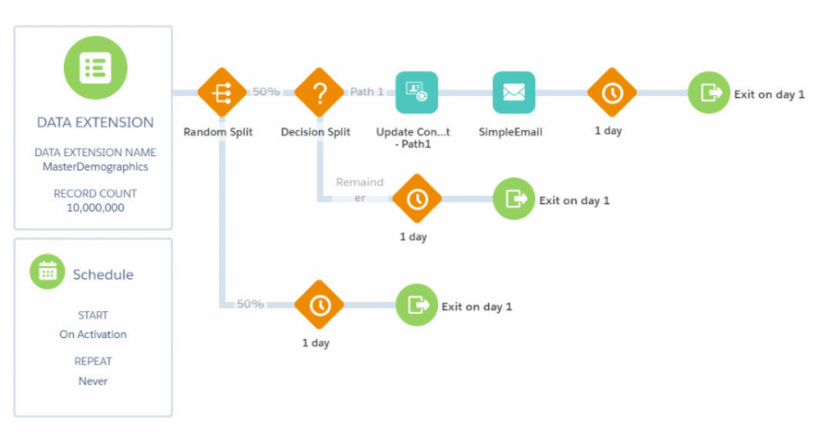
However, there’s an architectural decision sitting underneath every journey that most marketers never think to ask about: whether the account runs on a shared, multi-tenant database or a dedicated one. The dedicated option produces faster, more predictable performance. But getting there isn’t a setting that you flip. It’s a conversation with your account executive about moving to a different deployment tier.
Reviewer takeaway: Journey Builder is strong for enterprise campaign orchestration, especially when you need visibility and control across many journeys. But the orchestration power lives behind a layer of technical decision-making, such as database architecture, entry filters, and batch behavior, that has to be managed by someone who understands it, continuously, not just at setup. If your team has that person, or that partner, Journey Builder can run real sophistication at real scale. If you don’t, you’ll likely be using a fraction of what it can do, while still paying for all of it.
2. Segmentation, Personalization, and Data Activation
SFMC’s newer Marketing Cloud Next segment builder gets the basics of segmentation right: drag in a filter, set a rule, narrow your audience down step by step, exclude anyone who shouldn’t get the message, and group rules together for something more advanced, like “People who’ve placed at least 5 orders” instead of just “People who’ve placed an order.” Once it’s set up, it’s genuinely intuitive to use.
A specific wrinkle worth knowing: segments built for marketing campaigns have to be built on Salesforce’s ‘Unified Individual’ object specifically, not whatever data space or object you might already be segmenting on elsewhere in the platform. It’s a narrow, specific rule, and missing it means a segment that looks fine on the canvas simply won’t plug into your campaign the way you expect.
There’s also a real tradeoff in how often a segment refreshes. Salesforce offers windows as tight as hourly for time-sensitive campaigns, or a daily standard refresh for everything else. The choice matters, because a segment running on a daily refresh can be working off stale data by the time a campaign actually sends. It’s a freshness decision someone has to make per segment.
The more structural thing to know is that personalization doesn’t live in the same place as the segments you build for campaigns. It’s handled by a separate machine-learning layer reacting to real-time behavior, running on its own logic. That’s a strong capability on paper, but it means you’re not managing one connected picture of ‘who this customer is and what they should see’. You’re coordinating 2 related, but genuinely distinct, systems and making sure they tell a consistent story.
Reviewer takeaway: Salesforce Marketing Cloud is strong for advanced segmentation and personalization, and is especially powerful for teams with mature data operations. But it’s less simple for marketers who want fast, self-serve audience building out of the box.
3. Analytics and Performance Visibility
Salesforce Marketing Cloud’s built-in reporting, Intelligence Reports, covers the fundamentals well: ready-made dashboards for email, push, and journey performance, the ability to build pivot tables and reports without writing a query, and enough trend visibility day-to-day to spot what’s working and what isn’t.
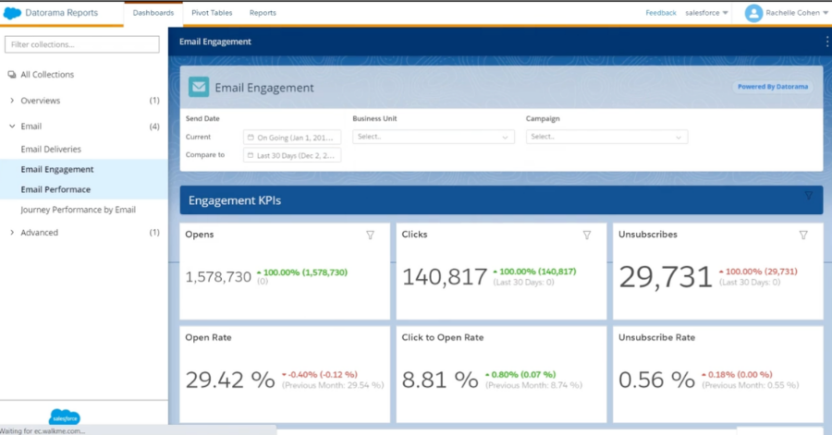
Where it’s more limited is in what the data actually represents. The numbers you see are campaign-level — sends, opens, and clicks aggregated by day — not a record of what any individual subscriber did.
If your evaluation criteria include drilling into a customer’s specific journey through your campaigns, or querying your own data extensions directly inside the reporting layer, that’s a meaningfully different reporting experience from the dashboard view, and worth confirming directly with Salesforce against your specific use case rather than assuming it’s included.
Reviewer takeaway: Salesforce Marketing Cloud reporting is solid for campaign-level visibility, especially for email, push, and journeys. But teams that need deeper, individual-level customer segmentation analysis or custom cross-channel reporting should expect extra setup, advanced reporting features, or additional cost.
4. AI and Agentforce Marketing Capabilities
Salesforce Marketing Cloud includes AI features through Einstein Generative AI, mainly for helping marketers create and refine campaign content.
Practically, Einstein can generate subject lines and body copy inside tools like Einstein Copy Insights and Content Builder. Marketers can test, copy, and download AI-generated options, then use them in email or campaign messages.
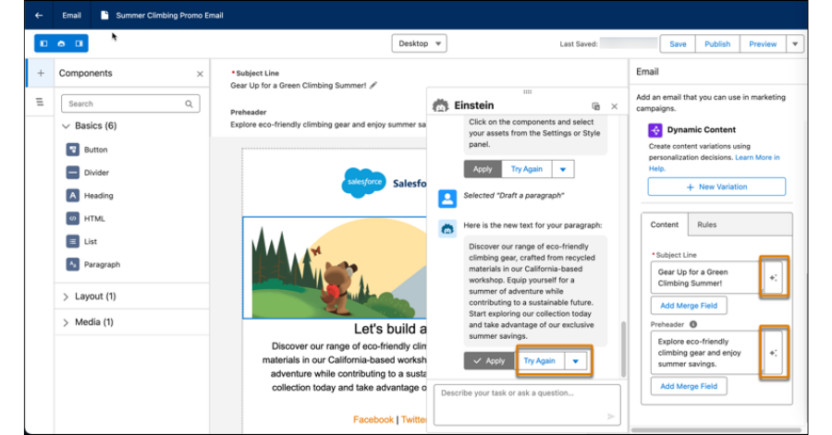
A useful touch is brand setup. Teams can define brand identity and tone, including default ‘Professional’ and ‘Casual’ personalities, or create custom personalities to better match their brand voice. Salesforce also positions these features behind its Trust Layer, which is important for enterprise teams concerned about data security and AI governance.
There are some limits to know, though. Einstein Generative AI is available in select editions, including Corporate, Enterprise, and Enterprise+, and Salesforce caps generations at the enterprise account level. You may need an additional Typeface add-on for image generation.
Agentforce extends Salesforce’s broader AI direction into more automated workflows. But for most marketing teams, the immediate value in SFMC is still content assistance, campaign productivity, and AI-supported personalization. Nevertheless, AI doesn’t fix a messy setup. If your data, segments, or journeys are hard to manage today, AI may not automatically make the platform easier to use.
Reviewer takeaway: SFMC’s AI features are useful for speeding up copy creation and keeping content closer to brand guidelines. But they work best when your Salesforce data, permissions, and marketing processes are already well organized.
The platform can clearly do a lot. The question most buyers eventually get to is what it costs to do all of it.
How Much Does Salesforce Marketing Cloud Cost?
Salesforce Marketing Cloud pricing varies based on the products you buy, the number of contacts, message volume, channels, add-ons, and contract structure.
Entry-level pricing often starts in the low thousands of dollars per month (according to G2 and TrustRadius, SFMC pricing starts at $1,250 per installation per month). But enterprise deployments can become significantly more expensive once multiple studios, clouds, integrations, and service costs are included.
Software Cost is Only Part of the Total Investment
The more useful way to think about Salesforce Marketing Cloud pricing is the Total Cost of Ownership (TCO). Teams also need to account for the work required to get SFMC live, connected, and usable across marketing automation workflows.
The total costs to make the platform work well include:
- Licensing costs: Monthly or annual platform fees based on edition, contacts, usage, and modules.
- Implementation costs: Setup, configuration, data modeling, migration, and journey architecture.
- Integration costs: Connecting SFMC with Salesforce CRM, data warehouses, Ecommerce platforms, mobile apps, analytics software like email analytics tools, and other customer systems.
- Onboarding and training: Helping marketers, operations teams, and admins learn how to use the platform correctly.
- Admin and technical support: Salesforce Marketing Cloud administrators, developers, data specialists, or certified agency partners.
- Ongoing maintenance: Updating journeys, managing data extensions, fixing sync issues, optimizing campaigns, and supporting new use cases over time.
That last point, ongoing maintenance, is one of the most underestimated line items in Salesforce Marketing Cloud customer reviews, where teams frequently describe costs expanding well past the original contract as usage, integrations, and support needs grow over time.
At the end of the day, you need to evaluate SFMC cost as a full operating commitment, not just as a software subscription. The platform can be a strong investment for the right team, but financial overkill for the wrong one. The question is, which team are you on?
Who Should (and Should Not) Use Salesforce Marketing Cloud?
Salesforce Marketing Cloud is a specific product, built for a specific kind of company, and that specificity is exactly why so many teams end up frustrated with it.
SFMC was engineered for organizations running massive customer databases through complex, event-driven journeys across email, SMS, app, and web, with the in-house technical muscle to build and maintain that machinery. If that’s not your situation, the platform’s strengths become your overhead.
Below is the self-qualifying test. Read both sides before you read a single vendor pitch.
Who Should Use Salesforce Marketing Cloud?
Salesforce Marketing Cloud is best for:
- Large enterprises or global brands sending personalized communication to millions of customers, and having multiple business units and sophisticated governance needs.
- Advanced marketing organizations running complex omnichannel customer journeys across email, SMS, web, mobile, advertising, and offline data sources, not just a handful of standard email flows.
- Companies with dedicated technical resources, including Salesforce administrators, certified Marketing Cloud specialists, developers, data engineers, or agency partners to unify fragmented data sources (behavioral web data, ad platform data, and offline data) into one customer view.
- Teams already deeply invested in the Salesforce ecosystem, especially those using Sales Cloud, Service Cloud, or other Salesforce products, and willing to manage the required integrations at an enterprise level.
In other words, Salesforce Marketing Cloud works best when the buyer isn’t just buying software. They should also be prepared to invest in the people, process, data architecture, and technical setup required to make the platform successful.
Who May Find Salesforce Marketing Cloud Less Ideal?
Some teams can make Salesforce Marketing Cloud work, but may find that it slows them down or requires more operational overhead than expected.
This means teams should consider Salesforce Marketing Cloud competitors and alternatives if they need easier implementation, faster campaign execution, lower operational complexity, stronger real-time customer engagement, or faster time-to-value. That’s what makes it less ideal for:
1. Mid-market and enterprise brands that need speed
Mid-market and enterprise brands often consider Salesforce Marketing Cloud because it’s a well-known enterprise platform.
That makes sense. Nobody gets fired for shortlisting Salesforce.
But brand recognition isn’t the same as product fit.
For many growing B2C brands, the challenge with SFMC is usability at speed. Sure, the platform can do a lot, but like we’ve said before, getting value from it often requires meaningful setup, training, integration work, and ongoing technical administration, which can ultimately drive up the total cost of ownership.
For instance, SFMC’s licensing runs anywhere from roughly $36,000 to $600,000+ annually, and that figure doesn’t include the certified developers most implementations require to actually operate it. If you’re a mid-market brand, you end up paying enterprise prices for a platform that’s too complex for smaller teams.
The bigger issue, as we’ve just mentioned, is not just the price. It is momentum. That can create a gap between what the platform can theoretically do and what the marketing team can realistically execute this quarter.
In such cases, your team might start evaluating enterprise and mid-market customer engagement platforms like MoEngage, especially when faster time-to-value, real-time segmentation, and marketer-led journey orchestration are your core requirements.
2. Mobile-first brands that need real-time engagement
Mobile-first brands have a different customer engagement problem. They’re not just sending campaigns; they’re responding to live customer behavior.
A customer opens the app, browses a category, adds an item to cart, and drops off. Or misses a payment and watches 3 episodes or searches for a route. Or redeems an offer and uninstalls the app.
Each of these moments can trigger a different engagement opportunity.
For mobile-first teams, the platform needs to understand mobile behavior as a core part of the customer journey. They should evaluate how easily SFMC lets them create real-time behavioral segments, trigger messages from customer actions, personalize journeys based on app and web behavior, analyze engagement and conversion without stitching together reports manually, and move fast without depending on technical teams for every campaign update.
This matters for industries like Ecommerce, fintech, media, travel, food delivery, gaming, and subscription services, where customer intent can change in minutes. If the platform can’t respond quickly, the moment is gone.
That’s why mobile-first brands often look beyond traditional campaign management and evaluate customer engagement platforms built around real-time, behavior-led orchestration.
3. Marketing teams without dedicated technical resources
Inside Salesforce Marketing Cloud, many day-to-day tasks can involve concepts that are unfamiliar to non-technical marketers: Data Extensions, SQL-based segmentation, data relationships, journey logic, integrations, and Salesforce-specific administration.
For teams with a strong marketing operations function, that may be fine.
For teams without dedicated technical resources, it can become a problem.
Lean marketing teams should be especially careful here. If your team doesn’t have a Salesforce Marketing Cloud administrator, developer, technical marketer, or agency partner, SFMC may slow execution, instead of improving it.
4. Teams currently using Salesforce Marketing Cloud but struggling to get value
Counterintuitively, being a Salesforce CRM customer doesn’t automatically make SFMC the right marketing layer. It just makes the case more nuanced.
Running SFMC alongside Sales Cloud or Service Cloud typically requires the ‘Marketing Cloud Connect’ integration. It introduces its own data-syncing issues and architectural fragmentation rather than the seamless unification you’d expect from two products under the same vendor.
Other signs of distress include:
- Campaign launches take longer than expected.
- Marketers depend on technical teams for routine segmentation and journey changes.
- Your customer data is spread across Salesforce, analytics tools, mobile systems, and data warehouses.
- Mobile push, in-app, SMS, or WhatsApp engagement feels disconnected from the rest of the customer journey.
- Reporting doesn’t clearly show customer behavior and campaign impact.
- Your team is paying for advanced functionality but only using a small portion of it.
- Maintenance costs keep rising.
- Marketers on your team avoid the platform because it feels too complicated.
At that point, the question is whether your team can turn SFMC’s power into better customer engagement quickly and consistently. If not, it may be time for your team to reassess the fit.
Which brings us to the next question…
When Do Teams Start Comparing Salesforce Marketing Cloud with MoEngage?
Teams usually compare MoEngage vs. Salesforce Marketing Cloud when their problem changes from platform capability to execution speed.
At the beginning, the priority may be Salesforce ecosystem alignment and centralized campaign management. In that context, Salesforce Marketing Cloud can make sense.
But over time, many B2C teams start asking a different question:
“How do we launch personalized, real-time customer journeys and engage customers faster with less operational complexity?”
That’s typically when MoEngage enters the conversation.
MoEngage is often considered by mid-market and enterprise B2C teams that want a more marketer-friendly way to orchestrate customer engagement across mobile, web, email, SMS, WhatsApp, and other digital channels.
The table below summarizes when B2C marketing teams typically evaluate Salesforce Marketing Cloud vs. MoEngage based on their main marketing priority:
| If the Main Priority is | Teams Usually Evaluate |
| Salesforce ecosystem alignment | Salesforce Marketing Cloud |
| Faster campaign launches and marketer-led execution | MoEngage |
| Real-time and mobile-first B2C engagement | MoEngage |
| Complex technical customization and governance | Salesforce Marketing Cloud |
| Lower operational complexity for lifecycle marketing | MoEngage |
In short, enterprise marketing teams usually choose Salesforce Marketing Cloud when Salesforce alignment and enterprise configurability matter most. But teams usually evaluate MoEngage when speed, marketer-friendliness, real-time engagement, and lower day-to-day complexity become the bigger priority.
If you want to see what the MoEngage side of that table looks like in practice, Loblaw, one of Canada’s largest retailers, moved their transactional messaging off a well-known legacy platform and onto MoEngage across 5 franchise brands in 12 weeks, cutting engineering bandwidth by 70% in the process.
At this point, you have a reasonably complete picture of where the platform lands for your team. Here’s how to use that picture.

Read Salesforce Marketing Cloud Reviews Before Choosing Your Platform
Salesforce Marketing Cloud reviews point to the same reality: SFMC can be a strong enterprise system, but the real question is, can your team move fast enough inside it?
If your B2C marketing team needs real-time customer engagement, faster journey launches, and less day-to-day complexity, explore MoEngage’s customer engagement platform.
Better yet, schedule a demo to see how quickly your team could build, personalize, and launch the kinds of cross-channel journeys that usually take far longer in legacy marketing platforms like SFMC.