










What Are Computed Traits? How Marketers Use Real-Time Behavioral Scores to Personalize at Scale

Maya has a segmentation problem she can’t quite name.
She knows her customers, or at least, she knows what they looked like three weeks ago when the last data export landed. This includes:
- Total spend
- Last purchase date
- City
- Plan type
The usual. And for broad campaigns, this data works too. But every time she needs something specific, such as “customers whose purchase frequency has dropped in the last two weeks” or “users who’ve spent over $200 but haven’t opened an email in 30 days”, she needs to file a request with the data team.
The average turnaround is 10 days. By the time the segment is ready, the moment has passed.
Maya isn’t the exception, but she’s the norm. And the problem isn’t that her team is slow, it’s that her platform was built to store customer data, not compute it.
What Static Attributes Can’t Tell You
Most marketing platforms store customer attributes as snapshots. A value gets recorded, it sits in a profile, and it stays there until something manually updates it.
That works fine for stable facts such as a customer’s country, their account tier, their signup date, and more. But it breaks down the moment you need to capture how a customer’s behavior is trending.
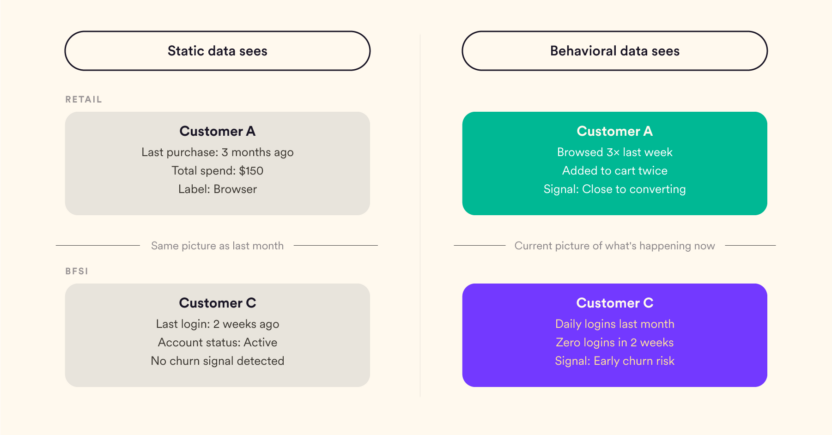
Take two customers with identical static profiles who both purchased twice in the last year, with $150 in total spend. On paper, they look the same. But one bought twice in the last 30 days and is clearly warming up. The other bought once in January and once in November and hasn’t been active since. Treating them the same, like the same segment, message, or offer, is the kind of mistake static data makes look rational.
The gap between what static attributes record and what behavioral patterns reveal is where most personalization falls short.
What Computed Traits Actually Are
Rather than explaining the concept and then illustrating it, here’s the illustration first.
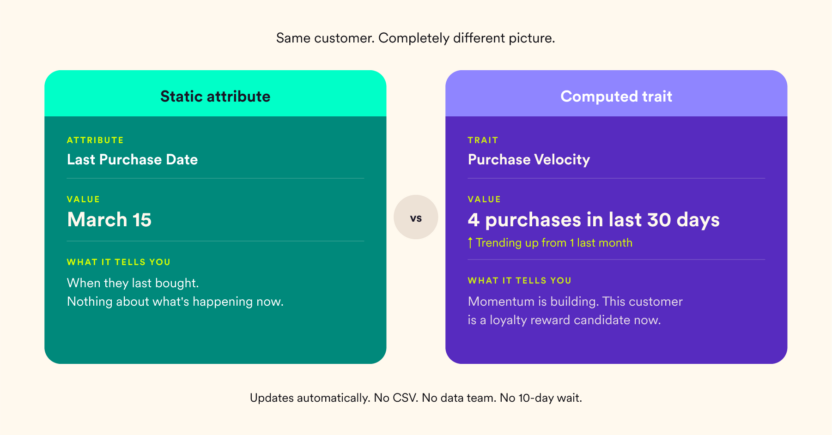
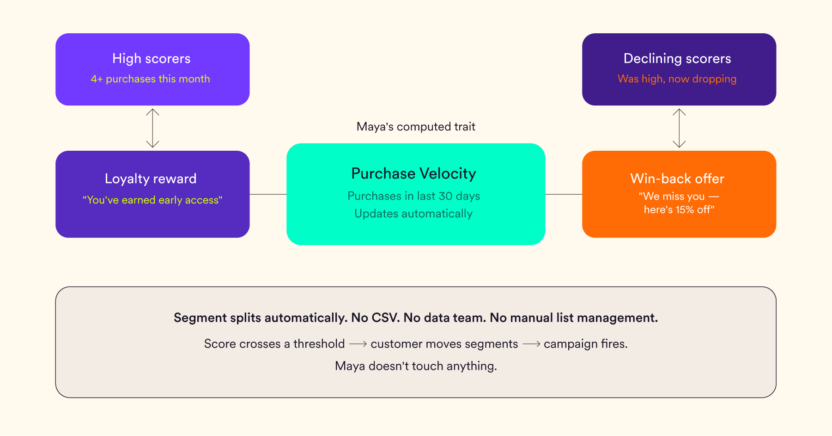
Maya wants to identify customers whose purchase momentum is building. She creates a trait called Purchase Velocity (the number of purchases in the last 30 days). Every customer now has a score, so high scorers get a loyalty reward and low scorers (who were previously high) get a win-back offer. The segment updates automatically as behavior changes. No CSV. No data team. No 10-day wait.
That’s a computed trait.
More formally: a computed trait is a dynamic user attribute that summarizes a customer’s behavior over a defined time window into a single, actionable value. Unlike a stored attribute, which records a fact. A computed trait calculates a behavioral summary and keeps it up to date as new events arrive.
Retail examples:
- Total Spend Last 30 Days
- Number of App Sessions This Week
- Favorite Product Category (based on browse frequency)
- Cart Abandonment Count Last 14 Days
BFSI examples:
- Login Frequency Last 30 Days
- Number of Transactions This Month
- Feature Adoption Score (based on the number of product features used)
- Days Since Last App Open
Each of these is a metric a marketer actually needs, and none of them exist as a raw attribute in the database. They have to be computed from event data.
How Computed Traits Work
Two ways to build a computed trait: one requires no technical knowledge, one gives data teams full flexibility.
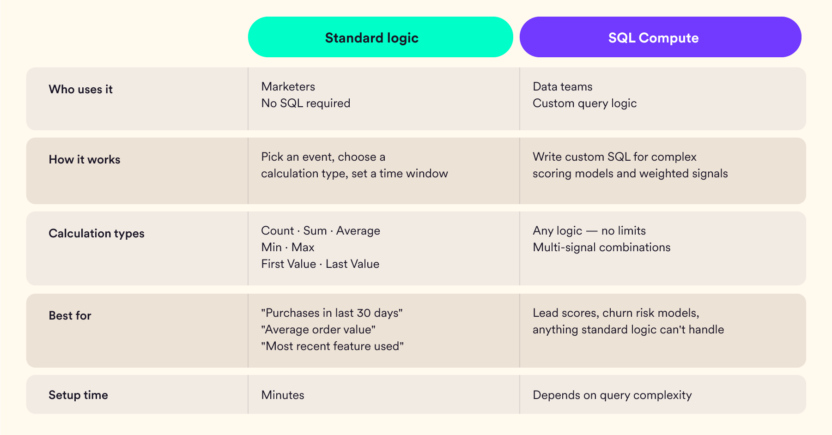
Both types update on a scheduled basis, i.e., weekly or monthly, keeping traits current without requiring manual intervention.
How Computed Traits Feed into Segmentation and Personalization
Once built, a computed trait appears in the segmentation interface exactly like any regular user attribute. That’s the practical point because marketers don’t need to know how a trait was computed to use it. It just shows up in the dropdown.
What changes is the precision of what’s possible.
Instead of “users who made a purchase,” Maya can now engage “users whose Purchase Velocity score is in the top 20% and has increased week-over-week.”
Instead of “inactive users,” she can engage “users whose Login Frequency has dropped below 2 in the last 14 days after averaging 8 the month before.”
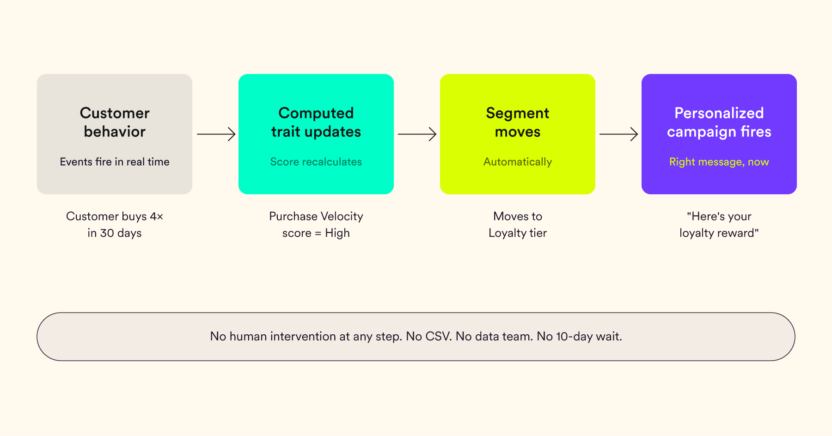
Automatic segment moves mean customers shift between segments as their behavior changes without anyone manually updating a list. A customer whose Purchase Velocity falls below a threshold automatically moves into an At-Risk segment. The re-engagement campaign fires without Maya having to touch anything.
Dynamic message personalization takes this further. Traits can be pulled directly into message content, such as this:
- “You’ve made 4 purchases this month: here’s an early access reward.”
- “It’s been 18 days since your last login. Here’s what’s new.”
- “Your savings this quarter: $340. Keep going.”
The message reflects what the customer actually did, not a generic assumption about what someone in their demographic is likely to do.
The Activation Gap: Why a Separate Tool Breaks This
Here’s where most teams hit a wall they don’t see coming.
Some platforms compute traits but store them separately from the engagement engine. The computation happens in a data warehouse or a standalone analytics layer. The trait value then syncs to the marketing platform on a schedule such as hourly, daily, or manually triggered.
That sync delay is the problem. And it’s not a small one.
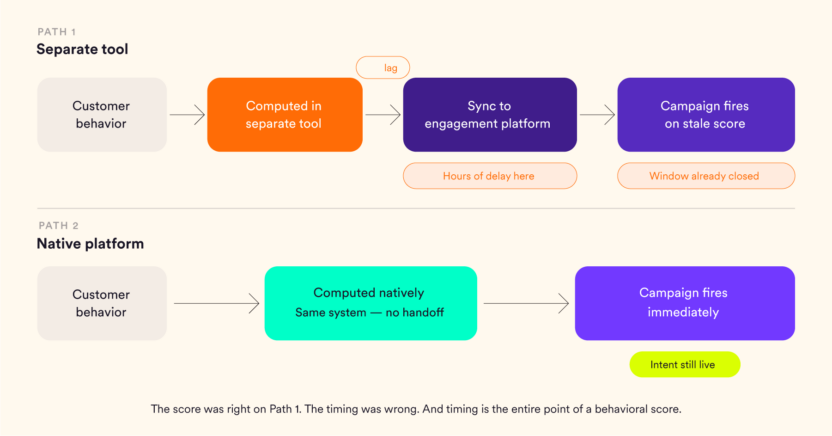
When Maya’s “Purchase Velocity” trait updates in a separate tool and then waits 6 hours to sync with her engagement platform, the segment she acts on is 6 hours behind reality. Basically, her customer crossed the re-engagement threshold at 10 am, and gets their message at 4 pm if they get it at all. And her customer, who bought twice since the last sync, is still sitting in the win-back campaign.
The score was right. The timing was wrong. And timing is the entire point of a behavioral score.
When computation and activation live on the same platform, the sync delay disappears. The moment a customer’s behavior pushes their trait past a threshold, the segment updates and the campaign fires. No intermediate step. No latency baked in.
This is what “native” means in practice – not just that the platform has the feature, but that the feature and the action it drives are part of the same platform.
How MoEngage Handles Computed Traits Natively
In MoEngage, computed traits are built and activated inside the same platform. Basically, no separate computation layer, no sync dependency.
Standard logic traits are available through a point-and-click interface. Marketers choose an event, select a calculation type, set a time window, and the trait is ready to use in segmentation. No SQL, no engineering request, no waiting.
For more complex scoring, SQL Compute lets data teams write custom queries that produce trait values available directly to marketers (the same way a standard logic trait would appear in their interface).
Once created, traits are available across the platform:
- In segmentation: as a filter criterion alongside any other attribute
- In journeys: as a trigger or branching condition
- In message content: as a personalization variable pulled directly into copy
The update frequency can be configured to weekly or monthly, depending on the use case. Daily updates are in development.
Conclusion – Maya: Six Weeks Later
Maya built her Purchase Velocity trait on a Tuesday afternoon. No ticket. No waiting.
Her re-engagement campaign now targets customers whose velocity has dropped in the last two weeks, rather than a broad “inactive” segment pulled from a three-week-old export. Her loyalty campaign reaches customers whose spending is trending up, not everyone who’s ever spent over $100.
Open rates are up. The data team hasn’t heard from her in weeks.
The data didn’t change. What changed was how quickly she could act on it.
If you’re ready to move beyond static segmentation, MoEngage’s Computed Traits give your team the behavioral scores they need without the engineering overhead. See it in action -> talk to our agent.