

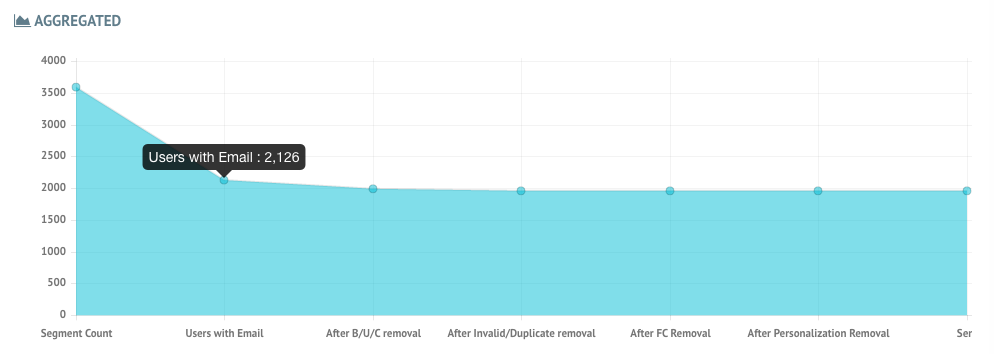
 The various delivery points are as follows:
- Segment Count - Total number of users that belong to the segment of the campaign
- Users with Email - Total number of users who have an email attribute
- After B/U/C removal - Number of users obtained after removing email addresses that have earlier bounced, unsubscribed, or spam complained.
- After Invalid/Duplicate removal - Number of users obtained after removing Invalid emails (missing ”@” & ”.”) and Duplicate Emails (multiple users with the same email address)
- After FC Removal - Number of users obtained after removing emails that have crossed Frequency Capping as defined in the FC Settings.
- After Personalization Removal - Number of users obtained after removing emails for which the email could not be sent due to personalization failure.
- Sent - This is the final count of emails that have been sent.
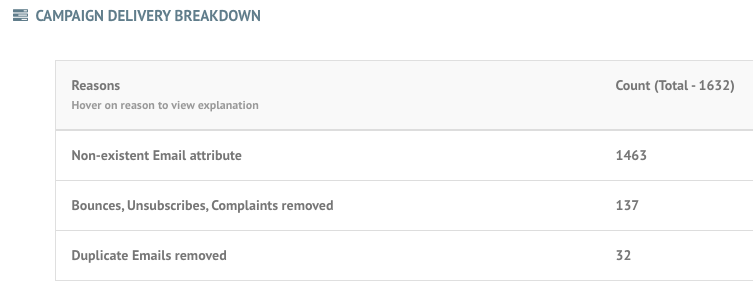 Any emails you send have an impact on your IP and domain reputation. So, we must maintain a clean email sending list - free of emails that bounced, unsubscribed, or complained - which we achieve by not initiating further emails to these email addresses.