



9 Best OneSignal Alternatives to Actually Engage Customers
If you’re searching for OneSignal alternatives, chances are, you’re using OneSignal… and you’ve hit a wall.
Maybe it’s the push tag limitations. Or the lack of in-depth insights in analytics dashboards. Or the fact that it’s more developer-friendly than what you’d expected as a non-technical marketer.
Whatever the reason, you’re done settling. And now, you’re building a vendor shortlist that can take your customer engagement strategy further.
But there’s another problem: finding the right OneSignal alternative isn’t just a matter of ticking boxes on a feature list. You need to compare pricing, channel coverage, AI capabilities, analytics depth, and integrations. Which platform would work for your brand’s use cases? Which one can your team use without much hand-holding, even after a year of onboarding?
This guide is built to cut those headaches in half. We’ve broken down the strongest OneSignal competitors, pinpointed their unique strengths, and mapped them to the priorities B2C marketers like you actually care about.
By the end of it, you’ll have 3-4 solid platforms worth moving onto your shortlist, and a clear sense of which ones can make your next campaign easier, smarter, and more profitable.
TL;DR
|

6 Best OneSignal Alternatives for Increasing Customer Engagement
Many of the customer engagement tools on this list of OneSignal alternatives can step in to replace OneSignal entirely, handling core messaging and engagement across channels. Others shine as specialists, perfect if you need to double down on a specific gap, like advanced analytics, email deliverability, or predictive marketing AI.
Let’s dive in!
1. Best for AI-driven omnichannel engagement: MoEngage
MoEngage is a cross-channel customer engagement platform (CEP). What sets MoEngage apart as a top alternative to OneSignal is that it covers a wide range of channels from a single platform. We’re talking double‑digit reach, from SMS to WhatsApp to web personalization, all managed through a single, streamlined dashboard.
Our Merlin AI works behind the scenes to spot engagement patterns, predict next‑best actions, and adapt campaigns for each audience segment in real-time (more about it later). Pair that with advanced analytics, and you’ve got a system that’s equal parts intelligent and transparent.
Cost: Free tier for up to 10K Monthly Tracked Users (MTUs), plus Growth and Enterprise plans.
G2 Rating: 4.5/5
Channels: SMS, MMS, RCS, email, mobile and web push, WhatsApp, in‑app and on‑site, web personalization, Google Ads Audience syncing, Facebook Audience syncing.
Standout Feature: AI Campaign Decisioning agent, that sets clear goals and boundaries (like spend caps) while tailoring campaigns to each customer with precision.
Why It’s Best for AI-driven Omnichannel Engagement: MoEngage brings every channel that matters into a single orchestrated experience, then uses AI to personalize that journey from the first touch to conversion.
Link to a Platform Tour:
What MoEngage Has that OneSignal Doesn’t:
We sourced all of this information directly from OneSignal’s website, with references, and it is accurate as of January 2026:
A) Web personalization and on-site messaging
OneSignal doesn’t offer any native way to personalize live website content. Marketers often need to rely on just push or in-app messages.
Unlike OneSignal, MoEngage offers built-in website personalization and on-site messaging (OSM) campaigns as core features. No waiting on dev hacks or external tools.
With web personalization, you can dynamically change website content for different segments in real-time (homepage banners, product recommendations, layouts, and so on), based on customer behavior, location, or session attributes.
Here’s what’s possible:
- Swap homepage hero images for VIP users vs. first-time visitors
- Show geo-targeted offers to engagers in specific cities
- Test new page designs and measure conversions
On top of that, on-site messaging lets you deliver in-session popups, banners, and nudges triggered by precise behaviors (scroll depth, custom events, and exit intent).
So, if your growth strategy depends on strong real-time engagement across multiple channels, MoEngage is the stronger fit. Not just because it natively supports 10+ channels — that’s more than what OneSignal offers — so building true omnichannel customer journeys gets easier. But also because it doesn’t automatically crown push king, as OneSignal does. Instead, it treats all channels as equal.
B) Deeper behavioral analytics
OneSignal’s analytics give you delivery, engagement, and basic outcome tracking per message or journey. However, it doesn’t provide a comprehensive view of product usage, user pathing, retention cohorts, uninstall analysis, or cross-channel behavior in one view.
MoEngage ships with product analytics baked in. You can explore event-level behavior across channels, track conversion funnels, visualize drop-offs, map multi‑touch customer journeys, and segment audiences by real customer attributes, all without jumping between systems.
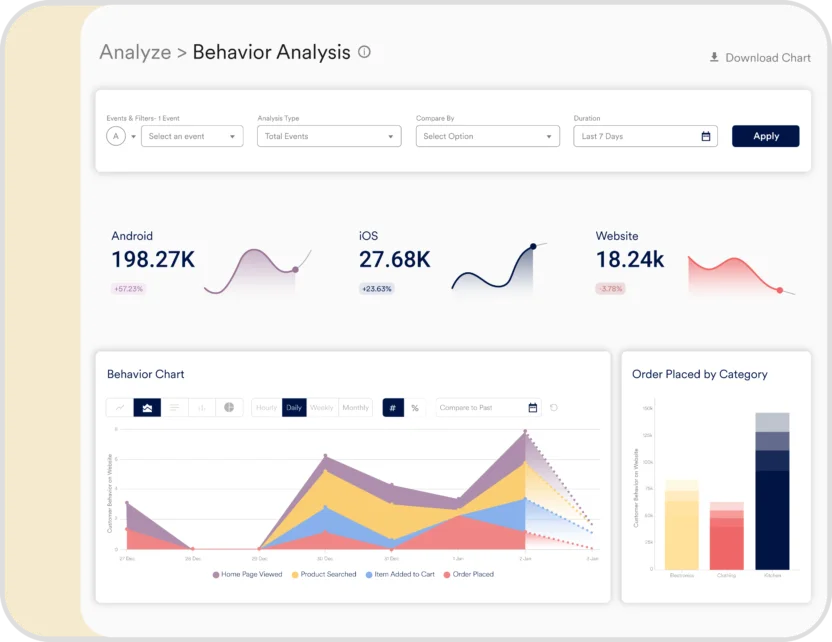
For growth-focused marketers, message-level CTRs aren’t enough. You need to see how engagement impacts deeper behaviors, such as purchases, repeat logins, or churn reduction. MoEngage’s analytics span the entire customer journey, not just the click, so you can prove ROI on campaigns and optimize based on what’s actually driving retention and revenue.
Long story short, MoEngage’s native deep, behavioral analytics gives you full visibility from the first impression through conversion and retention, while OneSignal’s scope ends at immediate message engagement.
C) Powerful AI capabilities
OneSignal’s AI message composer can help you write or refine push notification text. Its Intelligent Delivery also optimizes send time based on historical usage data.
That’s the length and breadth of it.
On the other hand, MoEngage’s Merlin AI Studio is an all-in-one generative AI hub for B2C marketing teams.
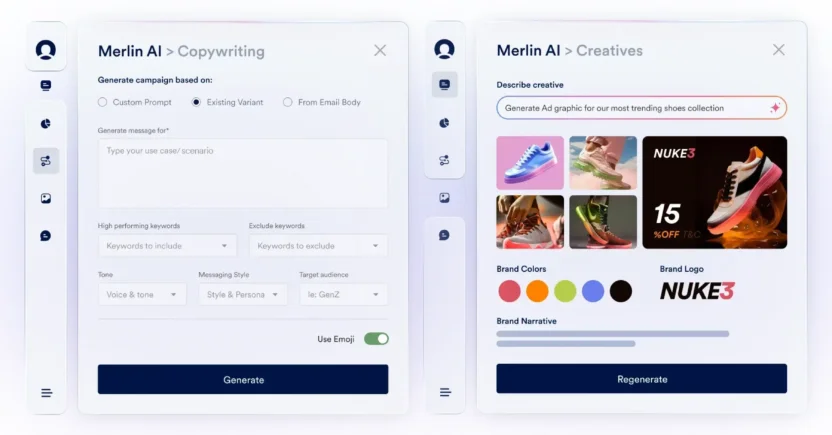
From one interface, you can:
- Generate on‑brand, multilingual content across push, email, in‑app, and on‑site
- Instantly create banners and visuals that match your brand identity
- Build precise segments from plain‑English prompts
- Turn simple personalization requests into advanced Jinja code
In fact, Merlin AI’s predictive agents go beyond content: identifying each customer’s top‑performing channel, calculating the best send time per customer, and routing every customer down the highest‑impact journey. It even decides the optimal offer, creative, and frequency for each customer.
In this way, AI becomes foundational to your entire engagement strategy. Everything is handled in one interface, so you can quickly drive full‑funnel, cross‑channel results.
D) Broader range of integrations
OneSignal’s 47 integrations cover most essentials (analytics, marketing automation, app creation, etc.), and they work well for straightforward stacks.
But in more complex, multi-channel marketing ecosystems, that number can feel limiting, especially if you want tighter connectivity with niche platforms, specialized analytics tools, or newer Martech solutions.
By contrast, MoEngage offers over 110 integrations out of the box, giving marketers more connection points. You achieve wider and deeper connectivity without piecing together extra middleware or custom code, resulting in faster launches and less integration debt over time.
That’s why G2 users score MoEngage a 9.3 vs. OneSignal 8.8 in terms of integrations. Particularly, users highlight MoEngage’s enhanced versatility in multi-channel marketing stacks, as compared to OneSignal.
Now that you’ve seen how MoEngage is different from OneSignal, it’s time to look at other OneSignal alternatives on this list.
2. Best for standard email campaigns: SendPulse

Among the top OneSignal competitors, SendPulse is designed for small businesses that need solid email marketing functionality without enterprise complexity or pricing. It covers all the fundamental email campaign needs (segmentation, automation, templates, and analytics).
Where SendPulse falls short compared to specialized platforms is in advanced analytics. It lacks detailed reporting you might need as a mid-market to enterprise brand. The email builder and automation capabilities are solid, but its email deliverability isn’t as sophisticated as Klaviyo or MoEngage. The platform’s interface is also cluttered, making it difficult for beginners to figure out where to start.
Cost: Freemium model with unlimited emails to 500 subscribers. Paid plans start around $8/month for 500 subscribers with unlimited sends, scaling based on subscriber count. SMS, chatbots, and other channels have separate pricing or credit systems.
G2 Rating: 4.6/5
Channels: Email, SMS, web push, live chat, social chatbots, and landing pages
Standout Feature: Built-in landing page and signup form builder that creates conversion-focused pages without needing separate tools, unlike OneSignal, which focuses purely on messaging delivery.
Why It’s Best for Standard Email Campaigns: SendPulse balances essential email marketing features (drag-and-drop editor, A/B testing, automation workflows, and subscriber segmentation) with genuinely affordable pricing that makes it accessible for growing brands just starting to scale their email programs.
3. Best for email deliverability: Klaviyo
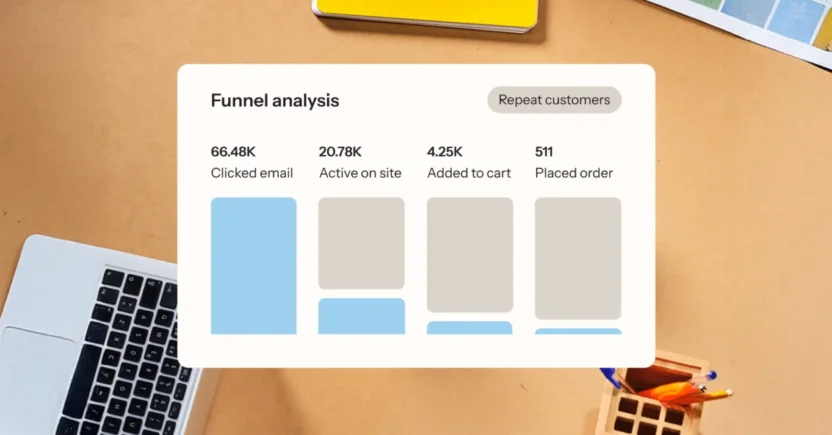
Klaviyo began as an email marketing platform and has since evolved into a CRM, specifically designed for Ecommerce brands. What sets it apart among OneSignal competitors is how it integrates marketing automation, customer data, and analytics into a single, unified system.
The platform’s true strength lies in its robust data foundation. It creates unified customer profiles by stitching together behavior from your website, email interactions, purchase history, and other touchpoints. For Ecommerce teams, especially, the Shopify integration is practically plug-and-play. Users consistently praise how seamlessly it syncs product catalogs, order data, and customer information.
However, before committing, it’s essential to note that Klaviyo’s pricing has become a significant concern for many users. Beyond the sticker price increases, there are hidden costs that catch teams off guard. The platform caps both your contact limits and email send volumes more aggressively than it used to, which means you might hit your tier ceiling faster than expected as you grow.
Cost: Klaviyo’s pricing scales with your active contact count and SMS/MMS credit usage. For example, if you manage 1,000-1,500 active contacts and send 15,000 emails plus 10,000 SMS/MMS messages monthly, you can expect to pay around $135/month. Marketing analytics and product reviews incur additional costs ($100/month and $25/month, respectively). Their Advanced Data Platform, which you’ll need to manage inactive contacts across channels, starts at $500/month for 100K total profiles.
G2 Rating: 4.6/5
Channels: Email, SMS, MMS, RCS, WhatsApp, in-app messaging, and mobile push
Standout Feature: Intelligent time delays in workflow automation that optimize when messages get delivered based on individual engagement patterns
Why It’s Best for Email Deliverability: Klaviyo AI continuously monitors and repairs your sender reputation behind the scenes. This ensures that your emails consistently land in primary inboxes instead of being filtered to spam, which directly translates to better open rates and increased revenue.
4. Best for mobile app experience: Airship
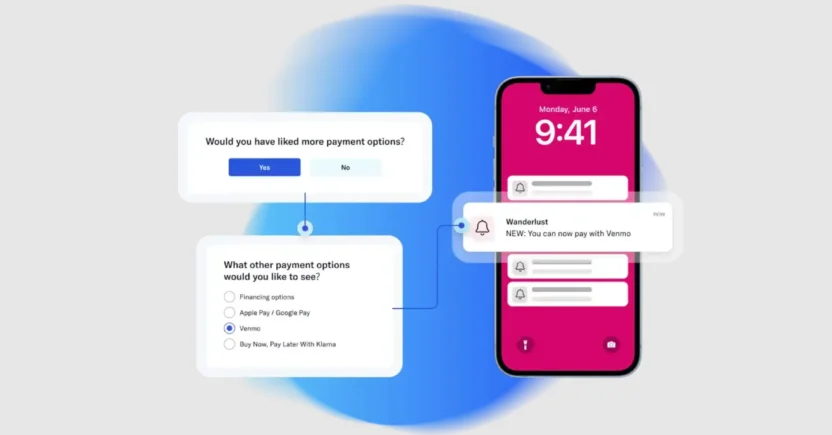
While OneSignal offers solid push notification functionality, Airship takes mobile-first engagement to an entirely different level with deep app integration, sophisticated in-app messaging, and mobile wallet passes. The platform is built specifically for companies where the mobile app is the primary customer touchpoint.
The catch is that if you need to pull in complex data, Airship’s reporting interface isn’t as strong as that of enterprise-grade platforms that offer robust analytics. Marketers switch to Airship competitors due to its limited A/B testing capabilities, too.
Cost: Airship offers two pricing plans — Essentials and Enterprise. Custom enterprise pricing is based on monthly active users and message volume. You can access key channels like SMS and email only under the Enterprise plan. App Store optimization is treated as an add-on.
G2 Rating: 4.0/5
Channels: Mobile push notifications, in-app messaging, SMS, MMS, email, mobile wallet, and web notifications
Standout Feature: Mobile wallet integration (Apple Wallet and Google Pay passes) that lets you deliver dynamic, location-aware content directly to customers’ physical devices — something OneSignal doesn’t natively support.
Why It’s Best for Mobile App Experience: Airship’s entire platform architecture is optimized for app-first engagement with features like session-based messaging, app activity tracking, and mobile-specific personalization.
5. Best for customer segmentation: Iterable
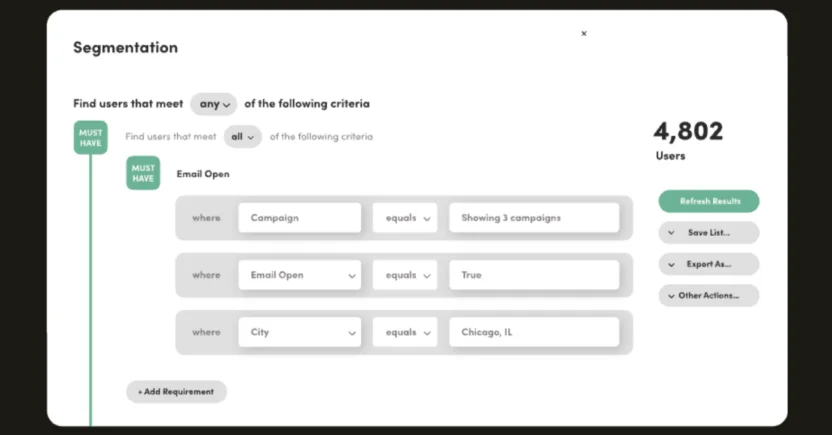
Iterable built its reputation among OneSignal alternatives on flexible, sophisticated audience segmentation. As an email-centric platform, the core interface is intuitive enough that marketers can build and launch campaigns without constant developer support.
The limitations become apparent when you need template flexibility or custom analytics. Email templates aren’t as customizable as some teams need, and you can’t fully tailor analytics dashboards to show exactly the metrics that matter to your business. Some users also report occasional performance lag when managing particularly complex automation workflows with extensive branching logic.
The pricing model charges for every contact in your database, including unsubscribed and inactive profiles. They also add premium fees for channels like mobile and web push notifications, which many alternatives to OneSignal include in their base pricing. No wonder some Iterable users and other marketing teams are also searching for alternatives to Iterable.
Cost: Contact-based pricing that includes inactive and unsubscribed profiles. Iterable charges additional fees for mobile and web push notifications. (Specific pricing is custom and quote-based.)
G2 Rating: 4.4/5
Channels: SMS, Roku, email, push notifications, in-app messaging, in-browser messaging, and WhatsApp
Standout Feature: Iterable Nova, their AI assistant, helps personalize message content and optimize campaign performance with minimal manual configuration
Why It’s Best for Customer Segmentation: You can segment audiences based on lifecycle stage, real-time behavioral triggers, or campaign interaction history. Iterable also supports RFM segmentation (Recency, Frequency and Monetary Value), which is particularly useful for Ecommerce teams prioritizing high-value engagement.
6. Best for intuitive navigation: Braze
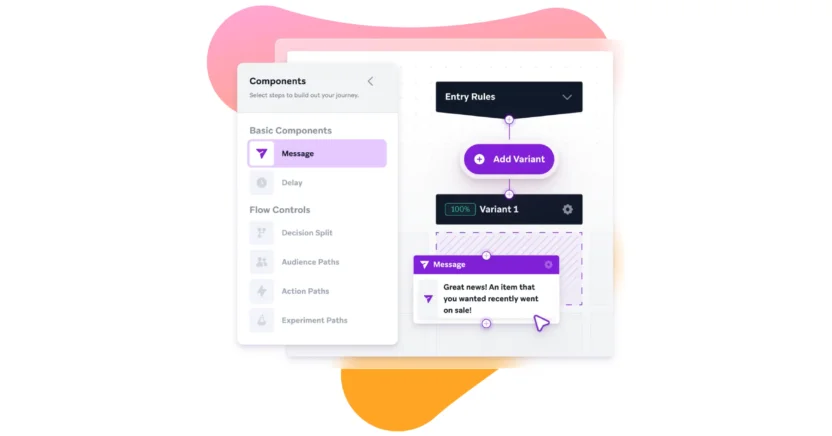
As one of the alternatives to OneSignal, Braze positions itself as an enterprise customer engagement platform, and it backs that up with a genuinely sophisticated data infrastructure. The platform connects directly to your data warehouse and backend systems.
What makes Braze particularly accessible is how thoughtfully they’ve designed the user experience. The drag-and-drop interface doesn’t require HTML knowledge, their documentation is thorough without being overwhelming, and the onboarding process is structured enough that teams don’t feel lost.
The tradeoffs? Initial setup can be technically complex. Some users report integration challenges that require deeper technical expertise to resolve. There’s a learning curve upfront before the platform’s power becomes accessible. If those obstacles sound like dealbreakers, it’s worth looking at other Braze alternatives to compare.
Cost: Starts at $1,000/month for the base platform. Enterprise pricing (which includes advanced features, extensive integrations, and dedicated support) is custom and negotiated based on your requirements.
G2 Rating: 4.5/5
Channels: Email, SMS, RCS, mobile app, web, LINE, and WhatsApp
Standout Feature: Cost-based channel prioritization that automatically routes messages through cheaper channels first (like push or email) before escalating to premium channels (like SMS)
Why It’s Best for Intuitive Navigation: The interface is genuinely elegant and intuitive. Complex functionality doesn’t require digging through buried menus or deciphering cryptic settings.

Other Notable Alternatives to OneSignal
So, you’ve checked out the obvious OneSignal competitors. However, there are other engagement platforms that might also earn a spot on your vendor shortlist.
1. Salesforce Marketing Cloud or Agentforce Marketing
Salesforce Marketing Cloud (now Agentforce Marketing) remains a staple for large enterprises that need data-driven engagement.
But being a legacy platform means integration with new tools can be painful, not to mention the rigid architecture, costly maintenance, and a user experience many find clunky. For marketers, decision safety only goes so far; usability and flexibility matter more when speed and adaptability decide campaign success.
That’s why many long‑time Salesforce teams quietly evaluate modern alternatives to Agentforce Marketing that play nicer with the rest of their tech stack while keeping data power intact.
2. Oracle Responsys
Oracle Responsys comes into consideration as a OneSignal alternative due to its multilingual campaign capabilities, allowing you to run multiple language variations within a single campaign. That’s a plus for brands serving diverse audiences.
Where it falls short in today’s omnichannel reality is channel coverage: it’s solid on email, push, and SMS, but skips RCS and WhatsApp entirely. And like a lot of older platforms, running back‑to‑back campaigns can feel sluggish. Teams often swap it with alternatives to Oracle Responsys that maintain the localization strength but add wider channel support and faster execution, ensuring campaigns stay timely and not stuck in the queue.
3. Adobe Marketo Engage
Marketo earns its place as an alternative to OneSignal, thanks to deep CRM integrations that make passing qualified leads over to sales smoother than most.
The trade‑offs are slower performance, a dated interface, and a steep learning curve for new users. These are the kinds of friction points that push modern marketing teams to shop around for leaner, multi‑channel engagement platforms and alternatives to Marketo Engage that can keep pace with evolving, customer‑first strategies instead of just covering the basics.
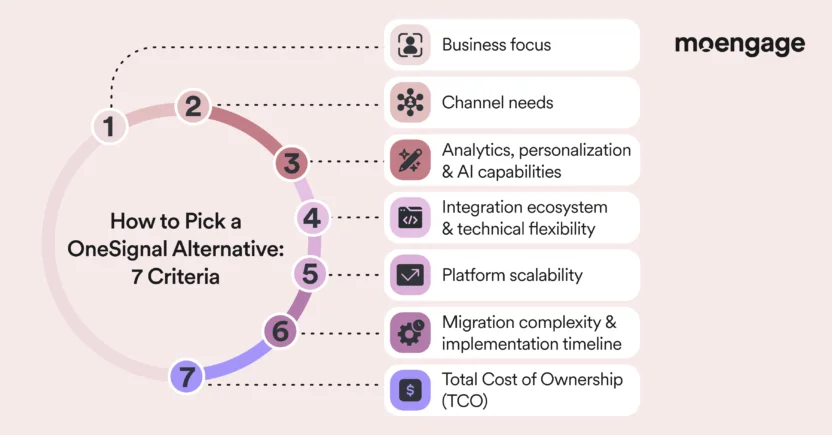
7 Key Criteria to Consider When Choosing a OneSignal Alternative
You should definitely not rush into platform decisions based on flashy demos. Nobody wants to choose a customer engagement platform that becomes a technical nightmare 6 months down the road.
Before you start building your vendor shortlist, you need a framework for evaluating the alternatives to OneSignal. Let’s walk through the seven criteria that actually matter when you’re making a decision this big for your team.
1. Business focus
Understanding where a platform focuses its product development tells you a lot about whether it’ll actually solve your specific problems.
OneSignal is often praised for its ease of use and cost-effectiveness, primarily for mobile push and web push notifications. It’s relatively industry-agnostic, which is both a strength (in terms of flexibility) and a potential limitation (due to less specialized functionality). When evaluating OneSignal alternatives, it’s essential to understand where each platform places its bets.
For instance, MoEngage and Braze position themselves as enterprise-grade, cross-industry platforms with sophisticated capabilities for media, fintech, retail, and travel companies. Airship is deeply mobile-app-focused, making it ideal if your primary engagement model is through native apps. On the other hand, SendPulse serves small to mid-market businesses looking for affordability and simplicity.
Questions to ask yourself about this when looking for a OneSignal alternative:
- Does the platform have demonstrable expertise and reference customers in your specific industry or business vertical?
- Are their templates, segmentation logic, and journey examples relevant to your business model?
- Will the platform’s roadmap align with where your industry is heading, or will you continually request custom features? Even if the latter is true, how willing is the vendor to incorporate your feedback into their roadmap?
2. Channel needs
A platform might offer native support for, say, over 20 channels (if such a platform exists today). But if all those channels can’t work well in sync, you might as well buy a CEP that focuses on just one channel.
You know what the real deal is? A CEP that ensures all its channels work well together and can orchestrate sophisticated cross-channel experiences without requiring custom development.
OneSignal has built its reputation primarily on push notifications, and it excels in this area at an attractive price point. But if you’re evaluating OneSignal competitors, you’ve probably outgrown a single-channel approach.
Klaviyo has deep email and SMS integration, but is purpose-built for Ecommerce workflows. Airship, too, remains heavily mobile-focused with strong push and in-app capabilities, but less robust email features. Platforms like MoEngage and Braze excel in this area with true omnichannel customer journey mapping tools that let you create sophisticated workflows spanning multiple channels, including push, email, and in-app messaging.
Questions to ask yourself about channel support when looking for a OneSignal alternative:
- Does your customer journey require coordination across multiple channels? Or are you primarily focused on one or two core channels?
- Does the OneSignal alternative support intelligent channel fatigue management across all touchpoints, or will you risk over-messaging customers?
- Will you need to incorporate emerging channels like RCS or web push in the next 12-24 months?
3. Analytics, personalization, and AI capabilities
What separates good CEPs from great ones is how they help you understand customer behavior and automatically optimize engagement.
OneSignal provides solid basic analytics around message delivery and engagement. But if you need predictive analytics, sophisticated segmentation based on behavioral patterns, or AI-powered journey optimization, you’ll likely find it limiting.
For advanced behavioral analytics, MoEngage is a strong contender, often offering deeper functionality than basic tools like SendPulse.
Questions to ask yourself about this when looking for a OneSignal alternative:
- What AI capabilities do you need for your use cases? Does the platform check those boxes?
- Does the platform allow you to test multiple branches of automated customer journeys in real-time?
- Can you easily build customer segments without involving your data team every single time?
- Does the OneSignal alternative let you track full-funnel conversion attribution from notification to purchase?
4. Integration ecosystem and technical flexibility
No matter which OneSignal competitor you buy, it needs to work well with your CDP, data warehouse, analytics stack, CRM, and every other tool your team depends on.
For example, Customer.io is developer-first with exceptional API documentation and webhook flexibility, making it ideal if you have robust engineering resources. Airship integrates well with mobile development frameworks and app analytics tools. MoEngage also provides strong integration capabilities, with a focus on mobile analytics platforms and data warehouses.
Questions to ask yourself about integration when looking for a OneSignal alternative:
- Does the platform offer native integrations with your core systems (CDP, CRM, analytics), or will you need to build custom middleware?
- How flexible is the OneSignal alternative’s data model in terms of accepting custom events and attributes?
- If you need a custom integration, can the platform provide a robust API with good documentation and responsive support?
5. Platform scalability
The CEP you finalize should be able to maintain a steady performance as your data complexity, user base, and campaign sophistication grow.
Klaviyo scales excellently within Ecommerce contexts and handles large product catalogs and customer databases efficiently, while Iterable is built for high-volume B2C use cases.
Enterprise-grade customer engagement platforms like MoEngage are built to handle billions of messages monthly with complex real-time personalization and segmentation (MoEngage processes over 200 billion events and over 1.5 trillion data points per month). These platforms are designed for brands with tens of millions of active users (with MoEngage profiling over 1.2 billion users each month) and can maintain sub-second response times for triggering campaigns based on live behavioral events.
Questions to ask yourself about scalability and performance when looking for a OneSignal alternative:
- What’s your projected message volume over the next 2-3 years? Can the vendor handle at least 2x that volume?
- Can the platform maintain consistent performance during peak events, such as Black Friday campaigns, major product launches, or other holiday email marketing campaigns?
6. Migration complexity and implementation timeline
Even the best marketing automation software or CEP isn’t worth much if you can’t successfully migrate to it without disrupting your existing campaigns, losing historical data, or consuming 6 months of engineering time.
That said, migration complexity varies significantly. Platforms like Klaviyo and SendPulse emphasize quick onboarding and self-service setup, making them accessible for smaller teams without extensive technical resources.
Enterprise platforms like MoEngage, Braze, and Iterable typically require more structured implementation with dedicated customer success managers. However, they also provide migration tooling, data mapping assistance, and professional services to facilitate a smooth transition. Airship’s mobile focus means implementation is tightly coupled with app development cycles.
Questions to ask yourself about migration when looking for a OneSignal alternative:
- What’s your realistic timeline for migration? Does that align with vendor implementation estimates and your internal resource availability?
- Do you need to run campaigns in parallel during migration (dual operation), and does the platform support that without double-charging?
- Does the vendor provide migration tooling, data mapping services, and dedicated implementation resources, or is this entirely on your team?
7. Total Cost of Ownership (TCO)
The real cost of a CEP includes a lot more than you initially think — licensing, implementation, ongoing maintenance, training, potential overage charges, and the opportunity cost of features you’re paying for, but not using. As you evaluate OneSignal alternatives, you’ll encounter radically different pricing philosophies.
Questions to ask yourself about pricing when looking for a OneSignal alternative:
- Do you clearly understand what metric drives your costs (MAUs, contacts, or messages sent)?
- Are there any hidden costs, such as implementation fees, training charges, premium support tiers, or add-ons not included in the base quote?
- Is the time-to-value worth the TCO?
Your job now is to map these criteria against your specific context, i.e., your growth stage, technical resources, industry requirements, and strategic priorities.
Ultimately, the right choice is the one that aligns with how your team actually works and where your brand is actually going.
Top 3 OneSignal Competitors: Feature Comparison
Considering the above key criteria, we’ve narrowed down your choice to the top OneSignal competitors: MoEngage, SendPulse, and Klaviyo.
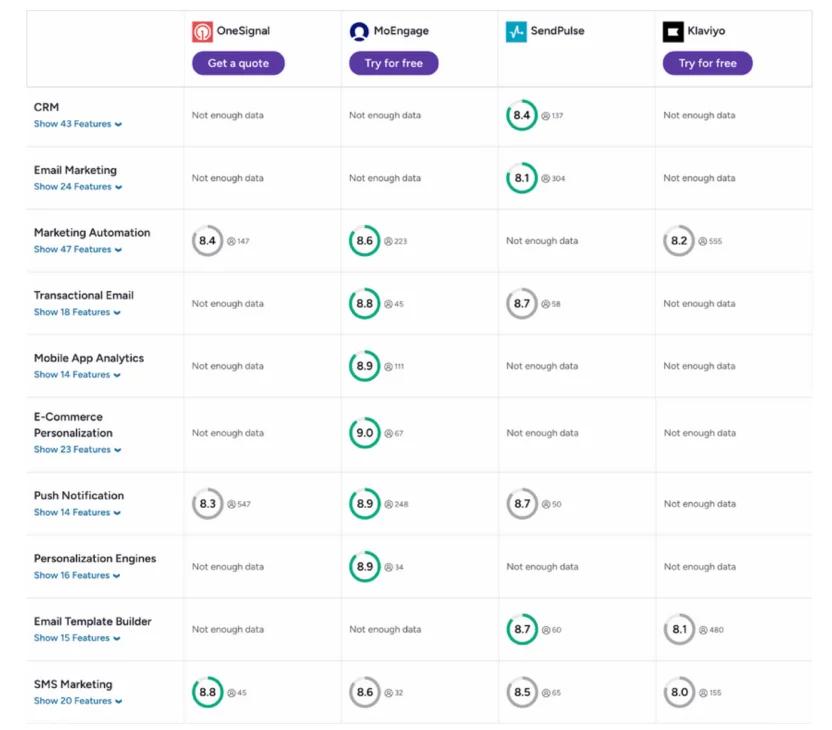
Source: https://www.g2.com/compare/onesignal-vs-moengage-vs-sendpulse-vs-klaviyo?source=search
Below, we’ve compared them side by side against OneSignal, using the factors B2C growth and lifecycle marketing teams typically use to evaluate when shortlisting CEPs.
| Criteria | OneSignal | MoEngage | SendPulse | Klaviyo |
| G2 Rating | 4.7/5 | 4.5/5 | 4.6/5 | 4.6/5 |
| Native Omnichannel Support | Push (web/mobile), in‑app, email, RCS & SMS | 10+ channels: SMS, RCS, email, mobile/web push, WhatsApp, in‑app, on‑site, web personalization & Google/Facebook audience sync | Email, SMS, web push, live chat, social chatbots, landing pages | Email, SMS, MMS, RCS, WhatsApp, in‑app & mobile push |
| AI Capabilities | AI Message Composer (push only) & Intelligent Delivery | Merlin AI Studio (Copywriter, Designer, Segment Assist, Jinja Assist, MPC, BTS, Offer/Campaign Decisioning & Intelligent Path Optimizer) | Basic automation flows (email/SMS/chatbot); no advanced AI | AI‑driven send‑time optimization & deliverability repair; strong automation logic |
| Integrations | 47 (HubSpot, Google BigQuery, Appsflyer, etc.) | 110+ (Zapier, Microsoft, Amplitude, Google, AWS, etc.) | 42 (Make, Pipedrive, Stripe, Shopify, etc.) | 300+ (esp. Ecommerce: Shopify, Prestashop, BigCommerce, etc.) |
| Key Strengths | Extremely fast push setup; great for tech teams | Full‑stack omnichannel with native personalization; advanced predictive AI & churn prevention | Multi‑channel starter kit; cheapest entry point | Elite email deliverability; Ecommerce-focused automation |
| Best For | Product/engineering‑led brands & early‑stage startups focused on scaling push notifications | Mid‑market to enterprise B2C marketing teams & growth/product teams running full lifecycle engagement | Small businesses; early digital adopters; budget‑sensitive SMBs | D2C/Ecommerce brands with dedicated marketing ops; Shopify‑native sellers |
5 Migration Strategies When Switching to a OneSignal Competitor
Do you know when platform migrations are likely to fail? When marketing teams skip critical planning steps. Or they don’t follow a customer engagement platform migration strategy. Or they discover halfway through that their new CEP can’t actually replicate the workflows they depend on.
Rushing a migration is exactly how you end up with broken workflows and angry stakeholders. Here’s how to approach migration strategically, one step at a time.
1. Build a detailed migration blueprint
Start by mapping exactly what you’re migrating and in what sequence. You need granular visibility into every component:
- Which user properties and behavioral events you’re tracking
- How your current segments are constructed
- What naming conventions you’re using across tags and attributes
- Which campaigns are actively running
- What integrations feed data into OneSignal
- How your mobile apps and web properties are currently instrumented with the OneSignal SDK
Document your current state comprehensively, then work backward from your desired end state. What capabilities are you gaining with the new platform that you couldn’t do in OneSignal? If you’re moving to MoEngage or Braze specifically for their advanced analytics and AI-powered optimization, will you implement those features immediately? Or if you’re switching to Klaviyo for its Ecommerce functionality, how will you restructure your data to leverage their product recommendation engines?
Break the migration into distinct phases with clear buffer phases between them. A typical structure might include realistic timelines for SDK implementation and event tracking verification, historical data import, user profile migration, campaign and workflow recreation in the new platform, and integration testing with parallel operation.
Each phase should have explicit success criteria before moving forward. Factor in time for unexpected complications, as they are inevitable.
2. Assemble a cross-functional migration team
You need to coordinate across multiple departments with different priorities and constraints. Specifically:
- Marketing (who understand campaign logic and customer journey requirements)
- Engineering (who will handle SDK implementation and API integrations)
- Product management (who can prioritize feature requirements and manage tradeoffs)
- Data/analytics (who ensure tracking integrity and reporting continuity)
- Compliance/security (who verify the new platform meets regulatory requirements)
Appoint a single migration leader who serves as the central coordination point internally as well as with your new vendor. This person doesn’t have to be the most technical or most senior. But they do need organizational authority to make final decisions, resolve conflicts, and hold teams accountable to timelines.
If you’re adopting a platform like MoEngage specifically for its managed migration services, take advantage of their project management expertise.
When MoEngage migrated SoundCloud’s 200+ campaigns in 12 weeks, the engagement improvement (15% increase in music streams) came not just from better platform capabilities, but also from having experienced migration specialists who understood both the technical requirements and the operational change management needed.

3. Invest heavily in documentation
One of the most common complaints about OneSignal is that its documentation, while extensive, can lag behind SDK updates (particularly frustrating for Flutter developers).
Before committing to a new platform, critically evaluate its technical documentation. Are the API references complete and up to date? Do they provide clear SDK integration guides for your specific development frameworks? Is there practical guidance on troubleshooting common issues, or just theoretical descriptions of features?
For developer-friendly teams transitioning to platforms like Customer.io, excellent API documentation can significantly accelerate the migration process. For less technical teams, platforms with better UI-based configuration and visual documentation become more important.
Create your own internal migration documentation, too. It’d come in handy as institutional knowledge for future platform changes or team onboarding. Comprehensively document your data architecture, workflow logic and campaign rules, and naming conventions.
4. Test rigorously with real workflows
The worst time to discover that a critical workflow doesn’t work in your new platform is after you’ve shut down OneSignal, and your customers are waiting days for transactional messages.
That’s why you must validate that every workflow, integration, and data flow functions correctly under actual operating conditions before you fully transition to a OneSignal alternative.
Start testing as early as possible, ideally in a sandbox environment that won’t affect your production campaigns. If you’re moving to a platform that offers staging environments (most enterprise platforms, such as MoEngage, do), utilize them extensively.
Involve your entire marketing team in the testing process. The people who will actually build and manage campaigns on a daily basis need to validate that the platform works for their workflows. They’ll catch usability issues and functionality gaps that technical teams might miss. Don’t wait until post-migration to identify bugs or workflow limitations.
Keep OneSignal running while you verify that the new platform works correctly, so you have a fallback in case problems emerge. Platforms like MoEngage, which offer real-time campaign previews during migration, make this testing process more transparent; you can see exactly how messages will render before sending them to customers. MoEngage also provides migration credits to offset the expenses of running both platforms in parallel.
5. Secure comprehensive onboarding support
Some platforms (like Iterable, according to user reports) have support teams that can be slow to respond precisely when you need rapid answers. Others provide proactive, hands-on assistance during the critical post-launch period.
Negotiate explicit post-migration support terms before signing the contract. What response time SLAs apply during the first 30-60 days? Can you schedule regular check-ins to review performance and troubleshoot issues, or is support purely reactive?
Schedule regular optimization reviews in the months after migration. Establish internal feedback loops to enable your team to quickly surface issues or questions.
When MoEngage helped Click Rain (a South Dakota digital agency) migrate from a legacy platform, they didn’t just complete the technical implementation and disappear. The Professional Services team scheduled weekly training sessions to ensure all team members understood the platform’s functionality and felt comfortable using it independently. That ongoing support was part of what enabled Click Rain to save its client over $18,000 annually.
Top 3 FAQs Answered About OneSignal Alternatives
Below, we’ll break down the three most common questions marketers have when looking into OneSignal alternatives. You’ll get context, examples, and the exact angles to investigate, so your marketing team can make a decision that nobody regrets a year later.
1. What are the main reasons marketers look for a OneSignal alternative?
Marketers typically look for alternatives to OneSignal when:
- Its free plan targeting limits (just two tags) restrict campaign precision
- Paid push costs climb compared to free options like Firebase FCM
- The platform’s developer-focused onboarding slows marketing team agility
They also face feature and integration gaps in email/SMS, and shallow analytics. In short, once the capability-to-cost balance shifts, marketing teams start exploring competitors.
2. What are the biggest factors that affect the price of a OneSignal alternative?
The key factors that can affect the pricing of OneSignal competitors are:
- Monthly Active Users (MAUs): Most platforms price based on how many unique users you engage monthly. Doubling MAUs will usually more than double your cost.
- Number of Channels Used: Including channels as add-ons to your plan increases license fees and delivery costs.
- Message Volume: Push might be cheap (or free), but large-scale email/SMS sends carry per-message charges.
- Automation Complexity: Advanced journey builders, personalization logic, and AI recommendations often sit in higher-priced tiers.
- Data Storage and Integrations: Using CDP-like features, storing large user profiles, or integrating with external analytics can move you into higher-tier contracts.
3. How can you effectively evaluate and price a OneSignal competitor?
Here’s a quick checklist of the steps to follow when sensibly evaluating OneSignal alternatives.
- Identify your primary growth channels (push or email or SMS, or any other) and focus pricing comparisons on those.
- Map your targeting needs if segmentation depth matters. Note any free-plan limits.
- Estimate realistic volumes, including MAUs, sends/month, and integrations. Use actual past data to model cost.
- Do a quick UI/UX trial to see if your marketing team can run campaigns without waiting on engineering.
- Check vendor roadmap and maturity. Avoid platforms where your must-have channel is still ‘in beta’, as that might still take time to materialize.

Evaluate OneSignal Competitors to Find the Best Fit for Your Campaigns
The next step is clear: narrow your vendor shortlist to platforms that actually help execute the campaigns you’ve been dreaming about, not just check boxes on a spec sheet.
Before quarter‑end budgets lock in, take a closer look at platforms that treat all channels equally, automate personalization without relying on dev cycles, and give you analytics deep enough to prove ROI to stakeholders. MoEngage, for instance, ticks all of these boxes and more.
Want to see if it fits your shortlist criteria? Request a hands-on demo to explore exactly how it would work for your campaigns.