






What are the Best Customer Journey Mapping Tools in 2027?

Customer journey mapping tools help you build a comprehensive view of how your customers actually engage with your product or brand across channels and touchpoints. As in, how they get to your website or app, which messages or campaigns they respond to, and at what point in the journey they leave.
Marketoonist’s founder-CEO, Tom Fishburne, in his keynote address at The Customer Engagement Summit, shared his harrowing experience as a customer while buying a new dishwasher. Every step in his customer journey was supposed to be designed to facilitate his progression to the next stage. But his actual experience turned out to be quite the opposite. His takeaway was that every touchpoint in the customer journey should be effortless.
That being said, you may be looking for a tool to map customer journeys or replace a legacy platform. But not all tools can help you design and optimize the customer experiences you want for your brand in 2026.
Some of them are more expensive than their features warrant. Others come with clunky interfaces that are difficult to navigate. For a change, you might even come across some that let you automate customer journeys.
Then what does it take to choose the right tool?
We cover the answer to that question in this blog post, along with a list of the best customer journey mapping software. Let’s jump in!
Compare the 14 Best Customer Journey Mapping Tools Side-by-Side
The table below summarizes the strongest customer journey mapping tools and software for common B2C use cases in 2027.
| Name | G2 Rating | Gartner Rating | Main Capability | Integrations | Best Fit For |
| MoEngage Flows | 4.5/5 | 4.8/5 | Maps customer journeys and sends messages across 16+ channels in one platform | Amplitude, Mixpanel, Zapier, Hightouch, Slack, HubSpot, Snowflake, Databricks, Shopify, TikTok Ads, Zendesk, Airtable, etc. | Enterprise and mid-market B2C marketing and lifecycle teams |
| Miro | 4.7/5 | 4.5/5 | Collaborative journey workshops | Confluence, Notion, Jira, Azure DevOps, etc. | Cross-functional teams |
| Lucidchart | 4.5/5 | 4.5/5 | Structured journey and process diagrams | Atlassian, Salesforce, Jira, Slack, MS Office, etc. | Operations and process-heavy teams |
| Smaply | 4.5/5 | – | Pain point cards | MS Office, Miro, Tableau, Google Workspace, Figma, etc. | CX and service design teams |
| Fullstory | 4.5/5 | 4.4/5 | Session replay | Google Cloud, Optimizely, Adobe Experience Cloud, etc. | Product and digital experience teams |
| UXPressia | 4.5/5 | 5/5 | Persona-driven journey mapping | Google Analytics, Google Sheets, Mixpanel, Slack, MS Teams, Jira, Azure DevOps (higher plans) | CX and UX teams |
| TheyDo | 4.5/5 | 5/5 | Journey management | Jira, Miro, Azure DevOps | Enterprises |
| Mural | 4.6/5 | 4.4/5 | Facilitated workshop whiteboard with timers, voting, and private mode | Jira, Slack, Microsoft Teams, Zoom, Asana, etc. | Workshop facilitators and distributed teams |
| FigJam | 4.6/5 | 4.5/5 | AI-assisted journey whiteboards that sit beside design files | Figma, Slack, Jira, Asana, Notion, etc. | Product and design teams already using Figma |
| Salesforce Marketing Cloud | 4.1/5 | 4.3/5 | CRM-driven journey automation with Journey Builder | Salesforce CRM (Sales, Service, and Commerce Cloud), Data Cloud, Tableau, Slack, etc. | Salesforce-centric enterprises |
| HubSpot | 4.4/5 | 4.5/5 | CRM-linked marketing automation and workflows | HubSpot CRM, Salesforce, Microsoft Dynamics 365, Shopify, etc. | Mid-market teams that want CRM and marketing together |
| Amplitude | 4.4/5 | 4.4/5 | Behavioral analytics: journeys, funnels, and retention | Snowflake, Segment, BigQuery, Braze, Salesforce, Slack, etc. | Product-led and app-first businesses |
| Adobe Journey Optimizer | 4.2/5 | 4.3/5 | Real-time cross-channel orchestration on Adobe Experience Platform | Adobe Experience Platform, Adobe Analytics, Adobe Journey Optimizer, CRM, CDP, and data warehouses | Enterprises on the Adobe stack |
That’s the cheat sheet. If this category is new to you, though, one quick definition will make every row in that table easier to read.
What is Customer Journey Mapping Software?
Customer journey mapping software is a platform that helps teams visualize, analyze, manage, or activate the stages and touchpoints customers move through when interacting with a brand.
It shows every step a customer takes with your brand, from the first ad they see to the Shopify post-purchase email they ignore, so you can find the spots where they get stuck or leave.
Think of it as Google Maps for your customers, except the traffic jams are abandoned carts.
Journey Mapping vs. Management vs. Analytics vs. Orchestration
Some customer journey mapping tools only draw the map. Others show you what customers really did. A few go further and send the messages that move customers along. Here’s how the 4 groups differ.
| Tool category | What it does | Example tools |
| Whiteboards and diagramming | Lets your team draw journeys and run workshops | Miro, Mural, Lucidchart, FigJam |
| Journey orchestration platforms | Maps customer journeys and sends the messages | MoEngage Flows, Salesforce Marketing Cloud, HubSpot, Adobe Journey Optimizer |
| CX journey management | Stores maps, personas, and pain points in one place | UXPressia, Smaply, TheyDo |
| Behavior analytics | Shows the paths customers really take | Fullstory, Amplitude |
A journey map tells you where customers should go. Customer journey analytics tells you where they actually went. Orchestration is what gets them back on track. Most teams need more than one, and the trick is knowing which gap hurts most.
Here’s a quick gut-check we like. Six months from now, can someone open the map, see who owns it, see whether it improved, and see what was done about the worst step?
If not, you’ve bought a drawing tool (awkward).
With the categories clear, let’s see which names keep coming up.
What are the Best Customer Journey Mapping Tools and Software in 2027?
The best customer journey mapping software depends on the job you need it to perform. Let’s look at each platform in more detail and get started with choosing the right tool for your team to create a customer journey map.
We’ve grouped the tools by what they’re built for. Pick the group that matches how you work, then compare within it.
Customer Journey Orchestration Platforms
These tools map journeys and then send the messages. If you’re a lifecycle marketer, start here.
1. MoEngage Flows: Best Customer Journey Mapping and Orchestration Tool for Cross-Channel Campaigns
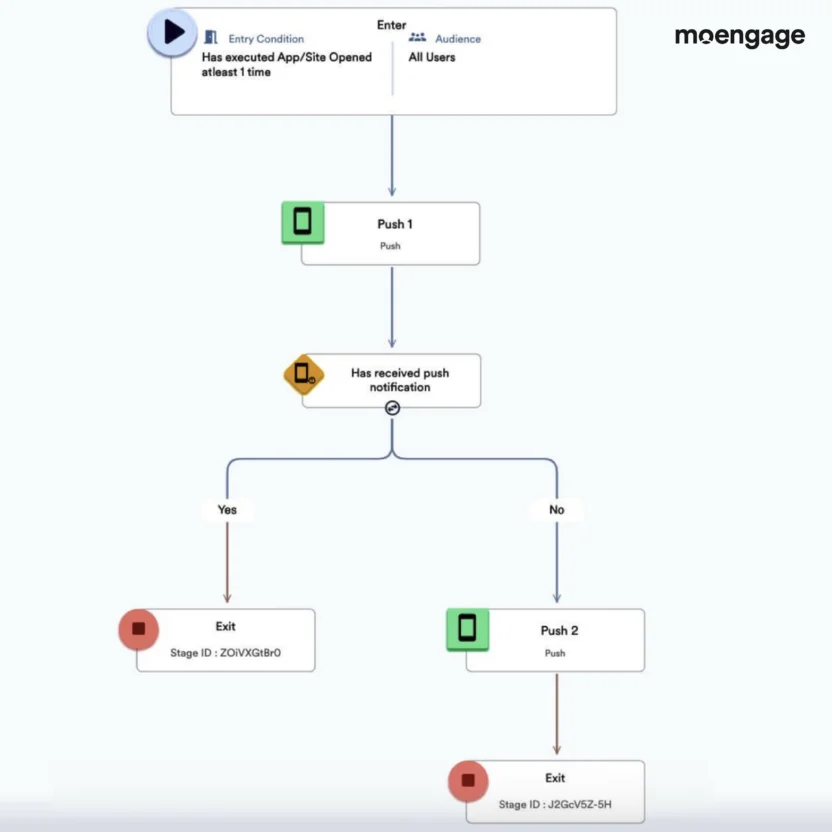
MoEngage Flows is a customer journey mapping tool where you can build complex customer journeys across 16+ channels on a canvas and optimize drop-offs. It’s part of the campaign workflow in MoEngage, an agentic customer engagement platform with cross-channel marketing built in.
How does that help? Unlike many of the other customer journey mapping software on this list, the platform doesn’t say, “Map journeys. Over and out.” It doesn’t stop at giving you a holistic view of your journeys and their performance.
Letting you auto-send personalized messages based on customer behavior, attributes, and their position in their journeys is where MoEngage shines. This means that you don’t map in one tool and schedule messages to customers based on those journeys. Both happen in one place.
No wonder using MoEngage Flow Versioning helped Poshmark achieve over 30% higher conversions from ‘Listers’ to ‘Sellers’. As for bridalwear brand Cocomelody, engaging their customers with email, SMS, and push through MoEngage Flows boosted their repurchase rate by 27%.
Best for:
Enterprise and mid-market B2C lifecycle marketing teams that need to map omnichannel customer journeys and ensure consistent messaging across all channels
Key features:
- No-code, drag-and-drop visual journey builder
- Over 16 channels, including email, mobile and web push, SMS, WhatsApp, and in-app messages
- Editable Flow Templates built for single-channel or multichannel journeys
- Merlin AI’s Intelligent Path Optimizer, which A/B tests up to 5 branches and re-routes customers to the best-converting path
Pros:
- Maps and sends in one platform
- Behavior-triggered personalization
- Templates speed up setup
Con:
- More than you need for a one-time workshop
2. Salesforce Marketing Cloud: Best for Salesforce-Centric Enterprises
Salesforce Marketing Cloud is the enterprise standard for teams already living in the Salesforce ecosystem. Its Journey Builder designs automated journeys using CRM data across email, mobile, advertising, and service channels.
Key features:
- Journey Builder for automated, personalized paths
- Native connection to Salesforce CRM data
- Cross-channel activation
Pros:
- Deep CRM connection
- Mature, enterprise-grade ecosystem
Cons:
- Complex to set up and maintain
- Typically needs specialist help and a bigger budget
3. HubSpot: Best for Mid-Market Teams That Want CRM and Journeys Together
HubSpot pairs its CRM with marketing automation, so lifecycle stages, deals, and customer interactions feed workflows in one system. It’s a common starting point for growing teams.
Key features:
- CRM records tied to automation workflows
- Customer timelines and lifecycle reporting
- Email, chat, and landing page automation
Pros:
- Easy to learn
- CRM and marketing under one roof
Cons:
- Less depth for high-volume B2C lifecycle programs
- Costs rise as contacts and features grow
Dedicated CX Journey Management Tools
These customer journey tools keep maps, personas, and pain points organized long after the workshop ends. They don’t send messages.
4. UXPressia: Best for Small CX Teams That Want Template-Led Maps
UXPressia is a template-first tool for journey maps, personas, and impact maps. It’s quick to learn, which makes it comfortable when you need a few polished maps and nothing fancier.
Key features:
- Journey map, persona, and impact map templates
- Real-time collaboration
- AI that drafts a first map from your documents
Pros:
- Low learning curve
- Quick to start
- Free plan available
Cons:
- Limited control over colors and fonts
- Free plan caps how many maps you keep
- Integrations and reporting sit on higher plans
Pricing: Per user, from about $36 per month on paid plans, per its published pricing.
5. Smaply: Best for CX Teams Visualizing Pain Points Across Journeys
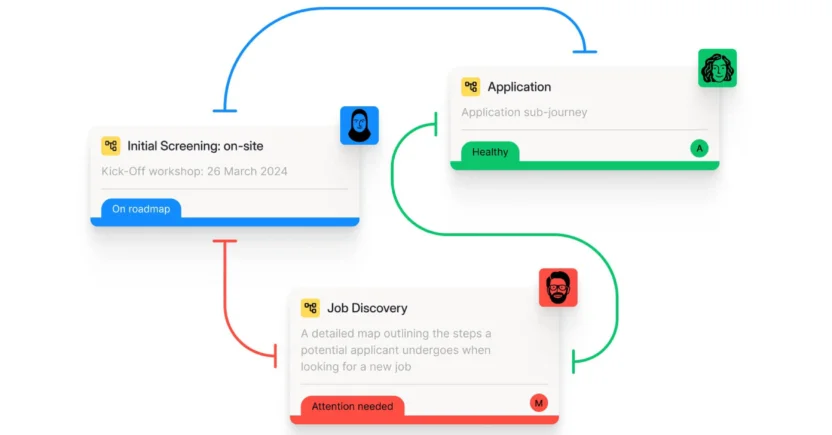
Smaply is software for customer journey mapping, helping you optimize every customer touchpoint. It lets you interlink journey maps, build a structured journey map repository, and analyze each map’s performance, step by step.
Key features:
- Drag-and-drop Journey Map Editor with real-time collaboration
- Pain point and solution cards
- Persona Builder linked directly to maps
- Reusable, customizable templates
Pros:
- Built specifically for journey mapping
- Links maps into a repository
- Free plan available
Cons:
- Gets slow as maps grow
- Advanced research features sit on higher plans
- Overbuilt for a single workshop
Pricing: Per editor, with viewers as a separate seat type. Published figures vary by source, so check the live page.
6. TheyDo: Best for Enterprises Running Journeys as a Program
TheyDo is built for big organizations that treat journeys as a company-wide program. It connects journeys to opportunities and improvement work so many teams can work from one source of truth.
Key features:
- Central journey management
- AI-assisted journey creation from research
- Integrations with tools like Jira
Pros:
- Built for scale
- Ties journeys to prioritized work
- Unlimited editors
Cons:
- Enterprise pricing, with no free plan for management features
- Steep onboarding
- Overkill for lean teams
Pricing: Quote-based. Its last published figures, from early 2024, started around $33,000 a year.
Whiteboard and Diagramming Tools
These are the fastest way to get a first map on the wall. They’re also where maps go to gather dust.
8. Miro: Best for Brainstorming and Diagramming Journey Maps
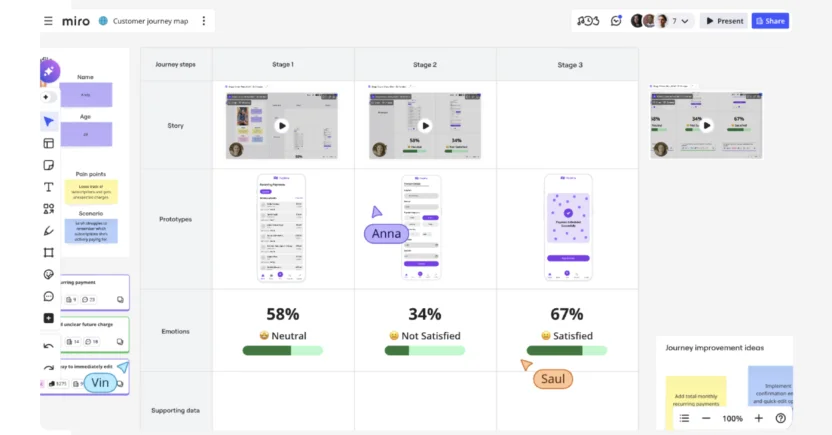
Want to brainstorm and share your ideas on a collaborative whiteboard workspace? Be Miro’s guest.
Whether you need to build funnel maps or develop a simple journey roadmap, Miro helps you create a journey map from scratch or use their pre-designed templates. In fact, Miro Journeys is one of the few customer journey mapping solutions on this list that can help you spot pain points.
Key features:
- Miro AI that turns qualitative and quantitative feedback into next steps
- Over 3K diagramming shapes
- Sticky notes, polls, voting, and comments for async or live collaboration
Pros:
- Fastest route to a first map
- Huge template library
- Everyone already has an account
Cons:
- Whiteboard setup can be time-consuming
- Slows down as boards fill with images
- Each board stands alone, so maps go stale
9. Mural: Best for Facilitated Workshops With Large Groups
Mural is Miro’s closest rival, built for facilitated sessions. Timers, voting, and private mode help a big group contribute without anchoring on the loudest voice in the room.
Key features:
- Timers, voting, and private mode
- Structured workshop templates
- Infinite canvas
Pros:
- Great facilitation tools
- Free tier with view-only visitors
Cons:
- A mural is a canvas, not a journey, so nothing persists as data
- No ownership or measurement layer
10. Lucidchart: Best for Process-Heavy Journeys and Swimlane Diagrams
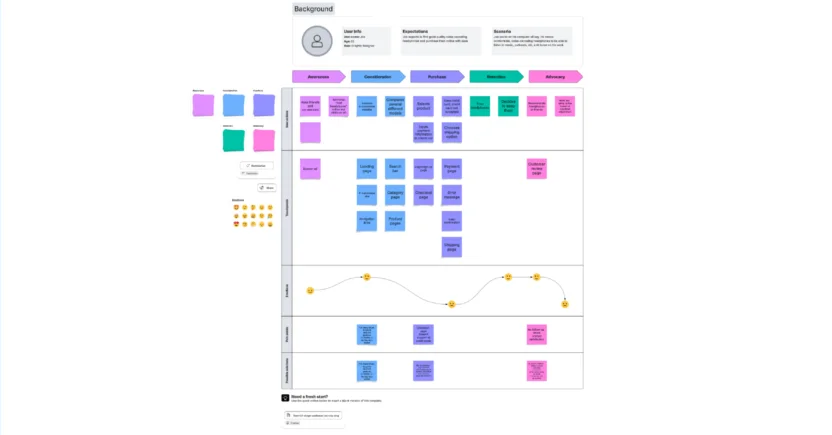
If you’re looking for a customer journey map builder that allows in-editor chatting and real-time collaboration, Lucidchart is the ideal tool for your brand. You can drag and drop multiple shapes on the infinite canvas while building a journey map. Customizing a journey map from Lucidchart’s template gallery is also an option if you don’t want to build a map from scratch.
Key features:
- Lucid AI that generates maps from prompts or imported data
- Conditional formatting to highlight patterns
- Swimlanes and process diagrams
Pros:
- Strong for process-heavy journeys
- Easy to share across the organization
Cons:
- Doesn’t act as more than a whiteboard
- Less journey-specific than UXPressia or Smaply
11. FigJam: Best for Product and Design Teams Already in Figma
FigJam is Figma’s whiteboard and the natural home for journey mapping on design teams that already live in Figma. The output looks good with little effort.
Key features:
- AI-assisted journey creation from a prompt
- Large community template library
- Cheap collaborator seats
Pros:
- Maps sit next to the designs they inform
- Great real-time collaboration
Cons:
- Static artifact once the session ends
- Nothing links a journey to delivery or measurement
Behavior Analytics and Feedback Tools
These tools show what customers really did and said. They’re a great companion to a map, and they don’t replace one.
12. Fullstory: Best for Product Teams Hunting Digital Friction
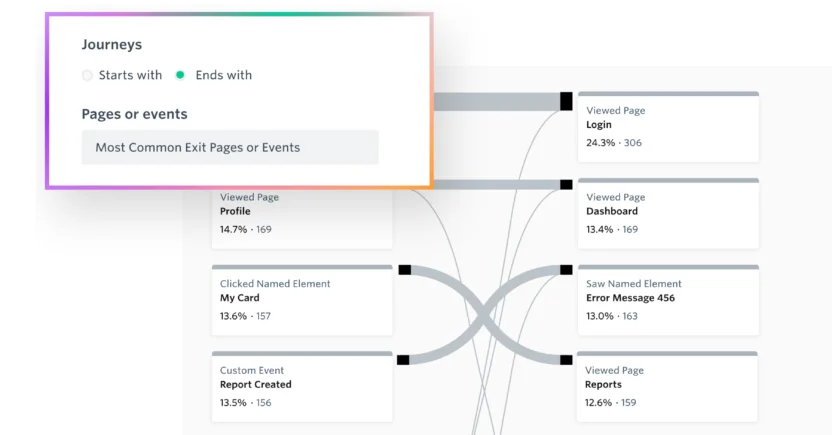
Being a behavioral data platform, Fullstory provides insights into how customers interact with your brand’s apps and websites. Thus, by understanding your customers, you can optimize your workflows to personalize the customer experience using Fullstory Analytics.
Key features:
- Session Replay showing where users scrolled, clicked, or completed forms
- Journey and funnel views by segment
- AI-generated session summaries
Pros:
- Shows the real journey, not the assumed one
- Free plan available
Cons:
- Learning curve for first-time users
- Doesn’t send messages
13. Amplitude: Best for Product-Led Growth Teams
Amplitude is a product analytics platform that visualizes real user paths through your app or site.
Key features:
- Journeys and pathing views
- Funnel and retention analysis
- Cohort tracking
Pros:
- Granular event data
- Spots unexpected drop-offs
Cons:
- Product-focused rather than marketing-focused
- Doesn’t send messages
14. Adobe Journey Optimizer: Best for Enterprises on the Adobe Stack
Adobe Journey Optimizer is Adobe’s journey orchestration platform, built on Adobe Experience Platform. It lets large brands design real-time, cross-channel journeys that trigger from customer events or audiences and draw on Adobe’s unified customer profile.
If your company already runs Adobe Experience Platform, Real-Time CDP, and Adobe Analytics, it’s the natural way to turn those profiles into actual messages.
Key features:
- Journey canvas for event-triggered and audience-triggered journeys
- Cross-channel delivery, including email, push, SMS, and in-app messages
- Real-time customer profile data from Adobe Experience Platform
- Offer and content decisioning for personalization
- Connections to Adobe Analytics, Adobe Target, and Real-Time CDP
Pros:
- Tight fit with the Adobe ecosystem
- Real-time profile data behind triggers and personalization
- Built for enterprise-scale data and governance needs
Cons:
- Reviewers cite a learning curve and usability challenges
- Needs significant implementation resources
- Priced for large organizations
That’s the full lineup of customer journey mapping tools. Now let’s turn it into a decision for your team.
What Features Should You Look for in a Customer Journey Mapping Tool in 2027?
Not all journey mapping software tools have the same features. What it boils down to is: what features does your team need in 2027?
Make two lists: one for must-haves, another for nice-to-haves. See which tools cover your must-haves, then narrow the list with the nice-to-haves.
Nevertheless, some customer journey mapping software features belong on every list.
| Customer journey mapping tool feature | Why It Matters |
| Visual, drag-and-drop builder | Lets anyone on your team build without code |
| Omnichannel tracking | Shows gaps across email, push, SMS, and in-app |
| Pre-built templates | Saves hours when you’re short on time |
| CRM and data integrations | Keeps maps grounded in real customer data |
| Predictive and AI insights | Helps you anticipate the next step |
| Real-time personalization | Changes the message as customer behavior changes |
| Governance and security | Keeps customer data safe as maps multiply (SSO, role-based access) |
| Action and workflow support | Turns a pain point into a task or an automated message |
Here’s what each one means in practice.
1. Visual Journey Builder
Visual customer journey mapping is the foundation of any journey map tool.
At a minimum, the platform should help you organize the journey into stages, actions, touchpoints, channels, pain points, emotions, opportunities, and outcomes.
For example, an Ecommerce customer journey might include:
Discovery > Product research > Product view > Cart addition > Checkout > Purchase > Delivery > Repeat purchase
But a useful map should help your team understand what the customer is trying to accomplish at each stage, what information they need, how they feel, which channel they are using, what could prevent progress, and which internal team owns the experience.
Look for a visual journey mapping interface that supports multiple views. Your marketing team may want a high-level lifecycle view, while your product team may need to zoom in on the onboarding flow and your customer service team may need to see the support handoff.
A strong visual journey map should also make relationships clear. If a customer clicks an email, opens the app, views a product, and then contacts support, the tool should help your team understand how those interactions connect.
This is especially important for enterprise B2C brands. A journey map that works for one product and one audience may become difficult to manage when you add multiple regions, personas, products, and channels.
2. Drag-and-Drop Journey Builder
A drag-and-drop customer purchase journey builder allows marketers to create stages, branches, delays, conditions, touchpoints, and outcomes without writing code.
This matters because customer journeys change constantly. A new product launches. A channel underperforms. A compliance rule changes. A customer segment behaves differently than expected.
But if every update requires a developer, your team will eventually stop updating the journey.
A no-code journey builder should allow you to create logic such as:
- If a customer completes onboarding, move them to education.
- If a customer doesn’t open three messages, reduce communication frequency.
- If a customer purchases, exit the acquisition journey.
- If a customer abandons checkout, send a relevant follow-up.
- If a customer shows signs of churn, start a retention flow.
For marketing teams, the important question isn’t simply whether the platform has a canvas. It’s whether the objects on the canvas actually do something.
In MoEngage Flows, for example, marketers can use the visual canvas to configure real campaign actions, audience conditions, wait steps, conversion goals, and journey branches.
3. Omnichannel Journey Mapping
Customers rarely stay in one channel. They may discover your brand through paid media, browse on a mobile device, open an email on a laptop, receive a push notification, complete a purchase in your app, and contact support through chat.
Your customer journey mapping tool should help you see those interactions as one connected experience.
Look for support for common messaging channels such as email, mobile push, SMS, WhatsApp, in-app messaging, web push, web personalization, paid media, websites, mobile apps, customer support, and offline interactions.
A channel-by-channel report can make each team look successful while the overall customer experience quietly falls apart. Email may report strong open rates, push may report strong clicks, and paid media may report efficient acquisition. But customers may still abandon during onboarding.
An omnichannel customer journey view helps you understand how those interactions influence one another.
For B2C brands, this also means checking whether the platform can manage frequency caps, channel fallback, opt-outs, regional rules, and customer preferences.
3. Customer Profiles and Segmentation
A customer journey is only as relevant as the audience entering it.
The customer journey mapping software platform should let you build journeys around customer attributes and behaviors such as lifecycle stage, purchase history, engagement level, product interest, location, device, subscription status, customer lifetime value, churn risk, and previous campaign activity.
It should also support both real-time behavior and historical data.
For example, a customer may have just abandoned checkout, but they may also be a high-value customer who has purchased from your brand five times. Those facts should influence the next interaction.
A strong platform should allow you to combine customer attributes with behavioral events. This lets you create segments such as:
“Customers in the United States who viewed running shoes twice, added a product to their cart, haven’t purchased in 24 hours, and have engaged with at least one email in the last 30 days.”
That level of detail helps your team avoid sending generic messages to customers who are at very different stages of the journey.
4. Real-time Personalization
Static journeys treat every customer the same. Real-time personalization changes the next interaction based on what each customer does, when they do it, and what your brand already knows about them.
For example, a customer who opens an email may receive an in-app message. A customer who ignores several messages may enter a lower-frequency flow. A customer who completes onboarding may receive advanced product education. A customer who shows churn signals may receive a retention experience.
Real-time personalization can also influence channel, timing, content, offer, frequency, and journey path. This is where customer journey mapping becomes customer journey orchestration.
The customer journey mapping tool should allow you to test whether personalization improves conversion, retention, engagement, revenue, or customer satisfaction. Personalization that can’t be measured is just a very confident guess, isn’t it?
5. Journey Analytics and Reporting
Your platform should help answer questions like:
- Where customers drop off
- Which path generates the highest conversion rate
- Which channel performs best at each stage
- Which segments need different messaging
- How long customers take to move between stages
- Which journeys improve retention or repeat purchase.
Good reporting works at the step level, not just the journey level. A journey-wide conversion rate tells you something is wrong. A step-level view tells you where.
Look for splits by channel and by segment, revenue tied to the journey, and some way to prove the journey worked, such as a control group that doesn’t receive the messages. Without a holdout, you can’t tell whether customers converted because of your journey or in spite of it.
Behavioral analytics tools such as Fullstory and Amplitude show what customers did. A sending platform should connect journey activity to business outcomes.
If a tool can’t connect journey activity to business outcomes, it may be a visualization tool, not a complete customer journey platform. To test that out, try this question in the demo: “Which step lost the most people last week, and was it the message or the timing?”
6. Templates and Prebuilt Workflows
B2C customer journey map templates help teams move faster. Useful templates include welcome journeys, onboarding journeys, abandoned cart journeys, browse abandonment journeys, trial conversion journeys, subscription renewal journeys, re-engagement journeys, post-purchase journeys, churn prevention journeys, and loyalty journeys.
Templates shouldn’t replace strategy. They should give you a useful starting point so you don’t have to reinvent the wheel every Tuesday.
7. AI-Driven Insights and Decisioning
Agentic AI in marketing can help marketing and CX teams move faster by summarizing customer feedback, identifying common drop-off points, recommending journey branches, predicting conversion or churn, selecting the best channel, optimizing send times, personalizing content, and finding high-performing paths.
But AI capabilities vary significantly between platforms.
Some customer journey mapping tools use AI to create a first-draft map. Others summarize research or analyze customer sessions. A smaller group uses AI to make decisions during the journey, such as selecting the best messaging channel, send time, or the next best action for each customer.
Those are different use cases.
AI that draws the journey map can save setup time. AI that analyzes behavior can help you find patterns. AI that makes next-best-action decisions can influence customer outcomes while the journey is running.
But AI-generated journeys still need human review. Don’t let an AI journey run without checking its audience, logic, consent rules, frequency limits, and business goal.
8. Integrations and Data Connectivity
A journey map becomes more valuable when it connects to your existing customer data.
Check whether the platform integrates with CRM systems, customer data platforms, Ecommerce platforms, product analytics, customer support tools, data warehouses, survey platforms, project management systems, and advertising platforms.
Also check whether those integrations are available on the plan you can actually afford. “Integration available” sometimes means “available after a significant upgrade.”
9. Governance, Security, and Compliance
Enterprise and mid-market B2C brands should evaluate role-based access, SSO and SAML, audit logs, workspace controls, consent management (like the new TCPA rules), data retention, regional data hosting, SOC 2 documentation, GDPR and CCPA support, frequency capping, and opt-out management.
A customer journey software platform often handles sensitive behavioral and profile data. Security can’t be an afterthought.
10. Ease of Adoption and Support
A platform can have every feature in the world and still fail if your team doesn’t use it.
Evaluate how quickly a new user can create a journey, understand customer data, collaborate with other teams, launch a campaign, and review performance.
Ask the vendor about onboarding, implementation support, training, documentation, response times, migration support, and customer success resources.
You should also test the platform with the people who will use it daily. A tool that looks simple in a sales demo may feel very different when your team builds a journey with 15 branches, four audiences, six channels, and three conversion goals.
The best customer journey mapping software is the one your team can adopt, govern, and use to improve customer outcomes.
Which is the Best Customer Journey Mapping Tool for Marketers in 2027?
For most B2C marketers, the best customer journey mapping tool is the one that connects the journey map to the messages. That’s why customer lifecycle marketing teams lean toward an orchestration platform like MoEngage Flows.
If your job is workshops and CX documentation, a dedicated mapper like Smaply or UXPressia fits better.
| Your Situation | Start Here |
| Total beginner, small team | Miro or UXPressia |
| Marketing team that needs maps and sends | MoEngage Flows |
| Salesforce or HubSpot already runs your CRM | Salesforce Marketing Cloud or HubSpot |
| Large CX program | TheyDo or Smaply |
| Finding drop-offs on your site | Fullstory |
Here’s how that plays out in the situations we hear most.
Which Customer Journey Mapping Software is Best for Beginners?
Start with a whiteboard. Miro and Lucidchart have templates and a low learning curve, so you can sketch a first map in an afternoon. If you’d rather start somewhere journey-specific, UXPressia (template-led) and Smaply (which has a free plan and a structured editor) are friendlier to a first-timer than a blank canvas.
Just plan for the day your map needs to do something, because that’s when whiteboards run out of road.
If you already know you’ll want the map to trigger messages, skip the detour and look at a platform with ready-made templates from day one.
Best AI-Driven Customer Journey Mapping Platforms for Marketers
“AI-driven” covers three very different jobs, and mixing them up is how teams overpay for a chatbot.
AI that draws the journey map is the most common. Miro AI, Lucid AI, FigJam, UXPressia, Smaply (AI Journey Map Create), and TheyDo can all draft a first map from a prompt or a document. It saves time, but you still have to decide what to do with the map.
AI that analyzes behavior comes next. Fullstory, for example, summarizes sessions and flags friction, and Smaply’s Research Hub turns transcripts and survey exports into insights. These help you understand what happened.
AI that decides what to send is where marketers see results. The tools in this lane include MoEngage, Salesforce Einstein (compare Salesforce vs. MoEngage AI decisioning), and HubSpot (Breeze), which offer features like send-time and channel optimization.
For that third job, MoEngage is the strongest pick because its AI doesn’t stop at drafting a pretty map. It helps you build the journey, decide who gets which message, and learn from the results. Merlin AI, the intelligence layer in MoEngage, is built into the canvas. Here’s what that looks like in practice.
| MoEngage’s Merlin AI Capability | What It Does | Why a Marketer Cares |
| Flows AI Assist | Turns a plain-English prompt into a draft journey, picking events, attributes, and timing from your data | Cuts journey setup from days to minutes |
| Next Best Action (NBA) | Picks each user’s most preferred channel and best send time from their last 60 days of engagement | Replaces “Email everyone Tuesday at 10” with per-person decisions |
| Intelligent Path Optimizer | Tests up to 5 branches and keeps shifting more users to the winner, based on engagement, conversion, or both | Optimizes while the journey runs, without waiting for a test to end |
| Predictions | Forecasts who is likely to purchase, uninstall, or go dormant | Lets you act before customers leave |
| Segment Assist | Builds audience segments from a plain-English description | No SQL, no waiting on a data team |
| Agents | Native agents and Custom agents that audit campaigns, analyze funnels, build drafts, and report on flows, with multi-agent workflows | Handles QC and reporting you’d otherwise do by hand |
NBA is the per-person decision: Merlin AI chooses push, email, SMS, or WhatsApp for each user, with a fallback channel when the preferred one isn’t available. Intelligent Path Optimizer is the journey-level decision: it keeps exploring even after it finds a leader, because the best branch can change over time. Together, they’re the AI decisioning marketers ask about.
The “agentic” part is what separates this from a chatbot bolted onto the side. A Global Agent works across audiences, campaigns, content, QC, analysis, and flows from one plain-language request, and your team can build Custom Agents for repeatable jobs like daily campaign QC.
MoEngage’s MCP server also lets assistants like Claude and ChatGPT work with your workspace, and Context Hub stores your brand guidelines once so outputs stay on-brand.
Which Tools Provide the Best Customer Journey Mapping for Shopify?
If your store runs on Shopify, you want a tool that turns store activity into messages, not just charts. MoEngage, having a native Shopify integration, installs its Web SDK on your store and tracks shopper events. From there, you can engage visitors with web push, on-site messaging, SMS, email, and web personalization.
Its Unified Identity feature can also merge duplicate profiles using identifiers such as email or phone number, including data from Shopify. That matters because the same shopper often shows up as 3 different people: a guest browser, a newsletter signup, and a checkout customer.
Whatever customer journey mapping tool you choose, confirm the Shopify connection in a demo with your own store data.

Best Customer Journey Mapping Software for a Mid-Size SaaS Company With Product and CS Teams
Product and customer success teams need two views at once: what users do inside the product, and what the company says back. Pair a behavior tool such as Fullstory or Amplitude with an orchestration platform, or pick one platform that covers both.
Whichever route you take, put onboarding and renewal journeys in the same view. Otherwise, your product team and your CS team will each be right about a different half of the customer.
What’s the Best Platform for Mapping Onboarding Customer Journeys?
Customer onboarding is where most customers quietly disappear, so you want a platform that starts you off with proven structure.
MoEngage Flow Templates include single-channel and multichannel onboarding journeys. The multichannel version lets you A/B test channels to find the best way to reach new users, and it uses conditional splits to detect a customer’s language and message them in it.
Then comes the measurement. You can set up to 5 conversion goals in one flow, so you can track the small steps (account created, first search, add to cart) on the way to the big one (first purchase).
Stage-level drop-off reporting on the canvas shows you exactly which step loses people. And when the drop-off is the user’s fault – say, a customer ignored 3 emails – the same canvas lets you branch them to another channel.
Which Platform Allows You to Build Cross-Channel Customer Journeys With Drag-and-Drop Tools?
Plenty of tools let you drag a box onto a canvas. The test is what happens after you drop it.
In MoEngage Flows, the boxes are real campaigns. You click the plus sign, pick a channel, and either configure the message or import one you’ve already built, so the canvas is the place where journeys get built and sent.
What makes it powerful is how many ways a journey can split. You can branch on a user property, on whether someone did an event, on a mix of both that produces up to 25 different paths, or on how the customer responded to an earlier campaign.
Add a wait-for condition, and a nudge only goes out if the customer still hasn’t purchased after the delay. The result is a journey that behaves like a smart store associate, not a mass mailing.
Which Customer Journey Tool Has the Best Omnichannel Tracking?
Whether you map one channel or many, the user journey mapping tool should give you full flexibility.
MoEngage Flows is our pick for omnichannel customer experience tracking, and the reason is that it tracks the journey, not just the channels. Three capabilities make the difference.
- First, the channel coverage. Within a single flow, you can combine push, email, SMS, RCS, WhatsApp, in-app, on-site messaging and cards, plus Facebook and Google Ads audiences, and you can bring in anything else through a Connector stage. Whiteboards let you draw those channels. Here, you’re running them.
- Second, the measurement unit. MoEngage counts ‘trips’, where one trip is one user’s complete pass through a flow. That means a customer who gets an email, a push, and an SMS still counts as one engaged trip, so you aren’t comparing apples to three oranges. Trip metrics (active, engaged, converted, drop-offs, and revenue) show on the canvas stage by stage and split by channel, so you can see where people stall and which channel moved them.
- Third, the identity underneath. Tracking falls apart when one human looks like 3 profiles. MoEngage’s Unified Identity merges profiles using identifiers such as ID, email, mobile number, or up to 5 custom attributes. That helps with online-to-offline matching, like someone who browses by email and buys in-store by phone number. You can then segment people who entered a flow or converted in it, using the “User Entered Flow” and “Flow Trip Conversion” events.
Together, that’s one customer, one journey, one scorecard.
Best Customer Journey Software With Real-Time Personalization
Real-time personalized customer experience means the message changes when the customer does. Someone browses sneakers, then buys them, and their next message shouldn’t be a sneaker ad.
The tools most often shortlisted for this are MoEngage Flows, HubSpot, and Salesforce Marketing Cloud. Both support behavior-triggered journeys.
The differences show up in how many channels they cover, how much setup they need, and how well they measure whether the personalization worked. Salesforce leans enterprise and typically needs specialist admins, while HubSpot suits smaller teams that want CRM-led triggers.
MoEngage Flows handles this in 3 ways.
- Behavior triggers start a journey the moment a customer acts, and conditions inside the journey check what the customer did next. A recent engine upgrade lets a flow evaluate a user’s behavior over the last 30 days no matter when they entered. So a customer who joined your onboarding journey a week ago and bought something yesterday gets routed accordingly, not nudged to buy again. The same upgrade honors the exact order of events, even when someone fires several in milliseconds, which stops customers from landing on the wrong path.
- Content personalization pulls from user properties, events, content blocks, and, for business-event-triggered flows, business event properties. A message can say “You left the Nike sneakers in your cart” instead of “You left something behind.” If a property is missing, say a first name, a fallback value you set steps in, so nobody gets a “Hey.”
- Guardrails keep the personalization from becoming spam. Frequency caps and Do Not Disturb windows can be set per flow, and a control group holds back a percentage of users so you can see whether personalization actually beat doing nothing.
Best Customer Journey Mapping Software With CRM and Customer Data Integration
The tools that connect best to a CRM fall into two camps: platforms where the CRM is the foundation, and platforms that plug into whatever CRM you already use. Here are the exact names.
| Tool | How It Connects to Your CRM and Data | Best Fit |
| MoEngage Flows | Documented integrations with Salesforce CRM, HubSpot, Microsoft Dynamics 365 Sales, Zoho CRM, LeadSquared, Freshsales, and Oracle OPERA Cloud, plus CDP and warehouse connections | B2C teams that keep their CRM and want journeys on top |
| Salesforce Marketing Cloud | Built on Salesforce CRM data | Teams all-in on Salesforce |
| HubSpot | Its own CRM, with sync options for Salesforce and Dynamics | Mid-market teams |
| Miro and Lucidchart | Pull CRM data onto a map, including from Salesforce | Teams that map first and activate elsewhere |
So why do we point B2C marketers toward MoEngage?
Because it doesn’t ask you to switch CRMs. It connects to the one you have.
It also helps your team with connections to customer data platforms such as Segment, mParticle, Tealium, RudderStack, Hightouch, and Adobe Real-Time CDP, and to warehouses including Snowflake, BigQuery, Redshift, and Databricks.
And when your journey needs to hand something back, like updating a field in another system after a customer buys, the Connector stage in MoEngage Flows does it from the canvas. Your CRM stays your source of truth, and your journeys stay in sync with it.
Which Platforms Allow Marketers to Build Complex Journeys Without Engineering Support?
You shouldn’t need a developer ticket to add a branch. HubSpot is known for giving marketers visual builders they can run themselves, while Salesforce Marketing Cloud and Adobe Journey Optimizer tend to need specialist admins as journeys get more complex.
Among the journey mapping tools, Smaply, UXPressia, and Miro need no engineering at all, but they stop at documentation.
MoEngage Flows is designed so marketers can build, test, and edit journeys themselves, and three features do most of the work.
Flow Versioning lets you edit a published journey, add stages or change paths, without cloning it and losing your history. Each version keeps its own reporting, so you can see whether the edit helped. Control groups let you prove it: a slice of users go through the flow without receiving messages, giving you a true baseline for how many would have converted anyway. And Merlin AI Flows Assist can draft the structure from a prompt, so you start from a working sketch instead of a blank canvas.
That combination is why a lean team can run a sophisticated program without waiting on sprint planning.
Guest Journey Mapping Software for Hotels
Hotels usually stack tools. A mapping tool like Miro or Smaply lays out the stages from booking to post-stay. A messaging platform handles pre-arrival and post-stay outreach, and it works best when it connects to your property system.
The map shows what the stay is supposed to be, and the data shows what it actually was.
Once you know where you fit, you need to know what to look for.
How to Compare the Best Customer Journey Mapping Tools in 2027
A polished demo doesn’t tell you how a platform will perform with messy customer data, complex paths, and multiple teams.
To compare customer journey mapping software properly, test each platform against real-world scenarios.
Use a sample journey that includes multiple personas, several entry points, cross-device behavior, multiple channels, conditional branches, abandoned steps, repeat purchases, customer support interactions, unsubscribes, and different conversion goals.
Then ask each vendor to demonstrate how the platform handles that journey.
A Useful Customer Journey Mapping Software Comparison Checklist for 2027
| Evaluation area | Questions to ask |
| Ease of use | Can marketing managers build journeys without engineering help? |
| Visualization | Can the platform clearly show stages, branches, touchpoints, and ownership? |
| Data integration | Can it connect to CRM, analytics, commerce, support, and customer data sources? |
| Real-time personalization | Can the next step change based on current customer behavior? |
| Analytics | Can you identify conversion, engagement, drop-off, and retention trends? |
| Templates | Are there ready-to-use onboarding, retention, ecommerce, and re-engagement workflows? |
| Collaboration | Can multiple teams comment, review, and approve changes? |
| Governance | Are permissions, audit logs, SSO, and data controls available? |
| Scalability | Can the platform support more journeys, channels, markets, and customer segments? |
| Migration | Can you import existing maps, workflows, segments, and customer data? |
| Support | Will your team receive implementation guidance and ongoing support? |
| Pricing | Does pricing scale by editor, customer volume, journey count, or channels? |
The strongest platform isn’t the one with the longest feature list. It’s the one your team can adopt, govern, and use to improve customer outcomes.
Best Customer Journey Mapping Software Pricing 2027
Pricing changes frequently, so verify current costs directly with each vendor before making a purchase.
Most customer journey mapping software follows one of several pricing models.
| Pricing model | How it works | What to watch for |
| Per user or editor | You pay for each person creating or managing journeys | Viewer and collaborator costs |
| Per journey | You pay based on the number of journeys managed | Portfolio growth can become expensive |
| Per customer volume | Pricing is based on profiles, events, or active users | Data volume and overage fees |
| Per message or channel | Pricing depends on sends or activated channels | Costs can rise with campaign scale |
| Per workspace | One fee covers a workspace or project | Limits on users, exports, or integrations |
| Custom enterprise pricing | The vendor prices the package based on scope | Implementation and support costs |
For marketing teams, pricing should be evaluated against business value, not just license cost.
A cheaper customer journey mapping tool may still become expensive if your team needs separate tools for customer analytics, segmentation, campaign execution, personalization, testing, reporting, and journey optimization.
An all-in-one customer engagement platform can sometimes reduce operational complexity, even if its initial subscription cost is higher.
How to Choose Software for Seamless Customer Journey Mapping
Start with the outcome, not the tool.
Ask what you want to improve during the next 6 to 12 months. You may want to increase trial conversion, reduce onboarding drop-off, improve repeat purchase, reduce customer churn, increase subscription renewal, improve app engagement, personalize Ecommerce journeys, coordinate cross-channel campaigns, or improve customer satisfaction. Whew, that’s a lot!
Then decide which category best matches your need.
| Primary goal | Best-fit journey mapping tool category |
| Run a journey workshop | Miro, Mural, or FigJam |
| Document business processes | Lucidchart |
| Build professional CX maps | Smaply or UXPressia |
| Analyze digital behavior | Fullstory or Amplitude |
| Activate personalized B2C journeys | MoEngage Flows |
| Manage enterprise journey portfolios | Smaply or TheyDo |
For most B2C marketing teams, the ideal setup isn’t necessarily one tool for everything.
A practical stack may look like this: research and map the experience, validate behavior with analytics, activate personalized journeys, measure outcomes, and optimize the next interaction.
4 Mistakes to Avoid When Choosing a Customer Journey Mapping Tool
Most teams who regret their pick don’t regret a missing feature. They regret how they chose. Here are four patterns worth dodging.
1. Choosing for the Workshop Instead of the Year
The tool that wins the demo usually feels best in a live session. The cost arrives later, when someone asks which journeys are current and who owns the worst one. Judge the tool on the boring six-month questions.
2. Buying Seats for People Who Only Need to Look
Journey work involves far more readers than editors. Some tools charge per member regardless, some separate editors from viewers, and some are flat rate. Count both groups before you compare prices.
3. Ignoring Which Plan the Integrations Sit On
Integrations, exports, and SSO are the most commonly gated features. Check the plan you plan to buy, not the feature list on the marketing page.
4. Treating Research as Something That Happens Elsewhere
Most tools let you attach a quote to a card. Fewer help you go from a pile of interviews to a defensible set of insights. If your maps are built on opinion, close that gap before you buy.

Customer Journey Mapping Tools: How to Pick the Right One and Win in 2027
Understanding customer behavior and pain points makes it easier to get value from customer journey mapping tools. The right ones give you data from every touchpoint and channel, so you can map journeys in detail, boost conversion rates, and improve the experience.
Whiteboards like Miro, Mural, Lucidchart, and FigJam are great for workshops. CX tools like UXPressia, Smaply, and TheyDo keep journeys documented. Analytics tools like Fullstory and Amplitude show where customers drop off.
And if you want the map to turn into real messages, an orchestration platform like MoEngage Flows closes the loop. While building a journey on the MoEngage Flows canvas, you can set triggers that automate campaigns at each touchpoint.
Sound exciting? Schedule a live demo to see how customers really interact with and navigate your product’s app or website.


