




How to Build Dynamic Content for Personalized Marketing Campaigns Using Merlin AI Jinja Assist
You have the real-time behavioral events and rich user profiles, but turning that data into personalized code requires developers, causing massive bottlenecks. Because of this, almost every campaign brief has a brilliant personalization element that never quite makes it to the final send.
The Personalization Paradox:
- 70.51% of teams have access to real-time customer behavioral data.
- 47% of marketers are still stuck executing basic, outdated (2022-era) personalization tactics due to developer bottlenecks.
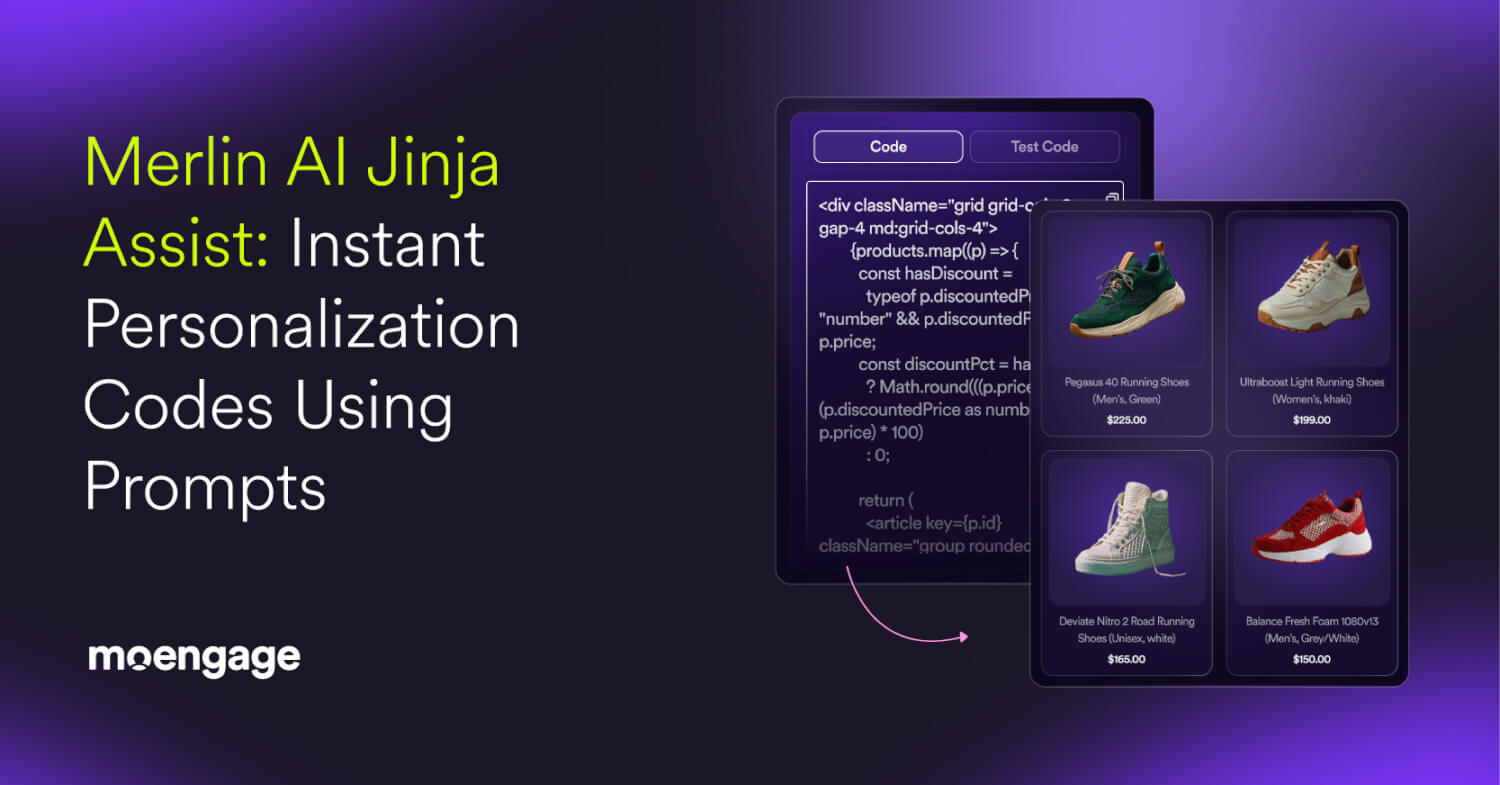
MoEngage Merlin AI Jinja Assist removes this friction entirely by turning your intent in plain English into functional Jinja code. Using directions from your prompt, the agent maps your user data, writes complex if/else logic on the fly, and formats the final code for any channel, from HTML emails to mobile push. You activate your data instantly, without ever waiting on an engineering ticket.
| 💡 Jinja is a templating language used to create dynamic content by filling in placeholders with real-time customer data. |
Why Use a Jinja Generator Over Hand-Coded Templates?
When learning how to create personalized marketing content, relying on a manual snippet library or a syntax cheat sheet slows you down. To truly personalize marketing content at scale, you need an automated jinja code generator that understands your data ecosystem.
MoEngage Merlin AI Jinja Assist is an intelligent agent built specifically around how personalization data lives inside MoEngage. This shifts the paradigm in five distinct ways:
- Generates Complex Logic Automatically: You describe the personalization you want in plain English, and the agent writes the nested loops, conditionals, and formatting.
- Drastically Reduces Errors: The generated code is optimized for MoEngage’s specific Jinja implementation, making it far less error-prone than hand-written snippets.
- Refines Content Instead of Restarting: Layer a new instruction onto an existing prompt and the agent folds it into the same block of code. Campaigns grow more sophisticated without anyone rewriting the code from scratch.
- Eliminates Technical Dependency: Discover how to build dynamic content blocks without routing advanced personalization through a developer queue, removing the single biggest bottleneck to your go-to-market speed.
- Teaches Your Team as It Builds: Every piece of generated code ships with a plain-language explanation, so your team understands the logic and gets more fluent in data personalization over time.
5 Ways to Personalize Marketing Content Using Jinja Assist
Under the hood, this advanced Jinja Generator works seamlessly across user attributes (stored properties), event and campaign attributes (triggered parameters), and product recommendation sets.
If you are figuring out how to create personalized marketing messages, here are a few popular use cases to deploy:
1. Dynamic Product Recommendations
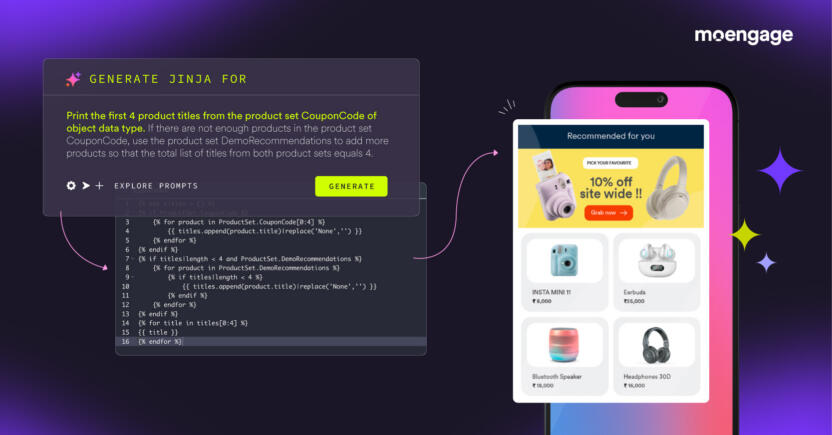
Direct the agent to generate Jinja that displays multiple products tailored to each user. You can pull in a user’s exact abandoned-cart items or render a personalized grid of trending products with titles and descriptions cleanly truncated to fit your layout.
2. Hyper-Targeting by Profile and Demographics
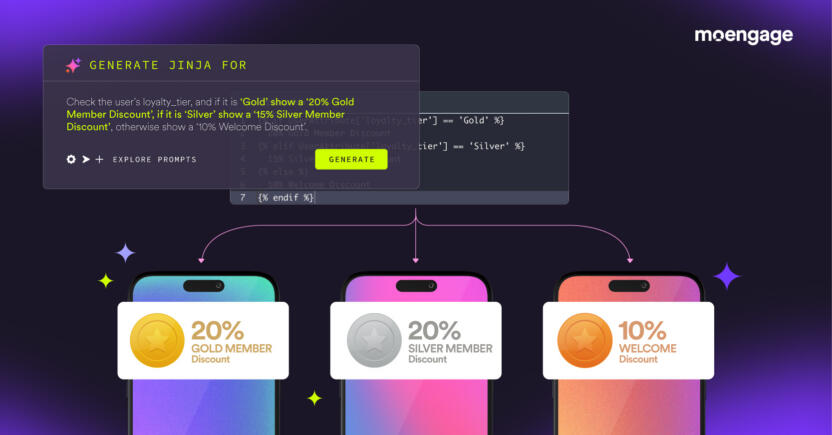
Prompt the agent to build logic-based rules that automatically swap language, imagery, and offers based on a user’s properties. This allows you to tailor the entire campaign by loyalty tier, gender, or preferred regional language.
3. Event-Triggered and Time-Sensitive Logic
Generate conditional code triggered by recent behaviors or specific dates. Automate birthday countdowns, format local time zones, or inject dynamic flight destinations and hotel details the moment a user triggers a booking event.
4. Live Calculations and Financial Summaries

Ask the AI to run inline math at the moment of send. You can calculate exact discount percentages, convert loyalty points to cash value, or generate dynamic portfolio balances and monthly spending recaps.
5. External API Fetching and Global Formatting
Rely on the agent to call external APIs for real-time data, such as live catalog updates or external hotel prices, and automatically format the exact spacing, currency symbols, and number styles for every individual global shopper.
What Is The Anatomy of a Perfect Jinja Prompt?
To master how to generate personalized content, you don’t need to learn coding; you just need to structure your intent clearly. The single biggest driver of high-quality output when using ai personalization in marketing messages is specificity. You must name the exact attribute, state the personalization type, and spell out what should happen if data is missing.
Consider the difference one sentence makes:
| ❌ “Titles & descriptions from similar items. Truncate descriptions if descriptions are over 50 characters.”
✅ “Show 6 titles & descriptions from Product Set Similar_Items. Truncate descriptions to a length of 50 characters. If fewer than 6 exist, fill the rest from Product Set Trending_Now.” |
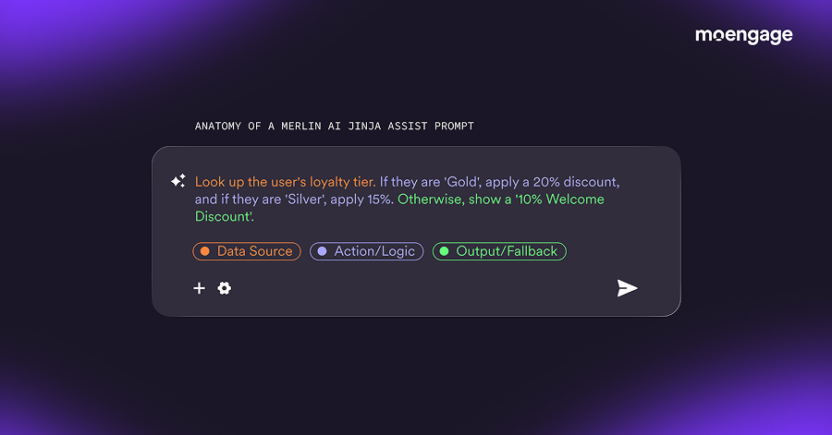
The fix is the 3-Part Personalization Formula: [Data Source] + [Action / Logic] + [Output / Fallback]
See It in Action: Merlin AI Jinja Assist Demo
The real power of MoEngage Merlin AI shows up when a campaign gets more demanding mid-build, and you don’t have to start over. Here is how a recommendation block comes together in a single sitting.
Step 1: Start Simple
A marketer types a natural language prompt into the dashboard:
Build a recommendation block using the product set ‘Recommended Items’. Include the product image, title, and price. Make the price blue and the title bold, add a $ sign before the price, size the images uniformly, add a horizontal line after each item, hyperlink the title and image, and limit to 6 products with 3 in a row.
Notice how much formatting detail rides along in plain English—color, weight, currency prefixes, image sizing, dividers, links, and a layout grid. In a few seconds, the MoEngage Merlin AI Jinja Generator returns the full code. The marketer opens Test Code, selects a test user, and previews a working block layout exactly as specified.
Step 2: Raise the Bar Without Re-coding
Now the team wants a loyalty discount applied, with the original price struck through. Instead of rewriting anything, they return to the same prompt and layer on one statement:
Also calculate and reduce the price of every product if the user redeems their loyalty points. Deduct loyalty_points × loyalty_multiplier from the loyalty_tier object, and show the old price with strikethrough formatting.
The Jinja Code Generator folds the new instruction into the existing code, reading values out of an object attribute, running the inline math, and applying the strikethrough formatting.
When previewed for a Platinum member with 670 loyalty points and a 0.03 multiplier, every product is dynamically marked down by roughly $20, with the original price crossed out beside it. Marketers can simply test on a real user, layer on more logic, and click Copy Code directly into the email builder.
How Global Brands Scale Dynamic Content Using Jinja Assist
Real-world brands are already shifting away from static workflows to embrace automated personalization.
Thomas Cook
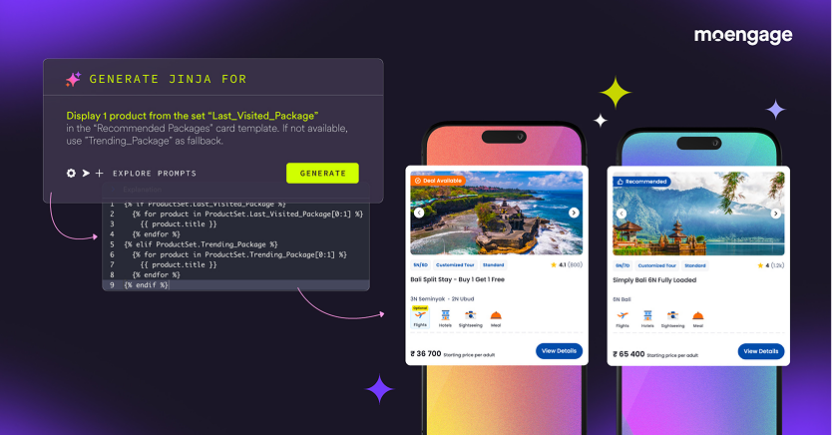
Travel leader Thomas Cook uses the MoEngage Merlin AI Jinja Assist feature to personalize travel recommendations the moment a campaign goes out. Instead of submitting a ticket to a developer queue, marketing teams use natural language to surface the right vacation packages, top beach hotspots, and most-traveled destinations tailored to each traveler.
The Result: Thomas Cook achieved a 20% higher engagement rate on campaigns deployed with this dynamic personalization engine.
Merlin AI Jinja Assist Prompt Toolkit
The behavioral data and rich profiles are already sitting inside your account. MoEngage Merlin AI Jinja Assist is what finally lets you act on them at the speed of a campaign brief. By learning how to build dynamic content through simple English prompts, you eliminate developer dependencies, test variants instantly, and ship deeply personalized experiences the same day.
Access over 400 copy-and-paste prompts for every Merlin AI agent in the Merlin AI Operations Toolkit, and start executing faster today.