


How to Generate Marketing Visuals At Scale With MoEngage Merlin AI Designer

In lifecycle marketing, high-quality visuals are expected at every touchpoint, in every format, for every campaign. Traditional design workflows don’t scale to this. The design queue has killed more campaigns than any bad brief: the concept is ready, copy is approved, the launch date is set, and then you wait. When visuals finally arrive, they need resizing, the background doesn’t match the seasonal theme, and the logo placement is off for mobile.
MoEngage Merlin AI Designer is an AI marketing creative generator built directly into your campaign creation screen. It lets you generate on-brand creatives instantly, without sacrificing the creative control that protects your brand.
Why Marketers Need an AI Image Generator for Marketing
According to the Resilient Marketer Report,
| 41.01% of marketers now use AI to generate creative assets, with 66.21% citing improved operational speed as their primary metric for success. |
The market is clearly in a productivity-first phase. But speed without brand consistency creates a different kind of problem. As a native AI image generator for marketing campaigns, Merlin AI MoEngage Generative AI engine is built for both, instant generation with your brand guidelines built in.
What You Can Do With MoEngage’s Merlin AI Designer Agent
This platform isn’t just a generic image builder; it acts as a true AI agent for creatives, seamlessly fitting into a marketer’s daily campaign building flow without switching tabs.
Put Your Hero Product in Multiple Backgrounds
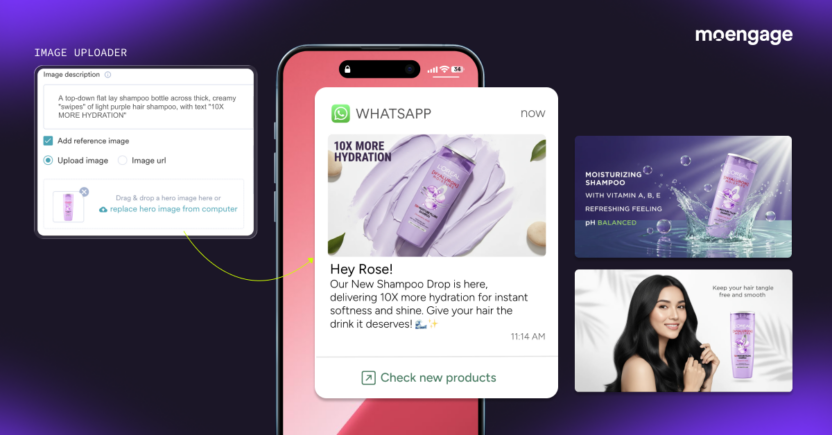 Upload a product image and use text prompts to instantly generate it against various backgrounds. It dynamically isolates your product asset and places it in fresh, high-converting contexts, without a costly photoshoot or a designer.
Show Different Products in One Theme

Have the AI take all your different products and place them into a single, fixed background, perfect for quickly building out cohesive visual collections for seasonal or thematic campaigns.
Display Same Product Category in Seasonal Thematic Settings

Prompt the agent to take items from a single product category and generate fresh creatives with different seasonal settings that automatically adjust to the specific context you provide.
Create Perfect Creatives for Every Feed

Rely on the Designer to instantly adapt and generate campaign images in every required size (1:1, 9:16, etc.) while keeping your core design and messaging perfectly aligned.
Generate Hyper-Local Visuals and Multilingual Banners

Command the AI to create demographic-specific visual styles that incorporate local cultural references, and generate banner text in multiple languages, so each image resonates with regional targets both visually and linguistically.
Get Perfect Logo Placement
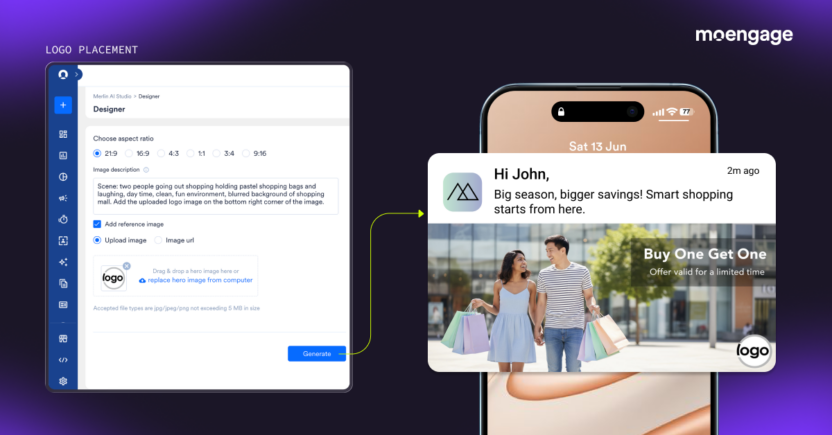
Provide your logo file and instruct the AI to handle automatic or manual logo placement perfectly within your new designs.
Get Flawless Text Rendering
One of the hardest things for a generic marketing image generator to do well is render crisp, legible text on a banner. MoEngage Merlin AI Designer handles this natively, generating visuals with perfectly rendered headlines, CTAs, and body text that are always clear, visually sharp, and free of spelling errors.
Prompt Enhancer
Instead of you having to write a perfect prompt to get a great image, Merlin AI’s integrated prompt enhancer automatically refines your basic image description, adding rich detail and nuance, before generating, so even a simple idea produces a polished, on-brief visual.
How the Merlin AI Engine Learns Your Visual Identity
Merlin AI Designer doesn’t require you to manually feed it a style guide every time. It learns your visual identity automatically.
Through an automated, asynchronous process, MoEngage Merlin AI Designer scans your uploaded image gallery and previously used campaign templates to identify recurring visual patterns and design choices. It then codifies your brand’s visual DNA across five core parameters:
- Brand Color Palette: your primary and secondary colors for color harmony across every generated asset
- Visual Style & Mood: the overall aesthetic, whether minimalist, vibrant, professional, or energetic
- Background Elements: preferred textures, gradients, or compositional framing
- Imagery Style: whether your brand uses photography, 3D renders, or flat illustrations
- Typography Guidelines: font weights and text placement drawn from your previous creatives
When you enter new visual instructions for a campaign, the Designer AI Agent blends your specific requirements with these learned guidelines. Every generated image, from push icons to email banners, is instantly recognizable as your brand, without manual design reviews or style guide lookups.
What Is The Anatomy Of A Perfect Merlin AI Designer Prompt?

To extract the maximum value out of this AI image generator for marketing, use our 5-Point Formula to give your design agent exact instructions:
- Hero Product: What you want featured, with any relevant details.
- Background/Setting: The environment or scene you want the product placed in.
- Mood/Style: The visual tone: aspirational, minimal, festive, contextual, etc.
- Format: The output dimensions or aspect ratios you need.
- Brand Elements: Logo placement, color palette, or any specific brand guidelines to apply.
Explore specific seasonal design prompts in the Merlin AI Prompt Toolkit.
How Customers Are Using Merlin AI Designer
Real-world B2C brands are moving past conceptual design bottlenecks and translating Moengage Merlin AI capabilities directly into accelerated campaign metrics.
Thomas Cook
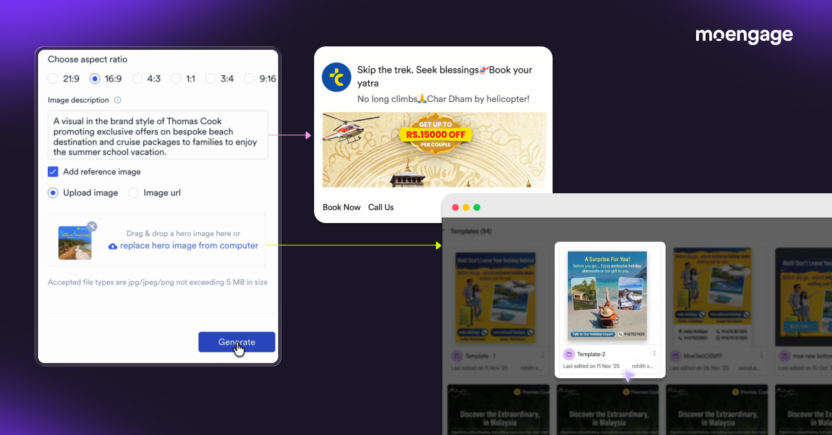
Created campaign visuals in 5 to 10 minutes instead of hours, achieving 90% faster go-live times.
Coca-Cola Malaysia
Used Merlin AI Designer to generate high-converting Chinese New Year creatives in seasonal colors, multiple variants, localized for the Malaysian market, in under 10 minutes, achieving 3x faster go-live rates.
| “We generated high-converting, festive creatives in 10 minutes, significantly boosting our campaign performance.”
Nadine Ng, Head of eB2B Singapore & eB2B Digital Engagement, SG & MY |
Merlin AI Designer Prompt Toolkit
Ready to put this into practice? Access over 400 copy-and-paste prompts for every Merlin AI agent in the Merlin AI Operations Toolkit, and start executing faster today.