



Braze vs. Iterable vs. MoEngage: Which Customer Engagement Platform is Best for Your Team? [2026]
![Braze vs. Iterable vs. MoEngage: Which Customer Engagement Platform is Best for Your Team? [2026]](https://www.moengage.com/wp-content/uploads/Braze-Iterable-MoEngage-comparison.png)
Are you a B2C marketer staring at a blank RFP spreadsheet and debating which to choose among Braze vs. Iterable vs. MoEngage? Chances are, you’re here for one or all of three reasons:
- You’re evaluating these customer engagement platforms (CEPs) to shortlist vendors for your buying committee.
- You’re switching from another CEP that’s starting to feel outdated, expensive, or too complex.
- You want one platform that actually delivers personalized, cross‑channel journeys without burning weeks in setup or relying on your tech team for every single change.
Picking the wrong CEP means wasted budget, slower campaigns, and frustrated stakeholders. Picking the right one means faster launches, happier customers, and measurable growth. And while you’re at it, why not compare MoEngage with Braze or see how Iterable differs from MoEngage, just to gain a deeper understanding?
Thankfully, this guide cuts through the noise for your marketing team by summarizing the differences among all three platforms. You’ll see exactly how Braze, Iterable, and MoEngage handle the most important marketing use cases — omnichannel orchestration, segmentation and personalization, analytics, AI capabilities, integrations, ease of use, security, and real customer feedback — so you know which to shortlist before you hit “Send RFP.”
|
TL;DR
|
Braze vs. Iterable vs. MoEngage: Feature Comparison at a Glance
Here’s a feature comparison table that highlights Braze, Iterable, and MoEngage’s core capabilities, covering the categories B2C marketing teams care about most — from AI tools and campaign analytics to data security. Use it to quickly see which platform’s strengths align with your growth stage before adding any of these vendors to your shortlist.
| Feature Category | Braze | Iterable | MoEngage |
| Journey Orchestration | Visual Canvas with advanced branching; steep learning curve | Drag-and-drop Studio with version control; manual advanced logic | No-code MoEngage Flows with AI path optimization; marketer-friendly |
| Segmentation | 100+ real-time filters, nested logic, SQL-powered segments | Flexible query builder; dynamic lists refresh on schedule, not real-time | Real-time behavioral & affinity filters; instant refresh; built-in RFM |
| Personalization | Liquid templating; dynamic content from events or external data | Handlebars templating (coding required for complex logic) | Real-time engine; no-code; A/B testing with AI auto-optimization |
| Campaign Analytics | 15+ dashboards; SQL needed for custom reports | Clean, intuitive UI; last-touch attribution only; no anomaly detection | Built-in product analytics; funnel & retention cohorts; actionable click-to-segment |
| AI Capabilities | BrazeAI suite; most advanced features are premium add-ons or need a 30K-100K+ audience | Copy & journey AI; predictive tools need 100K+ customers; manual winner selection | Merlin AI; no audience minimums; automated optimization |
| Data Security & Compliance | AES-256 encryption; ISO 27001, SOC 2 Type 2, HIPAA; GDPR/CCPA tools | AES-256, TLS 1.2+; ISO 27001, SOC 2 Type 2, HIPAA-assessed; GDPR/CCPA APIs | GDPR/CCPA APIs; PII masking, encryption, and patented tokenized sending; regional data centers (UAE, Qatar, KSA) |
| Best For | Enterprise brands with dedicated technical & data science teams | Mid-market teams that value ease of use and flexible journey management | Mid-market to enterprise B2C brands that need marketer-driven, AI-native customer engagement |
How Braze, Iterable, and MoEngage Handle Key Marketing Use Cases
When you’re deciding among Braze vs. Iterable vs. MoEngage, skimming feature lists isn’t enough. You need to see how each platform actually performs in the real‑world scenarios that matter most to your marketing team in particular.
In this section, we’ll break down the big use cases — omnichannel journeys, segmentation and personalization, analytics, AI optimization, and data security — showing where each of these vendors shines, where they struggle, and how that can impact your day‑to‑day campaigns.
Omnichannel engagement and journey orchestration
For B2C brands, this is where your messaging either clicks with customers or feels like spam. Customer journey orchestration determines whether your email, SMS, push, WhatsApp, in‑app, and ads work together in a smart, timely way… or go out in silos, leading to missed opportunities.
That said, let’s compare how Braze, Iterable, and MoEngage actually handle connected journeys, trigger timing, and AI optimization, and whether you need tech help to launch them.
| Capability | Braze | Iterable | MoEngage |
| Visual Journey Builder | Braze Canvas drag-and-drop with branching paths | Journey Studio drag-and-drop with version control & duplication | MoEngage Flows visual canvas with AI-assisted path selection |
| Channels Supported |
|
|
|
| Trigger Types | Real-time events, schedules, API triggers | Events, schedules, API calls | Real-time behaviors, schedules, chained journey triggers |
| AI Path Optimization | Intelligent Timing (48hr lead time); no real-time path decisioning | Journey Assist auto-generates structures; no real-time AI decisioning | Intelligent Path Optimizer tests up to 5 paths simultaneously; real-time winner selection |
| Pre-Built Journey Templates | Yes, for common use cases | Yes; reusable across projects | Yes, full lifecycle (onboarding, churn, re-engagement) |
| Frequency Capping | Yes, global prioritization built in | Yes | Yes |
| Transactional API | Email only; <1 min SLA | Yes, across channels | Yes, across channels |
| No-Code Friendly | Moderate – advanced features require ramp-up | High – designed for marketers | High – no developer dependency for advanced flows |
How does Braze handle omnichannel journey orchestration?
Braze lets you build multi-step customer journeys using Canvas, a drag-and-drop visual builder where you map out entire campaigns — from entry triggers (like “user abandoned cart”) to branching paths based on real-time actions (like “clicked email but didn’t purchase, so send SMS 2 hours later”). You can orchestrate every channel from one interface: email, push, in-app messages, SMS, WhatsApp, web push, Content Cards, webhooks, and even Facebook Custom Audiences.
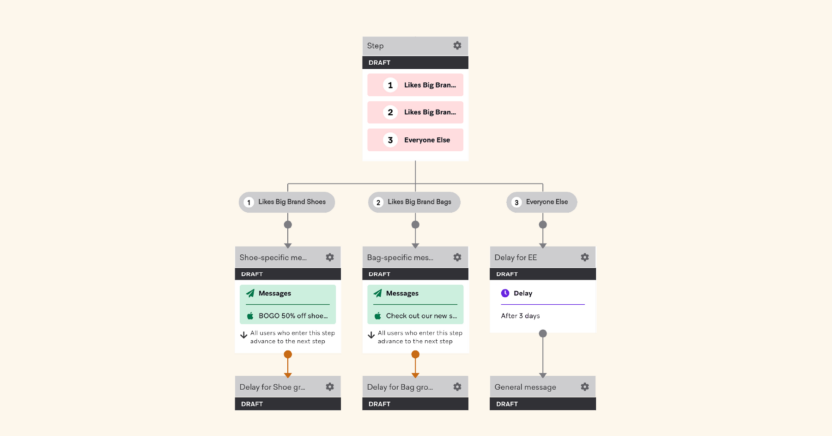
Source: https://www.braze.com/docs/user_guide/engagement_tools/canvas/canvas_components/audience_paths/
You can design complex campaigns (like onboarding flows or re-engagement sequences) in minutes using pre-built templates for common use cases. Frequency capping and global message prioritization prevent customers from getting bombarded when they’re eligible for multiple campaigns simultaneously, reducing unsubscribes.
The catch? You can use Braze’s transactional API only for emails, and that too, with a service level agreement (SLA) of less than a minute.
Plus, Canvas’s flexibility can feel overwhelming at first. Your team will need ramp-up time to master advanced features such as journey branching, holdout groups, and cross-channel orchestration.
What channels and journey features does Iterable support?
Iterable gives marketers a single workspace to build, manage, and optimize customer journeys across channels like email, SMS, push notifications, in-app messages, web push, WhatsApp, embedded messages, and in‑browser campaigns.
Its drag‑and‑drop Studio lets teams map out customer flows step‑by‑step, trigger messages based on events, schedules, or API calls, and insert conditions, delays, and split paths to personalize experiences.
The platform’s Journey Assist can auto‑generate journey structures or tile groups from prompts. Marketers can pause, archive, duplicate, or version journeys easily, copy successful setups between projects, and connect multiple entry sources to a single master journey.
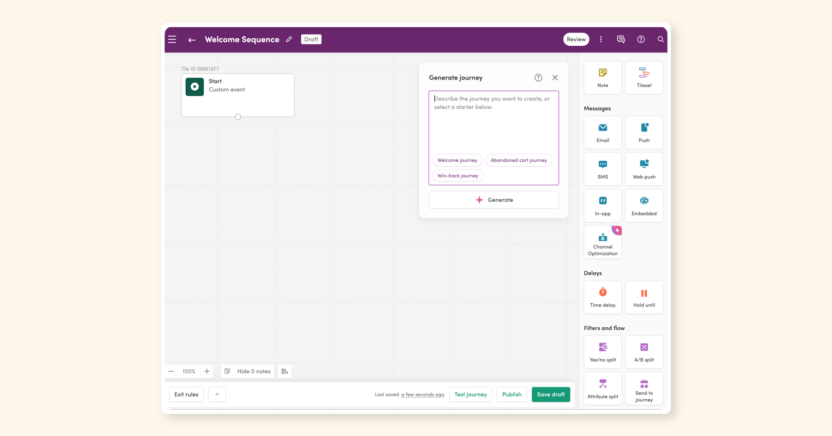
However, Iterable’s orchestration strength comes with some practical limits B2C marketers should consider. Advanced personalization still relies on the marketer defining logic manually — the AI won’t fully optimize journey paths or offers in real‑time, as a dedicated decisioning engine like Braze or MoEngage would. Some predictive features also require large active customer counts (≥100K) to deliver accurate targeting.
How does MoEngage Flows compare to Braze Canvas and Iterable Studio?
MoEngage Flows lets you run all your customer touchpoints — email, push, SMS, WhatsApp, in‑app, on‑site messaging, Facebook and Google Audience ads — as one connected journey, instead of scattered campaigns.
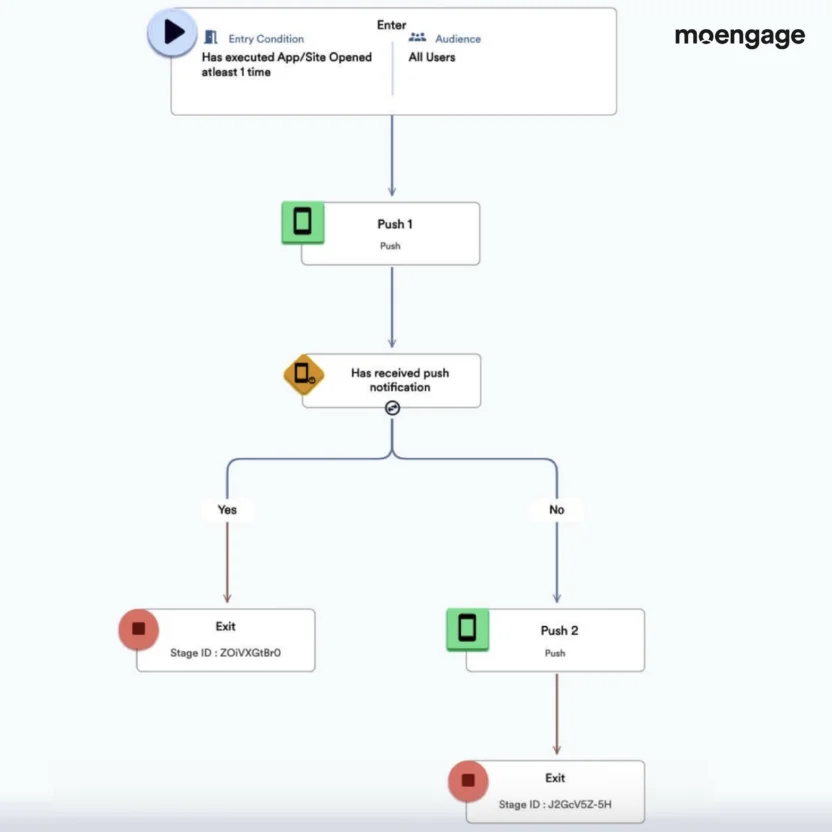
You can trigger actions from real‑time behaviors (“added to cart but didn’t buy”), schedule them periodically, or chain them so customers move from one journey to another without dropping off. All of it happens in one visual canvas, without writing code or waiting on developers.
The real power is in how MoEngage blends channels with data. You can create audience paths that split automatically based on actions, inaction, or preferred channel, and even use its Merlin AI to pick the next best action or optimize the path for conversions.
That means your abandoned cart flow, for example, can start with a push notification and instantly switch to SMS or email if the customer doesn’t click, all while keeping messaging consistent. Built‑in customer journey map templates help you launch complex journeys fast, from onboarding new customers to reactivating churn risks, without starting from scratch.
For B2C marketing teams, this translates into less juggling between tools, faster reaction times to customer behavior, and higher engagement across every stage of the lifecycle. Unlike platforms that require heavy tech work for multi‑channel orchestration, MoEngage keeps everything marketer‑friendly while still supporting advanced personalization, testing, and revenue tracking in‑flow.
A digital banking software headquartered in California, OptimizeFT, uses MoEngage Flows to map and optimize its customer journeys for a smoother customer experience. It sends triggered Flows campaigns via emails, SMS and in-app messages, and push notifications. OptimizeFT’s Vice-President of Customer Success, Mike Corrales, said:
MoEngage’s smooth sales process allowed us to get our queries resolved quickly and efficiently. One feature that stood out to us was MoEngage’s customer journeys and decision-making trees (Flows). It ticked all our boxes. I would definitely recommend MoEngage to others, I have on separate occasions. MoEngage is really good with their customer education, be it conducting discussion forums or customer interactions.
In short:
- Choose Braze if you want real‑time cross‑channel orchestration with a powerful visual Canvas, AI‑optimized send times, and built‑in A/B testing for entire journeys, and you have the team capacity to master advanced branching, prioritization, and complex campaign management.
- Choose Iterable if you need an approachable drag‑and‑drop journey builder that coordinates email, SMS, push, WhatsApp, and more from one workspace, value reusable templates and easy version control, and are okay with setting manual rules for advanced personalization or predictive targeting.
- Choose MoEngage if you want a marketer‑friendly, no‑code visual customer journey builder that blends real‑time triggers, multi‑channel execution, AI‑driven path optimization, and instant personalization — ideal for acting on real-time customer behavior while keeping the entire customer lifecycle in one connected platform.
Segmentation and personalization
Customer segmentation and personalization ensure you’re delivering laser‑targeted, relevant messages to the right customers at the right time.
Let’s look at how each of the three platforms among Braze vs. Iterable vs. MoEngage splits audiences, adapts messages in real-time, and scales personalization.
| Capability | Braze | Iterable | MoEngage |
| Segmentation Interface | 100+ built-in filters with AND/OR logic + nested segments | Query builder with stackable AND/OR logic; import/export to FB Custom Audiences | Rule-based + behavioral + affinity filters; static and dynamic segment mash-ups |
| Real-time Segment Refresh | Yes – auto-refreshes as behavior changes | No – dynamic lists update on a schedule you set | Yes – instant refresh as events occur |
| SQL / Custom Queries | Yes – up to 2 years of behavioral data via Query Builder | Yes – custom search queries supported | No native SQL; advanced filters cover most behavioral use cases |
| Behavioral Targeting | Event-based triggers (e.g., abandoned cart in the last 3 days) | Event and property-based targeting | Events, frequency, recency, affinity (e.g., ‘shops for sneakers on Saturdays’) |
| RFM Analysis | Manual via SQL or custom segments | Not built in | Built in – Recency, Frequency, Monetary scoring out of the box |
| Personalization Method | Liquid templating – pulls purchase data, weather, etc., dynamically | Handlebars templating – requires learning a templating language for complex logic | Real-time engine + A/B with AI auto-optimization; no-code for most use cases |
| Dynamic Content Builder | Not separate; Liquid inline in templates | Visual DCB available for if/else logic; complex logic still needs Handlebars | No-code personalization editor built into campaign builder |
| Segment Size Limits | No published audience cap | Static lists capped at 5M customers | No published audience cap |
Segmentation and personalization with Braze
Braze lets you slice and dice your customer base using over 100 built-in filters, from basic demographics to purchase history and message engagement. You can stack filters with AND/OR logic, create nested segments, and even write custom SQL queries to analyze up to 2 years of behavioral data. The platform auto-refreshes segments in real-time, so your audiences stay current as customer behavior changes.
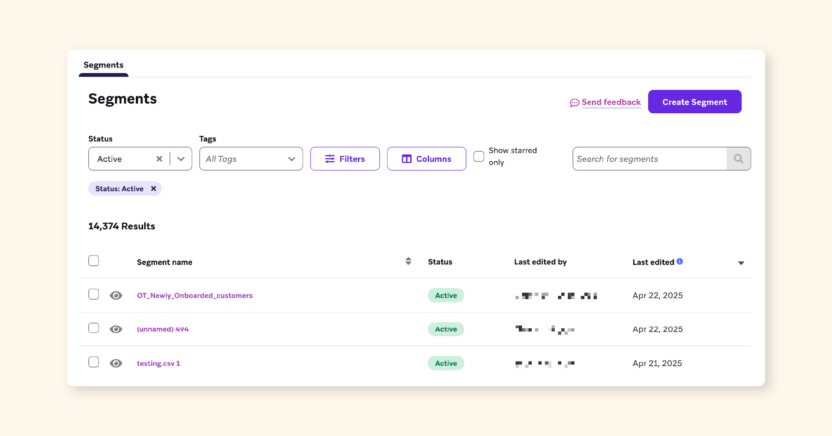
Source: https://www.braze.com/docs/user_guide/engagement_tools/segments/managing_segments/
Your marketers can build highly targeted campaigns without bugging IT every time. Want to message customers who abandoned their carts in the last 3 days, excluding VIP customers? Done in minutes.
Need to personalize emails with each customer’s recent purchase data or local weather? Braze’s Liquid templating pulls that info dynamically.
Your team can test messaging variants across precise audience segments, automate personalized journeys triggered in real-time (e.g., “Opened email but didn’t click”), and analyze which segments drive revenue.
That’s less time spent exporting CSVs and more time spent optimizing campaigns. You may need to standardize naming conventions across teams, though, to avoid ‘segment sprawl’ as your library grows.
The downside? Complex segments (especially SQL-based ones) can get technical fast, requiring some learning curve or dev support. And if you’re not careful with nested logic, you might accidentally create segments that exclude the customers you meant to include.
Iterable personalization and segmentation
Iterable gives you a query-builder interface where you can stack customer properties, events, and behaviors using AND/OR logic to find exactly who you want to message. You can segment by criteria such as purchase history and campaign engagement, then save the results as lists, including static lists (locked snapshots) or dynamic lists (auto-updating as customers qualify).
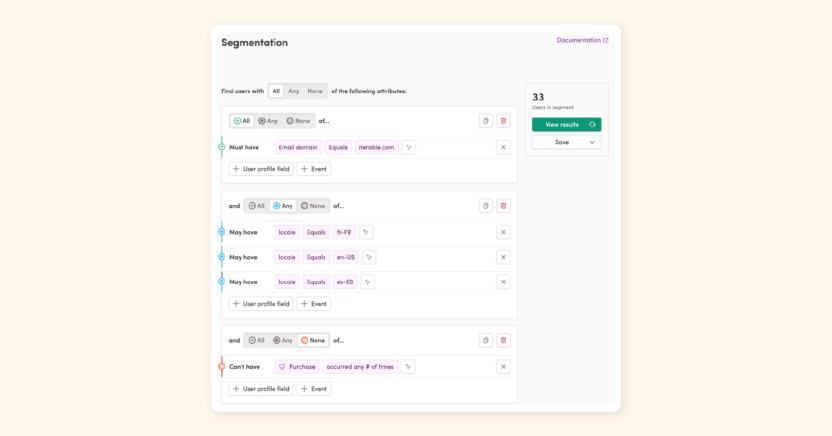
The platform supports exporting segments to Facebook Custom Audiences or CSV files. Unlike engagement platforms that force you into pre-built filters, Iterable lets you write actual search queries. But there’s no real-time segment refresh, so dynamic lists update on a schedule you set, not instantly.
Coming to personalization, Iterable’s Handlebars personalization pulls data from user profiles, events, catalogs, and external APIs to dynamically populate emails, SMS, push, and in-app messages with each recipient’s name, location, purchase history, or even live weather data.
Handlebars requires learning a templating language (think: basic coding), so your team may need training or dev support for complex use cases, especially when combining conditional logic with catalog data or data feeds.
And if you mess up a closing tag, your message won’t send. As a workaround, the Dynamic Content Builder (a visual tool) generates Handlebars for you if you don’t want to code, though it’s limited to if/else statements and can’t handle advanced logic.
That said, you’ll save hours on campaign setup, but watch out for ‘segment sprawl’ as your list library grows, just like on Braze. Iterable also caps static lists at 5 million customers, so large-scale campaigns may require splitting lists or upgrading infrastructure.
How does MoEngage compare with Braze and Iterable in terms of segmentation and personalization?
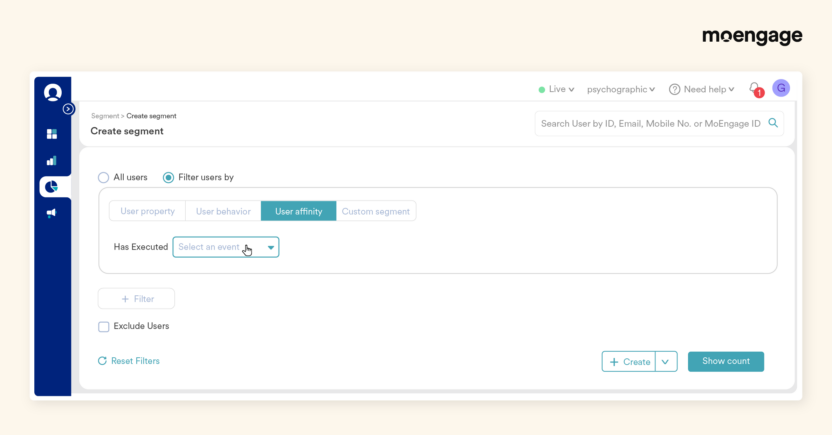
MoEngage gives marketing teams the power to segment customers based on who they are, what they’ve done, how often they’ve done it, and even their quirks and habits, all in real-time. Static lists, dynamic rule‑based filters, and custom segment mash‑ups can pull from user attributes, events, and behaviors going back years, so you can target “abandoned cart in the last 30 minutes” with the same ease as “loyal customers who buy twice a month.”
Advanced affinity filters let you get creative, like finding people who mostly shop for sneakers on Saturdays or stream a specific artist, so every message feels hand‑picked.
Personalization goes deep, too. MoEngage’s real‑time personalization engine lets you change web pages, in‑app content, and campaigns instantly for each customer, without waiting on developers. You can A/B test multiple versions of a page, auto‑optimize with AI, or tailor product recommendations, offers, and layouts based on past purchases, browsing patterns, or even lifestyle tags.
Combined with RFM analysis (Recency, Frequency, and Monetary value), you can spot your champions, understand who’s about to churn, and adjust messaging or rewards on the fly. For B2C marketing teams, this means faster launches and higher relevance.
In short:
- Choose Braze if you want real‑time audience segmentation with 100+ filters, nested logic, and SQL-powered capabilities; have the resources to manage complex segments; and need dynamic personalization, such as purchase- or weather‑based messaging, across channels.
- Choose Iterable if you prefer a flexible query builder for precise audience targeting, can work without instant segment refresh, and have (or can train) staff on Handlebars for dynamic campaign personalization at scale.
- Choose MoEngage if you need lightning‑fast, real‑time segmentation with behavioral and affinity targeting, instant personalization across all channels without developer bottlenecks, and built‑in RFM analysis to drive tailored enterprise-level campaigns for customer retention and growth.
Campaign reporting and analytics
Reporting should make it painfully clear what’s working, what’s wasting spend, and where customers drop off. Here’s a comparison of how Braze, Iterable, and MoEngage turn raw campaign data into actionable insights.
| Capability | Braze | Iterable | MoEngage |
| Dashboard Experience | 15+ separate dashboards; steep learning curve for new users | Clean, intuitive; easy for marketers to navigate without training | Unified dashboard; event tracking easy to validate; real-time event stream |
| Revenue Attribution | Yes – revenue reports by campaign and channel | Yes – last-touch attribution only | Yes – multi-touch attribution with channel performance breakdowns |
| Funnel Analysis | Available via custom reports (SQL often needed) | Basic funnel views available | Built in – step-by-step completion times, drop-off points, filter by device/location |
| Retention Cohorts | Available | Limited | Built-in – cohort analysis without additional tools |
| Predictive Analytics | Yes – Predictive Churn (30K customer minimum) | Standard campaign analytics built in | Yes – churn prediction and behavioral forecasting built in |
| Custom / SQL Reports | Yes – Query Builder (requires SQL knowledge) | Limited custom reporting | Yes – no SQL required; click data points to build segments or launch campaigns |
| Built-in Product Analytics | Requires third-party tools like Mixpanel | Requires third-party tools | Yes – user paths, session tracking, acquisition, all built in |
What does Braze’s campaign reporting and analytics look like in practice?
Braze provides detailed reporting across channels (email, push, SMS, in-app messages, Content Cards, and WhatsApp), with standardized metrics such as sends, deliveries, opens, clicks, and conversions. You can see which messages make money (revenue reports), which channels work best (email vs. SMS vs. push), and whether customers come back after you message them (retention reports).
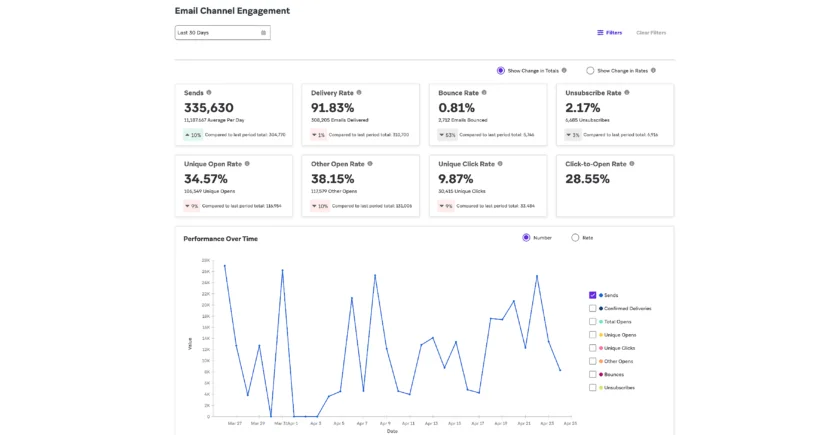
However, new team members in Braze spend weeks learning which dashboard shows what, where to find specific metrics, and how to export the reports your boss wants. You’ll have 15+ different places to check analytics — Campaign Analytics, Canvas Analytics, Channel Performance (only email and SMS), Revenue Reports, Home Dashboard, and more. Each one shows different metrics in different formats.
If you want a custom report showing something specific (like “revenue from customers in Texas who opened emails on weekends”), you’ll need someone who knows SQL to build it in Query Builder. Most marketers typically don’t have that skill.
For teams without dedicated analytics resources, this can create a real productivity gap.
How does Iterable handle campaign analytics and reporting?
In Iterable, the analytics interface is clean and intuitive. Most marketers can find what they need without extensive training, unlike Braze users.
Campaign Analytics provides everything you’d expect: delivery rates, click-through rates, conversion tracking, and revenue attribution. The heatmaps for email campaigns show exactly where customers clicked, helping you optimize future designs.
So, for teams that need solid reporting on standard metrics without technical complexity, Iterable delivers a straightforward experience that covers the fundamentals well.
On the flip side, Iterable’s analytics lack automation and advanced insights that Iterable competitors like Braze and MoEngage offer as standard features. Attribution is limited to last-touch only, which means it would be difficult to see which touchpoints along the customer journey contributed to conversions.
There are no automated insights or anomaly detection, either. You need to manually check dashboards to spot problems or opportunities, rather than being alerted whenever something changes. Also, Iterable doesn’t offer predictive analytics as a built-in feature, unlike MoEngage and Braze.
How MoEngage stacks up against Iterable and Braze in campaign analytics
MoEngage provides built-in product analytics covering customer behavior, funnels, retention cohorts, user paths, session tracking, acquisition performance, and channel performance. You don’t need separate analytics tools like Mixpanel or Amplitude just for basic insights anymore, unless you need to go even deeper than MoEngage already shows.
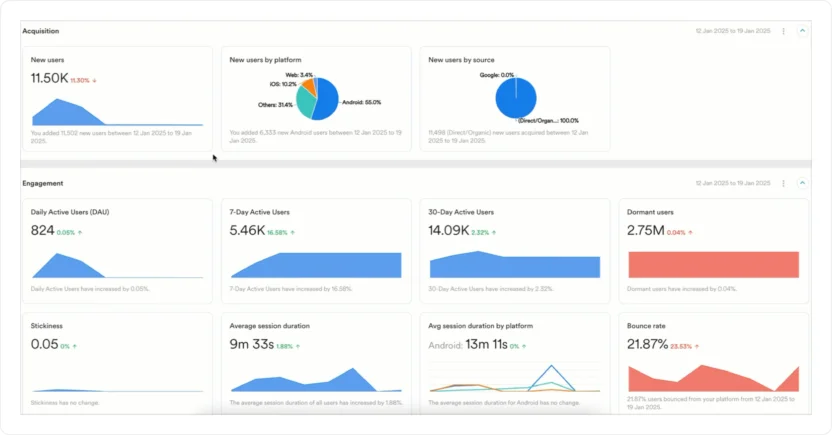
The platform offers funnel analysis, where you can instantly see conversion drop-offs and step-by-step completion times (e.g., “viewed product > added to cart > purchased”), and filter by device type, location, or custom attributes to pinpoint problem areas.
MoEngage also includes actionable analytics. Click any data point on a chart to instantly create a segment, launch a campaign, or export those customers without switching tools.
You can answer questions like “How many users searched for a hotel and actually booked one?” or “What’s the average number of orders per user?” without bugging your data team or learning SQL.
The clean dashboard makes tracing customer journeys straightforward. Event tracking is easy to validate during QA cycles, and the real-time event stream helps verify instrumentation quickly.
Advanced options like aggregation distribution (grouping users by total spending into $0-$50 and $51-$200 buckets) and time-to-convert analysis (how long customers take between funnel steps) give deeper insights than basic event counts.
Top-rated weather app 1Weather, for instance, analyzed its past customers’ mobile app activity using MoEngage Analytics, leading to 10% more clicks on push notifications and 25 million incremental app opens. Jeff Stone, Senior Engineering Manager at 1Weather, says:
We had a unique challenge of providing real-time, hyper-local, and personalized weather alerts to our users, and MoEngage has proved to be an asset in automating our efforts at scale. The analytics piece has helped us analyze, understand and uncover valuable insights to improve our retention.
In short:
- Choose Braze if your team has dedicated analytics or SQL skills, needs enterprise‑level and cross‑channel revenue and engagement tracking, and can handle a steep learning curve to unlock deep insights.
- Choose Iterable if you want fast, easy‑to‑use reporting for core campaign metrics, can live without advanced attribution or predictive analytics, and prefer minimal training time for new marketers.
- Choose MoEngage if you’re part of a data-driven team that needs real‑time, granular behavioral analytics, funnel and retention insights, and enterprise‑grade depth without relying on separate analytics tools or developers for basic reporting.
Braze vs. Iterable vs. MoEngage on AI capabilities
When evaluating these three customer engagement platforms, their AI capabilities determine whether you’re manually guessing what customers want or letting technology do the guessing for you. Here’s how Braze, Iterable, and MoEngage use AI to help you work smarter, and not harder.
| AI Capability | Braze | Iterable | MoEngage |
| Send Time Optimization | Intelligent Timing needs 48-hour lead time; not for API-triggered sends | Send Time Optimization available across campaigns | Best Time to Send applies across all channels without setup restrictions |
| Channel Optimization with AI | Intelligent Channel needs 6 months of data across 2+ channels | Channel Optimization selects the best channel per customer | Most Preferred Channel selects the optimal channel per customer |
| Churn Prediction | Predictive Churn – needs 30K+ customers; retrains monthly | Available with integrations | Churn Prediction – no minimum audience; triggers win-back messages automatically |
| Content Generation | AI Copywriting Assistant + AI Image Generator + Content QA | Copy Assist for text suggestions | Merlin AI Copywriter + Merlin AI Designer for on-brand text and images |
| Predictive Targeting | Predictive Churn + Intelligent Selection; needs 30K-100K+ customers | Predictive Goals + Brand Affinity; needs 100K+ customers | Churn prediction + behavioral forecasting; no published audience minimum |
| AI Decisioning | BrazeAI Decisioning Studio – premium add-on; requires Expert Services setup | Not available | Merlin AI decisioning (campaign and offer decisioning) built in across channels |
| Product Recommendations | Available via Catalogs and Connected Content | Requires custom development – can be expensive | Built-in product recommendations powered by behavioral data |
What AI features does BrazeAI offer?
Braze offers BrazeAITM, a collection of AI-powered features you can plug into your campaigns:
- Intelligent Timing learns when each customer prefers to engage with your messages. But you need to launch campaigns at least 48 hours in advance, and it doesn’t work for action‑based or API‑triggered sends.
- The Intelligent Channel filter identifies whether each customer prefers email, push, SMS, or WhatsApp, based on 6 months of interaction data. It needs 3 messages per channel across 2 channels to make valid decisions. For SMS specifically, you must enable link shortening with advanced tracking, or SMS might be selected even with 0% engagement.
- Intelligent Selection automatically determines which version of your campaign performs best and sends it to more customers over time.
- Predictive Churn needs at least 30,000 customers with purchase/interaction history and re-trains monthly (weekly on Pro). So, predictions can become stale.
- BrazeAI Decisioning StudioTM can personalize products, offers, channels, timing, and frequency for every customer. But it’s a premium add‑on that runs daily experiments and requires their AI Expert Services team for setup.
- You’ll also get built‑in helpers for writing copy (AI Copywriting Assistant), checking spelling/tone (Content QA), generating images (AI Image Generator), and writing Liquid personalization code (BrazeAITM Liquid Assistant).
Where BrazeAI falls short:
- Most advanced features require technical setups, premium add-ons, or additional contracts.
- Intelligent Timing doesn’t work with action-based or API-triggered campaigns. Rate-limiting restrictions apply when combining Intelligent Timing with other features.
- You need a substantial data volume (thousands of sends and extensive customer history) for AI predictive features to work reliably.
What this means for your team: BrazeAI is powerful if you’re an enterprise brand with dedicated data science resources, a large budget for premium features, and a massive audience base. For growth-stage brands with a lean marketing team, you’ll struggle to access or effectively use many of Braze’s best AI features; they’ll be locked behind paywalls or data requirements your brand probably can’t meet.
How does Iterable use AI to optimize campaigns?
Iterable’s AI toolkit is built to reduce creative lift, speed up campaign setup, and refine targeting over time.
But most of its AI is aimed at easing manual work. Things like suggesting copy (Copy Assist), auto-building simple customer journeys (Journey Assist), picking better send times (Send Time Optimization), and nudging unengaged customers with reworked messages (Next Best Action), for instance.
It also includes more advanced models, such as Brand Affinity™ scoring to segment by loyalty levels, Channel Optimization to select the best message channel for each person, Frequency Optimization to avoid over-messaging customers, and Predictive Goals to forecast which customers will take specific actions.
But here’s the catch: some features (like Predictive Goals or Frequency Optimization) need at least 100K customers and manual setup before they’re useful.
Where Iterable’s AI falls short:
- Enabling product recommendations requires expensive custom development for Ecommerce
- ‘No automated campaign optimization; there’s manual winner selection for every test
- No AI decisioning, which means everyone gets the same offers/experiences regardless of intent
- High data requirements. You need 100K customers minimum for Iterable’s Predictive Goals vs. Braze’s 30K
What this means for your team: Iterable’s AI supercharges copy creation, journey building, and personalization if you’ve already got significant, clean engagement data. For smaller lists, short data history, or non-English audiences, its benefits may be diluted.
What are MoEngage Merlin AI’s capabilities?
MoEngage’s Merlin AI helps you run smarter campaigns without extra guesswork. From one place, you can:
- Segment customers in real-time and create the best contextual offers for each customer with MoEngage’s AI Offer Decisioning.
- Create ready‑to‑send content (text plus on-brand images) across email, push, SMS, WhatsApp, in‑app, and even on‑site campaigns, with brand tone and context baked in, using plain-English prompts in Merlin AI Copywriter and Merlin AI Designer.
- Decide the best channel for each customer (using Most Preferred Channel) and the best time to send messages (using Best Time to Send), so you’re not wasting budget on messages they’ll ignore.
- Spot which customers might churn before they actually do (using Churn Prediction), and trigger win‑back messages automatically. No minimum number of customers is required, unlike in Braze and Iterable, so it’s usable even in mid‑market contexts.
- Test up to 5 journey paths at once with Intelligent Path Optimizer, and let AI pick the one that delivers the best results, updating in real-time. No need for multi‑day experimentation windows or manual winner selection.
Where MoEngage’s AI falls short:
- Because MoEngage’s AI features are bundled into the platform rather than offered as standalone modules, teams that want to swap in a third-party AI or ML layer (for example, to run their own custom recommendation engine or propensity model) will find MoEngage less modular in this regard
- While there aren’t any published audience minimums for Merlin AI features, the practical accuracy of tools like Churn Prediction and Most Preferred Channel improves meaningfully with larger audience sizes and richer behavioral history — as it does with any ML-based system
What this means for your team: For mid‑market and enterprise B2C brands, AI works in the background to connect data across channels, prevent wasted sends, and keep campaigns performing, without hitting the steep technical or data thresholds that come with Braze and Iterable. Smaller teams can still use Merlin AI in a scaled‑down way because its core optimization tools don’t require six‑month engagement histories or hundreds of thousands of customer records to be useful. It’s a win-win situation.
Romania’s leading telecommunications company and a subsidiary of Deutsche Telekom, Telekom Romania, has grown its push notification click-through rates (CTRs) to 65% using MoEngage’s Merlin AI Copywriter. Apart from enhancing its marketing team’s efficiency, using the tool also helped them free up time for other strategic tasks. George Enache, Digital Product Owner at Telekom Romania, notes:
The copy itself sounds authentic and on-brand, which is exactly what we want. Plus, it will save us a lot of time and money in copywriting for all of our campaigns, which is another win for us!
Bottom line:
- Choose Braze if you have 30K‑100K+ active customers, 6+ months of engagement history, in‑house technical support, and a budget for premium AI setups.
- Choose Iterable if you want campaign speed and segmentation AI, can meet a 100K+ customer minimum for predictive tools, and are okay with manual optimization.
- Choose MoEngage if you need always‑on, multi‑channel AI optimization without data ceilings, premium add‑on costs, or developer dependence, scaling from mid‑market volumes upward.
Customer data security and compliance
You can’t afford sloppy data practices. One breach or GDPR violation, and you lose trust (and possibly, millions). On that note, let’s take a look at how Braze, Iterable, and MoEngage protect customer data, comply with privacy laws, and prevent sensitive information from leaking into the wrong hands within and outside your team.
| Capability | Braze | Iterable | MoEngage |
| Encryption at Rest | Yes – AES encryption; additional PII hashing available | Yes – AES-256 | Yes – AES-256 with optional per-attribute PII encryption |
| Encryption in Transit | Yes – TLS | Yes – TLS 1.2+ | Yes – TLS |
| Access Controls | Role-based permissions; 2FA; IP allowlisting | Role-based permissions; SSO; MFA | Role-based with granular PII masking for non-admin users |
| PII Protection Options | PII hashing + field-level visibility controls | PII hashing + data anonymization via API | PII Masking, PII Encryption, and PII Tokenized Sending (patented – contact details never stored) |
| Compliance Certifications | ISO 27001, SOC 2 Type 2, HIPAA | ISO 27001, SOC 2 Type 2, HIPAA-assessed; EU-U.S. Data Privacy Framework | ISO 27001, SOC 2 Type 2, HIPAA-assessed |
| GDPR / CCPA Tools | Yes – data deletion, export, and user rights APIs | Yes – data export, forget-user, and hashing APIs | Yes – deletion (7-day processing / 60-day full backup removal), export, and opt-out APIs |
| Data Residency | Regional data centers available | AWS-based; US and EU data residency options | Regional PII Data Centers in UAE, Qatar, and Saudi Arabia; non-PII processed separately |
| Data Backup | Enterprise-grade; standard SLAs | Hourly backups in separate AWS accounts; tested annually | Regular backups; DR procedures in place |
| Best For | Healthcare and finance with tech resources to configure advanced encryption | Healthcare and finance; some API familiarity needed for privacy workflows | Fintech, healthcare, and regulated markets needing zero-storage PII via tokenized sending |
How does Braze approach data security?
All customer data in Braze is encrypted in transit and at rest, with additional hashing available to protect Personally Identifiable Information (PII). The vault has extra locks, too: you can make certain info invisible to most team members, require two-factor logins that need you to enter a code sent to your phone, and even block logins unless they come from safe company networks.
In fact, Braze has been audited and certified to stringent security standards (ISO 27001 and SOC 2 Type 2) and offers specialized solutions for industries with strict laws, such as healthcare (Health Insurance Portability and Accountability Act or HIPAA). It also provides tools to comply with privacy laws such as the General Data Protection Regulation (GDPR) for the European Union (EU) and the California Consumer Privacy Act (CCPA). So, if a customer asks to see, fix, or delete their data, you can do it quickly without digging through messy systems.
The only red flag? Some features (like advanced encryption) require additional technical support to set up, so smaller teams need to plan time or resources before diving in.
What are Iterable’s data security and privacy compliance standards?
In Iterable, all data is encrypted at rest (AES‑256) and in transit (TLS 1.2+), and access is tightly controlled with role‑based permissions, single sign‑on (SSO), and multi‑factor authentication (MFA).
For compliance, Iterable is ISO 27001, SOC 2 Type 2, and HIPAA‑assessed like Braze. It also participates in the EU‑U.S. Data Privacy Framework. It gives teams API tools to handle GDPR requests, including exporting data, deleting (‘forgetting’) users so no future information can be collected on them, and securely hashing identifying details.
Data backups are performed hourly in separate AWS accounts, tested annually, and destroyed using industry‑standard wipe methods when decommissioned.
Overall, Iterable’s security setup works well for brands that want strong compliance controls without the heavy onboarding requirements seen in some competitors. But advanced privacy workflows still require familiarity with APIs, so less technical teams should plan for some ramp‑up time.
How does MoEngage protect customer data and handle compliance?
MoEngage offers three flexible PII protection options to match different compliance requirements:
- PII Masking, which hides sensitive data like emails and phone numbers from non-admin users on the dashboard.
- PII Data Encryption, which encrypts attributes at rest so that even admins only see scrambled values, with no ability to decrypt.
- PII Tokenized Sending, a patented feature that never stores customer contact details in MoEngage. Instead, it fetches emails/phone numbers from your own servers at campaign send-time, then immediately deletes them after delivery.
All three options support GDPR and CCPA requirements with built-in APIs for data deletion (7-day processing, 60-day full removal from backups), data export, and user opt-outs.
The platform also operates regional PII Data Centers in the UAE, Qatar, and Saudi Arabia for companies needing data residency compliance, keeping sensitive customer information within specific country borders while processing non-PII data in MoEngage’s main infrastructure.
This means your team can run personalized campaigns without exposing customer data to your entire marketing team, thus avoiding accidental data leaks during screenshots or demos. Only admins see unmasked PII, while campaign managers preview messages with masked fields (shown as “XXXX”).
And PII Tokenized Sending is the most secure option for regulated industries like fintech and healthcare: your customer emails and phone numbers never touch MoEngage’s servers, eliminating the risk of breaches entirely.
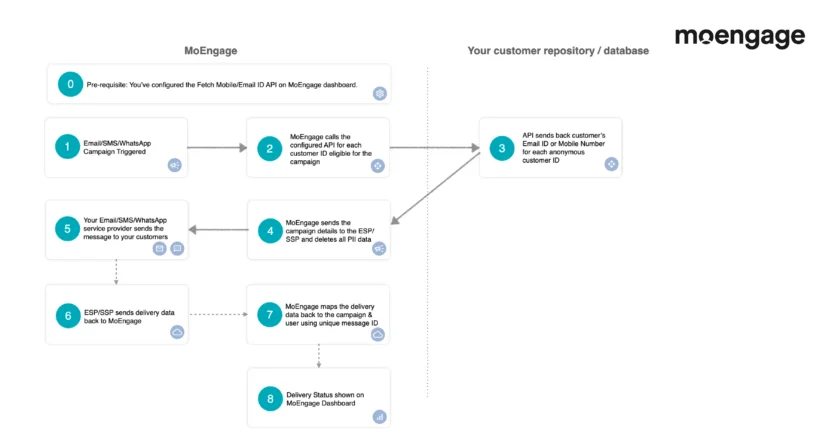
If a team member leaves, you don’t need to worry whether they’ve downloaded customer contact lists since masking blocks non-admin exports.
Comparing Other Key Factors of Braze, Iterable, and MoEngage
Braze vs. Iterable vs. MoEngage Integrations
Integrations determine if your CEP works smoothly with your Ecommerce, CRM, analytics, and ad stack. Let’s see how each of the three platforms connects with other tools, how much setup is required, and whether they keep data fresh enough for real‑time targeting.
Braze Integrations
Braze offers 165+ pre-built integrations connecting your marketing stack to:
- Analytics tools (Amplitude, Mixpanel, etc.)
- CDPs (Segment, mParticle, etc.)
- Data warehouses (Snowflake, Databricks, etc.)
- Ad platforms (Facebook, Google, etc.)
- Ecommerce systems (Shopify, BigCommerce, etc.), and
- Specialized services like weather data (AccuWeather) or loyalty programs
In other words, you can connect Braze to your existing tools without starting from scratch. Import product catalogs from Shopify, personalize messages with weather data from AccuWeather, or sync user traits from your data warehouse to power segmentation.
The downside? The integration setup still requires developer involvement (configuring API keys, mapping data fields, and testing syncs), so count on 1-6 weeks of engineering time, depending on complexity.
And while Braze provides documentation, you’ll need IT support to troubleshoot issues such as data mismatches, failed syncs, or rate limits when interacting with partner APIs.
Iterable Integrations
When it comes to integrations, Iterable offers a wide range of options for connecting with other tools — APIs, webhooks, data feeds, and custom HTML blocks. For a B2C marketing team, this means you can pull in customer data from Ecommerce, ad platforms, CRMs, and analytics tools, and trigger campaigns as customers browse, buy, click, or interact in real-time.
However, Iterable’s flexibility comes at the cost of simplicity. Many integrations lean heavily on their APIs, which can be powerful but require more hands‑on setup, testing, and technical upkeep than “plug‑and‑play” connectors you might see elsewhere.
In day‑to‑day marketing, Iterable’s integrations shine if you need deep customization and already have an established martech stack to plug into. But if your team wants speed, minimal technical lift, and out‑of‑the‑box connectivity, those same DIY strengths can feel like friction.
MoEngage Integrations
MoEngage offers 250+ pre-built integrations through its App Marketplace and Connected Apps platform, covering:
- CDPs (like Twilio Segment, mParticle, and Tealium)
- Analytics tools (like Amplitude, Mixpanel, and Heap)
- Data warehouses (like Snowflake, BigQuery, and Databricks)
- Ecommerce platforms (like Shopify, WooCommerce, and Magento)
- SMS/WhatsApp providers (such as Twilio and Infobip), and
- Specialized services like dynamic content (like Stylitics and Contentful), loyalty programs (like Yotpo, Punchh, and Eagle Eye), and conversational messaging (such as Yellow.ai and Verloop).
What sets MoEngage apart here is its low-code Connected Apps framework. Partners can build and launch custom integrations faster by using JSON configuration files, rather than overhauling APIs, drastically reducing development time and costs.
Iterable vs. Braze vs. MoEngage Ease of Use for Marketing Teams
CEP features mean little if your marketing team can’t use them. So, let’s compare hands‑on usability of each CEP among Braze vs. Iterable vs. MoEngage: how approachable the UI is, how steep the learning curve feels, and whether non‑technical marketers can run complex campaigns without bottlenecking in IT.
Is Iterable easy to use?
Iterable earns high marks for its intuitive visual journey builder that lets marketers design multi-step campaigns with branches, delays, and varied messages without digging through endless menus.
Users praise the platform’s flexibility and speed. Segmentation options are robust, experiments are easy to set up, and the overall UI feels user-friendly, even when managing large datasets.
However, campaign management becomes challenging at scale: once you’ve created hundreds of campaigns, sorting and search options fall short, and copying and pasting flows doesn’t always preserve settings, leading to errors.
The platform also requires careful planning for usage limits on profiles, sends, and events as you scale, which can catch teams off-guard if they don’t monitor it closely.
Is it easy to use Braze?
Braze mixes a friendly drag‑and‑drop experience with serious power under the hood. Tools like Canvas Flow make multi‑channel orchestration smooth, but advanced personalization uses Liquid templating, which can feel like learning a new language if you haven’t coded before. Their training portal is excellent, and smaller teams can get up to speed fast, but more complex setups may require technical support.
Moreover, Braze has a steep learning curve for newcomers: users describe feeling like they’re “attempting algebra as a 3-year-old” until they lean heavily on the learning portal and live trainings.
Overall, Braze is a good fit for marketers who crave flexibility and are ready to climb a short learning curve.
How easy is it to use MoEngage?
MoEngage focuses on keeping everyday marketing tasks incredibly straightforward. Funnels, event tracking, and segmentation all update in real-time, so you can spot problems or opportunities instantly. The campaign builder works across push, email, and in‑app channels without engineering help, and AI‑powered recommendations make personalization easy.
You’ll spend less time waiting for data refreshes or debugging. Segments update instantly, so you can validate targeting logic on the fly.
The built-in funnel and cohort analysis tools reduce dependency on separate analytics platforms for basic insights. And because event tracking is straightforward to verify in both the browser and the console during QA, your team catches instrumentation issues before campaigns go live, avoiding embarrassing send-time failures.
The learning curve is gentler than Braze’s, with most features accessible to non-technical marketers right away.
For B2C teams that want speed, clear insights, and low‑lift execution, MoEngage delivers an easy‑to‑use experience from day one.
What Customers Say about Braze, Iterable, and MoEngage
Now, what do actual users of the CEPs say when the sales pitch is over? We’ve distilled verified G2 and Gartner reviews to show you the real‑world pros, cons, and day‑to‑day experience of running campaigns with Braze, Iterable, and MoEngage.
Braze reviews from G2 and Gartner
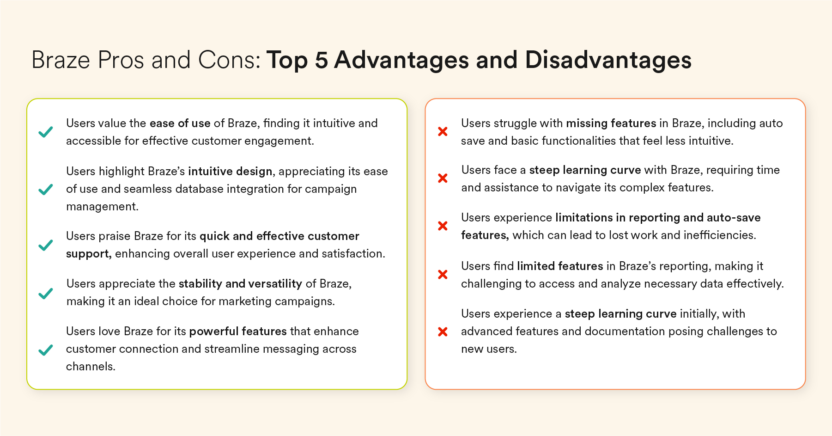
Source: https://www.g2.com/products/braze/reviews?qs=pros-and-cons
Braze Pros
People who use Braze say it’s great for talking to customers on lots of channels at once — email, texts, push notifications, and more — all from one place.
The Canvas Flow tool is a favorite because it lets marketing teams plan customer journeys visually, without always calling in developers. Reviewers love how they can use advanced segmentation to send messages to the right customers based on where they are in the buying process, their demographics, gender, or even tiny details like shopping habits.
They also like how easy A/B testing is to set up for things like subject lines or send times. Marketers value privacy‑friendly features and the ability to run in‑app messages without engineering bottlenecks. Plus, Braze’s support team gets a lot of praise for being responsive when something goes wrong.
Braze Cons
But some marketers mention that Braze’s reports don’t always give the full story, so they often need extra tools to see exactly how well campaigns are doing. Some of the fancier personalization tricks need a bit of coding know‑how (Liquid templating), creating a steep learning curve for non‑technical teams.
Email tools aren’t as strong as those from platforms that started out focusing on email, and setting up special data connections can take more work.
What’s more, you’d often need multiple teams involved for setup and maintenance because Braze depends on a live data connection to your site or app. Braze users also wish for a smoother and more interactive onboarding experience to get new users up to speed in a jiffy. Customization for certain in‑app designs can be limited, too.
Takeaway
Braze can be awesome if you want advanced targeting, multi‑channel control, and don’t mind learning some new skills or putting in setup time. But if your team needs strong analytics or advanced email marketing tools like email countdowns, you might want to check if Braze matches what your campaigns (and ultimately customers) need.
Iterable reviews from G2 and Gartner
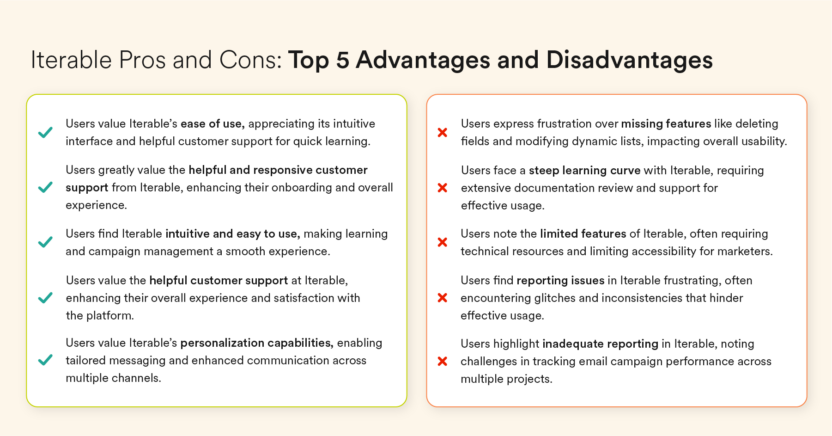
Source: https://www.g2.com/products/iterable/reviews?qs=pros-and-cons
Iterable Pros
Marketers say Iterable is easy to use and fast, with a friendly interface and a drag‑and‑drop journey builder that makes designing customer flows feel simple instead of scary. According to some Gartner reviewers, Iterable works well for both marketing and technical teams, with reliable sending and solid API documentation.
Iterable users also like that they can handle email, SMS, push, and in‑app messaging all in one place, and create detailed audience segments without looping in developers. It’s praised for making campaigns run quicker and keeping messages consistent across channels.
Reviewers also give points for responsive customer support and the ability to request and see new features added.
Iterable Cons
According to reviewers, conversion tracking isn’t always consistent. Sorting or searching campaigns gets clunky when you have hundreds. Setting up and managing complex journeys can require extra work or API/webhook know‑how, and usage limits mean teams have to plan ahead as they scale.
Built‑in analytics and experimentation tools don’t go deep enough, forcing teams to export data and use outside dashboards for better insights. Reporting is called basic, heat maps could be better, and small adjustments, like tweaking email designs or managing nested data, can be
harder than expected.
Takeaway
Iterable users love how easy it is to build and run multi‑channel campaigns without always needing tech help. But reviews from both G2 and Gartner show you’ll likely need outside tools or extra work for deep analytics, perfect conversion tracking, or advanced testing. For marketing teams that need rock‑solid, in‑platform testing and advanced analytics, these gaps may mean extra work to get the full picture.
MoEngage reviews from G2 and Gartner
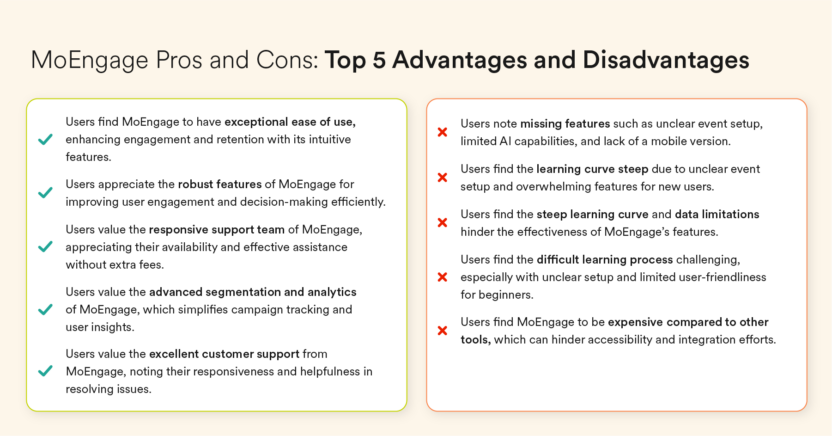
Source: https://www.g2.com/products/moengage/reviews?qs=pros-and-cons
MoEngage Pros
Marketers say MoEngage’s intuitive user interface makes it super easy to understand and control the customer journey. The dashboard gives a clean, big‑picture view, while real‑time event tracking and powerful segmentation help teams target users based on actions, location, or timing; no tech team required. The campaign builder is intuitive, letting you launch push, email, and in‑app messages quickly.
Customer support is seen as proactive and helpful, with strong technical knowledge and a willingness to dive deep into segmentation, personalization, and advanced configurations when needed.
Reviewers love the AI features that personalize content so customers only get what’s relevant, which boosts satisfaction and conversion rates. There’s high praise for A/B testing, robust analytics, and multi‑channel communication.
Our customers also highlight MoEngage’s constant innovation, from new landing page capabilities to fresh AI applications, while appreciating that this pace helps them stay ahead with modern customer engagement strategies.
Reviewers on Gartner trust our platform for consistent, on‑time delivery of critical messages like OTPs and alerts, even at a large scale. Strong documentation and flexible configuration make it reliable for complex, high‑volume campaigns.
MoEngage Cons
A few MoEngage users mention a learning curve to fully unlock MoEngage’s potential, slight UI slowness on heavy reports, and the need for strict naming consistency in events so you don’t get confused later.
Some also point out that advanced options and feature‑rich dashboards can feel overwhelming for new users, and too many generic features can dilute focus. Minor hiccups, like certain settings being lost after updates, have been reported — though support teams fix them quickly.
Takeaway
MoEngage’s reviews paint it as a user‑friendly but powerful platform that helps marketers act fast on customer data, personalize deeply, and run rich multi‑channel campaigns without heavy tech lift. Marketing teams love how it keeps evolving with new features and scales reliably for both everyday marketing and mission‑critical alerts.
So, if you value innovation, real‑time targeting, and ease of execution, MoEngage can be a strong match. Just be ready to invest a little time mastering its many tools and keeping your data naming tight so your analytics stay crystal‑clear.
When Do Marketing Teams Choose Iterable, Braze, or MoEngage?
All three platforms — Braze, Iterable, and MoEngage — are credible customer engagement platforms. The right choice depends almost entirely on your team structure, data maturity, and the specific use cases you need to unlock in the next 12 months.
When Braze makes sense
Choose Braze if you’re an enterprise or fast‑growing brand with:
- Large, engaged audiences (30K-100K+ active customers with deep history)
- In‑house technical support or analysts for SQL, Liquid templating, and complex journey branching
- A need for real‑time triggers across channels; perfect for time‑sensitive events like flash sales or password resets
- The budget for premium AI add‑ons (BrazeAI Decisioning Studio) and advanced integrations
When Iterable makes sense
Pick Iterable if you want:
- An intuitive drag‑and‑drop journey builder approachable for mid‑sized teams
- Flexible, custom segmentation without being locked into pre‑set filters
- Solid multi‑channel orchestration with reusable templates and easy version control
- AI helpers for speed (Copywriting assist, Journey Assist, etc.), without needing deep coding skills for most tasks
When marketing teams consider MoEngage
Go with MoEngage if you have a mid-market or enterprise team that needs:
- Real‑time, no‑code journey orchestration across push, email, SMS, WhatsApp, in‑app, on‑site, and ads, all tied together in one visual flow
- Lightning‑fast segmentation and personalization without developer bottlenecks, including behavioral, affinity, and RFM targeting
- Built‑in, actionable analytics that replace separate tools for funnels, cohorts, and time‑to‑convert insights
- AI optimization (Merlin AI) that works without massive data minimums, letting your teams act on churn risk, channel preference, and send time optimization instantly
Braze vs. Iterable vs. MoEngage FAQs
These are the questions we hear most often from B2C marketing teams evaluating customer engagement platforms (CEPs) like Braze, Iterable, and MoEngage when they’re shortlisting vendors for an RFP, switching from another platform, or matching features to their growth stage.
1. What is the difference between Braze and Iterable?
Braze is built for speed at scale, with real‑time triggers, advanced cross‑channel orchestration via Canvas, and AI‑powered send‑time/channel optimization. It’s incredibly powerful, but comes with a steeper learning curve and heavier technical requirements for advanced personalization and analytics.
Iterable focuses on usability and flexibility, with an approachable drag‑and‑drop Journey Studio, custom segmentation that doesn’t lock you into preset filters, and solid multi‑channel orchestration. It’s easier to use than Braze, but its analytics are less advanced, and its predictive AI features require large customer datasets (over 100K).
2. How does MoEngage compare to Braze and Iterable?
MoEngage combines enterprise‑grade capabilities with a marketer‑friendly user experience. You get real‑time journeys across channels like email, SMS, push, WhatsApp, in‑app, on‑site, and ads, paired with lightning‑fast segmentation, built‑in product analytics, and AI optimization that work without steep data minimums. Unlike Braze, you don’t need a large technical team for setup in MoEngage. And unlike Iterable, your team won’t outgrow the depth of analytics or automation with MoEngage.
3. Which marketing automation and customer engagement platform is best for Ecommerce/retail?
- Braze works well for large retailers with advanced data teams, offering rich personalization (purchase history, weather data, and so on) and real-time triggers for flash sales or inventory alerts.
- Iterable suits mid‑sized Ecommerce brands seeking flexible segmentation and approachable orchestration, with easy exports to Facebook Custom Audiences and CSV.
- MoEngage is ideal for Ecommerce from mid‑market up to enterprise, offering real‑time funnel tracking, affinity targeting (habitual buyers), and deep integrations with Shopify, WooCommerce, and Magento.
4. Which marketing automation and customer engagement platform works better for fintech teams?
Fintech teams value reliability, compliance, and personalized journeys:
- MoEngage adds patented PII Tokenized Sending (contact details never stored), regional data centers for data residency, and multi‑channel transactional alerts with an SLA of less than 5 seconds, making it especially strong for fintech brands needing secure, real‑time communication.
- Braze offers HIPAA compliance, real-time orchestration (transactional APIs with an SLA of under a minute), and advanced messaging logic, which are great for transaction alerts or fraud warnings.
- Iterable provides easy‑to‑use journey building for account onboarding or engagement campaigns, with API flexibility for custom events from core systems.
5. Which customer engagement platform has better AI capabilities?
- Braze has powerful AI for large‑scale brands: Intelligent Timing, Intelligent Channel, AI Copywriting/Image generation, Predictive Churn, and premium BrazeAI Decisioning Studio. It requires high data volumes and sometimes extra contracts.
- MoEngage delivers always‑on AI optimization without steep data or budget requirements: churn prediction, channel preference, send‑time optimization, Intelligent Path Optimizer, AI copy/design, and segment creation from prompts, making it powerful for mid‑market and enterprise teams.
- Iterable offers AI helpers (such as Copy Assist, Journey Assist, and Send Time Optimization) and predictive models, such as “Brand Affinity” and “Predictive Goals.” But these need big active lists (over 100K customers).
6. What size company should use Braze, Iterable, and MoEngage?
- Braze: Enterprise or fast‑scaling brands with 30K-100K+ active customers, big budgets, and in‑house technical/analytics teams.
- Iterable: Mid‑sized companies with marketing teams that value flexibility and usability but can meet the scale requirements for predictive AI.
- MoEngage: Mid‑market to enterprise teams wanting enterprise features without the complexity ceiling, working across multiple regions and channels, especially those with lean tech resources.
7. How long does implementation take for each customer engagement and marketing automation software?
- Iterable: Faster setup for core features (often weeks), but advanced personalization or integrations can extend timelines.
- MoEngage: Comparable for base setup, but real‑time segmentation and journeys can be live in days due to no‑code tools and a low‑code integration framework.
- Braze: Typically several weeks to 2 months, depending on complexity, integrations, and data migration.
8. Which marketing automation platform integrates best with Shopify and Salesforce?
- MoEngage: Direct real‑time MoEngage Shopify integration (product catalog + purchase events) and Salesforce connector via Connected Apps, often live faster due to low‑code setup; strong bidirectional sync for segmentation and personalization.
- Iterable: Integrations are often handled via API/webhooks; flexible, but requires tech support for initial sync.
- Braze: Pre‑built Shopify connectors and Salesforce integration, but setup requires developer configuration and data mapping.
Braze vs. Iterable vs. MoEngage: Choose the Right Platform for Your Growth Stage
Choosing among Braze, Iterable, and MoEngage comes down to matching the platform’s strengths to your growth stage, budget, team skills, and customer volume.
All three can run multi‑channel campaigns, personalize at scale, and pull in behavioral data. But the way they handle orchestration, analytics, AI, and integrations differs in ways that matter in day‑to‑day marketing today. Before finalizing your shortlist, request a live demo from each vendor using your own use cases. Focus on how each platform handles the journeys and segments most critical to your business, and ask specifically about implementation timelines, total cost of ownership, and what ongoing support looks like after go-live.
Having said that, if you’re a B2C marketing team looking to grow faster without the tech bottlenecks and want a single platform to manage journeys, segmentation, personalization, analytics, and AI optimization in real-time, MoEngage deserves a spot on your vendor shortlist.
The best next step?
Book a personalized demo to see how MoEngage can tailor customer journeys, personalization, and analytics for your brand, in MoEngage’s sandbox environment, live with your own data. That way, you can compare it head‑to‑head with Braze and Iterable and make a confident, growth‑focused decision.