


THE MODERN CUSTOMER ENGAGEMENT PLATFORM
MoEngage vs. Salesforce
Marketing Cloud
Many enterprise teams running Salesforce Marketing Cloud aren’t missing data, but speed. Compare MoEngage and Salesforce Marketing Cloud across channel coverage, segmentation ownership, AI availability, implementation timelines, and total cost of ownership to make an informed decision on which platform best fits your team.



How Gartner Compares MoEngage
and Salesforce Marketing Cloud
MoEngage is an agentic customer engagement platform for B2C enterprises. It combines customer insights,
behavioral segmentation, AI decisioning, journey orchestration, and omnichannel messaging,
while Salesforce Marketing Cloud provides broader alignment with the Salesforce CRM and enterprise ecosystem.
Gartner's independent analysis covers both platforms across capability areas, including multichannel campaign
management, audience segmentation, AI and analytics, and ease of implementation.
MoEngage vs. Salesforce Marketing Cloud:
Which is Better for Customer Engagement?
Meet Your Customers
Wherever They Are
Older marketing stacks often make you buy multiple modules just to run campaigns. That means scattered data and higher costs.
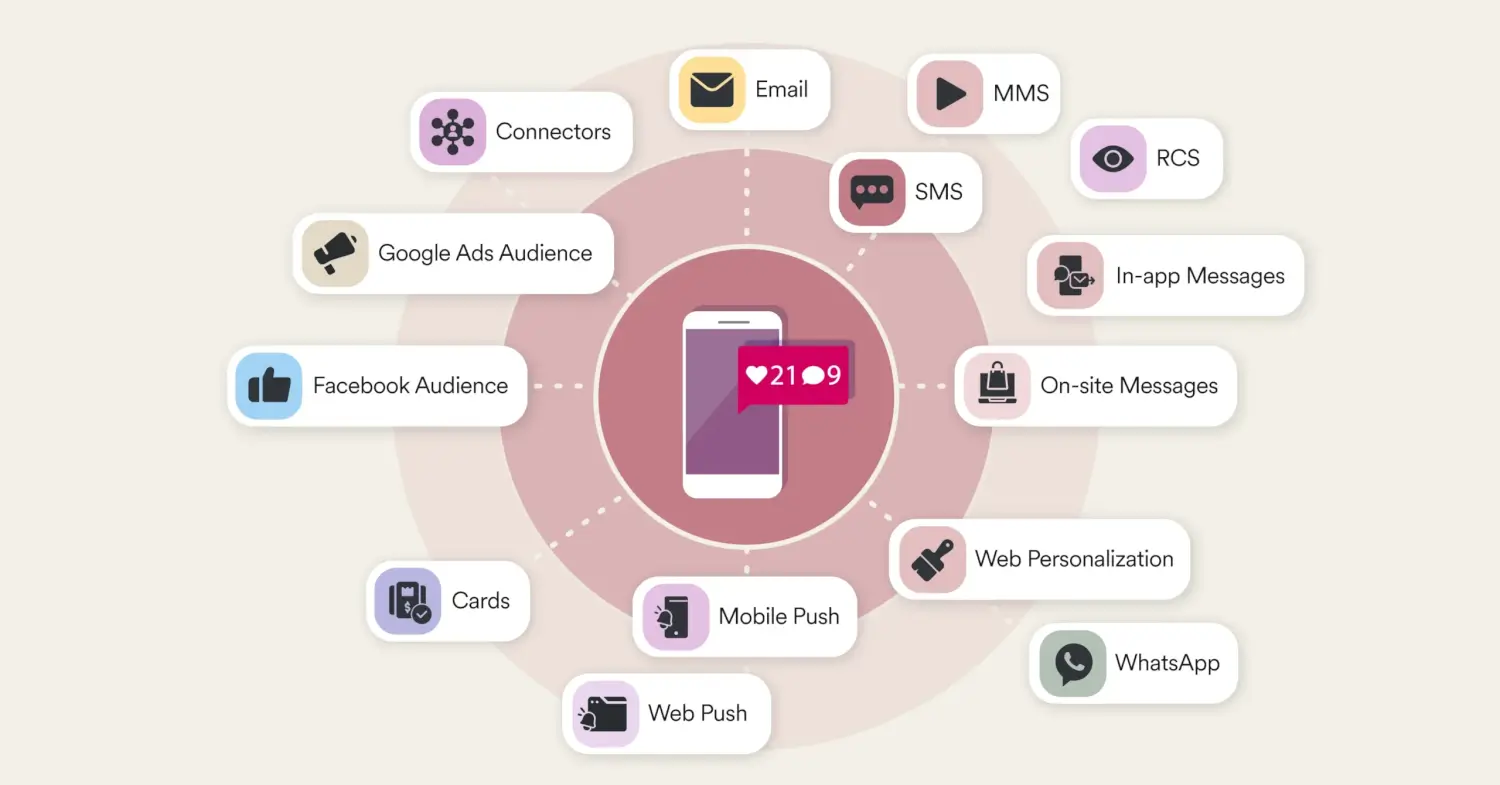
MoEngage gives you a single platform to run coordinated campaigns effortlessly across 10+ channels. Focus your efforts on consistent, personalized outreach wherever your customers are. The result? A better overall customer experience and
more conversion potential.
Go Live Faster With Richer
Pre-Built Templates
Legacy platforms often delay campaign launches with templates designed for specific channels and in basic formats.
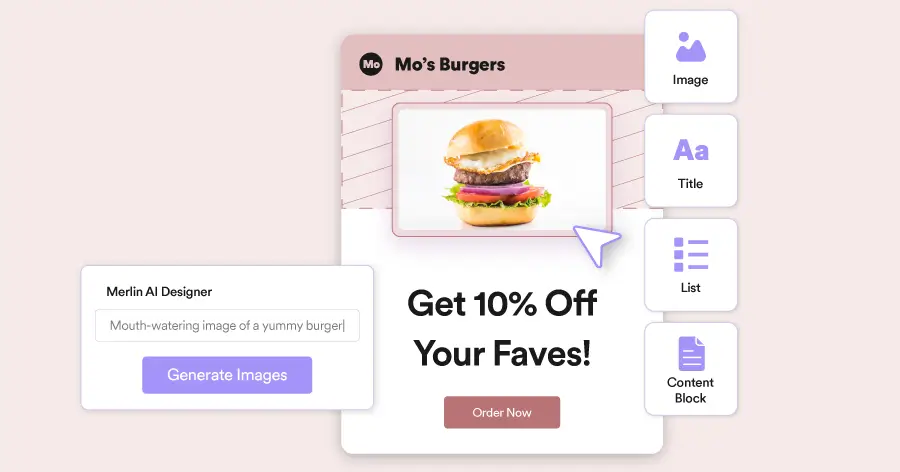
MoEngage’s rich template formats for more channels, like image banners and countdown timers for push, or ratings and video popups for in-app, help you tailor campaigns with fewer workarounds and shorter design cycles. Cut the time from idea to execution, so your campaigns can generate results sooner.
Build Segments Without Engineering Dependency
With just basic filters and multiple disconnected data systems for different types of data, traditional segmentation tools can’t excel in precise targeting. It becomes a slow, manual process instead.
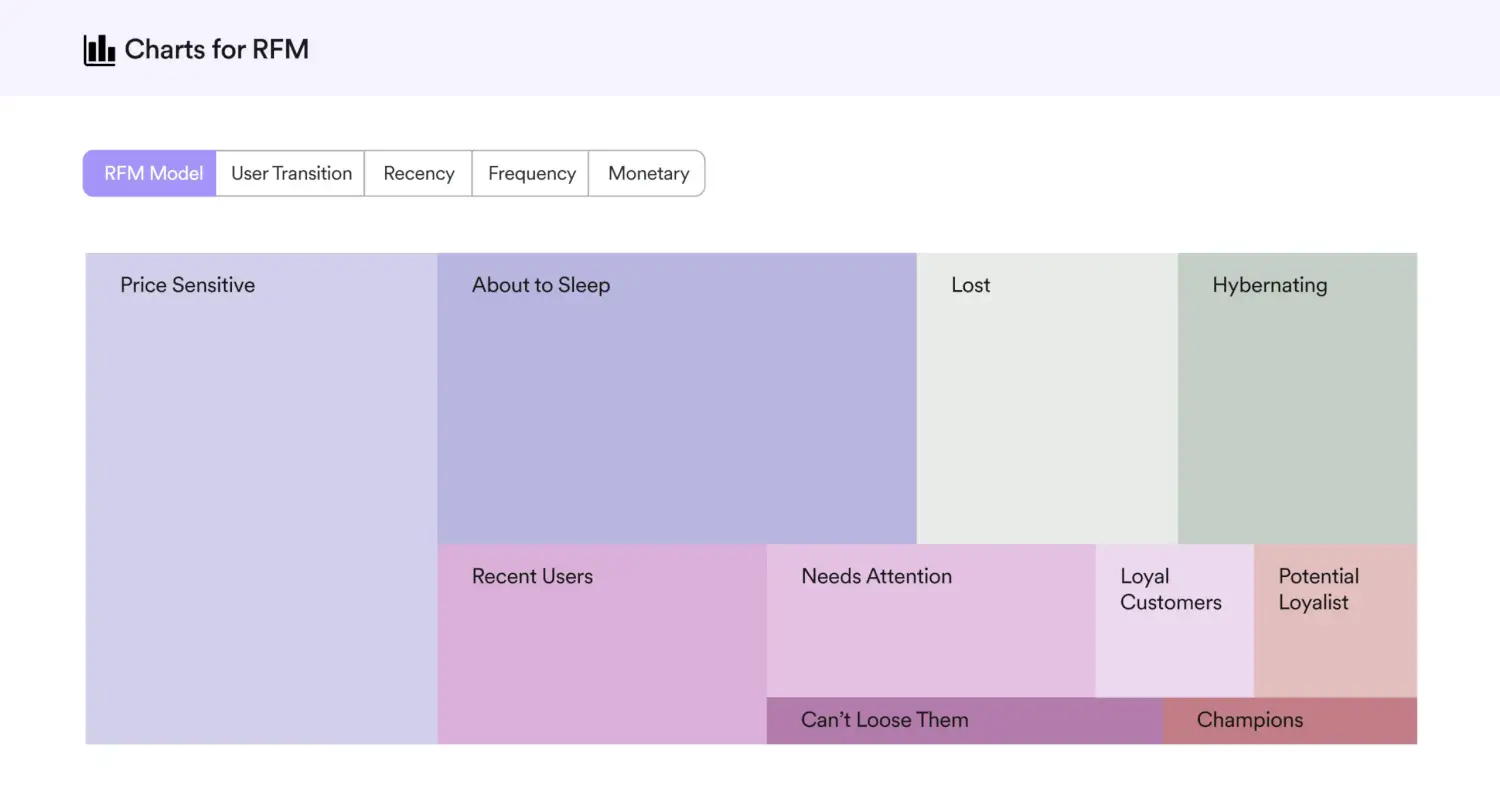
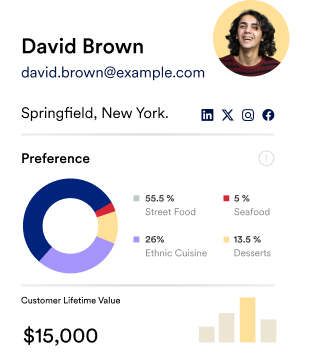
MoEngage’s advanced segmentation capabilities let you combine user attributes, behavior, affinities, events, and even live warehouse data. Instantly find at-risk, loyal, and high-potential customers with RFM analysis. Drive better engagement
from the right customers.
Send Messages When Each Customer is Ready to Act
Optimizing send times just for emails and push notifications?
That points to generic blasts and lower response
rates for SMS messages.
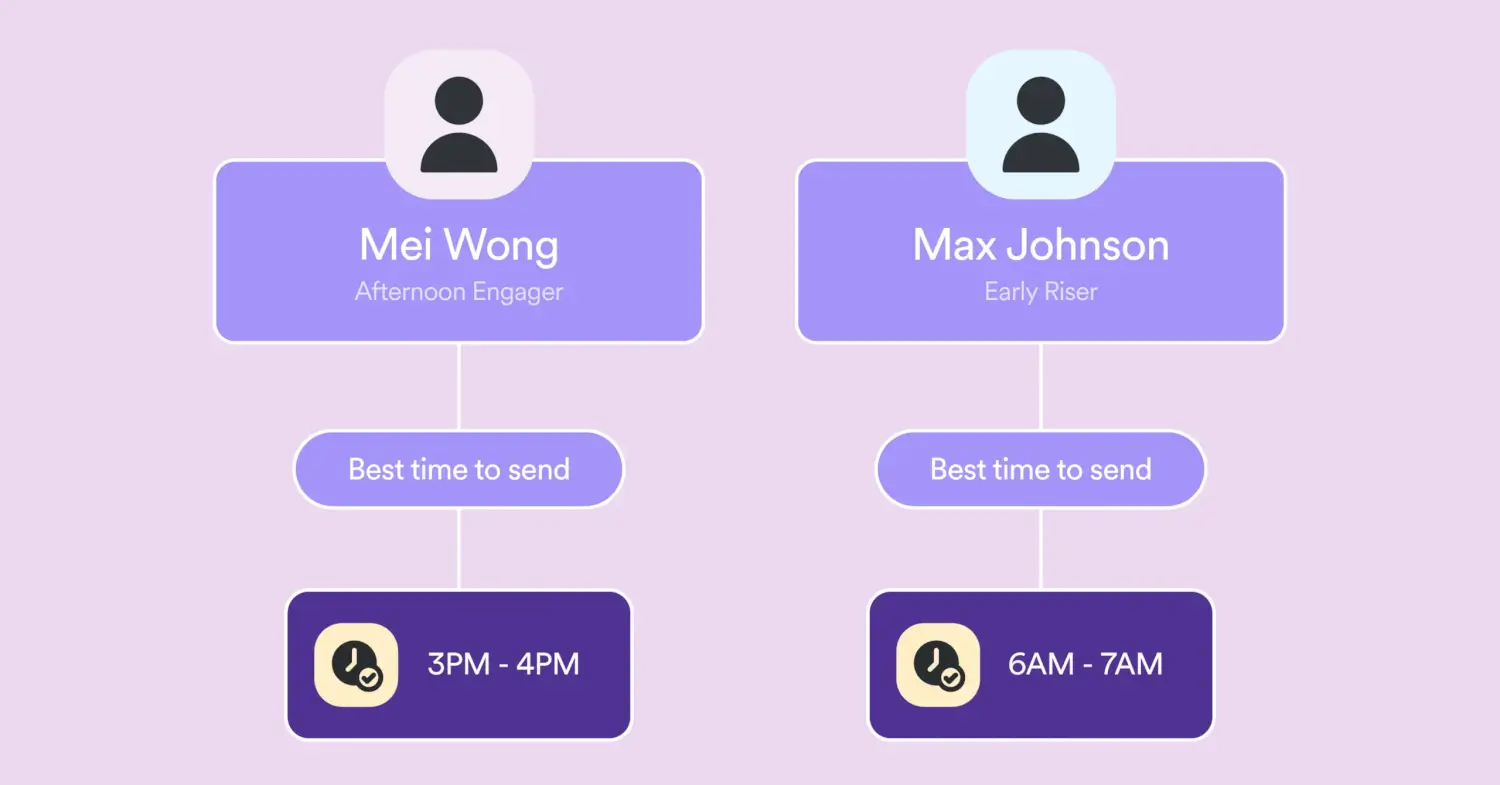
MoEngage’s Best Time to Send (BTS) feature works natively across email, SMS, and push notifications. It calculates the optimal message-receiving hour for each customer when they’re most likely to engage. More timely sends mean higher open rates, more clicks, and better conversion rates.
Identify Each Customer’s Preferred Channel
Old marketing platforms make you guess which channels your customer segments prefer. In turn, you guess where to invest
your time and budget.
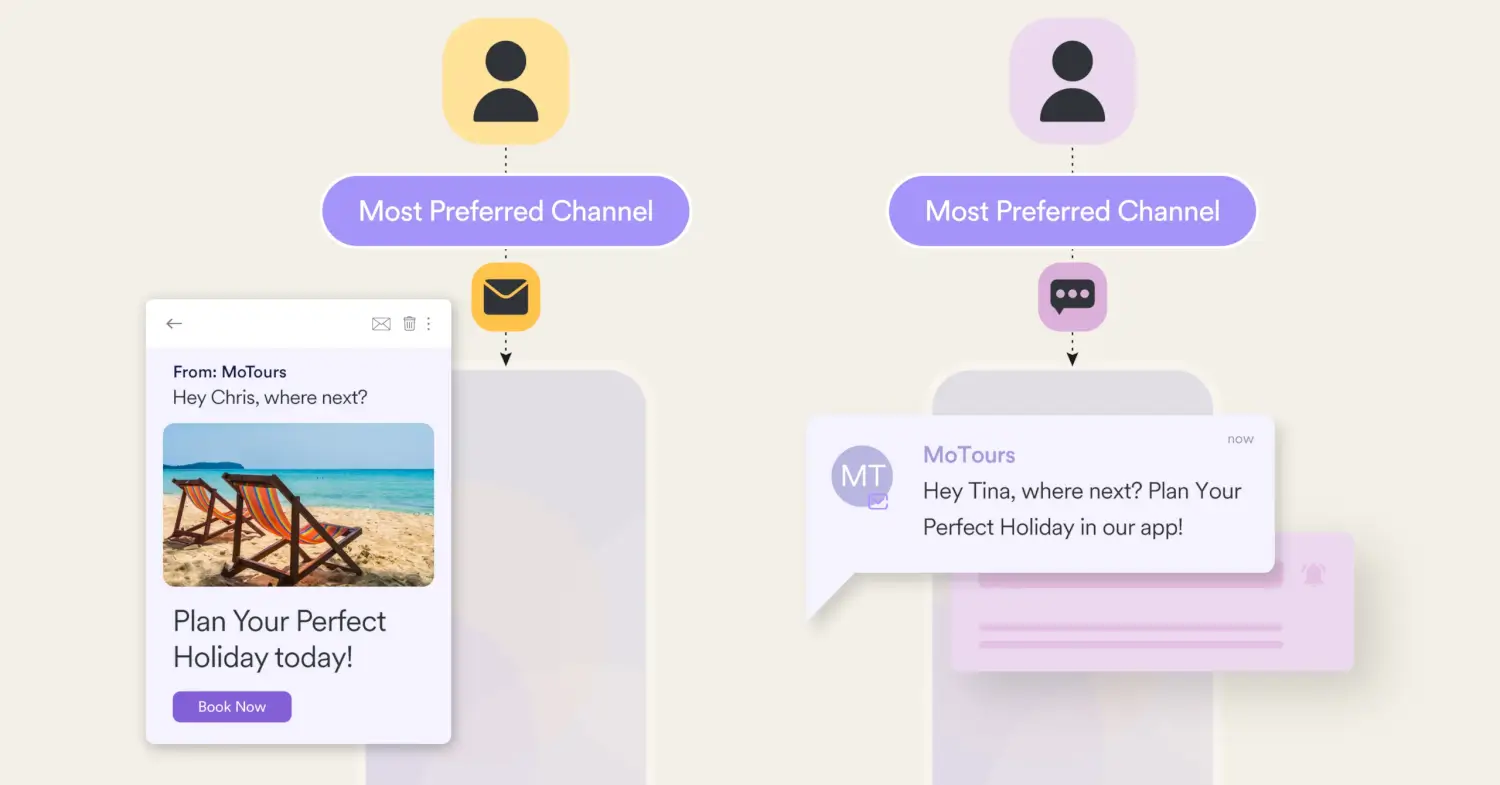
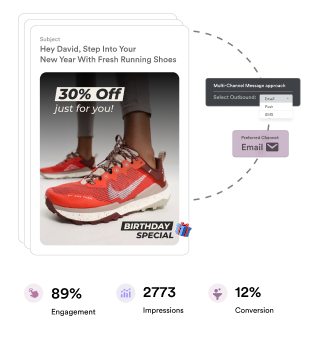
Say goodbye to the guesswork with MoEngage’s Most Preferred Channel (MPC) feature, which lets you identify the channel each customer interacts with the most. Then, prioritize that channel for high-stakes campaigns. Boost response rates and sales.
Let AI Handle Optimization Across the Entire Campaign
Most platforms offer AI as a point solution. That means the majority of campaign decisions still depend on manual judgment.
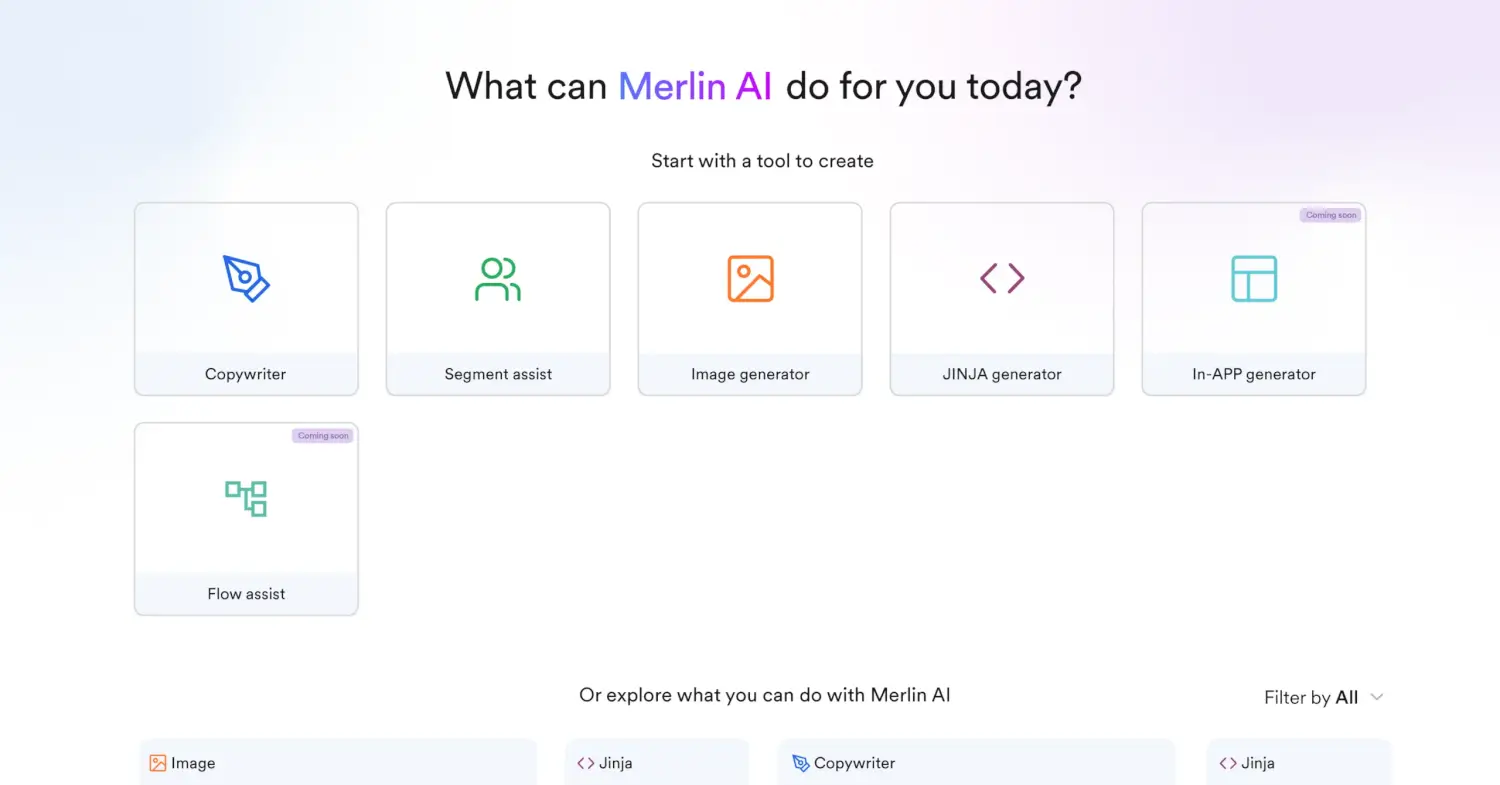
MoEngage’s Merlin AI works across the full campaign workflow — from building audiences with natural language prompts to predicting the right channel, send time, and content for each individual. Launch more campaigns on time
with relevant messaging.
What Enterprise Teams Say About MoEngage
At Loblaw, our goal was to unify our messaging strategies across a number of diverse business lines, while also finding a partner who could provide custom solutions tailored to our unique cases. MoEngage has been the partner of choice, offering steadfast support and facilitating partnership expansion across channels.

With MoEngage, Octapharma Plasma was able to create a communication ecosystem where our team could proactively engage with our audiences. It allows us to tailor our communications to hit our KPIs, and ultimately increase donor retention by delivering educational content and personalized messages on the channels our customers interact with most.

Our partnership with MoEngage allows us to further elevate our engagement strategies to deliver exceptional customer experiences and improve our marketing spend efficiencies. This collaboration helps us in meeting the evolving needs of our customers and deliver on our promise of being their trusted financial partner.


MIGRATION PROGRAM
How is a Migration to MoEngage Hassle-free?
Less effort + Less friction + Less migration costs = Faster time to value
Migration Support

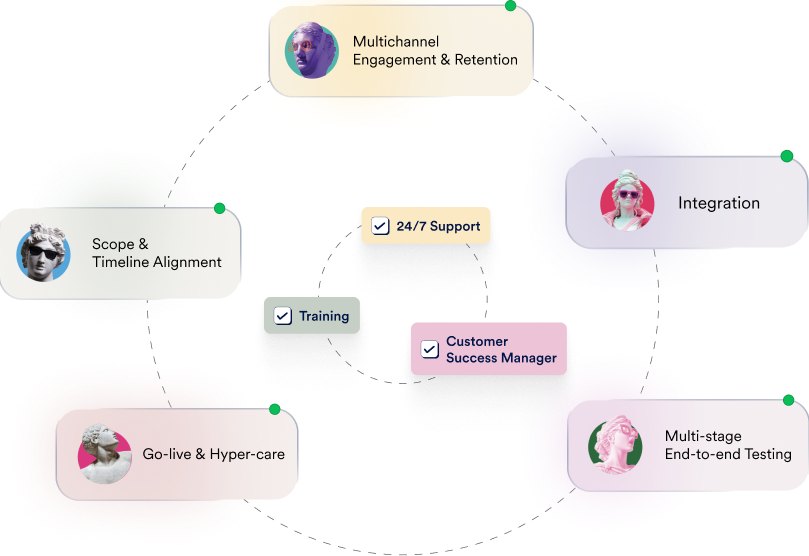
Our experienced migration specialists and certified agency partners have successfully guided hundreds of brands, big and small, through migrations to MoEngage.
AI Migration Agents
When moving to MoEngage, you won’t have to spend hours manually migrating customer and event data, campaigns, and segments. Instead, our automated migration agents can handle that for you faster and more accurately.


Fewer Switching Costs
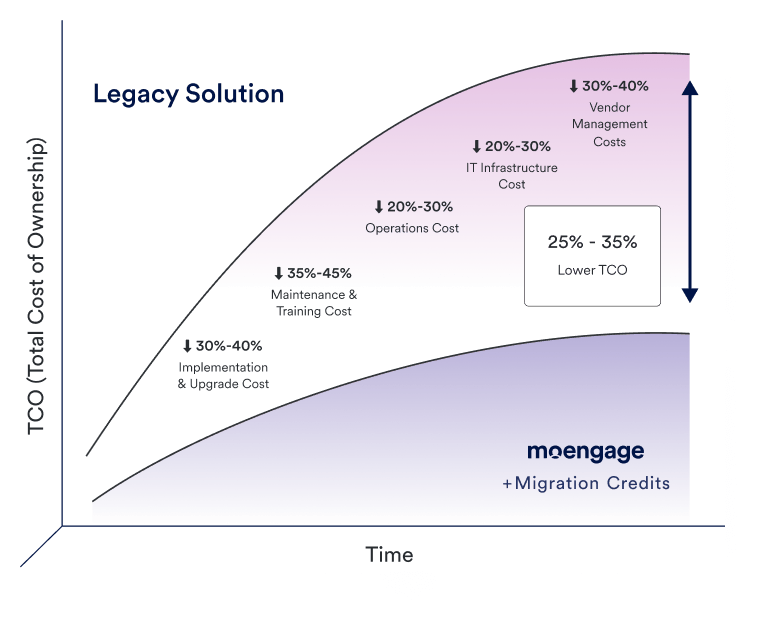
Worried about running two platforms at once during migration? We help you offset these expenses with migration credits. Get in touch to learn more.
Here at SoundCloud, we consider MoEngage as a true partner with over 90+ team members across content, product and marketing using the platform on a daily basis to create, launch and deliver engaging experiences for our fans and artists. Their support teams helped us migrate 200 live campaigns from the previous platform seamlessly in 12 weeks, while also providing custom support to solve our biggest challenges. Our goal is to be the top social and streaming platform globally, and MoEngage plays a crucial role in helping us achieve that.

We evaluated all of MoEngage's competitors, but none of them met our criteria for a CEP. MoEngage provided the best support during the migration of existing use cases in a detailed and methodical manner.

How Fastic Migrated to MoEngage in Just 3 Weeks
Integrations that Power Real-Time Cross-
Channel Customer Experiences
MoEngage integrates with your favorite tools, such as Shopify, WooCommerce, Segment,
and Twilio, and creates custom workflow automations for 5,000+ apps on Zapier.







MoEngage’s Customer Success Team Always Has Your Back

Sagar Gore
Associate VP,
Solutions Consulting

Todd Fessenden
Senior Implementation
Manager

Mahati Vanka
Engagement Manager

Jake Nordquist
Senior Director,
Customer Success
What is the Difference Between
MoEngage vs. Salesforce Marketing Cloud?
When you’re shortlisting customer engagement platforms for enterprises, MoEngage and Agentforce Marketing (Salesforce Marketing Cloud) will almost certainly appear on the same list.
At first glance, both platforms appear to cover similar ground. Both can send omnichannel campaigns, both offer AI features, and both serve enterprise marketing teams. Additionally, both offer PII Tokenized Sending, a feature that transforms your customer’s Personally Identifiable Information (PII) into anonymous tokens, so the data is never stored within your platform, maximizing security.
But they’re built differently, priced differently, and suited to different kinds of organizations.
The table below summarizes the most important differences between MoEngage and Salesforce Marketing Cloud for B2C marketing teams.
| Factor | MoEngage | Salesforce Marketing Cloud |
| Ease of Use | Built for marketer-led workflows with minimal technical overhead | Day-to-day execution often requires SQL, AMPScript, certified admins, or agency support |
| Architecture | Unified platform: Data, segmentation, channels, and AI in one system | Disjointed: Capabilities distributed across separate products, many developed through acquisitions |
| Mobile & WhatsApp | Native & Unified: One editor/flow for Push, In-App, and WhatsApp. | Fragmented: Disparate studios (MobilePush vs. MobileConnect). |
| Web Push & Popups | Built-in: Web channels use the same segments as Email/Mobile. | Add-on Dependent: Requires “Personalization” (Interaction Studio). |
| Web Personalization | Visual Editor: Change site content without touching code. | Technical: Requires developer-heavy JS implementation. |
| Segmentation | UI-based, dynamic, no SQL required | SQL-based (Automation Studio) for legacy segmentation, or a visual Data 360 segment canvas for newer editions |
| Gamification | Native: “Spin the Wheel” & scratch cards are out-of-the-box. | Custom Only: Requires 3rd-party tools or heavy coding. |
| AI (Merlin vs. Einstein) | Plug-and-Play: Predictive/GenAI works across all channels instantly. | Silo-Dependent |
| Data Logic | Real-time & Unified: Automatic stitching of web, app, and offline events. | Batch & Siloed: Requires manual SQL joins or extra-cost Data Cloud. |
| Warehouse Sync | Direct Query: Zero ETL. Reads Snowflake/BigQuery data instantly. | Mandatory ETL: Multi-step batch jobs to sync data before use. |
| Implementation timeline | Typically 2 months average go-live | Enterprise deployments commonly take 6-12 months |
| Pricing model | Based on monthly active users, platform edition, and channel usage | Tiered editions with add-ons; AI capabilities often licensed separately |
| Enterprise scale | Portfolio manages multiple brands or regions as Projects in one workspace. Dedicated regional data centers support geographic expansion. | Data Cloud unifies large, siloed enterprise datasets, but scaling generally requires more admins and specialized resourcing as complexity grows. |
| CRM integration | Native, bi-directional, real-time Salesforce CRM sync | Marketing Cloud Connect ties campaigns natively to Sales Cloud and Service Cloud |
| Support model | Dedicated onboarding and CSM-led support built to keep execution with marketers | Relies on certified Salesforce admins, systems integrators, or Professional Services for advanced configuration |
| Best for | Enterprise marketing teams that want to own execution across channels without depending on engineers or specialists | Organizations standardized on Salesforce, where CRM alignment and multi-cloud consolidation are the priority |
These differences aren’t absolute product limitations and may vary by edition, configuration, and integration. They show the typical operating model each platform is designed to support.
MoEngage’s agentic customer engagement platform (CEP) brings together channels, data, and advanced segmentation.
That doesn’t mean there aren’t any Salesforce Marketing Cloud or Agentforce Marketing alternatives that can fit your team like a glove. But since you’re already here, let’s look at the major contrasts between MoEngage vs. Salesforce Marketing Cloud.
MoEngage vs. Salesforce Marketing Cloud: Feature-by-Feature Comparison
MoEngage and Salesforce Marketing Cloud both support omnichannel customer engagement, but they differ in how teams manage data, audiences, campaigns, AI, and day-to-day execution. We’ll compare the areas most likely to affect your team’s speed, operating costs, and ability to personalize customer journeys.
How Do MoEngage and Salesforce Marketing Cloud Compare in Terms of Platform Architecture?
The biggest difference between MoEngage vs. Salesforce Marketing Cloud is their underlying architecture, which shapes how everything else works in practice.
Salesforce Marketing Cloud grew through acquisitions over many years. That’s why its core capabilities are distributed across separate products.
Audience segmentation in the newer product runs through Marketing Cloud Next’s Data 360 segment canvas, while the legacy Marketing Cloud Engagement product still segments primarily through Data Extensions and Automation Studio. Campaign execution and send-time optimization live inside Marketing Cloud Engagement. Real-time journey triggers may require configuration across multiple tools.
Even a relatively simple workflow, like updating a segment and triggering a cross-channel journey based on that change, can involve coordinating systems that weren’t originally designed to work together.
For organizations deeply embedded in the Salesforce ecosystem, with Salesforce CRM, Service Cloud, and dedicated admins already in place, that trade-off can make sense for the governance and ecosystem alignment it provides.
MoEngage was purpose-built as a single, unified agentic customer engagement platform. Data ingestion, segmentation, journey orchestration, and AI decisioning all operate within the same system, and MoEngage’s warehouse-native architecture connects directly to Snowflake, BigQuery, or Databricks without first copying or replicating data. When a customer takes an action (opens an app, abandons a cart, or completes a purchase), a marketer can respond across push, email, SMS, in-app, or web without touching a second tool or raising an engineering request.
Practically, when execution depends on infrastructure rather than marketers, campaign momentum slows. As AI-driven capabilities, such as channel prediction, send-time optimization, and automated customer journey decisions, become standard across the industry, that added complexity compounds into slower launches and fewer opportunities to improve conversion and retention.
Neither architecture is inherently right or wrong. The question is, which one matches how your team is structured today, and how fast you need to move.
How Do MoEngage and Salesforce Marketing Cloud Compare in Terms of Omnichannel Engagement and Journey Orchestration?
When choosing a customer engagement platform, channel flexibility matters. It’s a key factor you should take into account if you want to deliver timely and personalized campaigns.
Both platforms support multi-channel marketing. Where they differ is in how natively those channels are integrated and what’s required to activate them.
Salesforce Marketing Cloud started as an email platform and has since expanded. Email capabilities are deep and well-developed. Other channels are also available, like SMS, mobile push notifications, in-app messages, WhatsApp, LINE, social media, and web personalization. But some require separate modules or additional configuration. Running coordinated campaigns across multiple channels typically means working across more than one tool within the Salesforce suite.
With MoEngage, you not only get seamless support for the channels that Salesforce already provides, but you can unlock even more channels natively:
- On-site messaging (OSM): Trigger on-site messages like pop-ups, banners, or nudges by page visits, browsing behavior, or custom events to engage your website visitors in real-time. This channel is ideal for cross-selling, exit-intent promotions, and product recommendations.
- Web push notifications: Deliver timely web push notifications directly to your customers’ browsers, even when they’re off your website. It doesn’t matter whether your customers are using Chrome, Opera, Safari (macOS 13 or higher and iOS 16.4 or higher), Edge, or Firefox.
- Rich Communication Services (RCS): Send interactive, media-rich RCS messages with suggested reply buttons and a verified sender status to build trust. From high-resolution images and GIFs to carousels, video and audio clips, you can add any media to guide your customers toward the next step in their journey. In case of network or device limitations, you can even fall back on SMS to reach a wider audience, so you never miss a delivery.
- Connected Channels: Beyond the core channels, MoEngage natively connects to messaging apps like LINE, Viber, and Telegram, plus retargeting networks including TikTok Ads, Snapchat Ads, Pinterest Ads, and Criteo Ads, extending reach without a separate integration project.
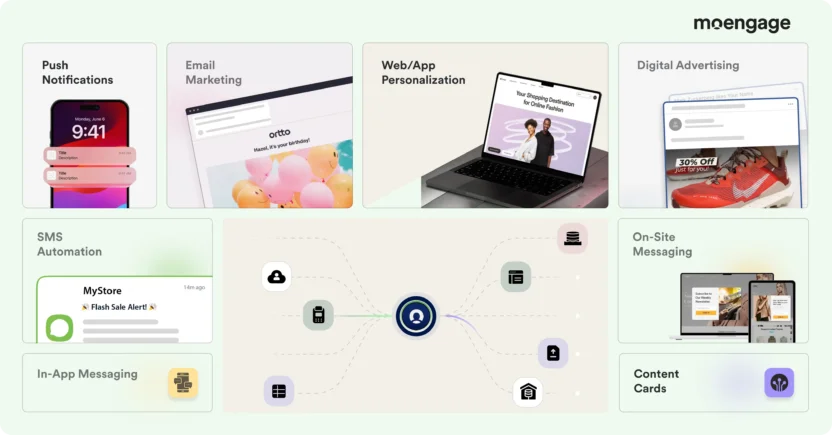
MoEngage’s native support for 16+ channels gives you the freedom to include more touchpoints in your lifecycle campaigns. That’s a major advantage if you need to increase engagement and conversions during key decision-making moments.
How Do MoEngage and Salesforce Marketing Cloud Compare in Terms of Audience Segmentation?
Segmentation directly affects how quickly your team can personalize at scale, and this is one of the sharper differences between MoEngage vs. Salesforce Marketing Cloud.
The table below compares the segmentation experience from a marketer’s perspective, including audience creation, updates, AI assistance, and data sources.
| Segmentation capability | MoEngage | Salesforce Marketing Cloud |
| Audience builder | UI-based, no SQL required | Visual segment canvas (Data 360) or SQL-based Automation Studio queries, depending on product generation |
| Audience updates | Dynamic — updates automatically as behavior changes | Often requires manual refresh or reconfiguration |
| AI-assisted segment creation | Natural language prompts via Merlin AI Segment Assist | Einstein AI filters available; underlying setup still technical |
| RFM segmentation | Built-in, recalculated at send time | Not natively available |
| Affinity segmentation | Built-in behavioral pattern targeting | Not natively available |
| Warehouse segments | Snowflake, BigQuery, Redshift, Databricks — live, no duplication | Available via Data Cloud (may require additional configuration) |
| Customer Data Platform (CDP) | Warehouse-native CDP built into the core platform | Sold separately as Salesforce Data Cloud |
| Salesforce CRM sync | Native, bi-directional, real-time sync | Not applicable, as this is the platform itself |
| Who owns segment creation? | Marketers | Often data engineers or Salesforce admins |
MoEngage is generally designed to let marketers create and activate behavioral audiences directly. SFMC can support sophisticated segmentation, but the level of technical involvement depends on the product generation, data model, and implementation.
Salesforce Marketing Cloud or Agentforce Marketing relies on Data Extensions for audience management, with segmentation traditionally built through Automation Studio’s SQL Query Activities. The next-generation product uses a segment canvas built on the Unified Individual object instead, where you build rules by dragging fields into Include/Exclude tabs and nesting them into containers for more complex logic, though segments here are capped at 50 filters per tab.
Einstein Generative AI can build segments from a natural-language description, and it’s deliberately built to exclude demographic attributes and small-population outliers from its suggestions to reduce bias. But the underlying setup and attribute mapping still need someone comfortable with Salesforce’s data model.
For teams with dedicated data engineers or a Salesforce admin, this is workable. For marketing teams that need to build and update audiences independently, though, it creates a dependency. Every time you want to test a new segment, refine targeting, or respond to a behavioral shift, there’s a process to work through, and it often involves someone other than a marketer.
On the other hand, MoEngage offers a visual, UI-based segmentation builder, Merlin AI Segment Assist, that marketers can use without SQL or engineering involvement. Audience definitions update dynamically as customer behavior changes. Segments reflect what’s happening now, not a snapshot from the last scheduled query.
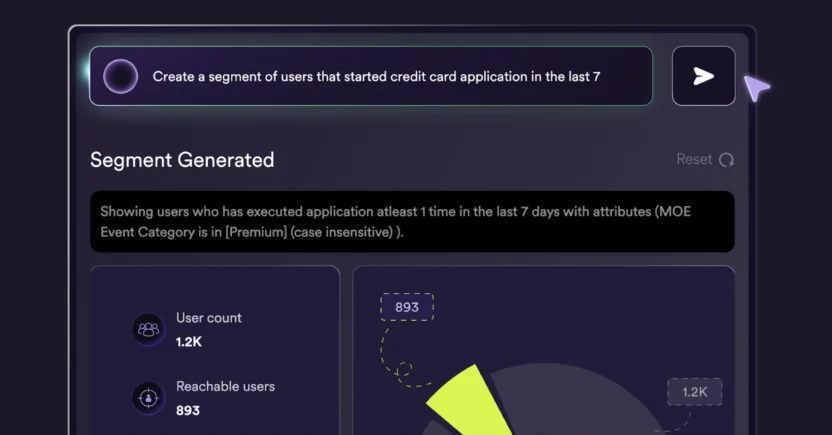
With MoEngage, you can also choose from a wide range of segment types built for different targeting scenarios:
- Rule-based segments: Combine user attributes, events, behavior, and event properties into complex logical groupings with nested AND/OR conditions.
- File segments: Upload fixed lists of customers from external analysis to the MoEngage platform for running campaigns.
- Affinity segments: Target customers based on ‘minimum of’, ‘top/bottom percentage of’, or ‘predominance’ behaviors. For example, a customer watches rom-coms for a minimum of 30% of their viewing time, or predominantly books cabs between 10 and 11 AM.
- RFM segments: Group customers in real-time into behavioral categories, like ‘Champions’, ‘Loyal’, ‘Potentially loyal’, and ‘At risk’, based on their Recency, Frequency and Monetary Value (RFM) scores. Recalculate them when sending campaigns to ensure the audience reflects the latest behavior.
- Warehouse segments: Pull audiences from live warehouse data (Snowflake, BigQuery, Redshift, or Databricks), without delays or data duplication.
- Custom segments: Save and reuse audience queries. You can also combine multiple segments into one by nesting up to three levels deep.
On the CRM side, MoEngage’s native Salesforce integration runs bi-directionally in real time: Salesforce contacts, leads, opportunities, and custom objects sync into MoEngage as users or events, while MoEngage campaign interaction data (opens, clicks, conversions, etc.) syncs back into Salesforce as Activities or custom objects. That gives a Salesforce-using B2C brand a way to unify marketing engagement data with deal and account data without licensing Marketing Cloud itself.
So, if you need to target customers who make a purchase on a weekday, reward your loyal customers with referral incentives, or engage recent website visitors with special discounts, MoEngage has built-in advanced segmentation capabilities to make it happen.
A useful question for any platform evaluation: who in your organization will build and maintain audience segments on a daily basis, and what does that process currently look like?
Compare Personalization and AI Decisioning in Salesforce Marketing Cloud vs. MoEngage
Both platforms can help you generate content using AI. The difference between MoEngage vs. Salesforce Marketing Cloud lies in where AI lives in the workflow and what it takes to use it.
The comparison below focuses on the main marketing jobs each platform’s AI is designed to support.
| AI capability | MoEngage | Salesforce Marketing Cloud |
| Send time optimization | Email, push, SMS (Best Time to Send) | Email and push only (Einstein STO); SMS not included |
| Channel preference prediction | Per-user preferred channel (Most Preferred Channel) | No direct equivalent feature at individual user level |
| AI copywriting | Email, push, in-app & on-site messages (Merlin AI Copywriter) | Email, SMS, MMS, and RCS (Agentic Content) |
| AI image generation | Built into campaign workflow (Merlin AI Designer) | Built into Agentic Content’s AI workspace, generated alongside copy |
| AI licensing | Included in the platform | Several features are separate add-ons |
| AI decisioning | Channel, timing, content, and next best action across lifecycle journeys | Einstein Decisions predicts the best offer per visitor using a contextual bandit model |
| Agentic AI | Agentic Decisioning plus Merlin AI Custom Agents for end-to-end workflow automation | Agentforce Marketing Goals Agent (self-optimizing campaigns) and Buyer Engagement Agent (inbound/outbound lead nurturing) |
| Model Context Protocol (MCP) | MoEngage MCP Server connects external AI tools (Claude and ChatGPT) directly to live campaign data | MCE MCP Server exposes Marketing Cloud Engagement APIs (data extensions, journeys, automations) to any MCP-compatible AI agent |
| Configuration required before use | Minimal — embedded in workflows | Often requires data prep and cross-product setup |
Salesforce Marketing Cloud offers AI through Einstein, including Einstein Send Time Optimization, Agentic Content for generating copy and images, and Marketing Cloud Personalization (formerly Interaction Studio) for web and app personalization. These are real capabilities used at enterprise scale, and Salesforce’s newer Agentforce Marketing Goals Agent takes this further by automatically choosing the campaign, channel, content, and timing for each customer.
Several Einstein features are licensed as separate add-ons rather than included in base editions. Using them typically involves data preparation and cross-product configuration. Salesforce continues to invest in its AI roadmap, but with a platform of this scale and history, new capabilities often arrive as additional modules or require migration to newer product versions, each of which may need its own setup, training, and internal adoption cycle.
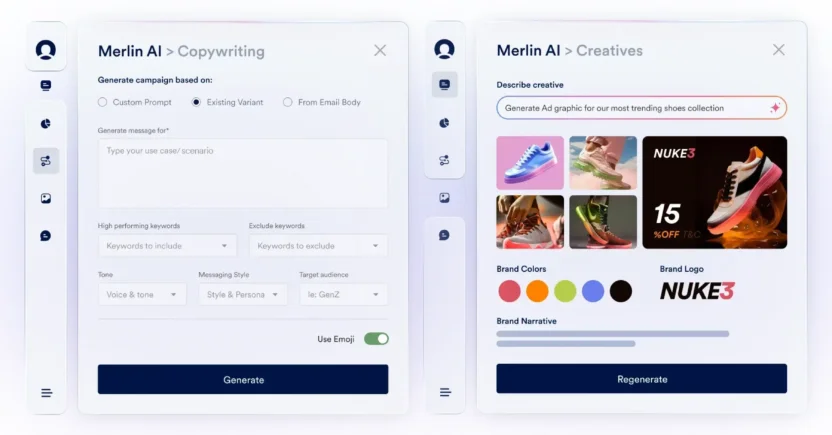
MoEngage includes AI across the core platform through Merlin AI, with no separate licensing or specialist configuration required to turn it on:
- Merlin AI Segment Assist: Build audience segments using natural language prompts — no SQL or technical support needed.
- Best Time to Send (BTS): Predicts the optimal send time for each individual customer across email, push notifications, and SMS — based on as little as 60 days of interaction data, updated weekly. Salesforce’s Einstein STO covers email and push, but not SMS.
- Most Preferred Channel (MPC): Identifies the channel each customer is most likely to engage with based on their behavior over the past two months, weighing both click depth and open frequency. Updates automatically as behavior shifts. Salesforce does not offer a direct equivalent at the individual user level.
- Merlin AI Copywriter: Merlin AI Copywriter generates campaign copy for email, push, in-app, and on-site messages inside the campaign creation workflow. Salesforce’s Einstein Generative AI covers email and SMS.
- Merlin AI Designer: Merlin AI Designer generates images and banners inside campaign workflows using text prompts and optional reference images — no external integration required.
- Agentic Decisioning (via Aampe): Runs a persistent, individually-learning AI agent per customer rather than optimizing at the segment or campaign level. It’s a meaningfully different architecture from Einstein Decisions’ contextual-bandit-per-offer model.
Both platforms have also opened themselves up to external AI tools through the Model Context Protocol (MCP), Anthropic’s open standard for connecting AI agents like Claude to live platform data.
MoEngage’s MCP Server lets an AI assistant read real-time analytics, build and patch Push and Email campaign drafts, preview personalization, and search across channels, all through OAuth-based access that inherits your existing MoEngage role permissions, with publishing always left as a human action.
Salesforce’s MCE MCP Server takes a similar approach for Marketing Cloud Engagement, exposing tools to create data extensions, build journeys, and add Einstein Send Time Optimization to a campaign step, all through plain-language prompts to an MCP-compatible agent.
Functionally, both are solving the same problem, although MoEngage’s MCP server is scoped to Push, Email, and SMS campaign work today, while Salesforce’s MCP server covers data extensions, journeys, and automations more broadly across Marketing Cloud Engagement.
Which Platform Has Better AI for Send-Time Optimization?
Both platforms use machine learning to predict when campaigns should be sent. The practical difference between MoEngage vs. Salesforce Marketing Cloud is, once again, channel coverage.
Salesforce Marketing Cloud Engagement provides Einstein Send Time Optimization (STO). This feature analyzes up to 90 days of historical customer engagement data and uses machine learning to predict when each customer is most likely to open or click an email.
You can also apply STO to mobile push notifications to determine the optimal campaign-sending slots. These predictions are updated weekly, providing you with current insights for email and push campaigns.
MoEngage’s Best Time to Send (BTS) feature determines the optimal hour for each customer to receive emails, push notifications, and SMS messages. Based on as little as 60 days’ interaction data, you can apply BTS in periodic and one-time campaigns.
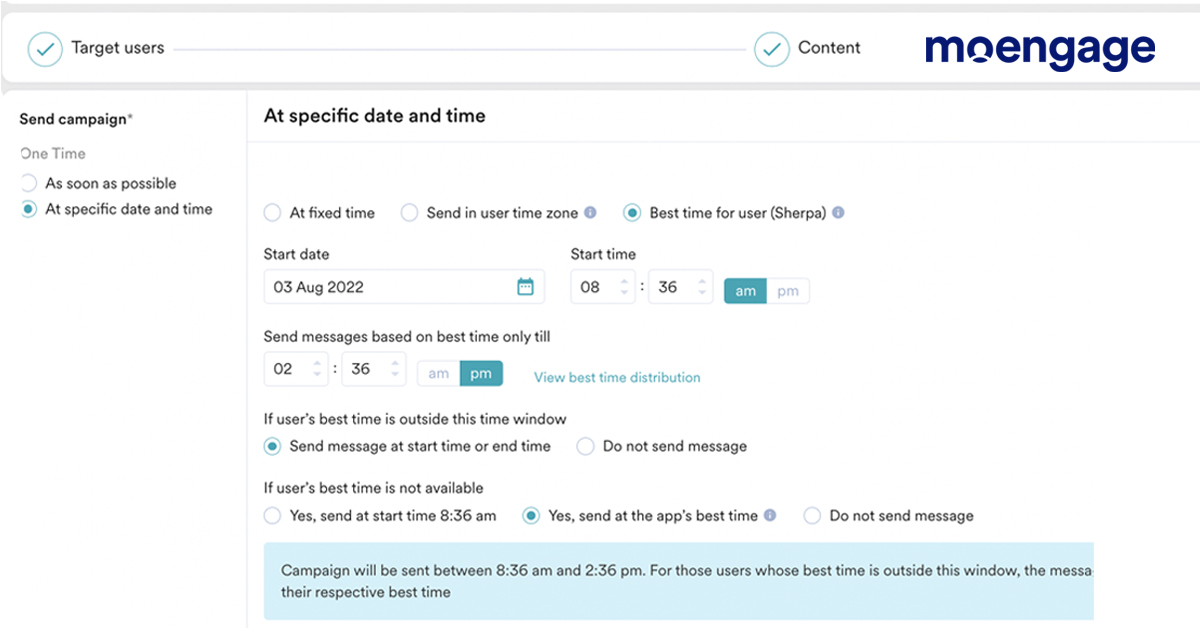
If a customer hasn’t interacted with your email or SMS, BTS uses their interactions with push instead to inform the timing for sending emails and SMS. You still have a relevant time slot for sending campaigns, rather than guessing when to send.
Like Salesforce’s Einstein STO, MoEngage’s BTS updates weekly, so your campaigns can automatically adapt to changing customer behavior. Just like Telekom Macedonia’s campaigns, which led to 132% higher CTRs using MoEngage’s BTS and other AI capabilities.
MoEngage remains a strusted strategic partner. Their guidance and insights have steadily improved how we engage and retain customers and the positive change speaks for itself.

Can MoEngage’s AI Predict Each Customer’s Preferred Channel?
Most cross-channel platforms can send campaigns across email, push, SMS, and in-app. What most don’t tell you is which of those channels each individual customer actually responds to.
Without that signal, you’re left with two options. Send across every channel and risk message fatigue. Or pick one channel per segment and accept that you’ll miss the customers who prefer something different. Neither is a great use of the budget.
MoEngage’s Most Preferred Channel (MPC) feature solves this at the individual level. It’s a user-level attribute, powered by Merlin AI, that identifies the channel each customer is most likely to engage with, based on their actual behavior over the past 2 months. It weighs both depth (number of clicks) and frequency (number of opens) to determine preference, and it prioritizes recent activity so recommendations stay current as behavior shifts.
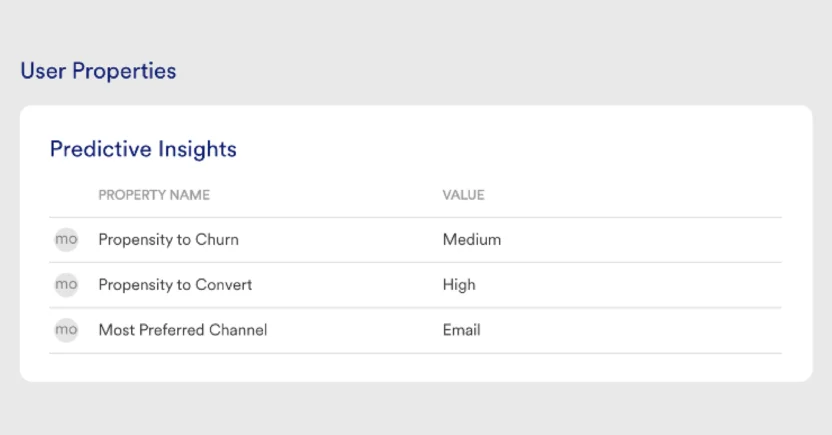
How does it work? Well, if a customer has engaged more with push notifications than with email over the past two months, MoEngage suggests sending them a push notification. But if their interactions shift to SMS the next month, MPC automatically updates the data to suggest sending them automated SMS campaigns.
The practical outcome: high-stakes campaigns get routed to the channel with the highest probability of response for each individual customer, rather than the channel that performed best on average across a segment.
How Do MoEngage and SFMC Compare in Terms of AI Decisioning?
For teams running high-volume lifecycle programs, including loyalty campaigns, churn prevention, and personalized offer delivery, AI-driven decisioning warrants evaluation separately from general AI features.
Salesforce offers Einstein Personalization and Marketing Cloud Personalization (formerly Interaction Studio) for AI-driven decisioning in digital experiences: website personalization, real-time product recommendations, and next-best-action within Salesforce workflows.
Underneath, Einstein Decisions works as a contextual bandit model. It evaluates up to 50 eligible offers per decision, starts out returning essentially random results until it’s made about 100 decisions, and typically needs thousands of impressions per offer before performance actually improves. It also deliberately keeps testing a small share of untested offers even after it’s learned what works, so it doesn’t get permanently stuck favoring an early winner. Getting it configured (choosing which behavioral and contextual signals feed the model) is usually a job for a data or analytics specialist.
These capabilities work well for teams that need tight integration between personalization and Salesforce CRM data. Einstein Personalization is priced separately at $96,000 annually, positioning it as an enterprise add-on rather than a capability available in standard editions.
MoEngage builds campaign decisioning and offer decisioning into the engagement platform itself. Merlin AI predicts the best channel, timing, and next action for each customer. What’s more, it automatically applies those decisions across active journeys, visible in engagement results, without a separately licensed or configured product.
Where Salesforce’s Einstein Decisions optimizes offer-by-offer with a shared model, MoEngage’s Agentic Decisioning (via MoEngage’s Aampe acquisition) takes this a step further with a persistent AI agent assigned to each user — one that keeps learning that user’s preferences across every future campaign, rather than resetting with each new one.
Compare Salesforce Marketing Cloud vs. MoEngage in Terms of Pre-Built Templates
Both platforms include pre-built templates to speed up campaign creation. The coverage differs by channel.
Salesforce Marketing Cloud Engagement offers strong email template options through Content Builder (drag-and-drop and HTML), WhatsApp templates via BSP connection, basic in-app layouts (full-page, modal, banner), and standard push formats. The depth of email reflects its origins as an email-first platform.
For teams with heavy email programs, this is sufficient. For teams that need creative variety across a wider set of channels, options thin out quickly, and building from scratch means more coordination across design and content teams.
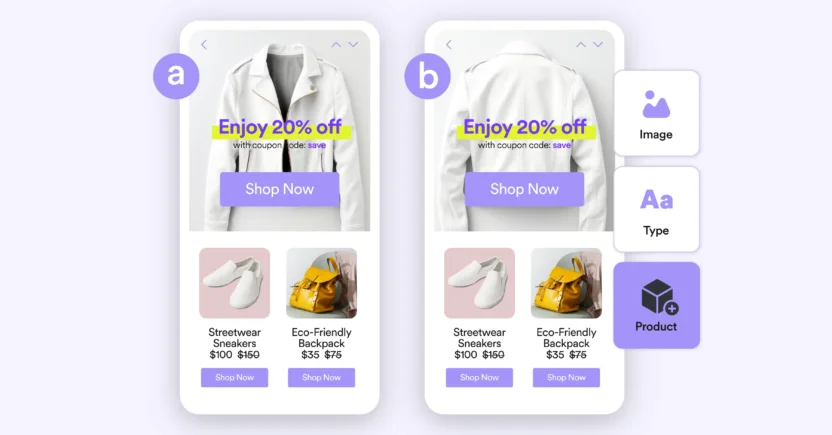
MoEngage gives you pre-built, richer template formats across a broader channel set than Salesforce does in Marketing Cloud Engagement:
- Email: Use our drag-and-drop or custom HTML editor to build email marketing templates, save them, and share them across your teams.
- Push notifications: From image carousels and countdown timers to stylized notifications and progress bars, choose from 6 different mobile push notification templates.
- In-app messages: Send popups, rating prompts, video popups, full-screen layouts, and native and HTML formats, along with getting built-in guidance for offer alerts, feature announcements, and other common use cases with in-app templates.
- On-site messages: Utilize pre-designed banners, nudges, and pop-ups for website engagement, offers, surveys, and lead capture.
- SMS sign-ups: Get pop-up or full-screen layouts in SMS sign-up templates to capture opt-in consent, with pre-configured compliance text for North America.
- WhatsApp: Add approved carousels, limited-time offers, and other marketing and authentication message layouts directly from your BSP.
Add to that the fact that every template type in MoEngage supports advanced personalization, and you’ve struck gold.
All of this is great, but enterprise buyers also need to know whether the platform can support their scale, security, governance, and integration requirements.
Are MoEngage and Salesforce Marketing Cloud Enterprise Platforms?
Yes. Both MoEngage and Salesforce Marketing Cloud support enterprise B2C marketing programs. The difference lies in what each platform is designed to centralize.
Salesforce Marketing Cloud is designed for organizations that want marketing connected closely to Salesforce CRM, Sales Cloud, Service Cloud, Commerce Cloud, and other Salesforce products.
MoEngage is designed for enterprises that want to centralize customer behavior, audience segmentation, journey orchestration, analytics, and omnichannel engagement in one customer engagement platform.
The table below compares SFMC vs. MoEngage across the enterprise requirements that affect daily marketing operations.
| MoEngage | Salesforce Marketing Cloud | |
| Scale | Portfolio manages multiple brands as Projects in one workspace. Billing scales with actual usage (MTU), and regional data centers support geographic growth. | Data Cloud unifies large, siloed enterprise datasets across regions and business units, but needs more admin resourcing as complexity grows. |
| Security and compliance | PII masking and encryption on by default, with Bring Your Own Key and PII tokenization built in. GDPR/CCPA API for programmatic data erasure. | Field-Level Encryption and Tokenized Sending cover similar ground. Offers Field-Level Encryption. |
| Governance | Role-based access controls across workspaces and Portfolio brands. | Role-based access, business units, and approval workflows, with Lock and Publish for large, multi-team orgs. |
| Integrations | Native SDKs, full REST API, native CRM/e-commerce connectors, direct warehouse sync, Zapier, and a hosted MCP Server. | Deep native ties within Salesforce; most third-party integrations run on nightly SFTP rather than live APIs. |
| Operating model | Marketer-led, self-serve execution backed by dedicated CSM support. | Admin and specialist-led, backed by one of the largest certified partner networks in the industry. |
In short, MoEngage is an agentic customer engagement platform for B2C enterprises, while Salesforce Marketing Cloud is part of a broader enterprise CRM and marketing ecosystem.
MoEngage vs. Salesforce Marketing Cloud Pricing and Total Cost of Ownership (TCO)
Salesforce Marketing Cloud and MoEngage price themselves in fundamentally different ways, and understanding that difference upfront will save your team from comparing numbers that aren’t actually comparable.
The table below shows the main pricing differences between Salesforce Marketing Cloud vs. MoEngage at a high level. Actual costs depend on customer volume, channels, product editions, integrations, support, implementation, and contract terms.
| Pricing Factor | MoEngage | Salesforce Marketing Cloud | What Buyers Should Consider |
| Pricing model | Monthly Tracked Users (MTU) | Packaged editions plus module add-ons (Data Cloud, Personalization, Einstein) | Ask each vendor to explain exactly what usage metric drives your quote and future price increases |
| Entry-level pricing | Based on the number of engaged users per month | $1,250/month (Pro tier) before add-ons | Get every add-on and module priced out individually before signing |
| Security add-on costs | PII masking, encryption, and tokenization are included by default | Field-Level Encryption requires buying Salesforce Professional Services | Ask whether your core compliance requirements are built in or billed separately |
| Contract length | Typically annual | Typically annual, negotiated per edition and module | Confirm renewal date, notice period, auto-renewal terms, and cancellation rights before signing |
Now, let’s see how each platform’s pricing works and which costs marketing teams should include in their evaluation.
How Salesforce Marketing Cloud Prices Its Platform
Salesforce Marketing Cloud’s pricing depends heavily on which products and editions your organization licenses, which is exactly why it’s difficult to compare using a single list price. The Engagement ‘Pro’ tier starts as low as $1,250 per month. That entry pricing looks attractive on its own, but it’s before Data Cloud, Marketing Cloud Personalization, or Einstein AI enter the picture. Once a brand adds the modules most real B2C deployments actually need, a full enterprise deployment typically runs $10,000 to $85,000 or more per year, and that range can climb further once system integrator costs get layered in.
Contracts are generally sold on an annual basis, though specific terms vary by product, deal size, and Salesforce agreement.
Some of Salesforce Marketing Cloud’s stronger security and compliance features add to that total cost in a way that’s easy to overlook during a sales conversation. Field-Level Encryption, for example, can only be configured by purchasing Salesforce Professional Services, which means a genuinely important protection for a B2C brand handling customer PII isn’t something an admin can simply switch on.
How MoEngage Prices Its Platform
MoEngage’s pricing takes a usage-based approach built around a metric called MTU, short for Monthly Tracked Users. MTU is calculated as every unique user profile with at least one tracked event in a given month. That’s a meaningfully different starting point than Salesforce Marketing Cloud’s module-based pricing, because your MoEngage bill is tied to how many people you’re actually engaging, not to how many products or editions you’ve licensed.
On top of the core platform fee, MoEngage bills channel usage (email, SMS, WhatsApp, push, RCS, cards, landing pages, and data exports) as separate add-ons, so your organization pays only for the channels it actually activates, rather than a bundled suite price that assumes every channel is in use.
The bottom line: The key difference is that MoEngage generally starts with a customer-engagement usage model, while Salesforce Marketing Cloud pricing is more dependent on product editions, modules, and add-ons. Ask both vendors to price the complete set of capabilities your team needs, not only the base platform.
Compare Salesforce Marketing Cloud and MoEngage
for Implementation and Ongoing Operations
Implementation timelines and ongoing operational overhead have a bigger impact on total cost of ownership than most feature comparisons account for.
Salesforce Marketing Cloud implementation timelines of 8-20 weeks are standard, with full enterprise, multi-studio rollouts stretching to 6 months or more. Ongoing execution often depends on certified Salesforce admins, internal specialists, or external agencies and system integrators. Routine campaign changes can require specialist involvement, depending on how the environment is configured.
This isn’t a flaw, though. Salesforce has one of the largest partner ecosystems globally, and for organizations that prefer a managed model, that network is an asset. The relevant question is whether that model matches your team’s operating structure and the pace at which you need to move.
If your team is already operating across multiple systems and depending on engineering or agencies to execute campaigns, the risk of staying on a complex platform isn’t neutral. Every quarter of slower campaign velocity, fewer experiments, and longer setup timelines has a cost.
MoEngage’s average go-live time sits at 2 months, with dedicated onboarding support throughout. The platform is designed for marketing teams to own day-to-day execution without relying on external support for standard campaign work. New capabilities, including AI features, are released continuously and are accessible within existing workflows, without requiring separate configuration or a platform migration.
What G2 Reviews Say About Implementation and Admin
Independent review data backs up that operational gap. G2’s head-to-head comparison of MoEngage vs. Salesforce Marketing Cloud offers a useful view of how customers experience setup and administration.
| G2 Metric | MoEngage Score | SFMC Score |
| Ease of Setup | 8.8/10 | 7.3/10 |
| Ease of Use | 9/10 | 7.6/10 |
| Ease of Admin | 8.8/10 | 7.8/10 |
| Meets Requirements | 8.8/10 | 8.2/10 |
Source: https://www.g2.com/compare/agentforce-marketing-formerly-salesforce-marketing-cloud-vs-moengage
The scores indicate that ease of setup and use may favor MoEngage, while SFMC’s broader capabilities may require more specialized support.
Salesforce Marketing Cloud reviews describe the platform’s learning curve as steep, with configuration and setup frequently flagged as resource-intensive. MoEngage reviewers, by contrast, point to being able to move from raw data to a live campaign without heavy reliance on engineering. This lines up directly with the faster average go-live time and the lower ongoing dependency on specialist support.
A practical question for reference checks: what percentage of your campaign changes currently require outside support, and what’s the typical turnaround time?
MoEngage vs. SFMC: Which is Better for Your Industry and Use Case?
The best choice depends on how your business engages customers.
The table below provides a starting point for evaluating common B2C use cases. Your existing CRM, data architecture, compliance requirements, channel mix, and internal resources should determine the final decision.
| Use Case / Industry | Best Fit | Main Reason |
| Retail and Ecommerce | MoEngage | Real-time catalog sync and native ad-audience sync to Google/Meta |
| Fintech and Financial Services | Salesforce Marketing Cloud | Native Sales/Service Cloud tie-in plus deeper security tooling (Field-Level Encryption, Shield). MoEngage offers PII tokenization and its own native Salesforce CRM sync. |
| Media and Streaming | MoEngage | Business Event-Triggered delivery reacts to content signals, not just app opens |
| Travel and Hospitality | MoEngage | Real-time transactional messaging without Salesforce’s batch-oriented throughput limits |
| Subscription and App-First | MoEngage | Event-driven architecture built for in-product behavior, not nightly batch sync |
| Already on Salesforce CRM | Salesforce Marketing Cloud | Native Sales/Service Cloud tie-in via Marketing Cloud Connect |
| No Salesforce CRM investment | MoEngage | Warehouse-native architecture and faster implementation with no CRM ecosystem to leverage |
Across these use cases, MoEngage is generally strongest when customer behavior, mobile engagement, and campaign speed are priorities. Salesforce Marketing Cloud is generally strongest when marketing must operate closely with Salesforce CRM and other Salesforce products.
Which is Better for Retail and Ecommerce Brands Between SFMC and MoEngage?
MoEngage is the better fit for most retail and Ecommerce brands than Salesforce Marketing Cloud. The reason comes down to how each platform handles inventory-driven, real-time engagement. MoEngage’s catalog sync updates automatically as inventory changes, which means a back-in-stock alert can fire the moment a product is actually back in stock, rather than waiting on a manually updated field. Salesforce Marketing Cloud can run comparable campaigns, but its Advertising Studio and Data Cloud components sit as separate modules rather than a single connected system, which adds setup and coordination work for a retail team trying to move fast during a sale or a restock.
Take the case of Stadium Goods, the New York-based sneaker and streetwear resale marketplace. After moving its back-in-stock alerts from a static, API-updated field to MoEngage’s real event-driven sync, Stadium Goods was able to build audiences based on specific purchase and browsing behavior and push those audiences directly to Google and Meta for lookalike targeting. The brand saw its strongest lift on international campaigns, nearly doubling its YoY increase in triggered revenue.
Is MoEngage or Salesforce Marketing Cloud Better for Fintech and Financial Services?
Salesforce Marketing Cloud has a real edge for fintech and financial services organizations that are already running on Salesforce CRM, because Marketing Cloud Connect ties campaigns directly to Sales Cloud and Service Cloud records. It’s useful when a customer’s account status or service case needs to inform what they’re sent.
MoEngage’s advantage shows up for financial services brands prioritizing privacy alongside personalization: its PII Tokenized Sending capability lets a bank or fintech build segments and run personalized campaigns across email, SMS, and push without transferring personally identifiable information into the platform at all. Further, its Bring Your Own Key option means the vendor itself can’t access customer PII without the customer’s own encryption key. Salesforce’s comparable protection, Field-Level Encryption, requires purchasing Salesforce Professional Services to configure, which adds cost and setup time that a fintech team may not want to absorb.
Which Platform is Better for Media and Streaming Brands: SFMC or MoEngage?
MoEngage is the stronger fit for media and streaming brands because its Business Event-Triggered delivery type reacts to backend content signals (like a new episode or a live event starting), rather than waiting for a user to open the app first.
Salesforce Marketing Cloud can trigger journeys off similar signals. But doing so typically means routing that data through Data Extensions and Automation Studio, which adds a layer most content-first brands would rather not manage.
Between MoEngage and SFMC, Which is Better for Travel and Hospitality Brands?
MoEngage is the better fit for travel and hospitality brands than Salesforce Marketing Cloud because time-sensitive, real-time messaging is the core of how these brands operate, and MoEngage’s architecture is built around exactly that.
Salesforce Marketing Cloud’s Journey Builder is capable of similar campaigns, but its own documentation recommends staggering journey start times and pre-filtering audiences before they hit the canvas.
Kayak, the global travel search engine, is a direct example. After switching to MoEngage, Kayak used MoEngage Inform to route time-sensitive transactional messages (price alerts, booking confirmations, trip updates, and gate change notifications) through the platform’s APIs to meet strict delivery service-level agreements, sending 4 billion messages daily and managing 1.5 billion user profiles. Further, their campaign launch time was reduced from 30 days to just 6 days on MoEngage. As John Ferris, VP of Technology at Kayak, put it:
MoEngage gives our team the flexibility to experiment quickly, test new ideas, and scale what works across brands locales.
Foxwoods Resort Casino tells a similar story on the hospitality side. After unifying guest data across channels with MoEngage, Foxwoods was able to automate real-time communications like loyalty tier upgrades and new member offers, leading to higher email open rates by 5 percentage points. Blair Bendel, SVP of Marketing at Foxwoods, described the shift:
Having everything in one place is amazing for us. We can finally make sure guests are getting exactly what they want to see, instead of sending the same message across every channel.
Is MoEngage Better Than Salesforce for Subscription and App-First Businesses?
Yes, MoEngage is generally the better fit for subscription and app-first businesses than SFMC, because its architecture assumes an event stream by default, rather than the batch-oriented model underlying much of SFMC’s third-party integration layer.
App-first businesses need to react the instant a user does something inside the product. Salesforce’s own third-party integrations for DMPs, ESPs, and analytics tools mostly run through nightly SFTP file transfers, which aren’t built for that kind of immediacy.
Turo, the car-sharing marketplace, illustrates what this looks like in practice. After adopting MoEngage, Turo consolidated push and email into a single system, where real-time behavior triggers real-time engagement, and journeys are meaningfully easier to build. The team also gained the ability to measure the true impact of campaigns through incrementality testing and a universal holdout group, giving every new experiment a clear, measurable baseline rather than a guess.
Which Platform is Better if Your Organization Already Uses Salesforce CRM?
Salesforce Marketing Cloud has a genuine structural advantage here that MoEngage doesn’t fully erase. Marketing Cloud Connect ties campaigns natively to Sales Cloud and Service Cloud records, so a deal stage change or a closed support case can trigger a journey without any integration work.
That said, MoEngage’s own native, bi-directional Salesforce CRM integration closes a meaningful part of this gap: Salesforce contacts, leads, opportunities, and custom objects can sync into MoEngage as users or events in real time, and MoEngage campaign interaction data syncs back into Salesforce as Activities or custom objects.
Which Platform is Better for an Enterprise That Does Not Use Salesforce CRM?
MoEngage is the clearer choice for an enterprise without a Salesforce CRM investment to protect. Salesforce Marketing Cloud’s single biggest structural advantage, which is native Sales Cloud and Service Cloud integration, simply doesn’t apply if there’s no Salesforce CRM data to connect to.
This means an enterprise in this position is paying for Salesforce Marketing Cloud’s complexity and cost without the ecosystem benefit that’s meant to offset it. MoEngage’s warehouse-native architecture, connecting directly to Snowflake, BigQuery, or Databricks without replicating data, plus its faster average implementation timeline, make it a more direct fit for an enterprise whose systems of record live outside the Salesforce ecosystem entirely.
These examples show why a broad feature checklist is not enough. The best customer engagement platform is the one that fits the events, channels, data, and operating model behind your most important journeys.
Is MoEngage a Good Alternative to Salesforce Marketing Cloud?
Yes, MoEngage is a legitimate Salesforce Marketing Cloud alternative for most B2C brands, particularly those that need to launch faster, run campaigns without heavy engineering involvement, or operate outside the Salesforce ecosystem entirely. It isn’t the right alternative for every organization, though. The answer depends on how deeply your marketing already needs to connect to Salesforce CRM data.
When MoEngage is Likely to be a Strong SFMC Alternative
MoEngage tends to be the stronger choice when:
- Your team needs to launch and iterate quickly. MoEngage’s average implementation timeline runs around 2 months, against Salesforce Marketing Cloud’s typical 8-20 weeks and up to 6 months for full enterprise rollouts.
- Marketers, not engineers, need to own day-to-day campaign work. MoEngage’s segmentation and personalization run through a no-code interface, while Salesforce Marketing Cloud’s deeper personalization typically requires AMPScript or SSJS.
- Real-time, behavior-triggered engagement is central to your business. MoEngage’s architecture reacts to events as they happen; much of Salesforce Marketing Cloud’s third-party data flow runs on nightly batch syncs.
- You don’t have a Salesforce CRM investment to leverage. Without Sales Cloud or Service Cloud data in the picture, Salesforce Marketing Cloud’s core structural advantage doesn’t apply.
Data privacy and PII handling are a priority. MoEngage’s native PII Tokenized Sending and Bring Your Own Key options are built into the core platform, where Salesforce’s comparable protections often require purchasing Professional Services to configure. - You want a single platform instead of several connected modules. MoEngage runs segmentation, journey orchestration, and AI decisioning in one system; Salesforce Marketing Cloud splits these across products like Marketing Cloud Engagement, Marketing Cloud Next, and Data Cloud.
When SFMC May Be the Stronger Fit
Salesforce Marketing Cloud is more likely to be the right choice when:
- Your organization already runs on Salesforce CRM. Marketing Cloud Connect ties campaigns natively to Sales Cloud and Service Cloud records, letting a deal stage change or closed support case trigger a journey without any integration work.
- Marketing, sales, and service teams need to share one live system of record. Salesforce Marketing Cloud’s governance model, with role-based access and business units, is built for exactly this kind of cross-team coordination.
- You need a large partner and implementation ecosystem. Salesforce has one of the largest networks of certified consultants and system integrators globally, which matters if your organization prefers a managed rollout over an in-house one.
- Email is your dominant channel, and volume is very high. Email Studio is a mature, high-throughput product built for large-scale sends, with AMPScript offering fine-grained control over dynamic content.
If MoEngage matches your engagement requirements, the next step is to understand what switching from Salesforce Marketing Cloud would involve.
Considering a Migration From Salesforce Marketing Cloud to MoEngage?
Brands often evaluate migrating from Salesforce Marketing Cloud to MoEngage when they want faster campaign execution, stronger behavioral and mobile engagement, or less dependence on technical teams for everyday marketing work.
MoEngage can support enterprise B2C use cases across email, mobile push, in-app messaging, SMS, WhatsApp, web, and other engagement channels. However, migrating from SFMC is not a one-to-one platform swap. Customer data, consent records, events, segments, templates, journeys, integrations, and reporting need to be reviewed and mapped.
A typical migration includes:
- Auditing SFMC data, journeys, campaigns, and integrations
- Mapping customer attributes, events, consent, and suppression rules
- Rebuilding priority segments and journeys in MoEngage
- Testing message delivery, personalization, and reporting
- Moving campaigns in phases before retiring legacy workflows
Not every SFMC asset will transfer directly. Journeys and automations often need to be redesigned for MoEngage’s behavioral data and engagement model.
Can MoEngage and Salesforce Marketing Cloud Be Used Together?
Yes. MoEngage and Salesforce Marketing Cloud can be used together when each platform has a different role in the marketing stack.
A common setup is to use Salesforce as the CRM and system of record, while using MoEngage for behavioral analytics, audience segmentation, and customer engagement across email, push, in-app, SMS, WhatsApp, and web channels.
This setup can work well when a brand wants to:
- Keep Salesforce for sales, service, or account management
- Use MoEngage for mobile and app engagement
- Build real-time behavioral segments
- Run lifecycle campaigns without relying heavily on technical teams
- Connect customer events and campaign data across both platforms
- Continue using Salesforce data while adding MoEngage’s engagement capabilities
Before implementing both platforms, define:
- Which platform owns customer profiles and consent
- Where events and behavioral data are collected
- How audiences are synchronized
- Which system manages unsubscribes and message suppression
- How campaign responses are sent back to Salesforce
- Which platform owns reporting and attribution
Using both platforms can increase flexibility, but it also adds integration and governance requirements. If your main priority is behavioral, mobile-first, and marketer-led engagement, MoEngage may be used as the engagement layer alongside Salesforce. If you need one platform for CRM, sales, service, and marketing operations, Salesforce Marketing Cloud may be the more suitable choice.
Whether you replace SFMC, use both platforms, or keep Salesforce as your main marketing system depends on the role each platform needs to play. The decision framework below can help you make that choice.
MoEngage vs. Salesforce Marketing Cloud: Which Platform Should You Choose?
MoEngage and Salesforce Marketing Cloud are both enterprise platforms, but they are built around different priorities.
- Choose MoEngage if your enterprise needs to build audiences from customer behavior, launch mobile and omnichannel campaigns, personalize journeys, and optimize engagement without relying heavily on technical teams.
- Choose Salesforce Marketing Cloud if you need to connect marketing campaigns closely with Salesforce CRM, sales, service, commerce, and broader enterprise workflows.
- Choose both if you need to keep Salesforce as your CRM while using MoEngage to analyze behavior and run lifecycle campaigns across channels.
The best way to evaluate the difference is to compare MoEngage vs. Salesforce Marketing Cloud using your own audiences, journeys, channels, data, and team workflows.
See Whether MoEngage Fits Your SFMC Use Cases
If MoEngage is on your shortlist, the most direct way to evaluate it is to bring your actual programs to a demo — the segments you need to build, the journeys you want to run, the channels you need to coordinate. Schedule a custom demo and walk through your real use cases. That’s more useful than any feature checklist.
I’m Up for It. How Do I Switch to MoEngage?
Set up a personalized demo to have all your questions answered.

MoEngage vs. Salesforce Marketing Cloud FAQs
How is MoEngage different from Salesforce Marketing Cloud?
MoEngage is a unified customer engagement platform that features advanced segmentation, send-time optimization, AI-powered content generation, a flexible structure, and faster go-lives — all without the fragmentation or lengthy learning curves associated with legacy systems like Salesforce Marketing Cloud.
What channels does MoEngage support?
MoEngage supports:
- SMS and RCS
- Mobile and Web Push Notifications
- In-app Messaging
- On-site Messaging (OSM)
- Web Personalization
- Content Cards
- Facebook Ads
- Google Ads Audience
- Connectors for regional channels like LINE
What if my team is already using Salesforce Marketing Cloud or another platform?
No worries.
MoEngage’s Migration Program ensures a smooth transition from your current customer engagement platform to MoEngage. Our team of onboarding experts helps you move your campaigns and customer data fast, guiding you all the way to go-live.
Can MoEngage integrate with our existing tools?
There’s no doubt about it.
MoEngage offers pre-built connectors and APIs for CDPs, CRMs, data warehouses, Ecommerce platforms like Shopify, and more. It seamlessly integrates into your existing tech stack.
How fast can we get started with MoEngage?
Timelines vary by your brand size and campaign volume. But most teams go live within weeks of migration. Examples include Drop (a card-linked offers and rewards app), which fully migrated and launched in just 7 days, and ClickRain, which swiftly moved its campaigns to MoEngage and thus saved its client $18,000 a year.
Is Salesforce similar to MoEngage?
Yes, Salesforce is similar to MoEngage, but they serve different purposes. Salesforce Marketing Cloud is one product inside a much larger Salesforce CRM ecosystem, assembled through several acquisitions (like ExactTarget and Evergage) over the years, which is why its segmentation, campaign execution, and personalization live in separate products. MoEngage was built from the ground up as an agentic customer engagement platform that’s unified, so data ingestion, segmentation, journey orchestration, and AI all run in one system instead of several connected ones.
Is MoEngage better than Salesforce Marketing Cloud?
MoEngage is better than Salesforce Marketing Cloud for a B2C marketing team without a deep Salesforce CRM dependency. It’s faster to implement, easier for marketers to run without engineering support, and built as one unified system rather than several connected products. Salesforce Marketing Cloud is better specifically for organizations already running Salesforce CRM, because Marketing Cloud Connect ties campaigns natively to Sales Cloud and Service Cloud records in a way MoEngage can only partially replicate through its own Salesforce sync.
Is MoEngage a customer engagement platform for enterprises?
Yes, MoEngage is a customer engagement platform for enterprises. It supports enterprise B2C programs through Portfolio, which manages multiple brands or regions inside one workspace, and through dedicated regional data centers that let a growing company store and process customer data in-region without rebuilding its infrastructure. Its usage-based pricing, tied to Monthly Tracked Users, also scales with actual engagement volume rather than a fixed enterprise tier.
Which is cheaper, MoEngage or Salesforce Marketing Cloud?
The answer depends on your customer volume, channels, edition, integrations, implementation, support, and add-ons. MoEngage typically prices around Monthly Tracked Users, platform edition, and channel usage, while Salesforce Marketing Cloud pricing depends on product editions, modules, usage, and implementation requirements. MoEngage may have a lower total cost for B2C engagement programs that don’t need the broader Salesforce ecosystem, but both vendors should be compared using a complete multi-year cost estimate.
Which is easier to implement: MoEngage or SFMC?
MoEngage is easier and faster to implement. Its average go-live time is around 2 months, because segmentation and personalization run through a no-code interface a marketer can operate directly, while Salesforce Marketing Cloud’s typical 8-20 week timeline (up to 6 months for full enterprise rollouts) reflects its dependency on AMPScript, SSJS, and certified admins for anything beyond basic setup.
What are the advantages of MoEngage over Salesforce Marketing Cloud?
The advantages of MoEngage over Salesforce Marketing Cloud are:
- Implementation runs in roughly 2 months instead of 8-20 weeks or more
- Segmentation and personalization require no code, where Salesforce needs AMPScript or SSJS
- The entire platform runs as one system instead of separate products stitched together
- Security features like Bring Your Own Key and PII Tokenized Sending are built into the core platform, while Salesforce’s comparable Field-Level Encryption requires purchasing Professional Services to configure
Which platform is better for Ecommerce brands with 1 million customers?
MoEngage is better for most Ecommerce brands at this scale, because it syncs product catalog and inventory data in real-time and pushes segments natively to Facebook and Google Ads for retargeting, without needing a separate CDP. Salesforce Marketing Cloud requires its Advertising Studio as a separate module to do the same ad-sync job, and its behavioral recommendation features depend on adding Data Cloud or Marketing Cloud Personalization on top, which is more setup than most fast-moving Ecommerce teams want to take on.
Which platform is better for fintech companies?
The better choice depends on the fintech company’s data, compliance, CRM, and engagement requirements. MoEngage may be a strong fit for customer onboarding, activation, push engagement, lifecycle messaging, retention, and behavior-based personalization, particularly when privacy-focused data handling is important. Salesforce Marketing Cloud may be a stronger fit when the fintech organization already uses Salesforce CRM and needs marketing journeys connected to sales, service, customer records, and enterprise governance. Security, consent, auditability, data residency, and regulatory requirements should be validated with both vendors before selection.
Which platform has better AI: MoEngage’s Merlin or Salesforce’s Einstein?
MoEngage’s Merlin AI is more immediately useful, because it’s included in the core platform and works across channels the moment it's turned on. Einstein, and specifically Einstein Decisions, needs roughly 100 decisions and thousands of impressions on a given offer before its performance actually improves. It starts out returning close to random results, and several of its stronger features, including Einstein Personalization at $96,000 a year, are priced and licensed separately from the base product. Choose Merlin when your priority is improving day-to-day B2C campaign decisions. Choose Einstein when your priority is applying AI across a wider Salesforce ecosystem. Compare the specific AI features, data requirements, pricing, and availability in the editions you are considering.
Do I need Salesforce CRM to use Salesforce Marketing Cloud?
No, Salesforce Marketing Cloud runs as a standalone product without Salesforce CRM. But doing so removes the platform's single biggest advantage, since Marketing Cloud Connect’s native tie-in to Sales Cloud and Service Cloud data only has something to connect to if your organization is also running Salesforce CRM.
Can MoEngage integrate with Salesforce?
Yes, MoEngage can integrate with Salesforce, and the integration is native, not a workaround. MoEngage syncs Salesforce contacts, leads, opportunities, and custom objects in as users or events in real time, and it sends campaign interaction data, such as opens, clicks, and conversions, back into Salesforce as Activities or custom objects, so both platforms stay updated with the same customer activity.